Confluence is a collaboration and content sharing platform used primarily by customers who are already using Atlassian's Jira project tracking product. The product appeals particularly to IT users.
$6.40
per month per user
TOPdesk
Score 8.4 out of 10
Mid-Size Companies (51-1,000 employees)
TOPdesk is the flagship highly-modular cloud-based or installed ITSM service desk and asset management solution from the Dutch company of the same name, for enterprise companies.
$76
per month Per agent
Pricing
Atlassian Confluence
TOPdesk
Editions & Modules
Free
$0
Free for 10 Users
Standard
$6.40
per month per user
Premium
$12.30
per month per user
Data Center
220,000.00
40,001+ Users - Annually
Enterprise
Contact Sales
Essential
$76
per month Per agent
Engaged
$109
per month Per agent
Excellent
$155
per month Per agent
Offerings
Pricing Offerings
Confluence
TOPdesk
Free Trial
Yes
Yes
Free/Freemium Version
No
No
Premium Consulting/Integration Services
No
Yes
Entry-level Setup Fee
No setup fee
Optional
Additional Details
Prices shown here reflect prices for deployments with 100 users or less. The prices decrease wien the user base surpasses 100.
The TOPdesk license model:
- Modular: Organizations purchase only the modules needed
- Saas or On premise
- Supports unlimited number of assets.
- Service agents based.
- Discount available for annual pricing.
We actually started with Atlassian Confluence from the beginning. Tried other (sometimes free) alternatives for personal use but they don't compare to Atlassian Confluence.
The choice for TOPdesk was made based on the features and integration needs of our business, and also by financial investment. SAP Business One is also used in the company, but only for financial and billing purposes. Atlassian Jira requires a much bigger investment, and makes …
It is more versatile and better adjustable to our organisation. I have worked with TOPdesk in multiple organisations. And in each of the organisations it was different and still the same. Like lego bricks were the bricks are the same, but the builds are all different for the …
The biggest reason we choose TOPdesk is [that] it had asset management functions and IT functions in a simpler-to-use format than the other options we looked at. It was also more customizable to our specific workflow than the others were. The others had similar functions, but …
I would recommend Atlassian Confluence for companies that want to have internal documentation and minimum governance processes to ensure documentation is useful and doesn't have a lot of duplicated and non-updated content. I wouldn't recommend Atlassian Confluence for companies with a low budget since this product might be a little costly (especially with add-ons).
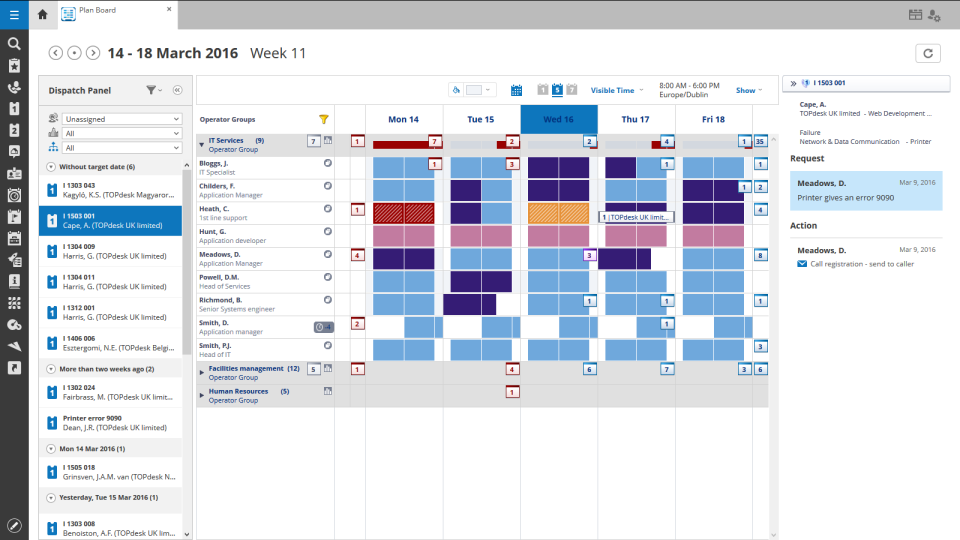
We had a smaller team of 6-7 people and for us it was perfect. It was very easy for us to book time per ticket and keep track of what we were spending the most of our time on. Escalating tickets was easy because of the prebuilt emails and message saving features. The typical features are all there of course such as incident, project management, etc. TOPdesk is highly customizable and we felt like we always had a good oversight of the KPI's, time management and customer satisfaction ratings. Our management liked the reporting features, the customizable dashboard and the data visualization. In my personal experience, TOPdesk also had the best search feature, and with the tags we were also very easily able to find the tickets we needed.
Cross product linking - If you use other Atlassian products then Atlassian Confluence is a no-brainer for your source of documentation, knowledge management etc. You can show previews of the linked asset natively E.g. showing a preview of a JIRA ticket in a Atlassian Confluence page.
Simple editing - Though the features available may not be super complex right now, this does come with the benefit of making it easy to edit and create documents. Some documentation editors can be overwhelming, Atlassian Confluence is simple and intuitive.
Native marketplace - If you want to install add-ons to your Atlassian Confluence space it's really easy. Admins can explore the Atlassian marketplace natively and install them to your instance in a few clicks. You can customise your Atlassian Confluence instance in many different ways using add-ons.
UI Design is very simplistic and basic could make use of more visually interesting colour choices, layout choices, etc.
Under the 'Content' menu, it defaults to having a landing page for all L1 and L2 category pages. Meaning as long as the broader content category has a sub-category, it still creates a separate landing page. In my team's case, this often creates blank pages, as we only fill out the page at the lowest sub-category (L3).
Hyperlinks are traditionally shown as blue, however, this results into very monotonously blue pages in cases where a lot of information is being linked.
I am confident that Atlassian can come with additional and innovative macros and functions to add value to Confluence. In 6 months, Atlassian transformed a good collaborative tools into a more comprehensive system that can help manage projects and processes, as well as "talk" with other Atlassian products like Jira. We are in fact learning more about Jira to evaluate a possible fit to complement our tool box.
It just works, has some continuous development and an easy-to-use interface, which is important especially because not all our colleagues are technical experts (or in other words, "capable of more than switching on and off the computer"). We use a large range of functions and therefore it would be really hard to replace TOPdesk in our company.
Great for organizing knowledge in a hierarchical format. Seamless for engineering and product teams managing software development. Helps in formatting pages effectively, reducing manual work. Tracks changes well and allows for easy rollbacks. Granular controls for who can view/edit pages. Search function is not great which needs improvement. Hire some google engineers
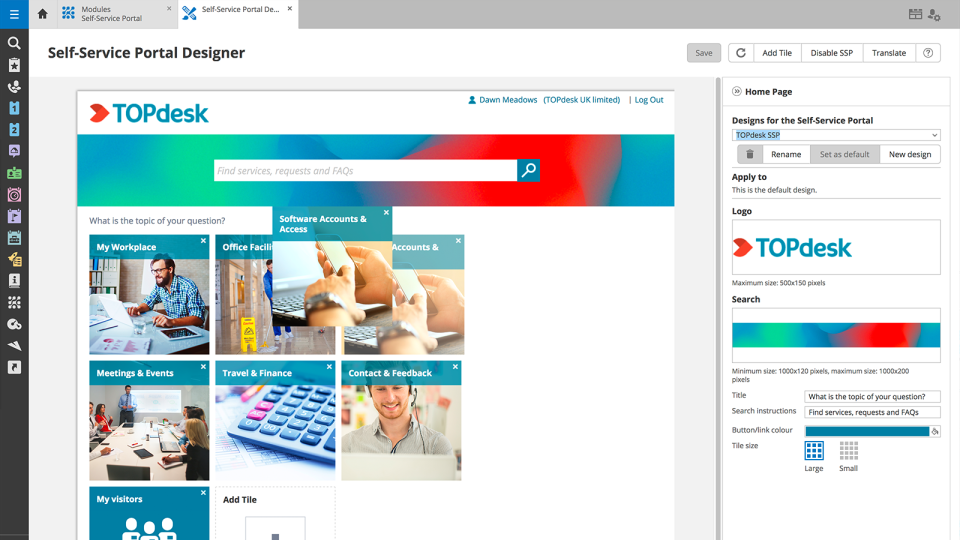
In short, we've been able to remove many pain points, automate multiple things, and empowered the end-user by being able to manage more items via the Self Service Portal. We've been able to do more than we were able to do with our previous ITSM platform. The TOPdesk development team added some things recently that will allow us to make some other things more efficient.
Like I said somewhere else in this review: the helpdesk of TOPdesk is top of the bill! In the Netherlands, that is. I can not plea for the helpdesks in other countries, but I guess the TOPdesk organization will make sure the quality of the helpdesk is the same in every country.
We never worked against the tide while using Confluence. Everything loads considerably fast, even media components like videos (hosted on the platform or embed external videos from Youtube, for example). We are not using heavy media components a lot, but in the rare occasion we happen to use one we have no problems whatsoever.
Although being a SAAS solution, TOPdesk performs pretty fast. One can imagine that any SAAS solution is slow or has hiccups, but we have not experienced such with TOPdesk. Pages load quickly, logging in goes smoothly. We have made reports on premise in the past - that always took some time, as you might expect with such complex tasks. It seems that in the SAAS solution TOPdesk somehow has managed to make it even faster!
This rating is specifically for Atlassian's self-help documentation on their website. Often times, it is not robust enough to cover a complex usage of one of their features. Frequently, you can find an answer on the web, but not from Atlassian. Instead, it is usually at a power user group elsewhere on the net.
Most if not nearly all questions are answered within the same or a few days. The helpdesk is very knowledgable about their product and are always willing to help. The only downside is that for more difficult questions it can take a while due to the experts being further removed from the helpdesk. But they are always willing to answer questions, even if they are not directly related to a problem with the service.
We had Topdesk in-house here training staff for almost a month (2-3 hour meetings 3x a week.) It was invaluable and we were able to take that training and share with the rest of our IT staff. Once implemented we were able to fly from there. The challenges we found were in how to get started. Once started the knowledge base offered from Topdesk has been invaluable.
Online training documentation is easy to access and consume. There is no real challenges with finding information on how to use the product and some really helpful knowledge base items that show us how valuable these options are in our own implementation of it. The online training we've used has been self driven
It was a challenge to port over years of the same thing and we ended up keeping old ideas in Topdesk that we will eventually weed out as time passes and we learn how users view categories and flows of tickets. Planning is key but bear in mind that just because you used to do it this way doesn't mean you still have to
We chose Atlassian Confluence over SharePoint because it's much more user-friendly and intuitive. Atlassian Confluence makes collaboration and knowledge sharing easier with its simpler interface and better search. While SharePoint can be powerful, it often feels clunky and complex, making it harder for our team to actually use it.
Spiceworks is an easier-to-use Help Desk solution but it lacks all other features that Topdesk has. Freshdesk was just too much for our environment. It was cost-prohibitive for our intended use. TOPdesk fit our org size and budget better than the others.
TOPdesk is very flexible and scalable. Every department in you organization can you the software. Perhaps some persons need some training, but that can be provided by TOPdesk ot some keyusers.