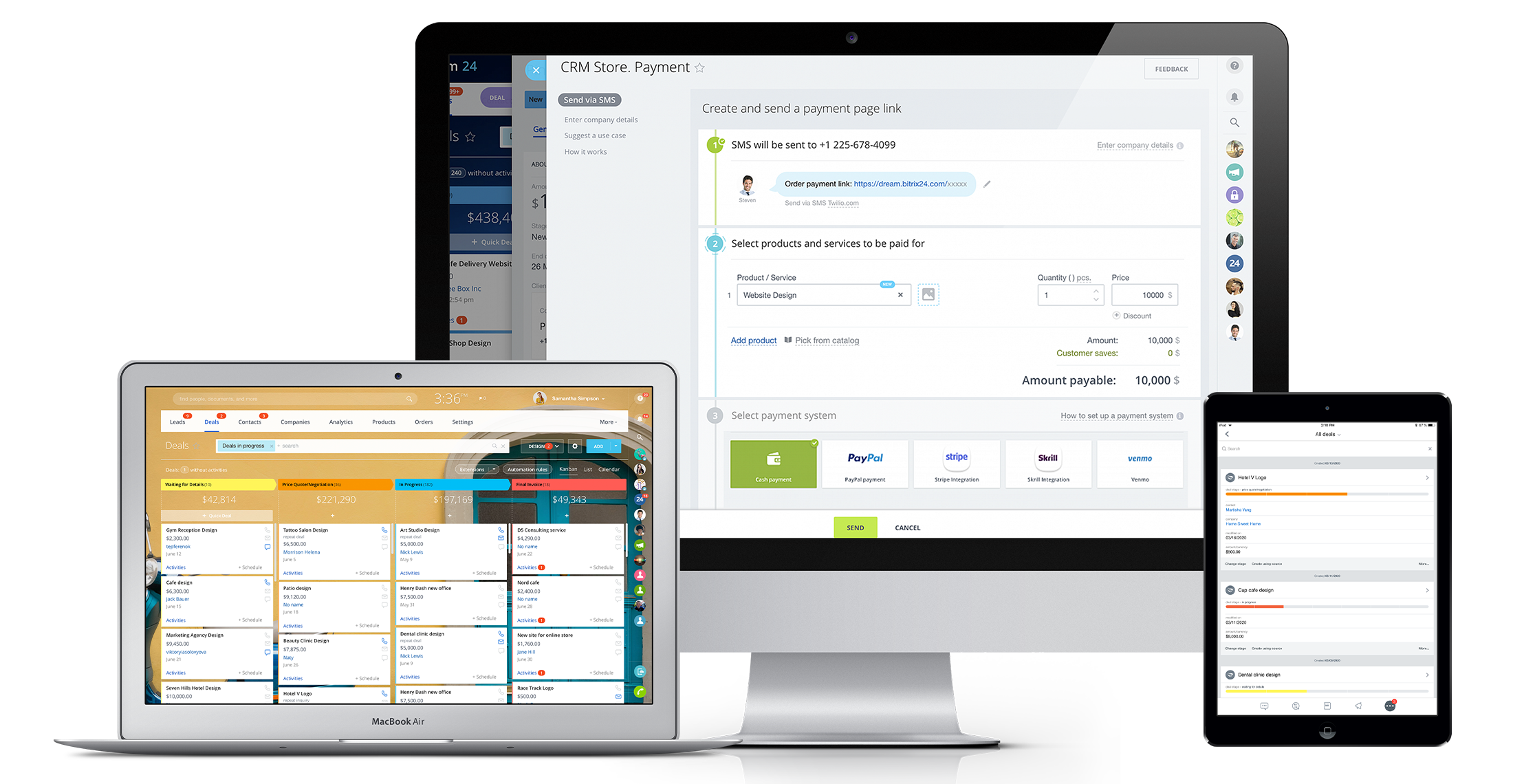
Bitrix24 is a local-hosted or cloud-based social intranet and project management platform that also contains core HR (HRMS) and CRM features. Bitrix24 also provides time management services and employee self-service.
$61
per month up to 5 users
Jobber
Score 8.6 out of 10
N/A
Jobber is field service management software from the company of the same name in Edmonton, Alberta.
$39
per month 1 user
Zoho One
Score 9.2 out of 10
N/A
Zoho One is a suite product from Zoho Corporation, that combines their sales and marketing application, and also gives organizations a comprehensive set of tools to organize finances, track payables, and manage bills and expenses.
$45
per month per employee
Pricing
Bitrix24
Jobber
Zoho One
Editions & Modules
Basic
$61
per month up to 5 users
Standard
$124
per month up to 50 users
Professional
$249
per month up to 100 users
Enterprise 250
$399.00
per month 250 Users
Enterprise
$499
per month up to 250 Users
Enterprise 500
$639.00
per month 500 Users
Enterprise 1000
$799.00
per month 1000 Users
Core
$39
per month 1 user
Connect (individual)
$119
per month 1 user
Connect
$169
per month up to 5 users
Grow (individual)
$199
per month 1 user
Grow
$349
per month up to 10 users
Plus
$599
per month Up to 15 users
All Employee Pricing
$444
per year per employee (Must purchase license for ALL employees)
Flexible User Pricing
$1080
per year Licenses for any no. of users
Offerings
Pricing Offerings
Bitrix24
Jobber
Zoho One
Free Trial
Yes
Yes
Yes
Free/Freemium Version
No
No
No
Premium Consulting/Integration Services
Yes
No
No
Entry-level Setup Fee
No setup fee
No setup fee
No setup fee
Additional Details
Price per month when paying for 1 year.
Discount available for annual pricing.
Month-to-month plans available.
More Pricing Information
Community Pulse
Bitrix24
Jobber
Zoho One
Features
Bitrix24
Jobber
Zoho One
Project Management
Comparison of Project Management features of Product A and Product B
Bitrix24
8.8
24 Ratings
13% above category average
Jobber
-
Ratings
Zoho One
-
Ratings
Task Management
8.024 Ratings
00 Ratings
00 Ratings
Gantt Charts
8.118 Ratings
00 Ratings
00 Ratings
Scheduling
9.921 Ratings
00 Ratings
00 Ratings
Workflow Automation
8.921 Ratings
00 Ratings
00 Ratings
Mobile Access
9.823 Ratings
00 Ratings
00 Ratings
Search
8.121 Ratings
00 Ratings
00 Ratings
Visual planning tools
9.022 Ratings
00 Ratings
00 Ratings
Communication
Comparison of Communication features of Product A and Product B
Bitrix24
8.5
24 Ratings
6% above category average
Jobber
-
Ratings
Zoho One
-
Ratings
Chat
9.023 Ratings
00 Ratings
00 Ratings
Notifications
9.924 Ratings
00 Ratings
00 Ratings
Discussions
8.023 Ratings
00 Ratings
00 Ratings
Surveys
8.017 Ratings
00 Ratings
00 Ratings
Internal knowledgebase
8.021 Ratings
00 Ratings
00 Ratings
Integrates with GoToMeeting
8.38 Ratings
00 Ratings
00 Ratings
Integrates with Gmail and Google Hangouts
9.012 Ratings
00 Ratings
00 Ratings
Integrates with Outlook
8.011 Ratings
00 Ratings
00 Ratings
File Sharing & Management
Comparison of File Sharing & Management features of Product A and Product B
Bitrix24
8.5
25 Ratings
6% above category average
Jobber
-
Ratings
Zoho One
-
Ratings
Versioning
8.021 Ratings
00 Ratings
00 Ratings
Video files
7.818 Ratings
00 Ratings
00 Ratings
Audio files
8.217 Ratings
00 Ratings
00 Ratings
Document collaboration
8.025 Ratings
00 Ratings
00 Ratings
Access control
9.923 Ratings
00 Ratings
00 Ratings
Advanced security features
8.921 Ratings
00 Ratings
00 Ratings
Integrates with Google Drive
7.016 Ratings
00 Ratings
00 Ratings
Device sync
9.821 Ratings
00 Ratings
00 Ratings
Payroll Management
Comparison of Payroll Management features of Product A and Product B
Bitrix24
-
Ratings
Jobber
-
Ratings
Zoho One
9.5
4 Ratings
24% above category average
Pay calculation
00 Ratings
00 Ratings
9.73 Ratings
Benefit plan administration
00 Ratings
00 Ratings
9.24 Ratings
Direct deposit files
00 Ratings
00 Ratings
9.73 Ratings
Customization
Comparison of Customization features of Product A and Product B
Bitrix24
-
Ratings
Jobber
-
Ratings
Zoho One
8.4
7 Ratings
11% above category average
API for custom integration
00 Ratings
00 Ratings
8.57 Ratings
Plug-ins
00 Ratings
00 Ratings
8.47 Ratings
Security
Comparison of Security features of Product A and Product B
Bitrix24
-
Ratings
Jobber
-
Ratings
Zoho One
9.1
9 Ratings
8% above category average
Single sign-on capability
00 Ratings
00 Ratings
9.49 Ratings
Role-based user permissions
00 Ratings
00 Ratings
8.99 Ratings
Reporting & Analytics
Comparison of Reporting & Analytics features of Product A and Product B
Bitrix24
-
Ratings
Jobber
-
Ratings
Zoho One
8.5
9 Ratings
13% above category average
Dashboards
00 Ratings
00 Ratings
8.59 Ratings
Standard reports
00 Ratings
00 Ratings
8.59 Ratings
Custom reports
00 Ratings
00 Ratings
8.69 Ratings
General Ledger and Configurable Accounting
Comparison of General Ledger and Configurable Accounting features of Product A and Product B
Bitrix24
-
Ratings
Jobber
-
Ratings
Zoho One
7.5
6 Ratings
3% below category average
Accounts payable
00 Ratings
00 Ratings
8.06 Ratings
Accounts receivable
00 Ratings
00 Ratings
8.26 Ratings
Global Financial Support
00 Ratings
00 Ratings
7.34 Ratings
Primary and Secondary Ledgers
00 Ratings
00 Ratings
6.03 Ratings
Journals and Reconciliations
00 Ratings
00 Ratings
7.54 Ratings
Configurable Accounting
00 Ratings
00 Ratings
8.04 Ratings
Standardized Processes
00 Ratings
00 Ratings
7.86 Ratings
Inventory Management
Comparison of Inventory Management features of Product A and Product B
Bitrix24
-
Ratings
Jobber
-
Ratings
Zoho One
9.4
4 Ratings
16% above category average
Inventory tracking
00 Ratings
00 Ratings
9.44 Ratings
Automatic reordering
00 Ratings
00 Ratings
9.23 Ratings
Location management
00 Ratings
00 Ratings
9.74 Ratings
Order Management
Comparison of Order Management features of Product A and Product B
Bitrix24
-
Ratings
Jobber
-
Ratings
Zoho One
9.0
7 Ratings
13% above category average
Pricing
00 Ratings
00 Ratings
9.17 Ratings
Order entry
00 Ratings
00 Ratings
9.26 Ratings
Credit card processing
00 Ratings
00 Ratings
9.44 Ratings
Cost of goods sold
00 Ratings
00 Ratings
9.14 Ratings
Order Orchestration
00 Ratings
00 Ratings
7.92 Ratings
Subledger and Financial Process
Comparison of Subledger and Financial Process features of Product A and Product B
Bitrix24
-
Ratings
Jobber
-
Ratings
Zoho One
7.6
7 Ratings
1% above category average
Billing Management
00 Ratings
00 Ratings
7.37 Ratings
Cash and Asset Management
00 Ratings
00 Ratings
7.24 Ratings
Travel & Expense Management
00 Ratings
00 Ratings
8.75 Ratings
Budgetary Control & Encumbrance Accounting
00 Ratings
00 Ratings
8.25 Ratings
Period Close
00 Ratings
00 Ratings
6.44 Ratings
Project Execution Management
Comparison of Project Execution Management features of Product A and Product B
Bitrix24
-
Ratings
Jobber
-
Ratings
Zoho One
7.9
6 Ratings
11% above category average
Project Planning and Scheduling
00 Ratings
00 Ratings
9.56 Ratings
Task Insight for Project Managers
00 Ratings
00 Ratings
8.66 Ratings
Project Mobile Functionality
00 Ratings
00 Ratings
6.35 Ratings
Definable Resource Pools
00 Ratings
00 Ratings
7.54 Ratings
Grants Management
Comparison of Grants Management features of Product A and Product B
Bitrix24
-
Ratings
Jobber
-
Ratings
Zoho One
9.5
2 Ratings
25% above category average
Award Lifecycle Management
00 Ratings
00 Ratings
9.52 Ratings
Procurement
Comparison of Procurement features of Product A and Product B
Bitrix24
-
Ratings
Jobber
-
Ratings
Zoho One
8.0
3 Ratings
12% above category average
Bids Analyzed and Compared
00 Ratings
00 Ratings
8.83 Ratings
Contract Authoring
00 Ratings
00 Ratings
7.52 Ratings
Contract Repository
00 Ratings
00 Ratings
7.52 Ratings
Requisitions-to-Purchase Orders Integrated
00 Ratings
00 Ratings
8.01 Ratings
Supplier Management
00 Ratings
00 Ratings
8.13 Ratings
Risk Management
Comparison of Risk Management features of Product A and Product B
Bitrix24
-
Ratings
Jobber
-
Ratings
Zoho One
9.1
4 Ratings
31% above category average
Risk Repository
00 Ratings
00 Ratings
9.12 Ratings
Control Management
00 Ratings
00 Ratings
9.33 Ratings
Control Efficiency Assessments
00 Ratings
00 Ratings
8.13 Ratings
Issue Detection
00 Ratings
00 Ratings
9.52 Ratings
Remediation and Certification
00 Ratings
00 Ratings
9.52 Ratings
Logistics
Comparison of Logistics features of Product A and Product B
Bitrix24
-
Ratings
Jobber
-
Ratings
Zoho One
8.3
2 Ratings
18% above category average
Transportation Planning and Optimization
00 Ratings
00 Ratings
9.01 Ratings
Transportation Execution Management
00 Ratings
00 Ratings
8.01 Ratings
Trade and Customs Management
00 Ratings
00 Ratings
8.01 Ratings
Fulfillment Management
00 Ratings
00 Ratings
8.72 Ratings
Warehouse Workforce Management
00 Ratings
00 Ratings
8.01 Ratings
Manufacturing
Comparison of Manufacturing features of Product A and Product B
Bitrix24
-
Ratings
Jobber
-
Ratings
Zoho One
8.4
1 Ratings
12% above category average
Production Process Design
00 Ratings
00 Ratings
8.01 Ratings
Production Management
00 Ratings
00 Ratings
8.01 Ratings
Configuration Management
00 Ratings
00 Ratings
9.01 Ratings
Work Execution
00 Ratings
00 Ratings
8.01 Ratings
Manufacturing Costs
00 Ratings
00 Ratings
9.01 Ratings
Supply Chain
Comparison of Supply Chain features of Product A and Product B
Bitrix24
-
Ratings
Jobber
-
Ratings
Zoho One
8.5
3 Ratings
15% above category average
Forecasting
00 Ratings
00 Ratings
7.22 Ratings
Inventory Planning
00 Ratings
00 Ratings
9.01 Ratings
Performance Monitoring
00 Ratings
00 Ratings
9.42 Ratings
Product Lifecycle Management
Comparison of Product Lifecycle Management features of Product A and Product B
Bitrix24 is a unified platform with all features in one place. It has a smooth deployment and implementation process. The software boosts teams' productivity and ensures flawless collaboration. Pricing of the software is incredibly affordable. It is highly customizable and a scalable CRM solution.
The cost of Jobber is not suitable for a startup - even our company size is hard pressed to squeeze in other areas of business to afford the cost. Zenmaid or other maid-forward services may be better suited since Jobber seems to focus it's offerings on one-off as opposed to recurring services like ours. For business who do in-person estimates like ours, the streamlined estimate feature which causes increased conversion rates makes it worth the cost - as we anecdotally gain more business this way. However, if we switch to an online booking / instant booking model as opposed to in-person estimates, we may not require this feature. Zenmaid has a "gamified" residential booking page that was extremely high converting for us - we received sometimes 30+ inquiries per day due to the ease of use - MANY more completed inquiries than we receive now - but they didn't have a quoting and deposit collection tool - so here we are. If we used their instant booking feature we would have stayed due to the scheduling tool, gap finder, prevention of double booking employees, and cleaning service focus, as well as significantly reduced pricing.
Zoho One helps me to create and document each of my closures by creating deals. Zoho One helps me to generate reports, which helps me to track my contact. Zoho One helps me on creating tasks and reminds me to get it done on time. Zoho One keeps each steps and actions I took from lead to a deal.
Real-Time Collaboration: Bitrix24 facilitates instant communication through features like instant messaging, group chats, and video conferencing. This enables teams to connect and share information in real time, promoting effective collaboration and timely decision-making.
Task Management: Bitrix24 offers comprehensive task management capabilities, allowing teams to assign tasks, establish deadlines, and monitor progress. This ensures that team members are aligned, promoting organization and focus on project objectives.
Social Intranet: Bitrix24 provides a social intranet platform that serves as a centralized space for employees to interact, exchange updates, and collaborate on projects. This fosters a collaborative environment, promotes knowledge sharing, and enhances teamwork across the organization.
Easy to see the kpis for different aspects of my business
And offers a consolidation of CRM campaign and other applications without having to use other technologies from other companies so it's great to consulate consolidated
It's user interface can use some work. Although it doesn't take as long as some other software to learn, there is still a bit of a learning curve when it comes to day to day usage.
Bitrix offers a lot of features. It would be nice to have those features laid out in an easier-to-read layout, versus the long list at the side of the page.
It's mobile app functionality is quite limited. It can be difficult to work with other team members, solely off of their mobile app.
For us, sometimes doesn't save the data, just gone, especially terrible if you have a data interruption since it has zero offline capability.
I think the price is way high now, made the mistake of 'upgrading' and cannot go back.
In my experience, way too easy to create a duplicate entry of anything, then near impossible to clean up, unless you notice it immediately.
I found no merge functionality. Same client has two entries? Too bad.
In my experience, does not work with Xero accounting software, took a long time to figure that out especially since they advertise it and that was why we chose both of them, for the supposed integration. For us, Quickbooks was also a pain.
In my experience, the app is unusable, must use the web version on a mobile device.
In my experience, the integrated payment processing cannot accept debit in Canada, only credit cards.
It has become the central nervous system of the business and has constantly proven to be of value. We are not just renewing but might even upgrade to advanced Bitrix24 plans and will be adding more user licenses in the next 3 months. Bitrix24 has a sharper learning curve initially. However once it is surpassed, it opens doors to a range of creative deployment strategies
It is a time-saving CRM that will help save time by using one application for all your business needs. Our brain sees colors, images, drawings, it is very visual, and so is Bitrix24. You can plan visually and easily see how everything is progressing. It has tasks, projects management, chat and video, CRM (as you know), visual staff structure, calendar, shared drive, mobile app. You can't ask for anything better out on the market for what you get with their free version and also their step-up plan is $20/month, all the way up to $200, they have a plan for your business. Get your free account and try it out for a few weeks.
Jobber is an easy-to-use and friendly software designed for efficiency. Its interface is well-organized, ensuring that each section is intuitive and accessible. Users can navigate smoothly through tasks, making project management simpler. Overall, Jobber enhances productivity and streamlines operations, making it a valuable tool for various projects.
We've been a long time user and are always tweaking our automation to gain efficiencies while improving our service levels. It's pretty easy to come up with what you want to do and then do it yourself. Though, if you're looking to do some really tricked out automations, use of a Zoho Consultant would be a better idea as you'll get exactly what you need much quicker.
I can't recall any instance of unplanned outages over the past 1 year of use. Likewise for application errors. However note that, advanced users will have a learning curve
The absolute worst! Your only contact method is via the paid version and via a chat window. They will take days to answer and when they finally do answer, they will provide nothing but a half baked canned help file.
There is hardly an app that covers it all while staying simple and wrapping up the process. From the filing of the request, everything goes smoothly following a natural progression. Reports are insightful, give you an instant overview and easy to understand. In addition, you can easily track any information from those on clients to expense tracking.
Support is great as a customer, as a partner I get moved to that team more often and find issues in the support being provided. It also appears that the support agents do not take into account all the information provided and default back to the "step 1 of the playbook" instead of taking into account the business reason the support is being requested and understanding the steps already taken.
Overall the training was very comprehensive. The trainer did provider necessary additional reading materials as well. However the general approach at Bitrix24 is to divert users to self-help documentation and videos. It is recommended that atleast 1-2 personnel in the organization be "Bitrix24 experts" so that lower phases of training requirements are covered internally itself. Also the best part about Bitrix24 is that not all users need to go very deep while using it. We have multiple counsellors who started using it on day 2 without any major hiccups
The choice of the B24 was prompted by the fact that in 2012 the company had a box version, but without the CMR. The license was expired, the version was no longer supported by B24. In the stages, the company's directorate drove the employees into tasks for B24, but with different success. However, most of the B24 was still familiar.
Square only allows for scheduling to one person. And my team couldn’t see their schedules. As a cleaning company, I need to let cleaners know what their pay is without them seeing what I’m charging. That’s game changer about Kobber.
There is nothing quite close to what Zoho offers with Zoho One in terms of breadth and depth of applications integrated together as a single product. Also, you get to manage a single license and user management on Zoho One, whereas you would need to work with multiple vendors and also simultaneously take care of billing and contract management with all of them. It is much easier with Zoho One
The scalability and reliability is almost 9.5/10 to be honest. We istarted with Bitrix24 for just 2 functions and now have expanded its usage to 2 more. In terms of users, every full-time employee (FTE) now uses Bitrix24 without fail. We are also working on giving limited/partial access to external service providers