Overview
ProductRatingMost Used ByProduct SummaryStarting Price
ConceptDraw PROJECT
Score 9.0 out of 10
N/A
ConceptDraw PROJECT is a project management tool providing a set of options to plan and implement projects successfully, and belongs to the ConceptDraw OFFICE suite. The core features of the tool are task and resource management and reporting, along with change control. The vendor says managing multiple projects is simple due to the Gantt Chart and Multi-Project Views and shared Resource Pool. Tasks that occur on a…N/A
Microsoft Project
Score 7.9 out of 10
N/A
Microsoft Project is a project management software. It provides core PM functionality, including agile workflow support and resource management. Project can be deployed in the cloud or on-premise.
$120
per year per user
Planview AdaptiveWork
Score 8.1 out of 10
N/A
Planview AdaptiveWork is a web-based collaborative work management software. Planview AdaptiveWork enables users to connect employees and partners and create documents, reports and specialized workflow automation. Planview AdaptiveWork is designed to work across multiple teams to enable cross-company task, project, and resource management.N/A
Pricing
ConceptDraw PROJECTMicrosoft ProjectPlanview AdaptiveWork
Editions & Modules
No answers on this topic
Project Server
$0
Planner Plan 1
$10
per month per user
Planner and Project Plan 3
$30
per month per user
Planner and Project Plan 5
$55
per month per user
Project Standard 2024
$679.99
one-time fee per installation
Project Professional 2024
$1,129.99
one-time fee per installation
No answers on this topic
Offerings
Pricing Offerings
ConceptDraw PROJECTMicrosoft ProjectPlanview AdaptiveWork
Free Trial
YesYesYes
Free/Freemium Version
NoNoNo
Premium Consulting/Integration Services
NoNoYes
Entry-level Setup FeeNo setup feeNo setup feeOptional
Additional DetailsPrice varies for Individual, Commercial, Academic, Nonprofit and GovernmentPlans are billed annually.
More Pricing Information
Community Pulse
ConceptDraw PROJECTMicrosoft ProjectPlanview AdaptiveWork
Considered Multiple Products
ConceptDraw PROJECT
Chose ConceptDraw PROJECT
MS Project has far more features and functionality, but ConceptDraw PROJECT has the features we need at a price-point that is far easier to handle for a small business.
Chose ConceptDraw PROJECT
Microsoft Project is a typical Microsoft product - too much programming overhead, poor graphics, confusing and fussy interface. OmniGraffle is close to CD PROJECT but has its own fussy parts, plus it is a lot more expensive than CD PROJECT; it is in the middle between …
Chose ConceptDraw PROJECT
ConceptDraw has a much simpler licensing and pricing model. Perpetual license and ability to use in offline mode was an important criteria for us. Perfect bundle for small and medium business.
Microsoft Project
Chose Microsoft Project
Microsoft Projects is more widely used and integrates with our Microsoft Office 365 suite of products. Speaking with peers within the industry it appears Microsoft Projects is a better fit for telecoms companies. Resource and task management seem easier and more effective with …
Planview AdaptiveWork
Chose Planview AdaptiveWork
This is more of a collaborative tool out of the box, where as Microsoft Project can also be customized to be more collaborative, but the out of box features for collaboration stand out.
Chose Planview AdaptiveWork
Clarizen is miles ahead of MS Project in terms of ease of use and connectivity. It also provides for changes to be made along with dependencies in a much simpler fashion.
Chose Planview AdaptiveWork
Clarizen has a cleaner, easier-to-use UI than both Wrike and Microsoft Project in my opinion. Clarizen is overall pretty intuitive and you can use it on a daily basis to manage your projects without it taking up an exorbitant amount of time. Although I would say Wrike is …
Chose Planview AdaptiveWork
It's about the same. It should be noted that Planview AdaptiveWork was not our first choice. We selected Planview PPM Pro & ProjectPlace based on capabilities and roadmap. There were roadmap items that were going to solve several business problems and allow us to leverage …
Chose Planview AdaptiveWork
I've always enjoyed working with AdaptiveWork. It's a customizable tool that is easy for the end user to use.
Chose Planview AdaptiveWork
Planview AdaptiveWork was the right size, at the right price point that fit our customization and integration flexibility. It is intuitive to use but allowed us to add complexity as our needs grew
Chose Planview AdaptiveWork
We selected Adaptive Work for it's ease of configurability, advanced scheduling capabilities, and workflow capabilities.
Chose Planview AdaptiveWork
It stacks up well to many other products. It is lightweight and intuitive to use. However, if you are a heavy Project user, or are considering a Project at the enterprise level, this might not be as sophisticated/ heavyweight as those kinds of products. However, for all but …
Chose Planview AdaptiveWork
Clarizen is easy to use, web based, and collaborative. It also does a great job organizing tasks across projects which is great for helping contributors get their work done on time. Management loves the reports they can create on overall status, costs, and when projects are …
Chose Planview AdaptiveWork
TeamWorks: Good product but can't handle portfolios and doesn't provide resource management.
Microsoft Project: Expensive. Steep learning curve.
Chose Planview AdaptiveWork
The social capability and integrating the notifications to keep people on top of their tasks is a big sell. Being able to share Gantt charts with customers that expire so that they only have visibility to current status is very helpful. Also a baseline comparison so that you …
Chose Planview AdaptiveWork
It is much easier to use and provides more immediate visualization than MS-Project does. The learning curve with Clarizen is far shorter than MS-Project. It is also less costly than MS-Project.
Chose Planview AdaptiveWork
MS Project suite and many more. Clarizen had the best tools for what we needed, and the Magic Quadrant report from Garnter confirmed it for us.
Chose Planview AdaptiveWork
The IT-start up firm I was working in the end selected MS Project with Sharepoint and Office 365 over Clarizen since the Microsoft solution was easier to use, more flexible, and could handle a larger workload than Clarizen could.
Chose Planview AdaptiveWork
AtTask, EPM Live, CorasWorks

There were many different reasons why we chose Clarizen but ease of use, functionality and price and adaptability were our top reasons.
Features
ConceptDraw PROJECTMicrosoft ProjectPlanview AdaptiveWork
Project Management
Comparison of Project Management features of Product A and Product B
ConceptDraw PROJECT
9.0
3 Ratings
15% above category average
Microsoft Project
8.0
111 Ratings
3% above category average
Planview AdaptiveWork
-
Ratings
Task Management9.63 Ratings8.2110 Ratings00 Ratings
Resource Management9.63 Ratings7.7107 Ratings00 Ratings
Gantt Charts9.63 Ratings9.0107 Ratings00 Ratings
Scheduling9.53 Ratings8.5109 Ratings00 Ratings
Email integration10.01 Ratings5.082 Ratings00 Ratings
Timesheet Tracking7.01 Ratings10.073 Ratings00 Ratings
Budget and Expense Management7.93 Ratings7.686 Ratings00 Ratings
Workflow Automation00 Ratings10.083 Ratings00 Ratings
Team Collaboration00 Ratings7.398 Ratings00 Ratings
Support for Agile Methodology00 Ratings4.883 Ratings00 Ratings
Support for Waterfall Methodology00 Ratings7.783 Ratings00 Ratings
Document Management00 Ratings9.077 Ratings00 Ratings
Mobile Access00 Ratings10.067 Ratings00 Ratings
Change request and Case Management00 Ratings7.864 Ratings00 Ratings
Professional Services Automation
Comparison of Professional Services Automation features of Product A and Product B
ConceptDraw PROJECT
9.4
3 Ratings
19% above category average
Microsoft Project
8.8
79 Ratings
13% above category average
Planview AdaptiveWork
-
Ratings
Project & financial reporting9.43 Ratings7.576 Ratings00 Ratings
Quotes/estimates00 Ratings7.855 Ratings00 Ratings
Invoicing00 Ratings10.045 Ratings00 Ratings
Integration with accounting software00 Ratings10.050 Ratings00 Ratings
Best Alternatives
ConceptDraw PROJECTMicrosoft ProjectPlanview AdaptiveWork
Small Businesses
Stackby
Stackby
Score 8.9 out of 10
Stackby
Stackby
Score 8.9 out of 10
HaloPSA
HaloPSA
Score 8.0 out of 10
Medium-sized Companies
InEight
InEight
Score 8.4 out of 10
InEight
InEight
Score 8.4 out of 10
Teamwork.com
Teamwork.com
Score 8.5 out of 10
Enterprises
InEight
InEight
Score 8.4 out of 10
InEight
InEight
Score 8.4 out of 10
Wrike
Wrike
Score 8.6 out of 10
All AlternativesView all alternativesView all alternativesView all alternatives
User Ratings
ConceptDraw PROJECTMicrosoft ProjectPlanview AdaptiveWork
Likelihood to Recommend
9.6
(3 ratings)
8.1
(111 ratings)
7.7
(78 ratings)
Likelihood to Renew
-
(0 ratings)
10.0
(3 ratings)
7.5
(26 ratings)
Usability
-
(0 ratings)
8.7
(9 ratings)
7.3
(5 ratings)
Availability
-
(0 ratings)
-
(0 ratings)
8.2
(3 ratings)
Performance
-
(0 ratings)
-
(0 ratings)
9.1
(5 ratings)
Support Rating
9.4
(3 ratings)
8.2
(34 ratings)
10.0
(7 ratings)
In-Person Training
-
(0 ratings)
-
(0 ratings)
8.2
(2 ratings)
Online Training
-
(0 ratings)
-
(0 ratings)
5.4
(5 ratings)
Implementation Rating
-
(0 ratings)
5.0
(1 ratings)
8.2
(4 ratings)
Configurability
-
(0 ratings)
-
(0 ratings)
8.0
(1 ratings)
Ease of integration
-
(0 ratings)
-
(0 ratings)
8.2
(1 ratings)
Vendor post-sale
-
(0 ratings)
-
(0 ratings)
9.1
(1 ratings)
Vendor pre-sale
-
(0 ratings)
-
(0 ratings)
9.1
(1 ratings)
User Testimonials
ConceptDraw PROJECTMicrosoft ProjectPlanview AdaptiveWork
Likelihood to Recommend
CS Odessa LLC
Getting started - using the Gantt chart to enter tasks in any order and then using those tasks to initially define a MindMap to further explore alternative dependencies. The alternative works better when initiating a project with significant unknowns.
Read full review
Microsoft
Microsoft Project Online is suited to Turnkey Projects where more Collaboration is required in Project Progress monitoring, risk assessment and conveying, issue recording and tracking. It is less appropriate when ERP Suites other than MS Dynamics are used, i.e when Enterprises need to integrate Finance / Accounting with It and having straight project management workflow
Read full review
Planview
I've been an AdaptiveWork (Clarizen) admin for the past 14 years, so I've seen much improvement since I started working with the product. I'm very happy we can utilize the hybrid mode by using the cards, I think this was long overdue but it works very well.
Read full review
Pros
CS Odessa LLC
  • Integration with ConceptDraw Mindmap makes work breakdown very easy.
  • We have cross-functional teams where team members often work on different projects in parallel. The multi project management feature has been a blessing over these years.
  • Another import feature is the availability of many different predefined report generation templates that made it very easy to communicate different aspects of the project to different stakeholders.
Read full review
Microsoft
  • I love the Gantt Chart that Microsoft Project offers me, because it provides me with a view from various aspects, it provides me with exact details about the fulfillment of tasks over a period of time, it also allows me to make comparisons with the necessary data and the fulfilled data. by the employees, in order to know exactly if the project's expectations have been met.
  • I love the Gantt Chart that Microsoft Project offers me, because it provides me with a view from various aspects, it provides me with exact details about the fulfillment of tasks over a period of time, it also allows me to make comparisons with the necessary data and the fulfilled data by the employees, in order to know exactly if the project's expectations have been met.
  • The alert system for the fulfillment and delay of assignments is perfect. Microsoft Project allows me to configure the task system, I can assign the necessary tasks to fulfill the project, and the software alerts me immediately if the managers are fulfilling the assignments.
Read full review
Planview
  • Many ways to acclimate to the system; documentation, videos, community, and contacts.
  • Planview provides scalable customization options tailored to the unique needs of each business unit or department. Easily add or remove fields in the system. As the admin, it was easy to learn how to configure.
  • Offers flexibility to adapt to existing systems and align with organizational workflows and processes. There are multiple ways to customize each part of the system to meet our needs.
Read full review
Cons
CS Odessa LLC
  • Non-intuitive keyboard shortcuts
  • No advanced reporting or estimates
Read full review
Microsoft
  • Seems overly complicated for users sometimes in using Project and its functionalities
  • Hard to share files for those folks who do not have MS Project, and then have to print out for them
  • Can be confusing since it looks and feels like MS Excel
Read full review
Planview
  • When it comes to reports, it would be great if there was an easy way to roll-up the results instead of having to create configurations to summarize data.
  • The consultant experience has not been great when it comes to more advanced needs for configurations. The consultants are in a different timezone which limits hours to work together and it seems hours are spent trying to determine what the requirement is and when the initial thought is that the configuration is possible, it may result in not being able to assist.
  • Charts in the reports section are not able to be exported
  • When pulling a report together, you need to make sure you pull from the right "item" or level. If you decide you need data that resides in another "item" or level, you need to re-do the report from the beginning.
  • Because the system is so configurable and I imagine different clients use the system differently, when you need something automated in your account, where you need to pull a consultant or SME in, the person doesn't necessarily understand your configurations and how things work so they are unable to give recommendations on how to solve problems that don't impact other configurations you already have set up in the system.
  • Templates cannot be updated unless they are pulled into a project and then re-saved. In the templates module, you are not able to open a template and edit to re-save. Therefore, making updates to a template can be very time consuming having to find a project to use to pull it in, make updates, re-save and then pull out. It would be great if the templates module allowed you to edit the templates and re-save.
Read full review
Likelihood to Renew
CS Odessa LLC
No answers on this topic
Microsoft
I like using Microsoft Project. It simplifies building a schedule
Read full review
Planview
I give my renewal of this product a 9. It's only because we never know what product may come out next and how other factors in our office political environment may cause impact upon this. If I always had my way, this is what we'd settle on as our de facto project management system.
Read full review
Usability
CS Odessa LLC
No answers on this topic
Microsoft
Microsoft
Project is easy to operate because data could be inserted, changed and
deleted like you are in an Excel timesheet. Besides, it provides a great
level of automation beween his fields allowing few data changes. Also, its
funcionalities are well defined and grouped in upper menus, so you can find a
funcionality quickly
Read full review
Planview
It is easy to configure, intuitive. The customization process is in some ways better than Salesforce.com. It has a great UI. It does however depend on how it's implemented.

The design of it is generally fine, however the ability to data upload people from a spreadsheet is an obvious miss.
Read full review
Reliability and Availability
CS Odessa LLC
No answers on this topic
Microsoft
No answers on this topic
Planview
Sometimes it is slow when everyone is entering their time on Fridays or Mondays but other than that we rarely see downtime and maintenance notifications are well in advance.
Read full review
Performance
CS Odessa LLC
No answers on this topic
Microsoft
No answers on this topic
Planview
Reports: Quick to Reasonable

Most Ancillary Pages: Quick to Reasonable
(By "ancillary" I mean lesser used/master data maintenance pages - e.g. People, Customers, Individual Tasks, Milestones, etc.)

Work Plan (with 100 sub items): Reasonable to Slow
Read full review
Support Rating
CS Odessa LLC
Online tutorials always available + chat, email and phone. Questions answered promptly and completely.
Read full review
Microsoft
Microsoft in recent years has transformed itself and gives a positive feeling when one interacts with the company. The company is focusing on its customers and willing to go extra mile to make customers happy.The company continues to invest in its products and bringing new features from time to time. Overall it is a positive feeling to be associated with such an iconic company.
Read full review
Planview
It's a good experience overall. Clarizen was useful when needed. It's mostly needed for advice on how to do more sophisticated actions or how to change something that was set up administratively. It's seldom used otherwise. The product consistently works, the documentation is acceptable, and the generally intuitive product is easy enough for most staff to pick up without much issue.
Read full review
In-Person Training
CS Odessa LLC
No answers on this topic
Microsoft
No answers on this topic
Planview
• We worked with a Project Manager on their side. He was very good about developing a project plan to hit our goal. I think we had weekly or twice weekly calls – very steady cadence over 3 month period.
• Their PM skills were great – kept us on task. For the last week, they sent 2 people on site and they did training for power users. After that a couple of them revisited here
Read full review
Online Training
CS Odessa LLC
No answers on this topic
Microsoft
No answers on this topic
Planview
Our trainer, Alex, is exceptional and knows the product really well. I swear he must have wrote the product himself! His manner with training is very easy going, gives you homework that is applicable to what you need to learn and stages it correctly for you. It was a pleasure to be trained by him.
Read full review
Implementation Rating
CS Odessa LLC
No answers on this topic
Microsoft
I wasn't part of it so I don't know
Read full review
Planview
We have been able to implement AdaptiveWork pretty easily but it requires updating of resource availability and continuous training as roles change and new people join the company. Other documentation is used such as spreadsheets for longer range planning and project approval
Read full review
Alternatives Considered
CS Odessa LLC
ConceptDraw has a much simpler licensing and pricing model. Perpetual license and ability to use in offline mode was an important criteria for us. Perfect bundle for small and medium business.
Read full review
Microsoft
While many of the above tools are extremely well-versed, Microsoft Project's largest advantage comes from it being related to the largest business productivity company in the world. Project does have its sharing limitations - but regardless, offers one of the most robust tools in the market today. Microsoft Project is built with large-scale projects in mind but is more than up to the task for smaller projects as well. However, there are options available (especially cloud-based options) that may be more fitting for higher-level projects that do not require going into the weeds.
Read full review
Planview
Planview AdaptiveWork was the right size, at the right price point that fit our customization and integration flexibility. It is intuitive to use but allowed us to add complexity as our needs grew
Read full review
Return on Investment
CS Odessa LLC
  • Inexpensive way to present a professional project plan when needed
Read full review
Microsoft
  • Project saved me, as the project manager, countless hours of digging through tickets and schedules to plan everything out. It also saved me time in adjusting the project triangle as needed, since it does so much automatically.
  • It is costly, and since it requires extensive training to master, it's not just the high licensing cost that you need to take into account.
  • The reporting features - even just printing out Gantt charts - makes it far easier to communicate with stakeholders. That means less time for PMs doing all of this manually, and it means less follow-up questions and delays moving forward.
Read full review
Planview
  • By implementing Planview AdaptiveWork on a company-wide level, we have been able to remove the other project management tools we have been using and consolidate our costs for technology down to a single tool
  • The ability to incorporate cross-departmental work and communication has streamlined our project management processes to a point where we can work seamlessly together without interruption trying to consider the gaps between tools
  • Reporting capabilities from the unified tool has given our leadership insight and the ability to make strategic business decisions more effectively than ever
Read full review
ScreenShots

ConceptDraw PROJECT Screenshots

Screenshot of Resource AllocationScreenshot of Gantt Chart ViewScreenshot of Multiproject DashboardScreenshot of Split and Recurring TasksScreenshot of Micro ReportsScreenshot of Custom Fields to a Project Schedule

Planview AdaptiveWork Screenshots

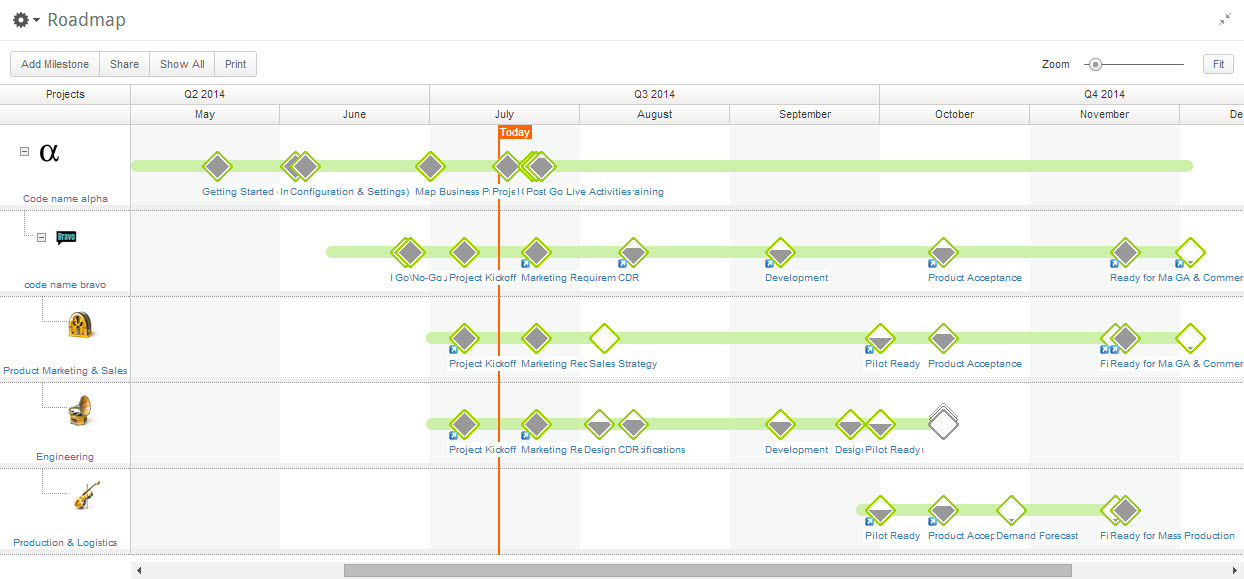
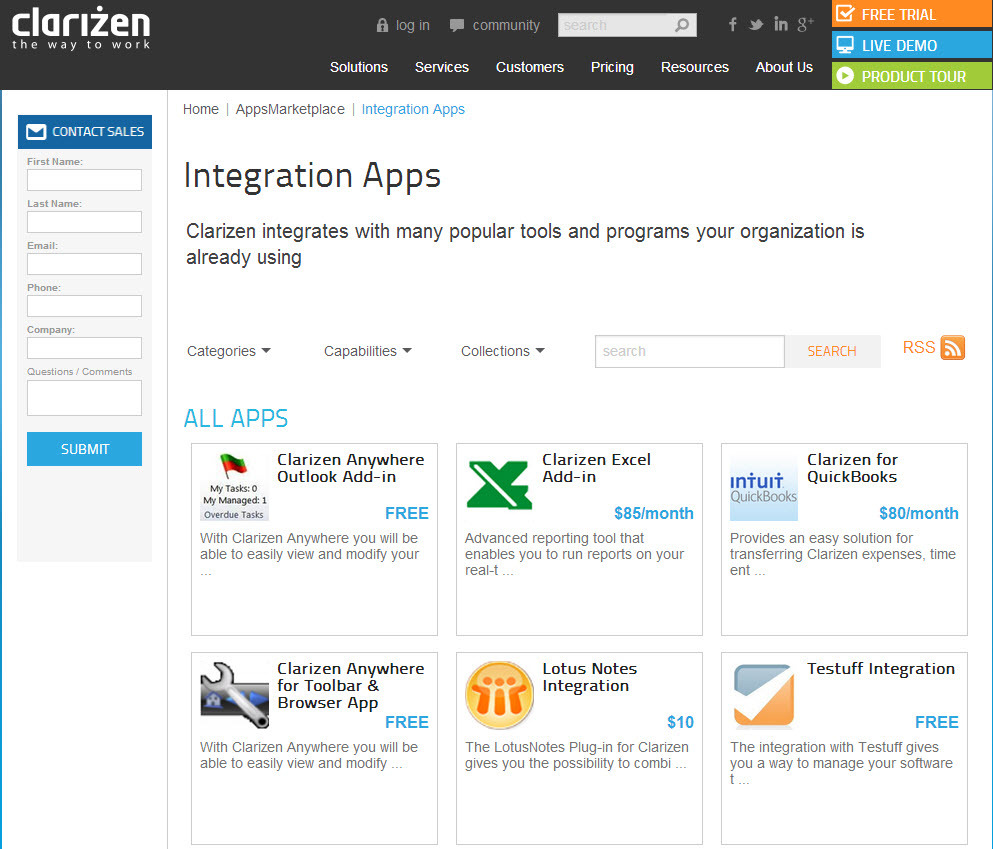
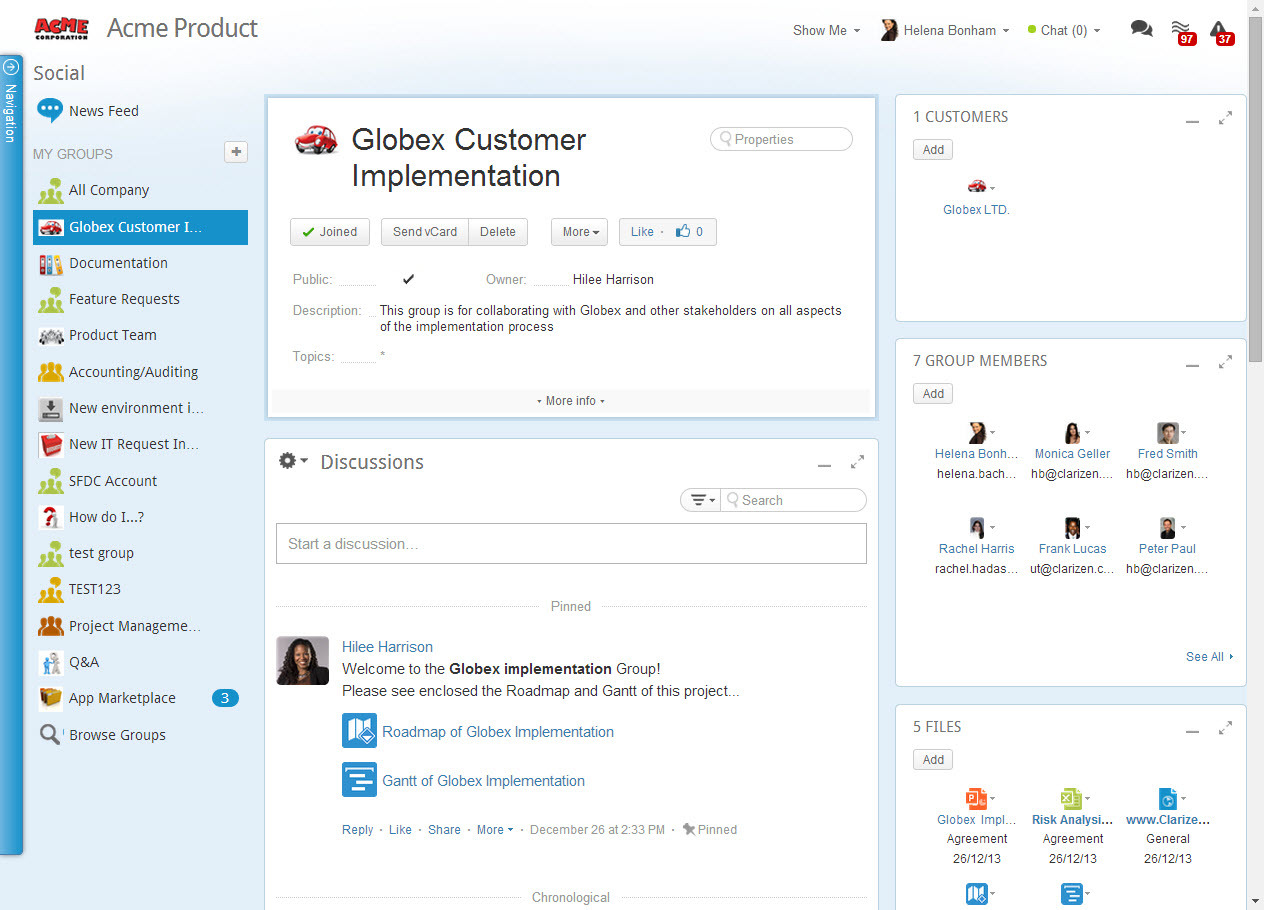
Screenshot of AdaptiveWork's Portfolio ManagementScreenshot of Integration Through an Array of AppsScreenshot of Real-Time Project ManagementScreenshot of Social Collaboration - From Ideation to Project Delivery