Dropbox is a cloud storage solution, equipped with features that help users to save time, improve productivity, and collaborate with others. Users can edit PDFs, share videos, sign documents, and collaborate with stakeholders without leaving Dropbox.
$9.99
per month
Sage Intacct
Score 8.6 out of 10
N/A
Sage Intacct is a cloud ERP system targeted at high-growth small and medium-sized businesses. Intacct includes applications for core financials and accounting, purchasing, order management, and financial reporting and business intelligence. It also integrates with 3rd party software like Salesforce.
N/A
Xero
Score 8.3 out of 10
N/A
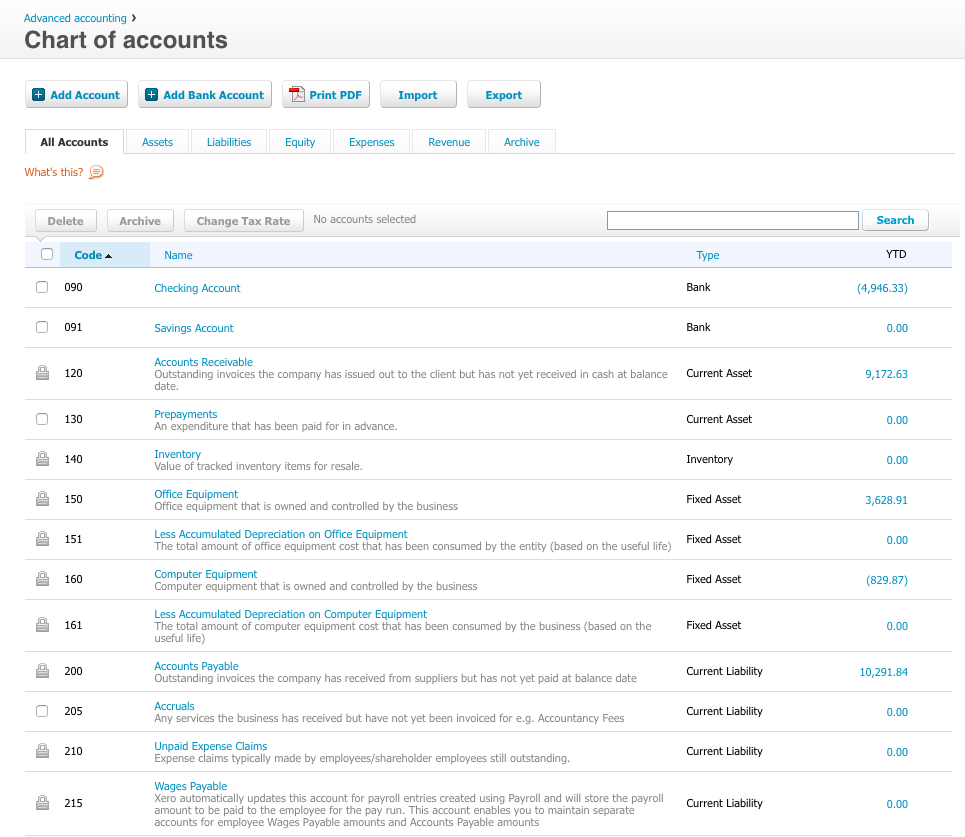
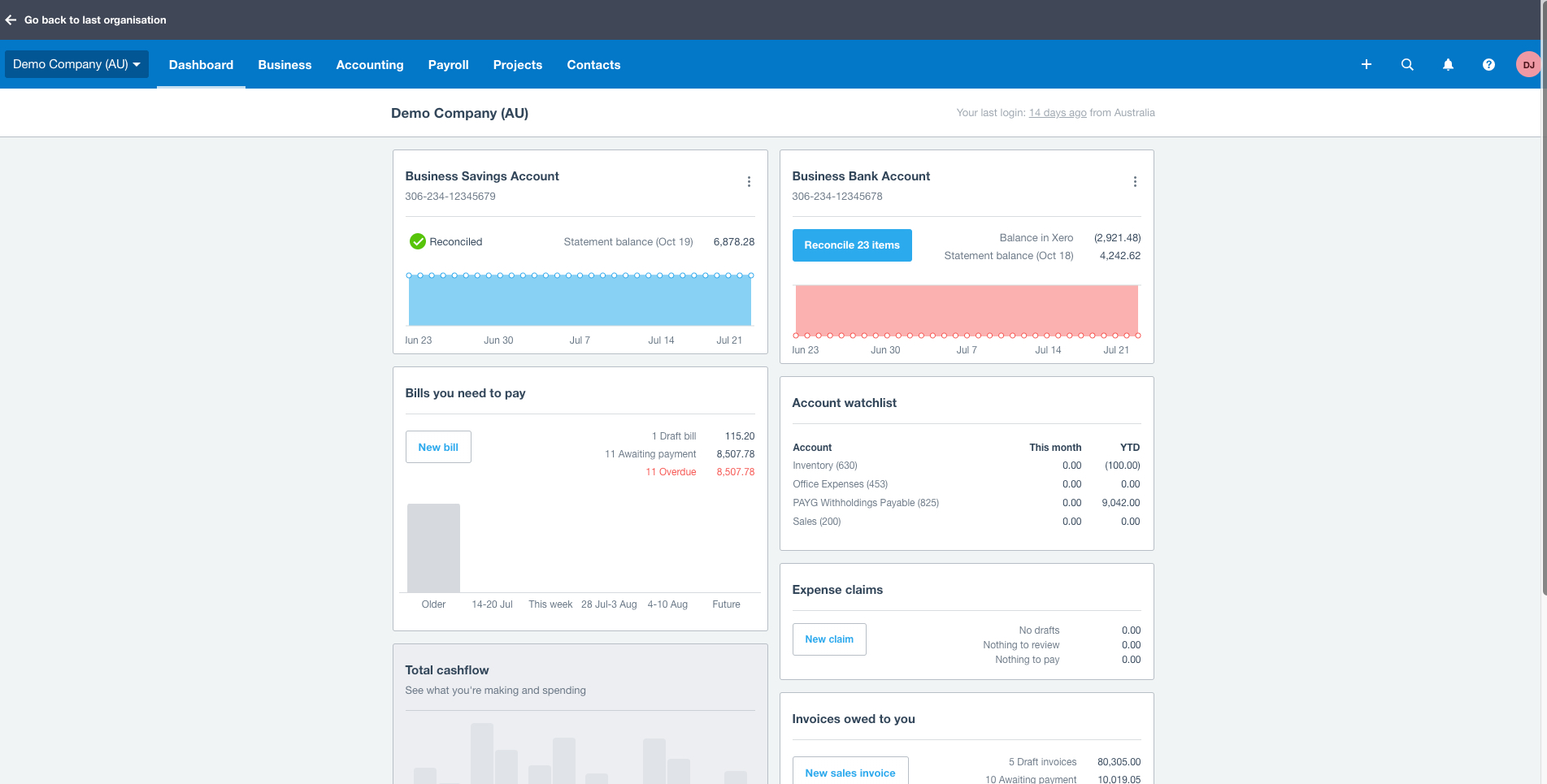
Xero is an online accounting software product for small businesses and personal finance. Its features beyond general ledger and double-bookkeeping include quotable invoicing, bank reconciliation, purchase order and expense management, and tax management. Third party apps can extend its features further.
$13
per month
Pricing
Dropbox
Sage Intacct
Xero
Editions & Modules
Plus
$9.99
per month
Essentials
$18
per month
Business
$20
per month per user
Business Plus
$26
per month per user
Basic
Free
No answers on this topic
Early
$13
per month
Growing
$37
per month
Established
$70
per month
Offerings
Pricing Offerings
Dropbox
Sage Intacct
Xero
Free Trial
No
No
Yes
Free/Freemium Version
No
No
No
Premium Consulting/Integration Services
No
Yes
No
Entry-level Setup Fee
No setup fee
No setup fee
No setup fee
Additional Details
—
Must contact sales team for pricing.
Prices in table are in USD and just apply to the US - other markets & prices are listed below:
Canada - Starter $18 CAD/month, Standard $45 CAD/month, Premium 5 $58 CAD/month
UK - Starter £14/month, Standard £28/month, Premium £36/month
AU - Starter $29 AUD/month, Standard $59 AUD/month, Premium 5 $76 AUD/month
NZ - Starter $31 NZD/month, Standard $66 NZD/month, Premium $84 NZD/month
DropBox is more business friendly. In my opinion, I feel more secure with my business documents. OneDrive had an issue and created multipe versions of my docs and I lost quite a few documents because of it. One Drive just seems to cluncky and desperately needs an update. I have …
Sage Intacct
Verified User
Administrator
Chose Sage Intacct
One of the multi-entity solution's most significant weaknesses is its inability to handle revaluations of foreign currency accounts. It needs to be manually worked out and posted, which is standard functionality in entry-level systems like Xero/Quickbooks. It has added more …
Sage Intacct is better than Xero, Quickbooks, and SAP. While Netsuite has more customization options it is harder to learn quickly. For large teams Sage Intacct is the way to go. NetSuite is great but without a coach to walk the team through where to go and how to setup it can …
I have used all these software. as discussed earlier Sage Intacct helps us in Inventory management. which is not good in our previous accounting software so we moved to Sage Intacct from that one. Some of the above mentioned software is not good for large scale businesses. I …
Sage Intacct has most of the best features but doesn't have things integrated that I don't need/use. It's very module based so you can add/remove modules as you need to. It's very scalable as well so as I add entities, there's not an incremental software cost like there would …
Sage Intacct is definitely superior to these. Stampli is used for invoice processing, it is good but limited, Intacct is definitely more powerful and includes many more services. Although I am not very familiar with Quickbooks, from the little that I saw, it is not nearly as …
I think Sage's comparison with the listing system software has a better, friendlier interface that improves the user experience. The support videos are also a plus, as they are not offered by all other software, which makes it easy to train new hires of the company. This saves …
Sage Intacct offers several automation benefits that can help streamline financial processes and improve efficiency. It's features and interface makes is better than similar other applications. Integration with different portals is easier in Intacct as compared to others. It …
Sage Intacct takes care of end to end requirement of a business. I personally find it very user friendly & the interface is very smooth. Everything is very systematically designed.
We still use BILL and Expensify to sync into Sage Intacct. The other accounting systems were not as strong on the multi-entity consolidation setup so Sage Intacct had made it easier for us overall, in terms of processes, closing schedule, and management.
Sage Intacct was selected for its advanced financial management capabilities, scalability for growth, user-friendly interface, and real-time reporting. Unlike competitors like QuickBooks and FreshBooks, it effectively handles multi-entity consolidations and also integrates well …
Sage Intacct act as a ERP where we can manage all the things like accounting to vendor management easily here in Sage Intacct there are lot of Module where as per the organization need we need to install an implement in organization level.
Much easier to understand with more traditional accounting concepts with much more flexibility and ease of use .
Verified User
Professional
Chose Sage Intacct
Sage intacct is a much more robost system than Sage 50 cloud accounting. Sage Intacct also offers the benefit of having a web based system over a desktop application like sage 50.
Compared to its alternatives, Sage Intacct is fast, simple and easy to use and manageable. I like how their support team responds quick when you contact them. Any company looking for a very effective and cost-effective application for accounting i recommend Sage Intacct.
Xero is more suitable for small and medium enterprises. Intacct is more suited for large scale operations. Reporting is more fluid and more customizable in Intacct than Xero. Both the applications fare well in case of the third party integrations.Consolidation and entity …
I formerly have used, Quicken, Quickbooks, My Advanced Invoices and another one whos name is not coming to mind. I found Xero to do everything in an organozed way and I've stayed with it.
I've used a lot of different accounting systems. Many of them so big and powerful, but a hassle to get set up. Xero is light, inexpensive, and easy to use. When I originally selected them they seemed like they were developing new features at a quick rate as well. I was invited …
Xero is the best. Xero thinks about the accountants and supports that role very well. Xero "makes sense" to average business owners and also is very powerful tool for the accountants. They have built the product right and keep improving it with every release they do. We picked …
I did a side by side with Quickbooks online and I find Xero is just much easier to jump in, get things done, and get out. They are very deliberate in the same way Apple is making sure that any feature added works extremely well and adds to the user experience. Very well thought …
Dropbox is well suited for sending File Requests to clients to upload documents, and for me to send File Transfers to clients with documents for them to download. I can create separate files for each client, and also create files within files, which is very convenient and useful for my business purposes. In Dropbox I can also see all of the File Requests that I have sent and it shows me how many times they've accessed it and how many files they uploaded. I can also see all of the File Transfers that I have made and whether how many times the client has accessed it and how many documents were downloaded. It also sends me notifications if the clients haven't downloaded their files yet so I can remind them. Dropbox Sign has been very easy to use, and I have already stated what could be changed with it
I would say it is well-suited when the company has multiple entities, brands, departments, or business lines and needs consolidated reporting. For example, if an organization operates across different legal entities or business divisions, finance can maintain separate books while still producing consolidated financial statements. This is useful when leadership needs both a roll-up view and entity-specific reporting.
I am a massage and physical therapist. We are not a fancy business but business admin can take a lot of time and effort. Xero came recommended to me by colleagues in the sector. You raise invoices, you get paid. and you pay your bills. These are all daily scenarios for most businesses and Xero does this particularly well. Since my accountant can query my records directly, this greatly saves on bookkeeping time when it is time to do the company returns.
I can make projects available to editors so that they can do their work.
Dropbox is a place where I can store files that I can access from anywhere, even if I don't have my laptop with me at the time.
I have an old friend who is an acting professor in Tokyo. He loves the dialogue that I write in my novels. He converts chapters into scenework for his acting students. They get very excited when there's new material!
Custom, real-time financial reporting. I am able to streamline my reporting to pull in various account groups and calculations which save me time from having to do it in Excel.
Out of the box standard reports for clients who don't require as custom of reporting or even as a great starting point to build out reports.
Integrations with other platforms, such as Airbase, various banks, Rippling, etc.
The dashboard module is extremely helpful in my monthly review of various entities.
Repeating invoices (most of my business is monthly recurring invoices) - it does these very well.
Reporting - particularly being able to dig into the different lines of the P&L statement.
Tracking categories - I assign a category to every line of every invoice so it's easy to see how much has been sold of each type of service every month and year, and compare them to previous periods.
Having different email addresses for different parts of a customer's business (eg invoices and statements to different places)
Easily seeing the text of emails that have been sent through Xero
More easily archiving old pay items. Our HR software updates rates when awards are updated which means a lot of old pay rates are in the system and they have multiple clicks to archive each one. Clicking the ones to archive in bulk and then just click archive for all would be much more efficient.
Dropbox is a user-friendly, easy tool which requires little to no skill and they offer a free version with a good amount of storage available. There are other file sharing tools available however at a cost. Dropbox free version I have used for years and it serves every purpose I need.
Sage Intacct is continuously evolving and increasing it's functionalities. I am excited to attend conferences to learn what is in the roadmap for future releases. Additionally, using Sage Intacct allows me grow as a professional, I am really enjoy the knowledge that I have within the product to be able to share my experiences.
In addition to the matters covered in this review, my reason for renewing this product is that Xero's functionality and the constant updates that the company provides, makes the software even more business friendly. The software therefore builds a brand loyalty among customers.
It works extremely well, and we have never had any issues with connecting or sharing files. It's very easy to use, and any team member can share, add, and delete files to a virtual drive. This is extremely helpful, and it's an amazing tool to use, ensuring everyone can connect and work together effectively.
The ease of use as a seasoned user is wonderful; however, new users struggle to adapt to the program efficiently. Better training videos--all in one location--would be beneficial. The use of a "sandbox" environment is a great tool for new employees or for the fiscal department to test certain journal entries or other transactions to verify accuracy of data.
As a standalone software, it allows users to fulfill most of the basic functions (e.g. transaction input and report generation) simply and conveniently. It also allows for multiple APIs to help augment various tasks that accounting-adjacent (e.g. claims processing). The cloud based model and portability to mobile devices allows tasks to be carried out in a more convenient way.
I really recommend the product for the Dropbox availability is a great having very very less downtimes, they errors are less I have been faced yet, due to connectivity sometimes we are getting errors. Only sometimes the limitations of some features show some errors.
There has only been one occurrence where Sage Intacct was not available to me, however I had already been working a number of hours trying to get a project completed. It honestly allowed me to step back and take a much needed break.
We have been actively using and 100% Xero based for our ecommerce accounting practice for over 4 years. There has on been one real outage for more than 5 minutes. Xero was open and transparent about the outage, what they were doing to resolve the issue, and provided 15 minute updates. Showing how they care about their customers and partners. Plus, showing that their customers care too, were understanding, and went surfing or in our case took a nap. Couldn't run our business without Xero as a partner.
Dropbox is really useful, you can access any file from anywhere and you can upload and even edit files online, but, sometimes it can be slow. Downloading, uploading, and syncing is a bit slow, it can take several minutes. Furthermore, the search engine for large amounts of data can be slow too and it is not powerful.
As fas as integration is concerned I don't feel this slows Sage Intacct down at all. However, sometimes I do feel it takes some larger reports more time to load due to all the detail. As well as, I "move very fast" in my motions so sometimes I double click on fuctions too quickly and the system seems to think that I have a duplicate request.
On a good day, things worked but after upgrades, things began to slow and or not work at all at times. I coined the moving circle while I waited as the "Xero Wheel of Death". Sometimes it never stopped and force quitting was necessary.
They immediately responded like in an example that I gave where one of our staff members accidentally deleted the whole Special Hope Network Dropbox, we immediately contacted Dropbox they walked us through the steps of how to retrieve the information and luckily enough we were able to retrieve the entire Dropbox and we have had back and forth with Dropbox on what to do when an employee leaves how to remove them how to add another employee.
Only a few times have we had to reach out to support, and every time we did, we received a relatively quick response and a solution was found fairly quickly. Only once was there an issue that took longer than a week to resolve, but it still did eventually get solved.
Always respond and keep issues open until you are satisfied with the result. Generally good responses, in the past, I had some support responses that were really basic and really annoying. They type where "have your tried restarting your computer" style of answers. Well, of course, I went through all the basics before contacting them. Duh, but I suppose not everyone does. Otherwise, it would be a 10. The last year has shown a marked improvement in the support responses however.
The person for corporate product dealing and knowledge of the product explore and better and secure use are properly handover to us. Also provide full software and tool training from the basic to the pro level with each and every possible explanation. Provide many sessions regarding every doubt. Also Guide better suitable options for our business to migrate and integrate for the expansion in all places employee smoothly.
I have taken in person training classes at several of the annual Sage Intacct user conferences. It is very interactive and the trainers are very easy to follow and understand. They are great at getting everyone in the class involved. They also make sure everyone has learned to task before moving to a new one.
I did not personally take any training for Dropbox so I am self taught but I know when our Vice President selected Dropbox, he personally did do some training modules on it and I'm assuming it was very easy and simple to understand since he now acts like he is a pro at it!
The free training is very minimal. For what we pay for the service, I would like more training. We end up training new users in-house because the provided free training is not nearly comprehensive enough. That being said, the training provided, for the material covered, was adequate and relevant for the given topics.
All of Xero's training is online and available for anyone (business owner or accountants) to learn and become experts in their system. There is a range of content from product training to real world webinars from their partners. Xero is beautiful accounting software and their training is the same.
I needed to stay current in improving my daily operations. Dropbox was suggested to me by a former colleague two-years ago and I've been using it just fine ever since.
I would not use a thrid party administrator to implement your system, especially if you are going to be modifying the system at all. Use Intacct implementors as they will be able to better support you on any issues that come up after you go live.
If it can be done, time the implementation near a new fiscal year so you can start clean. Otherwise, you have to go back and do historical data from the beginning of the fiscal year, which can be brain draining.
I prefer the layout and visual aspect of Dropbox as it mirrors my files on my computer. I feel that I am more organized, and it's easier to find my files in Dropbox than it was with Google Drive.
Sage Intacct is very similar to Netsuite, but I think the project reporting within Sage is simpler and easier to manage. Sage Intacct is much more robust than Quickbooks or most other softwares, but it is also significantly more expensive. I highly recommend to use Sage Intacct if your business is large enough to handle the price tag.
Each of the products I listed had their own list of drawbacks, but the one thing they all had in common, which was right on top of that list of drawbacks, was ease of use. I struggled to get myself accustomed to each system and struggled, but when it came to getting a client to even try and use it was when the true struggle started. Just found it easier to make use of Xero from the very beginning.
I would recommend to this product directly to the sales team of Dropbox for the best deal provide to my referred person and provide the best service to them.
It's easy to integrate with the systems of Windows and Linux, easy to have web versions accessible, which provide the web login credentials. Also, it can be installed for individuals for the best autosync features.
I have yet to fully stress test the product given the size of the company where I am using it. I am sure as we scale to more customers, more vendors and more reporting requirements, I will have a better understanding of what it is capable of in terms of bandwidth and processing
When it works (usually if a client already has Dropbox, so they don't get the solicitation to sign up), it works flawlessly.
I've had multiple clients not see the "continue with download only" at the bottom and email me to resend the media another way because they don't have a Dropbox account.
Positive - It runs better than our old software when we all work together, rather than having to sign off on each other and deal with syncing issues.
Negative - It's not as easy to go back to fix an amount, a date, etc. Sometimes, a very small mistake needs to be corrected by voiding and redoing the entire transaction.
We can successfully sync other software we use with Intacct! It reduces workload when things are automated.
Xero is a basic accounting system that performs basic accounting tasks easily and accurately. For that, it provides a positive impact on our day to day accounting operations.
Because of Xero's basic structure, I feel it lacks some of the sophistication that some users want and need. The ability to create unique custom reports would enhance the impact Xero would have on meeting business objectives by providing current and useful accounting information.
In my opinion, Xero's lack of focus on their customers - their users - is a real issue with me. In my opinion, those of us that are in the trenches that work with the system on a daily basis have to deal with the shortcomings of the system with the knowledge that Xero support refuses to address the operational issues that make their user's lives difficult. I feel if Xero would focus on truly making their software better from a users point of view, it has the potential to be a great system.