Google Analytics is perhaps the best-known web analytics product and, as a free product, it has massive adoption. Although it lacks some enterprise-level features compared to its competitors in the space, the launch of the paid Google Analytics Premium edition seems likely to close the gap.
$0
per month
Oracle Marketing
Score7.5 out of 10
N/A
Oracle CX Marketing (formerly Oracle Marketing Cloud) is a solution designed to enable marketers to plan and execute automated marketing campaigns via email, display search, video advertising, and mobile while delivering a personalized customer experience for their prospects.
Global Marketing Specialist in Marketing at Ingersoll Rand (Machinery, 10,001+ employees)
Chose Oracle Marketing
The Oracle CX Marketing tool has a few advantages over our previously used solutions. One of the most impactful ones would be the easy-to-use interface - more evidently seen when developing Email Marketing (Emailers) and also when creating steps for Marketing Automation …
A de minimis incentive was given to thank the reviewer for their time. The incentive was not used to bias or drive a particular response, nor was the incentive contingent on a positive endorsement. More Info
Google Analytics is particularly well suited for tracking and analyzing customer behavior on a grocery e-commerce platform. It provides a wealth of information about customer behavior, including what products are most popular, what pages are visited the most, and where customers are coming from. This information can help the platform optimize its website for better customer engagement and conversion rates. However, Google Analytics may not be the best tool for more advanced, granular analysis of customer behavior, such as tracking individual customer journeys or understanding customer motivations. In these cases, it may be more appropriate to use additional tools or solutions that provide deeper insights into customer behavior.
A duration of one and a half years is enough for us to recognize the capabilities of a tool and in my opinion, this one is just a great tool to manage marketing campaigns of even massive-sized firms. Its marketing automation tool and its way of managing campaign and the way it executes digital initiatives is enough to get an inkling of its abilities. Less favorable for the people who want to have something at a cheap price and are more dependent on the reports as its reports have nothing much in detail.
A de minimis incentive was given to thank the reviewer for their time. The incentive was not used to bias or drive a particular response, nor was the incentive contingent on a positive endorsement. TR verified that a representative sample of customers was invited. More Info
A de minimis incentive was given to thank the reviewer for their time. The incentive was not used to bias or drive a particular response, nor was the incentive contingent on a positive endorsement. More Info
A de minimis incentive was given to thank the reviewer for their time. The incentive was not used to bias or drive a particular response, nor was the incentive contingent on a positive endorsement. TR verified that a representative sample of customers was invited. More Info
A de minimis incentive was given to thank the reviewer for their time. The incentive was not used to bias or drive a particular response, nor was the incentive contingent on a positive endorsement. More Info
Integration options outside of auto-syncs. I am currently having an issue trying to find an adapter to use with Eloqua to API into our data warehouse but keep the functionality on the Eloqua side.
To provide more transparency and visual details of the syncs (integrations of outside data) from any other system that is feeding Eloqua, like what is being updated or changed, better explanations of errors, drill down to newly created records.
Custom Objects - Need to have a way to create CDOs outside of just form submissions and uploading of lists, like if you needed to import a file nightly to feed that CDO data but automate the import and make sure it maps to a contact record.
Import of data from a file on SFTP - There is no way to filter or create logic to control what is being fed into Eloqua. Currently, that manipulation has to be done by the IT side first. Less flexibility.
Better auditing capabilities within the canvas. meaning, sometimes if something is changed or not working the problem may not necessarily show up in immediately, the pattern could take a while to present itself. For example, the feeders into the program. If there is a problem, I don't know that maybe contacts are not entering the program until we do reporting that month and realize there was a lull of contacts going through. Then we have a whole month of missed records or other potential data issues. When you get do large and your Eloqua machine is very robust, the harder it is to see everything
Be able to add more than 250 custom contact records. That definitely inhibits my organization in how we need to use that record.
A de minimis incentive was given to thank the reviewer for their time. The incentive was not used to bias or drive a particular response, nor was the incentive contingent on a positive endorsement. TR verified that a representative sample of customers was invited. More Info
We will continue to use Google Analytics for several reasons. It is free, which is a huge selling point. It houses all of our ecommerce stores' data, and though it can't account for refunds or fraud orders, gives us and our clients directional, real time information on individual and group store performance.
A de minimis incentive was given to thank the reviewer for their time. The incentive was not used to bias or drive a particular response, nor was the incentive contingent on a positive endorsement. More Info
We have been able to automate so many marketing processes with Eloqua over the past 5 years that the only direction would be to adopt the latest and greatest features Eloqua adds. The alternative would be to go back to the marketing stone-age and start over again. And we would rather move forward with increased automation and efficiency.
Google Analytics provides a wealth of data, down to minute levels. That is it's greatest detriment: find the right information when you need it can be a cumbersome task. You are able to create shortcuts, however, so it can mitigate some of this problem. Google is continually refining Analytics, so I do not doubt there will be improvements
Personally, I find it quite easy to use. But for those members of our team who have little or no testing experience, it's been a bit more difficult. There's also training required for development teams in order to have your campaigns coded and set up in the most efficient way. Our developers have been able to do basic and intermediate tests with no difficulty, and they find the interface itself quite intuitive... it's just the extremely complex tests that require a bit more understanding.
We all know Google is at top when it comes to availability. We have never faced any such instances where I can suggest otherwise. All you need is a Google account, a device and internet connection to use this super powerful tool for reporting and visualising your site data, traffic, events, etc. that too in real time.
This has been a catalyst for improving our site's traffic handling capabilities. We were able to identify exit% from our sites through it and we used recommendations to handle and implement the same in our sites. We have been increasing the usage of Google Analytics in our sites and never had any performance related issues if we used Analytics
There are occasional complaints about slowness to refresh a screen or build a report. However, this is as much a factor of network access speeds as the system itself, since often the complaints occur when someone is accessing on a wireless network.
The Google reps respond very quickly. However, sometimes they can overly call you to set up an apportionment. I'm very proficient and sometimes when I talk to reps, they give beginner tutorials and insights that are a waste of time. I wish Google would understand my level of expertise and assign me to a rep (long-term) that doesn't have to walk me through the basics.
A de minimis incentive was given to thank the reviewer for their time. The incentive was not used to bias or drive a particular response, nor was the incentive contingent on a positive endorsement. More Info
We found that we often were telling support people how the system worked. Because we were on E9 that created a lot of support issues as well since few people on the support team seemed to know how E9 worked. That was mostly okay except when we had major system issues (like SSO preventing us from logging in after an update), it became really hard to get answers that weren't vague. It was always the issues that had the highest visibility within the organization (like with Sales) that seemed to take forever to resolve and didn't have a clear escalation path. When Oracle switched Eloqua over to the Oracle support portal it just got worse
A de minimis incentive was given to thank the reviewer for their time. The incentive was not used to bias or drive a particular response, nor was the incentive contingent on a positive endorsement. More Info
They offer very basic classes which are required for master certification.
After having been through it, I would not consider anyone with a master certification any more qualified, unlike Salesforce.com certification which is a more difficult thing to acquire. For example, one of the classes towards certification was around social media. I would have expected examples of how to incorporate into campaigns in the product, with a demo and hands-on test. Instead, it was a powerpoint slideshow that went on way too long and covered really basic stuff like “what is Facebook, what is Twitter”
love the product and training they provide for businesses of all sizes. The following list of links will help you get started with Google Analytics from setup to understanding what data is being presented by Google Analytics.
Ok, so, this sounds like it could be horrible because it was all remote, but we loved it... the Adobe training environment was easy to use, and the trainers were engaging. It was simple to switch back and forth between the meeting and the hands-on exercises in their training instances. We took the fundamentals training early in our implementation-- before the consultants came onsite-- and I know this made a big difference in our implementation, because we were able to ask informed questions throughout
I think my biggest take away from the Google Analytics implementation was that there needs to be a clear understanding of what you want to achieve and how you want to achieve it before you start. Originally the analytics were added to track visitors, but as we became more savvy with the product, we began adding more and more functionality, and defining guidelines as we went along. While not detrimental to our success, this lack of an overarching goal resulted in some minor setbacks in implementation and the collection of some messy data that is unusable.
I give it a 10 because the only issue we had was a result of not following the guidance we were given. Maxymiser provided a customized implementation guide for each site where we were adding the code. On our site implementations when we followed that guide to the letter, it was extremely fast and easy and has worked very well.
I have not used Adobe Analytics as much, but I know they offer something called customer journey analytics, which we are evaluating now. I have used Semrush, and I find them much better than Google Analytics. I feel a fairly nontechnical person could learn Semrush in about a month. They also offer features like competitive analysis (on content, keywords, traffic, etc.), which is very useful. If you have to choose one among Semrush and Google Analytics, I would say go for Semrush.
A de minimis incentive was given to thank the reviewer for their time. The incentive was not used to bias or drive a particular response, nor was the incentive contingent on a positive endorsement. More Info
It was quite complex to generate segments with Adobe analytics and I wasn’t personally satisfied with the overall performance of Adobe Analytics and wasn’t enough flexible in any way. So we decided to switch to something else better than Adobe Analytics and is available in the market at a cheap rate and we ended up doing our research for the most suitable tool at Oracle Infinity and we don’t regret our decision.
A de minimis incentive was given to thank the reviewer for their time. The incentive was not used to bias or drive a particular response, nor was the incentive contingent on a positive endorsement. TR verified that a representative sample of customers was invited. More Info
Google Analytics is currently handling the reporting and tracking of near about 80 sites in our project. And I am not talking about the sites from different projects. They may have way more accounts than that. Never ever felt a performance issue from Google's end while generating or customising reports or tracking custom events or creating custom dimensions
Eloqua is definitely good for larger companies that have 100,000+ contacts and complex marketing workflows and data. Personalization is fairly robust with Eloqua for larger campaigns with smart content and features. Scaling across channels is also seamless - as the platform has great options for non-email channels like SMS, Direct Mail, Chat, etc.
A de minimis incentive was given to thank the reviewer for their time. The incentive was not used to bias or drive a particular response, nor was the incentive contingent on a positive endorsement. More Info
A de minimis incentive was given to thank the reviewer for their time. The incentive was not used to bias or drive a particular response, nor was the incentive contingent on a positive endorsement. More Info
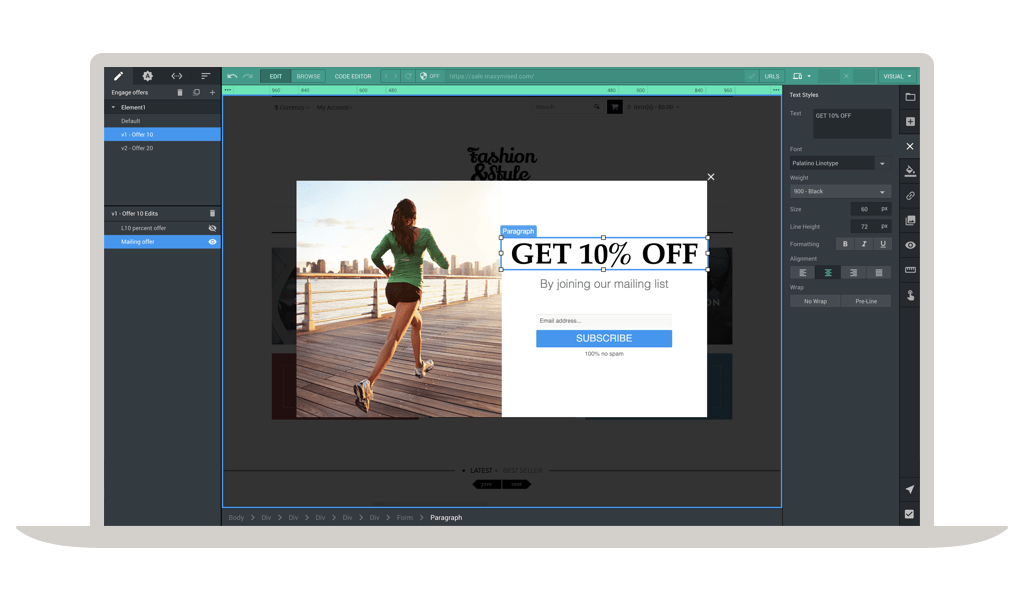
We are able to use it to help our clients scale through testing
We have been able to measure the impact of our events and sales events so we can determine which events to continue in the future and determine future investment
Launch a new brand out of Eloqua and measure awareness
A de minimis incentive was given to thank the reviewer for their time. The incentive was not used to bias or drive a particular response, nor was the incentive contingent on a positive endorsement. TR verified that a representative sample of customers was invited. More Info