Google Trends is a search engine optimization software solution offered by .
N/A
Heap
Score8.1 out of 10
Small Businesses (1-50 employees)
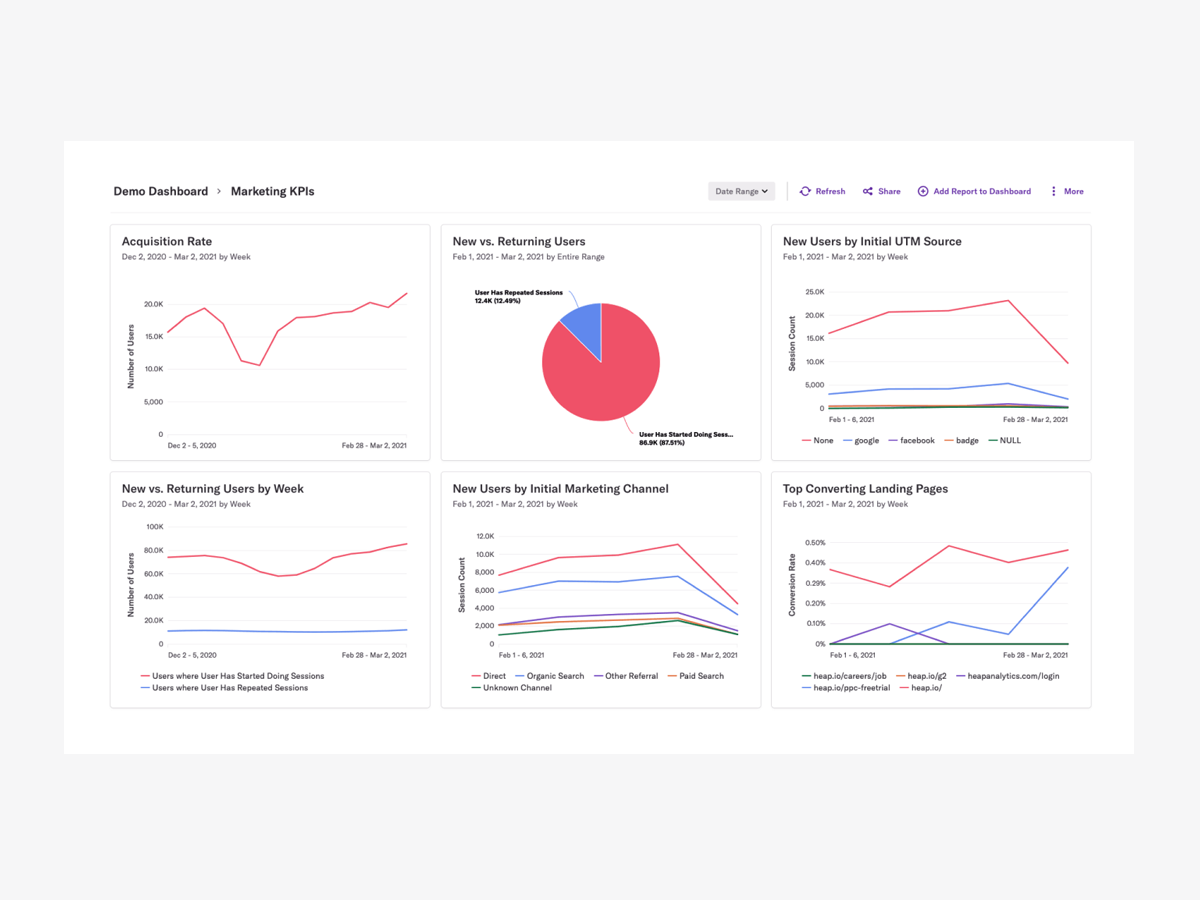
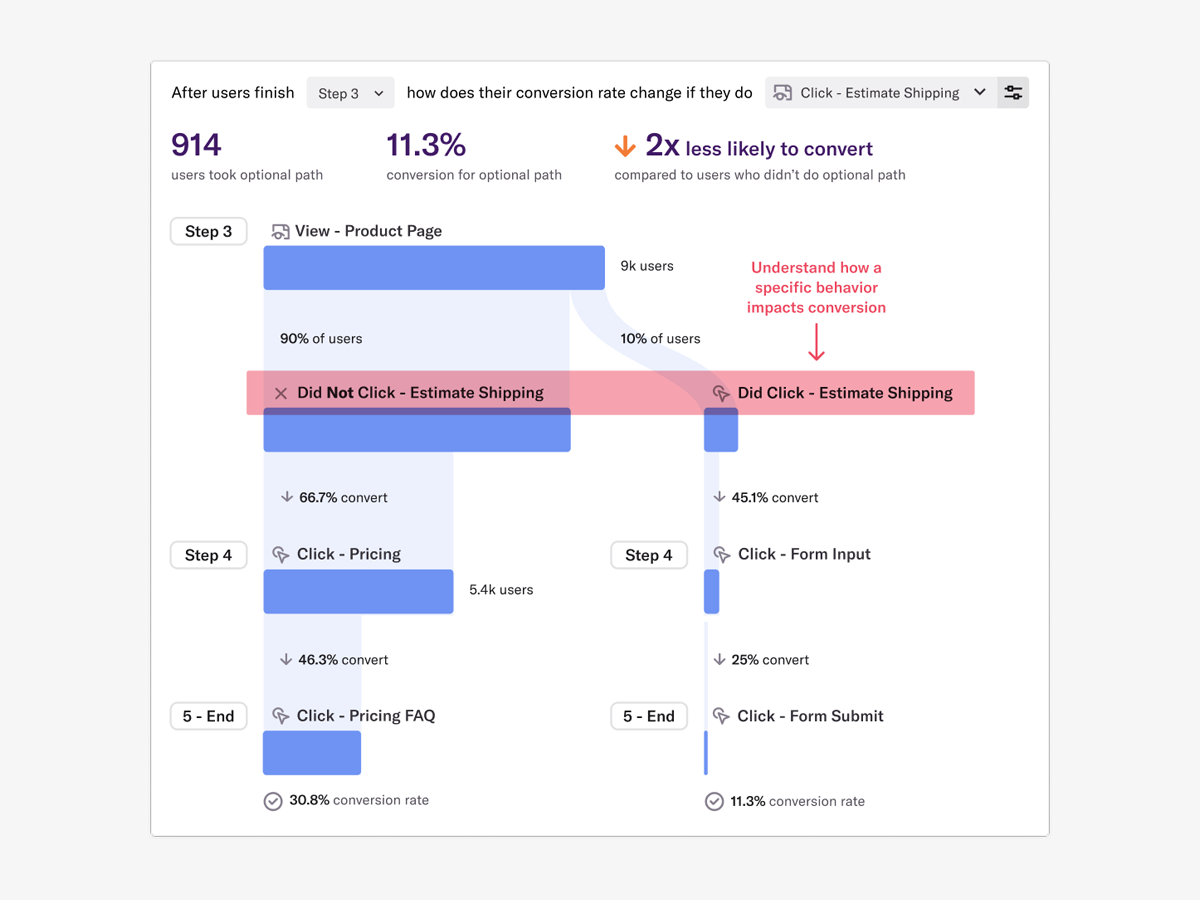
Heap is a web analytics platform captures every user interaction on web iOS with no extra code. The tool allows you to track events and set up funnels to understand user flow and dropoff. It also provides visualization tools to track trends over time.
$0
per month
Pricing
Google Trends
Heap
Editions & Modules
No answers on this topic
Free
$0
Up to 10k sessions/month
Growth
Starting at $3,600 annually
Up to 300k sessions/year
Pro
Contact Heap Sales
Custom sessions per month and unlimited projects
Premier
Contact Heap Sales
Custom sessions per month
Offerings
Pricing Offerings
Google Trends
Heap
Free Trial
No
Yes
Free/Freemium Version
No
Yes
Premium Consulting/Integration Services
No
Yes
Entry-level Setup Fee
No setup fee
Optional
Additional Details
—
Heap pricing is based on session volume. A session is a period of activity from a single user on your app or website. It can include many pageviews or events.
Google Trends is great for research and planning, to analyse keyword demand and associated costs. It really does help plan to capture consumer demand. It can be a little tricky to use, as the UX design isn't brilliant, so you'll need to learn how to navigate the website.
A de minimis incentive was given to thank the reviewer for their time. The incentive was not used to bias or drive a particular response, nor was the incentive contingent on a positive endorsement. More Info
Scenarios when Heap was well suited: It is when a user claims that he encountered a bug without giving us the details of the error message. Scenarios where it is less appropriate: Its when we try to capture user interaction in our mobile app
A de minimis incentive was given to thank the reviewer for their time. The incentive was not used to bias or drive a particular response, nor was the incentive contingent on a positive endorsement. More Info
I love how Google Trends presents the popularity of a specific query by location. For example, my product may be more popular or more "searched" in a specific state or city. This helps a lot for direct mail campaigns or any sort of in-person marketing efforts like events or pop-ups. You could use the information from Google Trends to decide what locations will be more receptive of your product/industry or you could see where people have little to no interest and build a brand awareness campaign focusing on those areas.
Another great feature within Google Trends is that it shows "Related Queries", which are basically suggestions of better keywords or phrases to incorporate into your content. If you search for data on a keyword you're using that's too broad (your content won't stand out among other web pages) or too narrow (not many potential customers are searching that keyword or phrase), Google Trends will suggest a related keyword or phrase that is more appropriate or trending at the moment. You could go back and incorporate these phrases into your content so that it's more likely to be found on search engines.
Within the Google Trends "Related Topics" section, you can choose whether you want to see topics that are "Top" or "Rising". I like this feature because looking at a "Rising" topic can help you create content that's more likely to be seen - especially if you're a beginner. Most topics that are in the "Top" category can have thousands of web pages that you're competing against and you can feel like your content is drowning. But the topics in the "rising" category can be great for newer sites that haven't developed authority online yet. You can write on one of these topics and be one of the first sites to create content on that topic, which gives you a head start over other sites.
Google Trends "Categories" is also a great feature. If you don't have any content ideas for your website, you can easily find inspiration by selecting a category that's relevant to your industry. The top keywords or topics will come up and you can create content on those topics to increase your number of web visitors. For example, if you work in the fashion industry and you don't have content ideas, you can have Google Trends generate data for the "Beauty & Fitness" or "Shopping" categories to see what's trending. Google will tell you if a specific brand, person, or event is trending and you could write an article based on one of those trends. Since people are searching for that topic, your content will be seen. This is a great way to create timely content even if you're new to an industry or simply haven't kept up with it.
A de minimis incentive was given to thank the reviewer for their time. The incentive was not used to bias or drive a particular response, nor was the incentive contingent on a positive endorsement. More Info
A de minimis incentive was given to thank the reviewer for their time. The incentive was not used to bias or drive a particular response, nor was the incentive contingent on a positive endorsement. More Info
It would be nice to have breadcrumbs available so that I can go backward in a particular search. One I click a topic and then click the related terms two or three times, I find that I'm so far down the rabbit hole that the "Back" button in my browser is a really inconvenient way to find my way back to a certain stage of my search. If there were breadcrumbs I could jump directly back to a particular stage and chase another rabbit from there.
It's easy to get lost searching in here for an extended period of time. I would be nice to be able to print a report of my whole session when I have finished.
It would be nice to have a Top Tends board of job searches or other information related to jobs that are currently popular Google searches.
A de minimis incentive was given to thank the reviewer for their time. The incentive was not used to bias or drive a particular response, nor was the incentive contingent on a positive endorsement. More Info
A de minimis incentive was given to thank the reviewer for their time. The incentive was not used to bias or drive a particular response, nor was the incentive contingent on a positive endorsement. More Info
It's a great platform. I'm glad that one of our product managers introduced it because it has allowed us to create all kinds of new functionality. We're not only able to create a better product experience from our communications because of Heap, but we're also able to generate all kinds of helpful analysis.
A de minimis incentive was given to thank the reviewer for their time. The incentive was not used to bias or drive a particular response, nor was the incentive contingent on a positive endorsement. TR verified that a representative sample of customers was invited. More Info
Google Trends is very easy to use. you just search for a certain keyword or phrase, and it tells you how often that keyword or phrase is searched, where in the world it is searched, and over the last decade, how often it is per year.
A de minimis incentive was given to thank the reviewer for their time. The incentive was not used to bias or drive a particular response, nor was the incentive contingent on a positive endorsement. More Info
On a scale from 1-10, I find Heap to be incredibly user-friendly and easy to use. I enjoyed the training videos available and was quickly able to pick up how to create events and reports to track user interactions on our product. I would recommend Heap for its usability first and foremost.
A de minimis incentive was given to thank the reviewer for their time. The incentive was not used to bias or drive a particular response, nor was the incentive contingent on a positive endorsement. TR verified that a representative sample of customers was invited. More Info
I've never run into any issues with Heap's availability, Heap is always there when I need it. I haven't run into any issues like application errors or unplanned outages during my 2+ years of using Heap. Each and every time I log in to Heap I have a completely functional experience
A de minimis incentive was given to thank the reviewer for their time. The incentive was not used to bias or drive a particular response, nor was the incentive contingent on a positive endorsement. More Info
Heap doesn't affect page load times considerably nor has a large impact [on] our overall score, as far as page loading times inside of the tool its pretty reliable to retrieve data as much as "instant" that it can be the delay seems to be on data getting tracked into the servers to be read but it's not significant.
A de minimis incentive was given to thank the reviewer for their time. The incentive was not used to bias or drive a particular response, nor was the incentive contingent on a positive endorsement. More Info
I haven't needed to use any support for Google Trends. However, I've used Google's support in general and it's a hit or miss. Usually, there's a long wait or they don't understand my problem. They are the only ones that can help, so sometimes I feel stuck. They prioritize paying customers for sure.
A de minimis incentive was given to thank the reviewer for their time. The incentive was not used to bias or drive a particular response, nor was the incentive contingent on a positive endorsement. More Info
Heap support has allowed us to troubleshoot and test a lot of different items. Their support team is always helpful and friendly, even when we come to them with the most complicated questions. I think this greatly improves the value proposition of the product because their support team is knowledgable and friendly.
A de minimis incentive was given to thank the reviewer for their time. The incentive was not used to bias or drive a particular response, nor was the incentive contingent on a positive endorsement. TR verified that a representative sample of customers was invited. More Info
The implementation was smooth and easy. The Heap team helped us with implementation and it went great! Within a few weeks, we were fully up and running and utilizing the platform to its full capability. This is an additional thing that has made this platform so great and we couldn't recommend it enough.
A de minimis incentive was given to thank the reviewer for their time. The incentive was not used to bias or drive a particular response, nor was the incentive contingent on a positive endorsement. TR verified that a representative sample of customers was invited. More Info
Google Trends is a great place to start in the content curation, content research, blog post writing, and resource page creation process. It is not, however, a place to do serious SEO optimization. Tools like Moz, or Analytics SEO would be a better place to go after you do initial research on Google Trends to dial in your keywords, and optimize content for search engines.
A de minimis incentive was given to thank the reviewer for their time. The incentive was not used to bias or drive a particular response, nor was the incentive contingent on a positive endorsement. More Info
Heap offers a ton of functionality on a single platform.It also has an smart data science layer to offers suggestions for next steps in the analysis, allowing us to explore alternative paths we may not think to take. The low-code option for updating data is appealing, and there is a lot of automation with minimal engineering effort.
A de minimis incentive was given to thank the reviewer for their time. The incentive was not used to bias or drive a particular response, nor was the incentive contingent on a positive endorsement. More Info
The most challenging part of using Heap in a growing organization is the naming and structure in which reports and dashboards are organized. I work within the marketing department and our Heap leader internally works within the IT/Product department, which makes it challenging because we often don't speak the same language, so the learning curve has been steep without any specific use-case examples to leverage online.
A de minimis incentive was given to thank the reviewer for their time. The incentive was not used to bias or drive a particular response, nor was the incentive contingent on a positive endorsement. More Info
A de minimis incentive was given to thank the reviewer for their time. The incentive was not used to bias or drive a particular response, nor was the incentive contingent on a positive endorsement. More Info
A de minimis incentive was given to thank the reviewer for their time. The incentive was not used to bias or drive a particular response, nor was the incentive contingent on a positive endorsement. More Info