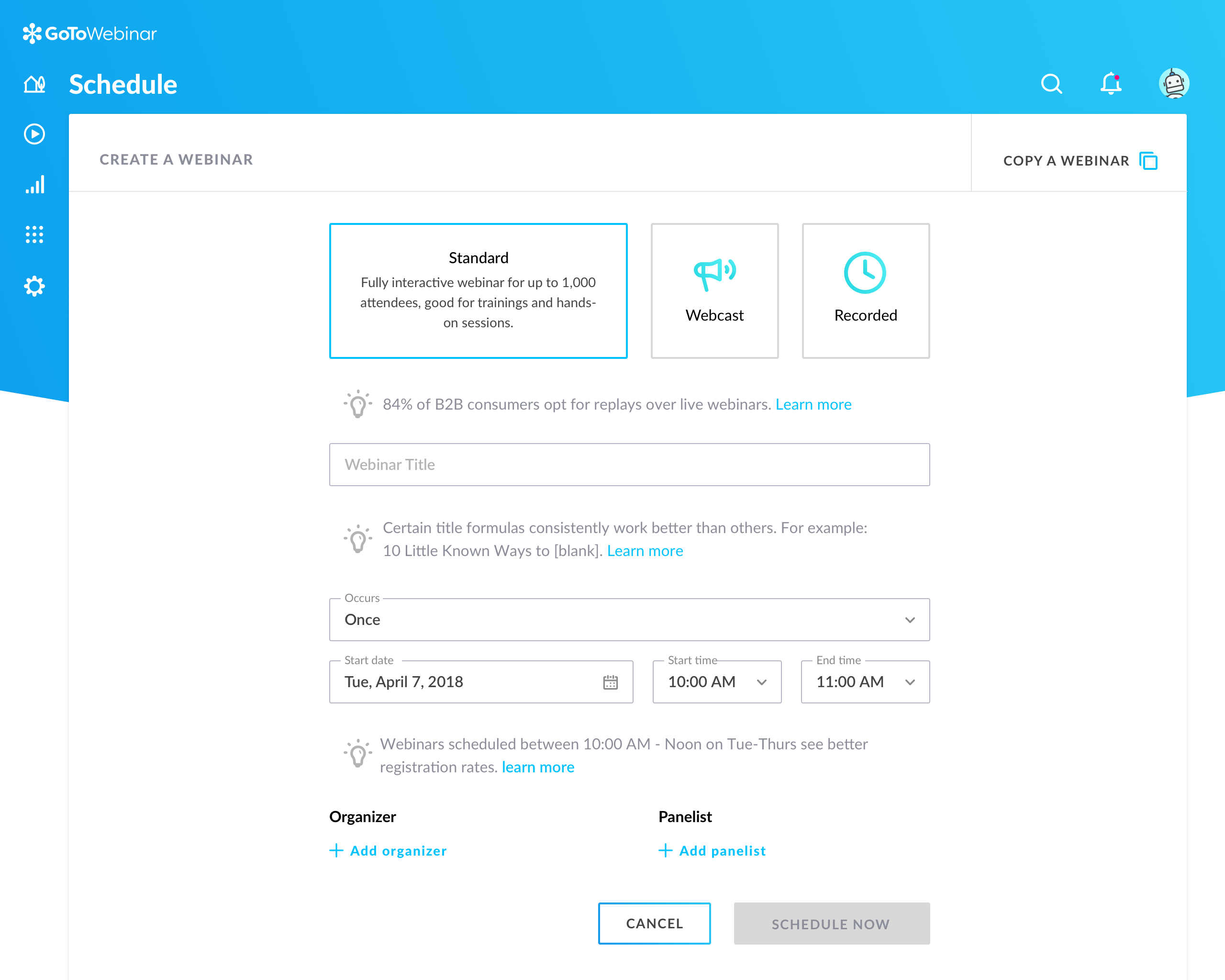
GoToWebinar is GoTo’s webinar and online conferencing solution, and offers features like audience polling and Q&A, flexible scheduling experiences, and webinar templates. It offers CRM integrations and reporting & analytics tools to help engage clients’ audiences.
$49
per month per organizer
RealVNC Connect
Score 8.5 out of 10
N/A
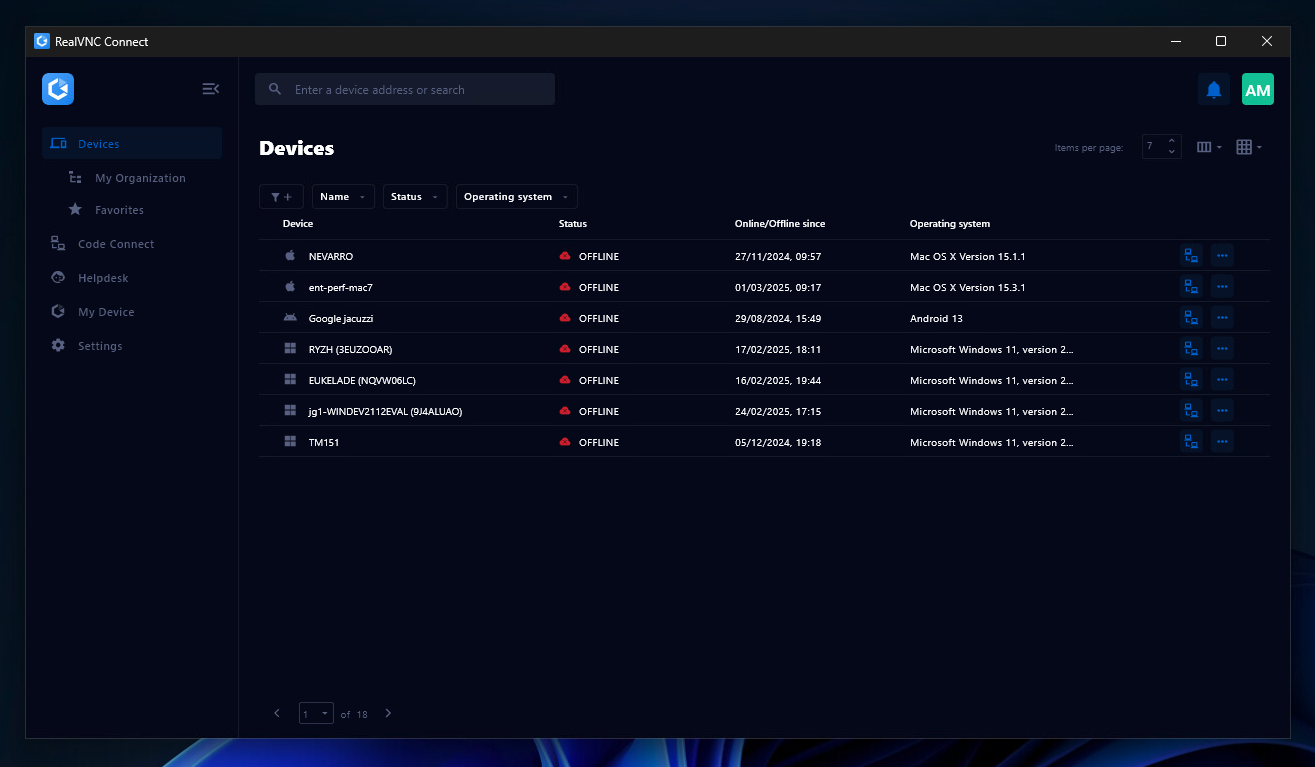
RealVNC® Connect is a secure remote access solution from RealVNC. It can be used to connect to a remote device anywhere in the world to view its desktop in real-time and take control as though sitting in front of it.
$99
per year (one concurrent session)
webinar.net
Score 9.8 out of 10
N/A
Webinar.net launched in 2019, designed to be a modern alternative to the dated Meeting tools that are often used for marketing and training applications, presented as a powerful, easy-to-use online presentation platform with polished user interfaces.
Webinar.net is fully hosted in the cloud. The vendor states this architecture allows users to reach very large audiences without capacity concerns, and enjoy simple, cost-effective pricing.
With it, brands are fully represented when…
N/A
Pricing
GoTo Webinar
RealVNC Connect
webinar.net
Editions & Modules
Lite
$49/month
per month per organizer
Standard
$99/month
per month per organizer
Pro
$199/month
per month per organizer
Enterprise
$399/month
per month per organizer
Essentials
$8.25
per month (billed annually) per concurrent session
Plus
$16.50
per month (billed annually) per concurrent session (add up to 3)
Premium
$29.75
per month (billed annually) per concurrent session (add up to 5)
Enterprise
Custom Pricing
per year
Enterprise
Custom Pricing
No answers on this topic
Offerings
Pricing Offerings
GoTo Webinar
RealVNC Connect
webinar.net
Free Trial
Yes
Yes
Yes
Free/Freemium Version
Yes
Yes
No
Premium Consulting/Integration Services
Yes
No
Yes
Entry-level Setup Fee
No setup fee
No setup fee
$329 per account
Additional Details
—
Plans work on a Per Concurrent Session basis. Each plan gives access to a bundled number of devices, but limits apply to the amount of devices that can be connected at any given time.
The Premium plan includes On-Demand Assist, a useful tool for providing just-in-time remote support to end-users without them needing RealVNC Connect installed on their device.
—
More Pricing Information
Community Pulse
GoTo Webinar
RealVNC Connect
webinar.net
Features
GoTo Webinar
RealVNC Connect
webinar.net
Reporting & Analytics
Comparison of Reporting & Analytics features of Product A and Product B
GoTo Webinar
7.1
153 Ratings
8% below category average
RealVNC Connect
-
Ratings
webinar.net
4.5
1 Ratings
52% below category average
Dashboards
7.2145 Ratings
00 Ratings
6.01 Ratings
Data exportability
7.1141 Ratings
00 Ratings
3.01 Ratings
Performance & Compatibility of Online Events Software
Comparison of Performance & Compatibility of Online Events Software features of Product A and Product B
GoTo Webinar
7.6
170 Ratings
7% below category average
RealVNC Connect
-
Ratings
webinar.net
7.0
1 Ratings
15% below category average
High quality audio
8.2170 Ratings
00 Ratings
8.01 Ratings
Mobile support
7.6120 Ratings
00 Ratings
6.01 Ratings
Online Meetings / Events
Comparison of Online Meetings / Events features of Product A and Product B
GoTo Webinar
7.2
170 Ratings
12% below category average
RealVNC Connect
-
Ratings
webinar.net
8.8
1 Ratings
8% above category average
Calendar integration
7.7147 Ratings
00 Ratings
9.01 Ratings
Record meetings / events
8.4165 Ratings
00 Ratings
8.01 Ratings
Slideshows
8.5148 Ratings
00 Ratings
10.01 Ratings
Event registration
8.6161 Ratings
00 Ratings
8.01 Ratings
Online Events Collaboration
Comparison of Online Events Collaboration features of Product A and Product B
GoTo Webinar
8.2
215 Ratings
3% below category average
RealVNC Connect
-
Ratings
webinar.net
8.5
1 Ratings
1% above category average
Audience polling
7.9193 Ratings
00 Ratings
9.01 Ratings
Q&A
8.6211 Ratings
00 Ratings
8.01 Ratings
Online Events Security
Comparison of Online Events Security features of Product A and Product B
GoTo Webinar
7.9
166 Ratings
6% below category average
RealVNC Connect
-
Ratings
webinar.net
8.0
1 Ratings
4% below category average
Participant roles & permissions
7.8163 Ratings
00 Ratings
6.01 Ratings
Confidential attendee list
8.0143 Ratings
00 Ratings
10.01 Ratings
Online Events Marketing
Comparison of Online Events Marketing features of Product A and Product B
GoTo Webinar
8.1
133 Ratings
2% above category average
RealVNC Connect
-
Ratings
webinar.net
7.0
1 Ratings
12% below category average
Branding options
8.1129 Ratings
00 Ratings
7.01 Ratings
Integration to Marketing Automation
8.0113 Ratings
00 Ratings
00 Ratings
Remote Administration
Comparison of Remote Administration features of Product A and Product B
GoTo Webinar
-
Ratings
RealVNC Connect
7.3
32 Ratings
8% below category average
webinar.net
-
Ratings
Screen sharing
00 Ratings
9.128 Ratings
00 Ratings
File transfer
00 Ratings
8.015 Ratings
00 Ratings
Instant message
00 Ratings
6.119 Ratings
00 Ratings
Secure remote access with Smart Card authentication
It is great for big events like training or product demos. It's good for marketing webinars with features like polls and Q&A. It's not ideal for small, casual meetings. It can be too expensive for some businesses. For smaller events, other tools might be better.
It is very easy to use if the remote device is already set up to receive connections, so if you are setting up devices before deploying them, it is a great tool to have. It is well-suited to use when shadowing users or using it as a teaching tool. There are other products that are better if you are trying to help someone on a one-use basis.
If price is not an object, I would always prefer ON24 rather than webinar.net. However, ON24 is much more expensive. Webinar.net is owned by 6Connex, so the integration of webinar.net in 6Connex is recommended if you need to host a webinar in a 6Connex environment. Support staff is nice, but not knowledgeable enough and takes too long. When a presenter plays a video they get muted automatically, even if the video has no sound! So you then have to either unmute the speaker yourself or having him/her doing it which adds to the stress of the moment. We have had a few cases when email reminders didn't go out, even if programmed and saved correctly.
VNC Connect does an excellent job in remotely connecting to a computer through either your local area network or even another computer on the internet. As long as the VNC Connect services is installed and the client is running in the background.
VNC Connect provides password protection to prevent unauthorized users from attempting to remotely access your computer. There's an option to have a separate password to remotely view vs view & access a computer. You can even add an additional level of security by turning on the feature to require Windows login credentials.
VNC Connect provides an additional set of controls after a remote connection has been established with another computer. You can have special keystrokes like Ctrl+Alt+Del sent as a command sequence to the other computer as well as access more than a single screen when in use at the remote computer location.
Can't schedule recurring webinars twice per week or every other week--must manually add or delete instances.
Can't schedule recurring webinars more than 'x' number of instances (less than a year's worth).
If you want a recurring webinar to continue past the last instance (in order to keep the same link), your only option is to manually add future instances before the last one occurs. If the last instance occurs, the webinar (and corresponding link) are archived with no recourse and you must recreate it from scratch and update every bit of external collateral with a new link. So I have to have reminders on my calendar every 6 months to go in and add additional dates for all my recurring webinars in order to keep my links active.
Canceling/changing seats is a huge pain.
The default 'join' screen is app-based rather than web based, so registrants often have to download GTW. I have a lot of clients whose computers are locked down from unapproved apps and have missed the webinar because the ability to join on the web is very unintuitive.
Our largest issue with GoTo have been the limitations on recording and using recordings to host a webinar, and the biggest of those is the ability to record. We have had most of our webinars recorded successfully, but when it failed to save, it failed in a big way. Their customer service team was there to help, but they were unable to truly fix the problem. There are, of course, other providers, but as we are still seeing where hosted webinars fit in our marketing strategy, cost is an important factor. Since our company already uses GoToMeeting, it makes more sense for us to stay with the entire suite of products, especially while we are testing the strategy as a whole.
VNC is a solid product for the price. It simply works and its reliable across different platforms. Some products state they work well in the Mac environment but don't deliver. This one does what it says. Connections are reliable, but of course, this depends on internet connections. The product works well over wireless connections as well. It delivers on what a remote tool should deliver on. My technicians are happy with the product and customers appreciate the ease of use when letting us connect to their systems. Some also appreciate the remote support while they are multi-task.
This is very easy to set up, configure, onboard, and use. The features can be explored without much ado. In-webinar and post-webinar features are also used seamlessly. Any new person can self-train in minutes and be hands-on. I love the overall usability of this tool.
It's a niche product and in that niche they try to cater to as many use cases as they can. Other as a TCO aspect i don't see many use cases where you can't use this product as the one tool for all remote session use cases in your company
The audience screen doesn't adjust automatically, not even on mobile phones; connection for presenters is difficult, taking time to support them and many times leaving them a bit frustrated. For us, it is not ideal the time it takes to publish content and also the time and quality of the support team replies. However, it has great potential for improvement.
I rated GoTo Webinar a 9 out of 10 for availability because it generally performs reliably, with minimal application errors or unplanned outages. The platform’s high uptime ensures that it’s usually accessible when needed, supporting a seamless experience for scheduling and conducting webinars. While occasional minor issues may arise, they are infrequent and typically well-managed, contributing to a strong overall rating for availability.
I rated GoTo Webinar an 8 out of 10 for performance due to its generally robust capabilities. Pages load quickly, and reports are generated efficiently, even for complex data sets. The platform’s integration with other systems typically doesn’t introduce significant latency or performance issues. However, during peak usage times or when handling very large data volumes, there can be occasional slowdowns. Despite these instances, GoTo Webinar consistently provides strong performance and reliability in its core functions.
I was always able to get someone on the phone when I needed to. They were very thorough and ensuring my questions were answered. And if I was asking for a solution or request that they didn't offer, they told me so I could at least stop trying to search for it.
VNC Connect is a reliable product that has been around for a long time. It is reasonably priced and works well in the Mac & PC environment. When you have a small team that supports many users we need tools that we can rely upon and that will get the job done on the first try. Many customers appreciate the quick assistance and can multi-task while our team works on their computer issues remotely. From a customer service point of view, this tool gives us transparency and efficient effectiveness.
They are very kind and readily available online and off-line; however they hardly know the answers and always need to check, making it very lengthy process and sometimes it feels like a bit of a waste of time too. I would suggest they are given more training to start with
The training is very informative, quick and to the point. All of the details one would need are present so the user doesn't have to go searching for additional information just to use the application. The layout of the training was also neat and concise, some of the other training sessions for other companies I've done in the past were confusing and not well thought out, this one is much more superior
I didn't participate in the implementation nor did my company. As far as I know we have an IT office running alla these projects and we just use the final products for our educational purposes. I also didn't notice implementation at any level while using the desktop interface, but would immediately recognize it, if so.
GoToWebinar has a user-friendly interface and intuitive controls. When comparing it with other platforms, assess how easily you can navigate through features, set up events, and engage with participants. Connection stability, audio and video quality seem pretty much ok. Interactive polls, Q&A sessions, recording options are also working fine and provide to the user experience
VNC is light and sleek with the quick setup, was impressed with the quick setup despite poor Internet connection outdoor. TeamViewer is good, but the pricing is not as good as VNC. Both do the basic job, but VNC still outperform TeamViewer in terms of performance and ease of use.
webinar.net was adopted by our company to replace ON24 since it is much cheaper. We use it in combination with Slido, sometimes. It serves large one-way webinars (up to 1,000 attendees) with limited interaction (polls and Q&A), while for smaller and more interactive online events we keep using Microsoft Teams Meetings or Webinars and Zoom Meetings.
I rated GoTo Webinar an 8 out of 10 for scalability because it effectively supports deployment across multiple departments and sites with its flexible features. It allows for easy management of large-scale webinars and integration with various systems, accommodating a growing number of users and sessions. However, some users might find limitations in advanced customization or specific integration needs as their requirements become more complex. Overall, its robust capabilities and adaptability make it a strong choice for scalable webinar solutions.
I have just used the software for about 1 month and so far so god. I am saving time whenever I can access my client's computers from my desk as opposed to having to leave my office to go to their offices. Saves me time and the client money.