Chose HotSchedules
I hated When I Work!!! It was so difficult to maneuver between schedules and after the ease of HotSchedules, it became frustrating.

| Product | Rating | Most Used By | Product Summary | Starting Price |
|---|---|---|---|---|
 HotSchedules | N/A | HotSchedules is a cloud-based scheduling, labor and communication management software solution serving the restaurant and hospitality industry. According to the vendor, key benefits include: Build & Communicate Schedules The scheduling and labor management software reduces the time it takes managers to create and communicate schedules. All scheduling and employee information is stored in one central location, so managers have access to time-off requests,… | $2 per month per employee | |
 When I Work | N/A | When I Work is a way for businesses to schedule, track time and attendance, and communicate with their hourly employees. The schedule and time clock is placed in every employee's pocket with When I Work's iOS and Android apps. It can be used to keep track of time off, employee availability, and manage shift swaps with a few clicks. When I Work integrates with payroll providers to streamline the process and avoid human error. | $2.50 per month per user | |
 WorkflowMax | Small Businesses (1-50 employees) | WorkflowMax is a web-based project management solution.The platform offers end-to-end functionality standard to project management software, including time tracking, lead management, collaboration with external stakeholders, invoicing, integrations, and customizable reporting. | $20 per month |
| HotSchedules | When I Work | WorkflowMax | ||||||||||||||||||||||
|---|---|---|---|---|---|---|---|---|---|---|---|---|---|---|---|---|---|---|---|---|---|---|---|---|
| Editions & Modules |
|
|
| |||||||||||||||||||||
| Offerings |
| |||||||||||||||||||||||
| Entry-level Setup Fee | No setup fee | No setup fee | No setup fee | |||||||||||||||||||||
| Additional Details | — | — | — | |||||||||||||||||||||
| More Pricing Information | ||||||||||||||||||||||||
| HotSchedules | When I Work | WorkflowMax | |
|---|---|---|---|
| Considered Multiple Products |  HotSchedules  Frank Jameson Operations Manager Chose HotSchedules I believe HotSchedules is a premier tool for our businesses. Our last scheduler app did not provide the store log feature, where as HotSchedules provides all of the features that we need and MORE. Reports, Staff Journals, tracking task assignments, handling multiple time off … |  When I Work  Emily Hammell Marketing and Communications Manager Chose When I Work When I Work seemed a bit easier to implement for our team and employees. When I Work had all the things we needed without a lot of the bells and whistles that we wouldn't really utilize. When I Work was also a bit more affordable for our budget. Overall, it was the better …  Jayelynn Willman Assistant Manager Chose When I Work Compared to its counterparts, When I Work allows you to interact with your staff where the others were strictly schedule based. This allows you to do so much more and saves you time from having to call each employee when something happens or a new special is announced. It puts … |  WorkflowMax No answer on this topic |
| HotSchedules | When I Work | WorkflowMax | |||||||||||||||||||||||||||||||||||||||||||||||||||||||||||
|---|---|---|---|---|---|---|---|---|---|---|---|---|---|---|---|---|---|---|---|---|---|---|---|---|---|---|---|---|---|---|---|---|---|---|---|---|---|---|---|---|---|---|---|---|---|---|---|---|---|---|---|---|---|---|---|---|---|---|---|---|---|
| Project Management |
| ||||||||||||||||||||||||||||||||||||||||||||||||||||||||||||
| Professional Services Automation |
|
| HotSchedules | When I Work | WorkflowMax | |
|---|---|---|---|
| Small Businesses |  7shifts Score 9.9 out of 10 | 7shifts Score 9.9 out of 10 |  Stackby Score 8.9 out of 10 |
| Medium-sized Companies |  Jolt Score 9.7 out of 10 |  PowerDMS by NEOGOV Score 7.1 out of 10 |  InEight Score 8.4 out of 10 |
| Enterprises | No answers on this topic |  Zoho People Score 8.9 out of 10 | InEight Score 8.4 out of 10 |
| All Alternatives | View all alternatives | View all alternatives | View all alternatives |
| HotSchedules | When I Work | WorkflowMax | |
|---|---|---|---|
| Likelihood to Recommend | 1.0 (167 ratings) | 10.0 (25 ratings) | 8.8 (28 ratings) |
| Likelihood to Renew | 9.1 (2 ratings) | 10.0 (1 ratings) | 9.0 (1 ratings) |
| Usability | 8.9 (12 ratings) | 9.0 (1 ratings) | 9.0 (2 ratings) |
| Support Rating | 8.9 (4 ratings) | 8.7 (19 ratings) | 7.0 (2 ratings) |
| Implementation Rating | - (0 ratings) | 8.0 (1 ratings) | 9.1 (1 ratings) |
| HotSchedules | When I Work | WorkflowMax | |
|---|---|---|---|
| Likelihood to Recommend | HotSchedules and Fourth
| When I Work
 Sasha Brito Marketing Director | Xero
|
| Pros | HotSchedules and Fourth
| When I Work
| Xero
 Inés Prieto R&D / Product Development Engineer - Quality |
| Cons | HotSchedules and Fourth
| When I Work
Jayelynn Willman Assistant Manager | Xero
|
| Likelihood to Renew | HotSchedules and Fourth
 Sawyer Harrison General Manager | When I Work
 AK Cyrway Co-Owner, President, Creative Services | Xero
 Lindsay Simpson Office Co-ordinator |
| Usability | HotSchedules and Fourth
Frank Jameson Operations Manager | When I Work
AK Cyrway Co-Owner, President, Creative Services | Xero
|
| Support Rating | HotSchedules and Fourth
| When I Work
| Xero
 Mary Moore Chief Bookkeeper and Xero Setup Expert |
| Implementation Rating | HotSchedules and Fourth No answers on this topic | When I Work
AK Cyrway Co-Owner, President, Creative Services | Xero
Mary Moore Chief Bookkeeper and Xero Setup Expert |
| Alternatives Considered | HotSchedules and Fourth
| When I Work
Emily Hammell Marketing and Communications Manager | Xero
 Caroline Laredo Managing Director |
| Return on Investment | HotSchedules and Fourth
 Amanda Zelichowski Manager | When I Work
| Xero
|
| ScreenShots | HotSchedules Screenshots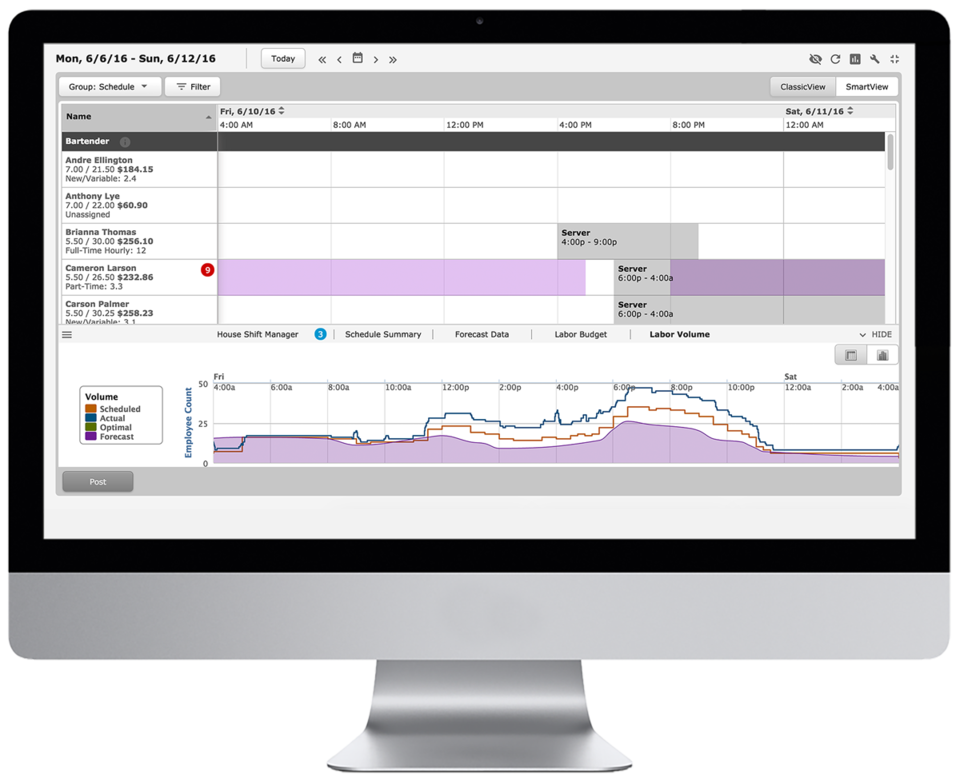 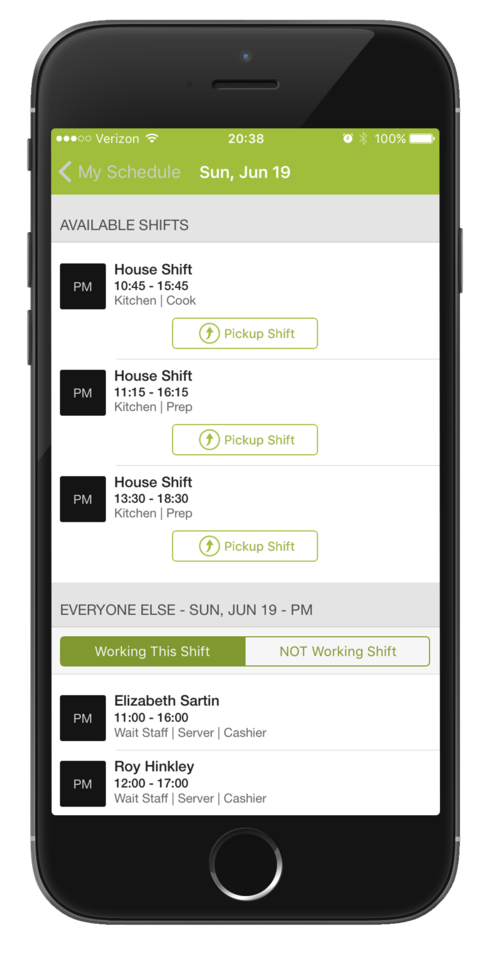    | WorkflowMax Screenshots  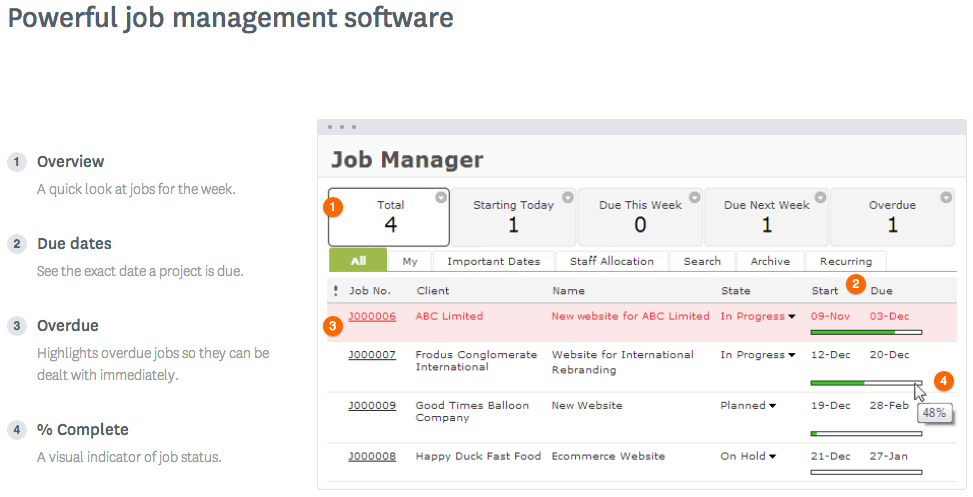  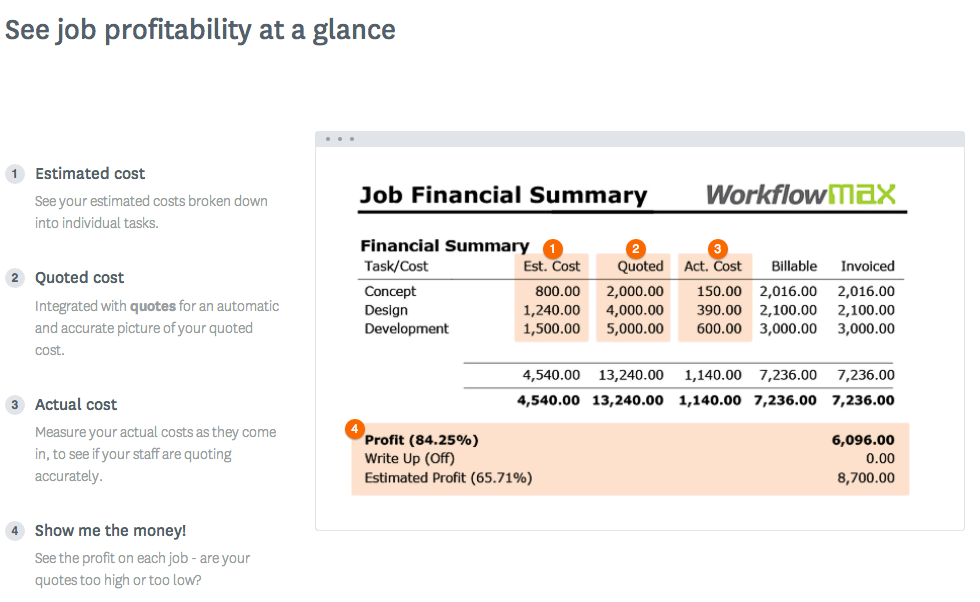  |
