
Zach Werden
Software Engineer
Chose Kentico Xperience

| Product | Rating | Most Used By | Product Summary | Starting Price |
|---|---|---|---|---|
 Kentico Xperience | N/A | Kentico is a web content management system for building websites, online stores, intranets, and Web 2.0 community sites. Kentico CMS uses ASP.NET and Microsoft SQL Server for development via its Portal Engine, using Visual Studio, or through Microsoft MVC. | $9,999 Subscription license | |
 Progress Sitefinity | N/A | Progress Sitefinity is a content management and customer analytics platform. It supports content management, tailored marketing, multi-channel management, and ecommerce sites. | N/A | |
 WordPress | N/A | Wordpress is an open-source publishing platform popular with bloggers, and a content management system, known for its simplicity and modifiability. Websites may host their own blogging communities, controlling and moderating content from a single dashboard. | $3 per month 6 GB storage |
| Kentico Xperience | Progress Sitefinity | WordPress | ||||||||||||||||||||||
|---|---|---|---|---|---|---|---|---|---|---|---|---|---|---|---|---|---|---|---|---|---|---|---|---|
| Editions & Modules |
| No answers on this topic |
| |||||||||||||||||||||
| Offerings |
| |||||||||||||||||||||||
| Entry-level Setup Fee | Optional | No setup fee | No setup fee | |||||||||||||||||||||
| Additional Details | — | — | Pricing for Business and Commerce plans vary on number of GB. | |||||||||||||||||||||
| More Pricing Information | ||||||||||||||||||||||||
| Kentico Xperience | Progress Sitefinity | WordPress | |
|---|---|---|---|
| Considered Multiple Products |  Kentico Xperience Zach Werden Software Engineer Chose Kentico Xperience  Albert Hovingh Web Developer Chose Kentico Xperience  Billy Rivet Business Owner Chose Kentico Xperience wordpress, joomla, drupal.  Fayas J Software Engineer Chose Kentico Xperience Out of these CMS systems I've worked in, Kentico is still hands down the easiest to build and manage. Ingeniux was a failed project, it was too cumbersome to work in (MVC based), it was a nightmare to do any custom dev work in it, couldn't debug, and their own staff couldn't get …  Irina Danilova Marketing email coordinator (part time contract project) Chose Kentico Xperience  Alex Kimber Southern Haemophilia IT and Data Manager Chose Kentico Xperience Kentico is a lot easier, more fluent and slicker than these products. It is easy to setup, use and teach others, so content can be managed by multiple users without any special training or skills i.e coding. It is definitely a lot more expensive so you are paying for a premium …  Brendon Lamb Web Developer Chose Kentico Xperience Kentico 8 really is a drastic improvement over previous versions of Kentico - the whole system is light years faster, much more intuitive to use and nicer for all users involved.  Eric Wiley Vice President, Technology Chose Kentico Xperience When discussing Kentico with clients, I find myself uttering the same phrase repeatedly. "Kentico provides 95% of the functionality of high-dollar CMSs at a fifth of the price." This allows clients to use the dollars they would have previously put towards licencing into feature …  Brian McKeiver Partner Chose Kentico Xperience  Gabriel Fuller Sr. Application Developer Chose Kentico Xperience It seems to have better organization and better extendability. In comparison to WordPress, the support that is offered by Kentico is incredible. When comparing to Sitecore, the price point makes it much more affordable for smaller to mid-size organizations that need a great CMS …  Jessica Hester Web Designer and Developer Chose Kentico Xperience WordPress - I do like WordPress, and we propose this CMS as an option to Kentico, but I firmly believe that unless everything happens to work perfectly, WordPress will cost more money to develop in the long run. Aside from that, WordPress has intrusive updates very regularly, …  Doug Schaffer Senior Web Developer Chose Kentico Xperience Wordpress is much quicker and lighter, but not as robust and is suitable in different situations. Sitecore and Kentico offer similar functionality, but with a different approach to development. Sitecore has a much higher price point and similar functionality, so in my opinion …  Todd Musgrove Digital Project Manager Chose Kentico Xperience I selected Kentico for it's strong .NET CMS offering. It's not particularly expensive as far as CMS systems go. Kentico offers enough advanced functionality to make any free CMS systems, like Umbraco, WordPress, pale in comparison. They are good starting points for anyone … | Progress Sitefinity  Sean Patterson Software Development Director Chose Progress Sitefinity WordPress is a solid competitor to Sitefinity, but it lacks the WSYWIG editor that Sitefinity provides. Additionally, a lot of features that Sitefinity has out of the box, such as advanced document management and form generation, require additional extensions to be installed in …  Matt Graf Assistant Director of Production for Online Learning Video Chose Progress Sitefinity  Michael Dell'Arciprete Director of Customer Acquisition Chose Progress Sitefinity Sitefinity is more robust than WordPress. It is much less expensive than either Oracle or IBM. It has a broad range of functional capabilities and it is very reliable. It is not a leader in security, but this was not our top priority. Its A/B testing is not as extensive as …  Louie Kafka Frontend Web Developer Chose Progress Sitefinity  Justin Cawthorne Senior Project Manager Chose Progress Sitefinity We evaluated a range of other platforms before selecting Progress Sitefinity. While many other platforms had a powerful range of features, Progress Sitefinity provided to be a comparable product at a price far more suited to our budget. Above all else, its ease of use gained …  Todd Knowlton CEO (Chief Executive Officer) Chose Progress Sitefinity In addition to being a user of Sitefinity, my company is also a Sitefinity Partner. More than a decade ago, we were supporting several CMS platforms and decided we wanted to pick one and be great at it. After analyzing many content management systems, we decided that Sitefinity …  Alex Hood CTO Chose Progress Sitefinity It is hands down just easier for our customers to use. The interface and the page builder experience is much better than what we have used in the past and has many enterprise features even in the lower price-point.  Kelly Martinez Systems Manager / Application Developer Chose Progress Sitefinity We looked at the newer version of SharePoint and it was too cost prohibitive and not well suited for an overall website. We were primarily using it because of the multiple editors features coupled with the ability to segregate them to different areas of the site. Progress …  Rasheed Romain Digital Marketing Front-End UI/UX, & Email Marketing Chose Progress Sitefinity Sitefinity is a better enterprise product.  Thomas Noack Director of Integrated Marketing Chose Progress Sitefinity
 Patrick King Founder + CEO Chose Progress Sitefinity Sitefinity is cleaner and more professional. It's far simpler to understand and isn't cluttered with things that a client may get into trouble with.  Tony Giruzzi Coordinator of Network Support Chose Progress Sitefinity Two-thirds of our websites use Sitefinity. More will be added soon as a work in progress.  Mike Fus Vice President of Operations Chose Progress Sitefinity We prefer Sitefinity to any of the open source solutions out there for the basic arguments you will typically hear. Additionally, Sitefinity fit well into our .NET development stack and competency we have on staff. Relative to Sitecore, Sitefinity seemed to offer better value … |  WordPress |
| Kentico Xperience | Progress Sitefinity | WordPress | |||||||||||||||||||||||||||||||||||
|---|---|---|---|---|---|---|---|---|---|---|---|---|---|---|---|---|---|---|---|---|---|---|---|---|---|---|---|---|---|---|---|---|---|---|---|---|---|
| Security |
| ||||||||||||||||||||||||||||||||||||
| Platform & Infrastructure |
| ||||||||||||||||||||||||||||||||||||
| Web Content Creation |
| ||||||||||||||||||||||||||||||||||||
| Web Content Management |
|
| Kentico Xperience | Progress Sitefinity | WordPress | |
|---|---|---|---|
| Small Businesses |  Bloomreach Score 9.0 out of 10 | Bloomreach Score 9.0 out of 10 |  ManageWP Score 10.0 out of 10 |
| Medium-sized Companies |  RWS Tridion Sites Score 9.0 out of 10 | RWS Tridion Sites Score 9.0 out of 10 | RWS Tridion Sites Score 9.0 out of 10 |
| Enterprises | RWS Tridion Sites Score 9.0 out of 10 | RWS Tridion Sites Score 9.0 out of 10 | RWS Tridion Sites Score 9.0 out of 10 |
| All Alternatives | View all alternatives | View all alternatives | View all alternatives |
| Kentico Xperience | Progress Sitefinity | WordPress | |
|---|---|---|---|
| Likelihood to Recommend | 8.0 (45 ratings) | 7.1 (171 ratings) | 8.6 (203 ratings) |
| Likelihood to Renew | 9.1 (22 ratings) | 7.2 (7 ratings) | 4.5 (38 ratings) |
| Usability | 8.0 (4 ratings) | 8.9 (10 ratings) | 8.1 (50 ratings) |
| Availability | - (0 ratings) | 8.2 (1 ratings) | 9.5 (3 ratings) |
| Performance | - (0 ratings) | 5.5 (1 ratings) | 8.6 (2 ratings) |
| Support Rating | 9.1 (4 ratings) | 9.0 (7 ratings) | 10.0 (11 ratings) |
| In-Person Training | - (0 ratings) | - (0 ratings) | 7.0 (1 ratings) |
| Online Training | - (0 ratings) | - (0 ratings) | 10.0 (1 ratings) |
| Implementation Rating | 10.0 (1 ratings) | 4.6 (4 ratings) | 9.0 (10 ratings) |
| Configurability | - (0 ratings) | 5.5 (1 ratings) | 10.0 (1 ratings) |
| Ease of integration | - (0 ratings) | - (0 ratings) | 8.0 (1 ratings) |
| Product Scalability | - (0 ratings) | 4.5 (1 ratings) | 10.0 (1 ratings) |
| Vendor post-sale | 9.1 (1 ratings) | 6.4 (1 ratings) | 10.0 (1 ratings) |
| Vendor pre-sale | 9.1 (1 ratings) | 5.5 (1 ratings) | 10.0 (1 ratings) |
| Kentico Xperience | Progress Sitefinity | WordPress | |
|---|---|---|---|
| Likelihood to Recommend | Kentico software
| Progress Software Corporation
Justin Cawthorne Senior Project Manager | Automattic
 Maria Clara Daly Director of Interactive Strategy |
| Pros | Kentico software
| Progress Software Corporation
 Jochem Bökkers Sitefinity lead | Automattic
|
| Cons | Kentico software
Eric Wiley Vice President, Technology | Progress Software Corporation
| Automattic
|
| Likelihood to Renew | Kentico software
| Progress Software Corporation
| Automattic
 Daniel Cetina Founder |
| Usability | Kentico software
Brian McKeiver Partner | Progress Software Corporation
| Automattic
|
| Reliability and Availability | Kentico software No answers on this topic | Progress Software Corporation
Kelly Martinez Systems Manager / Application Developer | Automattic
 Martin Aranovitch Founder, WPTrainMe.com - WordPress Training Plugin |
| Performance | Kentico software No answers on this topic | Progress Software Corporation
Kelly Martinez Systems Manager / Application Developer | Automattic
Martin Aranovitch Founder, WPTrainMe.com - WordPress Training Plugin |
| Support Rating | Kentico software
Jessica Hester Web Designer and Developer | Progress Software Corporation
| Automattic
 Mathew Riexinger VP of Online Marketing |
| In-Person Training | Kentico software No answers on this topic | Progress Software Corporation No answers on this topic | Automattic
|
| Online Training | Kentico software No answers on this topic | Progress Software Corporation No answers on this topic | Automattic
 Lori Berkowitz Web Developer |
| Implementation Rating | Kentico software
| Progress Software Corporation
| Automattic
|
| Alternatives Considered | Kentico software
Albert Hovingh Web Developer | Progress Software Corporation
Alex Hood CTO | Automattic
 Daniel Berry Marketing Manager |
| Scalability | Kentico software No answers on this topic | Progress Software Corporation
Kelly Martinez Systems Manager / Application Developer | Automattic
Martin Aranovitch Founder, WPTrainMe.com - WordPress Training Plugin |
| Return on Investment | Kentico software
 Jon East Technical Director | Progress Software Corporation
 Julia Spangler Creative Team Supervisor | Automattic
|
| ScreenShots | Kentico Xperience Screenshots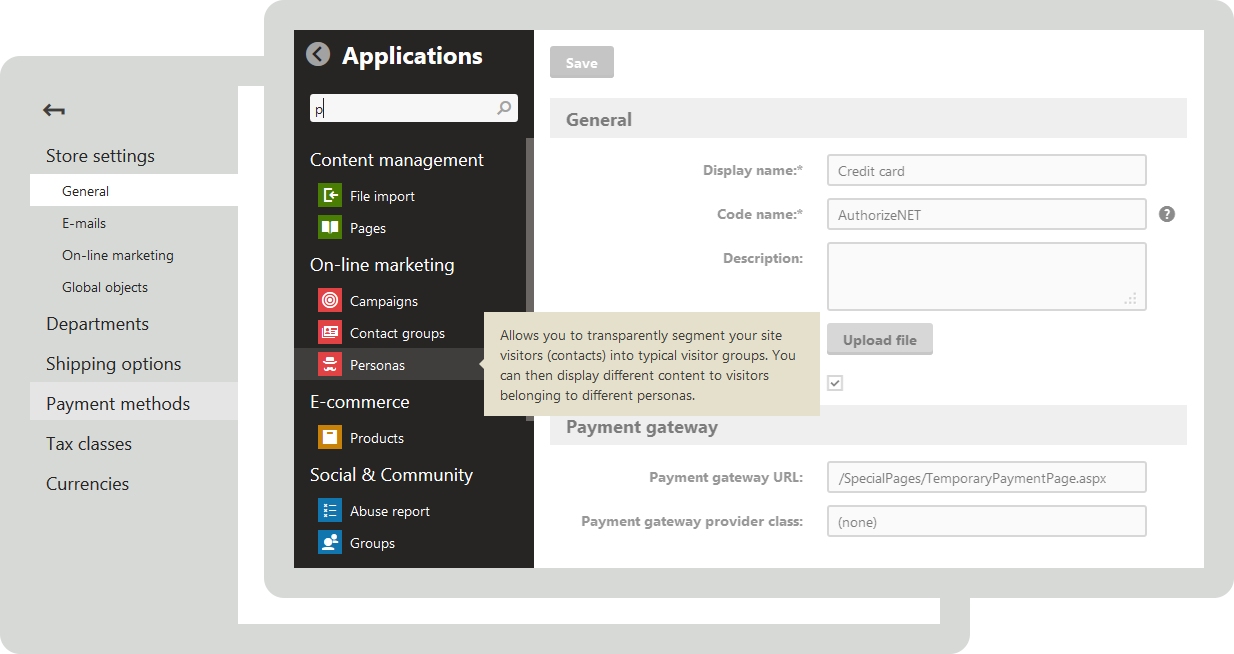      | Progress Sitefinity Screenshots    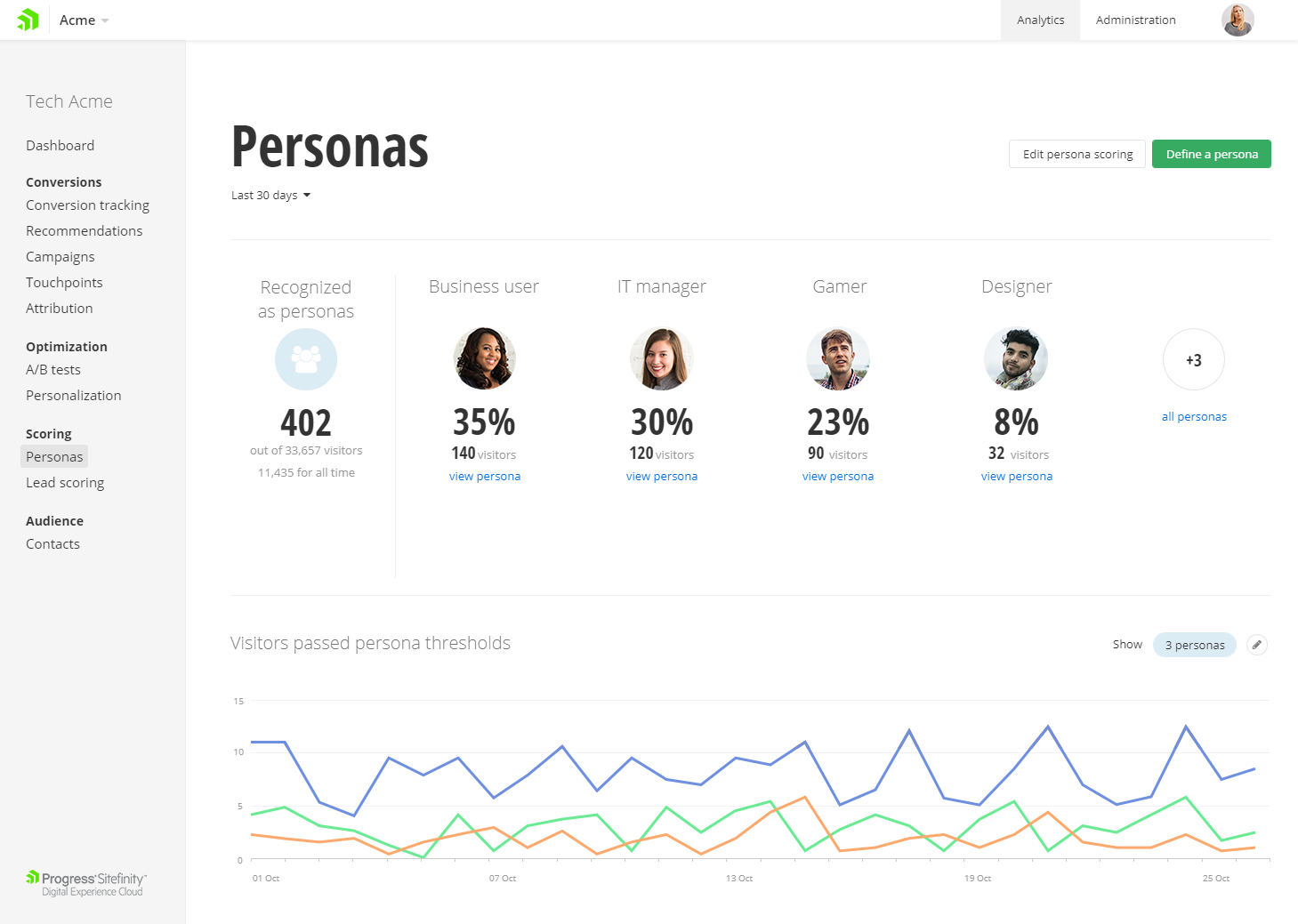 |