The Lightspeed Restaurant POS, from Lightspeed in Montreal, is a restaurant POS and management system designed to enable users to sync the user's menu with major food delivery apps, manage all orders and and reach new customers.
$69
per month 2.6% + 10¢
Microsoft Dynamics GP
Score 5.1 out of 10
N/A
Microsoft Dynamics GP is an ERP software with accounting capabilities. It includes various packs for customizability and features tailored to specific industries’ needs. GP is offered as a perpetual license or subscription.
N/A
AccountEdge
Score 6.0 out of 10
Small Businesses (1-50 employees)
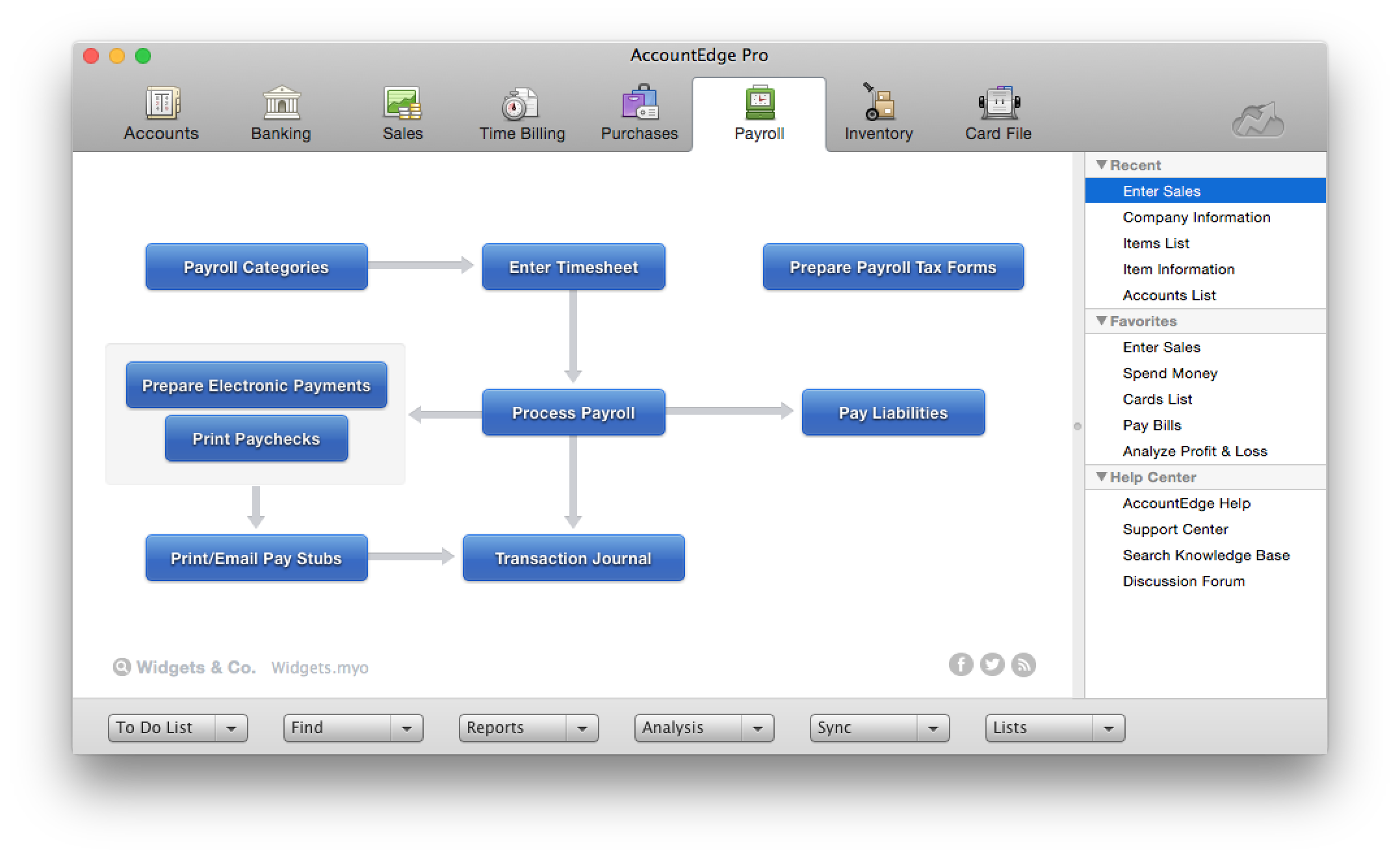
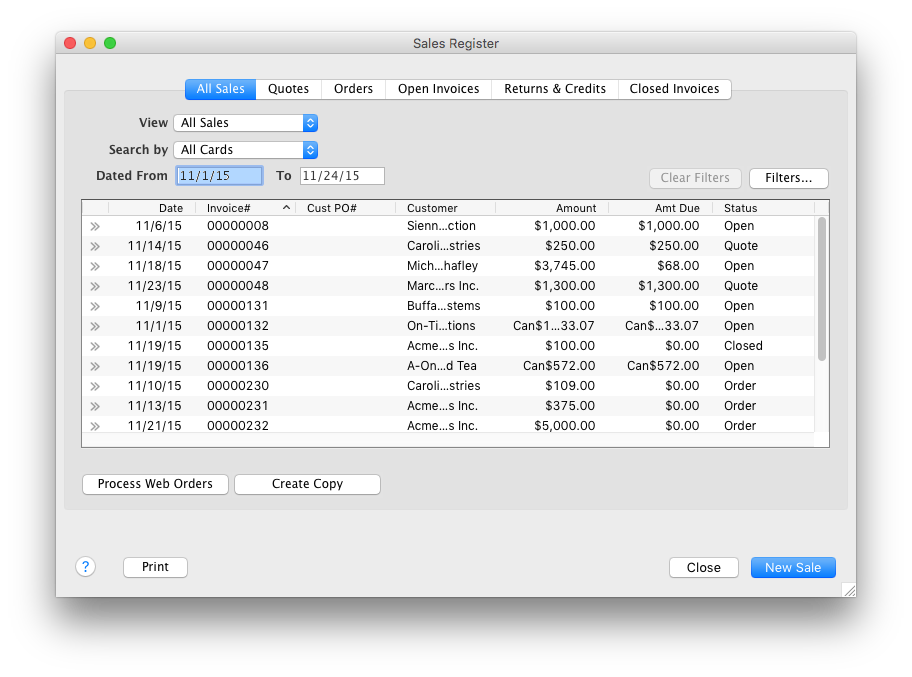
AccountEdge is a small business accounting software for Mac and Windows users. AccountEdge allows business owners to organize, process, and report on their financial information. Its features include accounting, integrated payroll, sales and purchases, contact management, inventory, and time billing. It was acquired by Priority Software in January 2018 to expand that company's small business portfolio.
$20
per month
Pricing
Lightspeed Restaurant
Microsoft Dynamics GP
AccountEdge
Editions & Modules
Lightspeed Restaurant Essentials
$69
per month 2.6% + 10¢
Lightspeed Restaurant Plus
$189
per month 2.6% + 10¢
Lightspeed Restaurant Pro
$399
per month custom per purchase rates
No answers on this topic
AccountEdge Pro
$20
per month
AccountEdge Network Edition
$30
per month
AccountEdge Hosted
$50
per month
Offerings
Pricing Offerings
Lightspeed Restaurant
Microsoft Dynamics GP
AccountEdge
Free Trial
No
No
Yes
Free/Freemium Version
No
No
No
Premium Consulting/Integration Services
Yes
No
Yes
Entry-level Setup Fee
No setup fee
No setup fee
No setup fee
Additional Details
—
—
—
More Pricing Information
Community Pulse
Lightspeed Restaurant
Microsoft Dynamics GP
AccountEdge
Features
Lightspeed Restaurant
Microsoft Dynamics GP
AccountEdge
Payroll Management
Comparison of Payroll Management features of Product A and Product B
Lightspeed Restaurant
-
Ratings
Microsoft Dynamics GP
6.4
20 Ratings
17% below category average
AccountEdge
6.6
6 Ratings
14% below category average
Pay calculation
00 Ratings
6.319 Ratings
10.06 Ratings
Benefit plan administration
00 Ratings
5.915 Ratings
8.04 Ratings
Direct deposit files
00 Ratings
7.518 Ratings
5.04 Ratings
Salary revision and increment management
00 Ratings
6.517 Ratings
6.05 Ratings
Reimbursement management
00 Ratings
6.016 Ratings
4.03 Ratings
Customization
Comparison of Customization features of Product A and Product B
Lightspeed Restaurant
-
Ratings
Microsoft Dynamics GP
4.3
27 Ratings
55% below category average
AccountEdge
5.0
3 Ratings
41% below category average
API for custom integration
00 Ratings
2.526 Ratings
00 Ratings
Plug-ins
00 Ratings
6.021 Ratings
5.03 Ratings
Security
Comparison of Security features of Product A and Product B
Lightspeed Restaurant
-
Ratings
Microsoft Dynamics GP
7.0
40 Ratings
16% below category average
AccountEdge
9.0
7 Ratings
9% above category average
Single sign-on capability
00 Ratings
5.832 Ratings
00 Ratings
Role-based user permissions
00 Ratings
8.240 Ratings
9.07 Ratings
Reporting & Analytics
Comparison of Reporting & Analytics features of Product A and Product B
Lightspeed Restaurant
-
Ratings
Microsoft Dynamics GP
5.4
41 Ratings
37% below category average
AccountEdge
9.0
7 Ratings
14% above category average
Dashboards
00 Ratings
3.529 Ratings
9.04 Ratings
Standard reports
00 Ratings
6.239 Ratings
9.07 Ratings
Custom reports
00 Ratings
6.539 Ratings
9.06 Ratings
General Ledger and Configurable Accounting
Comparison of General Ledger and Configurable Accounting features of Product A and Product B
Lightspeed Restaurant
-
Ratings
Microsoft Dynamics GP
5.1
48 Ratings
40% below category average
AccountEdge
7.2
8 Ratings
6% below category average
Accounts payable
00 Ratings
6.445 Ratings
9.08 Ratings
Accounts receivable
00 Ratings
5.936 Ratings
9.08 Ratings
Cash management
00 Ratings
6.436 Ratings
8.12 Ratings
Bank reconciliation
00 Ratings
5.741 Ratings
6.08 Ratings
Expense management
00 Ratings
4.531 Ratings
6.06 Ratings
Time tracking
00 Ratings
8.014 Ratings
6.04 Ratings
Fixed asset management
00 Ratings
4.628 Ratings
00 Ratings
Multi-currency support
00 Ratings
2.919 Ratings
9.03 Ratings
Multi-division support
00 Ratings
3.026 Ratings
9.02 Ratings
Regulations compliance
00 Ratings
3.314 Ratings
7.02 Ratings
Electronic tax filing
00 Ratings
9.012 Ratings
7.04 Ratings
Self-service portal
00 Ratings
7.012 Ratings
2.71 Ratings
Global Financial Support
00 Ratings
6.07 Ratings
00 Ratings
Primary and Secondary Ledgers
00 Ratings
4.721 Ratings
00 Ratings
Intercompany Accounting
00 Ratings
3.918 Ratings
00 Ratings
Localizations
00 Ratings
4.513 Ratings
00 Ratings
Journals and Reconciliations
00 Ratings
4.726 Ratings
00 Ratings
Enterprise Accounting
00 Ratings
2.916 Ratings
00 Ratings
Configurable Accounting
00 Ratings
4.117 Ratings
00 Ratings
Centralized Rules Framework
00 Ratings
3.814 Ratings
00 Ratings
Standardized Processes
00 Ratings
6.219 Ratings
00 Ratings
Inventory Management
Comparison of Inventory Management features of Product A and Product B
Lightspeed Restaurant
-
Ratings
Microsoft Dynamics GP
4.6
26 Ratings
46% below category average
AccountEdge
8.0
6 Ratings
9% above category average
Inventory tracking
00 Ratings
6.224 Ratings
8.06 Ratings
Automatic reordering
00 Ratings
1.013 Ratings
8.01 Ratings
Location management
00 Ratings
4.018 Ratings
8.03 Ratings
Manufacturing module
00 Ratings
4.515 Ratings
8.02 Ratings
Order Management
Comparison of Order Management features of Product A and Product B
One thing Upserve [POS (formerly Breadcrumb)] does well is splitting customer checks is very easy and intuitive. We used to host a lot of groups (pre pandemic) and splitting checks can be a nightmare. But they let you split it evenly by number or by item. You can even split one item (say, an app) across multiple checks.
Microsoft Dynamics GP is well-suited for our environment, as we pay a diverse group of employees, including on-the-road drivers, shop employees (some in other locations), and office employees. It easily tracks time off, taxes, pay, etc. The reporting allows us to verify with our drivers how they are paid each week, whether it be through mileage or stop-offs.
If you are handling a large client list, and are selling services, it is dead easy. If you are managing/selling a physical inventory, it seems like it has great options to do that quite well (disclaimer, I do not use those functions, but I have paid attention as that functionality was built into the software). If you want to link your bank account to a bookkeeping platform, this is not the software for you (at least so far).
Reporting: Upserve's backend reporting system is unparalleled in this industry. It's extremely robust and gives us eyes into every nook and cranny of our business.
Intuitive: The Upserve POS is nearly as intuitive as Square. The ease of use really helps us provide great service without spending a fortune in training.
Extras: A quality POS system is assumed with Upserve. It has all the bells and whistles and it's very effective. What takes Upserve over the top is all the added features. Our online ordering system, loyalty program, delivery platform integration, KDS system, and soon to be inventory management are all provided for free with our system. The other benefit is all these features are seamless and work really well.
Great Plains started as back office/accounting, and that is still it's strong suit.
SQL and the GP programming language, Dexterity, provide a robust, scalable, and stable platform with well documented maintenance and repair procedures. Relatively easy to manage, tune, and support.
Microsoft support for GP verges on "particularly well". Doesn't quite get there but good enough once you know what you're doing
Strong partner network, including the GP User Group (GPUG)
AccountEdge has a robust report menu that allows a user to slice and dice data for analysis. Report on projects for the life of the project across fiscal years. Report on different departments with segregated income statements.
For users who want to run payroll in house that is easily done through the payroll module. Print physical checks or direct deposit to employee's account, process payroll taxes and file year end W2s.
My personal favorites are time billing and retainers. As a service based business I can at my fingertips review how much money a client has on deposit with me and how much of that will be billed out at the end of the month. The integration with AccountEdge Mobile rounds it all out with being able to log my time on-site.
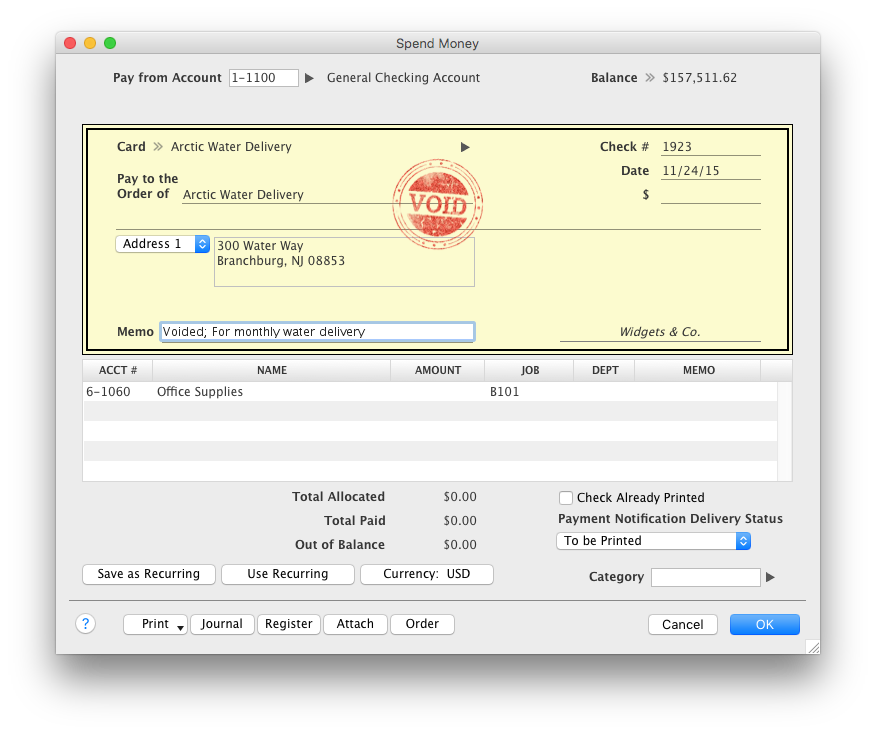
Last but not least AccountEdge Mobile in general, as the companion app for the desktop software is invaluable. My heaviest use is the spend money feature. Excellent for logging travel receipts & cash expenses while they are fresh on the brain. Really cuts back the data entry at the end of a trip and trying to recall what something may have been for.
On the KDS, the system will re-fire tickets when we split checks and sometimes when simply closing out.
On the KDS, when someone adds onto an order that has already been bumped from the screen and doesn't put the new item at the end of the queue. It bumps it to the front and keeps the original time of the original order. This makes it difficult to process the order and determine the priority of which order should be fulfilled.
With respect to the allocations, once the expense is entered into the allocation account, you lose the ability to run any detail on just the total of the expense. It would be nice if you could run a trial balance on the allocation accounts the same way you can with regular accounts.
I've always thought security set up could be a bit simpler. It actually has gotten better through the years. Specifically, with eight separate entities, it would be nice to have a "master" setup where you could call up one group entity, assign the users rights, and then be finished. Currently, whenever I have a new user, I have to call up each individual entity and select all of the features I want the user to have. That means I have to do eight steps for each user.
My biggest frustration, and one that I've mentioned to Acclivity for many years, is that it only permits opening nine windows at a time (plus the home window). I hit that limit almost daily, and then I have to decide what do I close so I can complete the transaction that needed the "9th" window.
The Accounts section includes two quick reports, "Analyze Profit and Loss" and "Analyze Balance Sheet. These can be filtered for the current month or any prior month in the current fiscal year. And that's fine most of the year, but at the beginning of the next year, when I haven't yet started the new fiscal year, these only go to December of the prior year. The regular reports for these can select "next year;" why can't these?
It would be helpful if the journal entry number would have one or two additional digits available. For example, when I am entering journal entries for a client, I would like to use a number such as CPA2014001, CPA2014002, etc. to distinguish what I enter from the "automatic" entries that AccountEdge does. But that's one more digit than AccountEdge allows, so if I had over 100 adjustments, I would run out of entry numbers.
Due the economic challenges that Puerto Rico is having, the company has had to merge some companies in order to be more efficient. It has been easy in GP to process those merges, even thought we had to spend days to accomplish that the process was smooth and accurate. In addition we were able to streamline the purchasing and sales process and the organization is confident to keep renewing GP for the future versions.
Without a doubt, when you need to do accounting use the program that will get the job done in the least amount of time with the least amount of errors. Once you are using a program that works you stay with it year after year and you will find yourself even excited about the updates
Upserve is very intuitive. It utilizes a tab system along the left side of the screen for easy access to menu categories. After choosing the tab you want to view (i.e. Food), all the food items and/or sub categories show up instantly on the screen. once your items are chosen, you are a card swipe away from starting the payment process. Very easy. That said, there are a few minor issues with usability. For example, splitting checks is really quite difficult. You have to create new checks one at a time, then have to go searching for the checks to ring guests up. Really not intuitive on this front. Thankfully, it's not incredibly inhibitive
Though it is a basic accounting package, I believe some users do not find the old style menus and navigation options intuitive. There is also a great lack of training resources in the market, so users have to learn the product without guidance a lot, resulting in inefficient workflows and misuse or misunderstanding of many features.
The intuitive interface does all the tasks we need our accounting software to do. Some tasks are slower to process than I would like but overall very usable. Customizable forms let us choose to either go with the easy ready-made out-of-the-box options or retool them to better fit our specific needs.
One of the finer advantages of desktop software, it's always available. AccountEdge doesn't suffer from outages or sluggish internet like web based applications do. It's always there when you power on your device!
Seriously, if I could give a 12 rating I would. Upserve support is 24/7 and completely free. No extra fees on evenings or weekends and they are fast. You can actually start a chat support straight from your ipad screen. 90% of our support issues have been solved in just a few minutes from the chat screen. That said, I prefer the phone. Calling into Upserve support is just as easy and everyone is always friendly and fast
On the few occasions we have needed tech support over the years, they were responsive and worked to get to the root of the issues. However, even though Checkout POS is a separate application, it was pitched to us as a natural extension of the functionality of our AE software that would integrate seamlessly. The company's support for Checkout has been minimal at best, and now totally abandoned. That colors our view of Priority's support unfortunately. And to be honest, that's why it's a 9 instead of a 10. So to be fair, AccountEdge's support itself has been very good over the years.
Basically the challenge with this implementation was the Business Portal, too many errors and even the aplication is up and running the users are still having issues. We will start planning the migraton to GP 2015 soon.
Lavu is the worst POS system I have ever encountered. It was the most frustrating part of everyone’s shift. They were never available for customer service, Upserve is. Their system would shut down across regions, Upserve does not. Upserve (at the time Breadcrumb) was highly rated and praised for simplicity.
I come from a strong background of using SAP. SAP doesn't have the flexibility of GP, an example would be SAP doesn't allow core mods, if they catch you, you lose support. Microsoft doesn't really care about mods, but they will be quick to have the vendor you used support your issue if it is caused by those mods. With SAP your company adapts to the software, where with GP you adapt the software to you.
For Mac enthusiasts, AccountEdge is the complete installed software solution for small to medium-sized businesses, as it has so many capabilities that QuickBooks for Mac lacks. However, it holds your hand less than QuickBooks for Mac does, so you ought to know what your are doing in keeping business books properly. If your needs are simple, QuickBooks for Mac may be a better solution. QuickBooks Online and Xero are excellent cloud accounting solutions that can be used on the Mac equally well as on Windows. QuickBooks Online offers a similar set of features as QuickBooks for Mac, with the addition of anywhere, anytime access. Xero is a great basic accounting solution in the cloud that can also be used equally well on Macs and WIndows, and offers endless customization and flexibility through its extensive third-party app integration for almost any need.
Bestsellers and slower items rise to the top in reporting features, making analysis quicker.
Dramatically reduced server error
Posed a challenge to continue face-to-face contact between servers and cooks; the POS tends to end conversations about special orders, special customer requests or restrictions, and generally conveys the nuances that contribute to excellent service. So we have to make a conscious effort to continue talking to each other.
Microsoft Dynamics GP allows my clients to move from a paper or spreadsheet based company to an integrated, electronic, streamlined business. I love being able to help clients gain efficiencies through the use of Microsoft Dynamics GP.
Microsoft Dynamics GP allows for better customer service because everything is at our fingertips. If someone calls questioning an invoice, we can easily look it up. If someone calls stating they paid an invoice with a certain check number, we can quickly run a query to find that particular check number to see where it was applied.
Having everything on a single platform provides ease of use for upgrades, backups and end user training. There is only one software to learn!