QuickBooks Online is a SaaS version of the QuickBooks product. It contains all of the features found in the local version. Higher-priced plans include greater automation, payment management, inventory and time tracking, and analytics features.
$38
per month
QuickBooks Time
Score8.8 out of 10
N/A
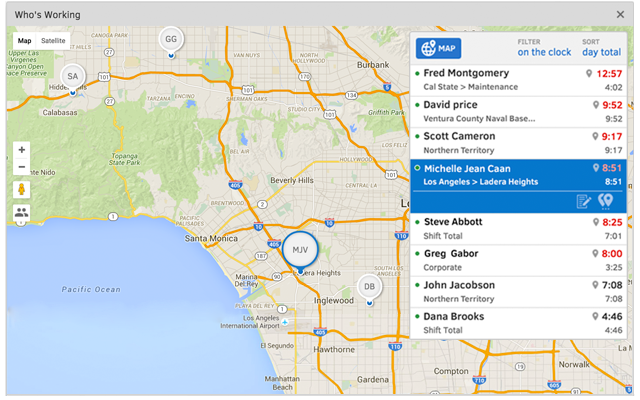
QuickBooks Time (formerly TSheets) is a cloud-based time tracking and scheduling app that allows employees to clock in and out from the job site with the devices they’ve already got in their pockets. The vendor aims to help companies replace paper timesheets with accurate, electronic time data as well as make payroll and invoicing faster and less costly. QuickBooks Time also accurately tracks time and GPS points (even without cell or internet service) then automatically syncs when back…
$0
1 user, unlimited projects
Pricing
QuickBooks Online
QuickBooks Time
Editions & Modules
Simple Start
$38
per month
Essentials
$75
per month
Plus
$115
per month
Advanced
$275
per month
Free
$0
1 user, unlimited projects
Premium
$8
per user/month + $20 base fee/month (paid annually)
Elite
$10
per user/month + $40 base fee/month (paid annually)
HR in Human Resources at RoofTec (Construction, 11-50 employees)
Chose QuickBooks Online
As I've mentioned, there aren't a lot of similar products, and certainly not with all the capability of QuickBooks Online. In my opinion, they nickel and dime for everything but they also do work pretty well across the board. I think the reconciliation process is also by far …
A de minimis incentive was given to thank the reviewer for their time. The incentive was not used to bias or drive a particular response, nor was the incentive contingent on a positive endorsement. More Info
Verified User
Chose QuickBooks Online
Peers in our industry who are using FreshBooks seem to be exceptionally happy with it, putting me on the defensive to stand up for QuickBooks. I don't seem to win those arguments though, but perhaps I need to be more of a power user with Quickbooks to up my game in that …
A de minimis incentive was given to thank the reviewer for their time. The incentive was not used to bias or drive a particular response, nor was the incentive contingent on a positive endorsement. More Info
Principal in Finance and Accounting at Adair Advisory Group (Accounting, 1-10 employees)
Chose QuickBooks Online
Xero provides similar functionality. It recently added a payroll function for my state. It also has the more robust document management system that QBO needs to move towards.
A de minimis incentive was given to thank the reviewer for their time. The incentive was not used to bias or drive a particular response, nor was the incentive contingent on a positive endorsement. More Info
Cloud Advocate, Principle Consultant, CEO in Engineering at Ingenium Group, LTD (Computer Software, 1-10 employees)
Chose QuickBooks Time
Toggle has a nice app, which makes it easy to switch time, however they do not integrate well with QuickBooks Online which means we are moving data between two systems. We like to run lean as a company with as minimal non-billable staff as possible, which means we need to …
A de minimis incentive was given to thank the reviewer for their time. The incentive was not used to bias or drive a particular response, nor was the incentive contingent on a positive endorsement. More Info
A de minimis incentive was given to thank the reviewer for their time. The incentive was not used to bias or drive a particular response, nor was the incentive contingent on a positive endorsement. More Info
A de minimis incentive was given to thank the reviewer for their time. The incentive was not used to bias or drive a particular response, nor was the incentive contingent on a positive endorsement. More Info
Founding Executive Director at Youth Revive Inc (Non-profit Organization Management, 1-10 employees)
Chose QuickBooks Time
The cost is better. We are a nonprofit organization. We don’t need a bunch of bells and whistles. We need affordability. We run on a tight budget. Bamboo, from research looked great but TSheets offered exactly what we needed at a fair price.
A de minimis incentive was given to thank the reviewer for their time. The incentive was not used to bias or drive a particular response, nor was the incentive contingent on a positive endorsement. More Info
Verified User
Chose QuickBooks Time
TSheets' ease of use for all and ease of syncing with other software really makes it stand out from other similar systems. It is also considerably affordable despite all that it offers to the company. Their customer service is also very helpful and they are available via email, …
A de minimis incentive was given to thank the reviewer for their time. The incentive was not used to bias or drive a particular response, nor was the incentive contingent on a positive endorsement. More Info
A de minimis incentive was given to thank the reviewer for their time. The incentive was not used to bias or drive a particular response, nor was the incentive contingent on a positive endorsement. More Info
Member in Information Technology at Silver Creek Solutions LLC (Information Technology and Services, 1-10 employees)
Chose QuickBooks Time
Procas is very cumbersome and much of the configuration/setup cannot be done via web browser. Procas is expensive. Procas support is not 24x7 nor is support more than 8 hours. Deltek is expensive.
A de minimis incentive was given to thank the reviewer for their time. The incentive was not used to bias or drive a particular response, nor was the incentive contingent on a positive endorsement. More Info
Verified User
Chose QuickBooks Time
I've not tried any others because TSheets is almost perfect.
A de minimis incentive was given to thank the reviewer for their time. The incentive was not used to bias or drive a particular response, nor was the incentive contingent on a positive endorsement. More Info
Corporate Controller in Finance and Accounting at Wheelhouse (Hospitality, 11-50 employees)
Chose QuickBooks Time
This is solely based on support, as TSheets support blows these other two out of the water. I HATE online chats from a support standpoint, but TSheets has surprised me each time with the clarity and timeliness of response.
A de minimis incentive was given to thank the reviewer for their time. The incentive was not used to bias or drive a particular response, nor was the incentive contingent on a positive endorsement. More Info
A de minimis incentive was given to thank the reviewer for their time. The incentive was not used to bias or drive a particular response, nor was the incentive contingent on a positive endorsement. More Info
A de minimis incentive was given to thank the reviewer for their time. The incentive was not used to bias or drive a particular response, nor was the incentive contingent on a positive endorsement. More Info
A de minimis incentive was given to thank the reviewer for their time. The incentive was not used to bias or drive a particular response, nor was the incentive contingent on a positive endorsement. More Info
A de minimis incentive was given to thank the reviewer for their time. The incentive was not used to bias or drive a particular response, nor was the incentive contingent on a positive endorsement. More Info
Accounting Vice President in Finance and Accounting at SD Bookkeeping (Accounting, 1-10 employees)
Chose QuickBooks Time
My Hours doesn't import/sync with QBO. We were with My Hours for several years, until their server crashed and we lost months of hours. We had already been looking at T Sheets and this was what made us make the final call to change. Having to re-create several months of …
A de minimis incentive was given to thank the reviewer for their time. The incentive was not used to bias or drive a particular response, nor was the incentive contingent on a positive endorsement. More Info
Certified Profit First Professional in Professional Services at Profit First Professionals (Accounting, 1-10 employees)
Chose QuickBooks Time
I learned about TSheets through Profit First Professionals. I haven't had a need to seek out any other options because of my complete satisfaction with TSheets - so I can't speak to how those other companies compare to TSheets. No need to look further.
A de minimis incentive was given to thank the reviewer for their time. The incentive was not used to bias or drive a particular response, nor was the incentive contingent on a positive endorsement. More Info
A de minimis incentive was given to thank the reviewer for their time. The incentive was not used to bias or drive a particular response, nor was the incentive contingent on a positive endorsement. More Info
Owner at Aloe Bookkeeping Inc (Accounting, 1-10 employees)
Chose QuickBooks Time
I select TSheets for myself and my clients because it is new, updated and versatile. It is a program adapting to the newer generation of workforce, being that everyone has a phone, and everyone has a computer. Real time updates on scheduling, breaks and overtime, allows for …
A de minimis incentive was given to thank the reviewer for their time. The incentive was not used to bias or drive a particular response, nor was the incentive contingent on a positive endorsement. More Info
A de minimis incentive was given to thank the reviewer for their time. The incentive was not used to bias or drive a particular response, nor was the incentive contingent on a positive endorsement. More Info
A de minimis incentive was given to thank the reviewer for their time. The incentive was not used to bias or drive a particular response, nor was the incentive contingent on a positive endorsement. More Info
Principal Engineer and Partner in Professional Services at Bay2Sierra Silicon Services, Inc. (Computer Hardware, 1-10 employees)
Chose QuickBooks Time
Our decision to use Tsheets was made over 9 years ago. At the time there was not another comparable solution available. Other solutions were desktop based, costly, and not available online.
More recently, Harvest has come to our attention as a competitor but we've not …
A de minimis incentive was given to thank the reviewer for their time. The incentive was not used to bias or drive a particular response, nor was the incentive contingent on a positive endorsement. More Info
A de minimis incentive was given to thank the reviewer for their time. The incentive was not used to bias or drive a particular response, nor was the incentive contingent on a positive endorsement. More Info
A de minimis incentive was given to thank the reviewer for their time. The incentive was not used to bias or drive a particular response, nor was the incentive contingent on a positive endorsement. More Info
A de minimis incentive was given to thank the reviewer for their time. The incentive was not used to bias or drive a particular response, nor was the incentive contingent on a positive endorsement. TR verified that a representative sample of customers was invited. More Info
QBO is a great solution for small and midsize companies. If the goal is to record all transactions and pull reliable financial reports, QBO is a great option. QBO is also a great solution if most operations are run in a system like Ramp. It syncs well with systems like that and turns the data into something management can use to make decisions. QBO is great because so many people use it. It is easy to find training online, and many people have experience with it.
A de minimis incentive was given to thank the reviewer for their time. The incentive was not used to bias or drive a particular response, nor was the incentive contingent on a positive endorsement. More Info
It would be very useful for certain remote jobs that require a high level of presence, as in the case of web development, or remote maintenance sessions, so that when reviewing the work data it is possible to ensure that there will be no failures. By being able to include files in the management, from the equipment tab, it is possible to fully control the hours in which each change in these files were made.
A de minimis incentive was given to thank the reviewer for their time. The incentive was not used to bias or drive a particular response, nor was the incentive contingent on a positive endorsement. More Info
Workflows for accounts payable invoice review are terrific.
Bill payment allows you to pay vendors online via ACH or check without having to write a physical check, which reduces admin time.
The cloud based login lends well to a remote or hybrid work environment for staff.
QuickBooks Online allows you to pre-configure vendors' general ledger expense accounts. This helps with general ledger coding accuracy and consistency.
QuickBooks Online integrates with Rippling HRIS, Coast, Capital One, JPMorgan Chase, etc., which lends well to an efficient month-end closing and reduced administrative time.
A de minimis incentive was given to thank the reviewer for their time. The incentive was not used to bias or drive a particular response, nor was the incentive contingent on a positive endorsement. TR verified that a representative sample of customers was invited. More Info
Support (their help desk team is incredibly helpful and always quick to respond).
Ease of access and use (the app is user-friendly an intuitive, and the desktop version is equally as approachable).
Manager functionality (it's useful to be able to clock employees in and out at multiple events on the same day by sorting them into different groups by manager/event).
A de minimis incentive was given to thank the reviewer for their time. The incentive was not used to bias or drive a particular response, nor was the incentive contingent on a positive endorsement. More Info
I dislike that the online bill pay option through QuickBooks is required for their invoicing.
The auto-fill portion of the customer setup, specifically the company name, is listed, but it also auto-fills in the name portion, which is inconvenient and time-consuming to remove.
A de minimis incentive was given to thank the reviewer for their time. The incentive was not used to bias or drive a particular response, nor was the incentive contingent on a positive endorsement. TR verified that a representative sample of customers was invited. More Info
The desktop version of the TSheets schedule does not have a search feature. This makes it challenging to find things you are looking for without extra work
The app can be a bit buggy. Though it is a great app, there are many reasons that the app will stop syncing and can cause problems with staff scheduling
A de minimis incentive was given to thank the reviewer for their time. The incentive was not used to bias or drive a particular response, nor was the incentive contingent on a positive endorsement. More Info
It like the product 'right out of the box' and I trust Intuit will continually improve it over the years based on my experience with their desktop products. The large providers of Apps makes customizing the entire package relatively easy and seamless for a wide variety of business types.
A de minimis incentive was given to thank the reviewer for their time. The incentive was not used to bias or drive a particular response, nor was the incentive contingent on a positive endorsement. More Info
TSheets tech support people, like Shawn Sommer, from Tsheets. She has been instrumental, after terminating the person in charge of TSheets I was left with a learning curve too high to climb but after 10 mins of her instructions I was able to make payroll in no time. She cleared all errors that nobody had fixed before. TSheets is not a vendor for me, TSheets is my partner in business. Thank you TSheets.
Beyond being overkill for a small org's needs, QBO is constantly stealing screen real estate and attention by hammering users for account upgrades, connecting to one of their approved consultants or buying add-ons. The idea of using a simple configurable bookeeping and light accounting interface is completely missing. At the very least, we should be able to hide functions like inventory that we will never use.
A de minimis incentive was given to thank the reviewer for their time. The incentive was not used to bias or drive a particular response, nor was the incentive contingent on a positive endorsement. TR verified that a representative sample of customers was invited. More Info
Our employees find TSheets easy to use and spend minimal time at reporting hours using it. As an administrator and user of the TSheets "data and information" I am extremely positive on the functionality and reporting that it has provided me. From its ease of set-up to training to reporting, TSheets has made us so much more efficient from an administration standpoint
A de minimis incentive was given to thank the reviewer for their time. The incentive was not used to bias or drive a particular response, nor was the incentive contingent on a positive endorsement. More Info
A de minimis incentive was given to thank the reviewer for their time. The incentive was not used to bias or drive a particular response, nor was the incentive contingent on a positive endorsement. More Info
A de minimis incentive was given to thank the reviewer for their time. The incentive was not used to bias or drive a particular response, nor was the incentive contingent on a positive endorsement. More Info
In my experience, most representatives keep me on the phone for hours, literally, for a single issue and then usually cannot resolve it satisfactorily. I have 10 open cases that need resolution and, in my experience, there has been NO follow-up communication on any of them.
A de minimis incentive was given to thank the reviewer for their time. The incentive was not used to bias or drive a particular response, nor was the incentive contingent on a positive endorsement. More Info
I have never failed to have an issue resolved within minutes of contacting Support. Jen D recently assisted my with an export issue and I was back on track in less the 10 minutes. She was knowledgable and thought about the current and future contexts of the issue and assured there would be no recurrence next payroll.
The person in charge of QB needs to be very accurate with record keeping and is recommended to stay on top of tasks. The biggest issue we have is reconciliation, and those issues occur only when too much time has occurred between reconciliations
A de minimis incentive was given to thank the reviewer for their time. The incentive was not used to bias or drive a particular response, nor was the incentive contingent on a positive endorsement. More Info
A de minimis incentive was given to thank the reviewer for their time. The incentive was not used to bias or drive a particular response, nor was the incentive contingent on a positive endorsement. More Info
As a freelance bookkeeper, the Desktop version of QuickBooks Online doesn't allow for ease of access from any device. Having to be on a computer with the software downloaded creates additional work to gain access to all required filings etc. Also, I personally find the linking functionality on the Online version to be much more streamlined and user friendly.
Besides Intuit Payroll (Sage), the only program I've used is WorkBrain through Menards, and it's more as a scheduling guideline for management, employees don't use it to punch in or out or record hours. However, WorkBrain does show scheduling and it matches with a punch clock to record those hours. Every other place I've used has used either punch clocks or handwritten time cards. I think the TSheets is modern, user-friendly, convenient, accessible, and cost-effective for the owners. It also streamlines payroll for the Accountant instead of manually entering all hours for multiple employees by hand into a software program like Sage.
A de minimis incentive was given to thank the reviewer for their time. The incentive was not used to bias or drive a particular response, nor was the incentive contingent on a positive endorsement. More Info
As we have grown along our professional path, we have also expanded our use of QB. The scalability is easy and features seem to be waiting for you until you need them. We have increased profits by over 10x from our first year in business to the current and have yet to find a reason to look elsewhere
A de minimis incentive was given to thank the reviewer for their time. The incentive was not used to bias or drive a particular response, nor was the incentive contingent on a positive endorsement. More Info
QuickBooks has given us a useful portal by which to get an overview of our financials.
QuickBooks has given us a relatively easy way to send out invoices quickly and efficiently.
Due to the customization limitations on QuickBooks, we've had to get creative in third-party implementations to better represent our brand and to track financials.
A de minimis incentive was given to thank the reviewer for their time. The incentive was not used to bias or drive a particular response, nor was the incentive contingent on a positive endorsement. More Info
A de minimis incentive was given to thank the reviewer for their time. The incentive was not used to bias or drive a particular response, nor was the incentive contingent on a positive endorsement. More Info