Overview
ProductRatingMost Used ByProduct SummaryStarting Price
Adobe Acrobat
Score 8.8 out of 10
N/A
Adobe Acrobat DC is the current version of the well-established document / PDF management solution, part of the Adobe Document Cloud (the other part being Adobe's eSign services based on technology acquired with EchoSign in 2011).
$29.99
per month per seat
Bluebeam
Score 9.2 out of 10
N/A
Bluebeam Revu is a PDF management, control, and editing tool. It enables collaboration and markup within shared documents across projects’ life cycles and has takeoff and bid creation capabilities.
$240
per year per user
Buildertrend
Score 7.4 out of 10
N/A
BuilderTrend is a construction management system. It includes functionality for pre-sale, project management, financial management, and customer management processes. It also provides mobile accessibility.N/A
Pricing
Adobe AcrobatBluebeamBuildertrend
Editions & Modules
Acrobat Pro for Individuals
$19.99
per month
Acrobat Pro for Teams
$23.99
per month per user
Acrobat Studio for Individuals
$24.99
per month
Revu Standard
$349
per seat
Revu CAD
$449
per seat
Revu eXtreme
$599
per seat
Core Subscription
Contact for quote
per year
Premium
Contact for quote
per month
Premium
Contact for quote
Offerings
Pricing Offerings
Adobe AcrobatBluebeamBuildertrend
Free Trial
YesYesNo
Free/Freemium Version
NoNoNo
Premium Consulting/Integration Services
YesYesYes
Entry-level Setup FeeOptionalNo setup feeNo setup fee
Additional Details
More Pricing Information
Community Pulse
Adobe AcrobatBluebeamBuildertrend
Considered Multiple Products
Adobe Acrobat
Chose Adobe Acrobat
I use adobe for quick efforts with large PDFs, like combining them with other PDFs or optimizing the file size. I use Bluebeam when I need to spend time working on the PDF and adding comments, color, and other medications.
Chose Adobe Acrobat
We actually use adobe alongside Bluebeam to supliment some of the layer features when looking at plans and layouts. We still use Adobe for ease of use for documents or contracts.
Chose Adobe Acrobat
I prefer Adobe Acrobat to Bluebeam because it has the functionality that I need and because I use so many other Adobe products, it's an easy transition for me. Bluebeam is much more cumbersome and really just has more construction-focused functionality that I don't need on a …
Chose Adobe Acrobat
The most important factor in choosing and using Adobe Acrobat is that it is an Adobe Suite software and nicely integrates with the other Adobe software we use to create print projects, such as InDesign, Photoshop, and Illustrator. It is also convenient that Acrobat has the free …
Chose Adobe Acrobat
I find Adobe Acrobat easier to use and I don't need to be as technical as Bluebeam is usually used for
Chose Adobe Acrobat
I found Adobe Acrobat far more intuitive.
Chose Adobe Acrobat
Initially we went with standardization, we were users of the Creative Cloud Suite and thought across the board would be the way to go. Pricing was a big factor, and it was good at that time. We have started to go a different direction as the price has increased and …
Chose Adobe Acrobat
Adobe Acrobat is the standard and the easy to use package prevailed over the competition. There are free alternatives out there but they do not offer an as intuitive or use-friendly package.
Chose Adobe Acrobat
Adobe Acrobat DC is easier to use and more intuitive than BlueBeam, we prefer Bluebeam for operations teams because it offers to scale and measuring for construction documents that our operations teams need, however, would prefer the Adobe suite for ease of use, and familiarity …
Chose Adobe Acrobat
I don't use Bluebeam, but many of my coworkers do - particularly when it comes to construction plans and surveys. They tend not to use Adobe Acrobat DC as much, sticking to Bluebeam for everything, but because they have the software they do not have difficulty using Adobe …
Chose Adobe Acrobat
Adobe Acrobat DC stacks up well against Foxit PDF Editor. But Foxit doesn't require an annual/monthly subscription. Can't really compare Bluebeam with Adobe, as Bluebeam is such a robust a powerful PDF program that is well geared towards the construction industry.
Chose Adobe Acrobat
When it came down to the final decision on choosing to go with Adobe Acrobat DC, it came down to the one that most of our team was comfortable working with and what they found easiest to use. It seemed that more people liked how you navigate through and use Adobe Acrobat DC …
Chose Adobe Acrobat
For my purposes, office administration versus engineering/project management, Adobe is more versatile. It's easier to combine documents, edit, bookmark, sign, fill out forms, design forms, etc.
Chose Adobe Acrobat
Having previously used Nitro Pro, we were pleased to gain the additional functionality that Adobe provides. Sending and tracking documents is much easier than on Nitro. The support function is slicker and quicker and there is a wider community of users to draw upon. I didn't …
Chose Adobe Acrobat
I think Acrobat DC really makes its case against Revu because of the ability to edit text much easier and add signing areas where in Bluebeam you need to be very exact and do not have the ability to make changes of document that may not lend itself for editing.
Bluebeam
Chose Bluebeam
I have nothing negative to say about Adobe Acrobat, either. I think the feature set of both it and Bluebeam Revu stack up very well with each other. I would suggest running a demo of both, and pick the one that is easiest for you. Our employee's with Acrobat experience took a …
Chose Bluebeam
I personally like the tools that Bluebeam offers over Acrobat and feel that, for my company, Bluebeam was much better suited. Scaling tools, markups, as-builts, RFI’s, submittal approval, and detail creation all really show its strength.
Chose Bluebeam
PDF file sharing is really easy and simple, so users can markup and others can view them in real-time. Also, editing PDF files to crop, batch, remove, or replace pages is really efficient compared to Adobe Acrobat DC. Plus, the licensing fee is pretty small compared to Adobe …
Chose Bluebeam
It is better than Acrobat in my opinion. More features and more user-friendly.
Chose Bluebeam
Bluebeam Revu has essentially replaced Adobe Acrobat as our default PDF viewer and editor, because its robust suite of architecturally-focused tools allow for better review of documents and creation of simple graphic diagrams. The scale and measurement tools are especially …
Chose Bluebeam
I believe Bluebeam is actually easier to learn and use versus Adobe Acrobat. With it’s how to videos and great customer support, there’s basically not a problem that cannot be figured out. As far as PDF modification, I believe Bluebeam’s tools and screen configuration is very …
Chose Bluebeam
It is just more advanced in terms of functionality. Bluebeam has far more features for collaboration, document sharing and marking up.
Chose Bluebeam
Bluebeam is targeted towards construction professional and offers features and built-in markups that I use everyday. Acrobat is a generic program that requires more training and set-up for use specific to construction and design. Bluebeam was more cost-effective than Acrobat, …
Chose Bluebeam
I haven’t spent enough time with Revit to give a full comparison. But three architects I’ve worked with have all said they enjoy both programs and Bluebeam was highly recommended for my needs in the company.
Chose Bluebeam
Years ago I used Adobe which was not well suited for CAD drawings. I soon found Bluebeam which at the time was a wonderful game changer. Sadly, my recent experience has caused me to begin searching elsewhere for new software.
Chose Bluebeam
Bluebeam is a more advanced PDF editor and better suited for the engineering and construction industry. It has far more tools and better capabilities for collaborative viewing, marking up, and sharing of documents.
Chose Bluebeam
Bluebeam definitely blows Adobe out of the water in the basic to the basic comparison. You will have to do more research on how exactly to use all the tools if you have never used the program before such as myself.
Chose Bluebeam
Much better. The features are greater, the layout is better and you can just do so much more. The features alone and what you can do with it makes it worth it. Also, it allows for you to edit and create in a much more user friendly way. All of our engineers love using it …
Chose Bluebeam
Bluebeam Revu is a no-brainer in the AEC space. Stop wasting money on owning adobe and Revu. Revu can replace all of your Adobe usage. With a good change management process, Revu can meet the needs of your entire organization. The Bluebeam team will be with you every step …
Chose Bluebeam

Revu was much easier to use, more cost-effective, and is more generally used in the construction and design industry than Adobe. We found Adobe to be more of a resource hog, as well as being bloated with offers for other Adobe applications, which many times would slow down a …

Chose Bluebeam
Bluebeam is a good in-between of Adobe and Photoshop. If you're not looking to do photo editing, but need more capabilities than just line work, Bluebeam is perfect.
Chose Bluebeam
We've used these other products in conjunction with Bluebeam mainly because Bluebeam lacks RFI/COR/PO/Mark-up/revision tracking, and doesn't handle punch lists or tasks.
Chose Bluebeam
Bluebeam Revu has a much more sophisticated interface that allows you to mark up documents in many different ways. It can store tools for standard markup use. It provides digital signatures which can be very useful for many document types. By creating a Revu studio, multiple …
Chose Bluebeam
Adobe is good for viewing PDFs, but as far as how PDFs are utilized in construction, Bluebeam is hands-down the best program I have used.
Chose Bluebeam
The newer Adobe interfaces are poor. Adobe does not do as well with drawing markup or takeoff tools. Adobe does seem to render some drawing files more quickly though. Adobe text document markup feels a bit more polished. Bluebeam was selected for better tools specific to …
Chose Bluebeam
There is no comparison. The editing tools, batch tools drafting tools, personal environment profiles, settings, printing, calibrating, direct connecting apps that links Bluebeam to AutoCAD and Revit. This is an extremely powerful program that is amazingly helpful and I probably …
Chose Bluebeam
Revu is far better than Foxit and Adobe Pro. We use it every day and it far exceeds the capabilities of those programs.
Chose Bluebeam
Bluebeam Revu is a better product than Adobe because it focuses more on achieving construction related goals. We selected Bluebeam Revu because others in our office had used it and recommended that we integrate it throughout the company.
Buildertrend
Chose Buildertrend
Their constant improvement is why we selected them.
Chose Buildertrend
I have not used anything like this before.
Chose Buildertrend
(Hubspot) For Sales & Marketing, it is really a killer awesome program that I would encourage Buildertrend to look into.
Hubspot is just on another level of intelligence and access that Buildertrend doesn't match up to.
At the same time, perhaps HubSpot lacks what Buildertrend …
Features
Adobe AcrobatBluebeamBuildertrend
Reporting & Analytics
Comparison of Reporting & Analytics features of Product A and Product B
Adobe Acrobat
-
Ratings
Bluebeam
10.0
1 Ratings
26% above category average
Buildertrend
-
Ratings
Dashboards00 Ratings10.01 Ratings00 Ratings
Standard reports00 Ratings10.01 Ratings00 Ratings
Custom reports00 Ratings10.01 Ratings00 Ratings
Data exportability00 Ratings10.01 Ratings00 Ratings
Construction Project & Field Management
Comparison of Construction Project & Field Management features of Product A and Product B
Adobe Acrobat
-
Ratings
Bluebeam
9.6
54 Ratings
26% above category average
Buildertrend
4.3
8 Ratings
53% below category average
Plan distribution & viewing00 Ratings9.452 Ratings1.06 Ratings
Plan markups & sharing00 Ratings9.654 Ratings2.07 Ratings
Issue tracking & punchlists00 Ratings9.333 Ratings2.28 Ratings
Photo documentation00 Ratings9.436 Ratings6.18 Ratings
Jobsite reports00 Ratings9.531 Ratings9.07 Ratings
Document sharing00 Ratings9.747 Ratings2.38 Ratings
RFI tools00 Ratings9.535 Ratings8.25 Ratings
Collaboration & approvals00 Ratings9.542 Ratings4.07 Ratings
As-built drawings00 Ratings9.545 Ratings8.74 Ratings
Mobile app00 Ratings10.027 Ratings1.38 Ratings
Submittal design and management00 Ratings9.521 Ratings3.06 Ratings
Checklists00 Ratings9.83 Ratings00 Ratings
Change orders00 Ratings9.73 Ratings00 Ratings
Estimating
Comparison of Estimating features of Product A and Product B
Adobe Acrobat
-
Ratings
Bluebeam
9.5
29 Ratings
23% above category average
Buildertrend
1.2
7 Ratings
145% below category average
Takeoff tools00 Ratings9.228 Ratings1.05 Ratings
Job costing00 Ratings8.45 Ratings1.06 Ratings
Cost databases00 Ratings10.01 Ratings1.06 Ratings
Cost calculator00 Ratings10.02 Ratings1.17 Ratings
Bid creation00 Ratings9.88 Ratings2.07 Ratings
Best Alternatives
Adobe AcrobatBluebeamBuildertrend
Small Businesses
Square 9 Softworks
Square 9 Softworks
Score 9.7 out of 10
FollowUp CRM
FollowUp CRM
Score 2.3 out of 10
FollowUp CRM
FollowUp CRM
Score 2.3 out of 10
Medium-sized Companies
MSB Docs
MSB Docs
Score 9.4 out of 10
InEight
InEight
Score 8.5 out of 10
InEight
InEight
Score 8.5 out of 10
Enterprises
Tungsten Capture
Tungsten Capture
Score 8.0 out of 10
InEight
InEight
Score 8.5 out of 10
InEight
InEight
Score 8.5 out of 10
All AlternativesView all alternativesView all alternativesView all alternatives
User Ratings
Adobe AcrobatBluebeamBuildertrend
Likelihood to Recommend
8.8
(812 ratings)
9.7
(66 ratings)
10.0
(11 ratings)
Likelihood to Renew
9.1
(45 ratings)
1.0
(2 ratings)
-
(0 ratings)
Usability
9.2
(254 ratings)
9.5
(4 ratings)
9.7
(4 ratings)
Availability
9.2
(3 ratings)
-
(0 ratings)
-
(0 ratings)
Performance
5.8
(10 ratings)
-
(0 ratings)
-
(0 ratings)
Support Rating
9.2
(63 ratings)
1.0
(11 ratings)
10.0
(1 ratings)
Online Training
9.0
(1 ratings)
-
(0 ratings)
-
(0 ratings)
Implementation Rating
9.8
(15 ratings)
-
(0 ratings)
-
(0 ratings)
Configurability
8.0
(4 ratings)
-
(0 ratings)
-
(0 ratings)
Contract Terms and Pricing Model
4.5
(2 ratings)
-
(0 ratings)
-
(0 ratings)
Ease of integration
8.0
(8 ratings)
-
(0 ratings)
-
(0 ratings)
Product Scalability
7.0
(4 ratings)
-
(0 ratings)
-
(0 ratings)
Vendor post-sale
1.0
(2 ratings)
-
(0 ratings)
-
(0 ratings)
Vendor pre-sale
1.0
(1 ratings)
-
(0 ratings)
-
(0 ratings)
User Testimonials
Adobe AcrobatBluebeamBuildertrend
Likelihood to Recommend
Adobe
When preparing artwork for print production from an application like Adobe Illustrator, Photoshop, or InDesign, the best way to preview and preflight the work is to export to PDF and use Adobe Acrobat's output preview to check process colors, spot colors, dielines, and any special requirements, like foil stamping or varnish. Adobe Acrobat is also where you make any needed final adjustments to ensure correct reproduction on press. Documents intended for screen viewing must be exported to PDF and edited in Adobe Acrobat so as to add and edit needed accessibility features critical for legislative compliance.
Read full review
Bluebeam, Inc.
The program is great for editing construction drawings, stamping/approving official documents and overlaying revised documents to see design changes. You can use it as an estimating takeoff tool, estimating database, document control, cloud document storage, the list goes on! Bluebeam poses many applications for the user to utilize for the desired needs. There may be some other software that has one specific function that can perform the specific task better, but Bluebeam is a holistic program with many tools for use.
Read full review
Buildertrend
Buildertrend was made for a specific industry (building) and so I would recommend it to anyone in that industry, with the exception of Sales and Marketing. But for everything else from the financing to the permitting to the construction and all else, Buildertrend is exactly what our team has used and will ALWAYS use. Even with our decision to use other systems for Sales and Marketing, we have never given one thought to taking Buildertrend out of our process. We will always be with Buildertrend.
Read full review
Pros
Adobe
  • Ability to manipulate a PDF in various ways.
  • Print production is incredibly helpful for checking off and making sure PDFs are ready for print.
  • Commenting in Adobe Acrobat is awesome! So nice to be able to hand off a PDF and get it back with edits that are easy to navigate and resolve!
Read full review
Bluebeam, Inc.
  • Once you set Bluebeam Revu as your default PDF handler, it launches immediately when clicking a PDF to open. The speed with which it opens documents is impressive.
  • Creating PDF's out of other documents, such as Word, Excel, JPG's, etc. is simple.
  • Digitally signing documents is a simple, secure process. You can keep your signature password-protected, yet still access it quickly.
  • The Bluebeam Revu mobile application ( I use the iOS version on an iPad Pro), is awesome. Not only does it handle PDF's like you would expect it to, it allows for effortless digital signing of documents on the fly. Nice to be able to quickly sign a document and email right back out from the tablet no matter where I am.
Read full review
Buildertrend
  • Manages in one place - crucial for organization.
  • Professional, across the board it provides companies with a seamlessly organized and flawless presentation - to subs/vendors/owners/etc.
  • Time Saver - you don't have to dig around through files/create templates/flip through your contact binder - it's all there.
  • Practical tools- designed for contractors. You get what you need - period.
Read full review
Cons
Adobe
  • More printing settings, like being able to adjust the margins and place the print area on the page when the file size is larger than the page, and I only want to print one section. Illustrator has this feature. Often, we print from Illustrator instead, because of this limitation.
Read full review
Bluebeam, Inc.
  • If you have several tabs open and you try to drag one out for a side by side view then you do not have all the modification options and you have to combine them back together.
  • There is a lag time when hitting the print option.
  • There is also a lag time when opening files, sometimes I think the window is frozen.
  • I wish the basic version also had basic file editing, as in editing a document as Adobe does.
Read full review
Buildertrend
  • Onsite consultants. There is a demand for this service that is great enough to allow outside BuilderTrend Super-Users like me to partner with BuilderTrend and make this a reality.
  • As their company grows, their support needs to grow as well.
  • Provide incentives for Super Users that are helping BuilderTrend acquire new business. Advocates should be their best friend.
Read full review
Likelihood to Renew
Adobe
Adobe Acrobat works seamlessly with the other Adobe products we use that are industry-standard. We will certainly continue to use Adobe InDesign, Photoshop, and Illustrator, meaning it will always be convenient to work seamlessly with Adobe Acrobat for our organization. We are happy with the performance of Acrobat and it's meets our expectations.
Read full review
Bluebeam, Inc.
Bluebeam is a powerful PDF viewer and mark-up tool. We are more familiar with it than Adobe Acrobat Pro or other viewers, and it has more features geared towards construction document managers than Acrobat Pro does.
Read full review
Buildertrend
No answers on this topic
Usability
Adobe
It’s a very easy app to learn and software is essential. I feel like the app could load a bit faster but overall, is one of my go to apps. Makes reading and editing pdfs easy and I enjoy the usability of the app. It is definitely something I make sure to have downloaded on any computer I’m working from
Read full review
Bluebeam, Inc.
I'm constantly finding that Bluebeam Revu does more than I knew it could. And when I find something that it can't do, I've found that Bluebeam truly listens to its user base and will work to incorporate any good suggestion when feasible.
Read full review
Buildertrend
Its simple to use and intuitive. The level of support that we have from online videos, to access to customer support, and the ability to call anyone at anytime on the main line has been invaluable to utilize and not get stuck on something you don't know yet. We've never not had anyone that couldn't respond in time for us.
Read full review
Reliability and Availability
Adobe
We have not had availability issues with Adobe Acrobat, or at least none that I am personally aware of. Some may encounter crashes of the software during outages of electricity in their city or neighborhood, which no one can plan for, but with generators in our organization, we have been lucky not to have outages
Read full review
Bluebeam, Inc.
No answers on this topic
Buildertrend
No answers on this topic
Performance
Adobe
One of the best features of Adobe Acrobat is its speed and stability. When dealing with massive multi-page files, having to reload a crashed program over and over again would slow down progress unnecessarily. And expanding on that, having the table of contents generated allows me to skip to different pages with ease, a necessary feature with exceptionally long files. word searches are even more helpful with text recognition.
Read full review
Bluebeam, Inc.
No answers on this topic
Buildertrend
No answers on this topic
Support Rating
Adobe
For a while, Acrobat DC crashed pretty frequently. I contacted Adobe Acrobat support about the problem. At first support was unable to provide a solution. After about a month Adobe's software engineers provided a fix. I just wish it had taken less than a month to solve the problem.
Read full review
Bluebeam, Inc.
Its hard for me to give a rating on this one as we rarely have to use the support feature for Bluebeam. However, when we have used it, they have been ultra supportive in helping us get exactly what we needed. I know another engineer was trying to figure out a feature and the rep gave a detailed tutorial on how to complete the task
Read full review
Buildertrend
I highly recommend. The only suggestion I have would be to offer a free trial. They do offer a 30 day money back guarantee. The price point isn't daunting if you have had a 100 % no strings attached/no effort to cancel or try to remember to get your money back - no strings attached chance to try out the product. Especially for such a big purchase decision, I think Buildertrend would see an incredible increase in sales. They have the value and companies just need a chance to see it first hand.
Read full review
Online Training
Adobe
Answered basic questions.
Read full review
Bluebeam, Inc.
No answers on this topic
Buildertrend
No answers on this topic
Implementation Rating
Adobe
I was not involved with the implementation process, so I cannot answer this question. However, when it was installed on my computer system, they did so virtually. I just sat there while they took control of my computer over the network and watch them install it, lickety split
Read full review
Bluebeam, Inc.
No answers on this topic
Buildertrend
No answers on this topic
Alternatives Considered
Adobe
In my opinion, both complement each other. Microsoft clearly has with Copilot the AI Edge. However, the visual dynamics of Adobe Creative are Outstanding and provide a balanced approach to creativity, utilizing both Excellent, user-friendly Tools.
Read full review
Bluebeam, Inc.
We feel there is not another program out there that would compare to Bluebeam at this current time. Some of the other programs out there do not include studio or the overlaying process which is one of our main uses. The ease of hyperlinking makes this product stand out the most.
Read full review
Buildertrend
The program has outstanding customer service. With project scheduling, project management, financial management, customer management, and service management capabilities in a single suite, there's really not much this program can't do! Owners generally love the use of this software as well, giving them the ability to view daily logs, photos, schedules, etc.
Read full review
Contract Terms and Pricing Model
Adobe
I am not responsible for sales or purchasing
Read full review
Bluebeam, Inc.
No answers on this topic
Buildertrend
No answers on this topic
Scalability
Adobe
I find that many users aren't aware of many features of the software they use, nor may they be comfortable with learning multiple-step processes. For the simplest of PDF purposes (scanning, downloading, exporting), it gets a thumbs-up. For anything involving electronic signatures, meh--causes eyes to glaze over, or forgetting what all is involved.
Read full review
Bluebeam, Inc.
No answers on this topic
Buildertrend
No answers on this topic
Return on Investment
Adobe
  • Adobe Acrobat has saved us time in managing documents. In this day, everything is fast, moves fast, and keeping up with that pace demands software that functions at the same level. Adobe Acrobat does that. It has streamlined the steps I need to take to edit and create documents we need to manage our customers.
  • Adobe Acrobat removes the worry and stress associated with managing a large influx of documents. Something as simple as a document featuring an image that was sent to us upside down. Using the old method, I would have to open other software, click 'Edit', find the 'Rotate Image' button, click it a couple of times, save it as a JPEG, then attach it to Word, and finally save it as a PDF. It was a grueling process that consumed a great deal of time. Now, I simply open the image, and Adobe automatically recognizes it is upside down and fixes it for me. I can save and move on; it literally takes me seconds. Amazing.
  • Adobe Acrobat is intuitive and easy to use, and the additional apps are relevant to the needs that come up. If I have an idea, I can go to the available apps and find exactly what I need. Impressive and speaks to the years of experience this company has had to fine-tune its product and make it obvious that it is aggressive in staying on top.
Read full review
Bluebeam, Inc.
  • A major positive aspect is being able to take your computer home without taking the entire set of paper drawings. They have made it so easy to navigate a set of drawings that I can work at home using only the digital drawings.
  • Collaboration with owners and architects has been a great feature. Setting up a Bluebeam studio and having everyone get in and mark things up, then having the architect be able to go in and see what markups have been added, has made the constructability review process much much better.
  • Even when not working on drawings, Bluebeam is a very good tool for working with standard PDF documents. The markup tools are very easy to use.
  • The negative aspect is the takeoff function because some people would like estimators to use the Bluebeam takeoff because it would make their job easier down the road; however, the actual act of doing a full scale takeoff in Bluebeam would require much more time.
Read full review
Buildertrend
  • The prior year cost me roughly $4300, which was barely reasonable for my volume. Some clients liked the format, some hated it and didn't participate. In my experience, few subcontractors or suppliers embraced the program, severely limiting the effectiveness.
  • For the coming year the fees would have exceeded $17,000, far too much for a program with limited client, employee, and subcontractor appeal with as small a volume as I have.
  • Honestly, for the last year, I feel they've been a burning tire hung around my neck and I regret not cancelling them in early 2019, I'd have $10,000 more in my pocket and no significant negative impact.
  • I did appreciate the daily log as a way to report on progress, but less than half my clients made use of this option.
Read full review
ScreenShots

Adobe Acrobat Screenshots

Screenshot of where to create, edit, convert, and share PDF files all from within Microsoft Teams – as part of Acrobat integrations with Microsoft 365 apps.Screenshot of Liquid Mode in Adobe Acrobat Reader mobile app, where users can read PDFs on phones and tablets without having to pinch and zoom. Navigate lengthy documents with intelligent outline and search tools, while maximizing readability and comfort with font size and line spacing that are adjustable.Screenshot of where to fill and sign PDF forms from anywhere and on any device. Here, users can collect signatures, digitally track progress, and automatically archive the signed document.Screenshot of the Adobe Scan mobile app, used to capture and convert documents into high-quality, interactive PDF documents that can be filled out, signed, and shared. This eliminates the hassle of finding a printer, filling a form by hand, and scanning it again.

Bluebeam Screenshots

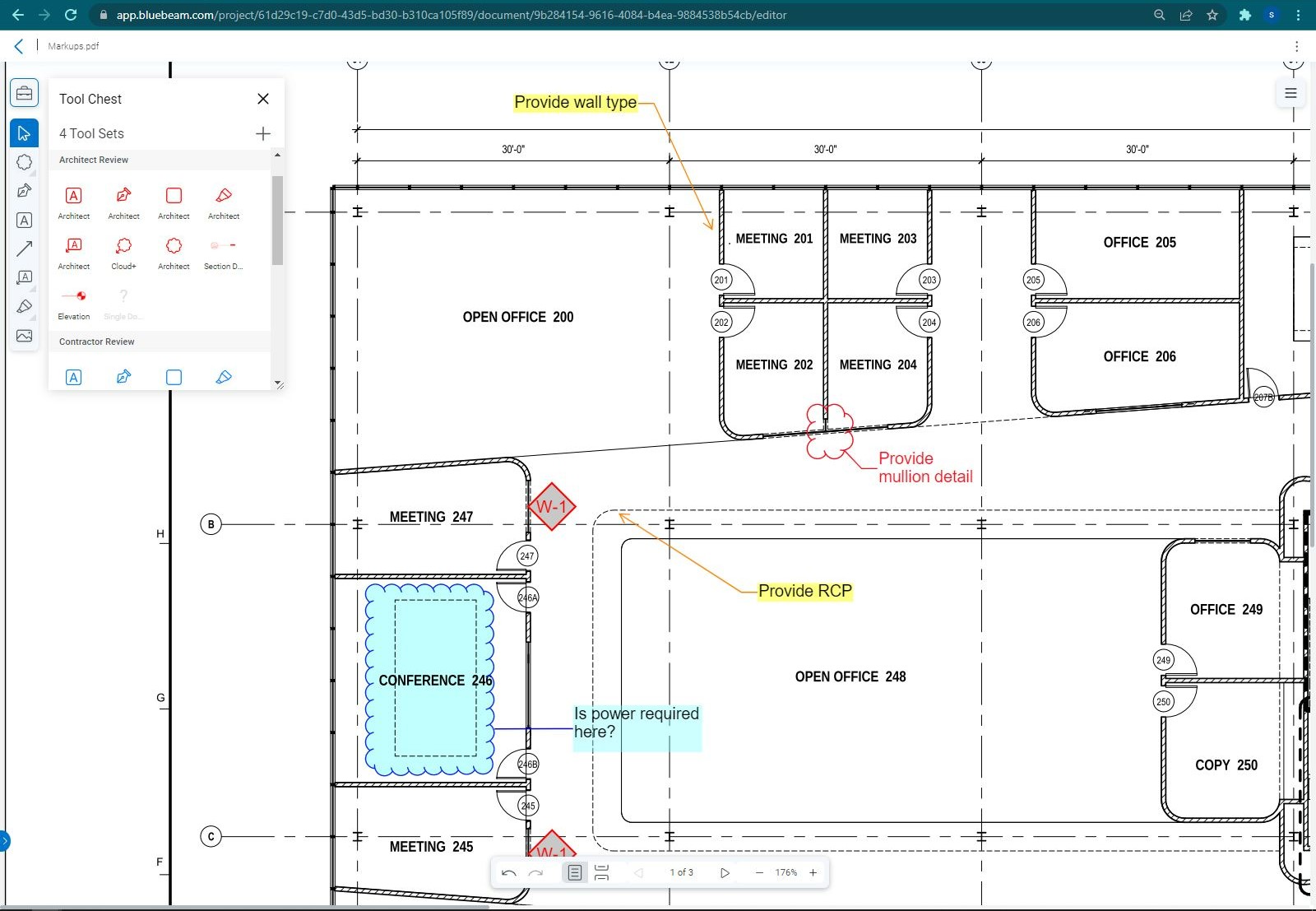
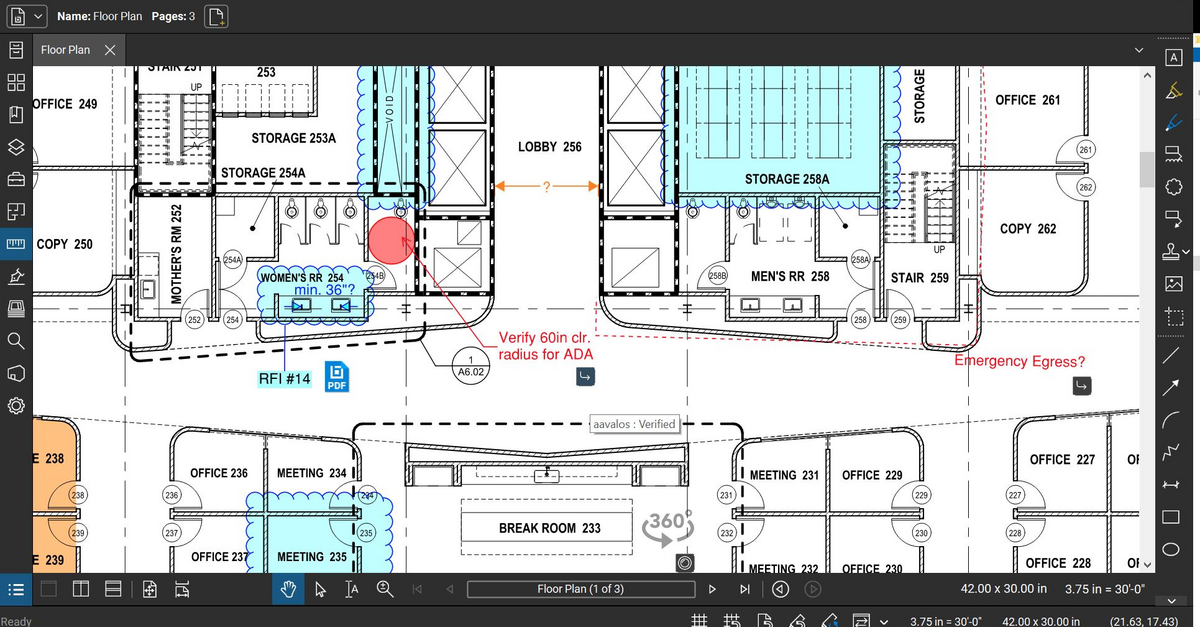
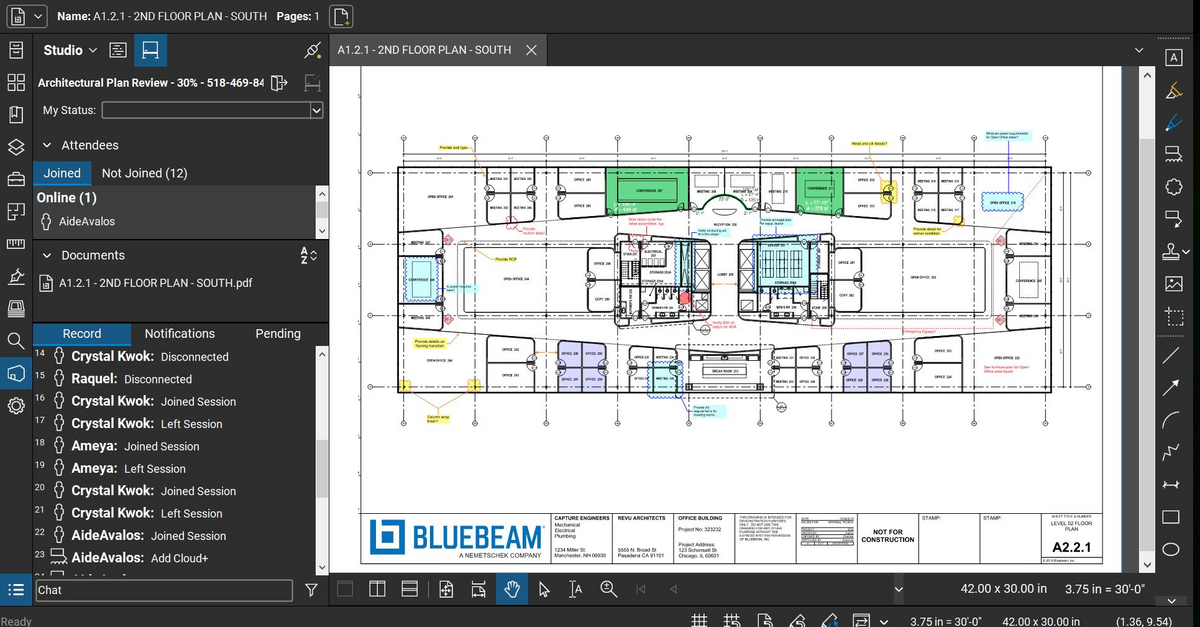
Screenshot of Bluebeam Cloud with Markup ListScreenshot of Bluebeam Cloud with Tool ChestScreenshot of Bluebeam Revu MarkupScreenshot of Bluebeam Revu Studio Session

Buildertrend Screenshots

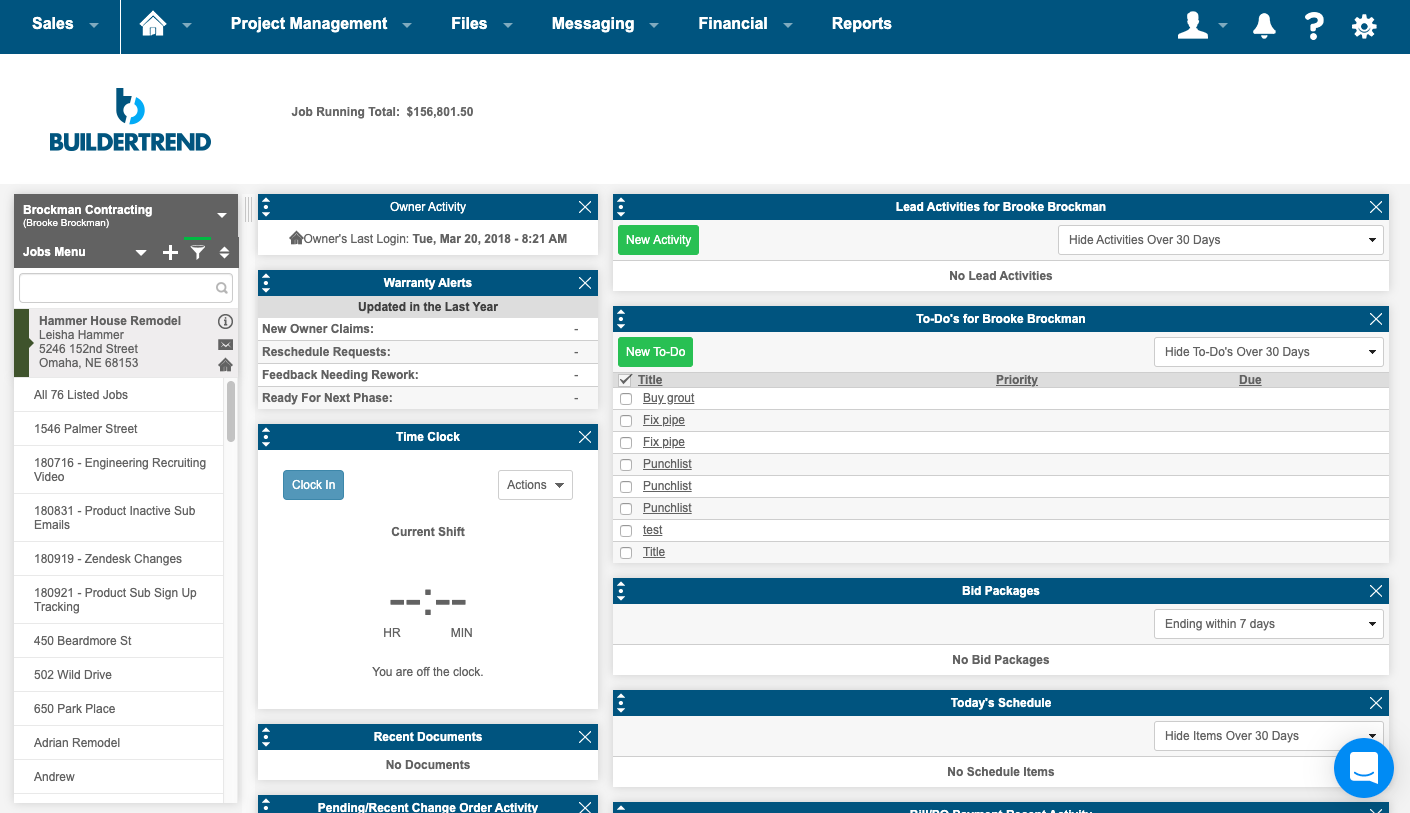
Screenshot of the homeowner portalScreenshot of a summary pageScreenshot of the scheduling interface & Gantt chartScreenshot of photos