Overview
ProductRatingMost Used ByProduct SummaryStarting Price
Autodesk Build
Score 8.1 out of 10
N/A
Autodesk Build, based on the former PlanGrid, is construction productivity software. It includes tools to collaborate, collect, and manage project information throughout the project’s construction and operations lifespan. It enables document centralization and tracking.
$39
user per month
Procore
Score 8.7 out of 10
N/A
Procore is a project management software designed specifically for the construction industry. Procore is cloud-based and allows unlimited users per instance, so that construction team members and stakeholders can all access project information and documents.N/A
SketchUp
Score 8.2 out of 10
N/A
SketchUp is 3D modeling software with an emphasis on usability. SketchUp is a Trimble product.
$119
per year
Pricing
Autodesk BuildProcoreSketchUp
Editions & Modules
Nailgun
$39
user per month
Dozer
$59
user per month
Crane
$139
user per month
Custom Bundle
Custom Quote
annually
Free
$0.00
per year
For Schools (free with G Suite or Microsoft education account)
$0
For Students
$55.00
per year
For Educators
$55.00
per year
Studio for Students / Educators (Desktop version)
$55
per year
Shop
$119.00
per year
Pro
$299.00
per year
Professional
$299.00
per year
Studio (Windows only)
$699
per year
Studio
$1199.00
per year
Offerings
Pricing Offerings
Autodesk BuildProcoreSketchUp
Free Trial
YesNoNo
Free/Freemium Version
NoNoYes
Premium Consulting/Integration Services
YesNoNo
Entry-level Setup FeeNo setup feeNo setup feeNo setup fee
Additional DetailsProcore charges an upfront annual fee by product and based upon Annual Construction Volume (ACV) - the aggregate dollar value of the construction work across the customer's projects. Procore contracts include access for unlimited users, customer support, unlimited data storage, and product enhancements, at no additional cost. Multi-year pools: Contract volume is set for the entire multi-year term and can be consumed at any time during that period to help smooth out variability in consumption. Volume opt-in: Up-front contractual pricing is put in place for additional volume that might need to be added mid-term, to increase predictability of costs. Renewal rate protection: Up-front setting of rates is locked now, so businesses can budget accordingly for future renewals and improve cost predictability in future years.
More Pricing Information
Community Pulse
Autodesk BuildProcoreSketchUp
Considered Multiple Products
Autodesk Build
Chose Autodesk Build
Bluebeam and PlanGrid work great together, not sure one could replace the other. Bluebeam is really great for more detailed markups, better than PlanGrid in that respect. When you zoom out on the markups for PlanGrid, markups get really thick and unreadable.

For me, Procore is …
Chose Autodesk Build
PlanGrid provides the perfect balance of simplicity and accuracy. As I've noted, Procore is more robust but the learning curve is steep, and, for my company, the majority of features would go unused (and thus would be a waste of money). PlanGrid offers a few solid features and …
Chose Autodesk Build
PlanGrid is an easier system to use then Procore; however, Procore offers more of a full management software than PlanGrid does with plan distribution.
Chose Autodesk Build
Compared on pricing, PlanGrid was best. Procore does submittals and pay apps, but GoBridgit was completely unrealistic in price for us to consider them. The overall use of PlanGrid along with current pricing makes it worthwhile for us. If pricing goes up, it would no longer be …
Chose Autodesk Build
PlanGrid is very similar to Procore but offers a slightly more straightforward user interface and seems not to be loaded with extra options that rarely would get used like Procore. PlanGrid is a much smoother software than Submittal Exchange or CMiC due to that same interface. …
Chose Autodesk Build
Plangrid would sit in between these two when it comes to mobile job site collaboration and document management. Procore is more a full-featured product but it is 2X-3X the cost and there is some question whether the extra costs actual turns in to an ROI at the end of the day. …
Chose Autodesk Build
Procore and PlanGrid are the most direct competitors. The pricing structures are very dynamically different between PlanGrid and Procore. Procore tends to succeed better in the "project management" realm, while PlanGrid succeeds far beyond Procore in its ability to deal with …
Chose Autodesk Build
Procore is a web-based service and is very slow. While PlanGrid updates and is not web based it is much quicker. PlanGrid is also much easier to use.
Chose Autodesk Build
I have only used Autodesk Build at work. Compared to Procore which I have recently been introduced to, Autodesk Build has a more modern look and accessibility features. I can not give an in-depth review between the two products as I do not spend a lot of time using Procore.
Chose Autodesk Build
BlueBeam is a program that some of our customers use as their management tool. It is a little more cumbersome than Plan Grid. We would certainly prefer using PlanGrid over other products that we have tried. Our field staff prefers to have a consistent platform to share the …
Chose Autodesk Build
They have similar platforms and uses. At this time we use both because General Contractors require we use some of these programs to work on their projects, and we don't have a choice which one we use. It's tough because we then have multiple platforms to learn, manage and use …
Chose Autodesk Build
It's easier to use, more user-friendly, has ready access, and is more cost effective.
Chose Autodesk Build
Bluebeam is easier to use for plan markups, but the punch list function of PlanGrid is far better.
Chose Autodesk Build
Plangrid, while not serving the external document distribution function, is unrivaled for internal document distribution and sharing in the construction industry. The speed at which documents are navigatable, the ability to download your projects for viewing without an internet …
Chose Autodesk Build
I haven't really used anything else extensively, but I have touched Procore a little. Not enough to compare though.
Chose Autodesk Build
Haven't actually used anything else like PlanGrid. I studied Procore but have never gotten a chance to use it in practice.
Procore
Chose Procore
Procore is far more userfriendly and adaptable than Plangrid or CMIC. It's a much more intuitive platform with better functionality and ease of use.
Chose Procore
Procore is the most comprehensive of all. Pricing on size rather than the user is another reason that we used in deciding on Procore.
Chose Procore
We selected Procore because it offered a complete project management and bidding software program. It didn't offer pieces but a complete picture of each project. The mobile and web option was a big reason for the choice.
Chose Procore
Procore is over priced, and other competitors have come a long way.
Chose Procore
Procore is leaps and bounds better than any other product on the market. While there is room for improvement, the other programs out there are cumbersome to use or do not have all of the functionality that Procore has as of today. I have yet to see anything that stands up to …
Chose Procore
Procore is very much the industry-standard software, I personally preferred using field wire because it was considerably more user-friendly for field operators to understand. Procore is utilized more readily between different trades, so often we would see Procore to be better …
Chose Procore
We evaluated both PlanGrid and Procore at the same time in the field. We had numerous users in each. We implemented both products. Even paid PlanGrid to train. (Procore implementation is free.) Our teams on PlanGrid abandoned their projects within 2 months and begged to be …
Chose Procore
Since Procore attempts to be an all-in-one solution, it comes with more capability than just about any other system we have seen or used. However, that does not always mean it is better. Using PlanGrid as an example, Procore's plan viewing is inferior to the more professional …
Chose Procore
Procore is significantly better than e-Builder but on par with PlanGrid. In my experience, Procore is hands-down the best product of its kind. The Procore customer and technical support is excellent, they are always available to help with any issues or questions you may have. …
Chose Procore
Procore has no equal in the GC Market.
Chose Procore
Much easier to use. Because I learned Procore first, it set a good foundation of what I should be looking for as I hunt and peck to navigate other program management software.
Chose Procore
Procore is more intuitive and easy to pick up and to navigate.
Chose Procore
I have previously used these other software's at other companies, and Procore is ahead of the game when it comes to these tools. These tools are all useful when it comes to one area of expertise in construction, but Procore is good at covering all of these areas and being a one …
Chose Procore
I can't compare Procore to most other construction software because they tend to focus more on one specific module (e.g. PlanGrid is only on drawing, RFI, and submittal management). I heard there's another company that is trying to build something like Procore that …
Chose Procore
To be honest, PlanGrid was far superior as a Drawing / Punchlist tool back when it came out. Procore did a major revision on their Tools in the last year or two, and now Procore is an excellent tool.
Chose Procore
Procore seemed to be more aimed at ease of use for contractors and the day to day on site staff.
Chose Procore
I've used PlanGrid for punchout related items for exteriors of builds and it works well. Procore has adopted very similar features which has made that software mostly obsolete since we really only use Procore on my project site.
Chose Procore
We selected Procore because it manages to have the benefits of many programs on a single platform on both PC and mobile devices regardless of the number of users. It is also safe and reliable for informational use in the design and construction industry.
Chose Procore
We are still using this program as well. Between the two, PlanGrid works better for people without a constant internet connection. However, Procore works extremely well with the mobile app, submittals, and drawing updates.
Chose Procore
We have tried PlanGrid and one other program that I can’t remember. There are not any other products that we have elevated or used further to my knowledge.
SketchUp
Chose SketchUp
Cost is the biggest one here. SketchUp is at a great price point.
Sketchup is easier to learn and to use.
I think Layout is Easier on SketchUp.
Chose SketchUp
Sketchup is a great tool to both create quick models that can be rendering in a sketchy manner in color and sent to the client for project visualization and understanding. Sketchup is great for working through design changes and problem solving on the elevations of massing. …
Chose SketchUp
Again, SketchUp is great sales tool for helping us illustrate to an owner how a product will look, but it won't replace AutoCAD's ability to create blueprints for contractors.
Features
Autodesk BuildProcoreSketchUp
Construction Project & Field Management
Comparison of Construction Project & Field Management features of Product A and Product B
Autodesk Build
6.5
58 Ratings
13% below category average
Procore
8.4
762 Ratings
12% above category average
SketchUp
-
Ratings
Plan distribution & viewing7.057 Ratings8.8732 Ratings00 Ratings
Plan markups & sharing6.057 Ratings7.7705 Ratings00 Ratings
Issue tracking & punchlists5.052 Ratings8.8684 Ratings00 Ratings
Photo documentation9.049 Ratings8.6734 Ratings00 Ratings
Jobsite reports9.037 Ratings8.3696 Ratings00 Ratings
Document sharing8.056 Ratings8.8752 Ratings00 Ratings
RFI tools5.039 Ratings8.8713 Ratings00 Ratings
Collaboration & approvals8.043 Ratings8.4691 Ratings00 Ratings
As-built drawings5.043 Ratings8.3119 Ratings00 Ratings
Mobile app3.055 Ratings8.0704 Ratings00 Ratings
Submittal design and management00 Ratings8.6214 Ratings00 Ratings
Meeting Minutes00 Ratings7.5202 Ratings00 Ratings
Specifications00 Ratings8.8211 Ratings00 Ratings
Change orders00 Ratings8.2175 Ratings00 Ratings
Human Resource Management
Comparison of Human Resource Management features of Product A and Product B
Autodesk Build
-
Ratings
Procore
7.9
60 Ratings
11% above category average
SketchUp
-
Ratings
Compliance data (COBRA, OSHA, etc.)00 Ratings7.960 Ratings00 Ratings
Payroll Management
Comparison of Payroll Management features of Product A and Product B
Autodesk Build
-
Ratings
Procore
7.6
54 Ratings
10% above category average
SketchUp
-
Ratings
Support for external payroll vendors00 Ratings7.654 Ratings00 Ratings
Reporting & Analytics
Comparison of Reporting & Analytics features of Product A and Product B
Autodesk Build
-
Ratings
Procore
7.8
197 Ratings
1% above category average
SketchUp
-
Ratings
Dashboards00 Ratings7.7182 Ratings00 Ratings
Standard reports00 Ratings8.0189 Ratings00 Ratings
Custom reports00 Ratings7.6184 Ratings00 Ratings
Data exportability00 Ratings8.1177 Ratings00 Ratings
Estimating
Comparison of Estimating features of Product A and Product B
Autodesk Build
-
Ratings
Procore
8.5
114 Ratings
12% above category average
SketchUp
-
Ratings
Takeoff tools00 Ratings10.04 Ratings00 Ratings
Job costing00 Ratings7.5100 Ratings00 Ratings
Cost databases00 Ratings8.14 Ratings00 Ratings
Cost calculator00 Ratings9.04 Ratings00 Ratings
Bid creation00 Ratings7.6107 Ratings00 Ratings
Best Alternatives
Autodesk BuildProcoreSketchUp
Small Businesses
FollowUp CRM
FollowUp CRM
Score 1.9 out of 10
FollowUp CRM
FollowUp CRM
Score 1.9 out of 10
Onshape
Onshape
Score 7.6 out of 10
Medium-sized Companies
InEight
InEight
Score 8.3 out of 10
InEight
InEight
Score 8.3 out of 10
Onshape
Onshape
Score 7.6 out of 10
Enterprises
InEight
InEight
Score 8.3 out of 10
InEight
InEight
Score 8.3 out of 10
Rhino
Rhino
Score 8.4 out of 10
All AlternativesView all alternativesView all alternativesView all alternatives
User Ratings
Autodesk BuildProcoreSketchUp
Likelihood to Recommend
7.0
(70 ratings)
8.9
(865 ratings)
8.0
(47 ratings)
Likelihood to Renew
10.0
(1 ratings)
8.6
(70 ratings)
9.0
(1 ratings)
Usability
5.0
(2 ratings)
10.0
(57 ratings)
7.0
(1 ratings)
Availability
-
(0 ratings)
9.9
(15 ratings)
-
(0 ratings)
Performance
-
(0 ratings)
9.5
(15 ratings)
-
(0 ratings)
Support Rating
9.0
(52 ratings)
9.6
(69 ratings)
8.5
(14 ratings)
In-Person Training
-
(0 ratings)
8.1
(5 ratings)
-
(0 ratings)
Online Training
-
(0 ratings)
9.3
(13 ratings)
-
(0 ratings)
Implementation Rating
-
(0 ratings)
10.0
(114 ratings)
-
(0 ratings)
Configurability
-
(0 ratings)
9.3
(15 ratings)
-
(0 ratings)
Ease of integration
-
(0 ratings)
9.1
(310 ratings)
-
(0 ratings)
Product Scalability
-
(0 ratings)
9.8
(15 ratings)
-
(0 ratings)
Vendor post-sale
-
(0 ratings)
9.9
(13 ratings)
-
(0 ratings)
Vendor pre-sale
-
(0 ratings)
9.8
(14 ratings)
-
(0 ratings)
User Testimonials
Autodesk BuildProcoreSketchUp
Likelihood to Recommend
Autodesk
PlanGrid performs really well in all aspects of construction from the general to the sub/trade. The platform distributes and communicates project documentation in an extremely user-friendly manner. As with most software, it is cheaper the larger the scale of the project. In situations where the project is relatively small, and the trade contracts are also of relatively low dollar value, the product can be cost-prohibitive.
Read full review
Procore Technologies
It works great for project management and putting all job-specific documents in one place. We are able to share drawings, submittals, and forms with our customers and subcontractors in a safe and reliable platform. However, getting reporting data is somewhat lacking, so if your business needs advanced options, you might try and find a better product.
Read full review
Trimble
SketchUp is great for individually studying options for building design. It is an awesome conceptual tool to be able to quickly model and manipulate a building to study different designs. It is not good for complex geometries, especially curves. Surfaces have a hard time registering and cutting into one another. It also eventually needs to go into Revit to be more realistic as it is not good as a documentation tool
Read full review
Pros
Autodesk
  • Plangrid is the best SaaS I have seen for ease of uploading construction plans and automated organization of those plans.
  • For companies that are not using other products for mobile access, the Plangrid mobile apps are perfect to allow people on and off site to share and collaborate in many phases of construction project documentation.
  • Plangrid has a very responsive technical support team (although it is pretty much email only).
  • Plangrid's website layout is easy to use and understand and allows new users to jump right in and do basic to moderate tasks without little training.
Read full review
Procore Technologies
  • Does well Emailing me (If i am subscribed to a project) to let me know when revisions have been updated.
  • Easy to navigate
  • Great at Allowing me as a project Engineer to Upload my drawings to Procore. Not a lot of steps, and very easy to do.
Read full review
Trimble
  • Quickly exploring solutions in 3D: We get a lot of "what if" and "what would that look like" questions. While hand-sketching and hand-drafting can be fairly quick, SketchUp allows me to quickly create 3D and 2D views of a detail or solution, change dimensions and materials in a flash, and show a client or installer the plan in minutes.
  • Creating professional design documents in LayOut: Projects of any scale need good documentation. Using a combination of SketchUp and LayOut, I can create a Design Intent Set, plans for permitting, a set for mechanical trades to mark-up, etc. Having clear, appropriately-scaled drawings with dimensions or notations is a must, and we don't always have the time or budget to get an architect involved!
  • Using live files to guide discussions: Not all clients are "visual" people, so opening their model and orbiting around their space in real time has been extremely helpful. Clients and trades enjoy the perspective views so much that we often include them in the full-sized drawing sets to give a good "overall" view of the project intent. For complex or tight spaces, sometimes un-rendered plans and elevations just aren't enough!
Read full review
Cons
Autodesk
  • The photo attachment process is a bit complicated. In ProCore (another similar software I've used), you can upload photos directly into RFIs for your reference, or into e-mails. For PlanGrid, you have to first upload the photo into the documents tab, then link them into the RFI. It's not intuitive and can add confusion to the documents tab.
  • Photos can't be directly uploaded. Between different devices and colleagues, it's possible you'll get an important photo outside of the PlanGrid photo capture feature within its app. Again, it's complicated for users to use.
  • In their new drawings viewer, the icons for actions do not have icons available. I had to use them all in order to understand what they meant, and I'm fairly tech savvy. I'm not sure if a new person to PlanGrid will pick up on each icon's abilities very easily.
  • There's no all-in-one solution in CM, but PlanGrid is fairly barebones, and I don't believe it has any ability to connect to other software. There's no ability to take meeting munites; you can hack the field reports feature to accomplish this, but it's clear that was not the intent of the designers.
Read full review
Procore Technologies
  • Downloading drawing sets sometimes involves an extra step that holds up the process
  • The dashboard is simplistic to the point that I don't feel like I am getting enough information about a specific project from the get-go
  • Granting access to a project on Procore is not very straightforward as a consultant- restrictions sometimes cause hold-ups
Read full review
Trimble
  • Ability to import Revit files and libraries.
  • Ability to export true curved vector linework. There are some workarounds, needs to be refined.
  • Create an OPEN MAPS connection. Since the split from Google, the source for high-quality aerials is limited.
  • Ability to dock all menus to the master window on a Mac
  • Ability to develop dockable menu trays on a Mac
Read full review
Likelihood to Renew
Autodesk
We are at the point where we have shown our teams what is possible with this software. We cannot take it away and go back to the way we used to do things. I think that they would push back on us to give them access to something electronic. It is a good program that we will continue to use
Read full review
Procore Technologies
We will undoubtedly renew Procore as it has proven itself to be a means to better track and improve upon our efficiency and communications between job sites and their project managers as well as all other departments. Procore has made an incredible impact on how we, as a company, do our job on all levels; it is one of our most powerful and effective resources.
Read full review
Trimble
We typically wait a few years in between renewing, as even older versions are powerful tools for modeling, and we make sure the amount of feature changes are worth the re-investment.
Read full review
Usability
Autodesk
Hard to get the hang of this software, but with time it become very repetitive and easier to navigate. I have used this software for over a year now and the constant updates by Autodesk have made the software better and better to use at work. This allows me to use this tool more effectively
Read full review
Procore Technologies
90% of Procore is very intuitive and any user can pick it up and go. There are a few elements, more so on the Financials side that need some prior knowledge of systems in order to understand how and why it functions as it does. Once this is understood, it flows effortlessly
Read full review
Trimble
It is very user friendly and easy to learn. It's simplicity allows for a low learning curve so more people can learn it faster. The downside is that most schools are no longer teaching it, so many younger professionals come out of school not knowing it and knowing more complex software and they have a hard time "dumbing down" their skillsets
Read full review
Reliability and Availability
Autodesk
No answers on this topic
Procore Technologies
If you are working in an area with little to no signal, Procore will still allow you to get in the system and use it fully and will then update once you are at a place with a strong enough signal. Whether it be with wifi or LTE cell phone reception.
Read full review
Trimble
No answers on this topic
Performance
Autodesk
No answers on this topic
Procore Technologies
For the most part Procore is very responsive. However there are times when it's a little slow but it's minimal.
Read full review
Trimble
No answers on this topic
Support Rating
Autodesk
Online chat during business hours is extremely helpful. The Plangrid staff has gone above and beyond many times to help us. One time they even offered to completely rebuild our 900+ sheet project so I could slip sheet a few old drawing revisions! This undoubtedly would have taken hours on Plangrid's end. They are always responsive and are continually improving, listening to user feedback.
Read full review
Procore Technologies
General Support for Project Management and Financials is consistent. The ERP support is never consistent and I do end up at times in a black hole. I have to continually reach out to get the issue resolved or get an update. The ERP support needs more of Procore's attention
Read full review
Trimble
Sketchup is so intuitive; I can't recall ever looking for official support. However, there are many user forums online that can answer more questions. The usefulness of the online forums is, however, tempered by the fact that there have been many versions of the software under different ownership and support regimes, and thus finding the right information for the right version of the software can be a challenge.
Read full review
In-Person Training
Autodesk
No answers on this topic
Procore Technologies
Procore's Implementation Team does a great job of ensuring users are confident in using the system. They run through a process of training sessions based on the tools you have purchased, and lay ou ta plan to help the power users configure the tool to suit the company's needs. They provide useful resources for certifications, support and ongoing training as well.
Read full review
Trimble
No answers on this topic
Online Training
Autodesk
No answers on this topic
Procore Technologies
Procore's certification program and focused how-to training videos allowed for easy training that did not feel overwhelming. The way the certification programs were broken up into small parts made it seem much less daunting to complete. The training feels focused and does not overload users with too much information all at once.
Read full review
Trimble
No answers on this topic
Implementation Rating
Autodesk
No answers on this topic
Procore Technologies
Iron out your cost code list in your accounting software before you link with Procore. Once the link is established that list is more or less permanent. Review the permission matrix carefully. It controls so much. You want to ensure the information provided to your users adequate but you also want to protect your sensitive data. Procore Financials are organized in a total contract value style. Any markup or Profit will need to be sent somewhere on your budget. This may be significantly different than the Cost budgeting that many contractors do
Read full review
Trimble
No answers on this topic
Alternatives Considered
Autodesk
Plangrid, while not serving the external document distribution function, is unrivaled for internal document distribution and sharing in the construction industry. The speed at which documents are navigatable, the ability to download your projects for viewing without an internet connection, and the document mark-up and photo tools place it head and shoulders above the competition.
Read full review
Procore Technologies
Procore has a clearer user interface and a wider variety of tools than any program I've used. Procore also lives up to their name in terms of helpful and fast customer service. There is always a Procore rep. that is available to contact, making any problems just a mini hurdle.
Read full review
Trimble
We have not evaluated any other competing software to this one. I heard about this software from a friend who teaches how to use it. She showed me in just a few minutes and I was HOOKED. I saw immediately the possible help it would be to my business. Thank you.
Read full review
Scalability
Autodesk
No answers on this topic
Procore Technologies
once in awhile Procore is down for a period of time, its frustrating when it happens but doesn't tend to last long.
Read full review
Trimble
No answers on this topic
Return on Investment
Autodesk
  • It helped us "wow" a joint commission survey in 2016 and have a successful survey because he loved how we could access plans on an iPad, check suite sizes, and didn't have to carry around huge, heavy sets of life safety plans.
Read full review
Procore Technologies
  • The Procore service impacts on construction projects are effective and reliable on production acceleration.
  • The collaboration is stable and easy files access and uploading of engineering drawings and plans is excellent.
  • New project planning and project financial data management on Procore functions are excellent.
Read full review
Trimble
  • It's good in the sense that you can quickly make a drawing and speeds up the design process. Not sure how to quantify that from a ROI perspective.
  • Also, good for editing an image after the fact. We can easily add a dimension that was forgotten in the original image.
  • Allows team members to understand a design easier than on other software platforms.
Read full review
ScreenShots

Autodesk Build Screenshots

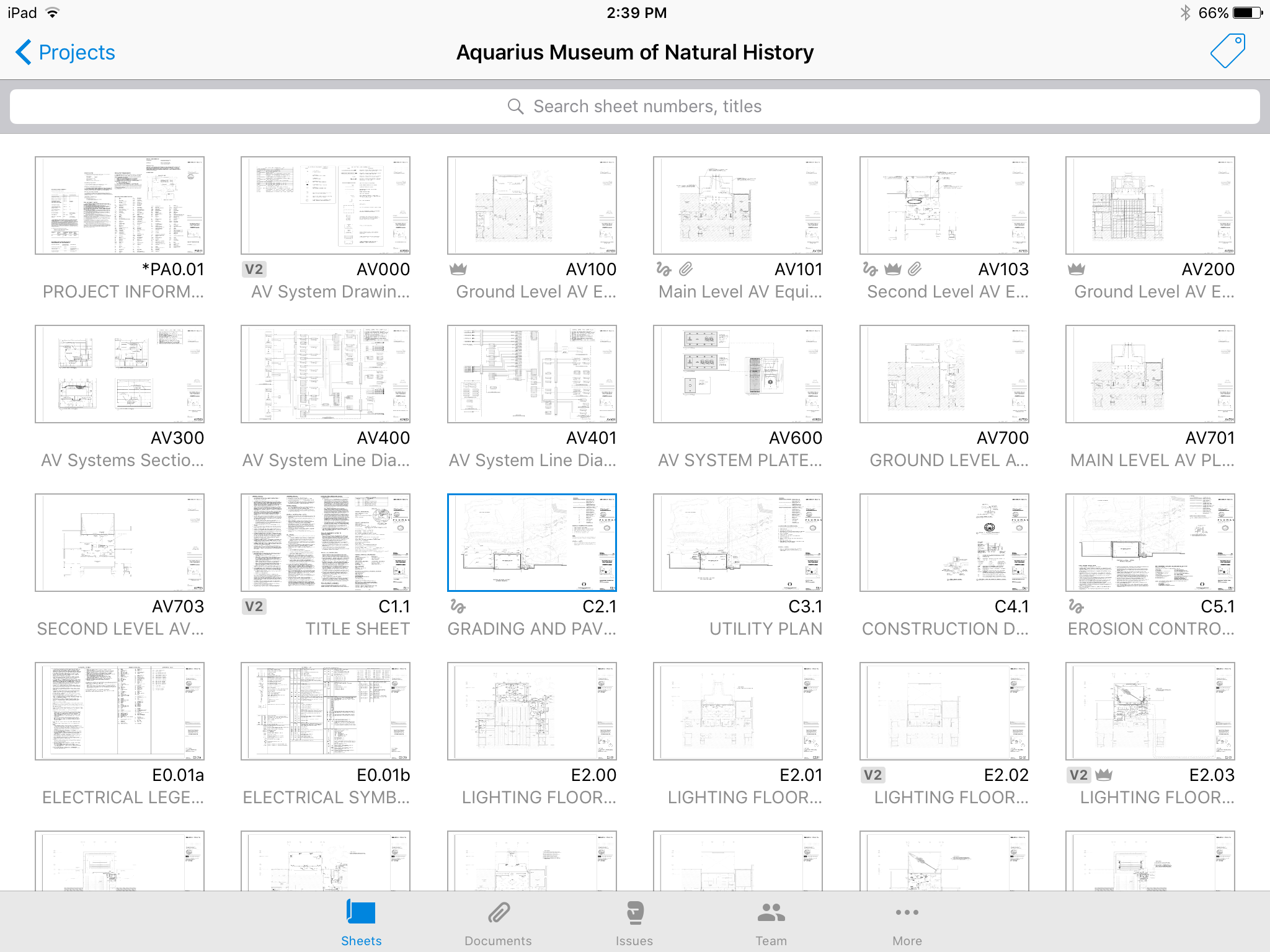
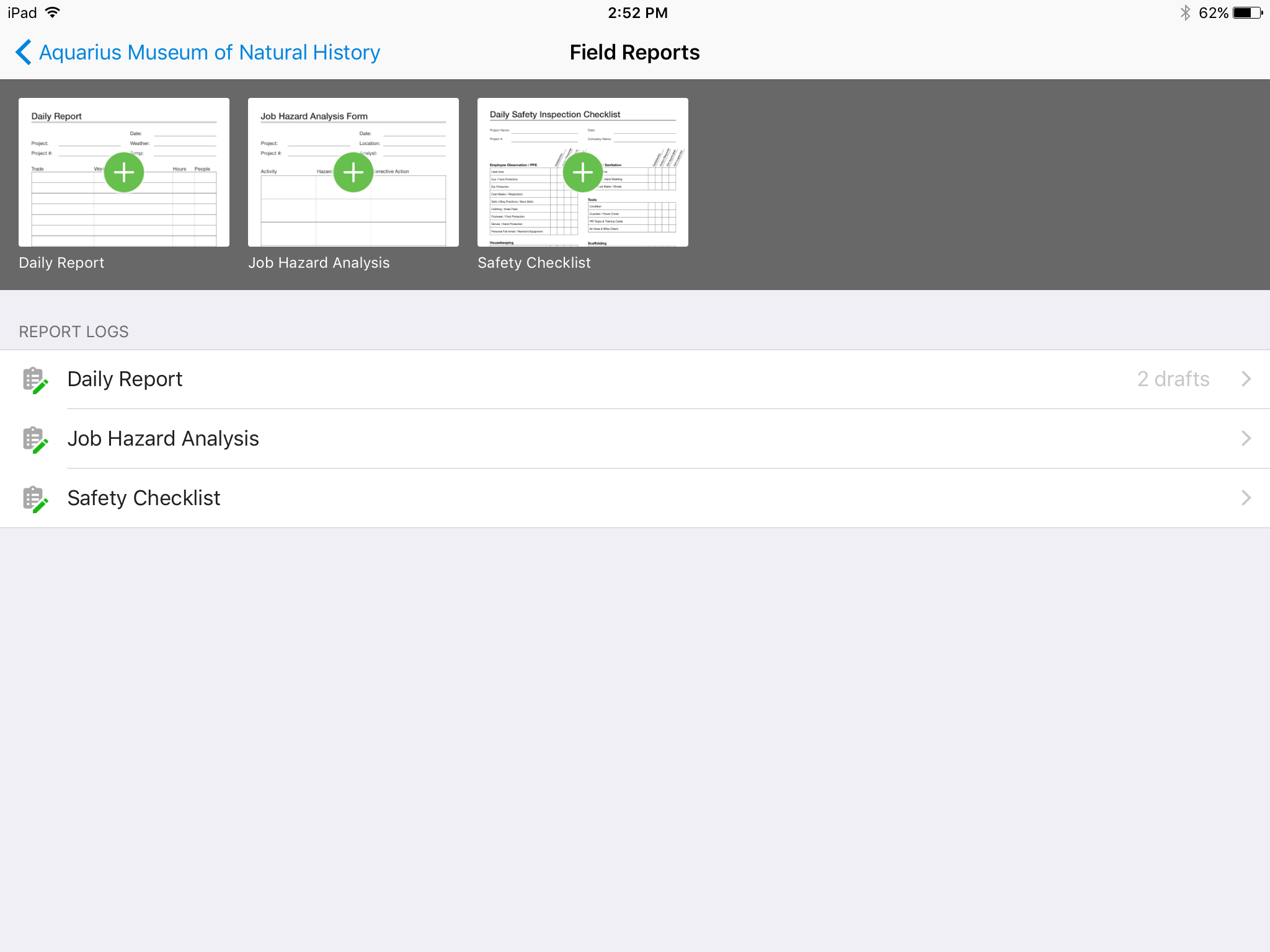
Screenshot of No confusing folders - all your plans at your fingertips.Screenshot of Easy overlay to visually detect changes or clashes.Screenshot of Track issues directly on the plan, including descriptions, photos, cost, and schedule impacts.Screenshot of Mark up plans for instant communication between field and office.Screenshot of Attach any kind of construction documents to your plans, including 360 photos.Screenshot of Track, review, and submit all your field reports on a mobile device.