Checkmk vs. LogicMonitor vs. SolarWinds Engineer's Toolset

Overview
ProductRatingMost Used ByProduct SummaryStarting Price
Checkmk
Score 8.6 out of 10
N/A
Checkmk is a solution for IT Monitoring of servers, applications, networks, cloud infrastructures (public, private, hybrid), containers, storage, databases and environment sensors. It can be deployed under all major Linux distributions or users can run it as Docker container or virtual appliance on other operating systems including Windows. The tool is available as a Raw Edition, which is open-source, and as an Enterprise Edition with a many additional enterprise features. The…
$0
up to 10 systems
LogicMonitor
Score 9.0 out of 10
Mid-Size Companies (51-1,000 employees)
LogicMonitor’s SaaS-based platform, LM Envision, enables observability across on-prem and multi-cloud environments. It provides IT and business teams operational visibility and predictability across their technologies and applications.N/A
SolarWinds Engineer's Toolset
Score 7.9 out of 10
N/A
SolarWinds® Engineer’s Toolset (ETS) helps users monitor and troubleshoot a network with over 60 tools for network management. ETS allows users to monitor and receive alerts in real time on network availability and health, and perform network diagnostics for faster troubleshooting and resolution of complex network issues. With ETS users can deploy an array of network discovery tools including Port Scanner, Switch Port Mapper or advanced Subnet Calculator, manage Cisco® devices with specialized…
$1,585
Per Instance
Pricing
CheckmkLogicMonitorSolarWinds Engineer's Toolset
Editions & Modules
Checkmk Free Edition
$0.00
up to 10 systems
Checkmk Raw Edition
$0.00
unlimited & always free
Checkmk Enterprise Edition
starting at $600.00
Enterprise
Contact sales team
Website Monitoring
Contact sales team
One Time Price
$1,585
Per Instance
Offerings
Pricing Offerings
CheckmkLogicMonitorSolarWinds Engineer's Toolset
Free Trial
YesYesYes
Free/Freemium Version
YesNoNo
Premium Consulting/Integration Services
YesYesNo
Entry-level Setup Fee$600 for up to 3,000 Services / around 100 hostsNo setup feeNo setup fee
Additional DetailsOur platform is broken down into Pro and Enterprise Pricing. Pro includes monitoring for all of your cloud, hybrid, and on-premises infrastructure. Our Enterprise package includes all of this, plus our AIOps and Machine Learning functionality that provides dynamic thresholds, root cause analysis, anomaly detection and more! LogicMonitor only charges by the device. What is considered a device? A device is anything with an IP address that you want to monitor, including a physical device or a cloud resource. This means multiple data sources under the same IP address can be monitored for the same price. Unlike some monitoring platforms. we don’t charge per node, interface, or metric.
More Pricing Information
Community Pulse
CheckmkLogicMonitorSolarWinds Engineer's Toolset
Considered Multiple Products
Checkmk

No answer on this topic

LogicMonitor
Chose LogicMonitor
Zabbix although opensource and free. The amount of time to setup, configure templates, and manage the individual agents ended up costing more in unrealized internal labor costs compared to LogicMonitor. Datadog was too complex and highly customizable with no real out of the box …
Chose LogicMonitor
SaaS monitoring makes so much sense. Why run your monitoring inside the same environment you're trying to monitor, and how do you monitor your on prem monitoring if there's an outage affecting your own infrastructure? Whilst LogicMonitor isn't a specific point solution so …
Chose LogicMonitor
I didn't select SolarWinds but after many more years with SolarWinds and prefer it. The selection process was done way before I showed up. If I was to be asked to choose one over the past one, I would have said keep the old one and just put some time into it for doing network.
Chose LogicMonitor
I loved SolarWinds and we actually still use some of their products but it is a very piecemeal solution and LogicMonitor had better options out of the box and seemed easier to use. It also had much better options for monitoring our network than WhatsUp. Though to be fair it …
Chose LogicMonitor
This beats Solar winds hands down.
SolarWinds Engineer's Toolset
Chose SolarWinds Engineer's Toolset
We have used LogicMonitor, PRTG and WhatsUp Gold previously which are similar to SolarWinds Engineer's Toolset capability. However SolarWinds Engineer's Toolset is completely unique with features like - Realtime monitoring, diagnostics on the fly, network discovery, easy …
Features
CheckmkLogicMonitorSolarWinds Engineer's Toolset
IT Infrastructure Monitoring
Comparison of IT Infrastructure Monitoring features of Product A and Product B
Checkmk
-
Ratings
LogicMonitor
8.8
1 Ratings
1% above category average
SolarWinds Engineer's Toolset
-
Ratings
Network visibility00 Ratings9.01 Ratings00 Ratings
Multi-system monitoring00 Ratings10.01 Ratings00 Ratings
Performance analysis and forecasting00 Ratings8.01 Ratings00 Ratings
Dashboards and visualization00 Ratings8.01 Ratings00 Ratings
Best Alternatives
CheckmkLogicMonitorSolarWinds Engineer's Toolset
Small Businesses
ConnectWise Automate
Score 8.4 out of 10
ConnectWise Automate
Score 8.4 out of 10
NinjaOne
NinjaOne
Score 9.1 out of 10
Medium-sized Companies
Icinga
Icinga
Score 8.9 out of 10
Logz.io
Logz.io
Score 8.5 out of 10
Intermapper
Intermapper
Score 8.4 out of 10
Enterprises
Zabbix
Zabbix
Score 8.5 out of 10
Zabbix
Zabbix
Score 8.5 out of 10
Cisco Meraki Dashboard
Score 9.0 out of 10
All AlternativesView all alternativesView all alternativesView all alternatives
User Ratings
CheckmkLogicMonitorSolarWinds Engineer's Toolset
Likelihood to Recommend
10.0
(2 ratings)
9.4
(179 ratings)
8.6
(11 ratings)
Likelihood to Renew
10.0
(1 ratings)
6.7
(8 ratings)
-
(0 ratings)
Usability
9.0
(1 ratings)
8.3
(29 ratings)
8.2
(1 ratings)
Availability
-
(0 ratings)
9.1
(1 ratings)
-
(0 ratings)
Performance
-
(0 ratings)
9.1
(1 ratings)
-
(0 ratings)
Support Rating
-
(0 ratings)
9.3
(109 ratings)
8.2
(1 ratings)
In-Person Training
-
(0 ratings)
8.2
(1 ratings)
-
(0 ratings)
Online Training
-
(0 ratings)
7.3
(1 ratings)
-
(0 ratings)
Implementation Rating
-
(0 ratings)
9.6
(24 ratings)
-
(0 ratings)
Configurability
-
(0 ratings)
9.1
(1 ratings)
-
(0 ratings)
Contract Terms and Pricing Model
-
(0 ratings)
7.4
(5 ratings)
-
(0 ratings)
Ease of integration
-
(0 ratings)
7.3
(1 ratings)
-
(0 ratings)
Product Scalability
-
(0 ratings)
9.1
(1 ratings)
-
(0 ratings)
Professional Services
-
(0 ratings)
7.6
(4 ratings)
-
(0 ratings)
Vendor post-sale
-
(0 ratings)
9.1
(1 ratings)
-
(0 ratings)
Vendor pre-sale
-
(0 ratings)
9.1
(1 ratings)
-
(0 ratings)
User Testimonials
CheckmkLogicMonitorSolarWinds Engineer's Toolset
Likelihood to Recommend
tribe29
In our organization which is a mash up of different hardware, software it was important to use an independent tool that wasn’t linked to one manufacturer incase a piece of hardware was dropped from support for example, we also value open-source software highly in our field. It’s important to in our IT environment to be able to customize and tweak software that we run. We don’t use the cloud monitoring aspect so Cannot comment on that side of the software.
Read full review
LogicMonitor
The example I will give will explain my rating for it. One employee left our company due to a personal issue, and at that time, our team was working on a highly secure project. He wanted to take revenge on our company, so he began hacking our systems from the outside. Since it appears that someone without authorization is attempting to access our systems, LogicMonitor simultaneously alerted our team to the problem. We stopped that threat with LogicMonitor.
Read full review
SolarWinds
I have found the toolset especially useful for scanning subnets to discover devices, and for setting up temporary real-time monitors when we are troubleshooting or setting up new connections. The most useful aspect has been the ability to apply the tools to help troubleshoot and pinpoint intermittent issues. More general tools like Orion often do not have the granularity to detect issues like intermittent packet loss which are especially impactful to applications like Voice. The toolset gives us another level of capability to dig into issues.
Read full review
Pros
tribe29
  • Device Management
  • Monitoring Network Quality
  • Device Quality of Service
  • SNMP
  • IOT Monitoring
Read full review
LogicMonitor
  • It shows us system issues right away so we can fix them fast.
  • It finds new devices on its own, so we do not miss anything.
  • It alerts us only when something really unusual happens.
  • Its dashboards make it easy for everyone to see system health.
  • It helps us see trends so we are ready for busy times.
Read full review
SolarWinds
  • Various monitoring
  • Stores history
  • Suggests indices
  • Helps to find the SQL query text
  • Helps to see what machines/users the bad queries are coming from
  • Shows current blocking session
Read full review
Cons
tribe29
  • Updates
  • mobile interface
  • Agent for android devices
Read full review
LogicMonitor
  • Segmentation at an instance level not just the resource when clients are sharing the same device but shouldn't see each other's relevant data
  • ARM CPU support for collectors to allow for a lighter weight appliance deployment
  • WMI collection with a Linux collector so a windows collector would not be needed or a virtual appliance template that can be used to deploy collectors
Read full review
SolarWinds
  • The unifying component that is intended to be the initial interface to the tools seems clunky. I prefer to start the tools individually rather than using it.
  • The port scanner could use some improvements to make it easier to use.
Read full review
Likelihood to Renew
tribe29
Very helpful software and I highly recommend to have on hand as a tool for testing, troubleshooting, and monitoring.
Read full review
LogicMonitor
This product has met virtually all of our needs. It was easy to implement and has been simple to support. Customization has been intuitive with many options available. They keep adding features and expanding available options. The future of LogicMonitor looks even better than it is today which is very promising. The management and support teams at LogicMonitor are always helpful
Read full review
SolarWinds
No answers on this topic
Usability
tribe29
Overall Checkmk is a great product that is made and ran by a European company that is open source and highly customizable, great support if needed. On prem support is a must for our organization which Checkmk supports. Our organization has been using Checkmk for over 5 years now Performance of the software runs excellent on its own Linux server, for any company with a good Linux admin, you can have a lot of un tweaking and creating custom checks for every aspect of your environment.
Read full review
LogicMonitor
Set up is super easy. Just stand up a small Linux or Windows server to act as a collector. There are no agents to install on monitored devices and all you need is SNMP or WMI access. When creating dashboards, all you have to do is find the widget on the device you want to show up and choose the menu option to add it.
Read full review
SolarWinds
Very easy to use and intuitive. Just be careful with the WAN Killer...it does what it says.
Read full review
Support Rating
tribe29
No answers on this topic
LogicMonitor
The sales team support we received was top notch. They worked hand in hand to make sure the product met all expectations. So far we have not really had to work with support that much; we have worked with setup team after purchase to deploy product fully. No issues so far and we are four weeks in.
Read full review
SolarWinds
Our organization uses it regularly. It is reliable, and we keep finding new uses for it
Read full review
In-Person Training
tribe29
No answers on this topic
LogicMonitor
Add good training
Read full review
SolarWinds
No answers on this topic
Online Training
tribe29
No answers on this topic
LogicMonitor
The training is good but room to improve
Read full review
SolarWinds
No answers on this topic
Implementation Rating
tribe29
No answers on this topic
LogicMonitor
I did not truly dedicate myself to implementing LogicMonitor. However, I overheard the IT team members explain that "LogicMonitor is perfect for us as it has made most of the work automated, and implementation and training sessions were perfect for us." Thus, I can state that everything went smoothly with our implementation.
Read full review
SolarWinds
No answers on this topic
Alternatives Considered
tribe29
Checkmk free version is far superior to PRTG free version. For the paid versions PRTG was more efficient and easier to use. Checkmk provides unlimited services on their free version while PRTG is limited. We like to use the free version to avoid monthly or annual costs while still utilizing the same SNMP features.
Read full review
LogicMonitor
Basically, we did not have any idea about it and how to choose, but we asked one of our former bosses, as they were very experienced with it, so they helped us by clarifying a few things between New Relic and LogicMonitor, as they told us that if you are looking for an automated option, then there is no better option than LogicMonitor.
Read full review
SolarWinds
I haven't compared any tools similar to SolarWinds Engineer's Toolset. This might be because I'm pretty biased when it comes to monitoring, and reporting solutions. I've found that SolarWinds provides the biggest bang for the buck in my opinion. I'm sure there are other solutions on the market that compete, but I haven't tried any of them because I've been very satisfied with SolarWinds.
Read full review
Contract Terms and Pricing Model
tribe29
No answers on this topic
LogicMonitor
Pricing seems to be getting more and more aggressive, I worry that it's going to turn into ServiceNow or SAP and everything minor feature will be an extreme cost that prices out us and our customers
Read full review
SolarWinds
No answers on this topic
Professional Services
tribe29
No answers on this topic
LogicMonitor
Haven't really used it but our initial onboarding PS was disappointing. Felt like we were being told what we needed to cover as opposed to what we wanted to cover. In addition, we were pushed into using the PS in tight time frames and we were not ready to do so.
Read full review
SolarWinds
No answers on this topic
Return on Investment
tribe29
  • avoid downtime
  • Plan updates based on usage of a VM or network switch to avoid impacting users
  • User satisfaction increased due to less visible downtime or issues with our IT infrastructure.
Read full review
LogicMonitor
  • We Eliminated an on-prem monitoring tool which was in excess of 25 servers
  • A decrease in time to response from our Network Operations Center resulted in a more consistent client experience
  • Dynamic alert thresholds helped reduce alerting by about 10 to 15% as soon as we turned it on for volatile metrics like CPU and memory
Read full review
SolarWinds
  • Spend less time downloading free buggy tools
  • All the tools in one spot, so you don't have to look around for tools
  • Get to the solution sooner
Read full review
ScreenShots

LogicMonitor Screenshots

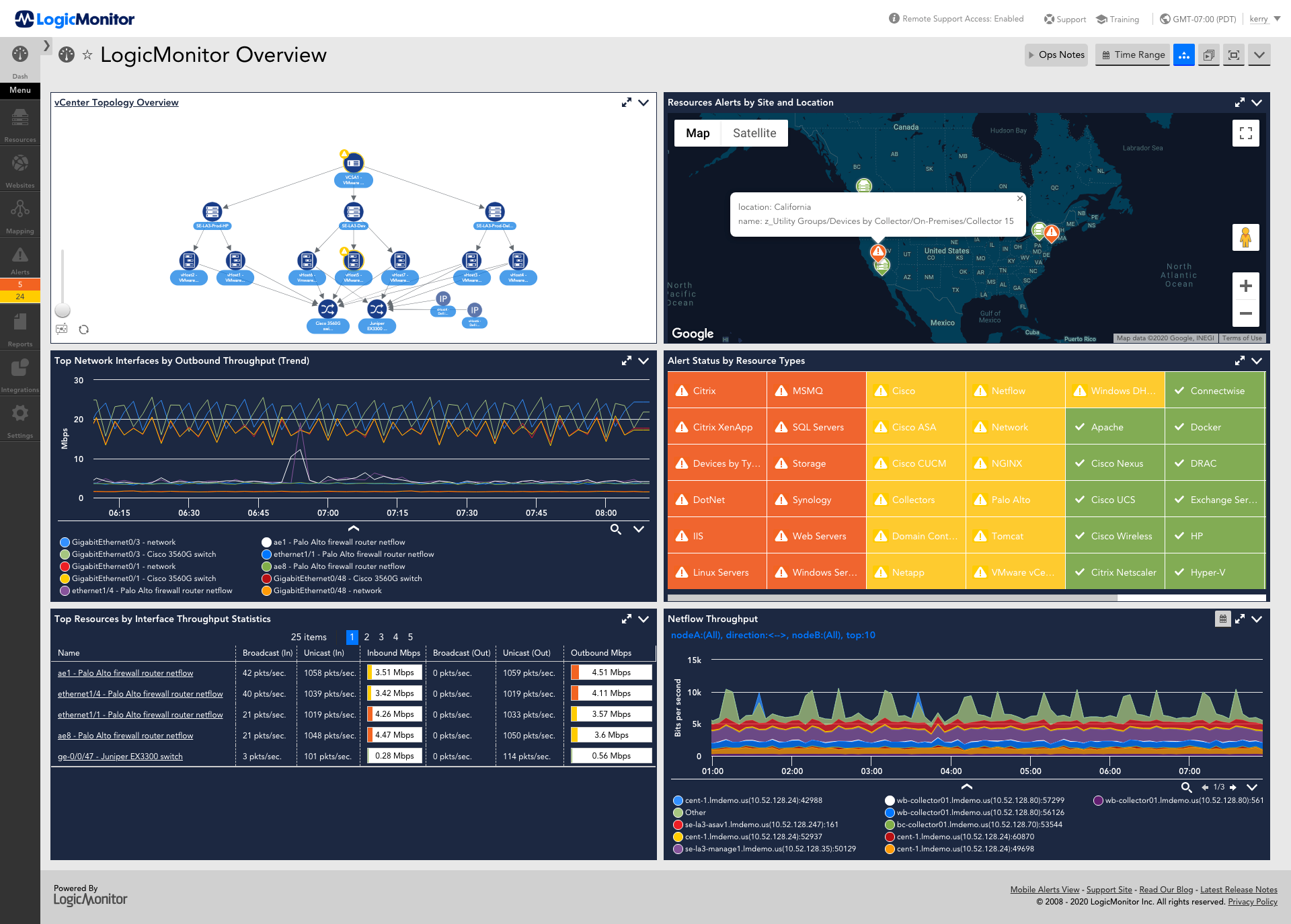
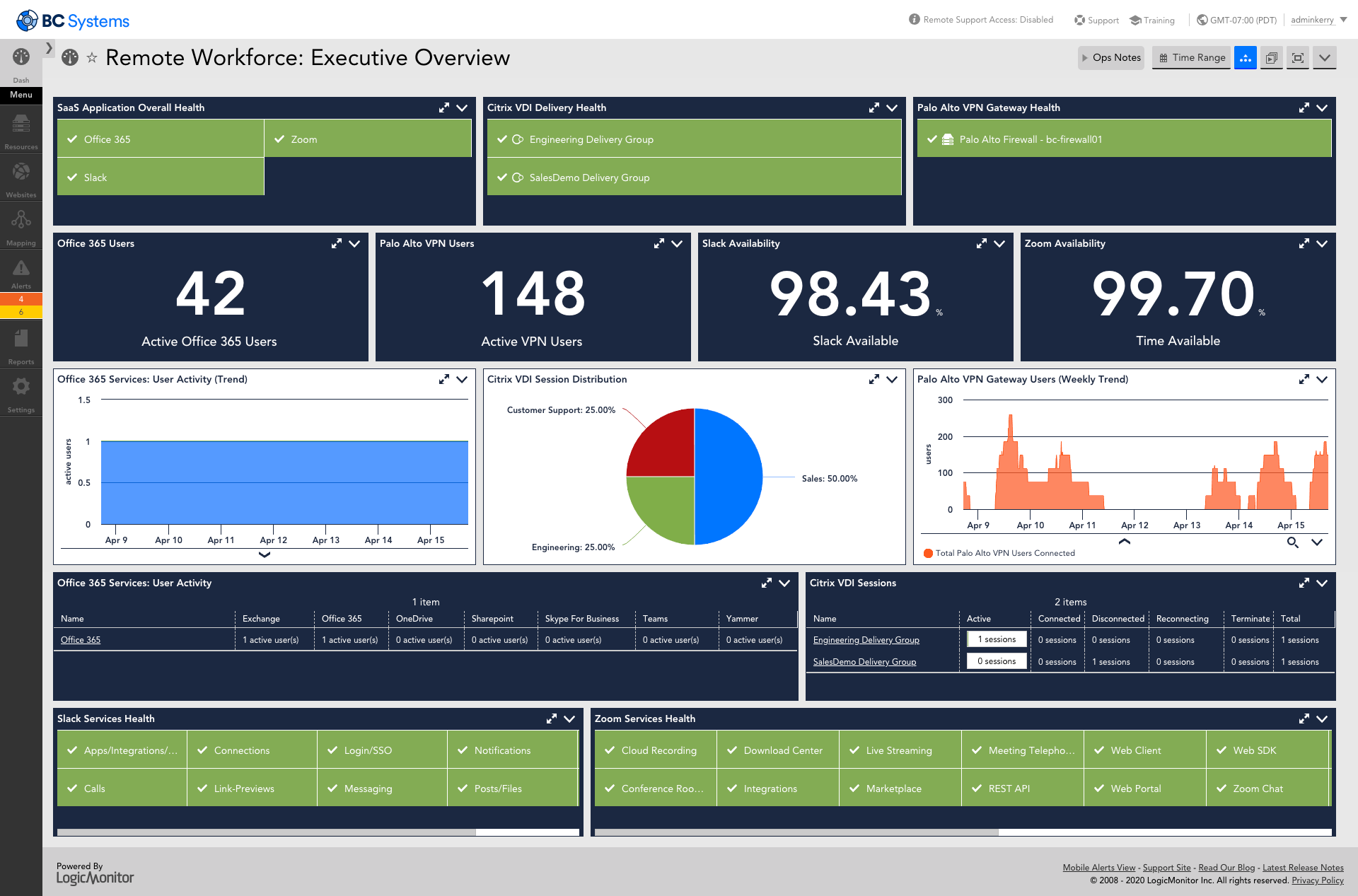
Screenshot of AIOps features for enterprises using technology or hybrid environments with cloud and container resources. LogicMonitor can be used to monitor and improve the performance of complex enterprise networks with dynamic thresholds, topology mapping, anomaly detection, and root cause analysis.Screenshot of LM Envision's comprehensive monitoring and observability capabilities across the IT infrastructure, that help to identify alerts for the most important systems while ensuring the user experience is uninterrupted across the globe.Screenshot of Monitoring that ensures servers and the applications running on top of them are highly available. Helps resolve issues and optimize resource consumption for the server infrastructure.Screenshot of LogicMonitor remote workforce monitoring, which ensures that employees are connected to the systems that keep them productive and provide proactive insight into dispersed systems and third-party outages.Screenshot of Unified cloud monitoring across a hybrid multi-cloud ecosystem.Screenshot of LM Logs delivering log analysis at enterprise scale.

SolarWinds Engineer's Toolset Screenshots

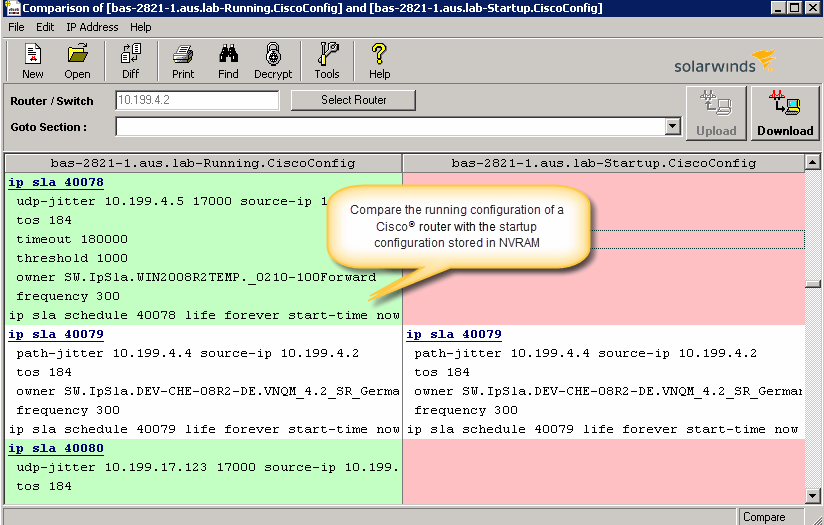
Screenshot of Perform network stress tests with Engineer's Toolset WAN Killer. You don’t need to use real traffic for studying network activities, like testing traffic and load balancing. Instead, deploy Engineer's Toolset WAN Killer to help interactively test connections and adjust the IP traffic generated to achieve the desired network load based on your requirements.Screenshot of Quickly troubleshoot your network with enhanced ping capabilities and packet route tracing, among other network bandwidth usage and monitoring tools included in ETS.Screenshot of Using ETS, you can run scans to gain insight into how routers, hubs switches, and other devices are configured by analyzing SNMP queries and viewing MIB attributes. ETS is designed to help you more easily understand whether your network and ports are using appropriate settings.Screenshot of Config Compare, a part of ETS, is built to compare the running configuration of a Cisco router with the startup configuration. With the Cisco configuration compare tool, you can easily detect the changes made to the network, switch, and router configurations that are not committed to non-volatile memory (NVRAM).Screenshot of Manage your IP network from discovery to address tracking. Discover subnets on a seed router and scan the subnet or a range of IP addresses, generate a list of subnets along with their mask, size, range, and broadcast address and actively monitor subnets to identify and track which IP addresses are in use on your network.