Contentsquare is a digital experience analytics cloud designed to help companies understand hidden customer behaviors, and use those insights to drive more successful experiences. It includes functionality from the former Clicktale heatmap, session recording, and A/B testing tool and now boasts a suite of customer journey analytic capabilities.
N/A
Google Analytics
Score 8.2 out of 10
N/A
Google Analytics is perhaps the best-known web analytics product and, as a free product, it has massive adoption. Although it lacks some enterprise-level features compared to its competitors in the space, the launch of the paid Google Analytics Premium edition seems likely to close the gap.
$0
per month
SALESmanago
Score 8.5 out of 10
Enterprise companies (1,001+ employees)
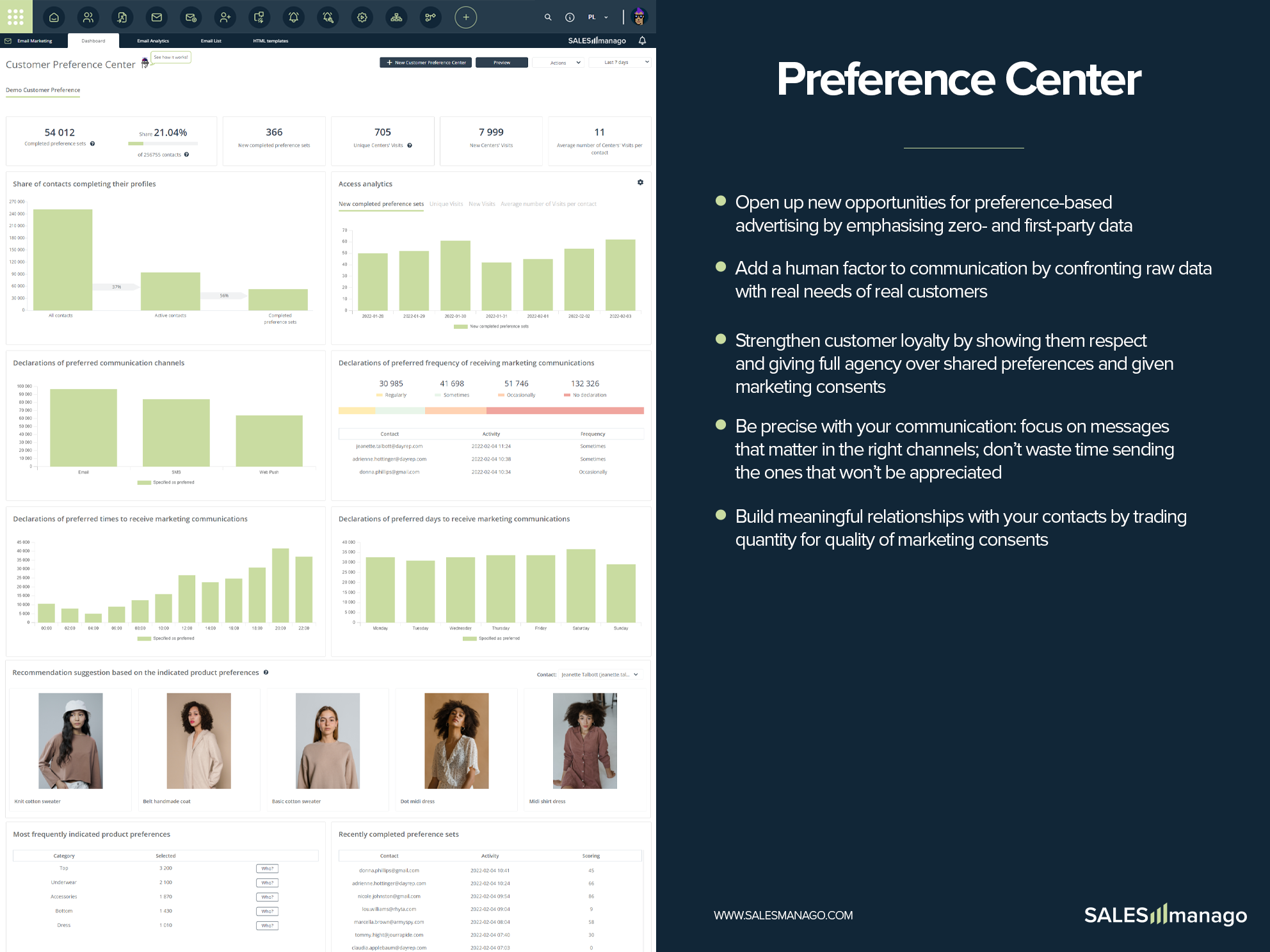
SALESmanago is a Customer Engagement Platform for eCommerce marketing teams, including AI-driven solutions that boast users among 2000+ mid-size businesses in 50 countries, as well as global brands such as Vodafone, Lacoste, New Balance and Victoria’s Secret. SALESmanago aims to improve eCommerce KPIs by leveraging three principles: (1) Customer Intimacy to create authentic customer relationships based on Zero and First Party Data; (2) Precision Execution to provide superior…
$499
per month
Pricing
Contentsquare
Google Analytics
SALESmanago
Editions & Modules
No answers on this topic
Google Analytics 360
150,000
per year
Google Analytics
Free
Essential
$499
per month
Professional
$1,999
per month
Enterprise
$4,000
per month
Offerings
Pricing Offerings
Contentsquare
Google Analytics
SALESmanago
Free Trial
No
No
Yes
Free/Freemium Version
Yes
Yes
No
Premium Consulting/Integration Services
No
No
Yes
Entry-level Setup Fee
No setup fee
No setup fee
Required
Additional Details
—
—
—
More Pricing Information
Community Pulse
Contentsquare
Google Analytics
SALESmanago
Considered Multiple Products
Contentsquare
Verified User
Analyst
Chose Contentsquare
ContentSquare [(Clicktale)] is going deeper on UX understanding than traditional web analytics tools. You can truly understand how a page is used (where users click or even miss click, on which part of the page they are spending most of their time, if some links are clicked but …
ClickTale is now a step ahead of the competition since it delivers insights based on pre-defined business KPIs and customer journeys that we have set up. We can also segment our traffic and easily sift through the many recordings finding the ones that match our lookup criteria. …
The only other website analytical tool I have used is Google Analytics. They both have some overlap but Google Analytics is much more broad, while ClickTale focuses on what it does and provides tools and analysis to work within its area of expertise. When used together, more …
We used CrazyEgg prior to ClickTale. CrazyEgg is simpler to use and much less expensive, but you get what you pay for. ClickTale gives us more capabilities that we desired. If you are a small start up with few people dedicated to the web, go with CrazyEgg. If you are a larger …
Google Analytics
No answer on this topic
SALESmanago
Verified User
Partner
Chose SALESmanago
FreshMail has fewer features. It helps in managing emails, but they are not as extensive as SALESmanago. In SALESmanago, the analytics are more accurate and show more information. I can also set up automatic email cycles.
Features
Contentsquare
Google Analytics
SALESmanago
Mobile Capabilities
Comparison of Mobile Capabilities features of Product A and Product B
Contentsquare
8.0
1 Ratings
5% above category average
Google Analytics
-
Ratings
SALESmanago
-
Ratings
Responsive Design for Web Access
8.01 Ratings
00 Ratings
00 Ratings
Mobile Application
8.01 Ratings
00 Ratings
00 Ratings
Dashboard / Report / Visualization Interactivity on Mobile
8.01 Ratings
00 Ratings
00 Ratings
Results and Analysis
Comparison of Results and Analysis features of Product A and Product B
Contentsquare
9.7
1 Ratings
3% above category average
Google Analytics
-
Ratings
SALESmanago
-
Ratings
Heatmap tool
8.01 Ratings
00 Ratings
00 Ratings
Click analytics
10.01 Ratings
00 Ratings
00 Ratings
Scroll maps
10.01 Ratings
00 Ratings
00 Ratings
Conversion tracking
10.01 Ratings
00 Ratings
00 Ratings
Goal tracking
10.01 Ratings
00 Ratings
00 Ratings
Session Recording and Replay
10.01 Ratings
00 Ratings
00 Ratings
User Segmentation
10.01 Ratings
00 Ratings
00 Ratings
Web Analytics
Comparison of Web Analytics features of Product A and Product B
Contentsquare
-
Ratings
Google Analytics
8.4
11 Ratings
4% above category average
SALESmanago
-
Ratings
Lead Conversion Tracking
00 Ratings
8.110 Ratings
00 Ratings
Bounce Rate Measurement
00 Ratings
8.410 Ratings
00 Ratings
Device and Browser Reporting
00 Ratings
9.211 Ratings
00 Ratings
Pageview Tracking
00 Ratings
9.011 Ratings
00 Ratings
Event Tracking
00 Ratings
8.311 Ratings
00 Ratings
Reporting in real-time
00 Ratings
7.910 Ratings
00 Ratings
Referral Source Tracking
00 Ratings
8.510 Ratings
00 Ratings
Customizable Dashboards
00 Ratings
7.910 Ratings
00 Ratings
Email & Online Marketing
Comparison of Email & Online Marketing features of Product A and Product B
Contentsquare
-
Ratings
Google Analytics
-
Ratings
SALESmanago
8.2
33 Ratings
7% above category average
WYSIWYG email editor
00 Ratings
00 Ratings
9.833 Ratings
Dynamic content
00 Ratings
00 Ratings
8.930 Ratings
Ability to test dynamic content
00 Ratings
00 Ratings
8.029 Ratings
Landing pages
00 Ratings
00 Ratings
5.025 Ratings
A/B testing
00 Ratings
00 Ratings
7.129 Ratings
Mobile optimization
00 Ratings
00 Ratings
8.129 Ratings
Email deliverability reporting
00 Ratings
00 Ratings
7.932 Ratings
List management
00 Ratings
00 Ratings
8.931 Ratings
Triggered drip sequences
00 Ratings
00 Ratings
9.825 Ratings
Lead Management
Comparison of Lead Management features of Product A and Product B
Contentsquare
-
Ratings
Google Analytics
-
Ratings
SALESmanago
8.2
31 Ratings
5% above category average
Lead nurturing automation
00 Ratings
00 Ratings
8.929 Ratings
Lead scoring and grading
00 Ratings
00 Ratings
8.028 Ratings
Data quality management
00 Ratings
00 Ratings
8.828 Ratings
Automated sales alerts and tasks
00 Ratings
00 Ratings
7.122 Ratings
Campaign Management
Comparison of Campaign Management features of Product A and Product B
Contentsquare
-
Ratings
Google Analytics
-
Ratings
SALESmanago
4.3
23 Ratings
53% below category average
Calendaring
00 Ratings
00 Ratings
6.221 Ratings
Event/webinar marketing
00 Ratings
00 Ratings
2.520 Ratings
Social Media Marketing
Comparison of Social Media Marketing features of Product A and Product B
Contentsquare
-
Ratings
Google Analytics
-
Ratings
SALESmanago
2.4
16 Ratings
102% below category average
Social sharing and campaigns
00 Ratings
00 Ratings
2.415 Ratings
Social profile integration
00 Ratings
00 Ratings
2.415 Ratings
Reporting & Analytics
Comparison of Reporting & Analytics features of Product A and Product B
Contentsquare
-
Ratings
Google Analytics
-
Ratings
SALESmanago
7.3
33 Ratings
1% below category average
Dashboards
00 Ratings
00 Ratings
7.933 Ratings
Standard reports
00 Ratings
00 Ratings
7.932 Ratings
Custom reports
00 Ratings
00 Ratings
6.026 Ratings
Platform & Infrastructure
Comparison of Platform & Infrastructure features of Product A and Product B
ContentSquare [(Clicktale)] is best suited to deep dive understanding of how web users truly consume your web pages. For example, when a traditional analytics software informs you on exit rates, ContentSquare [(Clicktale)] helps you to understand if users left without interacting with their last page or if they in fact spent time reading, scrolling, clicking it.
Google Analytics is particularly well suited for tracking and analyzing customer behavior on a grocery e-commerce platform. It provides a wealth of information about customer behavior, including what products are most popular, what pages are visited the most, and where customers are coming from. This information can help the platform optimize its website for better customer engagement and conversion rates. However, Google Analytics may not be the best tool for more advanced, granular analysis of customer behavior, such as tracking individual customer journeys or understanding customer motivations. In these cases, it may be more appropriate to use additional tools or solutions that provide deeper insights into customer behavior.
I find SalesManago to be a good tool for email marketing and automation processes. They live chat service allows fast and direct communication with customers. Website personalisation (tools like pop-ups and browser notification) work fine but I'd like to have a bit more personalisation options to be avalaible to users.
Heat Maps - we used and liked CrazyEgg in the past, and it was a cheaper tool that was easy to use. ClickTale gives us additional capabilities with better data about scroll reach, mouse movements, clicks and a summary report that shows what parts of our pages are getting attention. A product manager asked us yesterday for insights on how his product page was performing, and we were easily able to send him the reports in the heat map section.
Visitor recordings - We get good data on our website using analytics tools like GA, HubSpot and ClickTale, but it is very helpful to watch actual visitor recordings for certain visitor segments. If we add a new page or new feature to our website and notice a trend, we can easily drill down and watch visitors and see how they are interacting with the page.
Conversion funnels - We do a lot of our analysis in Google Analytics and you can set up conversion funnels in GA if you know how to do it. The problem is you can't segment the data and the aggregated data is not as helpful. ClickTale makes it very simple to do conversion funnels, and you can segment them with just a few clicks.
Segmentation - you can segment people in many ways (e.g using tags, rfm matrices, sales funnels, dynamic segments).
Automation flows - using workflows, automation rules, and website automations you can automatically do marketing actions after a trigger and in specific conditions. You have a lot of events, conditions and actions
Product Recommendations - this tool allow you to recommend products on your website. Maybe it's not quick to prepare it but the results at the end are awesome
RFM Segmentation - this is a great tool to segment and reach people according to their RFM profile
It's a bit difficult to navigate form heatmaps of one page on my sites to those of another.
It would be useful to have data on what percentage of clicks for each link are bounces. If this is available already, it is not very easy to find.
I have slight doubts about the accuracy of ClickTale's data based on some industry related articles I've read (i.e. http://redant.com.au/tool-reviews/clicktale-review-technology/). For the most part I feel like the data I'm getting is accurate, because it roughly corresponds to what I'm able to see on Google Analytics. It would be nice to see ClickTale address some of these issues.
Their expansion into the US has not been very successful, and if you are a West Coast customer want training, be prepared to get up at 4 a.m.
While their functionality is comparable to competing products there is nothing particularly unique to what they offer
Their instructional literature was obviously not produced by people for who English is a first language and they are not particularly English proficient.
At my former company I was able to upgrade our initial subscription level from bronze to gold without any problems after the first year. Unfortunately, the company I am presently with doesn't have a Clicktale subscription. I would have absolutely no hesitation in strongly recommending Clicktale to my current company if I ever get even a remote chance to do so. Clicktale is used in some of the statistics I use on my resume in an effort to quantify my results as a certified usability analyst. Clicktale has made a significant difference in my value to any team I work with.
We will continue to use Google Analytics for several reasons. It is free, which is a huge selling point. It houses all of our ecommerce stores' data, and though it can't account for refunds or fraud orders, gives us and our clients directional, real time information on individual and group store performance.
Google Analytics provides a wealth of data, down to minute levels. That is it's greatest detriment: find the right information when you need it can be a cumbersome task. You are able to create shortcuts, however, so it can mitigate some of this problem. Google is continually refining Analytics, so I do not doubt there will be improvements
SALESmanago is a pretty big tool (with lots of features), but if you know the principles - everything is easy to find, and easy to understand. Of course there are some settings or funcionalities which needs to be updated but still using SALESmanago is totaly different experience than 5-6 years ago (in a good way)
We all know Google is at top when it comes to availability. We have never faced any such instances where I can suggest otherwise. All you need is a Google account, a device and internet connection to use this super powerful tool for reporting and visualising your site data, traffic, events, etc. that too in real time.
This has been a catalyst for improving our site's traffic handling capabilities. We were able to identify exit% from our sites through it and we used recommendations to handle and implement the same in our sites. We have been increasing the usage of Google Analytics in our sites and never had any performance related issues if we used Analytics
The Google reps respond very quickly. However, sometimes they can overly call you to set up an apportionment. I'm very proficient and sometimes when I talk to reps, they give beginner tutorials and insights that are a waste of time. I wish Google would understand my level of expertise and assign me to a rep (long-term) that doesn't have to walk me through the basics.
love the product and training they provide for businesses of all sizes. The following list of links will help you get started with Google Analytics from setup to understanding what data is being presented by Google Analytics.
I think my biggest take away from the Google Analytics implementation was that there needs to be a clear understanding of what you want to achieve and how you want to achieve it before you start. Originally the analytics were added to track visitors, but as we became more savvy with the product, we began adding more and more functionality, and defining guidelines as we went along. While not detrimental to our success, this lack of an overarching goal resulted in some minor setbacks in implementation and the collection of some messy data that is unusable.
ClickTale is now a step ahead of the competition since it delivers insights based on pre-defined business KPIs and customer journeys that we have set up. We can also segment our traffic and easily sift through the many recordings finding the ones that match our lookup criteria. This paired with a good and reliable PII masking helps us with insight collection and drive business decisions which other solutions don't have. The new non-Flash interface is clean and simple to use and has all the functionalities centralized.
I have not used Adobe Analytics as much, but I know they offer something called customer journey analytics, which we are evaluating now. I have used Semrush, and I find them much better than Google Analytics. I feel a fairly nontechnical person could learn Semrush in about a month. They also offer features like competitive analysis (on content, keywords, traffic, etc.), which is very useful. If you have to choose one among Semrush and Google Analytics, I would say go for Semrush.
I use many marketing automation tools, and I choose the right tool for the right job. I like to use SALESmanago because of its great support and very good price for the product.
Google Analytics is currently handling the reporting and tracking of near about 80 sites in our project. And I am not talking about the sites from different projects. They may have way more accounts than that. Never ever felt a performance issue from Google's end while generating or customising reports or tracking custom events or creating custom dimensions
Rarely was actionable insight taken from the ClickTale tool that resulted in a better user experience on our website. We made small changes on different aspects of our webpages that typically did not show an improvement over the previous versions.
The dedicated time and resources in the ClickTale tool did not justify the investment. The heat maps can be helpful but they are based on mouse clicks (Google Analytics can help with that). Watching recordings can get time consuming and don't always provide enough data for an actionable takeaway.
If you take the approach of identifying a potential problem on your website first, then using the ClickTale tool to dig deeper in the issue, you might find the tool helpful. However, make sure you gather enough data on the potential issue before making changes to your site (and monitor the changes afterward).