Chose DiscoverOrg (discontinued)
We looked at a few other providers like Seamless.ai and Dun & Bradstreet but no one really had the [breadth] of info.

| Product | Rating | Most Used By | Product Summary | Starting Price |
|---|---|---|---|---|
 DiscoverOrg (discontinued) | N/A | Capabilities of the former DiscoverOrg product are now supplied by ZoomInfo, since the merger of DiscoverOrg and ZoomInfo into a single brand in 2019. | N/A | |
 Agentforce Sales | N/A | Salesforce' Agentforce Sales (formerly Salesforce Sales Cloud) is the company's flagship CRM platform. The AI CRM for Sales features data built right in. | $25 per month |
| DiscoverOrg (discontinued) | Salesforce Agentforce Sales | |||||||||||||||
|---|---|---|---|---|---|---|---|---|---|---|---|---|---|---|---|---|
| Editions & Modules | No answers on this topic |
| ||||||||||||||
| Offerings |
| |||||||||||||||
| Entry-level Setup Fee | No setup fee | Optional | ||||||||||||||
| Additional Details | — | — | ||||||||||||||
| More Pricing Information | ||||||||||||||||
| DiscoverOrg (discontinued) | Salesforce Agentforce Sales | |
|---|---|---|
| Considered Both Products |  DiscoverOrg (discontinued)  Siddarth Upadhya Manager, Global Business Alliance Chose DiscoverOrg (discontinued) DiscoverOrg stand at top and ZoomInfo is also good, but the recent acquisition of it by DiscoverOrg doesn't leave any doubt not to use DiscoverOrg. DiscoverOrg has the best data in terms of companies and also with different locations( depends on which country/territory your …  Colt McNally Business Development Chose DiscoverOrg (discontinued) ZoomInfo has a lot more contacts than DiscoverOrg  Alecs Lund Sr. Business Development Manager Chose DiscoverOrg (discontinued) I used Growbots at first. They were great as you have access to their entire database and isn't segmented like it is with DO. The difference is that Growbots is more of a Shotgun approach where it is just for email campaigns, and their data validity isn't the greatest. DO is …  Charles Lovette Sales Operations Chose DiscoverOrg (discontinued) We have used ZoomInfo and other lead identification tools, and DiscoverOrg's org chart feature is really nice for learning about the company structure.  Stephen Budlong Business Development Chose DiscoverOrg (discontinued) DiscoverOrg has far superior data accuracy - that is the sole reason we chose it over RainKing.  Kevin Kent COO Chose DiscoverOrg (discontinued) I prefer the tools offered directly through Salesforce. Data.com and Clean.  Annette Ochoa Account Development Chose DiscoverOrg (discontinued) The information is why we went with discoverorg. The information is constantly updated and accurate. I do not know how they manage to get such amazing information, but information is power. Or money, in this case.  Brian Charles MBA, MS Senior Vice President, IoT Engineering Chose DiscoverOrg (discontinued) DiscoverOrg is the most granular product on the market that allows sales professionals to find their ideal prospects, map their organizations, learn their business and then prospect into those targets. It is unsurpassed as compared to other tools that I have used (RainKing, …  Jessica Williams Inside Sales Representative Chose DiscoverOrg (discontinued) Data.com - nowhere near where discoverorg is on accuracy. Also use LinkedIn BUT the contact info is WAY less than what we get on DiscoverOrg. The ease of use and search fields that DirecoverOrg has is perfect. Anyone can log on without training and learn themselves on how to …  Kyle Husni Sales Operations Analyst Chose DiscoverOrg (discontinued) Usability for both the standalone site and CRM integration are awesome, very simple and very easy for all of our users to understand how to fully leverage the platform quickly. The data refresh and how well researched each piece of information is against a competitor who uses …  Max Tuvshinbayar Enterprise Account Development Chose DiscoverOrg (discontinued) DiscoverOrg's ease of use, updated information and triggers easily places it as my go to tool.  Cal Francis Director, Strategic Accounts Chose DiscoverOrg (discontinued) DiscoverOrg is more user friendly, and seems to have as good if not better customer info.  Cynthia Drechsler Director Sales Operations Chose DiscoverOrg (discontinued) InsideView is a strong product for learning about companies, their subsidiaries and high level executives. Discoverorg gives you the ability to get deeper into the contacts within a company.  Melanie Tanko Executive Assistant Chose DiscoverOrg (discontinued) I have used Salesforce and Data.com and although both have their pluses... I prefer the DiscoverOrg format and easy of way I can search for what I'm looking for.  Trisha SanFilippo Cherwell Business Development Manager Chose DiscoverOrg (discontinued) Data.com is awful, often times isn't updated or current information isn't used. DiscoverOrg typically is updated or on point with keeping things up to date as possible.  Aaron Stoermann Business Development Representative Team Lead Chose DiscoverOrg (discontinued) We chose DiscoverOrg because of the Salesforce integration. At the time Rainking did not have integration with our level of salesforce. Jigsaw did not have strong data hygiene, and insideview was also not strong with numbers and emails. None of the companies mentioned helped …  Jimmy Mack Senior Program Coordinator Chose DiscoverOrg (discontinued) DiscoverOrg supplements Salesforce well and builds on Salesforce's strengths. |  Agentforce Sales  Mark Dille Enterprise ADM Chose Salesforce Agentforce Sales Salesforce.com is above and beyond better in every aspect of Customer Relationship Management. The ability to take detailed notes and walk a potential customer from the beginning call all the way down the sales process is both easy and organized. The user interface is good …  Brent Borgersen Inside Sales Manager Chose Salesforce Agentforce Sales Salesforce is the only CRM I have used, so I do not have much insight to how it compares to other CRM's. With that being said, Salesforce is the industry standard for a reason. The complaints I have about the product are acute compared to the benefits I receive daily. |
| DiscoverOrg (discontinued) | Salesforce Agentforce Sales | ||||||||||||||||||||||||||||||
|---|---|---|---|---|---|---|---|---|---|---|---|---|---|---|---|---|---|---|---|---|---|---|---|---|---|---|---|---|---|---|---|
| Prospecting |
| ||||||||||||||||||||||||||||||
| Sales Intelligence Data Standards |
| ||||||||||||||||||||||||||||||
| Data Augmentation & Lead Qualification |
| ||||||||||||||||||||||||||||||
| Sales Intelligence Email Features |
| ||||||||||||||||||||||||||||||
| Sales Force Automation |
| ||||||||||||||||||||||||||||||
| Customer Service & Support |
| ||||||||||||||||||||||||||||||
| Marketing Automation |
| ||||||||||||||||||||||||||||||
| CRM Project Management |
| ||||||||||||||||||||||||||||||
| CRM Reporting & Analytics |
| ||||||||||||||||||||||||||||||
| Customization |
| ||||||||||||||||||||||||||||||
| Security |
| ||||||||||||||||||||||||||||||
| Social CRM |
| ||||||||||||||||||||||||||||||
| Integrations with 3rd-party Software |
| ||||||||||||||||||||||||||||||
| Platform |
|
| DiscoverOrg (discontinued) | Salesforce Agentforce Sales | |
|---|---|---|
| Small Businesses |  Lead411 Score 8.3 out of 10 |  Salesmate Score 10.0 out of 10 |
| Medium-sized Companies | Lead411 Score 8.3 out of 10 |  Creatio Score 9.0 out of 10 |
| Enterprises |  TechTarget Priority Engine Score 10.0 out of 10 | Creatio Score 9.0 out of 10 |
| All Alternatives | View all alternatives | View all alternatives |
| DiscoverOrg (discontinued) | Salesforce Agentforce Sales | |
|---|---|---|
| Likelihood to Recommend | 8.0 (106 ratings) | 8.8 (471 ratings) |
| Likelihood to Renew | 7.0 (2 ratings) | 9.2 (62 ratings) |
| Usability | 9.0 (1 ratings) | 8.4 (167 ratings) |
| Availability | - (0 ratings) | 9.0 (29 ratings) |
| Performance | - (0 ratings) | 8.0 (20 ratings) |
| Support Rating | 9.0 (1 ratings) | 9.0 (98 ratings) |
| In-Person Training | - (0 ratings) | 8.0 (12 ratings) |
| Online Training | - (0 ratings) | 9.1 (15 ratings) |
| Implementation Rating | - (0 ratings) | 9.0 (19 ratings) |
| Configurability | - (0 ratings) | 9.0 (4 ratings) |
| Contract Terms and Pricing Model | - (0 ratings) | 8.8 (9 ratings) |
| Ease of integration | - (0 ratings) | 9.0 (2 ratings) |
| Product Scalability | - (0 ratings) | 8.9 (85 ratings) |
| Professional Services | - (0 ratings) | 9.3 (8 ratings) |
| Vendor post-sale | - (0 ratings) | 8.0 (1 ratings) |
| Vendor pre-sale | - (0 ratings) | 8.0 (1 ratings) |
| DiscoverOrg (discontinued) | Salesforce Agentforce Sales | |
|---|---|---|
| Likelihood to Recommend | Discontinued Products
| Salesforce
|
| Pros | Discontinued Products
 Tina Lai Business Development Manager | Salesforce
|
| Cons | Discontinued Products
 Maureen C. McInerney Account Executive - ASUG Talent Hub | Salesforce
|
| Likelihood to Renew | Discontinued Products
 Michael J. Towle Corporate Sales Executive, Strategic Accounts | Salesforce
|
| Usability | Discontinued Products
| Salesforce
|
| Reliability and Availability | Discontinued Products No answers on this topic | Salesforce
 Kyle Dugger Salesforce.com Administrator |
| Performance | Discontinued Products No answers on this topic | Salesforce
 Rob Gottschalk Corporate Controller / Director Sales |
| Support Rating | Discontinued Products
| Salesforce
|
| In-Person Training | Discontinued Products No answers on this topic | Salesforce
|
| Online Training | Discontinued Products No answers on this topic | Salesforce
|
| Implementation Rating | Discontinued Products No answers on this topic | Salesforce
|
| Alternatives Considered | Discontinued Products
 Erik Viager Sr. Strategic Development Manager, B2D | Salesforce
|
| Contract Terms and Pricing Model | Discontinued Products No answers on this topic | Salesforce
 Al Mubassir Muin Software Engineer |
| Scalability | Discontinued Products No answers on this topic | Salesforce
|
| Professional Services | Discontinued Products No answers on this topic | Salesforce
 Aononna Tazin Customer Relationship Management Specialist |
| Return on Investment | Discontinued Products
| Salesforce
|
| ScreenShots | DiscoverOrg (discontinued) Screenshots 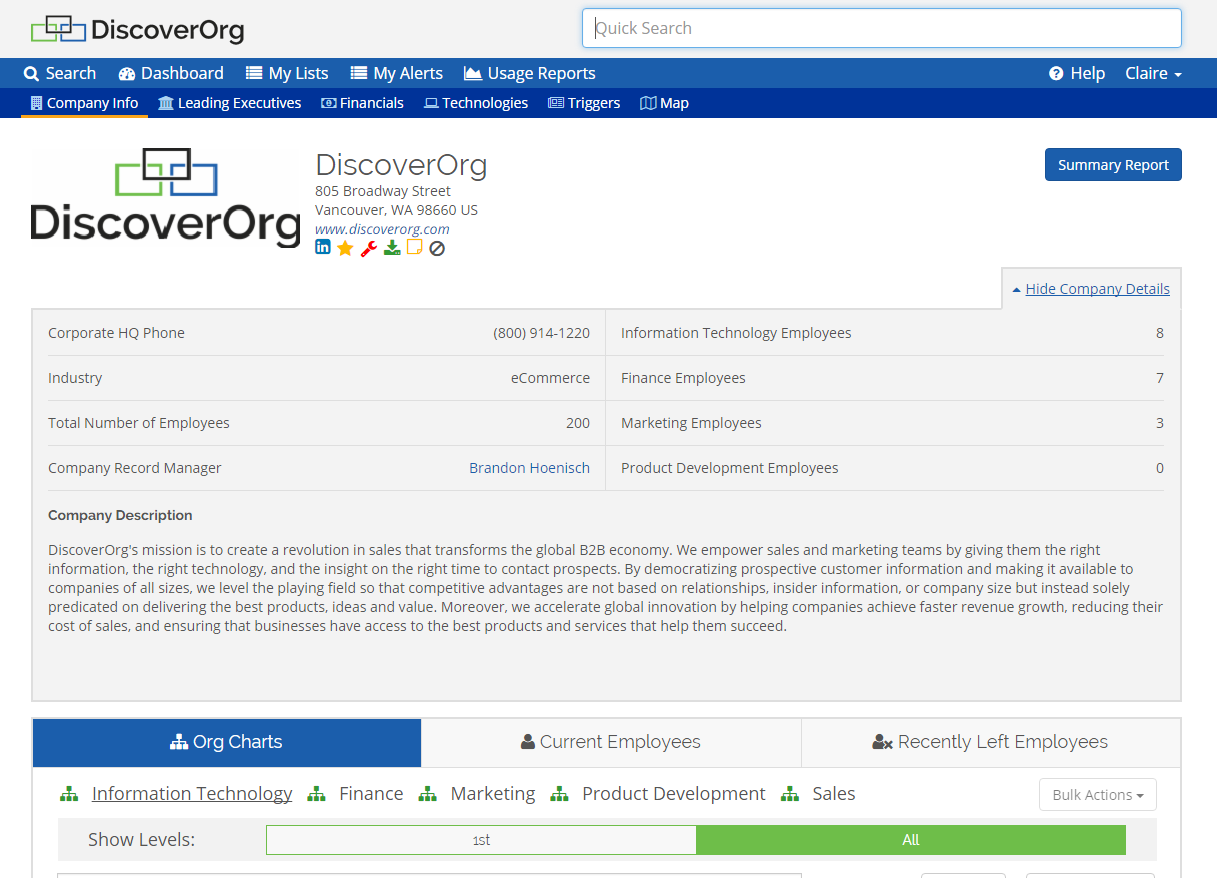     | Agentforce Sales Screenshots      |