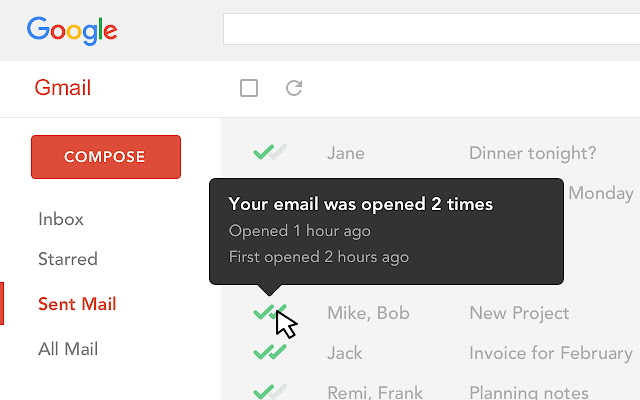
Mailtrack is a free email tracker for Gmail, boasting over 1,5 million active users. The vendor states users will Ffollow up with more accuracy, find out the moment emails have been read, track the…
N/A
Mixmax
Score 8.8 out of 10
N/A
Mixmax, a sales engagement platform for businesses using Gmail, helps revenue teams accelerate revenue at every stage of the customer journey. This product amplifies AEs, CSMs, and anyone in a customer-facing role, not just SDRs. By automating repetitive tasks and organizing their daily workflows, Mixmax aims to increase reps' productivity and empowers them with tools that help them sell. The vendor offers 5…
$29
per month
Streak
Score 8.3 out of 10
N/A
Streak is a cloud-based sales email tracking tool for Gmail. The vendor describes Streak as "CRM in your inbox," and the mission is to allow users to run their entire businesses from their inboxes. It includes email power tools such as view tracking info, mail merge, snooze, send later, snippets, and thread splitter. Streak is used by a range of different teams: Sales, Product Dev, Deal Flow, Fundraising, Support, Hiring, and Real Estate.
$49
per month billed annually per user
Pricing
Mailtrack
Mixmax
Streak
Editions & Modules
No answers on this topic
SMB
$29
per user/per month
Growth
$65
per user/per month
Free Plan
Free
Enterprise
Contact sales team
Pro
$49
per month billed annually per user
Pro
$59
per month per user
Pro+
$69
per month billed annually per user
Pro+
$89
per month per user
Enterprise
$129
per month billed annually per user
Enterprise
$159
per month per user
Offerings
Pricing Offerings
Mailtrack
Mixmax
Streak
Free Trial
No
Yes
Yes
Free/Freemium Version
Yes
Yes
No
Premium Consulting/Integration Services
No
No
No
Entry-level Setup Fee
No setup fee
No setup fee
No setup fee
Additional Details
—
—
Includes email tracking, link tracking, email sharing, snippets, and mail merge (up to 50/day)
More Pricing Information
Community Pulse
Mailtrack
Mixmax
Streak
Considered Multiple Products
Mailtrack
Verified User
Consultant
Chose Mailtrack
MailTrack is free to use in its limited use case, which is why it was it was selected before any other products at an individual capacity. It's super easy to use and I find it very accurate in doing what it's supposed to do. It's like the Apple of mail tracking, it just works. …
Streak is much faster in its notification that a client is on your email, and it also seemed to be more accurate in letting you know where the client was reading their email from (i.e. geographically speaking).
Mailtrack is great for tracking emails if you do not want to pay for larger more complicated tools that do the same thing. If you already love your system but just want to add some convenient read tracking, that's exactly what this is for. If you have a system that doesn't work well, I would take the time to evaluate alternatives that also include read tracking (Salesforce for example). This also applies if you're trying to use this for large outbound sales emails - there are a lot of applications that have email tracking built in (Outreach.io is a great example) so it may just be worth switching your whole system.
Mixmax is very useful for reaching out to multiple clients at once, when you have to send them a similar message and get that message out as quickly as possible. It is also great for scheduling emails to go out later, such as when you are Out of Office or want to send something during the weekend
If you receive a notification that a prospect just read your email and you don't receive a response, you're then aware they've received it and your pitch or product is on their mind -- making a call later that day all the more effective.
I have been using this platform in my company to handling the email tracking and engaging with the emails, it is far most the best help that I can have to actually do my work to great extent.
It helps me to create a pool in my own email inbox instead of creating in one system and then transferring it to others.
It also has amazing feature which is totally automated.
I would rate Mailtrack's overall usability as a ten out of ten. The reasons for this are actually quite simple. For now, only I have been using Mailtrack. However, looking at the rather easy to use characteristics Mailtrack has to offer, I would not hesitate to recommend it to the rest of my colleagues.
I didn't really need to use the customer support but the fact that they proactively make the installation process so easy by providing step by step instructions with videos and everything is kind of pro-active customer support that is needed. Good for them because at the end of the day, it's everyone's dream to use a product that they don't need support for.
Every time I have reached out to Mixmax I automatically get an email from a trained professional who has perfect insight into my issue with an understandable reason to why I am having and issue offers me a solution. The wait time is only around 5 minutes and they are always offering sympathy in certain situations.
There's a free tier. Obviously, there are other things to love, like notifications about your email being read, the fact that if an email hasn't been responded to in some time it gets bumped up. The fact that if other people have Mailtrack you will actually get notified who read your email. But the fact that there is a free tier is HUGE.
Tellwise is a bit more expensive $29/month/user and provides a bit more extended functionality for email and marketing automation. However, Mixmax's feature-set is still suitable for marketing automation and covers everything that is necessary for most sales for early-stage startups, for a much cheaper price (just $9/month/user for the "starter" plan).
HubSpot was almost too freeform, I had a hard time grasping how it could work for me because there was so much that could be changed around. Streak was so easy to figure out without much time invested and I like that it just lives in my Gmail without needing to go to a separate website/login.
I'm currently using the free version so my investment was time spent downloading the browser extension. I would say it's worth the investment because I can make more value through each email by finding the right time to send replies or know when is the exact time I should follow up.
Knowing when an email is read multiple times helps me know the importance of the content in my email.
The paid version allows Mailtrack to tell you which recipient read the email if there was more than 1.
Mixmax has probably saved me 2 or 3 business deals simply by having the "remind" feature because I didn't forget about the communication with the person.
It saves 10% of my time from having to search through email to find important communications with business contacts.