Microsoft Teams combines video conferencing software with team collaboration tools. The communications platform allows MS Office users to conduct conference calls and share files via SharePoint, and join or initiate a group chat.
$4.80
per month per user
MindTouch
Score7 out of 10
N/A
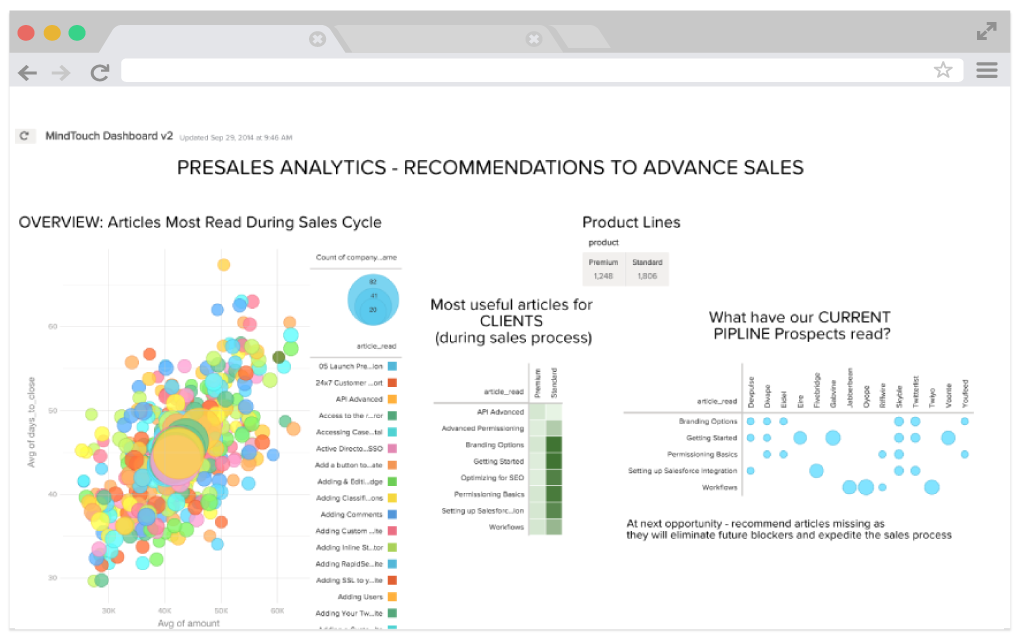
MindTouch is a customer experience management platform with content management and help authoring capabilities. Formerly known as MediaWiki, it is optimized for building knowledge bases for customer self-service and agent assistance purposes.
N/A
Pricing
Microsoft Teams
MindTouch
Editions & Modules
Microsoft Teams Essentials
$4.80
per month per user
Microsoft Teams Enterprise
$5.25
per month (paid yearly) per user
Microsoft Teams Enterprise
$5.25
per month per user
Microsoft 365 Business Basic
$7.20
per month per user
Microsoft 365 Business Standard
$15
per month per user
No answers on this topic
Offerings
Pricing Offerings
Microsoft Teams
MindTouch
Free Trial
Yes
Yes
Free/Freemium Version
Yes
No
Premium Consulting/Integration Services
No
Yes
Entry-level Setup Fee
No setup fee
No setup fee
Additional Details
Discounts are available for non profit organizations.
It's amazing as a daily driver for team communication, and document search/store. Also, if you're doing a lot of LONG meetings and have trouble remembering details, the AI summarization is amazing and convenient. It just works. I'm not saying I always do this, of course, but if I need to 'skim' instead of really digging into every detail from a meeting, the AI-generated summary is generally good enough that I can get away with it.
If a company doesn't want to make their knowledge base public-facing, you lose a lot of the value of using MindTouch in a closed environment. MindTouch is not ideal for extremely structured content management scenarios that are strong DITA advocates. Companies that require localization might not be good fits either.
A de minimis incentive was given to thank the reviewer for their time. The incentive was not used to bias or drive a particular response, nor was the incentive contingent on a positive endorsement. TR verified that a representative sample of customers was invited. More Info
A de minimis incentive was given to thank the reviewer for their time. The incentive was not used to bias or drive a particular response, nor was the incentive contingent on a positive endorsement. More Info
A de minimis incentive was given to thank the reviewer for their time. The incentive was not used to bias or drive a particular response, nor was the incentive contingent on a positive endorsement. TR verified that a representative sample of customers was invited. More Info
The webinars feature has some missing functionally such as the ability for all users to use the Q&A feature (only those with a Microsoft Teams account can use it now), the ability to upload documents for attendees to easily access and download, and the ability for presenters and organizers to easily chat amongst themselves throughout the webinar.
The "Channels" organization hierarchy could be more clear. If you have several channels set up, it can get clunky and hard to find the specific channel you are looking for.
The MS Planner tool lacks functionality and organization. You cannot assign more than one person to a task and it's confusing when you try to share tasks with people - it would be nice if they were automatically added to someone's calendar.
A de minimis incentive was given to thank the reviewer for their time. The incentive was not used to bias or drive a particular response, nor was the incentive contingent on a positive endorsement. More Info
When we do have a support issue, we frequently need to go through multiple people, contacts, ways of explaining things, etc,. before someone on their end actually understands our problem. It's rare that the first person we talk to understands the big picture or appreciates our use case.
The draft functionality is a promising start but lacks some key features that cause us regular frustration. For example, you can only create one draft of a page at a time. This is fine if changes come to you in perfect sequential order, but it makes it impossible for us to update a live page while a draft exists. More specifically, if we're working on updating content on a page for a new feature being released next month, but then we notice a typo today, we can't fix the typo in production without first deleting the draft or doing some hacky workaround of temporarily copying/pasting the source HTML of the draft page and saving it someplace else.
Existence of, or integration with, true source control would be a huge win, but it's something currently lacking in the product. MindTouch's content reuse feature is helpful in the right situations, but it's not robust enough to scale well for lots of content.
Version history of page changes is not 100% reliable. Sometimes items don't show up at all or there is a delay before the diff is visible. Also, creating a draft does not register at all in the page version history.
In-site search is poor, unless you know the *exact* title of what you're looking for. We tell our customers to use Google, not the MindTouch search. Google is excellent at searching our MindTouch site.
A de minimis incentive was given to thank the reviewer for their time. The incentive was not used to bias or drive a particular response, nor was the incentive contingent on a positive endorsement. TR verified that a representative sample of customers was invited. More Info
Microsoft Teams is included with our Office 365 subscription and we have no intention of migrating off of Office 365 and Microsoft products. Since Microsoft Teams is included for free with our Office 365 subscription, and since we enjoy all the features, benefits, and functionality, there is no question that our team will continue to use the product
A de minimis incentive was given to thank the reviewer for their time. The incentive was not used to bias or drive a particular response, nor was the incentive contingent on a positive endorsement. More Info
We've put lots and lots of content into the MindTouch system, of course, so that makes it harder to opt out, but we're also very pleased with their rate of development and weekly pushing of improvements, as well as their response and solutions to our questions and input All in all, a winning combination.
A de minimis incentive was given to thank the reviewer for their time. The incentive was not used to bias or drive a particular response, nor was the incentive contingent on a positive endorsement. TR verified that a representative sample of customers was invited. More Info
If you have the full Microsoft Office suite, it works really well because it's integrated well within its ecosystem, but if not, it can be annoying because it tries to open a shared file in the web versions of the file equivalents. The web version is also a bit slow, and the login is very difficult to handle if you have multiple Microsoft or Outlook accounts.
A de minimis incentive was given to thank the reviewer for their time. The incentive was not used to bias or drive a particular response, nor was the incentive contingent on a positive endorsement. More Info
The site is responsive across multiple devices and screens. It has a clear path to contact support. The articles are searchable. Site users do have trouble navigating the site and finding what they need. That may be due to the architecture of the site, but it'd be nice if MindTouch offered more solutions are this. Our content is organized by product line. And many of those product lines have overlapping training content, so we have extensive duplicate content.
A de minimis incentive was given to thank the reviewer for their time. The incentive was not used to bias or drive a particular response, nor was the incentive contingent on a positive endorsement. TR verified that a representative sample of customers was invited. More Info
A de minimis incentive was given to thank the reviewer for their time. The incentive was not used to bias or drive a particular response, nor was the incentive contingent on a positive endorsement. More Info
A de minimis incentive was given to thank the reviewer for their time. The incentive was not used to bias or drive a particular response, nor was the incentive contingent on a positive endorsement. More Info
MindTouch is a hosted site, so as a heavy user there are times when I notice that pages are slow to load, or something happens like Amazon Web Services crashing the entire east coast for a few hours, that you do notice even if it isn't actually the fault of the MT tool itself. It's the risk of using a hosted tool, but the benefits are pretty amazing and outweigh these performance issues.
A de minimis incentive was given to thank the reviewer for their time. The incentive was not used to bias or drive a particular response, nor was the incentive contingent on a positive endorsement. TR verified that a representative sample of customers was invited. More Info
The overall support provided by Microsoft for Microsoft Teams has been quite good but there is still some room for improvements. Microsoft needs to proactively work on fixing the open bugs in order to provide a seamless experience to the users. But over the service and experience provided by the Microsoft team have been quite satisfactory.
A de minimis incentive was given to thank the reviewer for their time. The incentive was not used to bias or drive a particular response, nor was the incentive contingent on a positive endorsement. More Info
It's good. Pretty solid. We got a lot of input to get up and running, but did a lot of the setup and customization work ourselves, because of our high standards. We've gotten good response and results on specific projects related to customization and our CSM is also pretty responsive. Overall, I think that the jobs of CSMs and support folks would be easier if the product weren't wonky in some ways. They seem to have to do more "workarounds" for basic functionality that should just work out of the box
A de minimis incentive was given to thank the reviewer for their time. The incentive was not used to bias or drive a particular response, nor was the incentive contingent on a positive endorsement. TR verified that a representative sample of customers was invited. More Info
Written documentation and videos are very good and have helped on numerous occasions when I've had to look up how to accomplish a certain task. The reason I have not given a full score is mainly because there have been some inaccuracies in the documentation because updates to the MindTouch framework have slightly changed the way things work. But this is usually the same type of challenges I face when making documentation for the software solution we develop. So all in all I'm very satisfied with both the personal webinars and the online documentation MindTouch provides for their service.
A de minimis incentive was given to thank the reviewer for their time. The incentive was not used to bias or drive a particular response, nor was the incentive contingent on a positive endorsement. TR verified that a representative sample of customers was invited. More Info
A de minimis incentive was given to thank the reviewer for their time. The incentive was not used to bias or drive a particular response, nor was the incentive contingent on a positive endorsement. TR verified that a representative sample of customers was invited. More Info
Just know that there is so much more involved than adding your content. There are so many pieces to launching your site -- especially if you are moving from another platform. If you are not a person who typically works in the "website" realm, do your homework, ask your web people, engineers, etc., because there's a lot to do that you won't know about until you are unexpectedly smacked in the face with it. Learn from my mistakes! We are very happy now, but it was a long road getting to launch day for us
A de minimis incentive was given to thank the reviewer for their time. The incentive was not used to bias or drive a particular response, nor was the incentive contingent on a positive endorsement. TR verified that a representative sample of customers was invited. More Info
Microsoft Teams offers a much more integrated experience between their chat and video call function compared to Google Chat and Slack. Both other tools are much better for internal communications are they have simpler UI without other features. Whereas Microsoft Teams can be used for more critical conversations, particularly between external companies, and has been very useful in sales conversations which is what we chose it for when speaking to companies that work exclusively through Microsoft.
A de minimis incentive was given to thank the reviewer for their time. The incentive was not used to bias or drive a particular response, nor was the incentive contingent on a positive endorsement. More Info
I will be brief. DealerTeam is built upon Salesforce and we try to support native apps. We used Desk.com first for basic Help Ticket management. The product did not satisfy how our customers were looking for information. We upgraded to Service Cloud with Knowledge Base and spent one year writing content and developing our support agency. Again, our customers were upset about submitting help tickets and waiting for answers. They wanted access to self-help while working with a customer. Today we continue to use Service Cloud with MindTouch integration and have found complete success. There is simply no other solution I know of that is a flexible and easy to use as MindTouch when it come to providing customer success and product support
A de minimis incentive was given to thank the reviewer for their time. The incentive was not used to bias or drive a particular response, nor was the incentive contingent on a positive endorsement. TR verified that a representative sample of customers was invited. More Info
Honestly, this tool is worth every penny. Yes, it's not free and you pay for the quality of services and the license. But the ROI and the benefits are all there. Also, the renewal, negotiation, and contract terms are all very well explained by our Microsoft account manager, and she's a charm.
A de minimis incentive was given to thank the reviewer for their time. The incentive was not used to bias or drive a particular response, nor was the incentive contingent on a positive endorsement. More Info
A de minimis incentive was given to thank the reviewer for their time. The incentive was not used to bias or drive a particular response, nor was the incentive contingent on a positive endorsement. TR verified that a representative sample of customers was invited. More Info
I used Skype for Business to take calls, hold conferences, and provide remote assistance to users. Microsoft Teams, on the other hand, is superior to Skype for Business in my opinion. My job entails a lot of screen sharing.
Personally, I would say that by using Microsoft Teams, it upped my collaboration with my colleagues by around 50% or around more than half of what I usually did prior to using it.
I had 100% show rate and attendance on all of my meetings in the past 6 months.
If I may add, I also have been chattier & collaborative towards my colleagues in past 3 months particularly the month of December when we had huge traffic at work. I would estimate this behavior to have been increased by around 60% than what I usually incur during normal operating days.
A de minimis incentive was given to thank the reviewer for their time. The incentive was not used to bias or drive a particular response, nor was the incentive contingent on a positive endorsement. More Info
Our operational efficiently has improved significantly. Prior to Mindtouch, we managing duplicate content in two separate authoring solutions. Delivering content predictably and consistently was difficult and stressful for writers. In Mindtouch, we were able to optimize our content (remove redundancies) giving us more time to test, review, and improve content quality.
Traffic to our knowledge center is increasing monthly.
Internally, SMEs and customer-facing teams are recognizing the value Mindtouch brings through self-service knowledge. These SMEs want to contribute more to content, either as contributing writers or collaborators with tech writers.
A de minimis incentive was given to thank the reviewer for their time. The incentive was not used to bias or drive a particular response, nor was the incentive contingent on a positive endorsement. TR verified that a representative sample of customers was invited. More Info