TrustRadius: an HG Insights company

Adobe Experience Manager

Score8.6 out of 10

466 Reviews and Ratings

What is Adobe Experience Manager?

Adobe Experience Manager is a combined web content management system and digital asset management system. The combined applications of Adobe Experience Manager Sites and Adobe Experience Manager Assets is offered by the vendor as an end-to-end solution for managing and delivering marketing content.

Media

AEM Forms - Creates an adaptive form
AEM Forms - themes library
AEM Forms - where to create a template
AEM Forms - the interactive communications editor
Adobe Experience Manager Sites - document-based authoring enables marketers to create and publish content with familiar tools.
Adobe Experience Manager Sites - Universal Editor, an advanced visual editor, empowers marketers to edit and publish content.
Adobe Experience Manager Sites - Content Fragment editor enables teams to create and manage structured modular content at scale.
Adobe Experience Manager Sites - built-in experimentation lets teams set up and run A/B tests within authoring workflows.
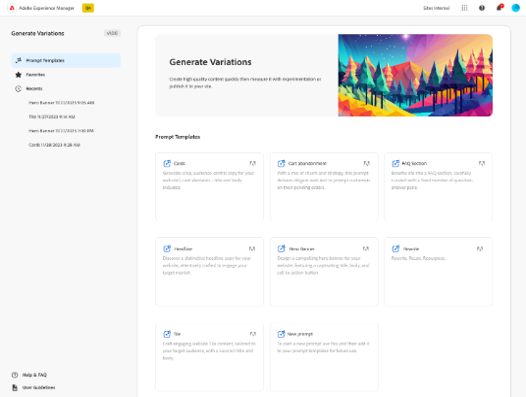
Adobe Experience Manager Sites - can create on-brand, audience-specific content variations at scale with Generate Variations.

1 / 9

Top Performing Features

  • Role-based user permissions

    Permissions to perform actions or access or modify data are assigned to roles, which are then assigned to users, reducing complexity of administration.

    Category average: 8.3

  • Publishing workflow

    The software allows users to set up a custom workflow for updating the website, including approval processes.

    Category average: 8.1

  • Internationalization / multi-language

    The software supports multiple languages, countries, currencies, etc.

    Category average: 8.3

Areas for Improvement

  • Community / comment management

    Users can put post/page comments through an approval process, auto-approve commenters based on their email addresses, block commenters by IP address, delete comments, etc.

    Category average: 7.6

  • Admin section

    The admin page is easy to navigate and use.

    Category average: 7.9

  • Code quality / cleanliness

    Code generated by WYSIWYG editor is clean and validates according to W3C standards.

    Category average: 7.2

AEM Again and Again.

Use Cases and Deployment Scope

I work as a DevOps and Systems Engineer for our AEM servers. The Servers are hosted by AMS.

Pros

  • It has been pretty robust and has handled the growth of sites and the number of sites hosted.
  • AEM is great at separating different levels of storage.
  • I enjoy the user management and permissions schemes.

Cons

  • There are some glitches in permissions inheritance that require us to toggle a save on permissions in groups that inherit from a group that was recently updated.
  • Large packages require stopping the workflow launcher OSGi components or many workflows will slow down the server.
  • Locked pages are hard to find unless I use /siteadmin... I often hear that the CQ tools will go away, but if we lose that, some small things might be harder to do, like finding locked pages.

Return on Investment

  • It is often expensive, but the company needs to have its sites, and the cost per site goes down the more sites we host.
  • Increased engagement.
  • Integration with other marketing tools.

Usability

Alternatives Considered

Adobe PhotoShop

Other Software Used

Microsoft Powerpoint, Microsoft 365, New Relic

Adobe Experience Manager Review - ABS

Use Cases and Deployment Scope

It addresses the organization of site pages for our 8,000-page site. It's easy to find other items needed for sites, assets, content fragments, and experience fragments.

Pros

  • Drag and drop components
  • Seamless connection between DAM assets and sites
  • 24/7 support for additional items to add

Cons

  • Site organization, have a search bar to find sites
  • Organization tool for assets DAM
  • Integration of rendered items within the site when used

Return on Investment

  • We have an Adobe offshore team with a long turnaround time
  • Some components don't work well together
  • Sometimes the page needs to fully reload for the components to show

Usability

Alternatives Considered

Adobe Firefly and Adobe XD

Other Software Used

Microsoft Visual Studio Code, Eclipse

Simple and customizable CMS

Use Cases and Deployment Scope

We have multiple instances on prem and cloud, and host hundreds of websites on Adobe Experience Manager. We use it to host public and customer websites, provide log-in for banking and benefits, or information about our products. We are insurance, so no e-commerce or anything like that, but we have a lot of contact forms or lead-gen, so customers can connect with an advisor or report a problem.

Pros

  • OOTB components and forms
  • Plug and play for content authors without too much complexity
  • The ability to host multi-language and live copies

Cons

  • I would love the ability to customize my toolbars with what I want to see and how I want things displayed, without adjusting the view for everyone. I think each use might see things differently, so it would be helpful if we can customize our ribbons.

Return on Investment

  • Business agility, bringing multiple websites onto one cloud instance and consolidating development resources.

Usability

Everything we asked for more

Use Cases and Deployment Scope

My organization uses Adobe Experience Manager to launch, optimize and grow our website and member services, including self-service digital member accounts; online quotes, contact with users' closest Travel Advisors and Insurance agents; and connections to local PNW Perks as well as AAA National apps, tools, and discount programs.

Pros

  • Site management
  • Forms
  • Content Updates
  • Component Library
  • Structured Content

Cons

  • Product and System naming conventions can get confusing since they are SO similar
  • Documentation found in different areas of Adobe can be conflicting or reference outdated items

Usability

Alternatives Considered

Adobe Target, Adobe Analytics, Adobe Brand Concierge and Adobe Experience Platform

Other Software Used

Microsoft Visual Studio Code, Azure DevOps

Powerful and Scalable CMS.

Use Cases and Deployment Scope

It is an AEM central content management tool we use to manage all our applications and deliver a consistent digital experience across them. It is a component-based architecture that reduces development and deployment time. It manages our digital assets, ensures brand consistency, and enables us to deliver customised content easily. Seamlessly integrates with almost every enterprise solution and gives an analytics tool inbuilt for improving customer engagement and better operational efficiency.

Pros

  • Enterprise level digital asset management and very robust.
  • Makes applications more scalable, secure and efficient.
  • Customization, brand value consistency and omni channel delivery.
  • Saves from maintenance and development time.

Cons

  • High implementation effort as well as cost for old infrastructure.
  • Licensing and operational cost not suitable for small size enterprise.
  • Non technical user needs training for using this solution.

Return on Investment

  • Improved content delivery speed and better productivity.
  • Better customer engagement, experience consistency and brand value.
  • Operation efficiency and reduce maintenance cost and optimization.
  • Gives long term ROI.

Usability