Overview
ProductRatingMost Used ByProduct SummaryStarting Price
Acronis True Image
Score 8.6 out of 10
N/A
Acronis True Image is a backup, cloning, cyber protection and privacy tool suite for home users.N/A
Box
Score 8.6 out of 10
N/A
Box is an online Intelligent Content Management solution that caters to individual users as well as businesses.
$20
per month 3 users (minimum)
Google Drive
Score 8.6 out of 10
N/A
Google Drive is a cloud file storage, synchronization, and collaboration platform and service, that features Google Docs, Sheets, and Slides for document editing and presentation.
$6
per month
Pricing
Acronis True ImageBoxGoogle Drive
Editions & Modules
No answers on this topic
Business Starter
$7
per month per user (3 minimum)
Business
$20
per month per user (3 minimum)
Business Plus
$33
per month per user (3 minimum)
Enterprise
$47
per month per user (3 minimum)
Enterprise Plus
$50
per month (billed annually) per user (3 minimum)
Enterprise Advanced
Contact us
per month per user (35 minimum)
Basic
$6.00
per month
Business
$12.00
per month
Enterprise
Contact Vendor for Quote
per month
Offerings
Pricing Offerings
Acronis True ImageBoxGoogle Drive
Free Trial
YesYesYes
Free/Freemium Version
NoYesYes
Premium Consulting/Integration Services
NoYesNo
Entry-level Setup FeeNo setup feeOptionalNo setup fee
Additional DetailsA discount is available for annual pricing.Discounts are available for students, educators, and non profit organizations.
More Pricing Information
Community Pulse
Acronis True ImageBoxGoogle Drive
Considered Multiple Products
Acronis True Image

No answer on this topic

Box
Chose Box
Dropbox trails built in platform players like Microsoft OneDrive and Google Drive from built in integration with services. However, the online interface and collaboration tools are better designed than the other platforms.
Chose Box
Both of these services are fine but they both seem to either be missing features or are much slower to do what needs to be done. Price might be the biggest difference since Google Drive is free but paying for Box is still worth it.
Chose Box
Box has excellent file sharing options and easy link creation. Most of the file share companies are top-notch, but Box is more user-friendly than Dropbox, and an interface that’s easier to navigate than Google Drive's. In my industry, I have to be versatile and able to use …
Chose Box
Box is compatible with other cloud-based storage solutions like Dropbox or Google Drive. While the latter is probably the most customizable, user-friendly and widely adopted, Box and Dropbox are fantastic alternatives for companies that shy away from the Google suite of …
Chose Box
Box works just as well as, if not better than Google Drive and Google Keep.

Box Notes is much easier to use than OneNote. OneNote is great if you just need to make your own notes - but sharing notes in OneNote is a pain. Box Notes is SO easy to use - we use it to take notes in …
Chose Box
Box and its competitors are all quite similar in their filesharing and storing capabilities. I think the closest, most similar product would be OneDrive, which I use quite often. Google Drive provides a bit more of real-time updating and version control of documentation that I …
Chose Box
Our university previously used a private VPN, and we've used Google Drive as well before. At a previous university, I had experience with Dropbox. While I was unhappy about the switch to Box at first (change is always hard), Box seems superior in ease of use and collaboration …
Chose Box
Box is nowhere as deep as Google Drive due to the breadth of Google's ecosystem, but it is a self-contained mini-DAM that most will find works really well. The added bonus of built in Gmail sharing is a nice addition.
Chose Box
I believe that anyone with exposure to software like Dropbox or Google Drive will have an easier transition when attempting to use Box. Where Box could improve is having a refresh of the UI/UX design. With an improvement to the design, Box can be more responsive and widely …
Chose Box
The best user experience of any of the major cloud data providers. As it's not a product of any of the other major technology companies, it remains agnostic to the many platforms / features that everyday users want to have.
Chose Box
Box is more professional when comparing other alternatives
Chose Box
The first reason that makes Box worth considering is the ability to ensure each authorized network participant can access the stored files. Another key advantage of using Box is that essentially all organization files and backups can be stored on the Box server and with the …
Chose Box
Among many other solutions box has been vetted by our security professionals and deemed to be the best solution for our particular organization. This lends to many of box's security features that still allow for collaboration and secure file sharing.
Chose Box
Box has cheap storage pricing and so is preferred by small organizations, and easy to use app and sync make it a good product to use.
Cross platform file sharing and editing over the cloud is one of the best features it has.
Chose Box
It gives different bands to give access to others to see documents which [helps] us to maintain confidential information easily and do what need. The best alternative to other cloud storage because of uploading and sharing the document.
Chose Box
Simply put, having unlimited file storage is a clear differentiator. Furthermore, the number of integrations offered by Box is simply unmatched. If you are looking for pure document and file sharing, I don't think there is a better product on the market. The benefits from …
Chose Box
Box is more secure than Dropbox and has a better user interface on desktop clients. We also like Box's UI for editing documents in the cloud and Box's offerings for sharing documents outside our organization over competitors like Dropbox. However, Dropbox is better known for …
Chose Box
Box is a professional tool that has a rich suite of features that go head to head with Google and has many more use cases [than] iCloud. For the price, Box is a great alternative to other cloud storage and data asset management software offers. Box is a great addition to any …
Chose Box
Despite its more expensive plan, Box offers a more robust variety of features. Whether it's file sharing, authorizations, file sizes, security, or customization options, Box just has more offerings. If you are a large company and need to share files with your employees and …
Chose Box
The only reason I selected Box was that I got unlimited storage and the interface was relatively easier to use.
Chose Box
As this gets integrated with Outlook, Office, Android devices, tablets, Mac devices, email, Webdocs, XML viewer and also sync well with Windows and Macintosh. This also has a feature for Microsoft Office suite integration for export and import and is also Microsoft Office …
Chose Box
Mainly how Box provides a far safer and a secure solution that is clearly complying with current data security regulations like HIPAA.
Chose Box
Mentioned already - I give Google the slight edge here. One thing I find interesting is the "search feature" for Box is actually really good - and arguably better than Google's. But I just like Google slightly more for the UI and "smart" features. Dropbox falls below both of …
Google Drive
Chose Google Drive
Free storage space is limited, if we need more space you have to pay a fee. In the Dropbox case they give you 2.5 Gb of free storage.
Chose Google Drive
Google Drive takes advantage because it integrates so well between other Google apps, so we can search for files easily. Also, we can connect Google Drive to other applications (developed by our company) which enables us to save form submissions, and other kinds of data, …
Chose Google Drive
The main aspect that led us to stay with Google Drive compared to the other software is its storage capacity that is undoubtedly superior. In the same way, to be able to work from the Gmail account is another point in favor because we consider this mail service as the most …
Features
Acronis True ImageBoxGoogle Drive
Enterprise Content Management
Comparison of Enterprise Content Management features of Product A and Product B
Acronis True Image
-
Ratings
Box
7.7
26 Ratings
5% below category average
Google Drive
-
Ratings
Content capture & imaging00 Ratings8.119 Ratings00 Ratings
File sync, storage & archiving00 Ratings9.725 Ratings00 Ratings
Document management00 Ratings8.524 Ratings00 Ratings
Records management00 Ratings7.120 Ratings00 Ratings
Content search & retrieval00 Ratings8.324 Ratings00 Ratings
Enterprise content collaboration00 Ratings8.021 Ratings00 Ratings
Content publishing & creation00 Ratings5.015 Ratings00 Ratings
Security, risk management & information governance00 Ratings8.326 Ratings00 Ratings
Contract lifecycle management00 Ratings9.112 Ratings00 Ratings
Automated workflows00 Ratings9.114 Ratings00 Ratings
Artificial intelligence00 Ratings2.011 Ratings00 Ratings
Mobile support00 Ratings6.923 Ratings00 Ratings
Integration00 Ratings9.623 Ratings00 Ratings
File Sharing & Management
Comparison of File Sharing & Management features of Product A and Product B
Acronis True Image
-
Ratings
Box
-
Ratings
Google Drive
8.0
219 Ratings
4% below category average
Versioning00 Ratings00 Ratings8.2193 Ratings
Video files00 Ratings00 Ratings7.2188 Ratings
Audio files00 Ratings00 Ratings7.8182 Ratings
Document collaboration00 Ratings00 Ratings8.8216 Ratings
Access control00 Ratings00 Ratings7.5214 Ratings
File search00 Ratings00 Ratings7.5218 Ratings
Device sync00 Ratings00 Ratings8.9204 Ratings
Cloud Storage Security & Administration
Comparison of Cloud Storage Security & Administration features of Product A and Product B
Acronis True Image
-
Ratings
Box
-
Ratings
Google Drive
8.3
213 Ratings
4% below category average
User and role management00 Ratings00 Ratings8.6200 Ratings
File organization00 Ratings00 Ratings7.5211 Ratings
Device management00 Ratings00 Ratings8.799 Ratings
Cloud Storage Platform
Comparison of Cloud Storage Platform features of Product A and Product B
Acronis True Image
-
Ratings
Box
-
Ratings
Google Drive
8.7
212 Ratings
1% above category average
Performance00 Ratings00 Ratings8.9210 Ratings
Reliability00 Ratings00 Ratings8.8212 Ratings
Storage Reports00 Ratings00 Ratings8.587 Ratings
Best Alternatives
Acronis True ImageBoxGoogle Drive
Small Businesses
NetBackup Flex Appliances
Score 10.0 out of 10
Square 9 Softworks
Square 9 Softworks
Score 9.7 out of 10
SugarSync
SugarSync
Score 4.0 out of 10
Medium-sized Companies
Bacula Enterprise
Bacula Enterprise
Score 9.5 out of 10
MediaValet
MediaValet
Score 9.0 out of 10
Druva Security Cloud
Score 9.4 out of 10
Enterprises
Bacula Enterprise
Bacula Enterprise
Score 9.5 out of 10
MediaValet
MediaValet
Score 9.0 out of 10
Druva Security Cloud
Score 9.4 out of 10
All AlternativesView all alternativesView all alternativesView all alternatives
User Ratings
Acronis True ImageBoxGoogle Drive
Likelihood to Recommend
9.4
(19 ratings)
8.1
(154 ratings)
8.4
(222 ratings)
Likelihood to Renew
-
(0 ratings)
8.0
(12 ratings)
10.0
(6 ratings)
Usability
9.0
(3 ratings)
8.1
(21 ratings)
8.5
(52 ratings)
Availability
-
(0 ratings)
10.0
(5 ratings)
10.0
(1 ratings)
Performance
9.0
(1 ratings)
9.1
(12 ratings)
9.0
(7 ratings)
Support Rating
8.9
(9 ratings)
8.5
(29 ratings)
1.1
(49 ratings)
In-Person Training
-
(0 ratings)
10.0
(1 ratings)
9.0
(1 ratings)
Online Training
-
(0 ratings)
10.0
(3 ratings)
-
(0 ratings)
Implementation Rating
-
(0 ratings)
10.0
(6 ratings)
8.0
(3 ratings)
Configurability
-
(0 ratings)
10.0
(1 ratings)
6.0
(1 ratings)
Ease of integration
-
(0 ratings)
10.0
(1 ratings)
5.0
(1 ratings)
Product Scalability
8.0
(1 ratings)
10.0
(1 ratings)
10.0
(1 ratings)
Vendor post-sale
-
(0 ratings)
10.0
(1 ratings)
-
(0 ratings)
Vendor pre-sale
-
(0 ratings)
10.0
(1 ratings)
-
(0 ratings)
User Testimonials
Acronis True ImageBoxGoogle Drive
Likelihood to Recommend
Acronis
Acronis Cyber Protect is great for any small/mid-sized business. The price point makes it attractive to all budgets >$100/year for 5 device deployments. Competitors offer less and charge more! Very happy with the suite of products, and renewals are simple and straightforward as well. I hope they don't change a thing!
Read full review
Box
I think Box is great for research teams or anyone that has a large number of files that need to be securely stored. Particularly in the case of social science research, where it is important to protect identifying data, Box is a great option. In cases where teams need a more reliable means for real-time collaboration, I would probably consider a different alternative
Read full review
Google
It is possible to share files and folders with up to 200 email addresses, as well as with persons outside the company.Use the drop-down arrow to select who may see, comment on, or change the file or folder before sending out an invitation.I am very much impressed with this feature
Read full review
Pros
Acronis
  • Delta backup makes backups super fast of larger files that do not change in its entirety (e.g. VM images, large PSD files)
  • Easy to use (set it and forget it)
  • Rescue media makes it easy to restore backups to different hardware and migrate to other work stations
  • Lots of backup options on the Windows version of ATI
Read full review
Box
  • The main feature that I like the most in Box is that it makes collaboration seamless, workers can easily check the documents any time and make changes according to the needs.
  • Box manages and backs up all of your files on its cloud servers, and provides a very nice interface for creating, viewing, editing, and collaborating on the most commonly used file types (PDF, XLS, DOC, etc.).
  • Over the past few years, Box has built on top of its basic cloud storage management with a host of other tools, such as workflows, AI, monitoring, and analytics.
  • It is helping us to make good connections with clients and our workers themselves as to its syncing and viewing feature to all is very much helpful and easy to go.
Read full review
Google
  • Any user with access can store a file using different platforms like Android, IOS, Windows, or Ubuntu (Desktop version)
  • You can share files with any number of different users with different access rights or you can even keep it public by providing the access link and assign different rights for public access
  • You can open Excel/Word files using google software Sheets/Docs in the browser environment without having to install software like Microsoft Office etc on your Windows OS
Read full review
Cons
Acronis
  • Some features have actually become more complicated over the years. One that comes to mind is creating a backup plan that can execute daily to an external USB media that is changed daily (older versions would back up to the, for example, "F" drive regardless of which drive was attached - newer versions identify each drive uniquely, and a backup task created with a given external drive will fail due to the lack of media presence if the drive is replaced).
  • Error messages could be less cryptic.
  • Support turnaround time and live assistance could be faster.
Read full review
Box
  • The graphic design of the dashboard should be simpler and more tangible that can be changed to the liking of the Admin.
  • Sometimes there are some syncing issues in the background.
  • The product has very limited functionality in some areas which could be a bit frustrating at times.
Read full review
Google
  • Having a little bit more control and clarity over what is shared and how it is shared would be a useful improvement.
  • Could be more robust and flexible as far as assigning restrictions.
  • Google Sheets could be enhanced because Excel really is not there yet as a product with equal capabilities as there are still quite a few limitations to the functionality.
Read full review
Likelihood to Renew
Acronis
No answers on this topic
Box
I like the security features and I like the website. It's easy to use and create and move things around as needed. The main reason for a lower rating is because the Box Sync app is just not a good program. It's a memory hog, it's slow, transfer speeds are slow, and it's not the most efficient route. If you have a large Box account and you need to get a computer up to speed on a large amount of data within Box, you are in for the long haul. Last time I had to do this, it took 3 days to sync all of the files and we are talking around 100 GB worth of data
Read full review
Google
It's perfect for me. It keeps things saved and is easy to remove items if needed. Also, I very much enjoy the formatting options. Along with the integrations it has for SSO. Overall, this is the most user friendly system I have ever come across.
Read full review
Usability
Acronis
Protect my system from data loss and also can manage multiple devices via online cloud from any where and also can set Multifactor authentication for more secure login access. Archive any backup which will use less space and we can transfer it to any other space also so it is very easy as server admin to manage acronics utilities
Read full review
Box
Everything with Box is seamless. It can be integrated into virtually any other software or application. You can even get the app for your phone or tablet to work on the go. File syncing is so quick. The only reason I gave it a 9 is the issue I discussed earlier about the local file application rebooting and not continuing to sync files. Other than that, it's great!
Read full review
Google
It's easy enough to use for computer users of all ages and skill levels. I am an advanced user, and I think the hardest part might be showing someone how to download and set up the app on their device if they weren't too familiar with computers, but overall it is very easy to understand.
Read full review
Reliability and Availability
Acronis
No answers on this topic
Box
Yeah, it's always worked, I've never had any kind of connection issues, the only issues I've had it I've been on our end when the Internet hasn't worked.
Read full review
Google
Always available
Read full review
Performance
Acronis
Backups run fast and no significant performance issues other than the ones discussed previously.
Read full review
Box
The general operation and management of Box is very efficient, both when accessing the account, and when adding files, downloading or modifying any document directly. The web platform, mobile and desktop versions work really well and quickly, making all the work and process flow smoothly and without setbacks. So far I have not been able to observe any inconvenience
Read full review
Google
The documents load fairly quickly and also update in real time, especially given the fact that multiple people can be using it at once. The "Offline" feature works great to allow the user to make edits and access the document without access to the internet, and then sync changes later once they're back.
Read full review
Support Rating
Acronis
Beyond a single instance, I haven't had to approach Acronis' support. I needed a new key following the death of my previous workstation, and they rapidly supplied it. I've heard from colleagues that they've quickly answered any questions that've been asked. If I need something, I'll generally frequent FAQ pages first, although Acronis actually has instructional videos to help users get started, which is forward-thinking. Great software that fills a vital niche for Windows systems.
Read full review
Box
I found their support community lacking in clarity when I experienced a login issue. The error messaging was poor on my Box Sync application. I did not reach out to support staff for help, instead, I reasoned that I should try downloading the Box Sync application again and reinstall it. That fixed my issue, thankfully. I think a less computer-savvy user would've been much more frustrated.
Read full review
Google
It takes a few days for customer support to get back to you. Although, I have not had to use support too often. Once you get an email back, they are very thorough and work hard to fix the problem quickly. It is a really great resource and a great way to get the help you need if you're stuck. A phone call also works quickly but you have to call during specific times.
Read full review
In-Person Training
Acronis
No answers on this topic
Box
The in person training was done in house and I helped with the training, people seem to respond well.
Read full review
Google
The effective google workspace using training that my organization received and was conducted by me (as a team lead of the ICT team) was mind-blowing and as a result, our staff is performing well in terms of using the application for their daily jobs than before. Now, in my institution, all teachers and all the administrative personnel are very much interested in cloud storage facilities, in previous my institution was afraid of losing all important documents in the cloud storage. But, after having received the training they are now realized that if anyone has only one google account then he or she can use 15GB of cloud storage freely and they are now happy because now it is not necessary for anyone to carry the traditional pen drive.
Read full review
Online Training
Acronis
No answers on this topic
Box
The documentation is good. Since Box is a popular service, there were also a number of YouTube videos and other sources that were helpful as we were considering the product and planning for deployment. Also, the ability to try the free version helped to prepare us.
Read full review
Google
No answers on this topic
Implementation Rating
Acronis
No answers on this topic
Box
Be careful with settings. It is easy to get overwhelmed with updates. For example, you don’t want to be updated when doing historical data uploads. I recommend taking off notifications initially and then turn on post you have done your historical data upload.
Read full review
Google
It's an extremely easy software to implement, once you sign up for a google account you automatically have access to google drive with a set amount of storage space. The business or Google Suite accounts have more storage space than a regular free account, but setting up and accessing google drive is very easy in both cases
Read full review
Alternatives Considered
Acronis
IDrive is incredibly faster than Acronis on cloud backup. After Acronis' failures on cloud storage I moved to IDrive for peace of mind. IDrive can also do local backups, and either variant of system state, server, outlook, exchange, etc. It does not however have the ability to do a full image of a bitlocked machine like Acronis, so I'm continuing the local imaging with Acronis.
Read full review
Box
They are kind of the same. And both of them do their job as promised. But for company and project wise I think that Box slightly wins for some points. Which [makes him] win over Google Drive (don't forget that Google Drive is very easy to use and has a lot [of] nice features too).
Read full review
Google
In short, Google Drive is better for independent users who store a normal amount of stuff. OneDrive makes more sense for businesses and teams that are doing heavy-duty storage or large-scale syncing. Realistically, though, most users will fall somewhere in between the two, where either platform would meet their needs.
Read full review
Scalability
Acronis
The Windows version is generally reliable and only ran into one issue thus far. Restores are easy and there are many features. On MacOS, it's a completely different story. There is significant resource leakage related to the updater app that can bog down part of a CPU core continuously until it is disabled. The mobile backup feature also needs to be disabled via UNIX command line or CPU usage will go up when a mobile device on the same network like an iPad or iPhone's screen is turned on.
Read full review
Box
It's great, as we put more files on there it's done very well.
Read full review
Google
I have always been able to access
Read full review
Return on Investment
Acronis
  • Peace of mind - knowing that if anything happens to our data, we can recover it.
  • File Versioning has saved us a few times - we can grab prior versions of a particular file if there is a problem.
  • Reasonably priced - there are more comprehensive backup solutions out there, but for online backup, this was the right product for the right price.
Read full review
Box
  • Box has been an only positive experience. It provides a seamless way for me and my team to collaborate on documents in such a way where we're not sending the document back/forth via email. It's a huge timesaver.
  • Box reduces the risk of sharing a sensitive document to the wrong person via email.
  • Box has provided a platform where my team can share notes in meetings - this has helped streamline and organize our meetings. Our meetings are more productive and actionable.
Read full review
Google
  • It has given our operation remote capabilities
  • Easier to access and understand client's need through collaborative enviroment
  • availability to digital resources fast and easy
  • saved our operation hundreds of dollars in physical storage (both investment and maintenance)
  • our operation became easier for new staff to get onboard: small learning curve to use it
Read full review
ScreenShots

Acronis True Image Screenshots

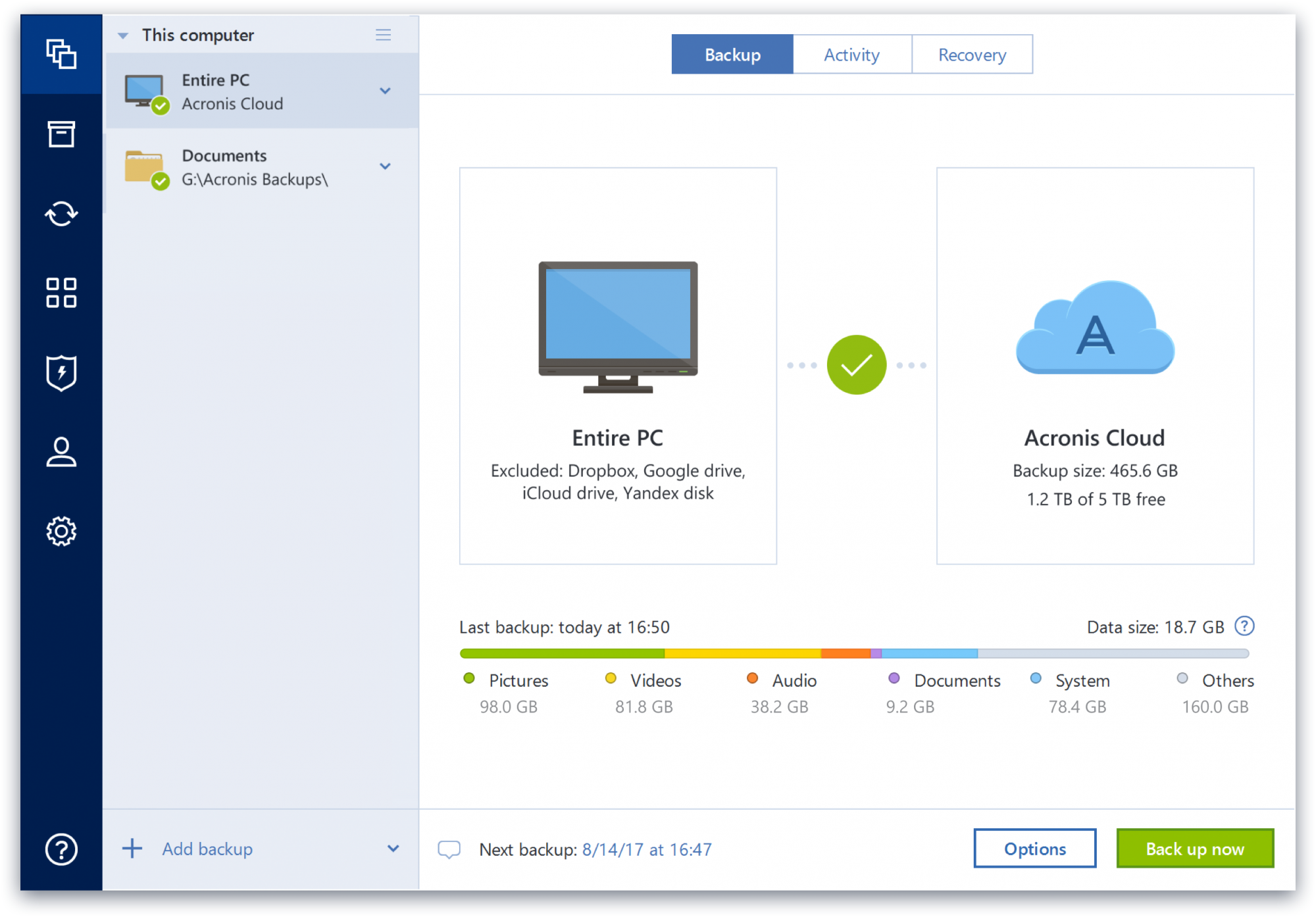
Screenshot of data control, which supports backup in just two clicks, and all data and backup information is displayed in one placeScreenshot of a display of the data that is backed up, the number of backup versions in storage, and how many photos, videos, music and documents that are available to restore.

Box Screenshots

Screenshot of an overview of Box's intelligent content management platform. It provides a unified, AI-powered approach to managing and securing your unstructured data, or content. ICM provides organizations with collaboration, AI, security, compliance, and workflow tools, interoperable and customizable, to get the most from their content.Screenshot of how with Box AI, AI can be accessed right where enterprise content exists. While that work can reside within Microsoft, Google, Apple, and other productivity suites, Box helps users to tap the full potential of AI for unstructured data.Screenshot of how Box creates a central workspace to edit, review, and assign tasks. Users can automate business processes and centralize content workflows in Box, including a configurable content submission, unlimited e-signatures, user-drive no-code workflow, and task assignment to power approvals.Screenshot of how Box secures content from threats, including malware and ransomware, and recover from attacks if they happen. This helps to maintain a zero trust architecture to ensure proper usage of corporate data, and prevent data theft.Screenshot of how Box can connect to any productivity suite, including Microsoft, Google, and Apple. This extends any existing security investments with integrations into key DLP, SIEM, and network security tools. Thus, seamless experiences can be built for users in any system they use, whether that’s a business tool like Salesforce or ServiceNow, or communications engines like Zoom and Slack.Screenshot of an overview describing Box's scalability. With unlimited storage capabilities Box has an exabyte (1,000PB) of customer data plus 1 gigabit per second upload and download speed. At its core, Box is a multi-tenant global SaaS platform with enterprise-grade reliability and end-to-end encryption to secure content.

Google Drive Screenshots

Screenshot of Google Drive PriorityScreenshot of Comment on Microsoft Files in Google DriveScreenshot of Shared drives