Overview
ProductRatingMost Used ByProduct SummaryStarting Price
Adobe Dynamic Tag Management (discontinued)
Score 10.0 out of 10
N/A
Adobe Dynamic Tag Management (DTM) was a tool used by marketers to manage tags, and for collecting and distributing data across digital marketing systems. Adobe DTM is a legacy, and it will not receive feature updates. Adobe invites users to upgrade to Launch on the Adobe Experience Platform.N/A
Countly
Score 8.0 out of 10
Mid-Size Companies (51-1,000 employees)
Countly is a product analytics solution and innovation enabler that helps teams track product performance and customer journey and behavior across mobile, web, and desktop applications. Ensuring privacy by design, Countly helps the user to innovate and enhance products to provide personalized and customized customer experiences, and meet key business and revenue goals. Countly empowers companies of any size or location to grow their business by helping them securely process billions of…N/A
Heap
Score 8.2 out of 10
Mid-Size Companies (51-1,000 employees)
Heap is a web analytics platform captures every user interaction on web iOS with no extra code. The tool allows you to track events and set up funnels to understand user flow and dropoff. It also provides visualization tools to track trends over time.
$0
per month
Pricing
Adobe Dynamic Tag Management (discontinued)CountlyHeap
Editions & Modules
No answers on this topic
Countly Enterprise Edition
Personalized Plans
per month per data point
Countly Community Edition
Free Forever
Free
$0
Up to 10k sessions/month
Growth
Starting at $3,600 annually
Up to 300k sessions/year
Pro
Contact Heap Sales
Custom sessions per month and unlimited projects
Premier
Contact Heap Sales
Custom sessions per month
Offerings
Pricing Offerings
Adobe Dynamic Tag Management (discontinued)CountlyHeap
Free Trial
NoYesYes
Free/Freemium Version
NoYesYes
Premium Consulting/Integration Services
NoYesYes
Entry-level Setup FeeNo setup feeNo setup feeOptional
Additional DetailsCustomizable, with free Community Edition (free forever) and free Enterprise Edition trial (free for 1 Month).Heap pricing is based on session volume. A session is a period of activity from a single user on your app or website. It can include many pageviews or events.
More Pricing Information
Community Pulse
Adobe Dynamic Tag Management (discontinued)CountlyHeap
Features
Adobe Dynamic Tag Management (discontinued)CountlyHeap
Security
Comparison of Security features of Product A and Product B
Adobe Dynamic Tag Management (discontinued)
10.0
5 Ratings
18% above category average
Countly
-
Ratings
Heap
-
Ratings
Role-based user permissions10.05 Ratings00 Ratings00 Ratings
Tag Management
Comparison of Tag Management features of Product A and Product B
Adobe Dynamic Tag Management (discontinued)
9.4
5 Ratings
15% above category average
Countly
-
Ratings
Heap
-
Ratings
Tag library9.04 Ratings00 Ratings00 Ratings
Tag variable mapping10.05 Ratings00 Ratings00 Ratings
Ease of writing custom tags10.05 Ratings00 Ratings00 Ratings
Rules-driven tag execution9.05 Ratings00 Ratings00 Ratings
Tag performance monitoring10.04 Ratings00 Ratings00 Ratings
Page load times10.05 Ratings00 Ratings00 Ratings
Mobile app tagging10.04 Ratings00 Ratings00 Ratings
Library of JavaScript extensions7.12 Ratings00 Ratings00 Ratings
Data Management & Integrity
Comparison of Data Management & Integrity features of Product A and Product B
Adobe Dynamic Tag Management (discontinued)
7.6
4 Ratings
7% below category average
Countly
-
Ratings
Heap
-
Ratings
Event tracking10.04 Ratings00 Ratings00 Ratings
Mobile event tracking10.04 Ratings00 Ratings00 Ratings
Data distribution management7.03 Ratings00 Ratings00 Ratings
Universal data layer10.04 Ratings00 Ratings00 Ratings
Automated error checking1.03 Ratings00 Ratings00 Ratings
Best Alternatives
Adobe Dynamic Tag Management (discontinued)CountlyHeap
Small Businesses
Google Tag Manager
Google Tag Manager
Score 9.3 out of 10
Fullstory
Fullstory
Score 9.1 out of 10
Fullstory
Fullstory
Score 9.1 out of 10
Medium-sized Companies
Google Tag Manager
Google Tag Manager
Score 9.3 out of 10
Whatfix
Whatfix
Score 9.9 out of 10
Whatfix
Whatfix
Score 9.9 out of 10
Enterprises
Tealium Customer Data Hub
Score 8.5 out of 10
Whatfix
Whatfix
Score 9.9 out of 10
Whatfix
Whatfix
Score 9.9 out of 10
All AlternativesView all alternativesView all alternativesView all alternatives
User Ratings
Adobe Dynamic Tag Management (discontinued)CountlyHeap
Likelihood to Recommend
10.0
(6 ratings)
8.0
(6 ratings)
8.5
(232 ratings)
Likelihood to Renew
10.0
(1 ratings)
-
(0 ratings)
9.3
(9 ratings)
Usability
5.0
(2 ratings)
-
(0 ratings)
9.0
(65 ratings)
Availability
-
(0 ratings)
-
(0 ratings)
9.1
(2 ratings)
Performance
-
(0 ratings)
-
(0 ratings)
8.4
(61 ratings)
Support Rating
10.0
(1 ratings)
7.0
(1 ratings)
9.0
(8 ratings)
Implementation Rating
10.0
(1 ratings)
-
(0 ratings)
9.0
(3 ratings)
Configurability
-
(0 ratings)
-
(0 ratings)
9.1
(1 ratings)
Ease of integration
-
(0 ratings)
-
(0 ratings)
9.1
(1 ratings)
Product Scalability
-
(0 ratings)
-
(0 ratings)
7.3
(2 ratings)
Vendor post-sale
-
(0 ratings)
-
(0 ratings)
8.2
(1 ratings)
Vendor pre-sale
-
(0 ratings)
-
(0 ratings)
8.2
(1 ratings)
User Testimonials
Adobe Dynamic Tag Management (discontinued)CountlyHeap
Likelihood to Recommend
Discontinued Products
If you're on the Adobe stack at all, you absolutely need DTM. It will make your life infinitely easier. It's so simple to update your Adobe Analytics code and have version control, and when we implemented Adobe Target, it took literally less than 15 minutes for me to do. I also think it's significantly simpler than Google Tag Manager. I went through all manner of difficulty when implementing tags on that and have not had similar problems on DTM. If you're frequently placing pixels, it's a great tool that will speed their deployment. The only situation in which I think a tag manager is not appropriate is if you have a dev with too much time on their hands. Otherwise, get a TMS and get DTM.
Read full review
Countly
Whether you're planning to include it into a website or a mobile application, this arrangement is simple to implement. The best feature has to be its superb "division," which allows you to delve deeper into your data without using SQL-like queries. On Ubuntu, the free "group version" can act organically aided.
Read full review
Heap
Scenarios when Heap was well suited: It is when a user claims that he encountered a bug without giving us the details of the error message. Scenarios where it is less appropriate: Its when we try to capture user interaction in our mobile app
Read full review
Pros
Discontinued Products
  • It is a rules based tag management system that allows the application of tracking pixels much easier than hard coding.
  • By placing 2 pieces of code on the top and bottom of each page of a website, we can create rules that track certain events and relay the information back to Adobe Media Optimizer and Google analytics.
  • It has simplified the coding process so one doesn't have to generate tons of gory javascript to deploy on each individual page to get tracking.
Read full review
Countly
  • Open-source and Self-hosted - Countly can be completely self-hosted, which makes it really easy to offset costs of a competing service like Segment or Mixpanel for early-stage companies.
  • A large number of SDKs and platform support - Countly provides fairly comprehensive support for mobile applications and general tracking. As a result, it's pretty easy to create comprehensive tracking of events for any company.
  • Custom queries, access to data - You have instant access to data and extensive customizability which makes this platform fairly easy to use for any purpose of user and market tracking.
Read full review
Heap
  • Realtime interactions which are captured automatically is a unique feature which no other product offers.
  • Low code implementation is a big plus for marketing teams, as there is less dependency on engineering
  • Detailed customer behaviours can be studied with captured replay sessions
  • Due to all the above points - it helped to improve customer experience
Read full review
Cons
Discontinued Products
  • It is only available with Adobe Marketing Cloud so you can't buy it as an independent product.
  • It is easier to use than Google Tag Manager, but not nearly as popular.
  • Whereas Google Tag Manager is free, Dynamic Tag Management must be purchased as part of Adobe Marketing Cloud.
Read full review
Countly
  • No specific thing in mind. All is good except sometimes the customer service lags a little when you have problems setting up the tool.
Read full review
Heap
  • I think Heap can improve its onboarding; I would love to see some info that is helpful for someone who isn't in Heap every single day.
  • Sharing dashboards can be tricky, it feels like a huge learning curve that I already have forgotten how to do.
Read full review
Likelihood to Renew
Discontinued Products
As it interfaces so well with AMO, we shall be utilizing the DTM for any future client additions.
Read full review
Countly
No answers on this topic
Heap
It's a great platform. I'm glad that one of our product managers introduced it because it has allowed us to create all kinds of new functionality. We're not only able to create a better product experience from our communications because of Heap, but we're also able to generate all kinds of helpful analysis.
Read full review
Usability
Discontinued Products
It is easy to use at a basic level, however without JavaScript resource you will struggle.
Read full review
Countly
No answers on this topic
Heap
On a scale from 1-10, I find Heap to be incredibly user-friendly and easy to use. I enjoyed the training videos available and was quickly able to pick up how to create events and reports to track user interactions on our product. I would recommend Heap for its usability first and foremost.
Read full review
Reliability and Availability
Discontinued Products
No answers on this topic
Countly
No answers on this topic
Heap
I've never run into any issues with Heap's availability, Heap is always there when I need it. I haven't run into any issues like application errors or unplanned outages during my 2+ years of using Heap. Each and every time I log in to Heap I have a completely functional experience
Read full review
Performance
Discontinued Products
No answers on this topic
Countly
No answers on this topic
Heap
Heap doesn't affect page load times considerably nor has a large impact [on] our overall score, as far as page loading times inside of the tool its pretty reliable to retrieve data as much as "instant" that it can be the delay seems to be on data getting tracked into the servers to be read but it's not significant.
Read full review
Support Rating
Discontinued Products
Although it is a newer product to Adobe, they seem to truly care about our challenges and are very proactive in making sure that we have the most knowledgeable support available in a timely manner.
Read full review
Countly
Countly practically does everything you need it to do. However, it can have challenges of its own sometimes.
Read full review
Heap
Heap support has allowed us to troubleshoot and test a lot of different items. Their support team is always helpful and friendly, even when we come to them with the most complicated questions. I think this greatly improves the value proposition of the product because their support team is knowledgable and friendly.
Read full review
Implementation Rating
Discontinued Products
It was quite seamless with the outstanding support from our Adobe account manager.
Read full review
Countly
No answers on this topic
Heap
The implementation was smooth and easy. The Heap team helped us with implementation and it went great! Within a few weeks, we were fully up and running and utilizing the platform to its full capability. This is an additional thing that has made this platform so great and we couldn't recommend it enough.
Read full review
Alternatives Considered
Discontinued Products
Adobe DTM provides a more secure data analytics solution. It is customized and best used on large scale deployments of websites with pages 10,000+. The Adobe Analytics tool, once learned, is very easy to use and provides more robust, customized graphics and ability to export data to "securely" via FTP from the cloud to SQL database.
Read full review
Countly
Countly have two main elements that make it the better option. First is open sourced so you can edit with code new options and new events, also you can use a variety of plugins depending of the necessities of the users and the objectives of every analysis. The second characteristic is that is very easy to use and even if is open source and the code could seem complex everything is very intuitive.
Read full review
Heap
Heap offers a ton of functionality on a single platform.It also has an smart data science layer to offers suggestions for next steps in the analysis, allowing us to explore alternative paths we may not think to take. The low-code option for updating data is appealing, and there is a lot of automation with minimal engineering effort.
Read full review
Scalability
Discontinued Products
No answers on this topic
Countly
No answers on this topic
Heap
The most challenging part of using Heap in a growing organization is the naming and structure in which reports and dashboards are organized. I work within the marketing department and our Heap leader internally works within the IT/Product department, which makes it challenging because we often don't speak the same language, so the learning curve has been steep without any specific use-case examples to leverage online.
Read full review
Return on Investment
Discontinued Products
  • The key factor is that my devs are not tied up with petty things like adding JS or advertising pixels. Simple work like that can be handled by me while they work on feature development.
  • Release cycle is much shorter when a dev is needed, say for a direct call rule that involves JS being written. We don't have to go through the normal release cycle and can do it on an ad hoc basis without all the rigmarole of a hot fix.
Read full review
Countly
  • Allowed me to understand my customer on a deeper level
  • Allowed me to tweak my content and sales pages
  • Allowed me to better understand my target market.
Read full review
Heap
  • It has helped us make decisions on what products to scope for our MVP based on the usage data.
  • It's allowed us to measure success with our beta product.
  • It's helped us view our conversion rates in an easy and usable manner.
Read full review
ScreenShots

Countly Screenshots

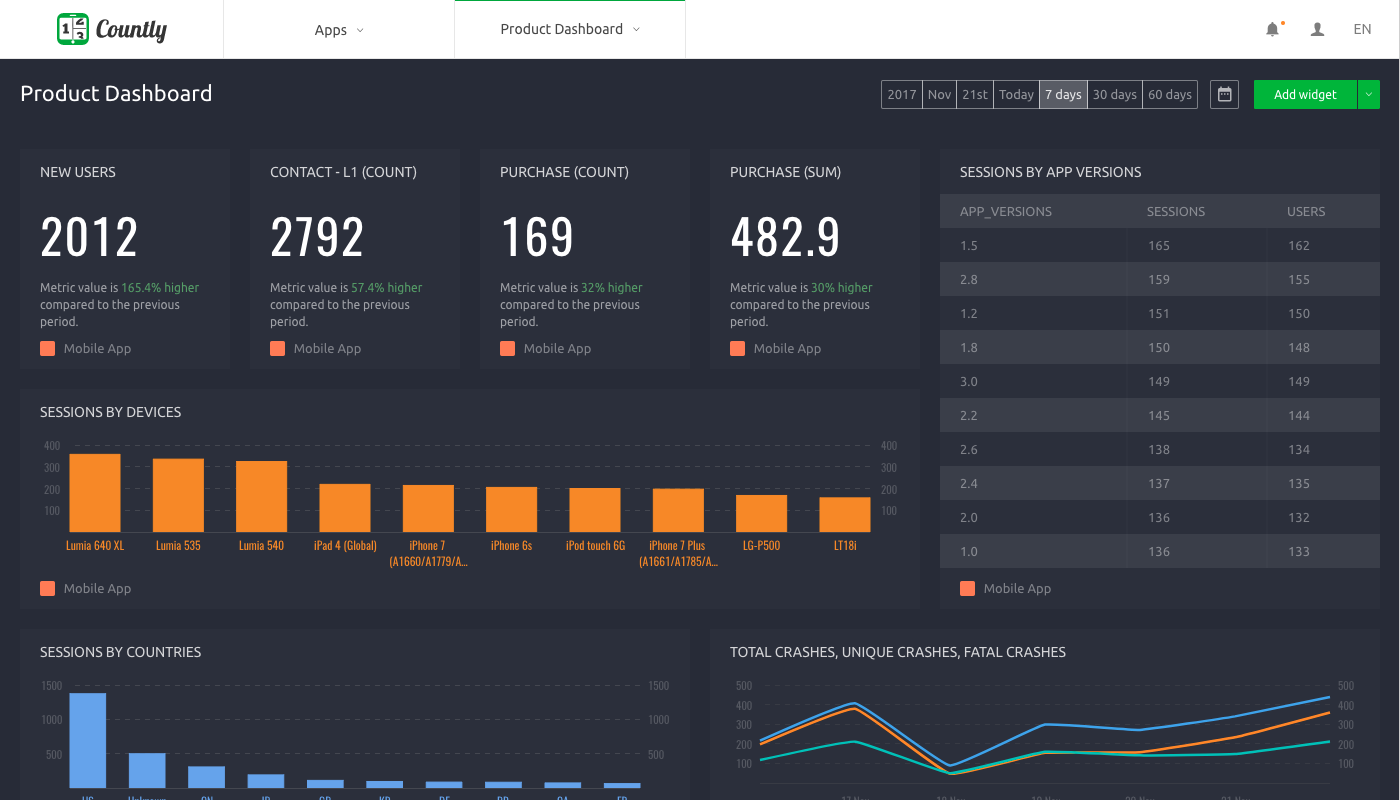
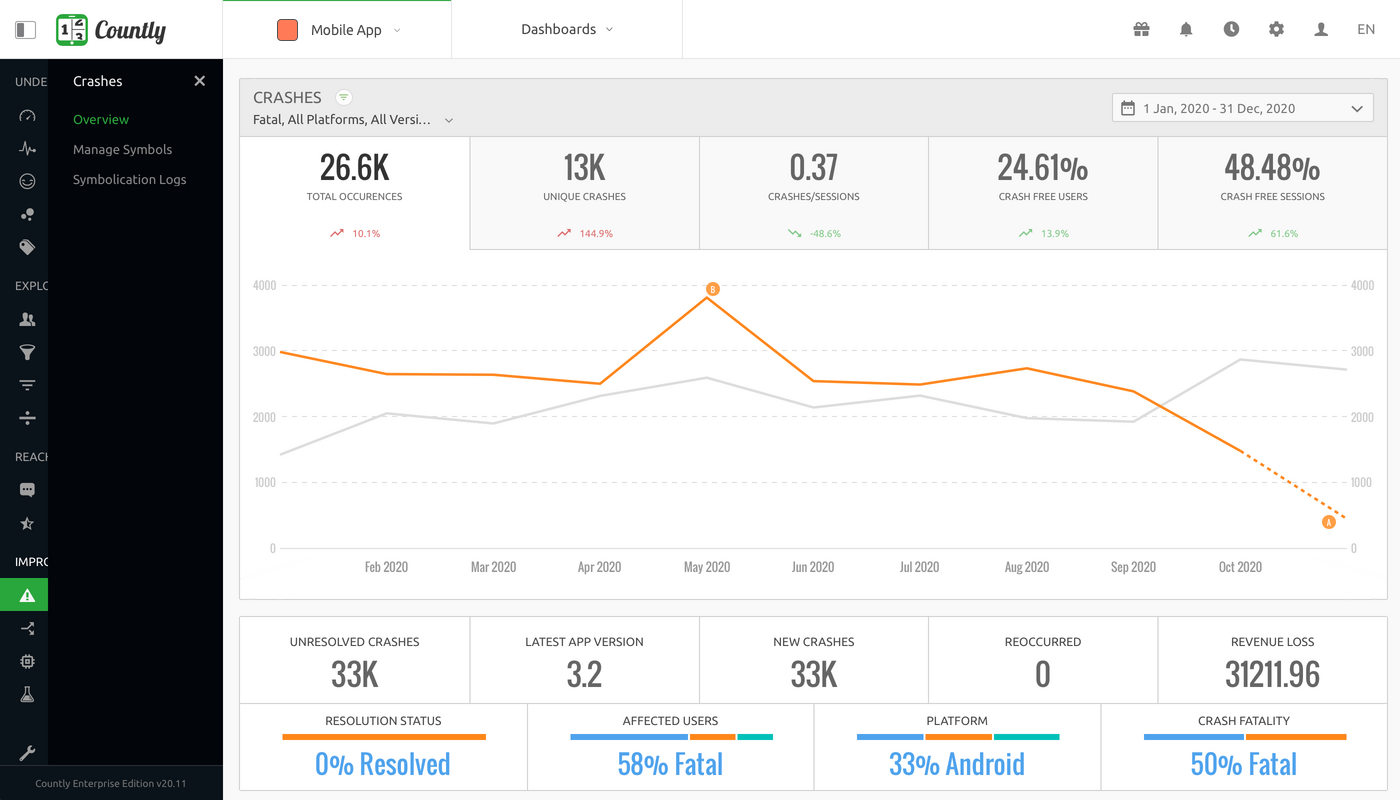
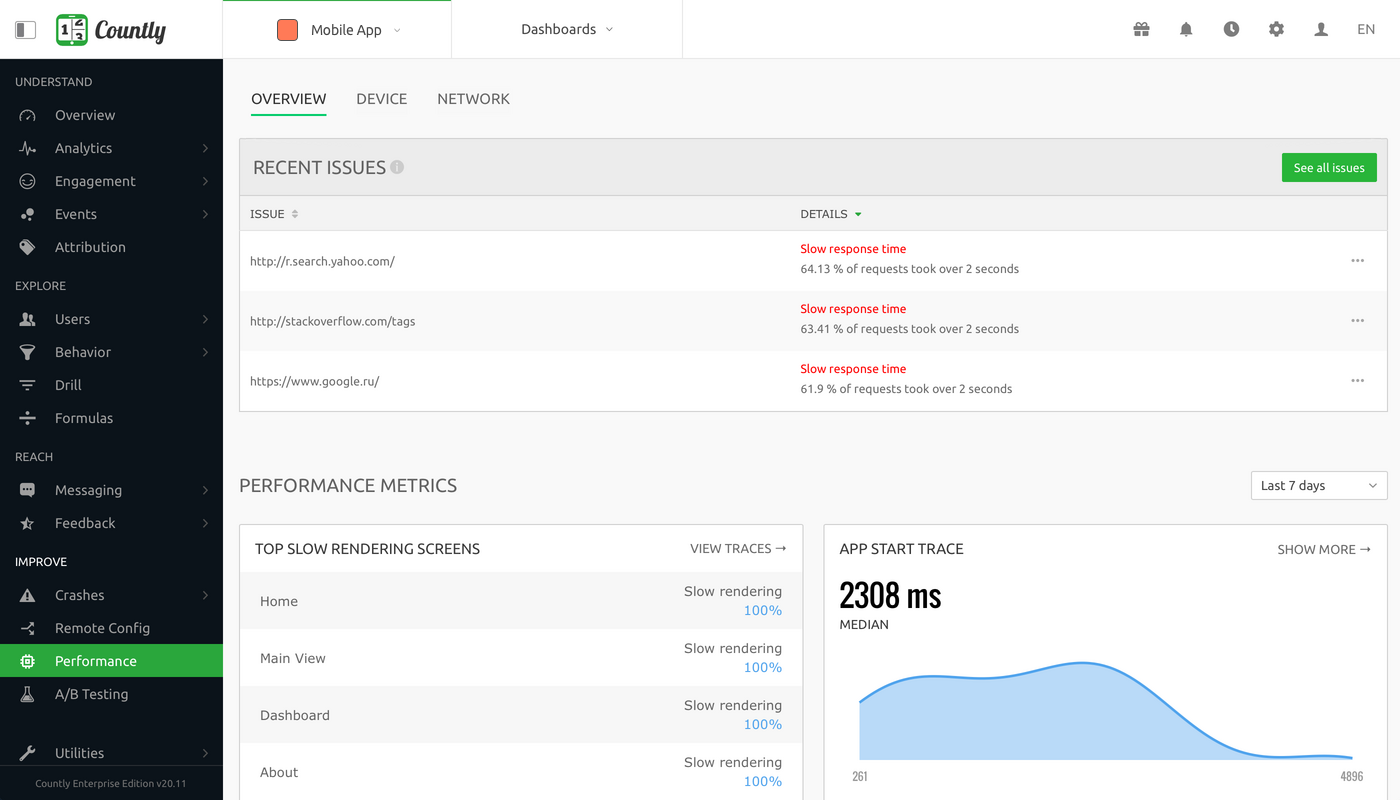
Screenshot of Overview - Product analytics platform to understand and enhance customer journeys in web, desktop and mobile applicationsScreenshot of Dashboard - Visualise metrics that matter the most to your businessScreenshot of User Profiles - Explore your product analytics data with individual user detailScreenshot of Crashes - Always be on top of crashes and exceptions in your applications, and resolve them quicklyScreenshot of Funnels - Track step-by-step goal completion rates inside your applicationScreenshot of Performance Monitoring - Keep track of your applications' network requests, perform code level profiling

Heap Screenshots

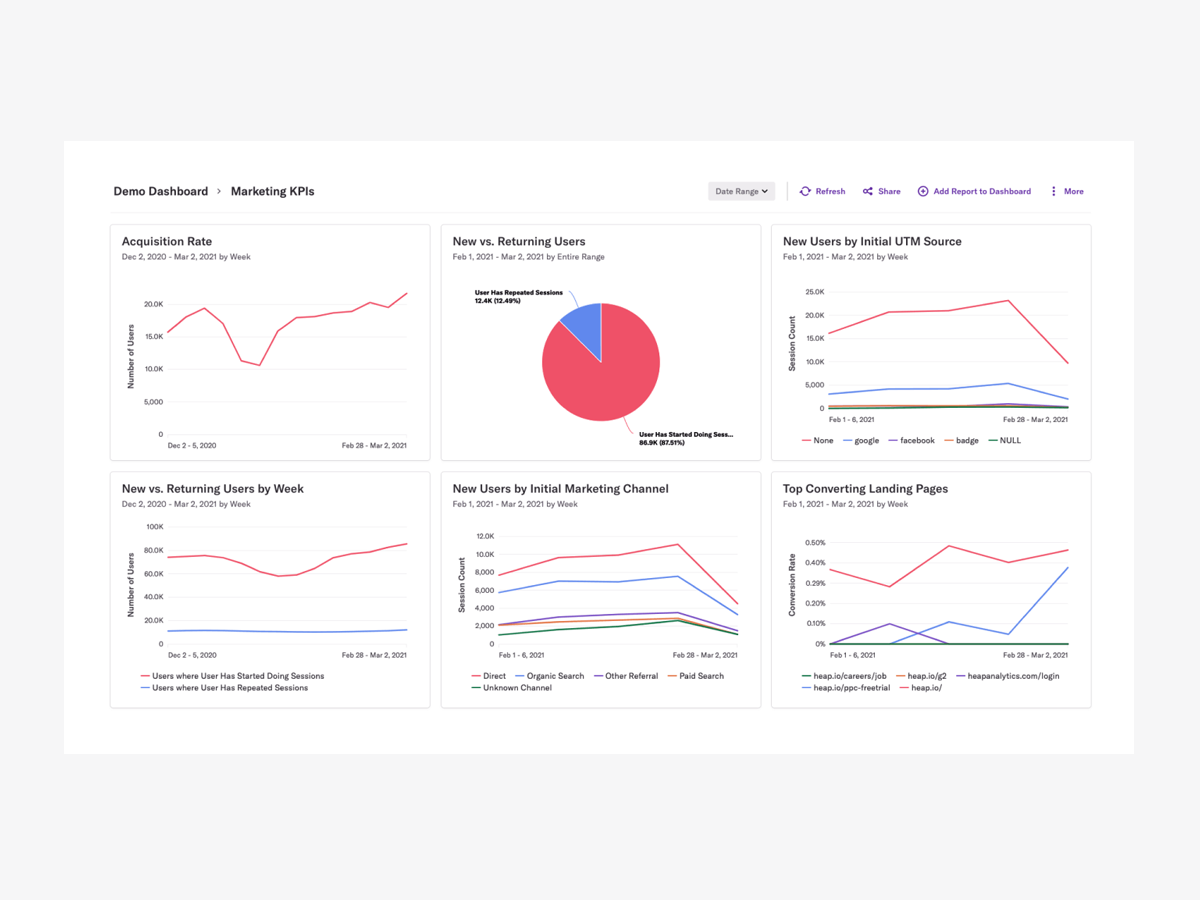
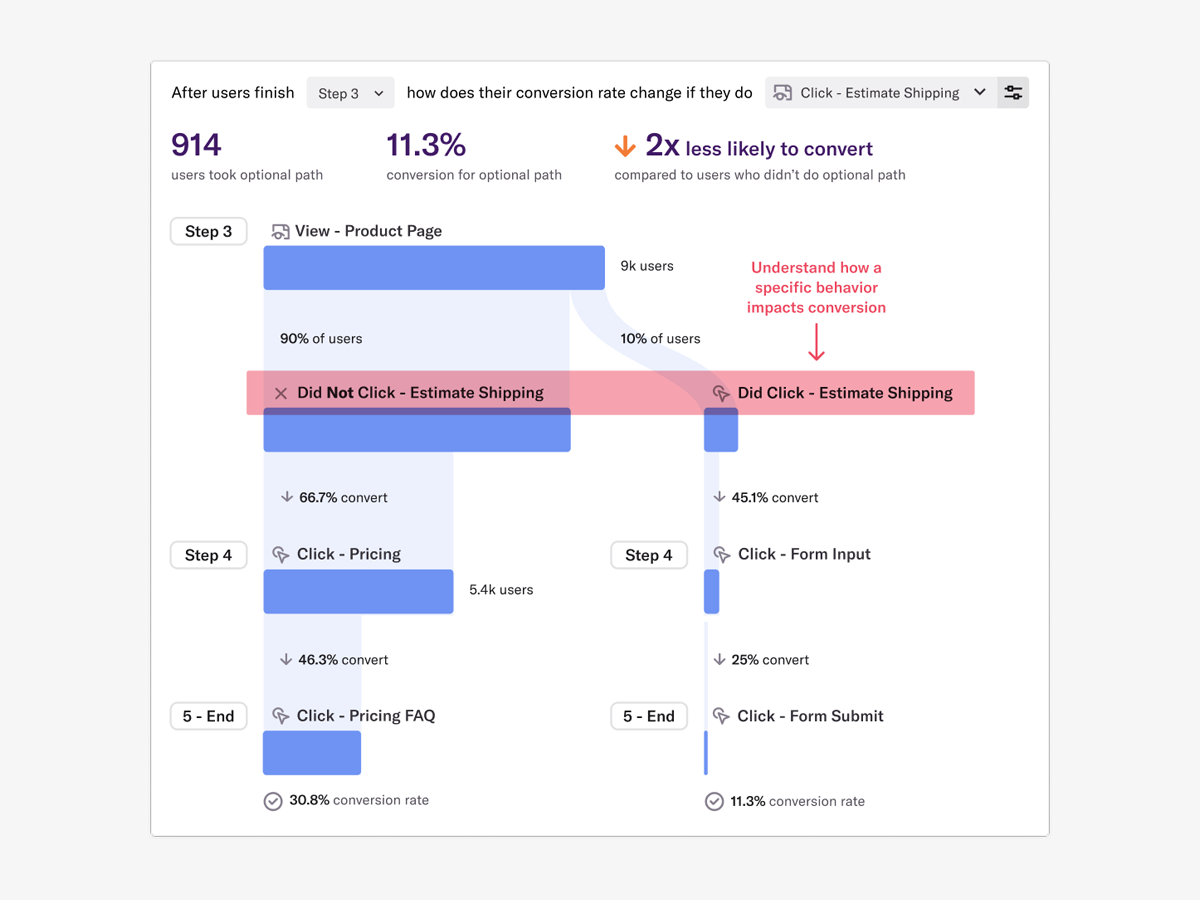
Screenshot of Dashboard in Heap (Use to get Product or User Behavior Insights)Screenshot of Effort Analysis provides the first-ever quantitative measurement of user friction, capturing the difficulty users face when moving through every step of every user flow across the digital experience.Screenshot of Heap Illuminate looks for the most common events between two steps in a funnel and generates a Top Events table that displays how well paths including different events convert to the next step so you can understand how that behavior is helping or hurting conversion.Screenshot of From Top Events you can choose an event and use Path Comparison to fork your funnel and see how the selected behavior impacts conversion downstream.