Adobe Workfront, acquired by Adobe in late 2020, is a web-based project-management tool. It is designed for both IT and marketing teams, but can be implemented for any kind of project. Workfront offers all the features standard to project management platforms, as well as resource allocation, automation, and agile workflow.
N/A
Lytho Workflow
Score 9.7 out of 10
N/A
Lytho Workflow is a creative project management software built specifically for the needs of creative and marketing teams. Combining elements of task and workflow management with the collaborative features of online proofing, Lytho Workflow helps teams get more content produced - faster. The key components of Lytho Workflow are Request Intake, Project Management, Review & Approval, and Reporting. From the initial creative brief, Lytho Workflow's request forms ensure…
N/A
Planview ChangePoint
Score 7.0 out of 10
N/A
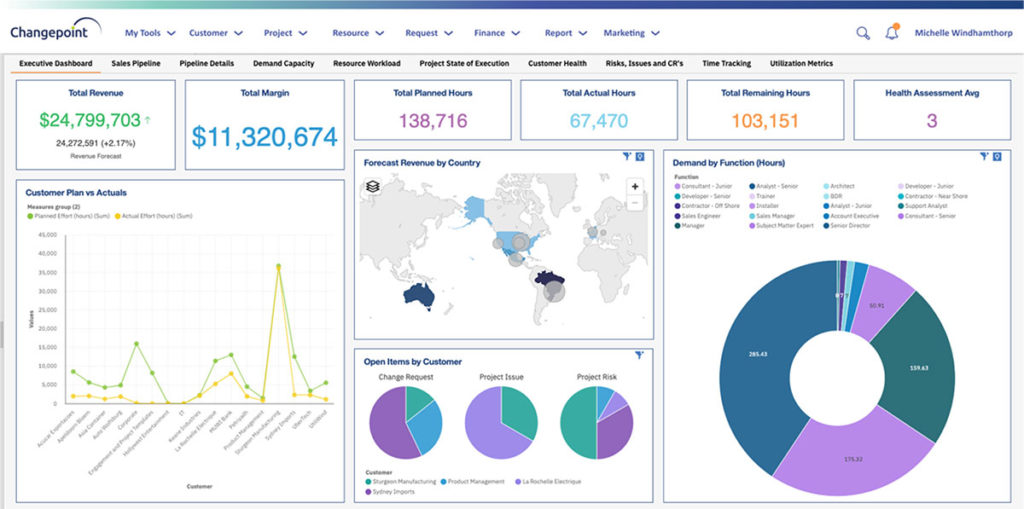
Planview Changepoint is a platform that marries professional services automation (PSA), project portfolio management (PPM) and business analytics to provide managers broad operational visibility and control over their strategic business portfolios.
N/A
Pricing
Adobe Workfront
Lytho Workflow
Planview ChangePoint
Editions & Modules
No answers on this topic
No answers on this topic
No answers on this topic
Offerings
Pricing Offerings
Adobe Workfront
Lytho Workflow
Planview ChangePoint
Free Trial
No
No
No
Free/Freemium Version
No
No
No
Premium Consulting/Integration Services
Yes
No
No
Entry-level Setup Fee
Optional
No setup fee
No setup fee
Additional Details
—
No two teams are alike. So why offer “one size fits all” pricing plans? They just don’t work – teams are locked out of features they need while they get features they don’t need. We do things differently. We create individual pricing based on your team’s specific needs and budget.
Workfront has better integration into the tools we use, like Adobe Creative Suite, Outlook, Salesforce, and our CMS and DAM. We needed a solution that could work well with our MarCOMM Stack and didn't need a whole lot of support. Although we're a small shop (license-wise) …
JIRA and Clarizen were too complicated and did not offer an integrated document review and proofing system. Microsoft Project did not handle multiple small projects and resource allocation as well. Smartsheet was too limited for large teams and required too much manual work.
I haven't really used the other systems. I have only researched them and compared them against each other. I chose Workfront because I felt like the UX/UI and the breadth of what Workfront offers far outweighed the opposition.
Verified User
Account Manager
Chose Adobe Workfront
We are in the process of reevaulating and looking for another project management system that better meets our needs.
They could not prove to us that they were able to replicate a lot of the functionality that we liked about Workfront. We stuck with Workfront because when we talked to friends at other companies in similar "creative departments," most of them are using multiple systems to …
Workfront enables us to manage all our projects effectively while providing a comprehensive overview of team resources. The Resource Planner helps the team identify their capacity to determine whether they are over- or under-allocated. This information is crucial for project planning and ensuring team members do not experience burnout.
It's a flexible program that can be molded to fit most businesses. It's geared towards agencies but we've been able to use it successfully as an in-house solution. It's pretty intuitive for the most part and is easy for new hires or clients to get up and running pretty quickly.
Changepoint is basic and would, therefore, work for businesses with uncomplicated requests, pretty straightforward workflows and willingness to work with an unsightly solution. It is basic, from the UI to the search option and the way the information is captured, which can be frustrating and counter-intuitive at times. It is relatively robust (i.e. I have been using it for almost 2 years and have not seen it crash once) but it does log me out when the system has been inactive for about 30 minutes - and I am only notified about being logged out upon clicking the Submit button, meaning many a line of text have been typed more than once!
Requests - Request forms are set up so that certain fields are required and there's a minimum turnaround time. This prevents others from submitting an incomplete request or requesting things last minute.
Proofing - Chasing after people to approve a proof is always a pain, but the simplicity of Lytho Workflow makes it less of a pain. I can quickly remind people in the route to review the proof by clicking a button.
Templates - I use templates so that a list of tasks is created for me when I accept a job. It also creates a timeline for when each task needs to be done.
Changepoint has significant reporting capabilities, though of course, the data that comes out is only as good as the data that goes in. I enjoy being able to use the standard reports to understand exactly how much a project has cost us and to compare it to how much we are charging. This allows us to more accurately set our prices. Though we have not used the report designer capability, I understand that custom reports can be designed with relative ease.
Changepoint has a versioning capability for changes made to user profiles in the system manager, which I find particularly helpful. As a non-power user, it is valuable to be able to see what changes I have made to various profiles so that I can troubleshoot a problem down the line.
Changepoint has significant functionality well beyond the features that we are currently using, and for this reason, I think it is affordable and a good deal. Particularly if your organization is interested in dedicating the time and resources into using all of the features around project planning, resource allocation, etc., the price is well worth the value.
We use Changepoint to manage the IS organization. I would like to see more advancement in order to do benefits management.
I would like to see a capability where a project manager can build a very detailed work breakdown structure, but only require project resources to charge time and provide a task status at a higher level.
All that I've said already is why. I suppose the clearest way to say it is that at this point? I cannot imagine running the 300+ active projects in eMarketing without AtTask; it simply wouldn't be possible and even more; I wouldn't imagine why we'd try to find an alternative tool when we have one meeting our needs.
Sometimes the decision to renew boils down to an old adage "if it isn't broken don't fix it". Previous to moving to Changepoint, it was obvious that we needed a better project management tool. Projects we completed on time but the time zone difference between the teams and several iterations of back and forth caused a number of communication issues with projects. The difference is night and day.
Workfront is overly complex, but it is functional as a tool to keep track of projects. It is a shame that sometimes it takes a lot of clicks to find anything. Workfront is slowly modernizing its interface but at the same time, hides certain information away thus making the experience feels worse.
Maintenance is required, but usually after work hours, Some days the proofing tool function is not operational, but this is a new function of the tool that WF is working out. the kinks on. Chrome is the best browser to use the system in and we find Firefox and Explorer lose some view functionality - Gantt Chart, Resource Grid
Workfront's performance has been very good. Everything always feels very fast and snappy in my experience. We have integrated it with custom scripts to create folder structure for media managing our projects. It works very well.
I know that this particular company has it's own Adobe Workfront employee that builds out things they need from the software, and meets with them regularly to troubleshoot. I'm not part of this process, but it's refreshing to see Adobe provide this level of customer service to people, and they're expedient.
The training is very easy to use and you can simply choose the topics included in the course(s) that are most important to your training needs. After each training course, you are tested on what you have learned. If you need a refresher course, they provide Course Catalogs as well as instructor-led courses & workshops.
Most people learn as you go, a lot of this stuff requires trial and error throughout so my suggestion is to provide as much information in the upfront and keep it as simple as possible. You can add other tools and features as you go but everyone should have the basics down so no bad habits can start to develop. Be persistent with everyone, and don't be afraid to correct and talk through steps again so everyone is on the same page
It's been a while since I've used another time and resource management platform, but I would say that Adobe Workfront takes the cake. Its newly refreshed user interface is simple to navigate, whereas other platforms can be quite confusing when "drilling down" on a project. Also, Adobe Workfront has features that I have not seen in other platforms, including collaboration capabilities and the ability to upload a document as proof so it can be reviewed for grammar, consistency, formatting, etc., before being presented or sent to a client.
By consolidating the requests, project management, and proofing without features we didn't need like invoicing it was an easy fit for us. We were able to quickly develop a comprehensive workflow and the gains to efficiency were immediate. Pricing was competitive (at least at the time) and the implementation was very good as well.
Planview Changepoint helps us to understand our key customers enabling us to capitalize on every financial opportunity and helps us to forecast demand against the capacities required for new opportunities, and also it automates and monitors contractual terms and conditions. It gives us visibility into our employees' skills and helps to optimize resource allocation.
As I stated earlier, I didn't have to pay for Workfront myself- I'm a user under a large organization. I know it's not cheap to implement, I don't know how the price scales for a small-business, but I do like the product enough that I'm going to look into it in the future for my own company.
We have been using Workfront for about 3 years. During this time they continue to be a very stable project management system. Workfront's overall scalability is able to handle increased loads of work. When using Workfront for a project management tool for the web team, we store documents, images & video's without any issues. They work with their customer's to provide the best project management system in the market today! I highly recommend Workfront for all project management needs. Workfront strives to deliver unique technology solutions to growing companies!
I wasn't working for the company when they first started using Lytho Workflow workflow, so I can't say what impact it has had. However, I do see the product as a necessity in the fast-paced environment that is retail marketing. The introduction of the new "change request" feature has saved countless hours of miscommunication and confusion when project objectives change.
Employee efficiency has decreased significantly within our Project MAnagement team. The main causes are lack of logical steps/not user-friendly and the slowness of the entire program.
Changepoint PSA has greatly improved being able to track budgets for all projects. Before this software, budgets were done manually by hand and cross-referenced with Accounting. Now, we can pull a report out of the system, as long as all parties entered their time and data correctly.