Adobe Workfront, acquired by Adobe in late 2020, is a web-based project-management tool. It is designed for both IT and marketing teams, but can be implemented for any kind of project. Workfront offers all the features standard to project management platforms, as well as resource allocation, automation, and agile workflow.
N/A
Seismic Content
Score 7.3 out of 10
Enterprise companies (1,001+ employees)
Seismic is a recognized leader in sales and marketing enablement. The vendor's value proposition is that their solution equips global sales teams with the knowledge, messaging, and automatically personalized content proven to be the most effective for any buyer interaction. Additionally, the vendor says powerful content intelligence and analytics enable marketers to prove and improve their impact on the bottom line, revealing what is really driving revenue and what needs to be…
N/A
Trello
Score 8.4 out of 10
N/A
Trello from Atlassian is a project management tool based on a Kanban framework. Trello is ideal for task-management in a to-do list format. It supports sharing boards and cards across users or teams. The product offers a free version, and paid versions add greater automation, collaboration, and administrative control.
$6
per month per user
Pricing
Adobe Workfront
Seismic Content
Trello
Editions & Modules
No answers on this topic
No answers on this topic
Standard
$6
per month per user
Premium
$12.50
per month per user
Enterprise
$17.50
per month per user
Free
Forever Free
Offerings
Pricing Offerings
Adobe Workfront
Seismic Content
Trello
Free Trial
No
No
No
Free/Freemium Version
No
No
Yes
Premium Consulting/Integration Services
Yes
Yes
No
Entry-level Setup Fee
Optional
No setup fee
No setup fee
Additional Details
—
—
A discount is offered for annual billing and for larger numbers of users.
I wasn't with this company when the buying decision was made. However, Workfront replaced Mavenlink, and what I could gather is Mavenlink was liked by users, but the owners and administrators wanted more reporting and more automation. For me, Workfront is far superior to MS …
Workfront destroys Trello in my opinion for large, multifaceted projects, however, is not compatible with the more intimate projects that perhaps involve 2-5 people. The free Trello option, though limited, is better suited for this.
It gave better structure for marketing/creative operations where intake, approvals and governance actually matter. Compared to Asana/Monday/Trello, it felt heavier but it handled standardised workflows, audit trails and stakeholder drived demand reliably.
We needed a single …
Workfront is more comprehensive. The thing that sets Workfront apart is that using their api, we can write custom integrations over Workfront and design our own dashboards using that integration. This allows us to not only use tools provided by Workfront, but write our own very …
Workfront offers more features than lower cost options, allowing us to scale our business and not have to shift with each jump in headcount. it also provides more financial data support compared to simpler tools. It integrates into accounting software as well.
Best of all three really, the security features are also important for us as we work in an industry where PPI is used so making sure GDPR rules are adhered to is essential and Workfront allows us to do that.
I love that Workfront is easy to configure and change as your organization grows. It's easy to stay up to speed with and make changes based on system changes and your organization changing. I also am in love with the reporting and custom data features. Custom forms and the …
Workfront has better integration into the tools we use, like Adobe Creative Suite, Outlook, Salesforce, and our CMS and DAM. We needed a solution that could work well with our MarCOMM Stack and didn't need a whole lot of support. Although we're a small shop (license-wise) …
Our team chose to implement Workfront for its detailed project reporting capabilities. Furthermore, Workfront's ability to perform complex virtual proofing is a huge benefit to our work team. Overall, my team's experience has been extremely positive as we continue to implement …
The other tools that we used in the past were simple and therefore the capabilities were really limited. Workfront is quite complex in what it can do which is something we didn't see with the other tools we used. We also were able to make Workfront work for ever facet of our …
I do not feel educated enough to add comments to this section, as we did not do a thorough comparison of these products. We merely looked at cost, basic info and the portfolio management features. We already had Workfront and were exploring our options.
The ProofHQ tool stands above other project management systems, especially in a marketing environment. Workfront is a valuable tool for our marketing processes and projects. The reporting and customization features allow us to configure Workfront around our specific business …
I have used Jira, Trello, Microsoft Project, Excel, many task list mgmt. apps (Todoist, RTM, etc.), podio, wrike, and paper. I have never found a project management tool that can accomplish bringing corporate people all into the same system as well as workfront (for large …
We did not evaluate any of the alternative products. Attask came as a recommendation from our previous HOD who had used it before. We use Trello and basecamp with third party organisations.
I didn't select Workfront, honestly. I'm sure it was selected because of its ability to track time to the smallest measure, but I firmly believe that teams would be better served by any of the communication enablement applications listed above. Which is a fancy way of saying …
I honestly, personally, haven't looked into other options very much besides Google Drive. I think for this purpose, Seismic does a better job because it holds everything we need without having to share files or give people access. It is just a site where we all have a log-in …
Trello is very cost-effective with a high upside and minimal implementation and training needs. If you need a full product management tool then this may not be for you. Although it does have an API for integrations with other tools I cannot speak to the feasibility of this.
Features
Adobe Workfront
Seismic Content
Trello
Project Management
Comparison of Project Management features of Product A and Product B
Adobe Workfront
7.4
347 Ratings
5% below category average
Seismic Content
-
Ratings
Trello
8.5
222 Ratings
9% above category average
Task Management
8.7346 Ratings
00 Ratings
9.5222 Ratings
Resource Management
7.6316 Ratings
00 Ratings
9.3185 Ratings
Gantt Charts
6.3277 Ratings
00 Ratings
7.173 Ratings
Scheduling
8.0312 Ratings
00 Ratings
9.1168 Ratings
Workflow Automation
7.7313 Ratings
00 Ratings
8.2142 Ratings
Team Collaboration
8.0333 Ratings
00 Ratings
9.0218 Ratings
Support for Agile Methodology
6.5217 Ratings
00 Ratings
8.9147 Ratings
Support for Waterfall Methodology
7.4229 Ratings
00 Ratings
7.6115 Ratings
Document Management
7.5315 Ratings
00 Ratings
8.2159 Ratings
Email integration
7.4264 Ratings
00 Ratings
7.7146 Ratings
Mobile Access
5.8262 Ratings
00 Ratings
9.1192 Ratings
Timesheet Tracking
7.9249 Ratings
00 Ratings
9.388 Ratings
Change request and Case Management
7.3243 Ratings
00 Ratings
8.7102 Ratings
Budget and Expense Management
6.8214 Ratings
00 Ratings
7.773 Ratings
Professional Services Automation
Comparison of Professional Services Automation features of Product A and Product B
Workfront enables us to manage all our projects effectively while providing a comprehensive overview of team resources. The Resource Planner helps the team identify their capacity to determine whether they are over- or under-allocated. This information is crucial for project planning and ensuring team members do not experience burnout.
It is excellent for a cloud-based workspace between you and your customers. I find the chat feature to be a cool and underutilized tool. I appreciate how you can consolidate all your information on one page, rather than having multiple attachments. Easy to clone DSRs (Digital Sales Rooms), which saves a significant amount of time. Especially when all you have to do is make minor changes between customers.
For teams or individuals with lots of individual tasks/details to track, Trello is perfect! It basically removes the need for a paper checklist. For those that need an overall project management tool that requires less tasks and more overarching goals, collaboration amongst various teams, and gantt charts I would suggest monday.com
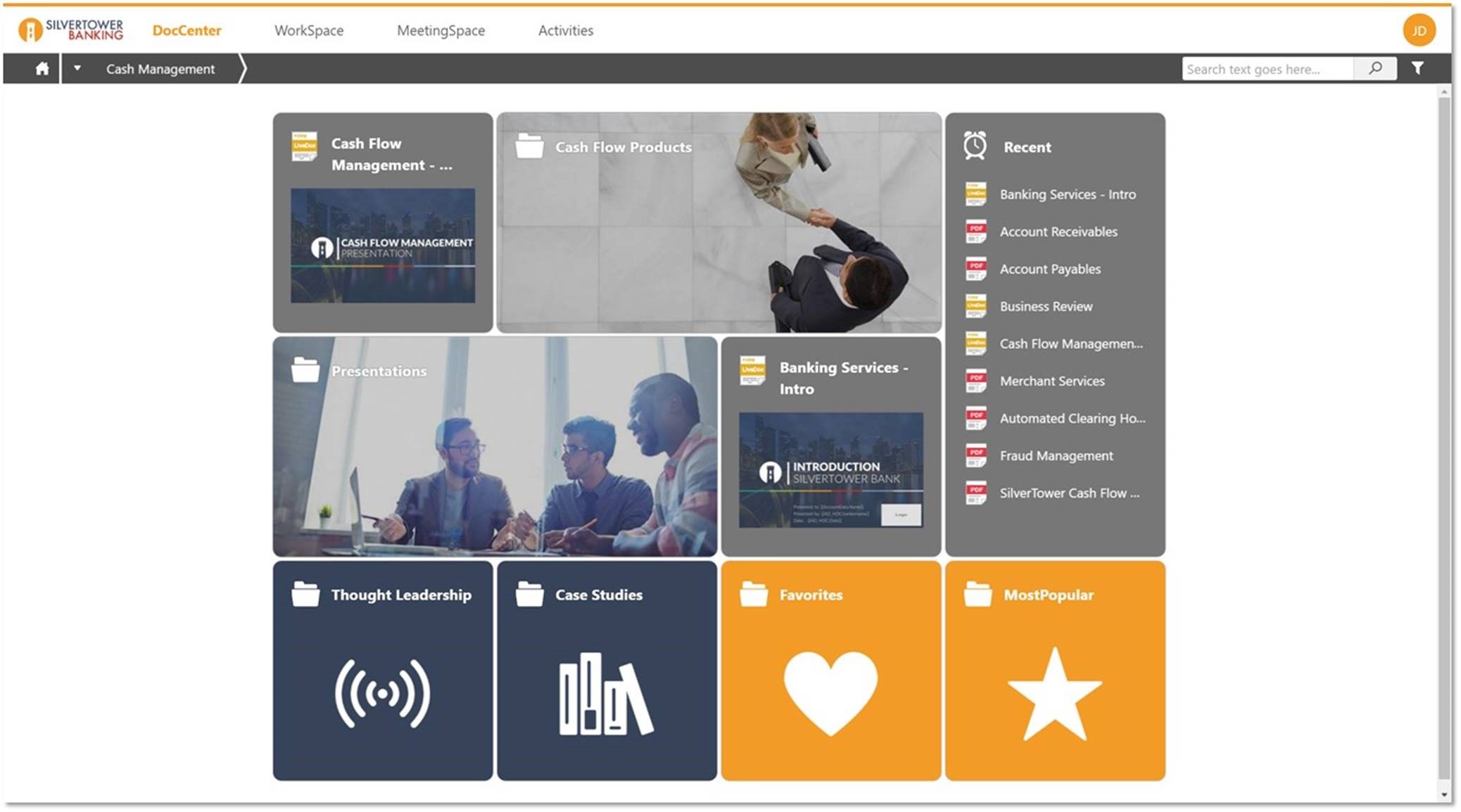
Seismic allows for one location to store all relevant content so that associates are not having to spend as much time searching for what they need.
Seismic provides the ability to fully customize content such that one template can serve many needs with the simple ability to answer questions that drive the customization in the content. This customization can range from simple to quite complex depending on your level of expertise with the tool.
Seismic provides a lot of flexibility when it comes to organizing your content and how to make the experience of accessing that content unique to the needs of each user in the system.
All that I've said already is why. I suppose the clearest way to say it is that at this point? I cannot imagine running the 300+ active projects in eMarketing without AtTask; it simply wouldn't be possible and even more; I wouldn't imagine why we'd try to find an alternative tool when we have one meeting our needs.
I am very likely to renew Trello, because it doesn't cost anything to do so. I am also very likely to use Trello's upgraded features in the future because a lot of my team's data is stored on there and they have already gotten used to the platform. Trello is very easy for new team members to pick up, making the onboarding and usability very streamlined.
Workfront is overly complex, but it is functional as a tool to keep track of projects. It is a shame that sometimes it takes a lot of clicks to find anything. Workfront is slowly modernizing its interface but at the same time, hides certain information away thus making the experience feels worse.
Seismic is super easy to use and has so many different features and functionality to take advantage of. But being a company who utilizes Google platform a lot we have some issues with the api connections and integrations across the board. But all in all it is not a huge issue, I would just like to see them improve the integration more
Trello is incredibly intuitive, both on desktop and mobile right away. It is also full of helpful features that make it even easier to use, and is flexible enough to suit almost any organizational need. Onboarding for the software is thorough, but concise, and the service is frequently updated with even more QOL improvements.
Maintenance is required, but usually after work hours, Some days the proofing tool function is not operational, but this is a new function of the tool that WF is working out. the kinks on. Chrome is the best browser to use the system in and we find Firefox and Explorer lose some view functionality - Gantt Chart, Resource Grid
Workfront's performance has been very good. Everything always feels very fast and snappy in my experience. We have integrated it with custom scripts to create folder structure for media managing our projects. It works very well.
I know that this particular company has it's own Adobe Workfront employee that builds out things they need from the software, and meets with them regularly to troubleshoot. I'm not part of this process, but it's refreshing to see Adobe provide this level of customer service to people, and they're expedient.
Seismic's support team has been exceptional at providing support when an issue has come up, or when we have had questions regarding the platform. They have responded quickly, and I feel as if they truly try to find a solution to the quickest of their abilities. My team and I truly feel supported when it comes to reaching out to Seismic.
I haven't reached out to their support very often and their support is very limited anyway for the free users. They do have tons of great articles and videos in their Help Center and constantly send emails with updates and add-ons to the product. The fact that I've barely ever had to contact their support team means that they've developed a great product.
The training is very easy to use and you can simply choose the topics included in the course(s) that are most important to your training needs. After each training course, you are tested on what you have learned. If you need a refresher course, they provide Course Catalogs as well as instructor-led courses & workshops.
Most people learn as you go, a lot of this stuff requires trial and error throughout so my suggestion is to provide as much information in the upfront and keep it as simple as possible. You can add other tools and features as you go but everyone should have the basics down so no bad habits can start to develop. Be persistent with everyone, and don't be afraid to correct and talk through steps again so everyone is on the same page
For our small business, getting a few of us started well on Trello was the key, I think. As long as a couple of us were really comfortable with the interface, we could lead others and help them with any questions. From now on, anyone who works with us just naturally uses Trello for information sharing - it's just part of what we do.
It's been a while since I've used another time and resource management platform, but I would say that Adobe Workfront takes the cake. Its newly refreshed user interface is simple to navigate, whereas other platforms can be quite confusing when "drilling down" on a project. Also, Adobe Workfront has features that I have not seen in other platforms, including collaboration capabilities and the ability to upload a document as proof so it can be reviewed for grammar, consistency, formatting, etc., before being presented or sent to a client.
Both Highspot and Seismic are great tools. They each provide an extensive library that can be easily customized based on the rep/team/deal cycle stage etc. Seismic has a much cleaner look and feel. As a rep, I felt it was much easier to navigate the tool and organize my content the way I wanted to. Highspot tended to feel cluttered and even overwhelming at times. Along with that, the AI and saved search feature ran smoother in Seismic. I could easily find the document or sales deck I was looking for, whereas in Highspot I felt I had to look around longer than I would have liked.
Trello is more simple and not as "robust" as the other tools, but it's easier to use and manage and understand and ACTUALLY get stuff done with. It's simplicity is part of the beauty of using it. You don't need a million options that nobody uses, you just need to get stuff done.
As I stated earlier, I didn't have to pay for Workfront myself- I'm a user under a large organization. I know it's not cheap to implement, I don't know how the price scales for a small-business, but I do like the product enough that I'm going to look into it in the future for my own company.
We have been using Workfront for about 3 years. During this time they continue to be a very stable project management system. Workfront's overall scalability is able to handle increased loads of work. When using Workfront for a project management tool for the web team, we store documents, images & video's without any issues. They work with their customer's to provide the best project management system in the market today! I highly recommend Workfront for all project management needs. Workfront strives to deliver unique technology solutions to growing companies!
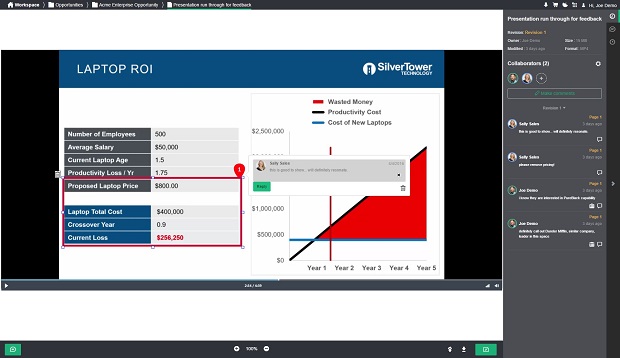
We can quickly generate product-specific proposals.
We've experienced repeated frustrations while trying to edit/update the LiveDoc.
Errors in LiveDoc coding have occasionally produced errors in the generated proposals where certain fields (Customer Name, for example) should have been automatically completed but were not.
Trello keeps me organized, focused, and on track. I could filter the Trello board to only see my issues and understand what I needed to work on and when.
Trello helped our team implement an agile structure. It's a very simple kanban method of viewing all of your team's tasks and statuses. You can completely customize the columns to your team's specific workflow and create tags relevant to your work.
Trello helps reduce unnecessary communications between teams. When I want to request translations, I simply create a card on the localization Trello board -- no need to directly message anyone on the team, and I can watch the status of the card change from "in progress" to "in review" to "translated," all without having to directly ask for updates.