Overview
ProductRatingMost Used ByProduct SummaryStarting Price
Asana
Score 8.5 out of 10
N/A
Asana is a web and mobile project management app. With tasks, projects, conversations, and dashboards, Asana lets an entire team know who's doing what by when, enabling workload balancing. Users can also add integrations for GANTT charts, time tracking and more.
$13.49
per month per user
ClickUp
Score 8.6 out of 10
Small Businesses (1-50 employees)
ClickUp is a productivity platform that brings together work apps, data, and workflows. Also presented as a Converged AI Workspace, ClickUp eliminates work sprawl to provide context and a single place for humans and agents to work together. The platform currently boasts over 20 million users worldwide.
$0
per month per seat
Clockify
Score 8.3 out of 10
Small Businesses (1-50 employees)
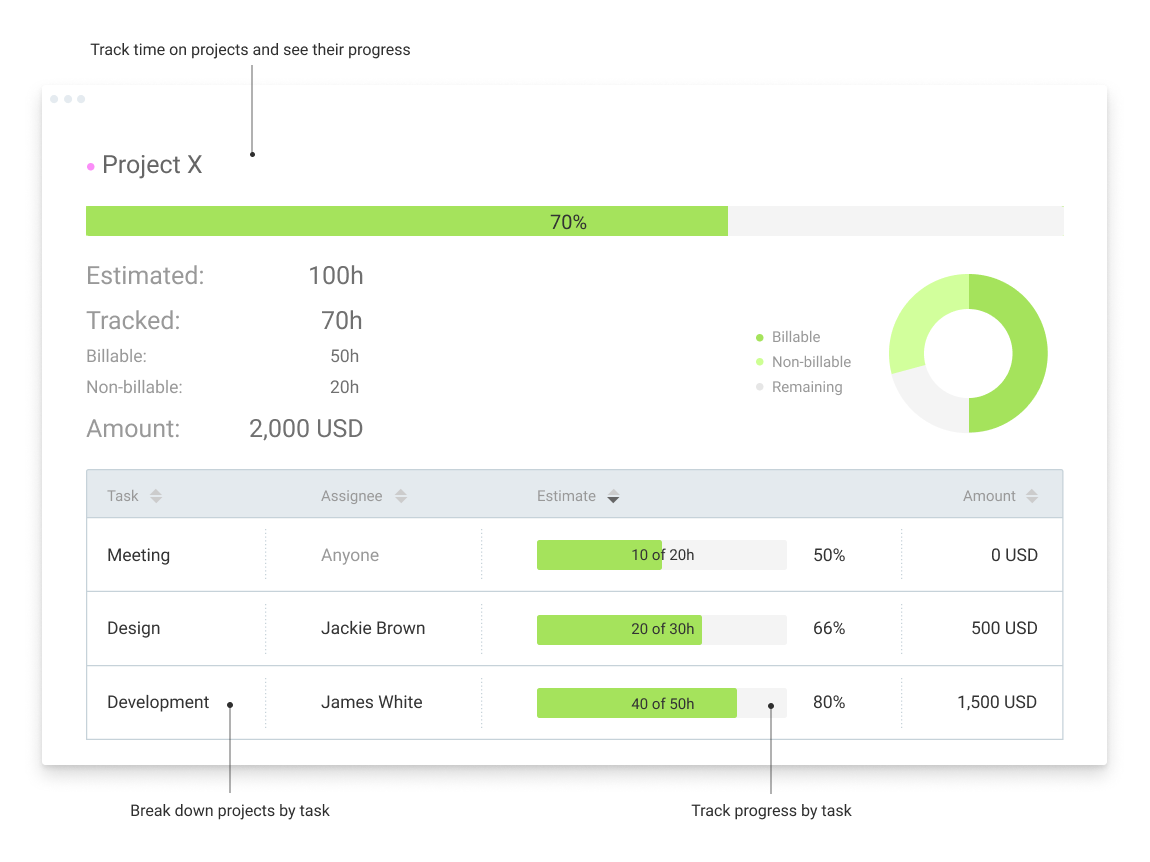
Clockify, from COING in Palo Alto, is a time tracker and employee timesheet software for teams of all sizes. Clockify lets users track how much time is spent working on tasks, as well as keep track of employee timesheets and billable hours, project completion, reports, and schedules.
$0
forever, unlimited everything
Pricing
AsanaClickUpClockify
Editions & Modules
Starter
$13.49
per month per user
Advanced
$30.49
per month per user
Enterprise
Contact Sales
Personal
Free
Unlimited
$10
per month per user
Business
$19
per month per user
Enterprise
Custom
Clockify Free
$0
forever, unlimited everything
Clockify Plus
$9.99
per month, per workspace
Clockify Enterprise
$9.99
per month, per user, per workspace
Clockify Premium
$29.99
per month, per workspace
Clockify Server
Starts at 450
Offerings
Pricing Offerings
AsanaClickUpClockify
Free Trial
YesYesYes
Free/Freemium Version
YesYesYes
Premium Consulting/Integration Services
YesYesYes
Entry-level Setup FeeOptionalNo setup feeOptional
Additional DetailsA discount is offered for annual billing.Discount available for annual billing.Unlimited usage and number of users for free. Paid plans are solely for access to additional features. Self-hosting software on own servers available.
More Pricing Information
Community Pulse
AsanaClickUpClockify
Considered Multiple Products
Asana
Chose Asana
Cost and the lowest ramp-up time is always factored in while still meeting the needs of a very fast-paced environment. Asana has more capability than Trello or ClickUp and is a more visual tool than JIRA.
Chose Asana
Asana generally takes less time to set up, so for my small team that has limited experience working with project management tools, Asana is great. We didn't need anything with lots of bells and whistles so Asana works well. ClickUp takes much more time to set up initially, but …
Chose Asana
Side by side with the other two Asana by far beats monday.com and is comparable and slightly better than ClickUp. Monday is completely browser-based and is hard to navigate and figure out how to set up. Asana and ClickUp are the exact opposite. Both are easy to set up and …
Chose Asana
For us, ClickUp was only implemented by department whereas Asana was implemented organization wide.
Chose Asana
Asana is better for the teams who seeks strealined, easy to use user interfaces with less complexity .

Which makes Asana a go to PMS to get things done rather then spending whole time on understanding about how feature works.
ClickUp
Chose ClickUp
Asana has a clean interface and is great for basic task management, but it lacks depth in custom workflows, advanced automation, and built-in documentation. ClickUp allows us to customize everything.

Jira is eccellent for technical teams, especially in software development, but …
Chose ClickUp
ClickUp is Asana on steroids! It's so much more powerful.
Chose ClickUp
Jira is a product that was once very good, but it became too "heavy" to use, many of its tools were not useful to me at the time and only caused me noise. On the other hand, Trello is very basic for the number of tasks, relationships and objectives of our organization, it is …
Chose ClickUp
The main reason I initially chose ClickUp over all of the others was price. Because we are a small nonprofit, our funds for this were basically $0. So the robust free version of ClickUp really sold me. Once I got in there and worked with it, I realized just how valuable this …
Chose ClickUp
ClickUp has more features integrated and well organized. Especially the concept of having Spaces, folders and lists helps a lot in organizing the projects and each having its own workflows.
Chose ClickUp
ClickUp had a more all-in-one solution for all the issues we have been trying to solve at the agency as well as an integration into our finance system (NetSuite) which helped adoption by our finance team.
Chose ClickUp
ClickUp is more visual and user-friendly, and also has the best customer service and webinars. The attention to clients is a huge differentiation between tools. The webinars are my favorite thing as they provide information, feature updates, and free templates.
Chose ClickUp
ClickUp allows for a lot more customization, so power users will be happy. But with a lot of customization comes more options, so users have to be wary when setting up projects to not overcomplicate them.
Chose ClickUp
Harvest doesn't have a lot of the tools which ClickUp does.
Chose ClickUp
Every other tool I have used has been for organizing tasks and work only. There were some of the other features, but none of them had the ability to do everything we need to manage a project from start to finish.
Chose ClickUp
I still use both. ClickUp is a little "bigger" and has some more tunning over details. When someone ask me about which to choose, my answer is "you must try them"... start using both and you'll find the best using them and asking users how they feel.
Chose ClickUp
I walked away from so many other products that I tried primarily because I wanted to have a task and productivity tool that allowed me to re-envision my 'data' at the task level. I wanted to be able to have Gantt views and dashboard views and then dive in deeper with comments …
Chose ClickUp
It combines them all with a user friendly interface and a really nice workflow. It keeps work in as less places as possible which makes it easy for new colleagues.
Chose ClickUp
ClickUp has the best UX by far. It also has the most necessary features and the fewest unnecessary features.
Chose ClickUp
- Data centralization
- Fast and clean
- Easy to manage
Chose ClickUp
All of them are based on activity management, however ClickUp stands out in several areas: integrations with other tools, management of several spaces simultaneously through views/dashboards, the vast majority of the tools listed do not allow me to have visibility of everything …
Chose ClickUp
ClickUp is by far the most easy to use, superb interface and functionality. The notifications are far superior too.
Chose ClickUp
The best feature of ClcikUp over others is it's customization as well as hierarchy. Departments, clients, operations become easier to manage if the hierarchy is setup in a good way that can allow your business scale without altering it repeatedly.
Customization is another …
Chose ClickUp
Much more flexible and complete, you can shape it for your liking.
Chose ClickUp
ClickUp can be very simple, yet very advanced. That helps us get started while providing something we can grow into as well, to avoid a future switch again.
Chose ClickUp
Because ClickUp simply aggregates all the best features from all those solutions.
Chose ClickUp
ClickUp was the best option for us given its low price, ease of use, and clean appearance. We moved from Zoho Projects, which was functional, but required advanced development knowledge to fully customize. Zoho Projects also was not as attractive or easy to use as ClickUp has …
Clockify
Chose Clockify
Both Clockify and Hubstaff served our business well. I was not involved in the selection of Clockify to replace Hubstaff, but I believe the decision to move was financial reasons.
Chose Clockify
Clockify is a perfect cheaper alternative to Harvest and other software that are more expensive but provide more tools. If you need software that tracks time efficiently and generates the required project and employees time reports, Clockify is terrific. If you need software …
Chose Clockify
Clockify has a more specific organization, which makes it easier to find and work on a specific task and track time all in one place.
Features
AsanaClickUpClockify
Project Management
Comparison of Project Management features of Product A and Product B
Asana
8.3
179 Ratings
7% above category average
ClickUp
8.3
719 Ratings
7% above category average
Clockify
-
Ratings
Task Management9.2179 Ratings9.3719 Ratings00 Ratings
Resource Management8.0152 Ratings8.4569 Ratings00 Ratings
Gantt Charts9.061 Ratings8.0522 Ratings00 Ratings
Scheduling8.4162 Ratings8.5597 Ratings00 Ratings
Workflow Automation9.0132 Ratings8.2570 Ratings00 Ratings
Team Collaboration9.4178 Ratings9.2687 Ratings00 Ratings
Support for Agile Methodology8.57 Ratings8.6482 Ratings00 Ratings
Support for Waterfall Methodology8.57 Ratings8.5402 Ratings00 Ratings
Document Management8.2150 Ratings7.9619 Ratings00 Ratings
Email integration8.2142 Ratings7.6503 Ratings00 Ratings
Mobile Access8.7149 Ratings7.3577 Ratings00 Ratings
Timesheet Tracking6.16 Ratings8.1481 Ratings00 Ratings
Change request and Case Management8.44 Ratings00 Ratings00 Ratings
Budget and Expense Management7.077 Ratings00 Ratings00 Ratings
Professional Services Automation
Comparison of Professional Services Automation features of Product A and Product B
Asana
6.5
48 Ratings
17% below category average
ClickUp
7.7
369 Ratings
1% below category average
Clockify
-
Ratings
Project & financial reporting5.51 Ratings7.7369 Ratings00 Ratings
Integration with accounting software7.647 Ratings00 Ratings00 Ratings
Best Alternatives
AsanaClickUpClockify
Small Businesses
Stackby
Stackby
Score 8.9 out of 10
Stackby
Stackby
Score 8.9 out of 10
Traqq
Traqq
Score 9.1 out of 10
Medium-sized Companies
InEight
InEight
Score 8.3 out of 10
InEight
InEight
Score 8.3 out of 10
TimeClock Plus
TimeClock Plus
Score 9.5 out of 10
Enterprises
InEight
InEight
Score 8.3 out of 10
InEight
InEight
Score 8.3 out of 10
Zoho People
Zoho People
Score 8.9 out of 10
All AlternativesView all alternativesView all alternativesView all alternatives
User Ratings
AsanaClickUpClockify
Likelihood to Recommend
9.0
(208 ratings)
8.8
(678 ratings)
7.0
(12 ratings)
Likelihood to Renew
9.6
(34 ratings)
8.0
(33 ratings)
10.0
(1 ratings)
Usability
8.3
(36 ratings)
8.1
(30 ratings)
7.0
(2 ratings)
Availability
8.4
(2 ratings)
9.5
(6 ratings)
10.0
(1 ratings)
Performance
-
(0 ratings)
8.0
(5 ratings)
9.0
(1 ratings)
Support Rating
5.0
(42 ratings)
9.3
(46 ratings)
8.2
(4 ratings)
Online Training
-
(0 ratings)
10.0
(2 ratings)
-
(0 ratings)
Implementation Rating
-
(0 ratings)
7.9
(7 ratings)
-
(0 ratings)
Configurability
-
(0 ratings)
8.0
(2 ratings)
-
(0 ratings)
Contract Terms and Pricing Model
-
(0 ratings)
5.0
(1 ratings)
-
(0 ratings)
Ease of integration
-
(0 ratings)
7.0
(2 ratings)
-
(0 ratings)
Product Scalability
8.2
(1 ratings)
8.9
(6 ratings)
10.0
(1 ratings)
Professional Services
-
(0 ratings)
5.0
(1 ratings)
-
(0 ratings)
Vendor post-sale
-
(0 ratings)
5.0
(2 ratings)
-
(0 ratings)
Vendor pre-sale
-
(0 ratings)
5.0
(2 ratings)
-
(0 ratings)
User Testimonials
AsanaClickUpClockify
Likelihood to Recommend
Asana
The usability of Asana is broad since it's available in a variety of platforms that are widely used nowadays. I think that it would be great for people who are constantly on the move and switching devices, since it has allowed me to work from my phone, too. I also think that Asana has proven itself to handle a large quantity of work
Read full review
ClickUp
ClickUp is well suited to organize projects and communicate internally with teams members and externally with clients or vendors. If you need to track emails, any emails responded to from an email sent within ClickUp is automatically tracked within the task where it originated. It also works great for storing document files within projects and tasks and tracking multiple versions of documents created or copied within ClickUp
Read full review
CAKE.com, Inc
Clockify is an easy 10 over 10 recommendation for me. I would recommend this anyone especially if they're required to track their time and productivity while on the job. Office workers, tellers, bankers - any desk jobs really can very well use the awesome features of Clockify to the fullest extent. It is easy to use, very simple to set up, and doesn't require that much resource from your computer for up-keep
Read full review
Pros
Asana
  • Through it, we were able to communicate and cooperate with the rest of the team to complete the work in the required manner and at the appropriate time.
  • Available for free on Android and iPhone.
  • Asana has a simple and easy user interface
Read full review
ClickUp
  • Customization is huge for us! We do not have the aspects of standard project management, so having the ability to customize basically everything in ClickUp is amazing.
  • An outstanding free version of the software! We are a small nonprofit organization that cannot afford the robust levels of other software, so having access to SO MUCH for free is incredible.
  • The layout and organization of tasks, Spaces, folders, etc. is perfect. I love how I can see which task all of my subtasks belong to on my dashboard. And the option to change colors and icons for everything also really appeals to my obsessive brain.
Read full review
CAKE.com, Inc
  • Clockify records exact times on a per project basis when you click Start/Stop.
  • User interface is very easy. It is easy to add a project on the fly, change the times I just recorded if I forgot to click Stop for example. The interface is intuitive and gives me the flexibility I need.
  • Reporting gives me everything I need from times, hours per project, billable or not, per client and any tags I've created. This provides enough flexibility for many different use cases.
Read full review
Cons
Asana
  • Asana is not really a project management tool, it is good for simple projects only
  • UI has some glitches (doesn't save preferences, etc.)
  • Integration with other tools (Office 365, MS Project)
  • No reminders if the working period you entered is on holidays
Read full review
ClickUp
  • I would like to see when scheduling a task for someone, their available hours, as I am scheduling instead of having to go back to the workload view
  • I'd like easier UX and understanding of what all of the different levels of folders, lists, tasks, can do and what they should be used for
  • Notifications can be cleaned up
Read full review
CAKE.com, Inc
  • In general, manuals or how to use instructional videos are always welcome - just covering the very basic are very good to get everyone up and running.
  • Maybe work on your scalability - the main reason why we switched to a different provider is because the company was ramping up and the competitors have more features that come with not just time and productivity tracking.
  • I always like the classic blue and white pallets on the app but sometimes I just wish there's more option to customize how it looks just to give it a little more flavor.
Read full review
Likelihood to Renew
Asana
  • Mobile + Desktop capabilities - Able to use it anywhere, anytime.
  • Task management - Easy to view projects and their progress.
  • Time management - Easy to see what elements require time / how they interrelate and manage the project on an overall basis.
  • Company management - Be able to see from a master dashboard perspective where each project is in its stages of completion.
  • Clear communication - It's visually documented who is doing what at what time so that the whole project gets done.
Read full review
ClickUp
It has been a game-changer in terms of project tracking, as animation is a demanding product that requires multiple layers of analysis, revisions, tracking, scheduling, etc. ClickUp simplifies many approvals as anyone can easily add items, and you can tag the people who need to look at them.
Read full review
CAKE.com, Inc
I'm using the free version at the moment and loving it. What a great product, easy, responsive and has better up time than Yahoo Mail. :) What isn't there to like?
Read full review
Usability
Asana
It is very user-friendly. Takes a new employee an hour to start figuring out how the system works. That's an important factor. You don't want to encounter the issue where employees need a week to understand how the system works. For example, JIRA, I tried using it for a week and I still don't understand the complicated layout. Asana has a simple interface. Once you see it, you get it type of program.
Read full review
ClickUp
Because for me, working with teams, ClickUp has provided a service that we longed for. Something that is non-complicated and easy to maneuver. We understand the learning curve can be steep, but we are willing to give the software a chance because it is everything we hoped it would be. However, leadership found the project works for our organization at this time. Moreover, we can customize to our needs.
Read full review
CAKE.com, Inc
Very affordable, accessible and simple. For this very reason I would say, it culminates to Clockify being very beginner and start-up friendly. It is its strongest suit after all, and this is the main reason why I would recommend this to anyone. I am very thankful for me ex colleague who recommended this to me, we're no longer working together but I still hear that he's still using Clockify to this very day on his own business
Read full review
Reliability and Availability
Asana
Working with Asana on a daily basis
Read full review
ClickUp
For over a year ClickUp was unavailable to us just twice for a couple of hours. I would say for a system this big and working globally that was a minor issue. They managed to fix all the issues within a couple hours and then it was back up and running perfectly fine.
Read full review
CAKE.com, Inc
I have never had an issue logging in or it not being available. I use Clockify every work day during the week, frequently starting/stopping projects. I've had past experience with other systems that suddenly aren't usable for an hour and that is something I have never experienced with Clockify. They are doing something right on their backend. Nice job, Clockify folks
Read full review
Performance
Asana
No answers on this topic
ClickUp
The speed of ClickUp is average to be honest. This is one of the biggest flaws of the system, sometimes it's also lagging a little bit but we also have a lot of documents, lists etc. on our workspace. However, with the next version of ClickUp I've seen they are planning to increase the speed by almost 500%, probably by changing the technology, so I am more than looking forward to it.
Read full review
CAKE.com, Inc
I already mentioned how it feels light across the wire. Pages load fast in the web browser. I have not tried the browser plug-in nor the mobile app. I give it a 9 instead of 10 as the desktop app seemed to hesitate when I clicked the start/stop of a project/task
Read full review
Support Rating
Asana
I haven't had to use their support so I can't rate it. The fact that I haven't needed them reflects the ease of use of the product. I would recommend that any new users schedule a complete demo of the product to ensure that they are using it to it's fullest (there's a lot of useful features).
Read full review
ClickUp
I started using ClickUp when it was what most would consider a baby company. There were the occasional bugs that made working in ClickUp a little bit of a headache, but the support feature allowed me to chat with a real persona and communicate my issues. I would always get prompt support and someone willing to really help me, not just point me to FAQ pages. Not feeling like a number really makes a difference.
Read full review
CAKE.com, Inc
I dealt very little with customer support because Clockify is so easy to use. That being said, the few times I did, I got fast responses and any issues that I did have were solved in a very fast manner.
Read full review
Online Training
Asana
No answers on this topic
ClickUp
There are multiple guides on literally all of the functions you can find within the system, therefore it's easy to learn anything you'd really like to use, starting from project and people management, down to Gantts, mind maps, time tracking, inviting Clients as guests to work with you on the projects and so much more.
Read full review
CAKE.com, Inc
No answers on this topic
Implementation Rating
Asana
No answers on this topic
ClickUp
Start small. Don’t try to build the most elaborate plans first. Resist the urge to get into Gantt charts if no one is used to them. Just get work written, add dates and assignees, and start getting used to it. If you did not use a work management tool before, you need to be gracious with yourself about the fact that you likely do not have the muscle memory for working this way yet. But you will get there.
And leverage people who know it if possible. Look for ClickUp experts and vendors. They can really supercharge your effectiveness at building the tool out and speed up the process.
Read full review
CAKE.com, Inc
No answers on this topic
Alternatives Considered
Asana
Asana is a top-tier project management software that helps us organize and track projects from start to finish. It allows us to apply tasks/to-dos to multiple projects without duplication, divide complex projects into smaller tasks, and track project progress. It also helps us organize work on Kanban boards or linear lists. It stands out from the crowd in a big way compared to the competition.
Read full review
ClickUp
I used Salesforce at my last job and would recommend ClickUp if utilizing the product for more than just sales. My last company tried using Salesforce for a number of other actions, such as department project tracking, client documentation, and outbound communication which did not work well. ClickUp is far better at managing multiple levels of organization within a company.
Read full review
CAKE.com, Inc
Harvest is very similar to Clockify. The only difference is that Harvest also has an invoicing and billing system built into it. So if you're billing your clients based off of time directly, Harvest may be a better option as far as that goes. Of course, Harvest only has minimum billing increments of 6 or 10 minutes, there is no 10-minute option so that's something where Clockify has them beat. They are both very easy to use.
Read full review
Scalability
Asana
I used this tool on a daily basis at work and it runs as a solid rock
Read full review
ClickUp
Scaling with ClickUp is superb. If you create a workflow best suited for your organization then it's all about creating new accounts and teaching the new employees the workflow you're using. It's that simple. There is no black magic when it comes to Clickup.
Read full review
CAKE.com, Inc
Because it feels light on the wire and runs so smoothly with great up-time. I have to assume that the same is true as it scales. I'm a single user so maybe I don't see if there are any scalability issues. With the way it seems architected to run so quickly across many platforms (desktop, mobile, web, browser plug-in), I have to think that it is using recent technology that provides scalability options
Read full review
Return on Investment
Asana
  • Productivity - Most of all, it allows me to be more productive and have a good sense of where I am with projects and deadlines.
  • Easy to use - I can make the most of my time to get up (and stay) up and running.
  • Project coordination - Allows me to assign tasks to my interns and communicate directly within the platform to keep the work train moving.
Read full review
ClickUp
  • Reduced walk-up work and miscommunications
  • We have been able to actually document time spent doing specific tasks, when before we were just guessing
  • We have been able to implement a rating system for projects that allows us to prioritize work more effectively
Read full review
CAKE.com, Inc
  • The free plan really did everything we needed for the 6 months or so we used it. Without Clockify, we would have had to pay roughly $40+/month for a software tool.
  • When we upgraded to the paid version, it was still only $10/month and helped us be able to have minimum billing increments which is a huge monetary increase.
Read full review
ScreenShots

Asana Screenshots

Screenshot of Product HomepageScreenshot of Team ConversationsScreenshot of Project CalendarsScreenshot of InboxScreenshot of List ProjectScreenshot of Portfolios

ClickUp Screenshots

Screenshot of Screenshot of Screenshot of Screenshot of Screenshot of

Clockify Screenshots

Screenshot of Time trackerScreenshot of TimesheetScreenshot of Time tracking appsScreenshot of DashboardScreenshot of ReportsScreenshot of Projects