Overview
ProductRatingMost Used ByProduct SummaryStarting Price
Avaza
Score 8.1 out of 10
Mid-Size Companies (51-1,000 employees)
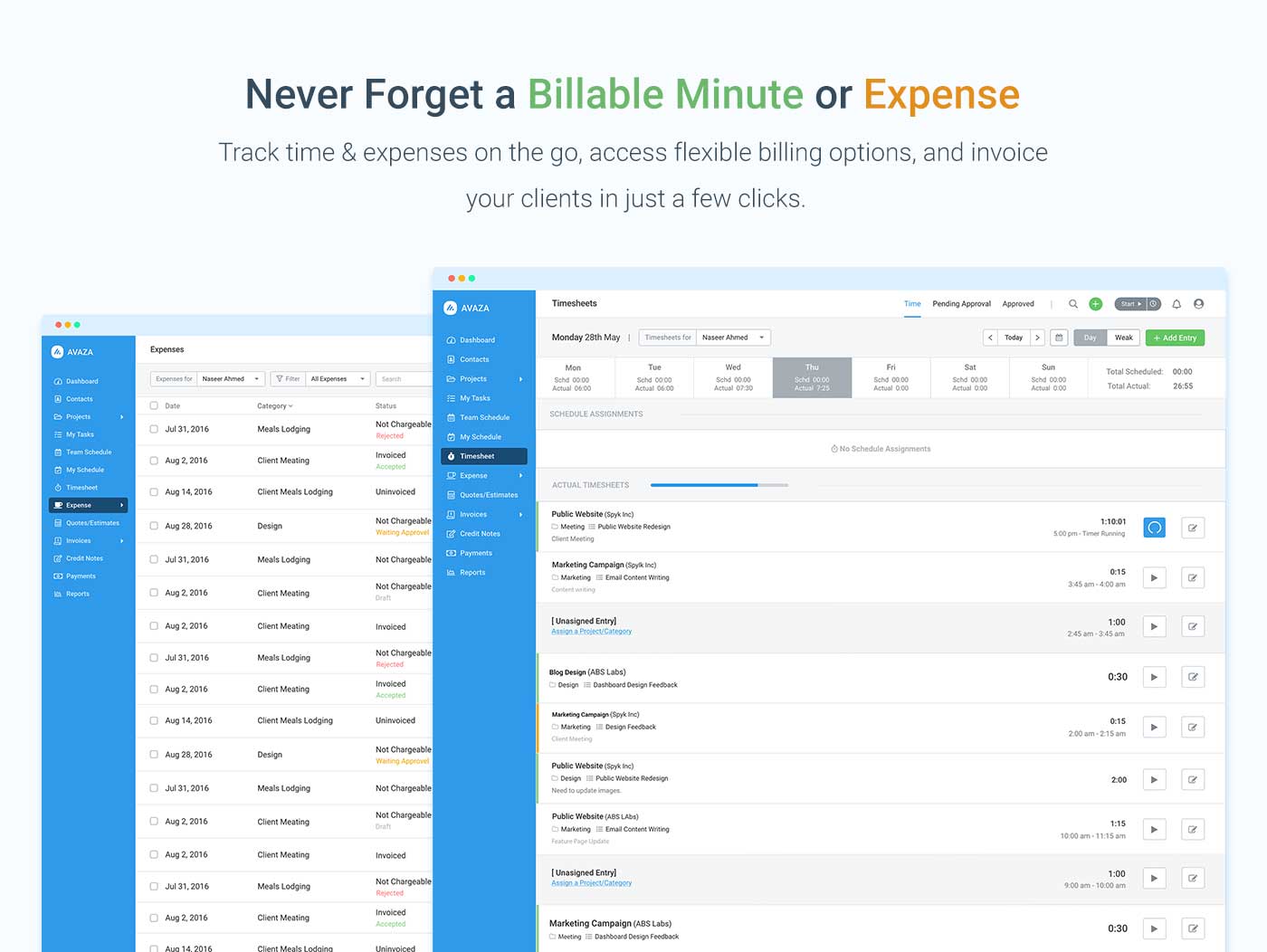
Avaza is a software suite targeted for all business sizes. It includes modules for project management and collaboration, resource scheduling, team chat, time tracking, expense management, quoting and invoicing. Depending on their business needs, companies can use as many, or as few, of the modules as they need. Avaza offers reporting functionality, and the project management module is designed with both list view and Kanban style task management, so users can choose…
$0
Microsoft To Do
Score 8.6 out of 10
N/A
Microsoft To Do replaces the former Wunderlist task management tool.N/A
Trello
Score 8.4 out of 10
N/A
Trello from Atlassian is a project management tool based on a Kanban framework. Trello is ideal for task-management in a to-do list format. It supports sharing boards and cards across users or teams. The product offers a free version, and paid versions add greater automation, collaboration, and administrative control.
$6
per month per user
Pricing
AvazaMicrosoft To DoTrello
Editions & Modules
Free Plan
$0
Unlimited Project Collaborators, 1 Admin, 1 Timesheet/ Expense User, 1 Resource Scheduling User
Startup Plan
$11.95
per month
Basic Plan
$23.95
per month
Business Plan
$47.95
per month
No answers on this topic
Standard
$6
per month per user
Premium
$12.50
per month per user
Enterprise
$17.50
per month per user
Free
Forever Free
Offerings
Pricing Offerings
AvazaMicrosoft To DoTrello
Free Trial
YesNoNo
Free/Freemium Version
YesNoYes
Premium Consulting/Integration Services
YesNoNo
Entry-level Setup FeeOptionalNo setup feeNo setup fee
Additional DetailsA discount is offered for annual billing and for larger numbers of users.
More Pricing Information
Community Pulse
AvazaMicrosoft To DoTrello
Considered Multiple Products
Avaza
Chose Avaza
Avaza is the only solution that ties all of our needs together in one platform at a reasonable price.
Microsoft To Do
Chose Microsoft To Do
Wunderlist is a good straightforward to-do list that doesn't have anything super extra attached to it. It comes with an app (unlike Trello), and easy to learn (unlike Asana). Trello and Asana are better for complex tasks but take a while to set-up. Wunderlist is the most …
Chose Microsoft To Do
Wunderlist is more of a to-do list than Trello or Slack. For team management and communication I feel like Wunderlist is lacking, though.
Chose Microsoft To Do
For my previous point where we tried to use Wunderlist for project management, we found Trello to be an easier option for projects. Trello is not great for task management like Wunderlist but is great for large-scale views of a project with multiple team members.
Chose Microsoft To Do
Trello is a pinterest-board version of Wunderlist - prioritizing visualization over utility. The program also requires more clicking into projects and does not sort projects as automatically as Wunderlist. Wunderlist is a more mature, productive product in my opinion, and has …
Chose Microsoft To Do
Reason I went with Wunderlist is a simpler build. Applications like Asana or Trello are more large scale for milestones on projects with multiple calibrations across the project. I did not need to overcomplicate things, I needed a simple easy solution that gets the job done, …
Chose Microsoft To Do
Trello was nice to use from a desktop perspective but with many of our project managers being on the go it was easier to use a platform that was built specifically for mobile. Someone could edit tasks and deadline dates on the fly with Wunderlist. Trello has a mobile version …
Chose Microsoft To Do
Wunderlist is nice to have as a program instead of a tab in Chrome. It's also a bit less cluttered, so that makes it super easy to use over an alternative like Trello.
Chose Microsoft To Do
Trello and Wunderlist have different features. I like Trello more for projects and Wunderlist more for straight-forward task lists. I use Wunderlist every day, I only use Trello when working a project that calls for it.
Chose Microsoft To Do
In terms of personal use, I think Wunderlist is probably better because it is so simple, but when it comes to project management/tracking or any type of corporate use, I would definitely recommend a tool like Trello because it has notifications built-in, a great web interface, …
Chose Microsoft To Do
I used Trello to try to keep organized for a large number of projects and just found that it was not as appealing as a classic list-style format. The boards seemed clunky and it took longer to keep everything on task because the user interface did not meet my expectations.
Chose Microsoft To Do
Both Trello and Remember the Milk offer their own value in managing tasks and projects. Wunderlist is the best simple task manager I've come across in that it focuses on the critical features you'd want in a task manager - great interface, ease of use, and accessible anywhere. …
Chose Microsoft To Do
Wunderlist is overly simplistic and a bit outdated compared to competing tools. Trello and Microsoft To-Dos and Planner accomplish the same things better.
Chose Microsoft To Do
To be honest, I loved Wunderlist, and so just moved over to Microsoft To Do out of inertia. Also Trello is more Kanban than a to-do list, so not exactly what we needed. Todoist might be more what we need, but we were already using Wunderlist, so we didn't want to take the time …
Chose Microsoft To Do
Microsoft To-Do simply put just does to-do lists very well. I don't want the visual components of software like Trello or ClickUp, and I had used Asana in previous roles and just found it to have too much going on. I also didn't like the notification system of Asana, constantly …
Chose Microsoft To Do
Microsoft came with the company laptop.
Chose Microsoft To Do
Compared to in-built apps from Microsoft or Apple, Wunderlist is far better. It is incredibly hard to collaborate on both Outlook, Gmail, or Apple calendar/reminders. I wouldn't suggest any of those for team projects. Additionally, Wunderlist allows me to separate your work and …
Chose Microsoft To Do
It is more simple, direct, and easy to manage. Also, the price point is much less than most, if not all CRM's on the market.
Chose Microsoft To Do
While I have tried a number of other to-do lists, Wunderlist is easy to use and free. Most other to-do lists that I have tried I have used for a day or two and the have deleted and returned to Wunderlist. Part of it is that I am used to this tool, but I think it is also just …
Chose Microsoft To Do
On the app, Wunderlist loads quickly and is easier to navigate. It's also very streamlined and not complicated in the slightest. You can quickly get to all your notes and share tasks/reminders or create new lists. Other apps are simple but take forever to load or are so full of …
Chose Microsoft To Do
I think each of this products has its pros and its cons, but the only right way to pick the best one is to try them all. This kind of software is used on a daily basis, and you end up interacting a lot more than you would think of, so you really need to use one software that …
Chose Microsoft To Do
I have tried a number of task managers over the years. Remember the Milk, todoist, Google Tasks, Outlook tasks and so on. Wunderlist has THE BEST user experience and flexibility. Email integrations make it powerful and flexible. Everything else I have used failed to some degree …
Chose Microsoft To Do
Wunderlist wins with simplicity. Where other software pile on the features, here we have something that sticks to its mission of being a central location for collaboration on tasks.
Trello
Chose Trello
Trello is more visual than Todoist and MS To Do. For me, the major advantage of Trello is its functionality around creating Kanban Boards—there is not the same flexibility or options in either of the other two products. I was also able to seek advice from colleagues who were …
Chose Trello
Trello is convenient for tasks management of the team, there are columns, additional tools, and integrations. Regular to-do lists are better to add routine tasks that you need to do daily. In Trello, It is convenient to add small projects or add smaller tasks for a big project …
Chose Trello
I prefer Airtable for project management, but I do like that Trello allows for the incorporating of personalized notes for other team members. This has helped us keep track of who's working on what and what stage of the process they're in. With Airtable, it's more about project …
Chose Trello
I prefer the ease of use in Trello, along with the more aesthetic appeal vs. Microsoft To Do.
Chose Trello
I believe Trello is the winner across the board because of its ease of use, clear visibility of tasks that need to be done, and the ability to add power-up. On top of this, the ability to collaborate is unmatched. If you'd like to add someone to a whole board you can, or to …
Chose Trello
Todoist is a good to-do list app but I found it a bit more confusing to use than Trello because it feels like it does too much. Wunderlist was great until Microsoft bought it and stopped providing support. I used it before I switched to Trello and it would easily compete with …
Features
AvazaMicrosoft To DoTrello
Project Management
Comparison of Project Management features of Product A and Product B
Avaza
8.0
7 Ratings
3% above category average
Microsoft To Do
5.6
76 Ratings
32% below category average
Trello
8.5
222 Ratings
9% above category average
Task Management10.07 Ratings8.076 Ratings9.5222 Ratings
Resource Management7.05 Ratings6.241 Ratings9.3185 Ratings
Gantt Charts7.04 Ratings4.58 Ratings7.173 Ratings
Scheduling8.06 Ratings8.158 Ratings9.1168 Ratings
Team Collaboration10.07 Ratings5.067 Ratings9.0218 Ratings
Support for Agile Methodology7.01 Ratings6.017 Ratings8.9147 Ratings
Support for Waterfall Methodology7.01 Ratings7.017 Ratings7.6115 Ratings
Document Management9.01 Ratings3.038 Ratings8.1159 Ratings
Email integration8.03 Ratings6.342 Ratings7.6146 Ratings
Mobile Access8.05 Ratings7.771 Ratings9.1192 Ratings
Timesheet Tracking7.07 Ratings3.012 Ratings9.388 Ratings
Budget and Expense Management8.05 Ratings4.95 Ratings7.673 Ratings
Workflow Automation00 Ratings3.033 Ratings8.2142 Ratings
Change request and Case Management00 Ratings5.39 Ratings8.8102 Ratings
Professional Services Automation
Comparison of Professional Services Automation features of Product A and Product B
Avaza
10.0
4 Ratings
25% above category average
Microsoft To Do
6.5
7 Ratings
17% below category average
Trello
6.0
72 Ratings
25% below category average
Quotes/estimates10.04 Ratings5.04 Ratings6.149 Ratings
Invoicing10.04 Ratings7.04 Ratings5.042 Ratings
Project & financial reporting10.04 Ratings7.96 Ratings6.758 Ratings
Integration with accounting software10.01 Ratings6.02 Ratings6.144 Ratings
Best Alternatives
AvazaMicrosoft To DoTrello
Small Businesses
Stackby
Stackby
Score 8.9 out of 10
Stackby
Stackby
Score 8.9 out of 10
Stackby
Stackby
Score 8.9 out of 10
Medium-sized Companies
InEight
InEight
Score 8.3 out of 10
InEight
InEight
Score 8.3 out of 10
InEight
InEight
Score 8.3 out of 10
Enterprises
InEight
InEight
Score 8.3 out of 10
InEight
InEight
Score 8.3 out of 10
InEight
InEight
Score 8.3 out of 10
All AlternativesView all alternativesView all alternativesView all alternatives
User Ratings
AvazaMicrosoft To DoTrello
Likelihood to Recommend
10.0
(7 ratings)
10.0
(73 ratings)
9.4
(222 ratings)
Likelihood to Renew
10.0
(1 ratings)
8.0
(4 ratings)
10.0
(6 ratings)
Usability
9.0
(1 ratings)
8.0
(9 ratings)
9.4
(60 ratings)
Availability
-
(0 ratings)
-
(0 ratings)
10.0
(1 ratings)
Performance
-
(0 ratings)
-
(0 ratings)
10.0
(1 ratings)
Support Rating
10.0
(1 ratings)
7.6
(30 ratings)
9.9
(81 ratings)
In-Person Training
-
(0 ratings)
-
(0 ratings)
10.0
(1 ratings)
Implementation Rating
-
(0 ratings)
10.0
(3 ratings)
8.0
(2 ratings)
Configurability
-
(0 ratings)
-
(0 ratings)
5.0
(1 ratings)
Product Scalability
-
(0 ratings)
-
(0 ratings)
10.0
(1 ratings)
Vendor post-sale
-
(0 ratings)
-
(0 ratings)
10.0
(1 ratings)
User Testimonials
AvazaMicrosoft To DoTrello
Likelihood to Recommend
Avaza Limited
We are a pretty unique business because we deal with bookkeeping, marketing, and HR and across all 3 departments, we have been able to successfully use the tool. Other software we have tried usually caters to one industry at a time.
Read full review
Microsoft
I think Microsoft To Do is helpful for people who don't need a lot of customization in a task manager. I prefer using 3rd party task managers that allow me to create projects with tasks and subtasks. But for a team that already uses Microsoft products and doesn't want to learn or invest capital in another task manager, Microsoft To Do covers the basics and syncs with your calendar.
Read full review
Atlassian
For teams or individuals with lots of individual tasks/details to track, Trello is perfect! It basically removes the need for a paper checklist. For those that need an overall project management tool that requires less tasks and more overarching goals, collaboration amongst various teams, and gantt charts I would suggest monday.com
Read full review
Pros
Avaza Limited
  • It switches between Kanban view, List view, and Gantt charts which fits varying preferences!
  • It helps us work smart by creating dependencies and linking tasks to calendars
  • It has a clean, intuitive dashboard that's very easy to navigate
Read full review
Microsoft
  • Wunderlist is what you need for your to do lists. It's really simple to use.
  • Allows you to set due date to your lists, share them with your team and/or create a folder to divide and organize all your list set
  • Also, Wunderlist is compatible with all platform and devices. So you can always be updated on your list or work on them from wherever you are and with all the devices you have.
Read full review
Atlassian
  • Helps track employees "to do before hire", "to do after hired," and "to do when employee leaves"
  • Provides important information on each employee like personal information along with data collected during the time of hire and during employment time
  • Allows more than one person to be assigned to a task per employee and will remain open until everyone involved has completed their task
Read full review
Cons
Avaza Limited
  • The interface and taxonomy could use an update, sometimes it's hard to figure out where things logically are or should be.
Read full review
Microsoft
  • Viewing more than one task at a time.
  • Email forwarding tasks - sometimes can be buggy and not always smooth.
  • Option to show more detail on a task without clicking task - example: being able to see attachment without clicking on task to view.
Read full review
Atlassian
  • I use colour coding a lot so I would like a wider range of colour options.
  • Also as a visual thinker I would like to be able to easily add images to cards.
  • I would like to be able to attach a wider range of file formats to cards.
Read full review
Likelihood to Renew
Avaza Limited
Because it has been amazing and easy to work with.
Read full review
Microsoft
It's working, and doing precisely what we selected it for. The only hesitation is if Microsoft suddenly drops the platform.
Read full review
Atlassian
I am very likely to renew Trello, because it doesn't cost anything to do so. I am also very likely to use Trello's upgraded features in the future because a lot of my team's data is stored on there and they have already gotten used to the platform. Trello is very easy for new team members to pick up, making the onboarding and usability very streamlined.
Read full review
Usability
Avaza Limited
Avaza is very easy to use, but the mobile app needs work.
Read full review
Microsoft
User friendly, easy to configure, and VERY simplistic. I particularly use heavily the phone app feature. While others in the room are on social media, I am reviewing my tasks and this triggers other tasks I know I need to get done. I like the sense of accomplishment of moving things to the completed pile as well.
Read full review
Atlassian
Trello is incredibly intuitive, both on desktop and mobile right away. It is also full of helpful features that make it even easier to use, and is flexible enough to suit almost any organizational need. Onboarding for the software is thorough, but concise, and the service is frequently updated with even more QOL improvements.
Read full review
Reliability and Availability
Avaza Limited
No answers on this topic
Microsoft
No answers on this topic
Atlassian
yes always support available when I need it!
Read full review
Performance
Avaza Limited
No answers on this topic
Microsoft
No answers on this topic
Atlassian
Never experienced issues with the above!
Read full review
Support Rating
Avaza Limited
They are always available and open to doing a call or a shared screen to walk through the issues.
Read full review
Microsoft
I have not had an issue where I needed to reach out to Wunderlist, but I know their contact and online chat is easy to access and feel confident that they would be helpful. My only worry is Wunderlist is becoming Microsoft to-do in May 2020, and I believe the app will become worse after that.
Read full review
Atlassian
I haven't reached out to their support very often and their support is very limited anyway for the free users. They do have tons of great articles and videos in their Help Center and constantly send emails with updates and add-ons to the product. The fact that I've barely ever had to contact their support team means that they've developed a great product.
Read full review
In-Person Training
Avaza Limited
No answers on this topic
Microsoft
No answers on this topic
Atlassian
It was helpful and informative! It was back before the pandemic in 2019 so I'm not sure if they still do it but I really enjoyed the experience
Read full review
Implementation Rating
Avaza Limited
No answers on this topic
Microsoft
Wunderlist giving 100% work satisfaction for me and my organization
Read full review
Atlassian
For our small business, getting a few of us started well on Trello was the key, I think. As long as a couple of us were really comfortable with the interface, we could lead others and help them with any questions. From now on, anyone who works with us just naturally uses Trello for information sharing - it's just part of what we do.
Read full review
Alternatives Considered
Avaza Limited
Avaza takes the easy of Asana and adds the invoicing and bookkeeping capabilities you need all in one place.
Read full review
Microsoft
It's a small tool compared to bigger project management software, but we found that they work perfectly together. It helps you declutter the larger PM tools, keep your smaller tasks in-line and make sure they get completed. When you're working in a creative agency, ideas and tasks are flying around, so having a tool like this that keeps you accountable and reminds you of your tasks is a must!
Read full review
Atlassian
Trello is more simple and not as "robust" as the other tools, but it's easier to use and manage and understand and ACTUALLY get stuff done with. It's simplicity is part of the beauty of using it. You don't need a million options that nobody uses, you just need to get stuff done.
Read full review
Scalability
Avaza Limited
No answers on this topic
Microsoft
No answers on this topic
Atlassian
Feels like anyone across the org (no matter their location) can use the tool easily!
Read full review
Professional Services
Avaza Limited
No answers on this topic
Microsoft
No answers on this topic
Atlassian
Not sure if we use those
Read full review
Return on Investment
Avaza Limited
  • Avaza has made it easier to see how long I spend on certain types of projects and where I could be spending more time.
Read full review
Microsoft
  • Its affordable enough that the limited set of problems it solves are worth the investment.
  • If you already have Office 365 it doesn't really make sense unless you hate the task app.
  • With Microsoft acquiring Wunderlist I wouldn't start investing in this product. I would either choose Office 365 and go with TO-DO or use a free app.
Read full review
Atlassian
  • Trello keeps me organized, focused, and on track. I could filter the Trello board to only see my issues and understand what I needed to work on and when.
  • Trello helped our team implement an agile structure. It's a very simple kanban method of viewing all of your team's tasks and statuses. You can completely customize the columns to your team's specific workflow and create tags relevant to your work.
  • Trello helps reduce unnecessary communications between teams. When I want to request translations, I simply create a card on the localization Trello board -- no need to directly message anyone on the team, and I can watch the status of the card change from "in progress" to "in review" to "translated," all without having to directly ask for updates.
Read full review
ScreenShots

Avaza Screenshots

Screenshot of avaza, appearing across platformsScreenshot of visual project resource scheduling for teamsScreenshot of time and expense trackingScreenshot of team chatScreenshot of time trackingScreenshot of the expense management interface