Constant Contact is a full-featured email marketing solution with capabilities such as social media integration, drag-and-drop editing, and real-time reporting. It is a bulk email tool designed for SMB customers. Since 2019, Constant Contact also offers marketing automation features, a website and landing page builder, and other tools to support midsize businesses.
$12
per month
Kapost
Score 7.0 out of 10
N/A
Upland Kapost helps you create and distribute meaningful content to support the buyer journey for B2B companies.
$1
per month
OutboundEngine
Score 9.9 out of 10
N/A
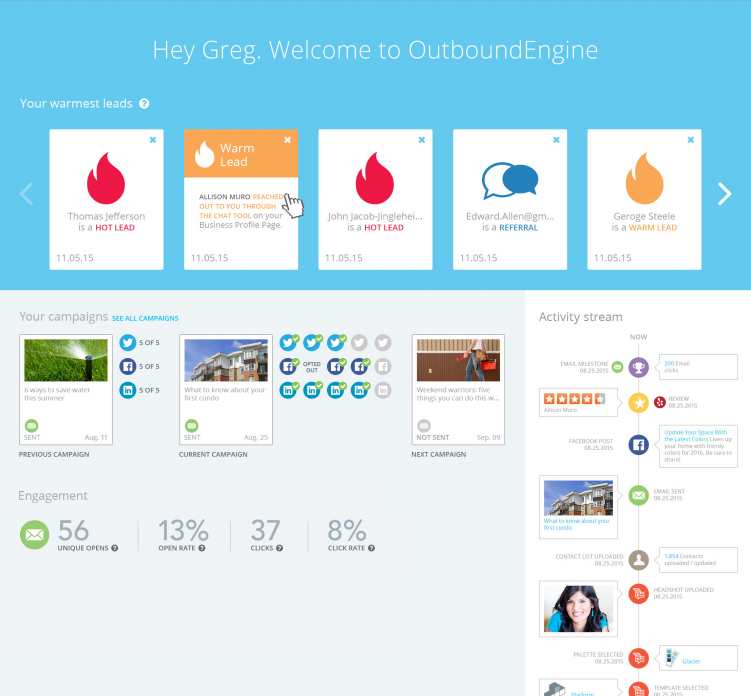
OutboundEngine provides a hands-off way for small business owners to market and grow their business. The product aims to provide small businesses with what big companies have achieved with marketing automation. The service aims to help users keep in touch with clients and prospects with professionally designed, branded campaigns. Benefits include: driving engagement, surfacing warm leads from current contacts, generating referrals and repeat business from their existing contacts, social…
$199
per user
Pricing
Constant Contact
Kapost
OutboundEngine
Editions & Modules
Lite
Starting at $12.00
per month
Standard
Starting at $35.00
per month
Premium
Starting at $80.00
per month
No answers on this topic
Essential
$199
per user
Value
$299
per user
Premium
$499
per user
Offerings
Pricing Offerings
Constant Contact
Kapost
OutboundEngine
Free Trial
Yes
No
No
Free/Freemium Version
No
No
No
Premium Consulting/Integration Services
No
No
No
Entry-level Setup Fee
No setup fee
No setup fee
$99 per user
Additional Details
The SMS Marketing tool can be added to any Standard or Premium Constant Contact account. SMS is only available in the US for Standard and Premium paid plans. SMS can be added when logged in to an account after purchase. Plans start at $10/month for up to 500 messages.
—
More information is available on the vendor's website.
OutboundEngine does the work for me so that emails are actually going out. Constant Contact has a ton of flexibility and is a great platform, but I was never using it because I rarely found time to create my own content.
OBE has automated emails, that are industry-specific, so I don't have to create them. On the surface, this is a plus, but my lead generation results have been very poor. Started writing my own emails, now the advantage from OBE is gone. OBE has social media posts, this is a …
Features
Constant Contact
Kapost
OutboundEngine
Email & Online Marketing
Comparison of Email & Online Marketing features of Product A and Product B
Constant Contact
8.7
120 Ratings
8% above category average
Kapost
-
Ratings
OutboundEngine
5.9
50 Ratings
19% below category average
WYSIWYG email editor
9.1102 Ratings
00 Ratings
00 Ratings
Dynamic content
9.1104 Ratings
00 Ratings
00 Ratings
Ability to test dynamic content
8.582 Ratings
00 Ratings
00 Ratings
Landing pages
8.878 Ratings
00 Ratings
00 Ratings
A/B testing
8.073 Ratings
00 Ratings
00 Ratings
Mobile optimization
8.686 Ratings
00 Ratings
8.643 Ratings
Email deliverability reporting
9.6116 Ratings
00 Ratings
3.150 Ratings
List management
9.0118 Ratings
00 Ratings
6.044 Ratings
Triggered drip sequences
7.862 Ratings
00 Ratings
00 Ratings
Reporting & Analytics
Comparison of Reporting & Analytics features of Product A and Product B
Constant Contact
8.4
117 Ratings
9% above category average
Kapost
-
Ratings
OutboundEngine
-
Ratings
Dashboards
8.488 Ratings
00 Ratings
00 Ratings
Standard reports
9.3115 Ratings
00 Ratings
00 Ratings
Custom reports
7.558 Ratings
00 Ratings
00 Ratings
Pre-Send Testing
Comparison of Pre-Send Testing features of Product A and Product B
Constant Contact
8.3
69 Ratings
3% above category average
Kapost
-
Ratings
OutboundEngine
-
Ratings
URL Validation
8.231 Ratings
00 Ratings
00 Ratings
Link Tracking
7.934 Ratings
00 Ratings
00 Ratings
Image Validation
8.932 Ratings
00 Ratings
00 Ratings
Inbox Display
8.635 Ratings
00 Ratings
00 Ratings
Email Accessibility Tools
7.928 Ratings
00 Ratings
00 Ratings
Spelling and Grammar Check
9.356 Ratings
00 Ratings
00 Ratings
Spam Testing
6.026 Ratings
00 Ratings
00 Ratings
Email Previews
9.768 Ratings
00 Ratings
00 Ratings
Content Creation
Comparison of Content Creation features of Product A and Product B
Constant Contact
-
Ratings
Kapost
8.2
9 Ratings
4% above category average
OutboundEngine
-
Ratings
Ideation
00 Ratings
8.07 Ratings
00 Ratings
Approval workflows
00 Ratings
8.09 Ratings
00 Ratings
Content collaboration
00 Ratings
8.09 Ratings
00 Ratings
Content calendar
00 Ratings
8.09 Ratings
00 Ratings
Network for content licensing/production
00 Ratings
9.01 Ratings
00 Ratings
Content Publishing
Comparison of Content Publishing features of Product A and Product B
Constant Contact
-
Ratings
Kapost
8.0
9 Ratings
1% above category average
OutboundEngine
-
Ratings
Content hub
00 Ratings
7.18 Ratings
00 Ratings
Forms / Gated content
00 Ratings
8.05 Ratings
00 Ratings
Embedded CTAs
00 Ratings
7.93 Ratings
00 Ratings
Content distribution
00 Ratings
9.07 Ratings
00 Ratings
Content promotion
00 Ratings
8.34 Ratings
00 Ratings
Content automation
00 Ratings
8.05 Ratings
00 Ratings
Content Reporting & Analytics
Comparison of Content Reporting & Analytics features of Product A and Product B
Constant Contact
-
Ratings
Kapost
8.0
7 Ratings
7% above category average
OutboundEngine
-
Ratings
Audience profiling and targeting
00 Ratings
8.05 Ratings
00 Ratings
Closed-loop tracking and reporting
00 Ratings
8.06 Ratings
00 Ratings
Content performance analytics
00 Ratings
8.07 Ratings
00 Ratings
Campaign optimization dashboard
00 Ratings
8.05 Ratings
00 Ratings
Competitive analytics
00 Ratings
7.92 Ratings
00 Ratings
Lead Management
Comparison of Lead Management features of Product A and Product B
Constant Contact
-
Ratings
Kapost
-
Ratings
OutboundEngine
6.4
38 Ratings
1% below category average
Automated sales alerts and tasks
00 Ratings
00 Ratings
6.438 Ratings
Social Media Marketing
Comparison of Social Media Marketing features of Product A and Product B
Constant Contact is an excellent tool for sending out flyers and newsletters. However, I feel the content's appearance is typically all the same. When I receive an email from Constant Contact, I can immediately identify it - the templates usually all look the same. When sending out communications with images, it is easy to use Constant Contact and link webpages. However, the email layout is always vertical and can get very lengthy. I prefer a more flip-book approach with options to flip the page.
Kapost has potential to be a great asset in small and large orgs. If you're not producing a great deal of content, or coordinating across a large team, there's still tremendous value, but it scales as your org scales because it makes it easier to coordinate and manage large teams and large content archives.
OutboundEngine does a referral campaign and I've been able to close a couple of deals based on getting in touch with people who engage with this campaign and state they could use my services in the next 6 months. This is a great follow up tool for those you may or may not know are going to be needing your services.
Market segmentation is great: my main segmentation is by region because that's how our sales team is divided.
Lists: making customized email lists is easy and intuitive; the custom fields allow some flexibility in case our fields don't exactly line up with Constant Contact's.
Campaigns: creating campaigns is quick and simple. I especially appreciate the 'resend to non-openers' option. I am constantly using this feature.
Subject line generator: I like using the recommended subject lines. I'm able to plug in their recommended ideas, or sometimes, this feature helps me generate my own ideas.
Filtering: If you make the most out of your custom details and custom fields, you can gain newfound access to materials that may have long been lost in the ether. It's really easy for us, for instance, to see all of our videos at once. Or everything targeting a certain buying stage. Or you can keyword search to see everything on one topic.
Workflows: It's really nice to lay out "who sees what when" in a digital way, because everyone involved on an asset can easily see what stage things are at. You can also set deadlines to tasks, which seems a bit more firm than a casual email, because you can visually see how meeting your deadline fits within the whole timeline.
Calendars: The calendar feature is nice for us because we have a blog, so we can see when everything is (supposed) to go live. It's easy to see when I, as a copy editor, should be expecting work, so I can align my day accordingly. Way better than the old-fashioned "mental note" system.
The content that they generate to send to our clients is relevant and the clients want to engage with us. It makes us appear more professional and consistent, even though we are a smaller company.
It helps us stay in touch with clients and helps us stay top of mind. We are able to generate more new business leads if we are in consistent contact with current, former, and potential clients.
Their customer service and support is outstanding. All my questions were answered and I went into the program feeling confident and knowledgeable.
It would be nice if we had more customizable options for emails - like moving around pictures and text boxes, rather than a set spot for everything to go.
I would like it if multiple people could work on a document at one time. So if I'm in charge of graphics, I can get those updated while someone else is entering content, etc.
Social media distribution needs improvement. Specifically a calendar for planned Tweets and a better way to schedule multiple shares of the same content.
System performance is somewhat slow.
Should be an easier way to make changes, like adding custom fields or publication destinations, to all content types, rather than one at a time.
I do not like the use of drawings to attract new customers, and they have ignored my requests to eliminate that for my personal emails.
I do not like it when a competitor in my immediate market has the same posts. It cheapens the service or makes it appear that I am simply sharing another's post.
There is no doubt that we are going to renew Constant Contact. We have not just invested a lot of time in learning and creating a great looking product but we have developed a strong database of information that allows us to track how we are doing for each newsletter. This supports our goals of creating products that residents desire and are excited to receive.
We are using some other systems that might have replaced Kapost, but none of them had the workflow functionality we were looking for. So, we're sticking with Kapost for now.
The biggest issue is poor ROI. The second biggest issue is rigid customer service process, lack of a sense of urgency, and inability to reach out to upper management with issues.
There is always room for improvement. I don't know how they test their systems, but they should invite not-so computer savvy people to test it. If I, as an expert have problems, they need to think like the technophobe. Since I've used Constant Contact in the past as part of my former employment, I have not viewed any of the tutorials and just jumped in to work on my client's newsletter. With that said, I found some areas easy and some a bit cumbersome
The calendar view is a great feature and so are the custom views. It is relatively easy to see a clear view of what content the user is responsible for and then the due dates associated to it. The ability to create and update workflows for the team is easy to navigate and keeps us on track.
Overall, OutboundEngine is very user friendly. It is simple to set up and explore, and if there are any issues or questions, the customer service team and account managers are always available to help. They are very knowledgeable and were able to explain everything in detail to me. The program is easy to navigate and helps me stay organized, and an uncomplicated and straightforward solution was exactly what I was looking for
I haven't had to contact Outbound Engine because I haven't had any application errors or unplanned outages. I basically have had such a trouble free experience with them that I haven't had to call. Everything is automated and I get a notice to review every isse. I suppose if I personalized the newsletter a bit more and added some of my own articles, I would need to contact them, (which I should really start to do) but so far things have been so on point, I haven't felt the need.
The system seemed quite slow sometimes. Specifically, there was sometimes a delay in sends if it was during a high traffic period. There were time-outs when uploading new code for an email, and a lag in reporting analytics which was sometimes as long as 72 hours
I think the overall support for Constant Contact has always been incredible; I have nothing negative to say. Our customer support representative was attentive, easy to understand, and very knowledgeable. I never felt like I wasn't a priority of his and my issues, while very small, were fixed in a very short time frame.
The reputation of the product matches up to its reputation as one of the leaders in the space. I love that you can share and access content at your fingertips from anywhere. The downside is that it does not have the prettiest interface but you can get over this with its functionality.
The customer service was excellent! Everyone I spoke to was kind and knowledgeable. My account manager was easily reachable. Setup of the OutboundEngine program was explained really thoroughly, and we knew how we could best use the product to meet the needs of our clients and get our online and social media presence off the ground.
Implementation is very easy for someone who wants to send out the “batch and blast” type newsletters. If you want to use their templates with no customizations, the product works fine. However, the more customizations you get into involving link color, etc, that’s where things can get tricky for someone who may not be familiar with coding
Constant Contact is much more intuitive for people who are not tech-savvy. Also, while sendgrid offered more options in it's drag and drop interface, it displayed differently across different email clients, which made it very cumbersome to use. It also took much longer to upload contact lists and it was harder to manage existing contacts. Performance in sendgrid was much slower as well, and the Preview feature was quite buggy. Our team initially chose sendgrid because of the integration options that it's API offered, but we ultimately switched to Constant Contact because it was much easier to build campaigns and better suited our requirements.
Workfront has a lot of great features, but Kapost was the right tool for what we needed at the time. With a team of our size, we had to make sure we weren't biting off more than we could chew and the project never got off the ground. We had to be thoughtful with how we rolled it out.
I selected it for the ability to have an automated system do 3 things all at once, social media posts, emails and the instant communication with the chat box. I have never seen a chat come through that lead to a helpful client touchpoint. I have never used another product but have since begun to weigh some of the less expensive options.
Very reliable in sending email campaigns and controlling the recipients so that no contact is sent the same email more than once, even if they are on a resent list
I have had nothing but positive impacts from using Constant Contact.
The church is large, and there are many subgroups and axillary groups within the church. Setting up specific groups based on responsibility, interest, member goals, and service needs allows me to send information quickly, saving valuable time for other tasks.
Constant Contact allows leadership to stay personally engaged with the members I work with, without over-taxing my time. It feels so seamless.