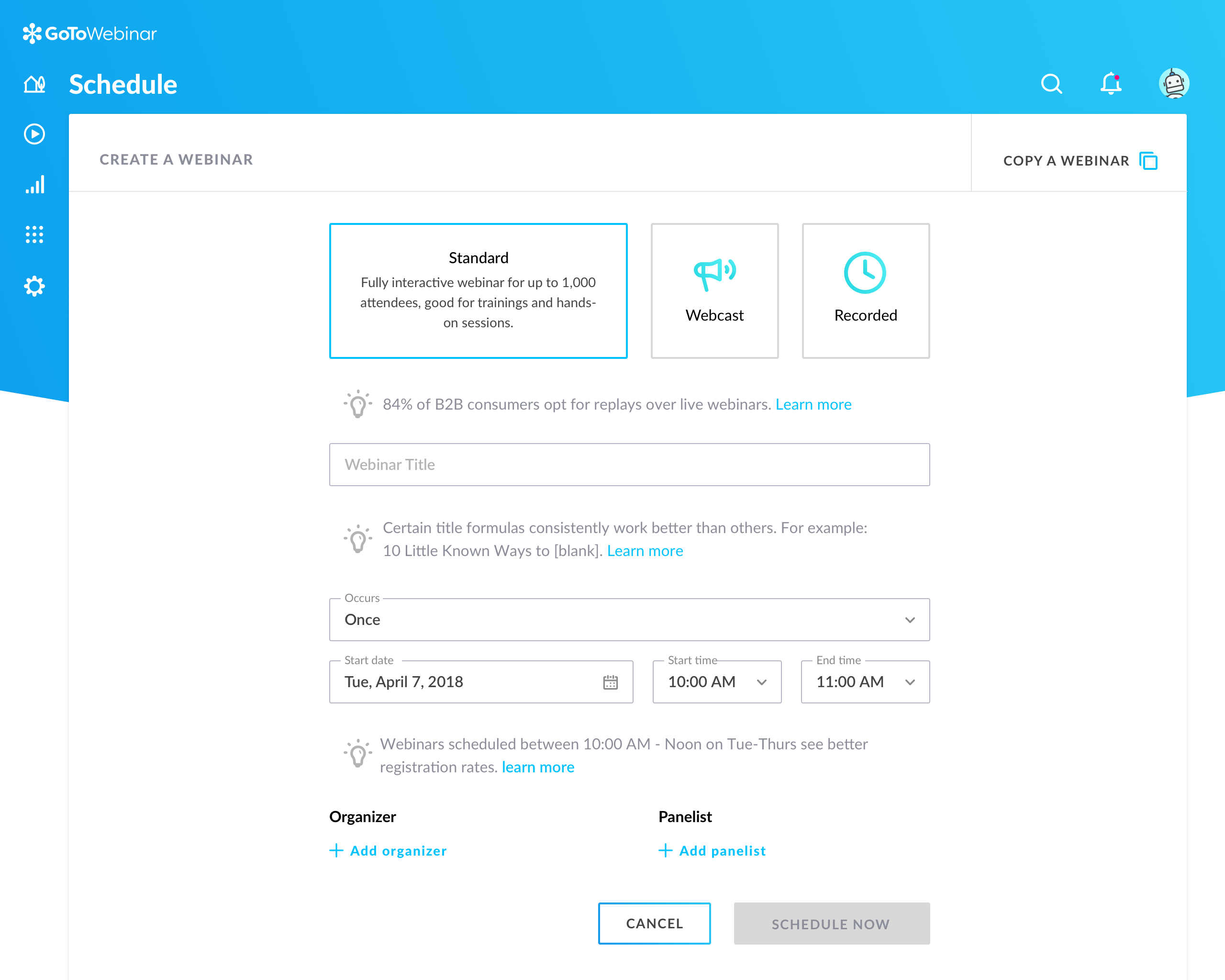
GoToWebinar is GoTo’s webinar and online conferencing solution, and offers features like audience polling and Q&A, flexible scheduling experiences, and webinar templates. It offers CRM integrations and reporting & analytics tools to help engage clients’ audiences.
$49
per month per organizer
Skype (discontinued)
Score7.1 out of 10
N/A
Skype (the personal edition or Skype free) was a web meeting, video conferencing, and VoIP software, now superseded by Microsoft Teams' free edition and unsupported from May 2025.
$2.99
per month
Pricing
GoTo Webinar
Skype (discontinued)
Editions & Modules
Lite
$49/month
per month per organizer
Standard
$99/month
per month per organizer
Pro
$199/month
per month per organizer
Enterprise
$399/month
per month per organizer
United States Subscription
$2.99
per month
North America Subscription
$6.99
per month
India Subscription
$7.99
per month
Offerings
Pricing Offerings
GoTo Webinar
Skype (discontinued)
Free Trial
Yes
No
Free/Freemium Version
Yes
No
Premium Consulting/Integration Services
Yes
No
Entry-level Setup Fee
No setup fee
No setup fee
Additional Details
—
—
More Pricing Information
Community Pulse
GoTo Webinar
Skype (discontinued)
Considered Both Products
GoTo formerly LogMeIn
Verified User
Chose GoTo Webinar
We used TeamViewer and Skype for Business before this and we had a tough time conducting webinars when the target audience was huge. Lack of integrations with 3rd party platforms, and no analytics capabilities limited ourselves from going to the next level in both sales and …
A de minimis incentive was given to thank the reviewer for their time. The incentive was not used to bias or drive a particular response, nor was the incentive contingent on a positive endorsement. TR verified that a representative sample of customers was invited. More Info
Verified User
Chose GoTo Webinar
Compared to other big-name video conferencing software, GoTo Webinar stands out as it serves to cater to large events whereas the competition can not. Zoom, Microsoft Teams, and Skype, for example, have all garnered much attention due to the need for virtual meetings but none …
A de minimis incentive was given to thank the reviewer for their time. The incentive was not used to bias or drive a particular response, nor was the incentive contingent on a positive endorsement. More Info
Verified User
Chose GoTo Webinar
I think Skype for Business is also a great option for connecting large numbers of people virtually, as it serves groups of over 25 (the free version stops at 25 attendees), but GoToWebinar is much better for presentations as it has better functionality for multiple video …
A de minimis incentive was given to thank the reviewer for their time. The incentive was not used to bias or drive a particular response, nor was the incentive contingent on a positive endorsement. More Info
Verified User
Chose GoTo Webinar
Zoom Video Webinar is probably the only one that comes close. And it is probably a toss-up between the two. Long term I see Zoom winning because their tech is newer. Blue Jeans, Slack, and Skype don't have the sophistication needed to run a webinar. WebEx is the worst. …
A de minimis incentive was given to thank the reviewer for their time. The incentive was not used to bias or drive a particular response, nor was the incentive contingent on a positive endorsement. More Info
Verified User
Chose GoTo Webinar
We used to use Skype a lot, but never again. GTW knows what its business users need, and supplies those features in a well supported, functional package, Google Hangouts or Slack meetings just don't have the functionality and ease of use. We will continue using GTW for the …
A de minimis incentive was given to thank the reviewer for their time. The incentive was not used to bias or drive a particular response, nor was the incentive contingent on a positive endorsement. TR verified that a representative sample of customers was invited. More Info
Verified User
Chose GoTo Webinar
I have been using many tools, like Skype, join.me, and Google Hangouts. GoToWebinar is the most organized and professional tool in the market. We are based in Spain, and we mainly use Skype, but some times the US market asks to use GoToWebinar. This is the main reason we use it.
A de minimis incentive was given to thank the reviewer for their time. The incentive was not used to bias or drive a particular response, nor was the incentive contingent on a positive endorsement. More Info
Business Development in Sales at Silver Ant Marketing (SAM) (Marketing & Advertising, 51-200 employees)
Chose GoTo Webinar
GoTo Webinar has a more custom approach towards the user who is specifically looking to manage a Webinar or Digital Event with a larger capacity of participants.
A de minimis incentive was given to thank the reviewer for their time. The incentive was not used to bias or drive a particular response, nor was the incentive contingent on a positive endorsement. More Info
Senior Account Manager in Marketing at Koddi (Marketing & Advertising, 201-500 employees)
Chose GoTo Webinar
All of the tools above are great but we’ve found they are only good for internal meetings and not external clients. The ease of use with GoTo Webinar is unmatched by any of the competitors so we choose to have 2 tools - 1 for internal engagement and 1 for external client use.
A de minimis incentive was given to thank the reviewer for their time. The incentive was not used to bias or drive a particular response, nor was the incentive contingent on a positive endorsement. More Info
EHSSQ Specialist and Site Security Officer in Manufacturing at Evonik (Chemicals, 10,001+ employees)
Chose GoTo Webinar
Super-smooth video and fantastic audio with an extended range of volume control. Other vendors can claim their product is a superior choice; however, in my history of experiencing multiple options, GoTo Webinar gets my highest marks!
A de minimis incentive was given to thank the reviewer for their time. The incentive was not used to bias or drive a particular response, nor was the incentive contingent on a positive endorsement. More Info
A de minimis incentive was given to thank the reviewer for their time. The incentive was not used to bias or drive a particular response, nor was the incentive contingent on a positive endorsement. More Info
Senior Marketing Manager in Marketing at Wiley University Services (Education Management, 10,001+ employees)
Chose GoTo Webinar
GoToWebinar was a familiar brand name and people in the education industry were using it daily. It was easy to use and we were able to host large-scale webinars. The video quality was superior and we were able to edit it easily and publish it externally. Overall, a simple …
A de minimis incentive was given to thank the reviewer for their time. The incentive was not used to bias or drive a particular response, nor was the incentive contingent on a positive endorsement. More Info
Verified User
Chose GoTo Webinar
GoTo Webinar is a dedicated platform for webinars and covers the entire lifecycle of webinar compared to players like zoom which have limited features. You can accommodated any audience size and support both recorded as well as live session. Recorded sessions have same …
A de minimis incentive was given to thank the reviewer for their time. The incentive was not used to bias or drive a particular response, nor was the incentive contingent on a positive endorsement. More Info
Verified User
Chose GoTo Webinar
GoToWebinar has quite a few competitors however the pre-, during, and post-webinar features that GoToWebinar offers helps it to soar over these other options. GoToWebinar's email reminders to clients, Q/A during the session, and post-survey follow-up keep your client engaged …
A de minimis incentive was given to thank the reviewer for their time. The incentive was not used to bias or drive a particular response, nor was the incentive contingent on a positive endorsement. TR verified that a representative sample of customers was invited. More Info
A de minimis incentive was given to thank the reviewer for their time. The incentive was not used to bias or drive a particular response, nor was the incentive contingent on a positive endorsement. TR verified that a representative sample of customers was invited. More Info
Verified User
Chose GoTo Webinar
Never used any other product besides Skype, and I wouldn't say they compete against each other...
A de minimis incentive was given to thank the reviewer for their time. The incentive was not used to bias or drive a particular response, nor was the incentive contingent on a positive endorsement. More Info
Discontinued Products
Verified User
Chose Skype (discontinued)
They both have their pros and cons. They work well--easy to use and operate. I don’t have a lot of negative things to say about either of them. I have enjoyed both systems and learned about the nuances of each one. I think it’s important to keep up with technology to say ahead …
A de minimis incentive was given to thank the reviewer for their time. The incentive was not used to bias or drive a particular response, nor was the incentive contingent on a positive endorsement. More Info
It is great for big events like training or product demos. It's good for marketing webinars with features like polls and Q&A. It's not ideal for small, casual meetings. It can be too expensive for some businesses. For smaller events, other tools might be better.
Having interacted with a new replacement tool, Microsoft Teams, it is challenging to recommend Skype, as it lacks some essential features, such as being less equipped with the latest updates, and it is not platform-independent, causing issues on PCs and phones, as well as during calls that might hinder work.
A de minimis incentive was given to thank the reviewer for their time. The incentive was not used to bias or drive a particular response, nor was the incentive contingent on a positive endorsement. TR verified that a representative sample of customers was invited. More Info
A de minimis incentive was given to thank the reviewer for their time. The incentive was not used to bias or drive a particular response, nor was the incentive contingent on a positive endorsement. TR verified that a representative sample of customers was invited. More Info
The instant chat function is great. Very straightforward, easy to use, easy to learn, no technical issues.
Video calls are pretty easy also, user friendly and a mostly stable connection with no issues.
Voice calls are easy also, eliminates the need for an external landline or the need to use your cell phone. Clear connections, not really any dropped calls.
A de minimis incentive was given to thank the reviewer for their time. The incentive was not used to bias or drive a particular response, nor was the incentive contingent on a positive endorsement. More Info
Can't schedule recurring webinars twice per week or every other week--must manually add or delete instances.
Can't schedule recurring webinars more than 'x' number of instances (less than a year's worth).
If you want a recurring webinar to continue past the last instance (in order to keep the same link), your only option is to manually add future instances before the last one occurs. If the last instance occurs, the webinar (and corresponding link) are archived with no recourse and you must recreate it from scratch and update every bit of external collateral with a new link. So I have to have reminders on my calendar every 6 months to go in and add additional dates for all my recurring webinars in order to keep my links active.
Canceling/changing seats is a huge pain.
The default 'join' screen is app-based rather than web based, so registrants often have to download GTW. I have a lot of clients whose computers are locked down from unapproved apps and have missed the webinar because the ability to join on the web is very unintuitive.
A de minimis incentive was given to thank the reviewer for their time. The incentive was not used to bias or drive a particular response, nor was the incentive contingent on a positive endorsement. TR verified that a representative sample of customers was invited. More Info
A de minimis incentive was given to thank the reviewer for their time. The incentive was not used to bias or drive a particular response, nor was the incentive contingent on a positive endorsement. More Info
Our largest issue with GoTo have been the limitations on recording and using recordings to host a webinar, and the biggest of those is the ability to record. We have had most of our webinars recorded successfully, but when it failed to save, it failed in a big way. Their customer service team was there to help, but they were unable to truly fix the problem. There are, of course, other providers, but as we are still seeing where hosted webinars fit in our marketing strategy, cost is an important factor. Since our company already uses GoToMeeting, it makes more sense for us to stay with the entire suite of products, especially while we are testing the strategy as a whole.
This is very easy to set up, configure, onboard, and use. The features can be explored without much ado. In-webinar and post-webinar features are also used seamlessly. Any new person can self-train in minutes and be hands-on. I love the overall usability of this tool.
A de minimis incentive was given to thank the reviewer for their time. The incentive was not used to bias or drive a particular response, nor was the incentive contingent on a positive endorsement. TR verified that a representative sample of customers was invited. More Info
Skype is not as good as Facetime in terms of ease to glance at it and figure out how it works. I think that's a result of Skype trying to be too many things at once. A lot of the menu and UI could be streamlined, and I would jettison some of the additional functions that have been tacked on over the years to simplify. That being said, while some options are slightly hard to find, they all work flawlessly once found.
A de minimis incentive was given to thank the reviewer for their time. The incentive was not used to bias or drive a particular response, nor was the incentive contingent on a positive endorsement. More Info
I rated GoTo Webinar a 9 out of 10 for availability because it generally performs reliably, with minimal application errors or unplanned outages. The platform’s high uptime ensures that it’s usually accessible when needed, supporting a seamless experience for scheduling and conducting webinars. While occasional minor issues may arise, they are infrequent and typically well-managed, contributing to a strong overall rating for availability.
A de minimis incentive was given to thank the reviewer for their time. The incentive was not used to bias or drive a particular response, nor was the incentive contingent on a positive endorsement. More Info
I rated GoTo Webinar an 8 out of 10 for performance due to its generally robust capabilities. Pages load quickly, and reports are generated efficiently, even for complex data sets. The platform’s integration with other systems typically doesn’t introduce significant latency or performance issues. However, during peak usage times or when handling very large data volumes, there can be occasional slowdowns. Despite these instances, GoTo Webinar consistently provides strong performance and reliability in its core functions.
A de minimis incentive was given to thank the reviewer for their time. The incentive was not used to bias or drive a particular response, nor was the incentive contingent on a positive endorsement. More Info
I was always able to get someone on the phone when I needed to. They were very thorough and ensuring my questions were answered. And if I was asking for a solution or request that they didn't offer, they told me so I could at least stop trying to search for it.
A de minimis incentive was given to thank the reviewer for their time. The incentive was not used to bias or drive a particular response, nor was the incentive contingent on a positive endorsement. More Info
I am not aware of the current support level for Skype for business, as I have never used even though I have the product. However, the support for Skype's personal paid users is not where it could be. Users who pay for Skype features do not have a clear path to reach out to support. So, rating 6, can be better as soon as I need to use Skype for business support and get a good experience. I will say that I will renew Skype for Business subscription, which is a significant inconsistency on my end. The explanation is that Skype for Business comes bundled with Office for Business, with no additional cost, so why not.
A de minimis incentive was given to thank the reviewer for their time. The incentive was not used to bias or drive a particular response, nor was the incentive contingent on a positive endorsement. More Info
I didn't participate in the implementation nor did my company. As far as I know we have an IT office running alla these projects and we just use the final products for our educational purposes. I also didn't notice implementation at any level while using the desktop interface, but would immediately recognize it, if so.
A de minimis incentive was given to thank the reviewer for their time. The incentive was not used to bias or drive a particular response, nor was the incentive contingent on a positive endorsement. More Info
A de minimis incentive was given to thank the reviewer for their time. The incentive was not used to bias or drive a particular response, nor was the incentive contingent on a positive endorsement. More Info
GoToWebinar has a user-friendly interface and intuitive controls. When comparing it with other platforms, assess how easily you can navigate through features, set up events, and engage with participants. Connection stability, audio and video quality seem pretty much ok. Interactive polls, Q&A sessions, recording options are also working fine and provide to the user experience
A de minimis incentive was given to thank the reviewer for their time. The incentive was not used to bias or drive a particular response, nor was the incentive contingent on a positive endorsement. TR verified that a representative sample of customers was invited. More Info
We use Skype in combination with Grasshopper. While Grasshopper acts as a routing toll free number with extensions, if we are making calls directly, we do it through Skype. Skype's desktop and mobile apps are easier to use, and provide unlimited local calls at a flat, affordable rate. Allowing our team to use their existing mobile or desktop devices without additional hardware for business office phone calls is important, and Skype makes that possible
A de minimis incentive was given to thank the reviewer for their time. The incentive was not used to bias or drive a particular response, nor was the incentive contingent on a positive endorsement. More Info
I rated GoTo Webinar an 8 out of 10 for scalability because it effectively supports deployment across multiple departments and sites with its flexible features. It allows for easy management of large-scale webinars and integration with various systems, accommodating a growing number of users and sessions. However, some users might find limitations in advanced customization or specific integration needs as their requirements become more complex. Overall, its robust capabilities and adaptability make it a strong choice for scalable webinar solutions.
A de minimis incentive was given to thank the reviewer for their time. The incentive was not used to bias or drive a particular response, nor was the incentive contingent on a positive endorsement. More Info
A de minimis incentive was given to thank the reviewer for their time. The incentive was not used to bias or drive a particular response, nor was the incentive contingent on a positive endorsement. More Info