Chose JobDiva
Search effective and ROI

| Product | Rating | Most Used By | Product Summary | Starting Price |
|---|---|---|---|---|
 JobDiva | N/A | JobDiva is a global applicant tracking system (ATS) and front-to-back talent management solution. JobDiva combines a CRM, synchronization with all major job boards and VMS providers, BI analytics, a mobile app, and a resume database. JobDiva also advertises unique search filters for screening resumes. | N/A | |
 Pipedrive | N/A | Pipedrive is a customer relationship management (CRM) software built to help small teams to drive sales. | $24 per month per seat | |
 Zoho CRM | N/A | Zoho CRM is a simple, very low-cost CRM option for the smaller end of the SMB segment. The product has several useful integrations with other products, including QuickBooks, and Google Apps and Google Docs. The product also has an integrated project management module. | $14 Per User/Per Month |
| JobDiva | Pipedrive | Zoho CRM | ||||||||||||||||||||||
|---|---|---|---|---|---|---|---|---|---|---|---|---|---|---|---|---|---|---|---|---|---|---|---|---|
| Editions & Modules | No answers on this topic |
|
| |||||||||||||||||||||
| Offerings |
| |||||||||||||||||||||||
| Entry-level Setup Fee | No setup fee | No setup fee | $14 /user/month | |||||||||||||||||||||
| Additional Details | — | Monthly plans are available. The Essentials monthly plan at $24 per month. | — | |||||||||||||||||||||
| More Pricing Information | ||||||||||||||||||||||||
| JobDiva | Pipedrive | Zoho CRM | |
|---|---|---|---|
| Considered Multiple Products | JobDiva  Phil DiMarco, PHR Corporate Recruiter Chose JobDiva JobDiva trounces Bullhorn from my experience. The user satisfaction rates don't lie, JobDiva is simply better from the user experience. Generally runs faster too.  Sam Jain Talent Acquisition Specialist Chose JobDiva [I] used bullhorn years ago. Actively using JobDiva [for] the last 3 years. I think this is the best ATS. Every company must have this to make their work easier and highly profitable. Every user must learn JobDiva in depth so it will enhance their performance. Also, doing …  James Wilton National Account Manager Chose JobDiva We are currently in the process of trying to link Salesforce to JobDiva CRM. It has not been a smooth integration. There is a feeling that there is more for us to utilize in Salesforce, but we can't leave behind the ATS functionality on the recruiting side. No tool is …  Khalid Farooq Sr. Talent Acquisition Associate Chose JobDiva [I selected JobDiva because of its] Integrated search, Duplicate Candidate Prevention, Applicant Tracking, Resume management, Reports, Mail Merge, AI, etc. Everything is wonderful.  Mike Murphy Executive Recruiter Chose JobDiva This is my first career staffing job and the first and only software used.  Angie Farmer Senior Technical Recruiter Chose JobDiva The ATS's I have used are not listed, Brassring, Taleo, SuccessFactors, none of them sourced and pulled candidates in from job boards.  Iben Krogh Senior Technical Recruiter Chose JobDiva Bullhorn seemed very focused on integration with LinkedIn but was missing on other factors. WinSearch was lacking as an ATS on all fronts, mass email would go to same people, there was no real prevention of duplicates and there was really no great way to link information and …  Samarth Bichawa Senior Recruiter Chose JobDiva Because I am using JobDiva since 3 years and I found it is perfect tool for staffing and recruitment.  Kay Larkin ERP Solutions Specialist - Genesis10 ERP Chose JobDiva I like Crelate the best and I liked MaxHire also. I was not a huge fan of iCIMS, but think that Bullhorn/Maxhire were good. Out of all of the products I have used, I like Crelate and MaxHire the best. My leadership selected JobDiva and I am unsure of the reasons because I was …  Margaret Turner Business Development Manager Chose JobDiva The best feature that I like the most that it has one of the best search features to have, it easily put a search to work and doing it in the background and will sort out the relevant and good candidates for next day which is amazing to have because it reduces the work and … | Pipedrive  Aviva Rosman Co-Founder and COO Chose Pipedrive Hubspot is more complex with more functionality, Pipedrive is easier and more straightforward to use.  Adam Tuchscherer Sales/Finance Exec Chose Pipedrive Overall compared to SFDC and other CRM tools Pipedrive stacks up very well when it comes to ease of use and usability. It needs a bit better more robust reporting compared to some of the other tools. But for the cost and value provides I'd rank Pipedrive very highly in …  Adil Khan Robin Front-end Developer| Team Lead Chose Pipedrive Pipedrive has an excellent UI, email tracking features, and the ability to display contact information and notes about each individual. It allows us to integrate other systems with a high degree of automation, which is crucial to our workflow. Easy to pick up and use, with …  Mark Rueckert Sales Director Chose Pipedrive Pipedrive is less complex and far more affordable. It is missing some of the marketing tools (email marketing, adspend tracking, etc.) But for a small team this tool is far superior. It cuts out the fluff and focuses on helping you manage a pipeline. And the cost is a million …  Jack Mattheus Human Resources Management Chose Pipedrive The difference between this CMR software and similar ones is that Pipedrive is much more complete in terms of features that can be exercised in different job roles such as consulting, human resources management and marketing.  Stephen Steinberg Founder Chose Pipedrive Pipedrive is extremely simple with the pipeline management, but more time-consuming than necessary for even simpler tasks like browsing through contacts or organizations, and especially making changes to those contacts or organizations. If they were able to make it so that you …  Brett Eskelson VP of Sales Chose Pipedrive Pipedrive is nowhere near as capable as Salesforce, but it's also much easier to manage. I think of Pipedrive as a simple version CRM that is good for managing inbound lead's interests in an organized way. When you have a larger sales structure with different components and … |  Zoho CRM  Nisarg Sutaria Chief GTM - Go-To-Market and Strategy Officer & Manager - SEO & SMM Chose Zoho CRM Maple CRM and Microsoft 365  Michael Weisel Co-founder & Chief Technology Officer Chose Zoho CRM Sugar was great when we first got started. Zoho CRM allowed us to take things to the next level and get the support that we needed along with that transition. Zoho CRM's customization was mush easier to setup and use without having to rely on developers to create custom code …  Nikita Vinichenko Marketing Manager CRM Chose Zoho CRM It is decent against what is offered in the market, it follows certain philosophy of CRM which may not be a perfect fit for everyone. There are not so many guides and new updates push for differentiation. Formatting and bugs appearances are often an issue.  Sanjay Singh Business Development Manager Chose Zoho CRM HubSpot is nice but Zoho CRM is better More features Cost effective  Waleed Aqdas Head of Business Enablement Technology Chose Zoho CRM Overall Zoho CRM is great. It might not be the best CRM but if you compare the price difference, i think Zoho CRM does wonders. I ll not line it up in the same position with Salesforce and Hubspot but it is full full-capacity CRM. If they add AI capabilities and add more …  Dinesh Kumar Lead Generation Executive Chose Zoho CRM HUbSpot Is not Effective . Even though it has all Option its not user Friendly to Create Report and filter the leads like that so i switch to Zoho  Aslin Baro Sales Executive Chose Zoho CRM For our organizations requirements, Zoho CRM fits for it and pricing to less than other products and it also has all suite plan where accounts team and marketing team use.  Lisa Parshan Digital Content Manager Chose Zoho CRM We selected ZOHO over the above - specifically salesforce - initially because of the price. Secondly, we do not have the technical expertise and budget to do a lot of customization at this time. So, we needed a product that had a good user interface, and that was flexible and … |
| JobDiva | Pipedrive | Zoho CRM | |||||||||||||||||||||||||||||||||||||||||||||||||||||||||||||||
|---|---|---|---|---|---|---|---|---|---|---|---|---|---|---|---|---|---|---|---|---|---|---|---|---|---|---|---|---|---|---|---|---|---|---|---|---|---|---|---|---|---|---|---|---|---|---|---|---|---|---|---|---|---|---|---|---|---|---|---|---|---|---|---|---|---|
| Recruiting / ATS |
| ||||||||||||||||||||||||||||||||||||||||||||||||||||||||||||||||
| Sales Force Automation |
| ||||||||||||||||||||||||||||||||||||||||||||||||||||||||||||||||
| Customer Service & Support |
| ||||||||||||||||||||||||||||||||||||||||||||||||||||||||||||||||
| Marketing Automation |
| ||||||||||||||||||||||||||||||||||||||||||||||||||||||||||||||||
| CRM Project Management |
| ||||||||||||||||||||||||||||||||||||||||||||||||||||||||||||||||
| CRM Reporting & Analytics |
| ||||||||||||||||||||||||||||||||||||||||||||||||||||||||||||||||
| Customization |
| ||||||||||||||||||||||||||||||||||||||||||||||||||||||||||||||||
| Security |
| ||||||||||||||||||||||||||||||||||||||||||||||||||||||||||||||||
| Social CRM |
| ||||||||||||||||||||||||||||||||||||||||||||||||||||||||||||||||
| Integrations with 3rd-party Software |
| ||||||||||||||||||||||||||||||||||||||||||||||||||||||||||||||||
| Platform |
|
| JobDiva | Pipedrive | Zoho CRM | |
|---|---|---|---|
| Small Businesses |  Breezy HR Score 8.9 out of 10 |  Salesmate Score 10.0 out of 10 | Salesmate Score 10.0 out of 10 |
| Medium-sized Companies | Breezy HR Score 8.9 out of 10 |  Creatio Score 9.3 out of 10 | Creatio Score 9.3 out of 10 |
| Enterprises |  PeopleStrong Score 10.0 out of 10 | Creatio Score 9.3 out of 10 | Creatio Score 9.3 out of 10 |
| All Alternatives | View all alternatives | View all alternatives | View all alternatives |
| JobDiva | Pipedrive | Zoho CRM | |
|---|---|---|---|
| Likelihood to Recommend | 9.0 (0 ratings) | 8.0 (0 ratings) | 8.5 (0 ratings) |
| Likelihood to Renew | 8.2 (0 ratings) | 8.0 (0 ratings) | 7.6 (0 ratings) |
| Usability | 9.0 (0 ratings) | 9.0 (0 ratings) | 7.8 (0 ratings) |
| Availability | 8.0 (0 ratings) | 8.2 (0 ratings) | 8.8 (0 ratings) |
| Performance | 8.0 (0 ratings) | - (0 ratings) | 8.5 (0 ratings) |
| Support Rating | 9.1 (0 ratings) | 8.5 (0 ratings) | 6.1 (0 ratings) |
| In-Person Training | 9.0 (0 ratings) | - (0 ratings) | 8.0 (0 ratings) |
| Online Training | 7.0 (0 ratings) | - (0 ratings) | 5.6 (0 ratings) |
| Implementation Rating | 8.0 (0 ratings) | 8.2 (0 ratings) | 5.6 (0 ratings) |
| Configurability | 7.0 (0 ratings) | - (0 ratings) | 5.1 (0 ratings) |
| Ease of integration | 7.0 (0 ratings) | - (0 ratings) | 7.2 (0 ratings) |
| Product Scalability | 8.0 (0 ratings) | - (0 ratings) | 5.7 (0 ratings) |
| Vendor post-sale | 7.0 (0 ratings) | - (0 ratings) | 7.7 (0 ratings) |
| Vendor pre-sale | 7.0 (0 ratings) | - (0 ratings) | 7.8 (0 ratings) |
| JobDiva | Pipedrive | Zoho CRM | |
|---|---|---|---|
| Likelihood to Recommend |
 Jazelle Gilbert Chief Administrative Officer |
Adil Khan Robin Front-end Developer| Team Lead |
|
| Pros |
|
|
|
| Cons |
|
Mark Rueckert Sales Director |
|
| Likelihood to Renew |
|
|
 Alexis Correa Owner |
| Usability |
 Chiru Musham (LION) Sr. Technical Recruiter |
|
|
| Reliability and Availability | No answers on this topic | No answers on this topic |
|
| Performance |
 Gabe Wells Recruiting Process Analyst / Technical Recruiter | No answers on this topic |
|
| Support Rating |
Khalid Farooq Sr. Talent Acquisition Associate |
|
|
| In-Person Training |
 Nisha Singh Manager HR - US | No answers on this topic |
|
| Online Training |
Nisha Singh Manager HR - US | No answers on this topic |
|
| Implementation Rating |
|
 Ed Juline Director of Sales |
|
| Alternatives Considered |
James Wilton National Account Manager | |
|
| Scalability | No answers on this topic | No answers on this topic |
 Ashley Longstaff Program Manager |
| Return on Investment |
 Mohit Sabharwal Technical Recruiter |
|
|
| ScreenShots | JobDiva Screenshots  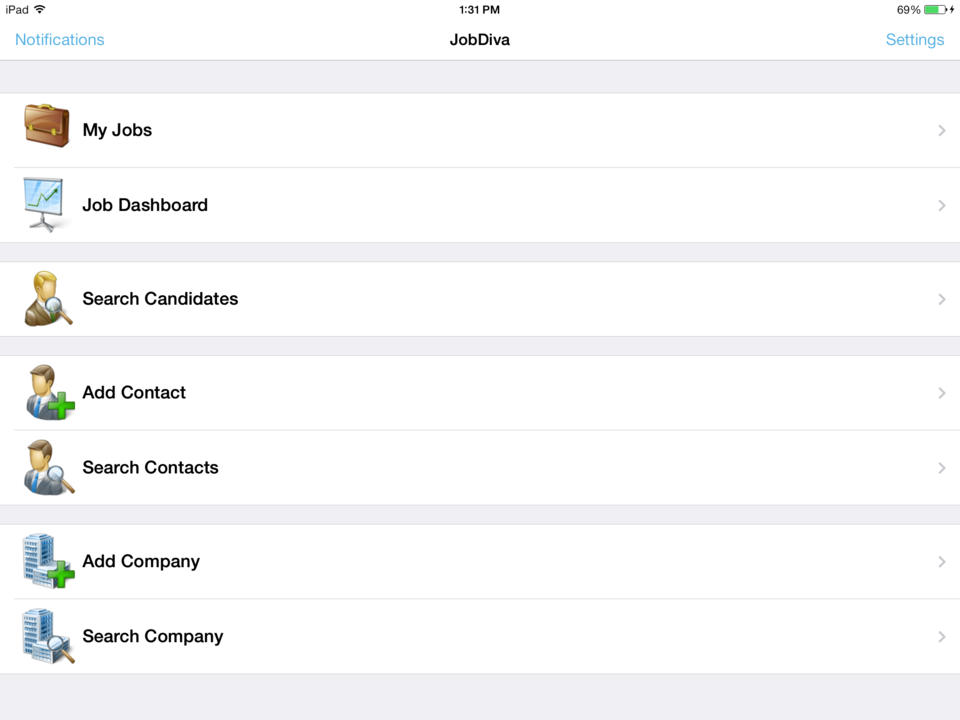    | Pipedrive Screenshots      | Zoho CRM Screenshots  |
