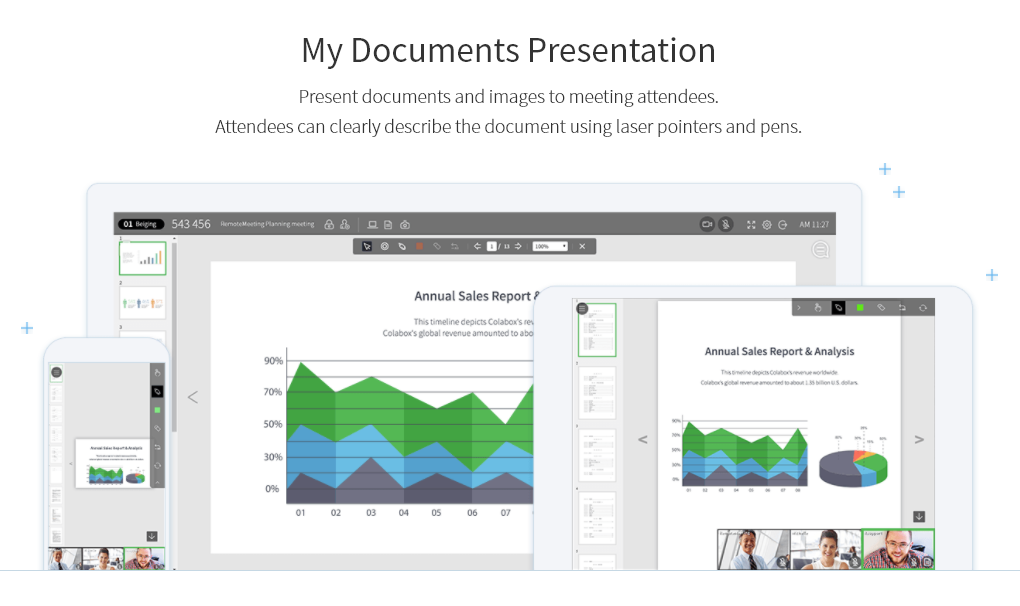
A web-based video conferencing tool. Supports mobile, browser and AI minutes. RemoteMeeting is a video conferencing solution. Use a browser to start and join video conferences. No need for a dedicated application. Present a desktop, share documents and interactively mark on them. Create automated meeting minute as record them for later review. RemoteMeeting can detect the speaker automatically and pin it in the main screen for a more immersive…
$0.20
per usage
Skype for Business / Lync (discontinued)
Score 7.3 out of 10
N/A
Skype for Business was an online messaging and conferencing tool, now superseded by Microsoft Teams.
N/A
Zoom Workplace
Score 8.4 out of 10
N/A
Zoom Workplace, Zoom’s open collaboration platform with an AI Companion, empowers teams to be more productive, and strengthen customer relationships throughout the customer lifecycle with Zoom’s Business Services for sales, marketing, and customer experience teams, including Zoom Contact Center.
$15.99
per month per user
Pricing
RemoteMeeting
Skype for Business / Lync (discontinued)
Zoom Workplace
Editions & Modules
RemoteMeeting Pay-per-USE
$0.20 / min
per usage
RemoteMeeting Pay-per-USER
$17.99 / month
per user
No answers on this topic
Add-On Zoom Translated Captions
$5
per month per license
Add-On - Zoom Whiteboard
$24.90
per year
Pro
$149.90
per year per user
Business
$199.90
per year per user
Business Plus
$250.00
per year per user
Add-On - Conference Room Connector
$499
per year
Basic
Free
Enterprise
Custom
Add-On - Large Meetings
starting at $600
per year
Add-On - Cloud Storage
starting at $120
per year
Add-On Audio Conferencing
starting at $1200
per year
Add-On Zoom Phone Power Pack
Starting at $300
per year per user
Add-On - Zoom IQ for Sales
Contact Sales
Add-On - Quality of Service Subscription
Contact Sales
Offerings
Pricing Offerings
RemoteMeeting
Skype for Business / Lync (discontinued)
Zoom Workplace
Free Trial
Yes
No
Yes
Free/Freemium Version
No
No
Yes
Premium Consulting/Integration Services
No
No
Yes
Entry-level Setup Fee
No setup fee
No setup fee
No setup fee
Additional Details
** Server deployment option available upon request.
Where Skype for Business, now part of Microsoft Teams fails, Zoom shines. Zoom is able to handle significantly higher number of participants without dropping in quality and/or issues with viewing all participants. Other aspects such as more fine-tuned control of participants is …
Skype for Business's unique features offers many benefits.
When I need to communicate with my colleagues, I rely on the chat function. Its
interface is intuitive and has top-notch sound. Making groups is easy, and
Our school district uses both Zoom and Microsoft Teams. Many of our users prefer Zoom over Teams because they say Zoom is easier. Not considering just the Chat feature, I like the ease of setting up a conference in Teams and sending out the calendar event. The integration of …
Skype for Business existing before all these other softwares were present. So legacy is maintained by Skype. Main feature that stacks up Skype against all of the mentioned apps is security provided by Skype for Business apps. As we all know Zoom was not at all safe to use as lots …
Skype for Business is great for arranging interactive sessions with group members. It has great audio and video quality and live chat enable others to communicate with each other personally or as a group during any session. File sharing is also easy. It is best for its quality …
We have Skype and teams both in the company. Teams GUI is very great when compared to Skype and also it has more features and options. It works with other 365 products. File storage, video quality is much better. Also, application integration are tremendous. It shows best …
We [use] Zoom at least 10x more often than Skype for Business, and even though I feel like Zoom has some very shady business practices, their recent security upgrades have been a really valuable way to feel safer about our calls. The biggest drawback on Zoom vs Skype for …
We're working to transition away from Skype for Business and onto one of the alternatives. Working with Skype for Business, many of the features feel "last-gen" and while it's not terrible and it gets the job done, the alternatives have more team collaboration utilities and …
Skype for Business is the paid version of Skype and thus provides more features and capabilities. As a business with employees worldwide, we require video conferencing software that supports more than 25 members in a call, which is why Skype for Business is preferred over Skype.…
Skype is a solid product, but in comparison to the other tools on the market (mainly the 3 we have used being UberConference, Zoom, and Join.e), it is significantly overpriced. The power of Skype for Business is extreme, however, they are all great at this point and it has no …
Skype for Business has made itself a clear leader among the pack. I would put it at the top of the list because it's easy to deploy/manage and simply works great!
We had a similar situation, when the server was saturated, it was impossible to connect, but you could raise your hand to ask questions, it had polling and Q&A. You could also record the meetings, even when you connected through phone.
Slack has a bit higher sound quality on calls but does not have a very comfortable GUI and not very good notification sounds. On the other hand, you can connect several accounts to Slack client, as for Skype for Business you can connect only one account and run only one …
Skype for Business will not work for video conferencing outside of our network so we can only video conference internally. Their chat feature is way better as well. You can save your chats and search them as well. You can also record meetings and it automatically takes notes …
Skype for Business had reliability issues and we often experienced poor quality audio and/or video. For a while, we tried using it with a large number of participants (50+) and encountered some bandwidth/quality issues. We haven't had any of these issues with Zoom.
Zoom was already installed when I started. The selection process was already completed. I have had experience with Skype for Business and I like the integration with MS products, but Zoom works better overall. I'm interested in getting Zoom as integrated as Microsoft products …
Microsoft Teams is very similar to Zoom Workplace in many ways, but I think Zoom Workplace is a clear winner when meetings involve members from different organizations. Teams is great for internal meetings (Zoom Workplace is great for this as well as the two tools are very …
Zoom has a very friendly UI that allows any kind of people to easily use the application, it has a light design but with all the necessary features without overflooding the options. Zoom has great stability and great performance among other counterparts making this a very …
We've selected Zoom because it integrates easily with our CRM and allowed to port our phone number. Unfortunately, their billing and tech support are really bad.
Low cost and improve quality when you have several participants. Multi platform support is also amazing for this tool, no mater if we are talking about PC or MAC, Windows or Linux, Zoom can be easily be used. Support provided by the vendor is also an incredible key feature of …
Zoom is much better than using a source such as Vonage for business meeting solutions. The main reason would be Vonage has limits and can't always function properly when using a government computer. In those situations, one would need to use a mobile device. When it comes to …
Verified User
Contributor
Chose Zoom Workplace
Zoom seems to be a bit more intuitive and user-friendly than Skype. We like the record function, screen share, and multi-use product.
Lecturer in Computational Design and Advanced Manufacturing (Architecture)
Chose Zoom Workplace
Zoom is 100% superior in almost all aspects compared to its 2 main competitors: Microsoft Teams and Skype. Only a few organizations in the Australian Education sector use Skype anymore. There are several universities and organizations that are forced to use Teams by their …
Despite the availability of many tools like Zoom on the market, Zoom has made its presence and become the most valuable and loved tool. The tool has all the features that any other tool like this should have and provides a one-stop solution for all the demands any business …
I used to use Skype before Zoom. Zoom's robust and quality features are not available in Skype. Zoom is a video conferencing solution that maintains advanced online collaboration features while improving video quality. It has made it possible for me to continue my work as a …
Verified User
Consultant
Chose Zoom Workplace
Zoom app is user friendly, it is also very fun to use. We chose zoom over other apps because of its efficiency and better functionality. Because of Zoom, we've all become great communicators. Also, since it is widely used by business owners and corporations, people are counting …
Skype is Windows only, so it's completely unusable for us. It's got poor audio and video quality too. Microsoft Teams, at least on Linux, is incredibly slow. I once timed it--it took 45 seconds from hitting enter in the browser location bar until the Teams channels were usable. …
Verified User
Analyst
Chose Zoom Workplace
In my opinion, Zoom blows Skype out of the water. Skype was a great tool, but always seemed like an unprofessional form of communication given that I had been using it since my adolescence. While Zoom can be used by the younger generation as well, it seems to be a much better …
Zoom stacks up as the best product against Skype since Skype is very very slow and lags a lot between calls and video conferences whereas Zoom has all the [same] features with better quality and [more] user friendly. Sometimes it's hard to open Skype as it gets stuck on the …
Verified User
Engineer
Chose Zoom Workplace
We went with Skype since the pricing was better compared to other options.
I did not list all of the software we have tried here, but we have literally tried and used everything, nothing works as seamlessly and easily as Zoom.
We were formerly a Skype shop which worked great for internal IM and phone, yet, when we attempted to share content outside the organization the ability to do so never worked. We then turned our attention to Cisco WebEx which provided the collaboration externally but was …
Zoom is easier to access and it doesn't fail like Webex does. I have issues getting into a Webex meeting all the time. I have to click on it multiple times to access or call the owner to figure out why I can't access the meeting. Very frustrating when you are trying to join a …
RemoteMeeting is a virtual conference room system that offers a simplified user experience with a modern and intuitive design and speed of just one click, it is a meeting tool that always has a room available for my team from anywhere and any device With powerful meeting modes for any occasion, it fully suits our daily virtual communication needs to connect with colleagues, customers, employees and vendors with the ease of just screen sharing with the unique and enjoyable collaboration experience.
Skype for Business, now part of Microsoft Teams is a remote/virtual team collaboration tool must have...especially if you already use Microsoft tools. Of course, since it now part of an MS 365 subscription, it really doesn't make sense to use anything else. It is easy to use and just works. I'm not sure how anyone who works with digital files/documents and needs to work with other people doing similar work can be effective without such a tool. Of course, there are a number of alternatives like Zoom or Webex, but why pay or use another separate tool if you don't need to. :-)
Integration with other products and the AI summaries have been huge wins for Zoom Workplace in our organization. They have been life changing for our team. Also, being able to make and receive calls from our cell phones rather than have to give out personal cell phone numbers has been wildly successful with our attorneys.
RemoteMeeting works in an extraordinary way to initiate meetings through videoconferences in real time sharing screen audio and video provides dynamic meetings in 3D With avatar profiles that make the experience of the participants much more enjoyable.
For team collaboration RemoteMeeting has fallen like a glove, it is a platform that allows high-level business videoconferences to be carried out with security and excellent wireless connection.
Instant messaging to anyone who we know only by name/email. Even if they're offline, they get the message in missed convos and a notification automatically goes to them via Outlook mail. All conversations are saved and accessible via Outlook.
Video and voice calls are a norm in the WFH scenario, and an average employee has around 4-5 calls a day. Skype gives notifications for upcoming meetings, allows easy scheduling via outlook calendar, and its audio/video quality [is] reasonably good compared to the amount of data it consumes.
Status availabilities - in the WFH scenario, you could be off for lunch, out of office, busy, sharing screens - and might not want to be disturbed. Skype allows you to do that, and in case you're off, ensures that you know that you have missed messages.
Screen sharing - we have to share screens at least once or twice a day with a coworker when working on some issues/features, and Skype easily lets us do that. One of the best things about Skype is that the screen can be shared without being on a video/voice call - which is of immense advantage because oftentimes, you could prefer sharing the screen, while it [is] too noisy to talk.
I love how easy it is to set the focus on the presenter. It is annoying when people don't spotlight themselves as a presenter, so you get to see the whole gallery of attendees in smaller, two-inch windows.
I like the capability of having break-out rooms. Even though I don't use them very often, it is nice to have them available if the right situation presents itself for smaller group chats.
The recording quality is better than I have experienced with other products (Microsoft Teams, WebEx, etc.), and the fact that it is already an MP4, so I don't have to convert it for publishing on our intranet is huge to me.
RemoteMeeting is a modern and high-level video conferencing solution that provides a quality service, it is a tool where meetings are not boring, so it offers positive and satisfactory results, it provides flexible and intuitive features with solutions that fit our needs. user, ease, visually pleasing interface, safety and quality.
Connection issues can be hard to diagnose when they come up(as some knowledge of server information may be needed to reestablish as the connection troubleshooting options on the sky are not as user-friendly as the rest of the platform.
Some issues setting up camera/sound could use more info on troubleshooting options with playback sound, video, etc.
Statuses sometimes are unreliable and do not display correctly .
Allow a way to group individual people chats - not channels just individual peeps into groups for ease of finding - like how you can group shared calendars into sections in Outlook
The software is simple to install and configure. It is rather simple to explain for correct use. It is possible to profile users for the different functions offered. It is integrated quite completely with Outlook and with Active Directory security. It performs all communication functions well with one or more interlocutors and the possibility of granting control of your computer is convenient.
We're sticking with Zoom for the foreseeable future--given its compelling feature set, ease of use, and advanced technology, there's just no other competition to be excited about. Plus it's a Gartner-recognized industry leader, so it's a rather easy choice.
Very easy to use. Even though Microsoft Teams has a lot of features and integrations, as a user I feel completely comfortable on finding what I need, getting information about the app extensions and using them. It's a very comprehensive tool, intuitive design and does not make me feel tired to be using it. I am glad with the current experience.
Zoom is made for the non tech office. It has features that can be made to do what you need to run things on a day to day basis. Immediately we we able to get meetings going with remote employees. The ability to be able to add smartphone connected people was a big plus. Zoom met our needs at the time.
There have been less than a handful of outages during our two years with Zoom, and whenever there was one, an email informing us of the outage went out immediately, and they had the issue resolved shortly thereafter.
Zoom has among the best performance of any video conference platform, as I've mentioned several times. Besides that, their Chat platform works great, and their back end always runs smooth. It's unfortunate that reporting can now only be done by one month at a time, but nonetheless, it only takes a second to run any kind of Zoom report, whether it's an attendee report, Poll results, a user report, a list of meetings from the past month, etc.
I have only had to reach out to the Support team at Skype for Business once with an issue, and I was pleasantly surprised and encouraged by the quickness and thoroughness of their response. The wait time was short and my question was dealt with politely and clearly, so I would say the support team has it together.
Because I got a response right away, and was assigned one specific individual to work with me from the beginning to the resolution. I had an actual email address and direct contact with this person without having to start over and over every time I contacted Zoom - this singular individual remained attentive and was well informed on the subject matter and quite able to resolve my needs.
Skpe for business is utilized company wide in regards to my company. Everyone not only uses it, but uses it often. It is an effective way of communicating. It also integrates very nicely with outlook and all conversation history is pushed to a folder within the outlook system. We also have it so that if someone misses a message, they are sent an email reminder saying that there is a message that went unread.
If you receive any pushback from higher ups, point to any of the various positive reviews like this one. Or show Zoom's excellent Gartner report, or articles describing Zoom's partnership with Sequoia capital. It's not difficult to show how Zoom is a trustworthy industry leader with best-in-class technology.
The results we have obtained with RemoteMeeting have been unparalleled, it is an online meeting solution that improves the way we share screen perfectly from anywhere because it provides collaboration tools for more efficient meetings from offering virtual backgrounds, face focus to automatically detect the face on the screen, separate video and information display for multiple monitors, simplicity security and speed is a perfect tool.
For the below reason I will always choose this app over its competitors: Better audio and video quality, Little to no disconnections or freezing when on a call/video conference Integrates well with mailbox/ calendar/ one drive, and SharePoint is easy to use
Zoom Workplace is typically on the more expensive end against other options, but it's the industry leader for a reason. It has the most brand credibility by far, but that doesn't mean it's perfect. There are limitations when it comes to technical performance, customization and video/audio quality. I prefer Slack myself for communication apps, but Zoom Workplace is a good alternative.
The billing and price model is really fair for so many functions that they offer, our remote work requires each of the features that Zoom offers, so accepting payment for a tool like this is the least we can do. I like that billing arrives on time and that they offer opportunities and payment times.
Because the Basic licenses are completely free, and because it's very easy to configure and install Zoom, and because anyone can join Zoom from a link without needing an account, scaling is a Breeze. There are absolutely no roadblocks. My company keeps adding more Zoom Pro license every week since it's so in demand. We were able to convert users from several different platforms onto Zoom with no trouble at all.
Zoom is perfect for our business. We use it to video chat with prospective clients. The name recognition alone gives us credibility and it is very easy to screen share and send content out.
RemoteMeeting has a positive impact on my organization by offering simplified meetings that significantly increase the collaboration and productivity of my work team, offering cloud-based virtual meeting solutions that improve customer relations, reduce work time and additional costs, as well as Provide progress in projects and efficiency.
It is a video conferencing solution that improves the way we communicate with colleagues, customers, employees, partners and suppliers with a simplified experience with privacy protection, making all participants feel comfortable and safe in meetings, since we use RemoteMeeting. Work flow has increased by 15%, sales have increased and work teams develop a better relationship with each other.
Skype for Business has enabled a migration in part away from fixed line telephony and introduced the user to mobile working with a headset which cannot be overstated as being a game changer.
Being able to schedule Skype for Business meetings through Outlook has meant meetings with colleagues without a meeting room has been a great enabler.