TrustRadius: an HG Insights company

Adobe Experience Manager

Score8.6 out of 10

426 Reviews and Ratings

What is Adobe Experience Manager?

Adobe Experience Manager is a combined web content management system and digital asset management system. The combined applications of Adobe Experience Manager Sites and Adobe Experience Manager Assets is offered by the vendor as an end-to-end solution for managing and delivering marketing content.

Media

AEM Forms - Creates an adaptive form
AEM Forms - themes library
AEM Forms - where to create a template
AEM Forms - the interactive communications editor
Adobe Experience Manager Sites - document-based authoring enables marketers to create and publish content with familiar tools.
Adobe Experience Manager Sites - Universal Editor, an advanced visual editor, empowers marketers to edit and publish content.
Adobe Experience Manager Sites - Content Fragment editor enables teams to create and manage structured modular content at scale.
Adobe Experience Manager Sites - built-in experimentation lets teams set up and run A/B tests within authoring workflows.
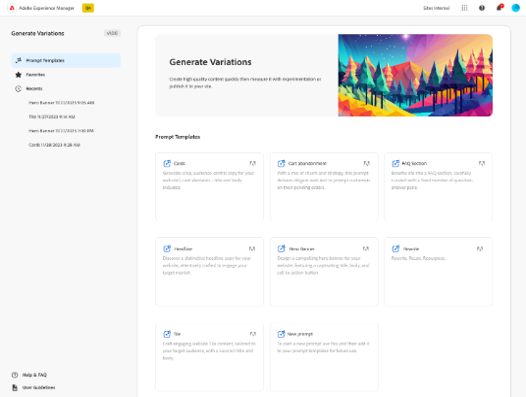
Adobe Experience Manager Sites - can create on-brand, audience-specific content variations at scale with Generate Variations.

1 / 9

Top Performing Features

  • Role-based user permissions

    Permissions to perform actions or access or modify data are assigned to roles, which are then assigned to users, reducing complexity of administration.

    Category average: 8.3

  • Publishing workflow

    The software allows users to set up a custom workflow for updating the website, including approval processes.

    Category average: 8.1

  • Internationalization / multi-language

    The software supports multiple languages, countries, currencies, etc.

    Category average: 8.3

Areas for Improvement

  • Community / comment management

    Users can put post/page comments through an approval process, auto-approve commenters based on their email addresses, block commenters by IP address, delete comments, etc.

    Category average: 7.6

  • Admin section

    The admin page is easy to navigate and use.

    Category average: 7.9

  • Code quality / cleanliness

    Code generated by WYSIWYG editor is clean and validates according to W3C standards.

    Category average: 7.2

Powerful and Scalable CMS.

Use Cases and Deployment Scope

It is an AEM central content management tool we use to manage all our applications and deliver a consistent digital experience across them. It is a component-based architecture that reduces development and deployment time. It manages our digital assets, ensures brand consistency, and enables us to deliver customised content easily. Seamlessly integrates with almost every enterprise solution and gives an analytics tool inbuilt for improving customer engagement and better operational efficiency.

Pros

  • Enterprise level digital asset management and very robust.
  • Makes applications more scalable, secure and efficient.
  • Customization, brand value consistency and omni channel delivery.
  • Saves from maintenance and development time.

Cons

  • High implementation effort as well as cost for old infrastructure.
  • Licensing and operational cost not suitable for small size enterprise.
  • Non technical user needs training for using this solution.

Return on Investment

  • Improved content delivery speed and better productivity.
  • Better customer engagement, experience consistency and brand value.
  • Operation efficiency and reduce maintenance cost and optimization.
  • Gives long term ROI.

Usability

Great for Beginner Designers

Use Cases and Deployment Scope

Adobe Experience Manager was used at a previous position I had held. I loved using this to manage all web / social presence in one place. This was great for apps, form responses, and web contact us page forms. It helped us have an overall better digital experience being able to connect these all to one universal system.

Pros

  • Organizing and Obtaining information from form results
  • Maintaining a strong digital experience from one place
  • strengthening our online experience as a brand

Cons

  • The training aspect of Adobe Experience Manager could have been a bit more streamlined
  • It was a bit tricky to connect to our socials as they are Meta
  • Sometimes the platform would take a while to load

Return on Investment

  • increased customer engagement across our website and socials
  • saved money on other data analytics tools / easier to use than meta business suite for socials
  • increase in emails opened by 32% in one year

Usability

Alternatives Considered

ACI Enterprise Payments Platform, Adtelligent Header Bidding Management Platform and 4Comply

Other Software Used

Adobe Illustrator CC, Adobe PhotoShop, Adobe InDesign

Adobe Experience Manager Review

Use Cases and Deployment Scope

In our organisation we are using this tool to handle our all application with consistent user experience. Centralized dashboard of Adobe gives all the control from where we can manage assets, shared component and personalised content very effectively. Publishing of consistent content across all our application is now very smooth and quick without interrupting the performance of our applications. Better security and reliability we feel after this intigeration in our organization.

Pros

  • Reusable component saves development time & maintain consistency or user experience.
  • Quicker deployment of consistent content without downtime.
  • We can create personalized content easily using the inbuilt templates.

Cons

  • Subcription cost is too much high.
  • Sometimes engineer needs to update somethings on production applications.

Return on Investment

  • Better user experience and security of our application.
  • Saves time in manually updating the content on different application.
  • Improves productivity as well as efficiency of our applications.

Usability

AEM the game changer tool

Use Cases and Deployment Scope

Our organisation is using this platform from the past 3 years for maintaining almost 100 plus application of assets and content. It offers omni channel from there we can change content across all the application at the same time without any downtime. It is easy to integrate with almost every type of application or website. It provides full of control all over the application from this single platform. It gives flexibility and transparency. Adobe product never disappoint allow it is fulfilling our needs superbly.

Pros

  • Easy to design new pages or component as well as easy to reuse.
  • Easy to integrate with other Adobe services for better productivity and smooth experience.
  • Centralised system provide extra security and ensure zero downtime.

Cons

  • Bugs troubleshooting is challenging sometimes, needs developers.
  • Pricing is also high, not pocket friendly.
  • AI generated content sometimes creates issue.

Return on Investment

  • Reusing of components and pages reduce application size.
  • Saves manual efforts for maintaining all application.
  • Improves traffic and makes consistency across all our application.
  • Ensure better security, scalability and makes our applications more robust.

Usability

Adobe Product Never Disappoint.

Use Cases and Deployment Scope

This solution provides flexibility to handle or manage multiple websites using the same platform. Easy to manage content with same consistency with zero down time across our all applications. It gives the centralised system where we can control every single assets like images, video and graphics that we are using in our all websites or applications. For more functionality we can integrate with other Adobe services. It increase productivity and efficiency rapidly.

Pros

  • Reusable components makes application light weight.
  • Inbuilt templates saves development time.
  • Maintain consistency across our all applications.

Cons

  • AI generate bad content needs improvements.
  • Troubleshooting is challenging sometimes.

Return on Investment

  • Increase traffic and conversion rates across our all applications or websites.
  • Existing or inbuilt template helps in better development and productivity.
  • Reduce maintenance cost and resources.

Usability