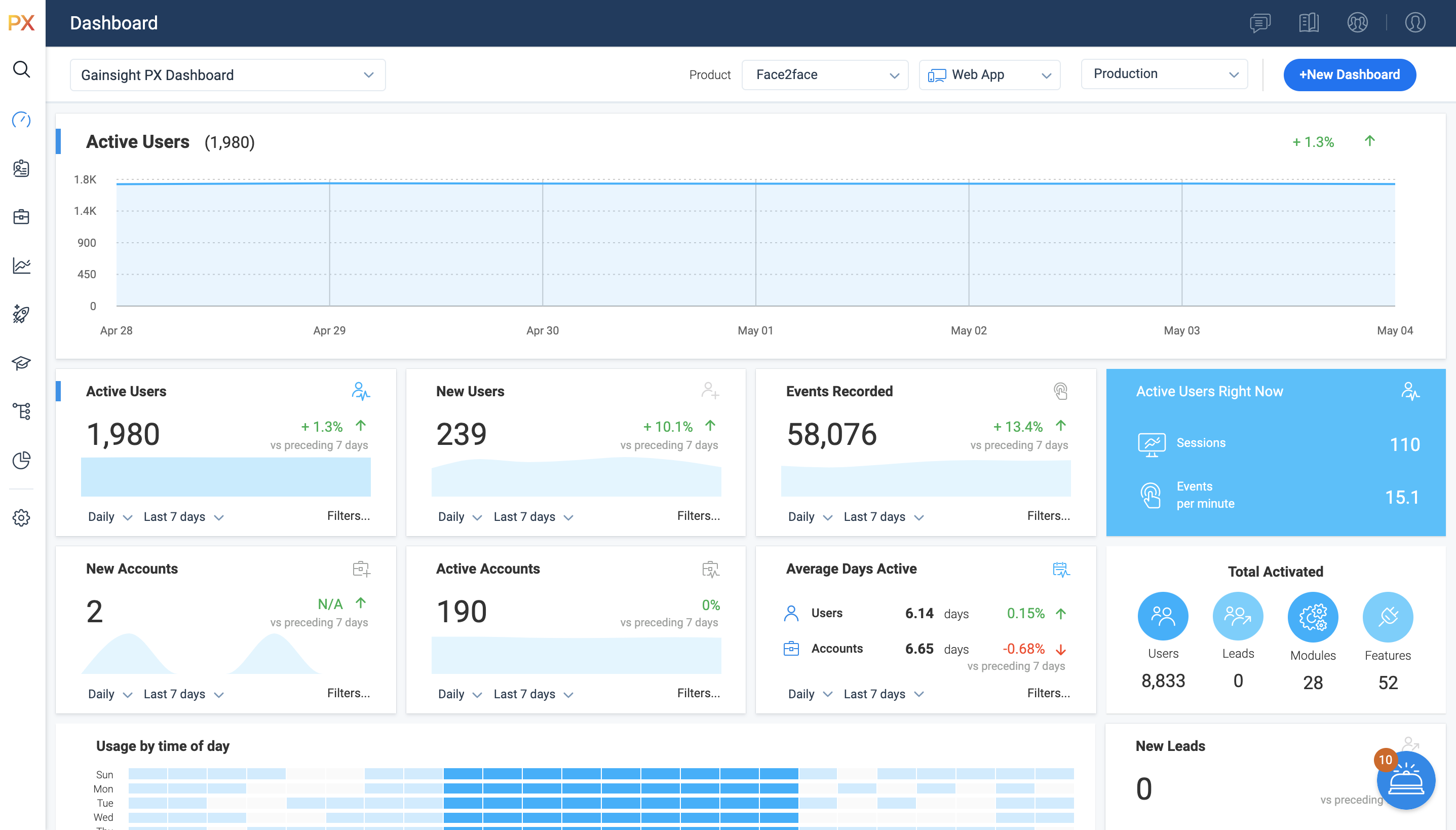
For SaaS products, Gainsight's product experience software enables companies to track every step of their user's journey and fully understand how they're interacting with a product over time.
$0
100 or less MAUs (Monthly Active Users)
Google Analytics
Score 8.2 out of 10
N/A
Google Analytics is perhaps the best-known web analytics product and, as a free product, it has massive adoption. Although it lacks some enterprise-level features compared to its competitors in the space, the launch of the paid Google Analytics Premium edition seems likely to close the gap.
$0
per month
Hotjar
Score 7.9 out of 10
N/A
Hotjar is a conversion rate optimization tool for digital marketers. Features include heatmapping, visual session recording, conversion funnel analytics, form analytics, feedback polls and surveys, and usability testing.
The tool is used by digital analysts, UX designers, web developers and product marketers. Hotjar was acquired by Contentsquare September 2021, and is now a Contentsquare brand.
$39
per month 100 daily sessions
Pricing
Gainsight PX
Google Analytics
Hotjar
Editions & Modules
Starter (Free)
$0
100 or less MAUs (Monthly Active Users)
Starter
Starting at $400/M
500+ MAUs (Monthly Active Users)
Growth
Custom
Per MAUs (Monthly Active Users) and more
Google Analytics 360
150,000
per year
Google Analytics
Free
Hotjar Observe - Plus
$39
per month 100 daily sessions
Hotjar Ask - Plus
$59
per month 250 monthly responses
Hotjar Ask - Business
$79
per month Starting from 500 monthly responses
Hotjar Observe - Business
$99
per month Starting from 500 daily sessions
Hotjar Scale - Business
$213
per month Starting from 500 daily sessions
Hotjar Ask - Scale
Contact Sales
per month unlimited volume
Offerings
Pricing Offerings
Gainsight PX
Google Analytics
Hotjar
Free Trial
Yes
No
Yes
Free/Freemium Version
Yes
Yes
Yes
Premium Consulting/Integration Services
Yes
No
No
Entry-level Setup Fee
No setup fee
No setup fee
No setup fee
Additional Details
—
—
Discount available for annual pricing.
More Pricing Information
Community Pulse
Gainsight PX
Google Analytics
Hotjar
Considered Multiple Products
Gainsight PX
Verified User
Manager
Chose Gainsight PX
The feature on Gainsight PX are easy to understand and implement in the solution, the pricing is also very competitive and functionalities like Customer health score, Customer monitoring, playbooks, surveys etc helps us to provide great insight to the team.
Handles the basics better with minimal training and investment, but falls short at optimization work. Google Analytics has remained the backbone of our web analytics work for a very long time, so it is a nice "default" option to always have present in our programs even if we …
Microsoft Clarity is speedy, extremely tidy, and straight to the point, and it contains everything a SME would need to maintain a healthy SEO without the need for technical understanding; its UI is far superior to GA, and it also provides additional capabilities like as …
Google Analytics stacks up as some of the best among the competition, assuming you're using it for its intended purpose. It's been the easiest to integrate into our applications, as well as the easiest UI to use. We selected Google Analytics for security and budget reasons, but …
We have been using Google Analytics for over 10 years. Over that time we have periodically reviewed our analytics platforms a number of times. For us, it made more sense to stay with google analytics primarily because if we migrated to another platform we would lose the …
I haven't seen a solution that visualizes the user experience and interactions in the way that Hotjar does, creating a video of how each user progressed through our app. Mixpanel and Google Analytics are leaders in the space but we've found the visual elements of Hotjar to be …
Sr. Director, Marketing Digital Experience & Design
Chose Hotjar
HotJar works better than Google Analytics when it comes to heatmap tracking. HotJar records all clicks, not just the clicks to other pages on the website.
Hotjar has the ability to give you a heatmap that shows you what section of our page has been clicked on the most by visitors. It also records what a user is doing on your website, which gives you great insight. Google Analytics doesn't have that feature but combined they help …
Ok Hotjar is more comparable with CrazyEgg, we haven't really [used] CrazyEgg since we get everything we need with Hotjar and the tools work just perfect, let's say HotJar is a very polished product and that's why we haven't changed it.Normal analytics like Google Analytics …
Google Analytics is a much more robust platform than Hotjar, but works great as a complement to Google Analytics - in other words, it was a matter of choosing both, not either/or. While there are workarounds for them on Google Analytics, heatmaps and screen recordings are much …
I have moved jobs, so that is why I am now using Hotjar. I think that Decibel Insight has more functionality than what Hotjar does, as it allows you to be able to automatically view pages and heatmaps, rather than needing to wait for the data to gather.
The fact that it has a trial period in which you can fully try each feature of the platform. The fact that is very intuitive for us to understand each feedback given by the users and to interpret how they move and what they observe on the pages we need to test.
There was not something specific negative that we noticed in the other products, hotjar came in the discussion through a referral from one of our colleagues, was covering all the tickboxes that we had set and decided to move forwards with it
Whatever software does, Hotjar does better. Integration and setup are really fast and you can have data to analyze in a few minutes. Also, the support team is very dedicated and there's a lot of documentation and examples you can follow.
Hotjar was significantly cheaper for us, and they’ve been brilliant at honouring their legacy pricing model which is much cheaper up until recently. We find that Hotjar also offers a wider range of tools that we would otherwise need to pay more for elsewhere like surveys. The …
Cmparing with other products in the same vertical, we found the UX UI for Hotjar the best. It is easier to integrate with and has lot many more features as compared to its nearest competitors. We fount the product to be robust and accurate with lot of customizable options to …
I liked the Hotjar User interface a little more and it seemed a little bit easier to set up. For some users with just the basic needs smart look was overly complicated. whereas in Hotjar everything you need is in one simple easy-to-view dashboard. Also, it offered more free …
Hotjar was relatively more known to the team and they had past experience as well with the tool which made the adoption relatively easier. As such we didn’t find a lot of difference between the two tools when it comes fulfilling our use cases so for us specifically both were …
Mouseflow matches nearly every feature that Hotjar offers – although, they may work a little differently. The most relevant difference is in data capture. Hotjar offers unlimited options for heat maps, recordings, forms and comments as long as you are a paying customer. In …
Hotjar had a better interface and a more intuitive setup. Lucky Orange wasn't bad, it just came in second. Hotjar also delivered more results for the price.
Hotjar is robust and incredibly affordable. It's insane how cheap it is for what it provides. Recordings and heatmaps alone are worth the price tag. Add on the other feedback gathering functionality and it's a really good bargain. It comes at a slight cost at the manual …
Video Capture - HotJars video capture of user sessions is nothing short of amazing. It is so useful (not to mention cool) to see, in real time, how users interact with our software. It makes our jobs so much easier and more enjoyable to get …
I didn't evaluate anyone else. I found Hotjar and it was exactly what I needed, and I've never looked back. From what I've heard from peers, Hotjar is one of the best.
The free version of hotjar is still incredibly useful, not severely limited as some other products are. They are also willing to work with you if it is necessary to bill annually, and the full version opens up a lot more specific kinds of targeting for more in depth research …
Hotjar is more visual and provides insights on real visitors using our website. It's more than just numbers or general stats. That's why Hotjar is very helpful.
It’s a robust tool that allows you to easily map and track key features and actions within your products. It also allows for in app communications to help guide the user through the path you want them to follow. The ability to connect with Gainsight CS also allows you to leverage that data to drive actions for the account team, incorporate it in health scoring, and use it to trigger digital programs. You do need a well thought out strategy for management of the platform, the data and how you will use it.
Google Analytics is particularly well suited for tracking and analyzing customer behavior on a grocery e-commerce platform. It provides a wealth of information about customer behavior, including what products are most popular, what pages are visited the most, and where customers are coming from. This information can help the platform optimize its website for better customer engagement and conversion rates. However, Google Analytics may not be the best tool for more advanced, granular analysis of customer behavior, such as tracking individual customer journeys or understanding customer motivations. In these cases, it may be more appropriate to use additional tools or solutions that provide deeper insights into customer behavior.
Hotjar is good for a first pass at understanding user sentiment or locating potential usability issues. There are features such as "rage clicked" which shows recordings or instances when a user rage clicked or had an issue with your site. Hotjar has also been helpful to launch intercept surveys on mobile, desktop, and app, which not all competitor software allow. Hotjar recordings are fun to watch. "Watching Hotjar like Netflix" is a favorite pastime at work.
Gainsight PX provides powerful segmentation capabilities to help marketers target the right customers with the right message. Through its segmentation capabilities, Gainsight PX enables marketers to create custom segments based on user behavior, demographics, and other criteria to ensure that the right message is delivered to the right customer.
Gainsight PX offers robust analytics capabilities to help marketers gain insights into customer behavior and engagement. Through its analytics capabilities, Gainsight PX enables marketers to track user engagement, identify customer trends, and gain insights into customer behavior.
Gainsight PX provides an intuitive user interface to help marketers quickly and easily create and manage campaigns. Through its user interface, Gainsight PX enables marketers to create and manage campaigns with ease, allowing them to quickly launch campaigns and track their progress.
Heat mapping is great on Hotjar. It is a good place to start when you are looking at the UX & CRO on your website. You can see the % of people clicking on elements on a page, how far they scroll, and mouse movements.
Hotjar is great for session recordings. These record the mouse movements, clicks, pages and scrolls of a user in video format. You can watch these to investigate what works well on a site and identify potential roadblocks and bugs.
Hotjar is great as it ensures that users details are anonymous; for instance, if you are watching a session recording, you cannot see what a user types in a form field, as Hotjar blanks this out.
Hotjar has a poll function, so you can have polls on your website.
Dashboards. There is no way to provide notes to others which would be very beneficial in consuming data across a team. Lacking functionality - no resizing, no organization options, run into bugs when using it frequently, overall hard to design a layout that is easy to follow.
No way to identify what features/elements are being used but aren't tagged. This would be a huge value add.
Retention Analyzer. Default view doesnt allow for filtering and includes test data. In our case this doesnt allow for a true comparison between two segments.
Segments. You can't use segments in areas you should be able to. I shouldnt have to recreate a segment as a saved filter.
We will continue to use Google Analytics for several reasons. It is free, which is a huge selling point. It houses all of our ecommerce stores' data, and though it can't account for refunds or fraud orders, gives us and our clients directional, real time information on individual and group store performance.
Even though the heat maps and user recordings were useful, our website was significantly slowed down after we installed Hotjar, so much so, that it took over a minute for our blog to load. The data that we gathered was not worth the length that it took our website to load.
It is a good product, but like with every product, there is room for improvement or even just things I, as a user, would prefer, such as the ability to click on a company and have it go to Salesforce instead of Insight. It can also be difficult to find certain reports.
Google Analytics provides a wealth of data, down to minute levels. That is it's greatest detriment: find the right information when you need it can be a cumbersome task. You are able to create shortcuts, however, so it can mitigate some of this problem. Google is continually refining Analytics, so I do not doubt there will be improvements
So easy and simple to use! Straightforward anyone in the team is able to easily go in and set up anything in Hotjar. The UI is really simple. Whenever you give feedback to Hotjar they continously take on board the feedback and improve the tool.
We all know Google is at top when it comes to availability. We have never faced any such instances where I can suggest otherwise. All you need is a Google account, a device and internet connection to use this super powerful tool for reporting and visualising your site data, traffic, events, etc. that too in real time.
This has been a catalyst for improving our site's traffic handling capabilities. We were able to identify exit% from our sites through it and we used recommendations to handle and implement the same in our sites. We have been increasing the usage of Google Analytics in our sites and never had any performance related issues if we used Analytics
I have not had to contact support frequently but when I have I used the chat and my questions were answered immediately. I've also used their knowledge center, help documentation and training videos which are all very thorough. The support we've received from our Customer Success Manager has been helpful as well.
The Google reps respond very quickly. However, sometimes they can overly call you to set up an apportionment. I'm very proficient and sometimes when I talk to reps, they give beginner tutorials and insights that are a waste of time. I wish Google would understand my level of expertise and assign me to a rep (long-term) that doesn't have to walk me through the basics.
Hotjar is a SaaS-based company, and as such has a good support service. Users can quickly submit support tickets through Hotjar's online portal. Enterprise customers get access to additional support members and have SLAs to support their larger, more complex needs. Overall, Hotjar is extremely reliable and I've never had to reach out to customer support.
love the product and training they provide for businesses of all sizes. The following list of links will help you get started with Google Analytics from setup to understanding what data is being presented by Google Analytics.
I think my biggest take away from the Google Analytics implementation was that there needs to be a clear understanding of what you want to achieve and how you want to achieve it before you start. Originally the analytics were added to track visitors, but as we became more savvy with the product, we began adding more and more functionality, and defining guidelines as we went along. While not detrimental to our success, this lack of an overarching goal resulted in some minor setbacks in implementation and the collection of some messy data that is unusable.
Heap has a great value proposition and very nice user experience. But it lacks the clear funnel analysis that Gainsight PX provides. Plus Heap also does not have integration with a lot of CRMs and Customer data platforms. Also, Additionally if you go in the market to find Heap implementors or SI vendors, you won't find any.
I have not used Adobe Analytics as much, but I know they offer something called customer journey analytics, which we are evaluating now. I have used Semrush, and I find them much better than Google Analytics. I feel a fairly nontechnical person could learn Semrush in about a month. They also offer features like competitive analysis (on content, keywords, traffic, etc.), which is very useful. If you have to choose one among Semrush and Google Analytics, I would say go for Semrush.
Video Capture - HotJars video capture of user sessions is nothing short of amazing. It is so useful (not to mention cool) to see, in real time, how users interact with our software. It makes our jobs so much easier and more enjoyable to get this type of d
User Surveys - The ease and flexibility of surveys we can make available on our website are an awesome tool to get additional data.
Simple implementation - Adding a very small amount of code to our website gives us the ability to use all of HotJars features without having to touch our code again.
Google Analytics is currently handling the reporting and tracking of near about 80 sites in our project. And I am not talking about the sites from different projects. They may have way more accounts than that. Never ever felt a performance issue from Google's end while generating or customising reports or tracking custom events or creating custom dimensions
Allow us to integrate actual product usage with Salesforce.
Too much developer time went into it, especially when the premise was that this was mostly going to be handled by the Product team. This was mostly because the Gainsight PX event editor doesn't support more complex querying on events.
We have fixed many issues, for example, checkout usability problems with the video recording feature. You can catch bugs and get an overall idea of how a particular page is working.
Polls have helped us pair intent with the video sessions, so we can understand better why certain users answered different things. You get greedy and try to ask everything but that won't work. Keep it simple and it will give you small but important insights.