Jotform Enterprise is a digital workspace productivity tool that provides a platform for organizations. The aim of Jotform Enterprise is to give companies an easy-to-navigate tool that makes reaching out to customers, collaborating with coworkers, and collecting e-signatures and data a more seamless process. Jotform Enterprise strives to enable companies to make data-driven decisions without compromising when it comes to quality and security. It doesn’t matter what type of…
$0
Paymo
Score 9.0 out of 10
N/A
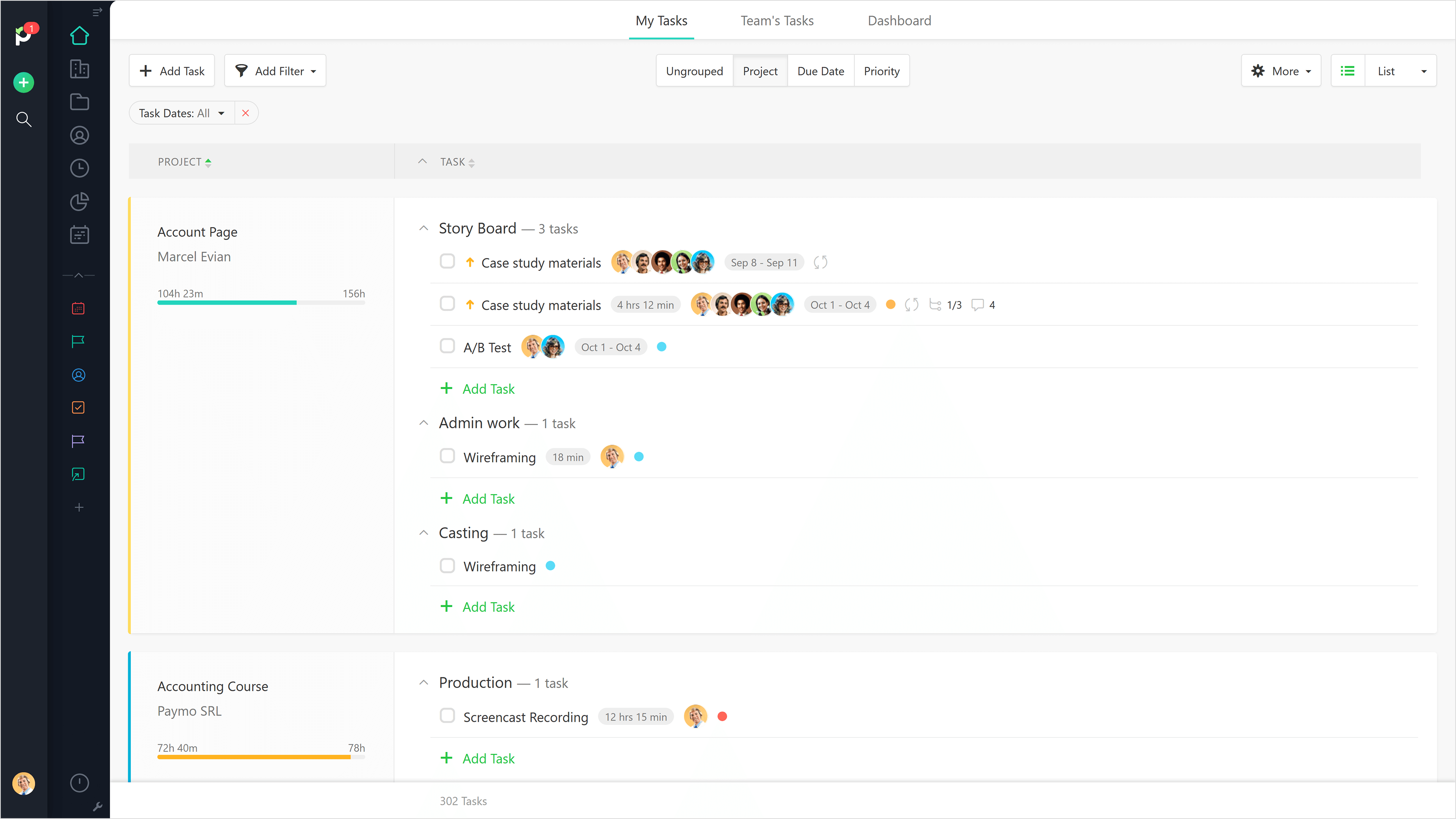
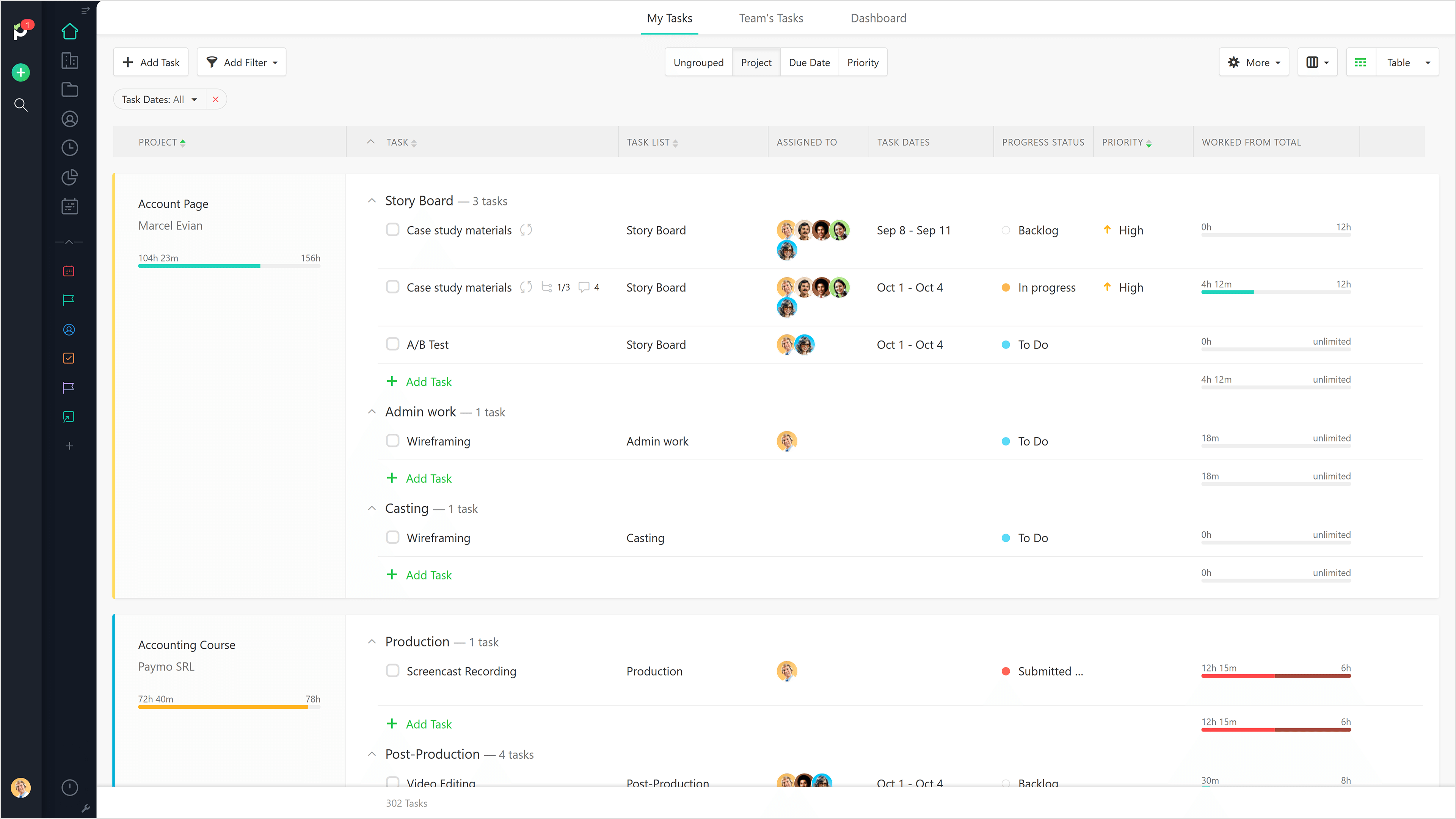
Paymo is a collaborative work management platform that helps track team progress, collaborate in context, and make smarter decisions. It acts as a single source of truth, where project planning, resource scheduling, file proofing, time tracking, and billing feed into each other to co-exist under the same roof.
$0
Up to 10 users
Toggl Track
Score 9.2 out of 10
N/A
A solution for employee time tracking software that allows your team to track time on multiple platforms with just one click, featuring integrations with 100+ apps via browser extensions, and native calendar and integrations for any preferred project management tools.
$10
per month
Pricing
Jotform
Paymo
Toggl Track
Editions & Modules
Free
$0.00
Bronze
$34.00
Monthly
Silver
$39.00
Monthly
Gold
$99.00
Monthly
Enterprise
Custom
Free
$0
Up to 10 users
Small Office
$11.95
per user/per month
Business
$18.95
per user/per month
Starter
$10.00
per month
Premium
$20.00
per month
Enterprise
Custom
Offerings
Pricing Offerings
Jotform
Paymo
Toggl Track
Free Trial
Yes
Yes
Yes
Free/Freemium Version
Yes
Yes
Yes
Premium Consulting/Integration Services
No
No
No
Entry-level Setup Fee
No setup fee
No setup fee
No setup fee
Additional Details
—
Free version available for freelancers.
—
More Pricing Information
Community Pulse
Jotform
Paymo
Toggl Track
Features
Jotform
Paymo
Toggl Track
Survey Format & Appearance
Comparison of Survey Format & Appearance features of Product A and Product B
Jotform
7.9
163 Ratings
1% below category average
Paymo
-
Ratings
Toggl Track
-
Ratings
Survey templates
8.6139 Ratings
00 Ratings
00 Ratings
Themes
7.5147 Ratings
00 Ratings
00 Ratings
Custom logo/branding
7.5153 Ratings
00 Ratings
00 Ratings
Survey Content
Comparison of Survey Content features of Product A and Product B
Jotform
9.1
150 Ratings
7% above category average
Paymo
-
Ratings
Toggl Track
-
Ratings
Changes to live survey
9.2126 Ratings
00 Ratings
00 Ratings
Question design help
9.2124 Ratings
00 Ratings
00 Ratings
Multiple question types
8.8147 Ratings
00 Ratings
00 Ratings
Survey Logic
Comparison of Survey Logic features of Product A and Product B
Jotform
9.5
126 Ratings
13% above category average
Paymo
-
Ratings
Toggl Track
-
Ratings
Survey logic flexibility
9.5126 Ratings
00 Ratings
00 Ratings
Survey Reporting & Analytics
Comparison of Survey Reporting & Analytics features of Product A and Product B
Jotform
8.4
153 Ratings
4% above category average
Paymo
-
Ratings
Toggl Track
-
Ratings
Response tracking
8.1144 Ratings
00 Ratings
00 Ratings
Data export
9.1146 Ratings
00 Ratings
00 Ratings
Standard reports
7.9132 Ratings
00 Ratings
00 Ratings
Custom reports
8.3124 Ratings
00 Ratings
00 Ratings
Analytics
8.7114 Ratings
00 Ratings
00 Ratings
Survey Administration & Security
Comparison of Survey Administration & Security features of Product A and Product B
Jotform
9.1
127 Ratings
5% above category average
Paymo
-
Ratings
Toggl Track
-
Ratings
Access controls
9.1123 Ratings
00 Ratings
00 Ratings
Compliance
9.2116 Ratings
00 Ratings
00 Ratings
Survey Distribution
Comparison of Survey Distribution features of Product A and Product B
Jotform
8.2
96 Ratings
2% above category average
Paymo
-
Ratings
Toggl Track
-
Ratings
Vendor-offered crowdsourcing
7.275 Ratings
00 Ratings
00 Ratings
Respondent restrictions
9.196 Ratings
00 Ratings
00 Ratings
Project Management
Comparison of Project Management features of Product A and Product B
Jotform
-
Ratings
Paymo
5.9
9 Ratings
27% below category average
Toggl Track
-
Ratings
Task Management
00 Ratings
3.59 Ratings
00 Ratings
Resource Management
00 Ratings
5.36 Ratings
00 Ratings
Gantt Charts
00 Ratings
4.43 Ratings
00 Ratings
Scheduling
00 Ratings
7.06 Ratings
00 Ratings
Team Collaboration
00 Ratings
4.16 Ratings
00 Ratings
Support for Waterfall Methodology
00 Ratings
7.82 Ratings
00 Ratings
Document Management
00 Ratings
5.06 Ratings
00 Ratings
Email integration
00 Ratings
5.04 Ratings
00 Ratings
Mobile Access
00 Ratings
5.37 Ratings
00 Ratings
Timesheet Tracking
00 Ratings
9.09 Ratings
00 Ratings
Budget and Expense Management
00 Ratings
8.88 Ratings
00 Ratings
Professional Services Automation
Comparison of Professional Services Automation features of Product A and Product B
We use it for mostly community surveys and I absolutely prefer it over any other survey program out there. It is easy to create, easy to understand and easy to navigate. I love the QR code option it creates for you to share your form/ survey with others. It really is the best out there!
Beautiful interface throughout, easy setup, most natural progressions are fluid and easy to use. Browser functionality allows us to use it cross-platform. Very reasonable pricing model as well. We have had a little trouble using Paymo for the entire creative process to have proofs reviewed and approved. Also, have to use external forms to have work submitted from campus.
I have been using Toggl for about seven years now, and I absolutely love it. It keeps me on track with the tasks I complete throughout the day. Tracking my time makes me more accountable for the work I produce and how much time my work takes. Having the breakdown of my tasks helps inform decisions on hiring support staff. I can see exactly where my time goes and then formulate a strategy to either bring in more help, delegate work, or re-prioritize. When coupled with other productivity apps (I particularly use ToDoist), you can unlock even more of Toggl's power. Toggl Track isn't so much a checklist tool--it's a time tracker; but when I integrate my to-do app with the time tracking, I can quickly and easily switch between tasks without disrupting workflow.
The ability to code exactly what time I worked on a project enables me to bill clients more accurately and within different minimums, which besides more accurately tracking time, this has been extremely helpful as I negotiate contracts for services and offer different deals with potential clients. Some are billed to the minute, some in 15-minute minimums, and some in 20-minute blocks.
The live reports are great, showing time spent in the minimums that I've set, while also including as much detail as I wish to share.
I've now started just writing my notes into the tracker, which are then carried into the live reports - this eases my needing to send logs to clients, as well as helping me to keep projects on track.
Toggl integrates smoothly across multiple devices. I can seamlessly move from the field on my phone to the office on my computer and utilize Toggl the entire time.
It has great customization. Setting up multiple customers in a variety of ways is easy and quick to do. We haven't found something we needed that we couldn't set up.
The reporting is clean and informative. Reports can be generated for multiple criteria.
It would be really helpful if on the timer tool, they asked you to switch projects when you stop the timer, so it could fill that time in right away for you.
I never use the 'My Tasks' because I don't fully understand how to integrate it to be useful to what our purposes are in Paymo. Some Youtube tutorials might be helpful
I am genuinely trying to come up with room for improvement, but I am struggling
Toggl is seriously my favorite tool I use as a freelancer, and they offer so much functionality for free - that's why I always write reviews
Maybe they could make it a little easier to adjust time tracking mistakes (leaving the timer running too long) -- I have to do several clicks to fix it and I make this error frequently
As a seasoned user who relies on seamless online forms for a multitude of purposes, I can confidently attest that JotForm has not only simplified the form creation process but has also elevated it to new heights.JotForm's interface is a masterpiece of intuitive design. Even if you're a newcomer to the world of online form creation, the platform's user-friendly layout will have you crafting professional-grade forms in no time.
It is a complete, a bit overambitious app but with many features that are needed. I didn't need most of the features but managed to make the most of the two I was using. Also, I think it is a well-rounded app and I am considering moving some team collab there.
Very easy to use, can enter projects and tasks on the fly, can use either a timer or enter hours later manually, the interface is simple and intuitive. Has a mobile app that is also easy to use.
I honestly have not used the support feature with Jotform. From what I can see when I look information up, everything I want to do something that I can't figure out myself it seems to not be a possible solution or edit that Jotform is currently capable of.
Good! Fast, excellent, speedy responses. They always wanted to know why and how they could improve on something (good on receiving feedback, too). Not that they were much needed, but my limited experience with them is good; they were really keen to understand what the problem was really about and how they could help with it.
I haven't needed much support from Toggl, as it's mostly come from a small team trying out the tool. I'm not entirely sure what the best way to reach them would be if I did need them. I'm also not sure how responsive they would be to support requests. But I think it's positive that I have not needed them
the most valuable things that Jotform give free trial, so the resistant users can get the experiences of the easiness and more handling to the digital things
Typeform is better hands down [in my opinion]. It's not even a comparison as [I feel] JotForm doesn't work properly and [from my experience I think] their support is very problematic. I would suggest using Typeform or using GravityForms as an alternative to JotForm. Whatever you do, [I feel you shouldn't] depend on JotForm for something that is important to your business or research project.
We still use Trello and Slack, but Basecamp and HubSpot are too much for our operation to manage or integrate. Paymo is missing some of the tracking features of HubSpot and isn't as universally used as Basecamp but we've been with them for 8 years and they seem to know what matters most to their user base
One year ago I compared it to several tools, trying to use them in parallel. Now I don't remember the exact names of those tools, but Toggl was the best for its simplicity. It is easier to use, with fewer clicks and hence less destruction
It saved me time. Within minutes I was able to create and share forms to collect demographic data.
While struggling to use another software, I thought of Jotform and it was able to assist me with collating the data I had to confirm results previously obtained.
I could not easily identify what new information was provided in a resubmission by a respondent.
Gives me more accurate time that I've spent on projects compared to older methods I've used.
Has data that I can pull together, for example my boss wanted to know the percentage of time I'd spent working on projects for one client compared to everything else - I was able to give them an accurate percentage.
Forces you to stay on top of jobs, which can lengthen the time to complete something
My timetracking needs are simple, so this is a great tool for me. Start the timer, stop the timer as client work is performed, whether that is uninterrupted time or not.
It is very easy to review work time invested for each of my clients, making it easy for me to track my daily time and review monthly hours for preparing invoices.
Daily time is automatically aggregated.
Each time entry can be tagged with work activity, or projects can be segmented and time assigned to the segments with start and stop times.