Chose Leapsome
I feel like Leapsome is a more effective tool than Betterworks. I have enjoyed using it, and I think it provides a lot of additional functionality. I also appreciate the training options that are provided in Leapsome.

| Product | Rating | Most Used By | Product Summary | Starting Price |
|---|---|---|---|---|
 Leapsome | N/A | Leapsome is a platform for Performance Management & Employee Engagement. CEOs and HR / People Operations teams in companies such as Trivago, Babbel and Mercedes-Benz choose Leapsome to enhance their people management processes. With Leapsome, you develop employees across your organisation. Leapsome combines tools for Goals & OKRs Management, Performance Reviews and 360s, Employee Engagement Surveys, Instant Feedback & Praise, and 1-on-1 Meetings into one easy to use and customizable… | $6 per month | |
 Medallia | N/A | Medallia is an enterprise customer feedback solution that allows companies to collect customer feedback across multiple channels and touchpoints, and analyze, understand and react to it in real time. | N/A | |
 SurveyMonkey | N/A | SurveyMonkey provides free, customizable surveys, and a suite of paid, back-end programs that include data analysis, sample selection, bias elimination, and data representation tools. SurveyMonkey also offers large-scale, enterprise options for companies interested in data analysis, brand management, and consumer focused marketing. | $25 per month (billed annually) per user (starting at 3 users) |
| Leapsome | Medallia | SurveyMonkey | ||||||||||||||||||||||
|---|---|---|---|---|---|---|---|---|---|---|---|---|---|---|---|---|---|---|---|---|---|---|---|---|
| Editions & Modules |
| No answers on this topic |
| |||||||||||||||||||||
| Offerings |
| |||||||||||||||||||||||
| Entry-level Setup Fee | No setup fee | Optional | No setup fee | |||||||||||||||||||||
| Additional Details | — | — | — | |||||||||||||||||||||
| More Pricing Information | ||||||||||||||||||||||||
| Leapsome | Medallia | SurveyMonkey | |
|---|---|---|---|
| Considered Multiple Products |  Leapsome  Ankit Bhangar Sr. Product Manager Chose Leapsome Leapsome had much more flexibility in terms of configuration. We could add specific questions in surveys that need to ask, as well as select questions suggested by Leapsome or earlier asked questions. The output of the survey is amazing as well, its graphical, lets us know the … |  Medallia  Bruce Lee Account Manager Chose Medallia We are also using Salesforce.com for our customers/clients' records, usage, cases, and such. Like Medallia, we are using Salesforce.com to understand the different account usage based on the services we provide. With the data provided by Salesforce.com, we would understand …  Jose Michael dela Cruz Account Manager Chose Medallia Medallia is one of our many tools for our agents and managers. It stands out because, in this tool, we get to hear our customers and build stronger relationships with them. We are able to see reports to keep track of those tasks assigned to agents and see how well they are …  Emerson Cruz Account Executive 2 Chose Medallia Easier to use and view every survey.  Jose Harley Bueno Sales Manager Chose Medallia Medallia is easy to use and has a lot of features that are tailored to fit the organization.  Noomi Codon Senior Director Voice of the Customer Chose Medallia I reviewed a number of platforms and Medallia was at the top for a B-to-B environment and had an easy way to integrate with Salesforce and have all that was needed right in Salesforce.  Emily Penfold Dailey Director of Digital Presence Chose Medallia If you have a very large business with multiple outlets, Medallia is a reasonable choice to make because of the major scalability and the vast amounts of data you can collect. If you are a small, one-off, or independent business, it can be very costly and not all of the tools … |  SurveyMonkey  Maria Sergeeva UX and Content Designer Chose SurveyMonkey SurveyMonkey has a visualisation, and for Google Survey, you have to download your data the some other program, like Looker. But Google Survey is fully connectable to Google Sheets, and Survey Monkey doesn't allow you to download your database, especially if it is free text …  Stefan Achard President and Founder Chose SurveyMonkey As [I] mentioned in the previous comments, [I believe] there is no comparison. [In my opinion,] SurveyMonkey is a market lagger.  Andrea Hester Director Of Operations Chose SurveyMonkey SurveyMonkey has the most options in terms of available question formats, analysis and participant tracking, and customizability. Google Forms is a more basic interface with fewer options for tracking and analysis, and Typeform is better in terms of design and branding options …  Shawn Bennett Sr. Account Executive - Inbound Team Lead Chose SurveyMonkey SurveyMonkey offers a better end user and survey building experience. The tools to easily create a fun and engaging survey are easily accessible, easy to understand, and easy to use. You could go as far as to say that a monkey could figure out how to use SurveyMonkey.  Caroline Dobson Human Resources Generalist Chose SurveyMonkey SurveyMonkey is easier to customize and provides much more in depth analytics. SurveyMonkey also provides better templates providing us with a better presentation to our employees. SurveyMonkey also comes with a more trustworthy platform that ensures confidentiality, which is …  Duane Thompson Product Development Lead Chose SurveyMonkey SurveyMonkey has more than 150 survey templates to choose from that are expert-written ranging from market research product survey, customer satisfaction survey templates, 360-degree employee evaluation, product testing, website feedback and so much more. It has more …  Vinicius Andrade UI/UX Designer Chose SurveyMonkey The level of options compared to Google Forms, and the regionalized prices compared to Typeform.  Jason Emery AIS Director Chose SurveyMonkey I have used Qualtrics as well. I would say Qualtrics is a more of a higher end survey solution but if your needs are basic survey monkey is probably the better value and easier to get started. |
| Leapsome | Medallia | SurveyMonkey | |||||||||||||||||||||||||||||||||||||||
|---|---|---|---|---|---|---|---|---|---|---|---|---|---|---|---|---|---|---|---|---|---|---|---|---|---|---|---|---|---|---|---|---|---|---|---|---|---|---|---|---|---|
| Performance and Goals |
| ||||||||||||||||||||||||||||||||||||||||
| Performance Management |
| ||||||||||||||||||||||||||||||||||||||||
| Survey Format & Appearance |
| ||||||||||||||||||||||||||||||||||||||||
| Survey Content |
| ||||||||||||||||||||||||||||||||||||||||
| Survey Logic |
| ||||||||||||||||||||||||||||||||||||||||
| Survey Reporting & Analytics |
| ||||||||||||||||||||||||||||||||||||||||
| Survey Administration & Security |
| ||||||||||||||||||||||||||||||||||||||||
| Survey Distribution |
|
| Leapsome | Medallia | SurveyMonkey | |
|---|---|---|---|
| Small Businesses |  iSpring LMS Score 9.5 out of 10 |  Sogolytics Score 8.5 out of 10 |  Square 9 Softworks Score 9.3 out of 10 |
| Medium-sized Companies |  Reviewsnap Score 9.0 out of 10 |  CustomerSuccessBox Score 9.5 out of 10 |  Qualaroo Score 7.0 out of 10 |
| Enterprises |  Predictive Index Behavioral Assessment Score 9.6 out of 10 |  Verint Voice of the Customer Score 9.2 out of 10 | Verint Voice of the Customer Score 9.2 out of 10 |
| All Alternatives | View all alternatives | View all alternatives | View all alternatives |
| Leapsome | Medallia | SurveyMonkey | |
|---|---|---|---|
| Likelihood to Recommend | 8.0 (0 ratings) | 9.2 (0 ratings) | 8.8 (0 ratings) |
| Likelihood to Renew | - (0 ratings) | - (0 ratings) | 9.0 (0 ratings) |
| Usability | - (0 ratings) | 9.0 (0 ratings) | 9.0 (0 ratings) |
| Availability | - (0 ratings) | - (0 ratings) | 10.0 (0 ratings) |
| Performance | - (0 ratings) | - (0 ratings) | 6.0 (0 ratings) |
| Support Rating | - (0 ratings) | 7.0 (0 ratings) | 9.4 (0 ratings) |
| Implementation Rating | - (0 ratings) | - (0 ratings) | 10.0 (0 ratings) |
| Leapsome | Medallia | SurveyMonkey | |
|---|---|---|---|
| Likelihood to Recommend |
Ankit Bhangar Sr. Product Manager |
|
|
| Pros |
|
|
|
| Cons |
Ankit Bhangar Sr. Product Manager |
|
|
| Likelihood to Renew | No answers on this topic | No answers on this topic |
 Ben Donkor Social Media & Online Analyst |
| Usability | No answers on this topic |
|
|
| Performance | No answers on this topic | No answers on this topic |
 Jeannette Saquet President |
| Support Rating | No answers on this topic |
|
 Betsy Scruggs Research |
| Implementation Rating | No answers on this topic | No answers on this topic |
 Rachel Biederman Senior Director, Marketing and Communications |
| Alternatives Considered |
|
Bruce Lee Account Manager |
|
| Return on Investment |
|
Jose Michael dela Cruz Account Manager |
|
| ScreenShots | Leapsome Screenshots      | Medallia Screenshots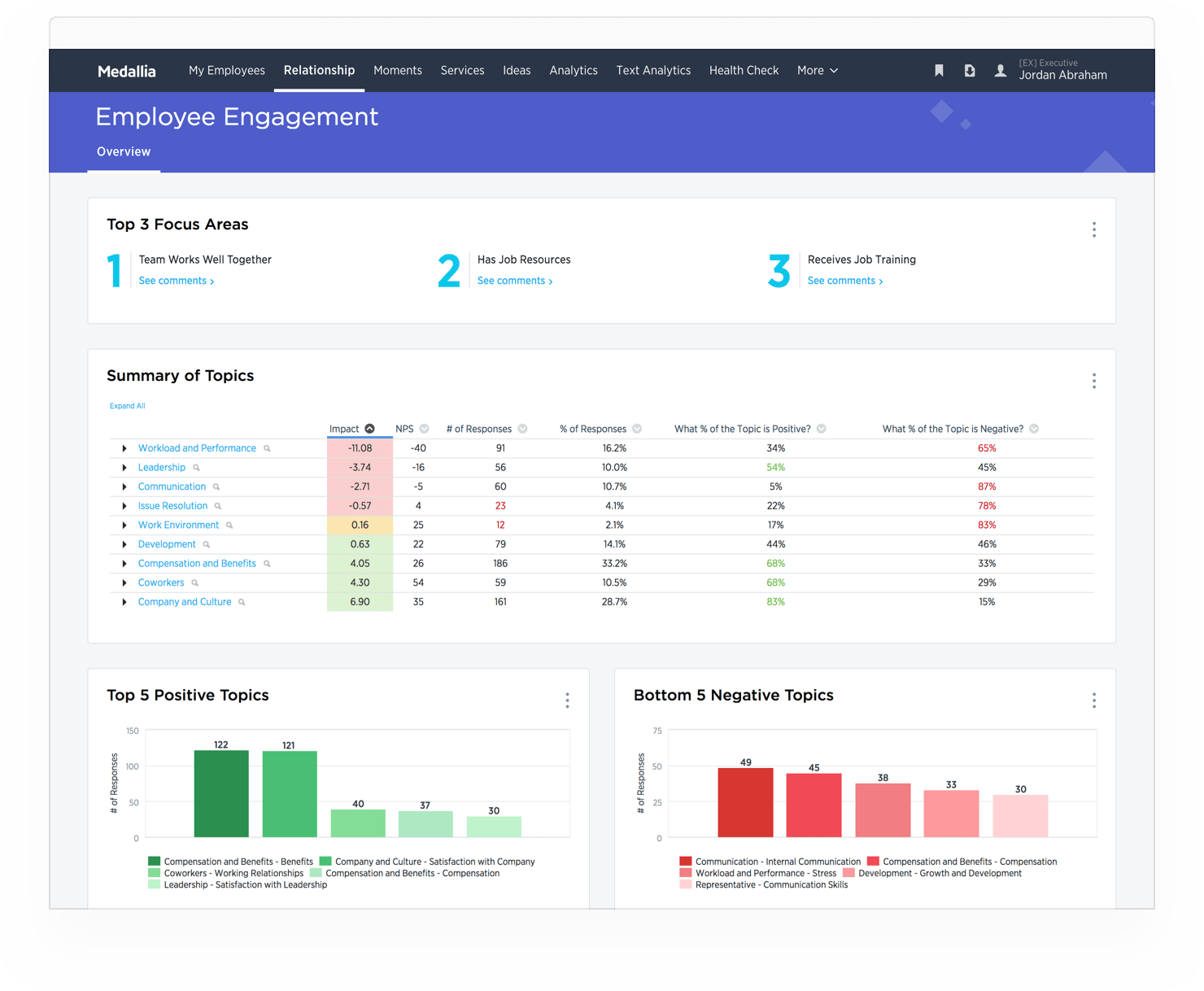      |