
Justin Roodman
Program Expert
Chose Vimeo

| Product | Rating | Most Used By | Product Summary | Starting Price |
|---|---|---|---|---|
 Screencastify | N/A | Screencastify is a suite of video-creation tools for the classroom, from the company of the same name Chicago. It is used in K-12 classrooms around the world, for teachers and students, to create instructional videos, record presentations, and give better feedback, and to support remote learning. | $15 per month per user | |
 Vimeo | N/A | Vimeo is a video experience platform. They enable anyone to create high-quality video experiences to connect and bring ideas to life. They proudly serve their growing community of nearly 300 million users — from creative storytellers to globally distributed teams at the world's largest companies. | $9 per month | |
 Wistia | N/A | Wistia is a video marketing platform that helps teams create, host, market, and measure their videos and webinars. Wistia is used to create professional videos, host webinars, collect and send leads to a connected marketing automation platform. Wistia additionally offers customers support and educational resources. | $24 per month |
| Screencastify | Vimeo | Wistia | ||||||||||||||||||||||
|---|---|---|---|---|---|---|---|---|---|---|---|---|---|---|---|---|---|---|---|---|---|---|---|---|
| Editions & Modules |
|
|
| |||||||||||||||||||||
| Offerings |
| |||||||||||||||||||||||
| Entry-level Setup Fee | No setup fee | No setup fee | No setup fee | |||||||||||||||||||||
| Additional Details | Discount available for annual pricing. | — | 20% discount for annual pricing. | |||||||||||||||||||||
| More Pricing Information | ||||||||||||||||||||||||
| Screencastify | Vimeo | Wistia | |
|---|---|---|---|
| Considered Multiple Products |  Screencastify No answer on this topic | Vimeo Justin Roodman Program Expert Chose Vimeo  Rocky Kev Technologist/Business Coach Chose Vimeo Wistia's pricing is so weird. They charge you monthly, and by how many videos you host. Vimeo has a flat fee, with an upload limit (which I was close to hitting once in 4 years).  Matthew Dilworth Demand Generation Marketer Chose Vimeo Similar in nature. Integration with MAP and SFDC were a bit more built out and native with Wistia. Folder management is on par with both.  Tara Brueske Booking and Vocal Coaching Chose Vimeo Vimeo is more reasonably priced and a little more user-friendly. Plus, I like the look of it and that I can use it at a price that doesn't break the bank for a small business like mine. It seems to have more features than these other platforms, so you don't have to have so many … | Wistia  Ian Nate Digital Marketing Operations Manager Chose Wistia Vimeo Pro works well for artistic folks, those on a budget, or those not looking to leverage video for demand gen or lead capture. It served us well for a while, but just wasn't cutting it. Wistia has more on the integrations end than Vimeo, and we have benefitted the most from …  Josh Rizzo Marketing Director Chose Wistia  Rebecca Pierce Murray Director/Producer/Trainer/Virtual Image Master Chose Wistia  Jolynn Marcum Training Department Manager Chose Wistia Wistia is much more user friendly and gives the ability to replace videos. Also the the statistics were easier to access and use with Wistia.  Jonathan Eichorst Director Digital Strategy Chose Wistia Wistia proved to strike a balance between features, support, reliability, and ease of use. Some offer deeper features, but require much more of executional teams, which increases drag and friction in continually distributing new content.  Will Goad Sr Director of Implementation Chose Wistia Wistia is slightly more expensive, but the metrics/data provided, combined with the ease of use, makes it the perfect choice for us. Being able to break videos into series/projects is very useful. Additionally, the chapter feature makes it easy to allow users to watch all or …  Gil Parrish Founder & CEO Chose Wistia Wistia is much easier to use than Vimeo!  Maggie Millard Director of Marketing Chose Wistia We use Vimeo in addition to Wistia, and will probably continue using both indefinitely. My team produces a lot of demo / testimonial webinars, which we host in Wistia for the aforementioned reasons. But, we also produce a lot of webinars, training videos, customer support …  Brett Doucette, ABC, MBA Sr. Digital Marketing Manager - Lead Gen Chose Wistia Superior to both, especially when using HubSpot as your marketing automation solution  Tammye Michau Event Coordinator Chose Wistia Vimeo had the password ability so that we could sell classes on-demand, but did not have the ability to brand like Wistia offered. It also was not as quick to upload and render the videos so we could offer them to the viewers. Brightcove worked well with our CRM platform, but …  Sarah Zimmerman Ambassador of Buzz Chose Wistia Wistia is better suited for businesses than YouTube and Vimeo as you get a more in depth look at your viewers, how many videos they are watching, how long they are watching or re-watching, and can get email addresses to connect with then. Although we also upload videos to …  Lexi Ryman Maketing and Web design Chose Wistia Vimeo pro and Youtube. Youtube's embeds are messy and end in a mess of videos that aren't retailed to my product. Vimeo pro has analytics and embed options. However wistia takes the mess out of embeds and gives the in depth analytic options along with other platform embeds. |
| Screencastify | Vimeo | Wistia | |||||||||||||||||||||||||||
|---|---|---|---|---|---|---|---|---|---|---|---|---|---|---|---|---|---|---|---|---|---|---|---|---|---|---|---|---|---|
| Video Marketing |
| ||||||||||||||||||||||||||||
| Video Platform Integrations |
| ||||||||||||||||||||||||||||
| Video Security |
| ||||||||||||||||||||||||||||
| Video Player |
| ||||||||||||||||||||||||||||
| Video Analytics |
| ||||||||||||||||||||||||||||
| Video Hosting, Management & Storage |
| ||||||||||||||||||||||||||||
| Video Engagement |
|
| Screencastify | Vimeo | Wistia | |
|---|---|---|---|
| Small Businesses |  Sendspark Score 10.0 out of 10 | Wistia Score 9.6 out of 10 | Sendspark Score 10.0 out of 10 |
| Medium-sized Companies |  Snagit Score 9.6 out of 10 |  Flipgrid Score 1.0 out of 10 |  Atlassian Loom Score 9.4 out of 10 |
| Enterprises | Snagit Score 9.6 out of 10 |  Panopto Score 7.6 out of 10 |  Vyond Score 8.6 out of 10 |
| All Alternatives | View all alternatives | View all alternatives | View all alternatives |
| Screencastify | Vimeo | Wistia | |
|---|---|---|---|
| Likelihood to Recommend | 10.0 (1 ratings) | 8.8 (44 ratings) | 9.5 (73 ratings) |
| Likelihood to Renew | - (0 ratings) | 8.0 (1 ratings) | 10.0 (10 ratings) |
| Usability | - (0 ratings) | 8.6 (4 ratings) | 9.0 (15 ratings) |
| Availability | - (0 ratings) | 9.0 (1 ratings) | 10.0 (2 ratings) |
| Performance | - (0 ratings) | 10.0 (1 ratings) | 10.0 (11 ratings) |
| Support Rating | - (0 ratings) | 5.0 (10 ratings) | 10.0 (11 ratings) |
| Implementation Rating | - (0 ratings) | 7.0 (1 ratings) | 10.0 (2 ratings) |
| Configurability | - (0 ratings) | 9.0 (1 ratings) | 9.0 (1 ratings) |
| Contract Terms and Pricing Model | - (0 ratings) | 5.0 (1 ratings) | - (0 ratings) |
| Ease of integration | - (0 ratings) | 8.0 (1 ratings) | 8.0 (11 ratings) |
| Product Scalability | - (0 ratings) | 8.0 (1 ratings) | 10.0 (1 ratings) |
| Professional Services | - (0 ratings) | 10.0 (1 ratings) | - (0 ratings) |
| Vendor post-sale | - (0 ratings) | 8.0 (1 ratings) | 9.0 (1 ratings) |
| Vendor pre-sale | - (0 ratings) | 5.0 (1 ratings) | 9.0 (1 ratings) |
| Screencastify | Vimeo | Wistia | |
|---|---|---|---|
| Likelihood to Recommend | Screencastify
| Vimeo
Tara Brueske Booking and Vocal Coaching | Wistia
 Joshua Rodriguez Digital Marketing Strategist |
| Pros | Screencastify
| Vimeo
 Marissa Roth Associate Director of Chapter Services | Wistia
|
| Cons | Screencastify
| Vimeo
 Jonah Dempcy Web & Mobile Developer | Wistia
|
| Likelihood to Renew | Screencastify No answers on this topic | Vimeo
| Wistia
Jolynn Marcum Training Department Manager |
| Usability | Screencastify No answers on this topic | Vimeo
 David Calvert Pastor for Creative Arts | Wistia
Ian Nate Digital Marketing Operations Manager |
| Reliability and Availability | Screencastify No answers on this topic | Vimeo
| Wistia
Jonathan Eichorst Director Digital Strategy |
| Performance | Screencastify No answers on this topic | Vimeo
| Wistia
 T. Blane McMichen President |
| Support Rating | Screencastify No answers on this topic | Vimeo
| Wistia
|
| Implementation Rating | Screencastify No answers on this topic | Vimeo
| Wistia
Tammye Michau Event Coordinator |
| Alternatives Considered | Screencastify
| Vimeo
 Hanaa Ibham Manager - Video Team | Wistia Rebecca Pierce Murray Director/Producer/Trainer/Virtual Image Master |
| Contract Terms and Pricing Model | Screencastify No answers on this topic | Vimeo
| Wistia No answers on this topic |
| Scalability | Screencastify No answers on this topic | Vimeo
| Wistia
Jonathan Eichorst Director Digital Strategy |
| Professional Services | Screencastify No answers on this topic | Vimeo
| Wistia No answers on this topic |
| Return on Investment | Screencastify
| Vimeo
 Mark Nowowiejski Sr. Instructional Designer | Wistia
|
| ScreenShots | Wistia Screenshots  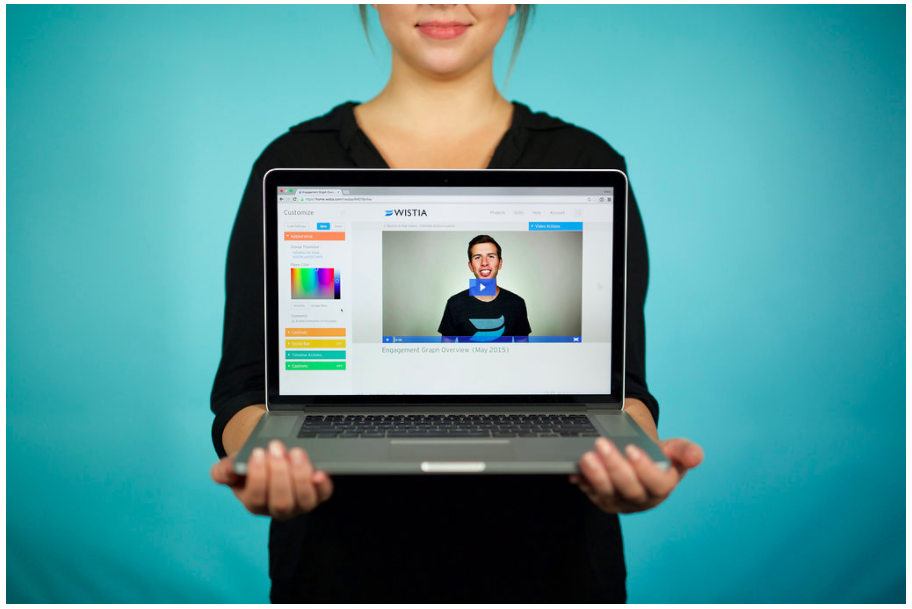  |