Filter Ratings and Reviews
Filter 34 vetted Astera Centerprise reviews and ratings
Reviews (1-25 of 29)
Companies can't remove reviews or game the system. Here's why.
It is used by our data reporting and solutions team to create solutions and complete corrections to EDI issues that arise when submitting healthcare EDI files to the Wisconsin State Medicaid program. We also use this tool to load data to our SQL data warehouse so that all company SQL users have access to the data received from the state and other outside vendors.
- Astera's customer service and help team are quick to respond and have always found solutions to my questions or problems. They also follow up after completing a support request to make sure everything was working correctly. If it's not something the current version allows, as far as functionality, they develop a solution for the next version because they assume if one company has that need that others will as well.
- I've never lost touch with our sales representative. She checks in at least twice a year, if not more, to make sure that we are happy with their product and to see if we need anything. I've rarely needed anything, but when I did she made sure to have the correct person contact me regarding what I asked for and she followed up to make sure the request was resolved.
- EDI is a very complex language and making any changes can cause errors in other areas that you aren't aware of. Astera Centerprise creates an environment that is much easier to understand than looking at a raw data file. The functionality allows us to make changes to each transaction within a file in under a minute with no errors created. Making these changes before we had Astera Centerprise took a week for one file. We can now get to more files to create clean data for the state and have reached 97% acceptance.
- Centerprise's functionality can be applied at any level. It can be a broad change to an entire segment, or it can be a single digit that is changed. You can program the system to look for specific items within a file and change only the records that need to be changed. It can sequence items, it can remove items and it can add items when specifically programmed to. And if you run into a wall creating the program, Astera's help desk will help you get past it. And the program language used is easy to understand as well. If you understand functions in Microsoft Excel or SQL statements, you will be able to use this product.
- When purchasing Astera Centerprise you are given options on how you would like to be trained and each option comes with a different price tag. We chose to be trained using online meetings over several days. The training went too fast and it was not always easy to understand until I started using the product.
- I am a person that wants to learn how and why something works so that I can use the knowledge in the future. When contacting the support team they take the problem, create a solution for you and send it back. The solutions always work, but when I get the solution I have to review every field and function to understand how it works so that I can re-create it for another solution I need. I would much rather have the support team explain what I had done incorrectly and what they changed or I would like to find a solution with them instead of having it handed to me.
- Astera uses license keys to allow their customers rights to only the functionality that was purchased. Each user and server has its own key and each key is only good for one year. There have been 2 different times that we received keys that had less functionality that we purchased. It wasn't until it created problems that we noticed and had to request new keys. This year our sales representative made sure she was available when we updated our keys so that if there was a problem she could fix it right away; however, there were not issues this year. I believe this is something they pay closer attention to now.
April 29, 2020
We currently use the Astera Centprise and ReportMiner products to create automated scheduled tasks that: retrieve, extract, and process financial information for reports and data integration with other enterprise-level systems. We specifically use the ReportMiner product to extract data from a PDF format for easier integration with other systems. The Centprise product allows our business analyst to easily manage and create a custom workflow and models to automate the complex data integration between systems regardless of file formats.
- Centerprise simplifies data modeling and workflow creation. The product has a very user-friendly UI, business users with no technical background need very little training.
- Extracting data from a PDF and other proprietary formats.
- The Centerprise product is very scalable and can handle robust volumes.
- I would like to have integrated source control and better change management tools. Often workflows and data models are updated or modified and the history or original files are not tracked or easy to follow in the history.
- Licensing a new instance can be difficult.
We are using it in Data Migration project to move data from legacy applications to state of the art applications. It is being used by projects under the Data Migration programs. Being used to migrate HR data, CRM data, ERP data, etc.
Data Sources: Oracle DB, SQL Server DB, XML, CSV.
Targets: Oracle DB, XML
Data Sources: Oracle DB, SQL Server DB, XML, CSV.
Targets: Oracle DB, XML
- Very simple installation and configuration.
- Easy to learn.
- User Interface (UI) is very intuitive.
- Simple licensing.
- Expert product support services.
- Performance with large dataset (50 million+ rows) can cause some issues. But there are ways to work around that.
- Generating XML using CSV source - adding additional header elements in the XML was not available in the product. Needed to do some post processing. Should be included in the product feature.
- Data Accuracy - 38 decimal places (i.e NUMBER data type in Oracle type) not supported by Astera in the version we used. Newer version may have addressed this issue
- Needs more pre-built connectors for well-known cloud apps (Dynamics, SFDC etc.).
April 21, 2020
Our business intelligence group uses it to run our ETLs to pull data from over 10 source systems to our enterprise data warehouse. We also use it to generate data feeds to other systems from EDW.
- Simplistic in standing up a complex ETL process in days.
- Low maintenance.
- Fast execution time.
- Better normalization functions.
- Shouldn't have to adjust to daylight savings.
May 12, 2020

We use it primarily for publishing to a data warehouse. Another production application creates and exchanges XML files with a federal regulatory agency, and as a 1-off, we are using Centerprise to validate an Oracle-to-SQLServer migration.
- Of the six mid-tier ETL/DI tools I studied, Centerprise is the most intuitive to use.
- Customer support is email-centric, but nonetheless solid. Astera happily does conference calls when the need arises.
- Wide range of features.
- Expression transformation uses SQL-ish (as opposed to Java-ish or MS-ish) commands. Simple to use, and select/paste helps.
- Love the PowerCenter-style expression transformation.
- Documentation explanations are in video and text format. While most explanations are relatively clear (or even very clear), in my opinion, the documentation is a bit haphazardly-organized. It takes me longer than I'd like to find something, although I usually do.
- Look-ups transformation certainly works, but it could be more robust. (There are ways around that.)
May 01, 2020

Our company enables Finance Accounting and Procurement back office technology for a wide variety of clients. We use Astera ETL to extract tabular accounting data in PDF documents and extract/convert that to Excel files. The PDF files are received from banks, and the data contains financial transactions that need to be reconciled with the accounting data in our systems. Astera enables extraction using simple config steps, it is accurate and reliable.
- Customizable/configurability.
- Easy to configure.
- Accurate and reliable.
- Price.
April 30, 2020

Astera Centerprise is being used by two teams that are responsible for onboarding data for new or existing customers. Those teams work in conjunction to ensure that proper workflows are set up to review and qualify the data prior to ingestion to our downstream systems. It has helped to centralize our data loading and transformation efforts, and provide visibility into data issues or patterns that we didn't have insight into before. Quality of data is key for our process, and we are TB scale, so performance and scalability were a factor as well.
- Handles large volumes of data well!
- Centralizes and simplifies data management loading!
- Provides insight into data anomalies and patterns that weren't previously visible!
- Like any tool, it has a learning curve and is somewhat proprietary in how they approach things.
- It can be clunky to train others who aren't familiar with such tools or concepts, not so intuitive that it can be picked up by any engineer.
Astera streamlines our data integration process by doing all the work through a workflow. It enables our analysts to connect to virtually any data source and combine, transform, and map data, including statistical and predictive tasks.
- Supports numerous data sources.
- Integration with AWS services.
- Individual statistics per record.
- Visualization intended for debugging.
- Attractive user interface.
- Streaming facilities.
- There is no reusable JDBC configuration.
- Processor configuration changes require stopping all data flow.
It helps us in the massive storage of data and the resolution of intelligence problems of our business. It simplifies complex integrations: Apache Spark, Databricks, Qubole, AWS, Snowflake, Google Cloud Platform and NoSQL ..., and offers us integrated data quality to transform big data into reliable information. It provides us with clean and filtered data structures, which are exploited by the different end-user tools, increasing the quality and value of data, and allowing the optimization of our decisions.
- Ease of managing large volumes of data.
- Good integration with Mainframe platforms.
- The Data Stream Programming Concept is straightforward.
- Good integration with Data Provenance and auditing.
- Possibility of handling binary data.
- Simple user interface.
- Lack of statistics per processed record.
- High resource consumption.
April 30, 2020

We streamline the transfer of our business data in file formats, securely and at scale, from local and cloud sources (Amazon S3, Azure Blob and HDFS) to data warehouses and data warehouses. We extract and transfer massive volumes of changed data from transactional systems to relational databases, avoiding redundancies by leaving intact unchanged data and storing it in the cloud. We update our databases and host the data on the spot.
- Astera allows us to use connectors that support any type of data (structured, unstructured and complex), any pattern (between batches, ETL, ELT, real-time, Big Data processing, APIs, events and transmissions) and advanced functions such as optimization pushdown, data change capture, advanced search, partitioning and error handling.
- We create very simple and complex data integration loads in a mapping designer with time-consuming advanced data integration as standard.
- The software is available at all times and from virtually anywhere.
- Using the built-in task wizards to replicate and synchronize batch data at scale we occasionally encounter design flaws.
It is used by the software development department. We are using this for the ETL process to move and transform the data from one data source to another based on the business rules.
- It is easy to use. Does not required too much technical background to learn.
- It can quickly transfer the data across different data sources as it supports the multi-thread processes.
- It supports many different data sources.
- Better support for SQLite, as it is only partially support it.
- Supporting the spatial functions. For example, connection SDE or geo databases.
- More user-friendly error message reporting.
April 17, 2020

Astera Centerprise currently is used in two of our sub companies. Centerprise plays the major role in integrating Microsoft Dynamics AX, Salesforce and other in-house built applications.
- It offers simplicity in building simple to medium integrations really fast.
- The integration flows are mostly easy to read and hence can be shown to and understood by many non-technical people.
- Any kind of feasible built-in security framework was something that was badly missing up till version 8. And even in version 8 it is still doing just the first baby steps. More effort should be invested from Astera to build a secure framework ideally with Active Directory integration.
- Better debugging options are needed. Sometimes the flows are failing and it is hard to trace the problem. Ideally we could have a debugger that step by step highlights the elements in the flow and thus shows where the data is currently being transformed in that step (just like when you debug source code).
April 29, 2020

Astera allows us to monitor the database software at all times. It does not help to manage through data extraction, transformation and loading (ETL) tools. We monitor the disk usage of the database server. This allows us to track Big Data data at the moment and respond to our users and anticipate their needs.
- It has a wide range of platforms, including Oracle, SQL Server, MySQL, PostgreSQL, and more.
- Efficient workflow.
- Granular coverage for each database platform.
- Advanced SQL optimization.
- Test of performance.
- Real-time performance diagnostics.
- Detection and protection of our confidential data.
- Backing up the database takes a long time.
- Testing backups to make sure the database can be recovered is difficult.
- Recovering lost data in the event of an incident is time consuming.
Used for syncing data between ecommerce solution and ERP system.
- EDI integration.
- API integration.
- ETL batch updates.
- No issues encountered so far.
May 23, 2017
We are a large federally qualified health center that serves approximately 70,000 patients per year. Recently we began implementing a data warehouse and analytics platform, and have started a project to integrate our electronic health record system into other systems. Centerprise Data Integrator has become an essential toolkit for us in translating and moving our data. We use this as our main ETL tool to load our data warehouse from a variety of sources. We also use the product to transfer semi-structure data from Citrix SecureForms into our electronic health record system. We are able to develop tablet-based electronic forms that a patient can fill out, and then use Centerprise Data Integrator to validate the data and load it directly into the patient's chart. This saves on the overhead involved in paper processes. Since the tool is so user-friendly, we have multiple teams and users that do not have a extensive SQL or SSIS training creating high quality solutions.
- The user friendly interface to develop integration packages means that you don't need to be highly trained in SQL code.
- There is a huge variety of out-of-box functions, translations, and connectors. This means you can get up and running with using these different components right away.
- Centerprise Data Integrator can mine data from unstructured and semi-structured data sources like pdf files and csv's. It means that virtually anything you have can be moved into a SQL database or fed into other systems.
- Centerprise Support has been excellent and responsive to our needs.
- We had some issues in getting the software running with their licensing model on our Citrix Desktop. They were very helpful in working with us on this issue.
- With any product that creates SQL code in the background, I am skeptical of how optimized that will be for our specific environment. We have not yet had problems related to this, but customers may want to monitor closely.
- They do not yet seem to have a large customer base and robust user community.
August 17, 2015
We purchased Centerprise to be our ETL tool for our new "CloudNet" Crop Insurance Policy system. It was our tool to do our nightly loads to our Data Warehouse for all of our reporting needs. It was also our tool for sending and receiving all our daily RMA files to the government.
- Once you get the feel around the interface, Centerprise is a real easy and fast tool to get up and running. You can have a Dataflow up and running in mere minutes compared to some other tools on the market. The interface is simple and pretty much everything is all in once place and easy to understand.
- The Preview data on each object is a lifesaver. To be able to set up a Dataflow and preview it's data immediately without having to run or set up a workflow is a very time-saving benefit.
- You can run Dataflows. They do not need to be incorporated into a Workflow in order to run.
- You have the ability to pass in and out parameters to Dataflows. Very handy if you need specific information about a Dataflow (or data in that flow) in order to continue on processing the next step.
- The scheduler is extremely nice and easy.
- Centerprise is an all in one package. Everything is together. You do not need a separate scheduler or bits and pieces of other products in order to get full use of Centerprise. You can Read, write and parse files. You can send emails and/or FTP to government (any) sites. You can schedule your jobs or have your System (we had .NET) call and trigger a job for you.
- Our main concern is backward compatibility with QA testing. We had a few releases of new code, changes or fixed that broke existing code which took us over 90 hours to run thru and refresh all our flows. We like the enhancements, but we don't have time to back thru everything, everytime there is a release to retest and refresh all the Flows. It's not feasible for us.
- Help documentation. There needs to be a lot more with a lot of examples (so we aren't calling and bugging support all the time). Although, they were extremely helpful, but I'm sure they have other things to do than teach us how to use the product.
- Pretty much any enhancement we needed at the time (or asked for) was given to us in a pretty timely manner. The Cobol objects were fixed/enhanced. The out variables were added. The only thing we didn't get to use that we asked for was the REST service calls. We had a lot more we wanted to do with the product.
August 07, 2015
We mainly use Centerprise for two areas. Our team takes other systems' data and transforms that into our format for our developed software. We use Centerprise to pull the necessary information out of the other systems' reports to validate the completion of a conversion. We also use it to extract data from the other systems' reports to do the actual data transformation into our format when the other system's provider will not supply data for the conversion.
- Because the standard reports from one system to another are not always compatible - Centerprise allows us to create a reusable template to standardize the information that we use to validate conversions. Standardizing the reporting data from two systems is an awesome strength that can be developed out of Centerprise.
- We have had several instances that the supplier of software to a customer will not provide data out of their system for conversion. Sometimes it is a timing issue (you will need to wait 6 months for this) and other times it is a cost issue. We have been able to convert accounting and payroll information into our system just based on reports out of the legacy system. Because we can save the template we can now convert anyone on that legacy system without the involvement of the legacy system's software provider.
- We have several support calls that have been labeled as to be done in the future. One is the reading of the File Definition in AcuCobol with the sign trailing in a numeric field. The handling of this would help us in several areas but we have been able to develop a work around at this point.
- Some of the child/overlap configuration for the "RMD" seems awkward.
Centerprise is primarily used to move data from our operational database into our newly created data warehouse. We also intend to use it to exchange data files between different applications. We are still in development, but we pull data from sources that span our whole organization into an enterprise data warehouse that will be accessed by our internal and external users through MicroStrategy, our reporting tool.
- It's incredibly easy to use. The YouTube videos Astera provides are enough to get you started. People with no previous ETL experience can start building simple mappings very quickly.
- It's incredibly easy to install and maintain. After I first installed Centerprise, I was able to start working in just a few minutes, and the maintenance releases are pretty straightforward.
- I am particularly impressed with how much Centerprise simplifies transformations that require more work in other ETL tools. The perfect example is the SCD transformation, which handles all the logic in an Slowly Changing Dimension. Even with a market leader like Informatica, the SCD logic has to be manually built. With Centerprise this can be built in just a few minutes, and it impacts every mapping.
- Performance is definitely an area to work on. My own benchmarking shows a notable difference when introducing simple transformations into a jobflow.
- The tool lacks debugging capabilities
- I would like to see more jobflow stats than the ones provided
- It is Windows-based. Many companies (including ours) are UNIX shops, and try to avoid Windows servers as much as possible, so it would be nice to have a non-Windows version.
August 03, 2015
Centerprise is used as a key ETL and data integration component bringing together several different financial data sources to compile a single view of our client's corporate finance group. It delivers a single integrated view of their 'cash register' systems and solves the problem of the manual integration of the separate system's data and reports.
- The links to many different data sources made it real easy to gain access to the key data elements and integrate the data across many different systems.
- The graphical approach is self documenting and permits the rapid assimilation of existing work by new team members.
- It makes it VERY easy to build source/destination data reconciliations.
- The ability to incrementally see the data transformation results at any point in a data flow is invaluable.
- The XML processors make it real easy to process and integrate XML data. We've even used Centerprise on its own data logs to pull out and report on the XML job log data for custom reporting.
- Centerprise is an invaluable tool for addressing data integration particularly dealing with 'Shadow IT' Excel spreadsheets.
- The dataflow architecture will take some getting used to as you have to understand the various data flow objects and THINK about how a data flow will work to accomplish what you want.
- The scheduler and job monitor are areas where the product can be improved. We would like to see an independent job monitor as a separate read only component so that a client use license is not not needed to see the working jobs.
- The job scheduler interface is not that intuitive and adding jobs, particularly in 100's, is VERY time consuming using the interface.
- The mapping between UTC and local times need work and the scheduler needs to handle switching back and forth between day light savings.
August 21, 2015
We convert data from various sources to our ERP system. I use Centerprise for two jobs. 1) take the data from reports provided and transform them to delimited files that can be imported into our ERP system. 2) Transform the data into an Excel spreadsheet into a format that may be compared to data already imported into our ERP system, to verify that the data did get into the database correctly.
- Parses fields from reports. Vertical reports can be transformed into one single row in Excel.
- Process PDF reports. Very helpful. So far, the best tool for this task that I have used.
- Easy to use. No need have a strong developer background to use.
- PDF reports are tricky at times. The columns line up when printed on paper. But Centerprise does not always see the columns this way.
August 13, 2015
Our department handles data conversion for a proprietary database. We process and manipulate data coming from competitors' systems in a variety of formats, and convert it into our systems. Centerprise readily replaces the need to use multiple other programs with their Data Integrator. Instead of processing in one program, then the next, and so on, we now have a single-point tool that does everything the others do, and much more.
- We often receive PDF-based reports from a competitor's financial and payroll management system. A normal cut and paste operation makes a mess of the data, whereas the Centerprise Data Integrator parses and aggregates the data.
- In some cases, we have to generate a value for a proprietary field in our database based on multiple fields of competitive data. Rather than support multiple versions of our own data importer, we can build the value on the fly, saving time and effort.
- The Data Integrator is intelligent in its ability to parse reports, map and modify fields, and export data. We are just now going into more depth from starting at the tip of the Centerprise iceberg. The more we see, the more impressed we are.
- I haven't seen any areas for improvement, but as I become more proficient with its usage, there's an outside chance I could provide suggestions.
August 10, 2015
Centerprise Data Integrator is used to process XML data. The software is currently used by myself only. Data Integrator replaced SSIS as our XML mapping tool. Due to a very aggressive implementation timeline, SSIS was not feasible. Data Integrator allowed me to map complex XML data very quickly and without much ramp-up time.
- Maps XML data exceptionally well
- Integrates flawlessly with SQL 2012
- Extremely robust set of transformations and functions which allows a huge amount of flexibility with ETL
- The help functionality. Needs better search and more examples.
August 10, 2015
Centerprise Data Integrator is used for importing data received in various formats from our customers. Some send in XML format, others in CSV, some in other delimited types and some we obtain via APIs and web services. The data is then normalized using Centerprise Data Integrator and pushed into our dealer data datastores.
- Centerprise Data Integrator makes it very easy for non-technical people to create and maintain data mappings from one data source type to another. This is beneficial to allow developers and engineers to focus on other parts of the business needs and not be bogged down with constant work flow changes desired by the customers.
- Centerprise Data Integrator is very good at moving and translating large blocks of data efficiently.
- Our biggest problem is with updates. We feel we have to thoroughly test each and every update with complete regression testing before we can apply that update to our production environment. This is due to previous updates often containing bugs or changing existing functionality.
- Centerprise Data Integrator could do a much better job at moving a lot of small sets of data instead of a few large sets.
- Web services connection could be much better. It is difficult to get some web services to work properly.
- Could really benefit from allowing 32-bit integers instead of only 64-bit integers.
Using Centerprise as an ETL tool is working out great. Especially working with un-common data sources! The tool is easy to use, very affordable to own and returns are very high.
- Easy to learn. We were able to train new employees and get them to speed within a week.
- Easy for business users.
- Would like to see template based development. For example I should be able to select a new TARGET table to be a TYPEII table, the tool should have a wizard to create the right map.
Centerprise is an integration tool we use for data manipulation and transfer. The tool makes it easy to transform database data from one endpoint and deliver it to another. This is an excellent tool that makes things like writing hard long SQL scripts into just a click and drag press the go button and done process. Centerprise saves us a huge amount of time when integrating legacy databases data into our application.
- Slick drag and drop UI is easy to learn and get started with
- Customer service is friendly and responsed quickly
- Large array of built in functions makes data manipulation easy
- Sometimes when previewing the data output or even running complex dataflows it can take a long time.
- Occasionally crashes after long use
- Could use some more functions like row number
Astera Centerprise Scorecard Summary
Feature Scorecard Summary
What is Astera Centerprise?
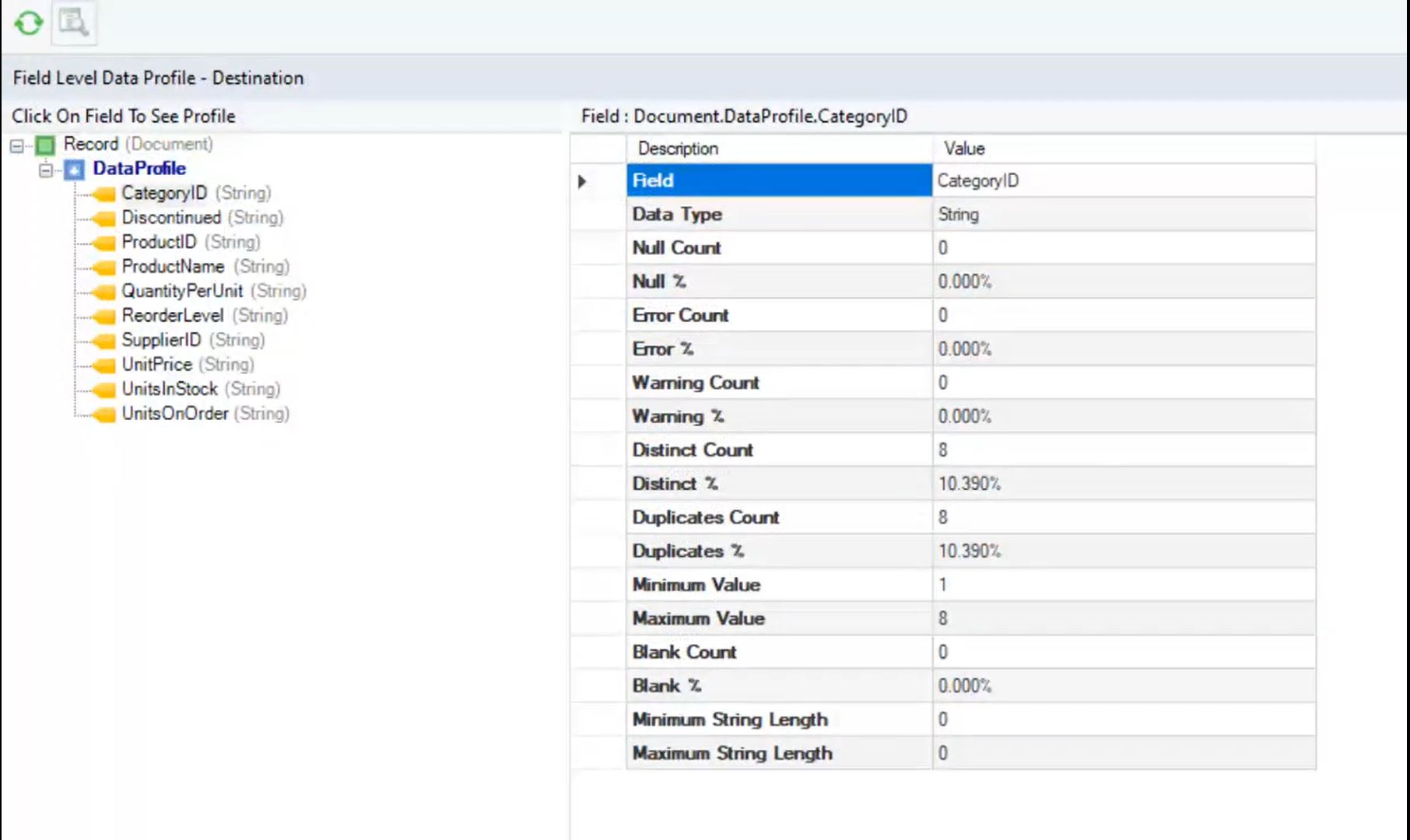
Astera Centerprise is a complete data integration solution that includes data integration, data transformation, data quality, and data profiling capabilities in a code-free environment, and promises to enable business users to handle data with minimal IT support. Centerprise enables users to exchange data with a wide range of supported applications, databases, and formats.
Categories: Data Integration
Astera Centerprise Screenshots
Astera Centerprise Video
Visit http://info.astera.com/Centerprise-Activity_View-Demo-Landing-Page.html to watch Astera Centerprise video.
Astera Centerprise Integrations
Microsoft SQL Server, SAP Adaptive Server Enterprise (ASE), legacy, ReadyAPI (formerly SoapUI Pro, LoadUI Pro, & ServiceV Pro), SAP CRM, Salesforce.com, MySQL, Microsoft Dynamics 365 (formerly Microsoft Dynamics CRM), Salesforce, Oracle, Netezza, Teradata, XML, Excel, X12, PRN, IBM DB2, REST, ODBC, Ole DB, Delimited, flat, fixed length files, COBOL, HIPAA, JSON
Astera Centerprise Competitors
Informatica, Adeptia, Talend
Astera Centerprise Pricing
- Has featureFree Trial Available?Yes
- Does not have featureFree or Freemium Version Available?No
- Has featurePremium Consulting/Integration Services Available?Yes
- Entry-level set up fee?No
| Edition | Pricing Details | Terms |
|---|---|---|
| Centerprise Enterprise | Contact rep | Lifetime License per Seat |
Discounts are provided for 10 pack, 20 pack, 50 pack, and enterprise wide Centerprise Professional licenses.
Astera Centerprise Customer Size Distribution
| Consumers | 0% | |
| Small Businesses (1-50 employees) | 11% | |
| Mid-Size Companies (51-500 employees) | 47% | |
| Enterprises (> 500 employees) | 42% |
Astera Centerprise Support Options
| Free Version | Paid Version | |
|---|---|---|
| Phone | ||
| Live Chat | ||
| Forum/Community | ||
| FAQ/Knowledgebase |
Astera Centerprise Technical Details
| Deployment Types: | On-premise |
|---|---|
| Operating Systems: | Windows |
| Mobile Application: | No |
| Supported Countries: | USA |
| Supported Languages: | English |


