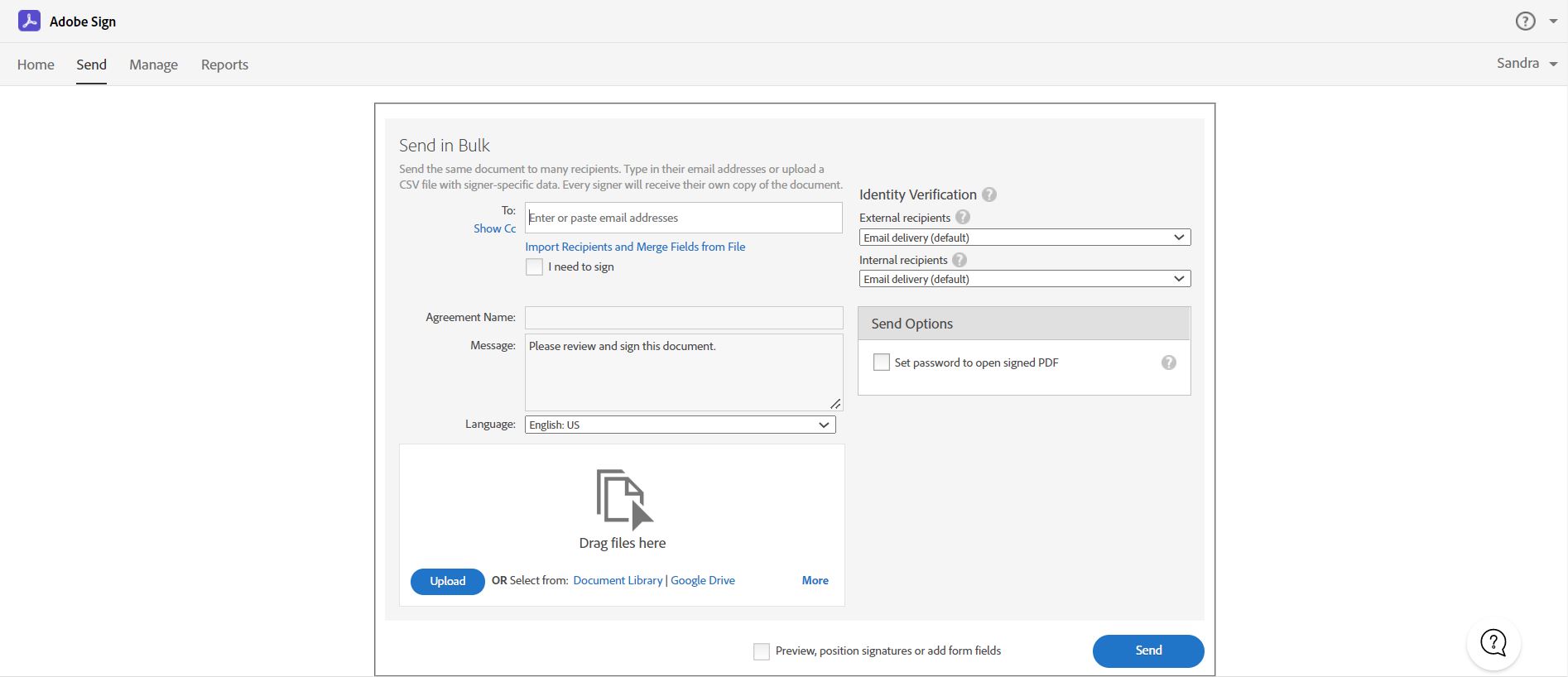
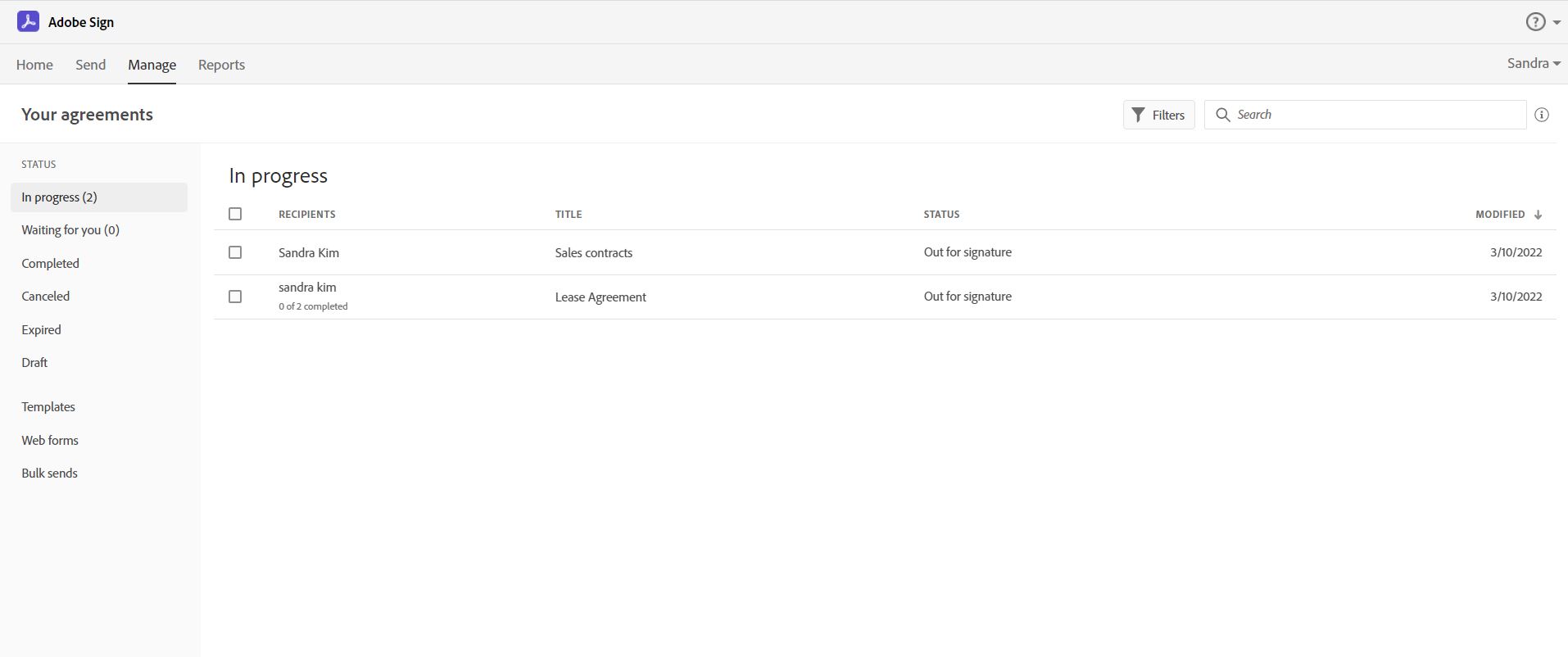
Acrobat Sign is an e-signature solution that combines simple and secure e-signatures with Adobe Acrobat. With Acrobat Sign, the user can create, sign, send for signature, manage, and track documents from one Adobe platform. The user can create signing experiences for customers and teams by enabling them to sign documents on any device or browser – anytime, anywhere. No additional software download or accounts are needed. As Microsoft’s e-signature solution, Acrobat Sign…
$14.99
per month license
Dropbox
Score 8.5 out of 10
N/A
Dropbox is a cloud storage solution, equipped with features that help users to save time, improve productivity, and collaborate with others. Users can edit PDFs, share videos, sign documents, and collaborate with stakeholders without leaving Dropbox.
$9.99
per month
Druva Security Cloud
Score 9.4 out of 10
N/A
Workforce mobility and the rise of cloud
services is an essential part of any business, but it creates a number of
challenges for IT. Data spread across devices and cloud services, unpredictable
schedules, and varied network connections all complicate efforts to protect and
govern enterprise information.
The Druva Cloud Platform (formerly Druva inSync &
Druva Phoenix) provides unified data protection, management, and information
governance across endpoints and cloud…
I have prior experience at a previous company with DocuSign, and while that platform may provide a smaller set of features & functionality, it is also more intuitive for first-time users.
Dropbox is more intuitive and easier to use than Carbonite.
Verified User
Manager
Chose Dropbox
Dropbox is much more user freidnly for non users, and google sucks because it compresses files and ofter degrades image quality
Verified User
Partner
Chose Dropbox
Fox seems more geared towards large corporation seeking and enterprise solution. Dropbox seemed more appropriate for my needs being a small organization and also for personal use. For example a user looking to expand their local hard drive, as well as looking for cloud backup …
Dropbox is more rubust in security. It's more formal and contained compared to Google Drive. It's easier to manage users and access form an employer's perspective because it allows the files to be easily remain despite an employee's departure. Ownership can easily remain in …
Perhaps the convenience and joy of using Dropbox keeps me (and my data) using it. I have gotten lost in some of the details of other products, which can feel like a scavenger hunt in a foreign library. Dropbox makes it easy to do me.
Verified User
Employee
Chose Dropbox
This is just what my company uses and I think Dropbox has a reputation of easy and universal access for larger files.
We only used WeTransfer few times before using Dropbox and we used free version. I found uploads long, they expire quickly, so you cannot resend to other customers, or if customer didn't upload quick enough you must upload again and send again. Many also complained they had …
Verified User
Manager
Chose Dropbox
The filing system that Teams is based on is confusing when outside of Teams which then forces you to use only Teams to look for a collaboration. It is tough to search for things in Teams, but their keyword search does work well, however, you really need to know part of the …
Easier to use Dropbox than G-drive. Less costly on a per size and user basis.
Verified User
Executive
Chose Dropbox
I would say OneDrive is definitely more glitchy with syncs than Dropbox and users often get confused with the layout and the login (is it a personal account or business account? I'm logging in with my business account but it says the account doesn't exist? Why is my stuff …
Verified User
Analyst
Chose Dropbox
Dropbox is easy to access and upload and download data. The data is secure and safe. [Files are put in an] organized manner, folder creation is easy, and [adding] titles, labeling, and tagging are easy.
In terms of product support, Druva Cloud Platform is much better than Veeam backup. Our major point for selecting Druva Cloud Platform was that it helps large organizations backup data to a specific network and also helps restore data in less time. Compared to Veeam, it has …
Acrobat Sign isn't quite as user friendly as other E-Sign platforms I have used. However, it offers a wide range of features that provide convenience and efficiency. For example, I can have multiple people receive the same document separately, or I can have multiple people receive and review the exact same document. I also like that I can choose to set a signing order or not, this is important for when I send Offer Letters and other things that require order of approvals.
Dropbox is well suited for sending File Requests to clients to upload documents, and for me to send File Transfers to clients with documents for them to download. I can create separate files for each client, and also create files within files, which is very convenient and useful for my business purposes. In Dropbox I can also see all of the File Requests that I have sent and it shows me how many times they've accessed it and how many files they uploaded. I can also see all of the File Transfers that I have made and whether how many times the client has accessed it and how many documents were downloaded. It also sends me notifications if the clients haven't downloaded their files yet so I can remind them. Dropbox Sign has been very easy to use, and I have already stated what could be changed with it
100% cloud backup solution that was implemented well and easy to use. Great communication from our AE through the process and whenever needed. There is a robust admin web management portal that offers a fairly granular user privilege setup and the ability to add different regions in backup. Druva Security Cloud doesn't require a lot of bandwidth or additional resources for either backups or restores. Users can independently recover their data. We are able to back the files up both individually and at a group level. The support team is 24/7 and easily accessible. Biggest con, in this day and age, is that it would be great to have an admin smartphone application. More details when the backup is running would be nice as well as more customizable reports. Also some cosmetic bugs related to the UX, but nothing huge.
Adobe Acrobat Sign tracks whether or not a signer has viewed a document
Adobe Acrobat Sign tracks when a signer has signed, and the document has been sent to the next signer
Adobe Acrobat Sign sends you confirmation emails and progress update emails along the way
Adobe Acrobat Sign provides a "confirmation of signing" page at the end of the document package you put together, to prove the signatures are authentic
I can make projects available to editors so that they can do their work.
Dropbox is a place where I can store files that I can access from anywhere, even if I don't have my laptop with me at the time.
I have an old friend who is an acting professor in Tokyo. He loves the dialogue that I write in my novels. He converts chapters into scenework for his acting students. They get very excited when there's new material!
Builds on Adobe platform so it is easy to utilize, but many features require enterprise subscription.
Integrations available but your CRM integration is only available with enterprise license.
Lots of templates but there are additional templates with enterprise only and there was no drag and drop editor.
Adobe captures some analytical metrics but many of the analytics we required were not available - specifically metrics related to how the tool converts and reduces use time by our team and the impact on clients.
They have more ways to improve in Analytics section and UX.
I recommend to have to integrate with the cloud storages cheaper option to store backups which would be tremendous for customers to save snapshots costs.
Love to see Druva Data Resiliency Cloud have a better rbac policy on who can trigger the DR engine.
It is by far the easiest service we have used to obtain digital signatures from employees. In the past we had done it by hand (a process I would not recommend for 1500+ employees) and with another company that would not allow us to create our own forms and would charge us for each form.
Dropbox is a user-friendly, easy tool which requires little to no skill and they offer a free version with a good amount of storage available. There are other file sharing tools available however at a cost. Dropbox free version I have used for years and it serves every purpose I need.
This is the second company I've brought to Druva. Just today, I was tasked with recovering a file from a user that last saw it 6 months ago. I was able to restore it in under 5 minutes of getting the request. It's really that easy.
I've had very little trouble with it in all my uses with it. I do wish the text boxes you add wouldn't cut off the text if you entered too many words and that it would adjust it's size to fit within the space you've provided. However, that just takes a little refining in the initial set up of the document before you send it out.
It works extremely well, and we have never had any issues with connecting or sharing files. It's very easy to use, and any team member can share, add, and delete files to a virtual drive. This is extremely helpful, and it's an amazing tool to use, ensuring everyone can connect and work together effectively.
The product is easy to navigate and manage. Setup and configuration is also easy. We did not need to pay for any additional professional services. Our account team worked with use on the integration. It was not complex or difficult to learn how to setup and use. End users also have the ability to log in and manage their own files and emails
I would have rated this a 9 or greater had they not had had such critical outages. They have taken steps to resolve this so I may come in and revise this
I really recommend the product for the Dropbox availability is a great having very very less downtimes, they errors are less I have been faced yet, due to connectivity sometimes we are getting errors. Only sometimes the limitations of some features show some errors.
Like any service, there are scheduled maintenance periods and unscheduled outages, however outages have been very limited and fortunately have not had any impact on our environment.
The Adobe Acrobat Sign's performance are excellent.
When we send electronic document by email for signature all the customers receive it regularly, nobody has any issue to open it and the signature phase was very easy. The user-friendly aspect of this product reduce or reset the call for IT support
Dropbox is really useful, you can access any file from anywhere and you can upload and even edit files online, but, sometimes it can be slow. Downloading, uploading, and syncing is a bit slow, it can take several minutes. Furthermore, the search engine for large amounts of data can be slow too and it is not powerful.
Page response in the admin center is acceptable- rarely are we waiting for data to load. Backup speeds seem fine, and restore speeds are OK considering it's likely pulling data from cold storage. It often takes 30-60 seconds for the restore to begin transferring files, but speeds are acceptable thereafter
It is a great tool to get signatures from the client and has reduced a lot of overhead that was caused before resulting in very long delays. With the integration of Adobe Acrobat Sign, we have reduced this delay making the process much smoother and more efficient.
They immediately responded like in an example that I gave where one of our staff members accidentally deleted the whole Special Hope Network Dropbox, we immediately contacted Dropbox they walked us through the steps of how to retrieve the information and luckily enough we were able to retrieve the entire Dropbox and we have had back and forth with Dropbox on what to do when an employee leaves how to remove them how to add another employee.
We had an issue in my first year that took a long time to fix. The support guy was awesome, took screen shots, filled me in, was professional, but it just took so long. I do think that was an anomaly, but it certainly sticks out nonetheless. Beyond that, we've had pretty good support "relationships" with the reps. They're usually pretty prompt at getting back and quite knowledgeable. Just make sure you have your proxies updated, because that's always step 1!
The person for corporate product dealing and knowledge of the product explore and better and secure use are properly handover to us. Also provide full software and tool training from the basic to the pro level with each and every possible explanation. Provide many sessions regarding every doubt. Also Guide better suitable options for our business to migrate and integrate for the expansion in all places employee smoothly.
The best types of training are well integrated into the product and Echosign does this well. As mentioned earlier in my review - there are some areas of functionality that can be difficult to understand ("only I sign") for the novice user. Other areas such as macro usage, bulk signature and so on were easily learned and understood via the online tools.
I did not personally take any training for Dropbox so I am self taught but I know when our Vice President selected Dropbox, he personally did do some training modules on it and I'm assuming it was very easy and simple to understand since he now acts like he is a pro at it!
We did not use it in the manner that most companies do, so I am pleased with how our company handled implementation. We will be pushing the full company over into Echosign for various processes which will incorporate more of an implementation effect.
I needed to stay current in improving my daily operations. Dropbox was suggested to me by a former colleague two-years ago and I've been using it just fine ever since.
Implementation from cloud ranger to Druva Data Resiliency Cloud platform was a seamless integration experience to upgrade the policies and license for continual backup/recovery support. This may be one of the best "set it and forget it" apps for backup solutions, that also allow notifications for failures etc...
They are just different. Adobe's number one feature that puts it above it's competitors is that your document, the signing process, all of it exists within Adobe. There is no need to go from Word, to Adobe, to DocuSign. It saves you time and makes life easy for you (and for your clients).
I prefer the layout and visual aspect of Dropbox as it mirrors my files on my computer. I feel that I am more organized, and it's easier to find my files in Dropbox than it was with Google Drive.
We evaluated VMWare as a provider and found their dependence on IaaS or on-premises setup was a deal breaker. Being all-cloud really required that we have a cloud-native SaaS backup solution. VMWare and other IaaS and on-prem providers really could not match Druva Data Resiliency Cloud's abilities, at least not that we were able to determine.
I would recommend to this product directly to the sales team of Dropbox for the best deal provide to my referred person and provide the best service to them.
At the beginning we assigned Adobe Acrobat Sign just to Purchase Office Department because at that moment we needed a tool that supported us to avoid manual signature and was compliance with remote working.
Now we are using it also in other situation because it help us with time and we can also reduce cost
It's easy to integrate with the systems of Windows and Linux, easy to have web versions accessible, which provide the web login credentials. Also, it can be installed for individuals for the best autosync features.
As the product is cloud based within AWS, scaleability is unlimited. The on-premise units of scale are predictable and allow administrators to scale up / down as needed. In my experience, the flexibility around these appliances, allow organisations to vertically or horizontally scale the environment with confidence and ease. Conversely, it is possible to set thresholds to ensure that organisations do not over commit and manage budgets effectively.
When it works (usually if a client already has Dropbox, so they don't get the solicitation to sign up), it works flawlessly.
I've had multiple clients not see the "continue with download only" at the bottom and email me to resend the media another way because they don't have a Dropbox account.
Using Druva has simplified greatly the backup process. Once fully configured to your business needs, Druva provides a fast amount of backups.
Druva has saved a lot of time for the IT team. Usually time is wasted by staff members searching for a missing email. Now, they reach out to us or use their own Druva account to locate a missing email quickly and easily.