
Berlynn Pierce
CRM Project Manager
Chose Asana

| Product | Rating | Most Used By | Product Summary | Starting Price |
|---|---|---|---|---|
 Asana | N/A | Asana is a web and mobile project management app. With tasks, projects, conversations, and dashboards, Asana lets an entire team know who's doing what by when, enabling workload balancing. Users can also add integrations for GANTT charts, time tracking and more. | $13.49 per month per user | |
 ClickUp | Small Businesses (1-50 employees) | ClickUp is a productivity platform that brings together work apps, data, and workflows. Also presented as a Converged AI Workspace, ClickUp eliminates work sprawl to provide context and a single place for humans and agents to work together. The platform currently boasts over 20 million users worldwide. ClickUp Brain² is deeply embedded into the workspace, offering conversational intake for project scoping and autonomous task generation. It can transform brainstorming docs… | $0 per month per seat | |
 LiquidPlanner | Mid-Size Companies (51-1,000 employees) | LiquidPlanner is a cloud based predictive project management solution. Some key features include: Dynamic Timeline View, Workload View, and Real-Time Activity Stream. | $0 per month per user |
| Asana | ClickUp | LiquidPlanner | ||||||||||||||||||||||
|---|---|---|---|---|---|---|---|---|---|---|---|---|---|---|---|---|---|---|---|---|---|---|---|---|
| Editions & Modules |
|
|
| |||||||||||||||||||||
| Offerings |
| |||||||||||||||||||||||
| Entry-level Setup Fee | Optional | No setup fee | No setup fee | |||||||||||||||||||||
| Additional Details | A discount is offered for annual billing. | Discount available for annual billing. | — | |||||||||||||||||||||
| More Pricing Information | ||||||||||||||||||||||||
| Asana | ClickUp | LiquidPlanner | |
|---|---|---|---|
| Considered Multiple Products |  Asana Berlynn Pierce CRM Project Manager Chose Asana  Brian Keary Owner and CEO Chose Asana Side by side with the other two Asana by far beats monday.com and is comparable and slightly better than ClickUp. Monday is completely browser-based and is hard to navigate and figure out how to set up. Asana and ClickUp are the exact opposite. Both are easy to set up and …  Darshan Bhatt UX Designer Chose Asana Asana is better for the teams who seeks strealined, easy to use user interfaces with less complexity . Which makes Asana a go to PMS to get things done rather then spending whole time on understanding about how feature works.  Karuthapandian Muthuraj Marketing Operations Specialist Chose Asana Support and Excellent Design UI.  Andrew Makar Program Manager Chose Asana Asana has its proper place in task management. There are better tools that provide similar functionality but the decision depends heavily on the actual requirements. If you own a small business or a start up, Asana is excellent. If you are an enterprise level organization, … | ClickUp  Ben Soutas Marketing Chose ClickUp I have never been the decision maker on software like this. They are always decided by someone else before I start working for a company. ClickUp seems like the one with the most features though. My co-worker especially loves it and is the one who insisted we use ClickUp over …  Pip Meecham Systems Consultant Chose ClickUp The short answer: other tools do individual pieces better. Productive handles financials and resourcing more natively. Notion is prettier for documentation. Monday looks slick for simple boards. But no other single platform covers the full spectrum the way ClickUp does: tasks, …  Howar Rasguido Web Developer Chose ClickUp Mejor integracion y visualizacion de tareas, la contabilidad del tiempo por tareas/tickets es una de las partes mas robustas de ClickUp, la integration con gitlab es una ventaja y ayuda mucho a la organizacion del trabajo, la posibilidad de agrupar tareas por grupos o tipos …  √ Andre Lucas Co Founder Chose ClickUp ClickUp has more features integrated and well organized. Especially the concept of having Spaces, folders and lists helps a lot in organizing the projects and each having its own workflows.  Erica Hernandez Group Director, Client Operations Chose ClickUp ClickUp had a more all-in-one solution for all the issues we have been trying to solve at the agency as well as an integration into our finance system (NetSuite) which helped adoption by our finance team.  Holly Biondo Marketing & Communications Manager Chose ClickUp Every other tool I have used has been for organizing tasks and work only. There were some of the other features, but none of them had the ability to do everything we need to manage a project from start to finish.  Gastón Barcia Advisor Chose ClickUp I still use both. ClickUp is a little "bigger" and has some more tunning over details. When someone ask me about which to choose, my answer is "you must try them"... start using both and you'll find the best using them and asking users how they feel.  Paige Knickle Owner of Copper Cabbage Studios Chose ClickUp I walked away from so many other products that I tried primarily because I wanted to have a task and productivity tool that allowed me to re-envision my 'data' at the task level. I wanted to be able to have Gantt views and dashboard views and then dive in deeper with comments …  Ariana Nhu Le Project Manager Chose ClickUp - Data centralization - Fast and clean - Easy to manage |  LiquidPlanner  Philipp Pettit Software Engineer Chose LiquidPlanner LiquidPlanner offers centralized tools to manage the requirements and objectives of each project, as well as the management of deliveries, monitoring, and team management. The tool integrates with Hubstaff and other platforms. |
| Asana | ClickUp | LiquidPlanner | |||||||||||||||||||||||||||||||||||||||||||||||||||||||||||
|---|---|---|---|---|---|---|---|---|---|---|---|---|---|---|---|---|---|---|---|---|---|---|---|---|---|---|---|---|---|---|---|---|---|---|---|---|---|---|---|---|---|---|---|---|---|---|---|---|---|---|---|---|---|---|---|---|---|---|---|---|---|
| Project Management |
| ||||||||||||||||||||||||||||||||||||||||||||||||||||||||||||
| Professional Services Automation |
|
| Asana | ClickUp | LiquidPlanner | |
|---|---|---|---|
| Small Businesses |  Stackby Score 8.9 out of 10 | Stackby Score 8.9 out of 10 | Stackby Score 8.9 out of 10 |
| Medium-sized Companies |  InEight Score 8.2 out of 10 | InEight Score 8.2 out of 10 | InEight Score 8.2 out of 10 |
| Enterprises | InEight Score 8.2 out of 10 | InEight Score 8.2 out of 10 | InEight Score 8.2 out of 10 |
| All Alternatives | View all alternatives | View all alternatives | View all alternatives |
| Asana | ClickUp | LiquidPlanner | |
|---|---|---|---|
| Likelihood to Recommend | 9.0 (209 ratings) | 8.8 (736 ratings) | 8.5 (17 ratings) |
| Likelihood to Renew | 9.6 (34 ratings) | 9.2 (37 ratings) | 4.4 (2 ratings) |
| Usability | 8.6 (37 ratings) | 8.5 (89 ratings) | 10.0 (1 ratings) |
| Availability | 8.4 (2 ratings) | 9.5 (6 ratings) | - (0 ratings) |
| Performance | - (0 ratings) | 8.0 (5 ratings) | - (0 ratings) |
| Support Rating | 5.0 (42 ratings) | 9.4 (46 ratings) | 9.0 (2 ratings) |
| Online Training | - (0 ratings) | 10.0 (2 ratings) | - (0 ratings) |
| Implementation Rating | - (0 ratings) | 7.9 (7 ratings) | - (0 ratings) |
| Configurability | - (0 ratings) | 8.0 (2 ratings) | - (0 ratings) |
| Contract Terms and Pricing Model | - (0 ratings) | 5.0 (1 ratings) | - (0 ratings) |
| Ease of integration | - (0 ratings) | 7.0 (2 ratings) | - (0 ratings) |
| Product Scalability | 8.2 (1 ratings) | 8.9 (6 ratings) | - (0 ratings) |
| Professional Services | - (0 ratings) | 5.0 (1 ratings) | - (0 ratings) |
| Vendor post-sale | - (0 ratings) | 5.0 (2 ratings) | - (0 ratings) |
| Vendor pre-sale | - (0 ratings) | 5.0 (2 ratings) | - (0 ratings) |
| Asana | ClickUp | LiquidPlanner | |
|---|---|---|---|
| Likelihood to Recommend | Asana
 Marina Torttoli Marketing Director | ClickUp
| LiquidPlanner
|
| Pros | Asana
 Ammar Aboalrub Freelancer | ClickUp
| LiquidPlanner
 Robert Tupa V.P. |
| Cons | Asana
| ClickUp
Erica Hernandez Group Director, Client Operations | LiquidPlanner
|
| Likelihood to Renew | Asana
 page V CEO (Chief Executive Officer) | ClickUp
 José Francisco Laguna Technical Writer | LiquidPlanner
|
| Usability | Asana
| ClickUp
Ben Soutas Marketing | LiquidPlanner
|
| Reliability and Availability | Asana
 Ronen Soreq Project Manager | ClickUp
| LiquidPlanner No answers on this topic |
| Performance | Asana No answers on this topic | ClickUp
| LiquidPlanner No answers on this topic |
| Support Rating | Asana
 Adam Lumley Director of Marketing & Communications | ClickUp
 Cassandra Shenning Marketing Director | LiquidPlanner
|
| Online Training | Asana No answers on this topic | ClickUp
| LiquidPlanner No answers on this topic |
| Implementation Rating | Asana No answers on this topic | ClickUp
 Leon Prather II, CTS Manager, Digital Product Operations | LiquidPlanner No answers on this topic |
| Alternatives Considered | Asana
 Rafiqul Islam Full-stack Software Engineer | ClickUp
| LiquidPlanner
|
| Scalability | Asana
Ronen Soreq Project Manager | ClickUp
| LiquidPlanner No answers on this topic |
| Return on Investment | Asana
 Kristi Porter Chief Do-Gooder | ClickUp
| LiquidPlanner
 Clay J. Seal Production Team Lead |
| ScreenShots | Asana Screenshots      | ClickUp Screenshots     | LiquidPlanner Screenshots  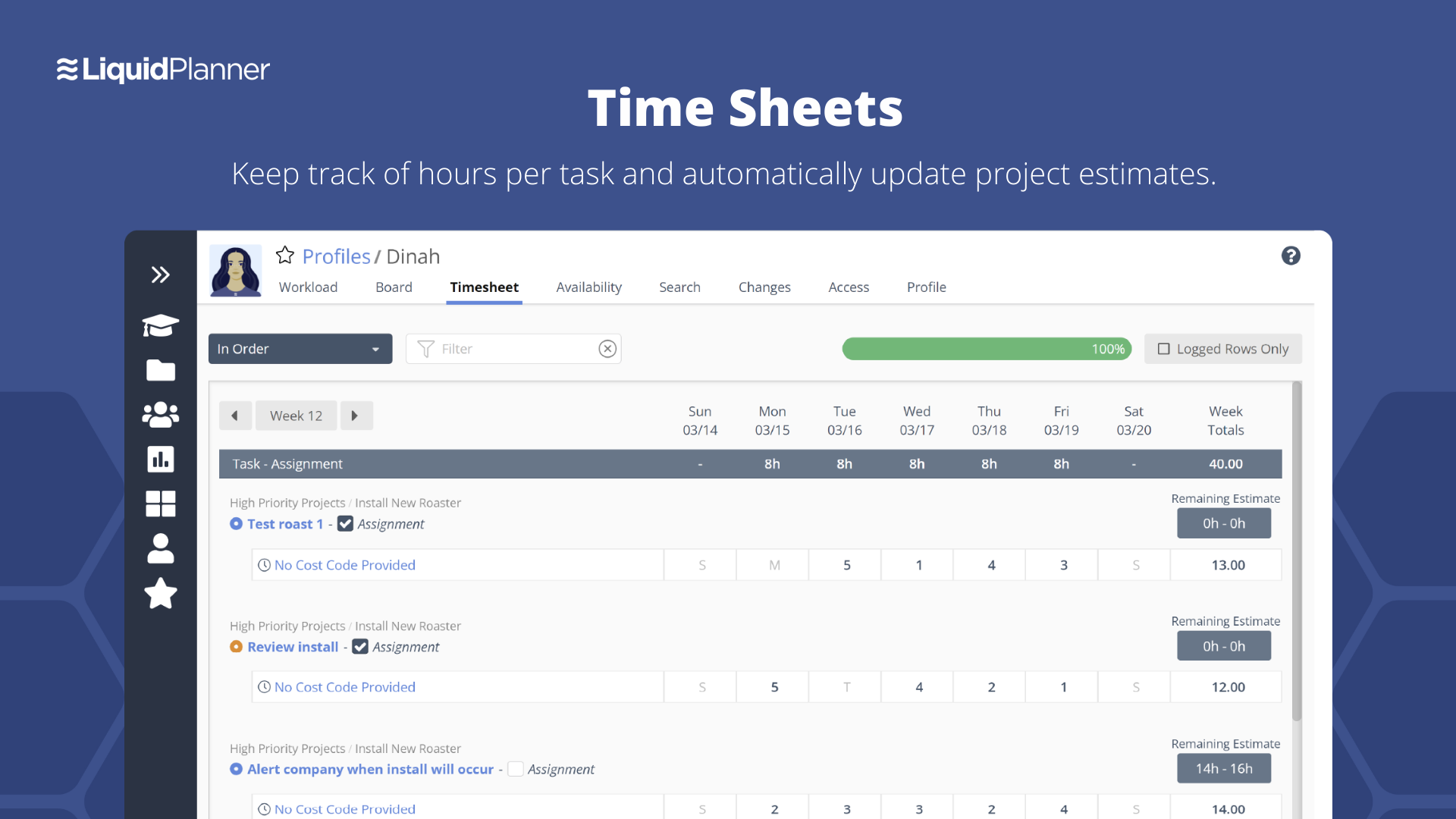 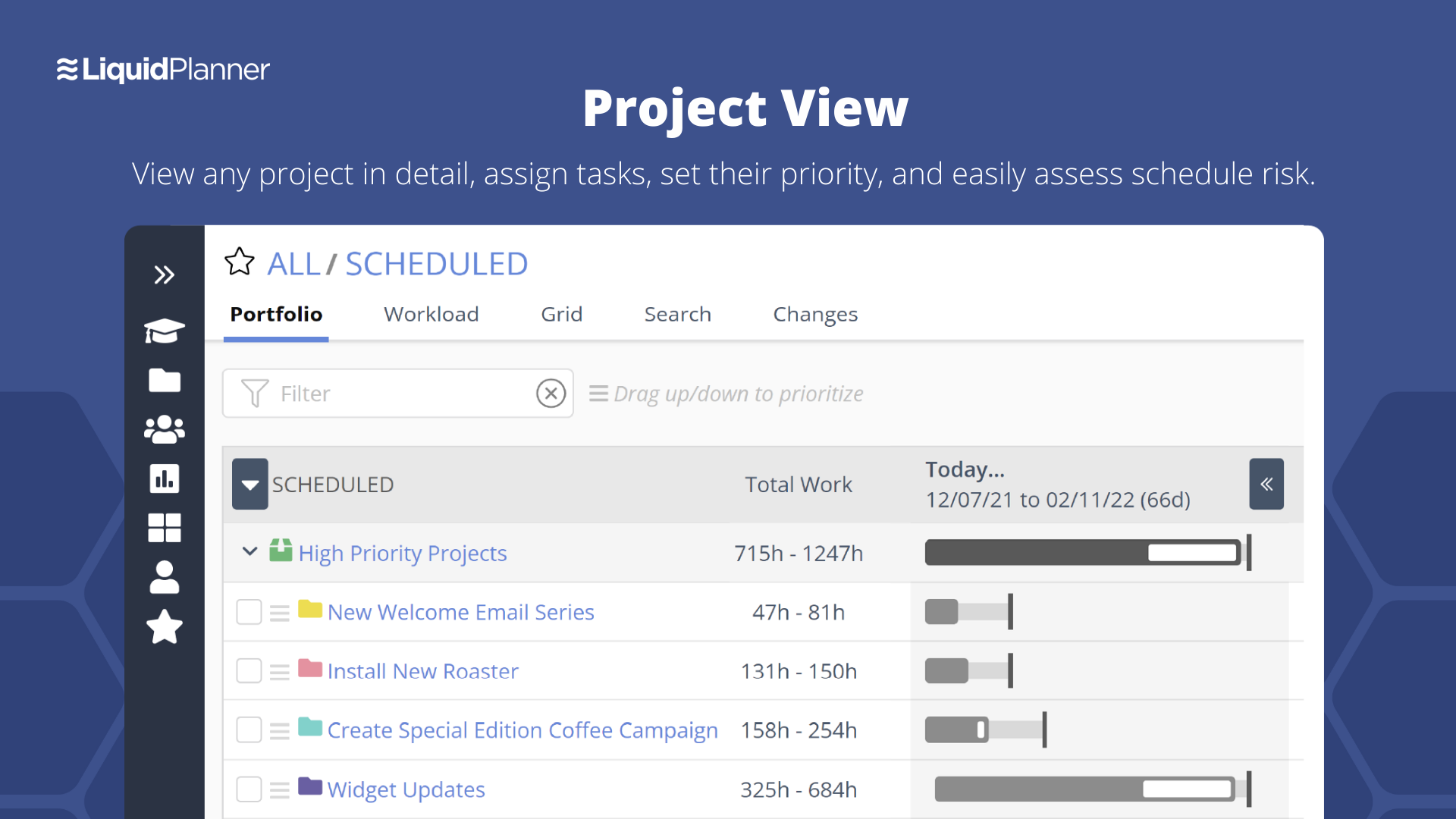  |
