Contentsquare is a digital experience analytics cloud designed to help companies understand hidden customer behaviors, and use those insights to drive more successful experiences. It includes functionality from the former Clicktale heatmap, session recording, and A/B testing tool and now boasts a suite of customer journey analytic capabilities.
N/A
Optimal
Score 9.1 out of 10
N/A
Optimal Workshop, a company in New Zealand, offers their suite of user research tools on a subscription basis, including the Treejack information architecture tool, OptimalSort card sorting test, Chalkmark first-click testing, and other tools.
$2,388
per year
Optimizely Web Experimentation
Score 8.7 out of 10
N/A
Whether launching a first test or scaling a sophisticated experimentation program, Optimizely Web Experimentation aims to deliver the insights needed to craft high-performing digital experiences that drive engagement, increase conversions, and accelerate growth.
Optimal Workshop was the best tool that provided just what we needed and not anything more. The price point was also perfect for us as it provided room to try it out and then jump into a bigger package.
Optmizely is much more performant product. We have witnessed less issues with page performance on Optimizely and have no issues with flickering. We had these issues with Maxymiser.
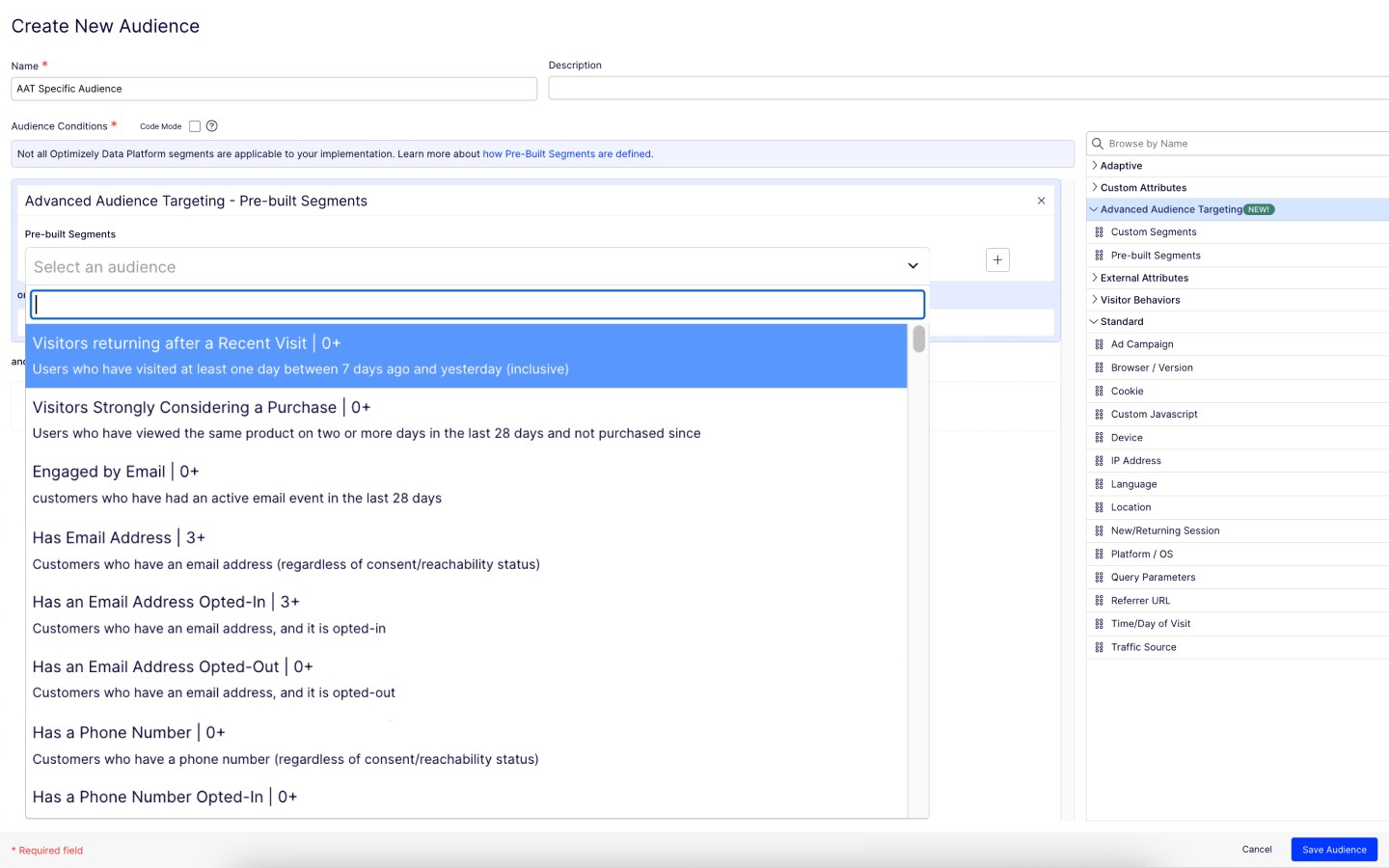
The ability to do A/B testing in Optimizely along with the associated statistical modelling and audience segmentation means it is a much better solution than using something like Google Analytics were a lot more effort is required to identify and isolate the specific data you …
It's a lot more, well, site stacked, it's way better than that. Adobe Target. I think the UI is easier to use on Optimizely. The one thing that I would say comparatively is our analytics talking to each other. Obviously Adobe, we use Adobe Analytics and Adobe Target, so they …
Google Optimize was much less flexible for our program needs and requires Google Analytics for analysis and metrics tracking. Optimizely Web Experimentation lets you build any number of metrics which can be much more complex than standard GA goals. Optimizely Web …
ContentSquare [(Clicktale)] is best suited to deep dive understanding of how web users truly consume your web pages. For example, when a traditional analytics software informs you on exit rates, ContentSquare [(Clicktale)] helps you to understand if users left without interacting with their last page or if they in fact spent time reading, scrolling, clicking it.
Optimal Workshop is great for UX testing for those with a budget to do so. This may be a little on the expensive side for smaller businesses, but definitely not anything crazy expensive. The insights that you get out of these tests are invaluable and can be the difference between launching a site and succeeding/failing.
I think it can serve the whole spectrum of experiences from people who are just getting used to web experimentation. It's really easy to pick up and use. If you're more experienced then it works well because it just gets out of the way and lets you really focus on the experimentation side of things. So yeah, strongly recommend. I think it is well suited both to small businesses and large enterprises as well. I think it's got a really low barrier to entry. It's very easy to integrate on your website and get results quickly. Likewise, if you are a big business, it's incrementally adoptable, so you can start out with one component of optimizing and you can build there and start to build in things like data CMS to augment experimentation as well. So it's got a really strong a pathway to grow your MarTech platform if you're a small company or a big company.
Heat Maps - we used and liked CrazyEgg in the past, and it was a cheaper tool that was easy to use. ClickTale gives us additional capabilities with better data about scroll reach, mouse movements, clicks and a summary report that shows what parts of our pages are getting attention. A product manager asked us yesterday for insights on how his product page was performing, and we were easily able to send him the reports in the heat map section.
Visitor recordings - We get good data on our website using analytics tools like GA, HubSpot and ClickTale, but it is very helpful to watch actual visitor recordings for certain visitor segments. If we add a new page or new feature to our website and notice a trend, we can easily drill down and watch visitors and see how they are interacting with the page.
Conversion funnels - We do a lot of our analysis in Google Analytics and you can set up conversion funnels in GA if you know how to do it. The problem is you can't segment the data and the aggregated data is not as helpful. ClickTale makes it very simple to do conversion funnels, and you can segment them with just a few clicks.
Tree Testing - it is a very simple and easy to use system, that provides the data needed from a tree test
Card sorting - provides a system for users to participate in navigation menu layouts. We looked into several options, but this seemed very intuitive for users.
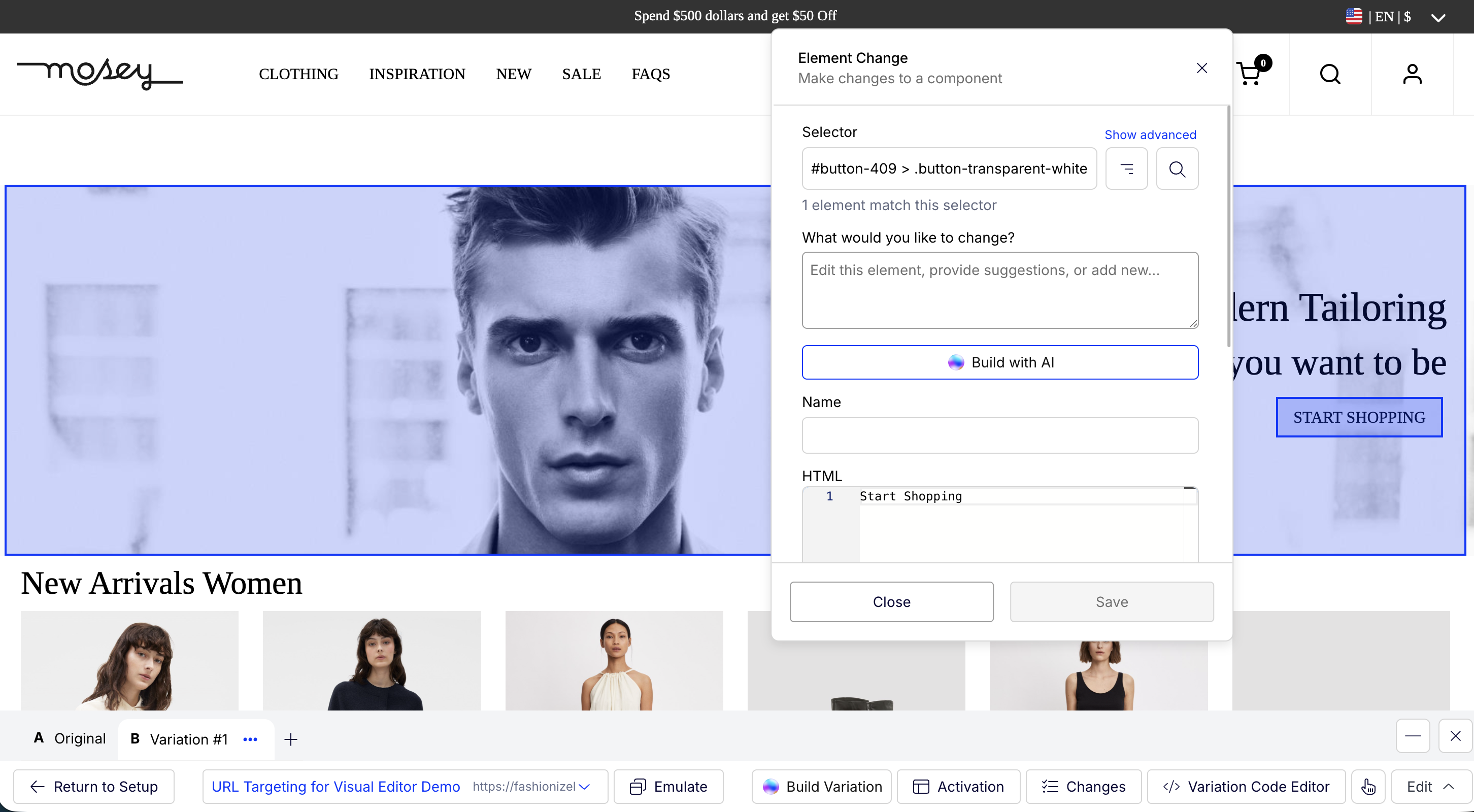
The Platform contains drag-and-drop editor options for creating variations, which ease the A/B tests process, as it does not require any coding or development resources.
Establishing it is so simple that even a non-technical person can do it perfectly.
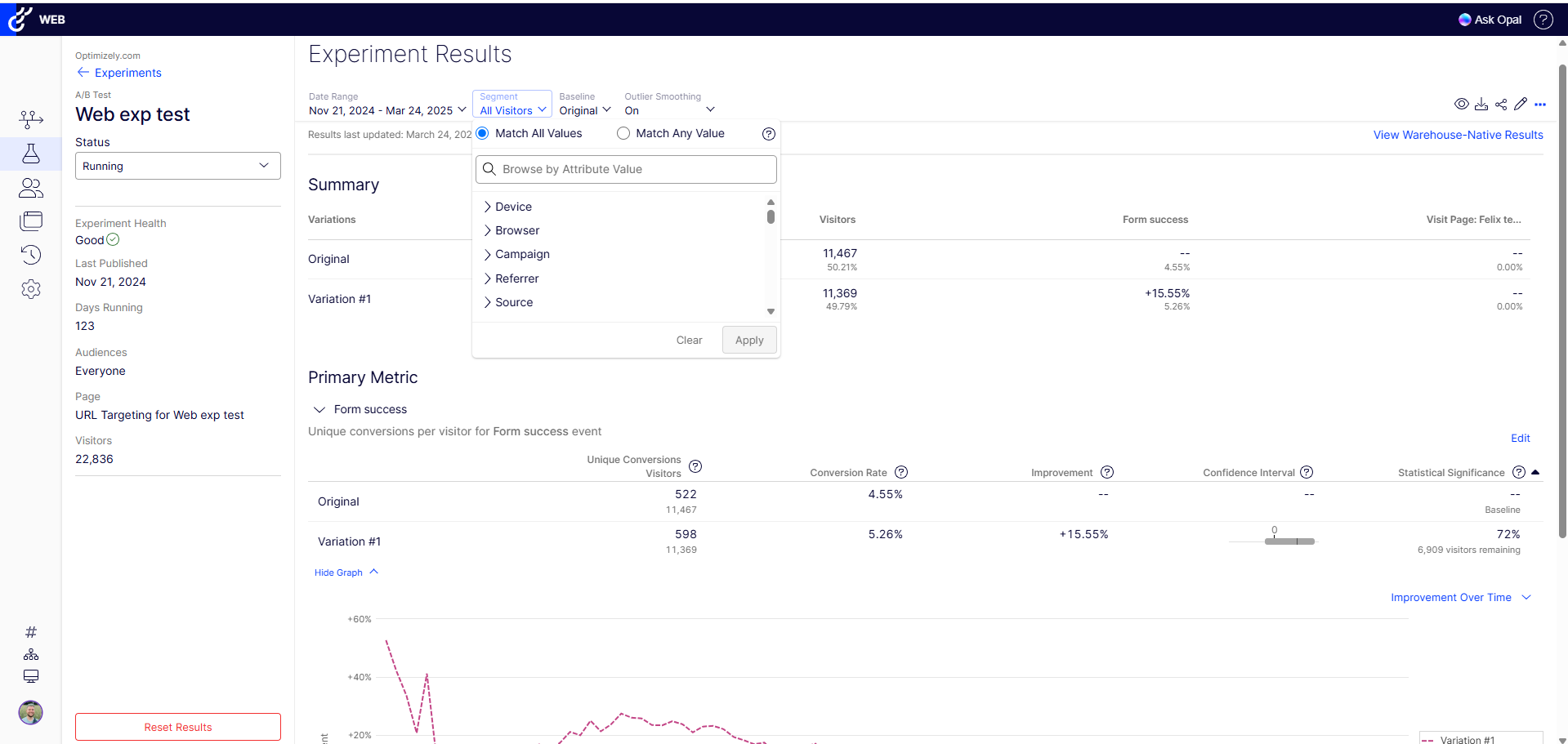
It provides real-time results and analytics with robust dashboard access through which you can quickly analyze how different variations perform. With this, your team can easily make data-driven decisions Fastly.
It's a bit difficult to navigate form heatmaps of one page on my sites to those of another.
It would be useful to have data on what percentage of clicks for each link are bounces. If this is available already, it is not very easy to find.
I have slight doubts about the accuracy of ClickTale's data based on some industry related articles I've read (i.e. http://redant.com.au/tool-reviews/clicktale-review-technology/). For the most part I feel like the data I'm getting is accurate, because it roughly corresponds to what I'm able to see on Google Analytics. It would be nice to see ClickTale address some of these issues.
The recruitment panelists are not professional, nor do they take the tasks seriously. You are going to get a lot of bad data.
They are HQ'd outside the US and must have a small team because the customer service is the absolute WORST I've experienced in their industry.
They pride themselves on documentation, but when they fail to document something they blame the customer for the mistake.
There are way too many limitations with the tool after you launch, limited integrations, and poor survey questionnaire options. The tool itself is far too basic for most sites, especially B2B.
At my former company I was able to upgrade our initial subscription level from bronze to gold without any problems after the first year. Unfortunately, the company I am presently with doesn't have a Clicktale subscription. I would have absolutely no hesitation in strongly recommending Clicktale to my current company if I ever get even a remote chance to do so. Clicktale is used in some of the statistics I use on my resume in an effort to quantify my results as a certified usability analyst. Clicktale has made a significant difference in my value to any team I work with.
I rated this question because at this stage, Optimizely does most everything we need so I don't foresee a need to migrate to a new tool. We have the infrastructure already in place and it is a sizeable lift to pivot to another tool with no guarantee that it will work as good or even better than Optimizely
I would rate Optimal Workshop's overall usability 9 out of 10 due to several key factors. Firstly, the platform has a user-friendly interface makes navigation straightforward, even for first-time users. The tools and features are well-organized, ensuring users can quickly find what they need without unnecessary complexity. Secondly, the platform is highly intuitive, meaning users can easily understand how to perform tasks without extensive guidance. This is supported by clear and concise instructions throughout the application, reducing the learning curve significantly.
Additionally, the learnability of Optimal Workshop is exceptional. New users can become proficient in a short amount of time, thanks to its well-thought-out design and helpful onboarding materials. Even more advanced features are presented in a way that feels approachable and manageable. Finally, the platform supports a seamless workflow, allowing users to focus on their research or tasks rather than struggling with the software. These qualities collectively make Optimal Workshop a reliable and efficient tool for many projects, justifying its high usability rating.
Optimizely Web Experimentation's visual editor is handy for non-technical or quick iterative testing. When it comes to content changes it's as easy as going into wordpress, clicking around, and then seeing your changes live--what you see is what you get. The preview and approval process for sharing built experiments is also handy for sharing experiments across teams for QA purposes or otherwise.
I would rate Optimizely Web Experimentation's availability as a 10 out of 10. The software is reliable and does not experience any application errors or unplanned outages. Additionally, the customer service and technical support teams are always available to help with any issues or questions.
I would rate Optimizely Web Experimentation's performance as a 9 out of 10. Pages load quickly, reports are complete in a reasonable time frame, and the software does not slow down any other software or systems that it integrates with. Additionally, the customer service and technical support teams are always available to help with any issues or questions.
We’ve never had to use much of their support services since the platform is very easy to use, we have however needed to transfer ownership between team members due to people leaving or other circumstances. Under those situations, the support offered to us has been been very quick and efficient and we never had to nudge them much to get the job done.
They always are quick to respond, and are so friendly and helpful. They always answer the phone right away. And [they are] always willing to not only help you with your problem, but if you need ideas they have suggestions as well.
The tool itself is not very difficult to use so training was not very useful in my opinion. It did not also account for success events more complex than a click (which my company being ecommerce is looking to examine more than a mere click).
In retrospect: - I think I should have stressed more demo's / workshopping with the Optimizely team at the start. I felt too confident during demo stages, and when came time to actually start, I was a bit lost. (The answer is likely I should have had them on-hand for our first install.. they offered but I thought I was OK.) - Really getting an understanding / asking them prior to install of how to make it really work for checkout pages / one that uses dynamic content or user interaction to determine what the UI does. Could have saved some time by addressing this at the beginning, as some things we needed to create on our site for Optimizely to "use" as a trigger for the variation test. - Having a number of planned/hoped-for tests already in-hand before working with Optimizely team. Sharing those thoughts with them would likely have started conversations on additional things we needed to do to make them work (rather than figuring that out during the actual builds). Since I had development time available, I could have added more things to the baseline installation since my developers were already "looking under the hood" of the site.
ClickTale is now a step ahead of the competition since it delivers insights based on pre-defined business KPIs and customer journeys that we have set up. We can also segment our traffic and easily sift through the many recordings finding the ones that match our lookup criteria. This paired with a good and reliable PII masking helps us with insight collection and drive business decisions which other solutions don't have. The new non-Flash interface is clean and simple to use and has all the functionalities centralized.
For the price as it is very convenient for first-time beginners, its intuitiveness both for the one who is designing the activities and for those who have to interact with them. The fact that it collects and gathers the data into insights of the overall responses collected by all users.
The ability to do A/B testing in Optimizely along with the associated statistical modelling and audience segmentation means it is a much better solution than using something like Google Analytics were a lot more effort is required to identify and isolate the specific data you need to confidently make changes
We can use it flexibly across lines of business and have it in use across two departments. We have different use cases and slightly different outcomes, but can unify our results based on impact to the bottom line. Finally, we can generate value from anywhere in the org for any stakeholders as needed.
Rarely was actionable insight taken from the ClickTale tool that resulted in a better user experience on our website. We made small changes on different aspects of our webpages that typically did not show an improvement over the previous versions.
The dedicated time and resources in the ClickTale tool did not justify the investment. The heat maps can be helpful but they are based on mouse clicks (Google Analytics can help with that). Watching recordings can get time consuming and don't always provide enough data for an actionable takeaway.
If you take the approach of identifying a potential problem on your website first, then using the ClickTale tool to dig deeper in the issue, you might find the tool helpful. However, make sure you gather enough data on the potential issue before making changes to your site (and monitor the changes afterward).
We're able to share definitive annualized revenue projections with our team, showing what would happen if we put a test into Production
Showing the results of a test on a new page or feature prior to full implementation on a site saves developer time (if a test proves the new element doesn't deliver a significant improvement.
Making a change via the WYSIWYG interface allows us to see multiple changes without developer intervention.