Document 365 is a cross-device document solution aimed at improving productivity. The PDF document solution includes Kdan's PDF Reader mobile and desktop apps along with online converting and faxing services.
$9.99
per month
PowerDMS by NEOGOV
Score 7.0 out of 10
N/A
PowerDMS by NEOGOV is a software platform designed to recruit, train, equip, and protect employees across their careers, used for policy management, community engagement, and staff scheduling.
N/A
UKG Pro
Score 8.2 out of 10
N/A
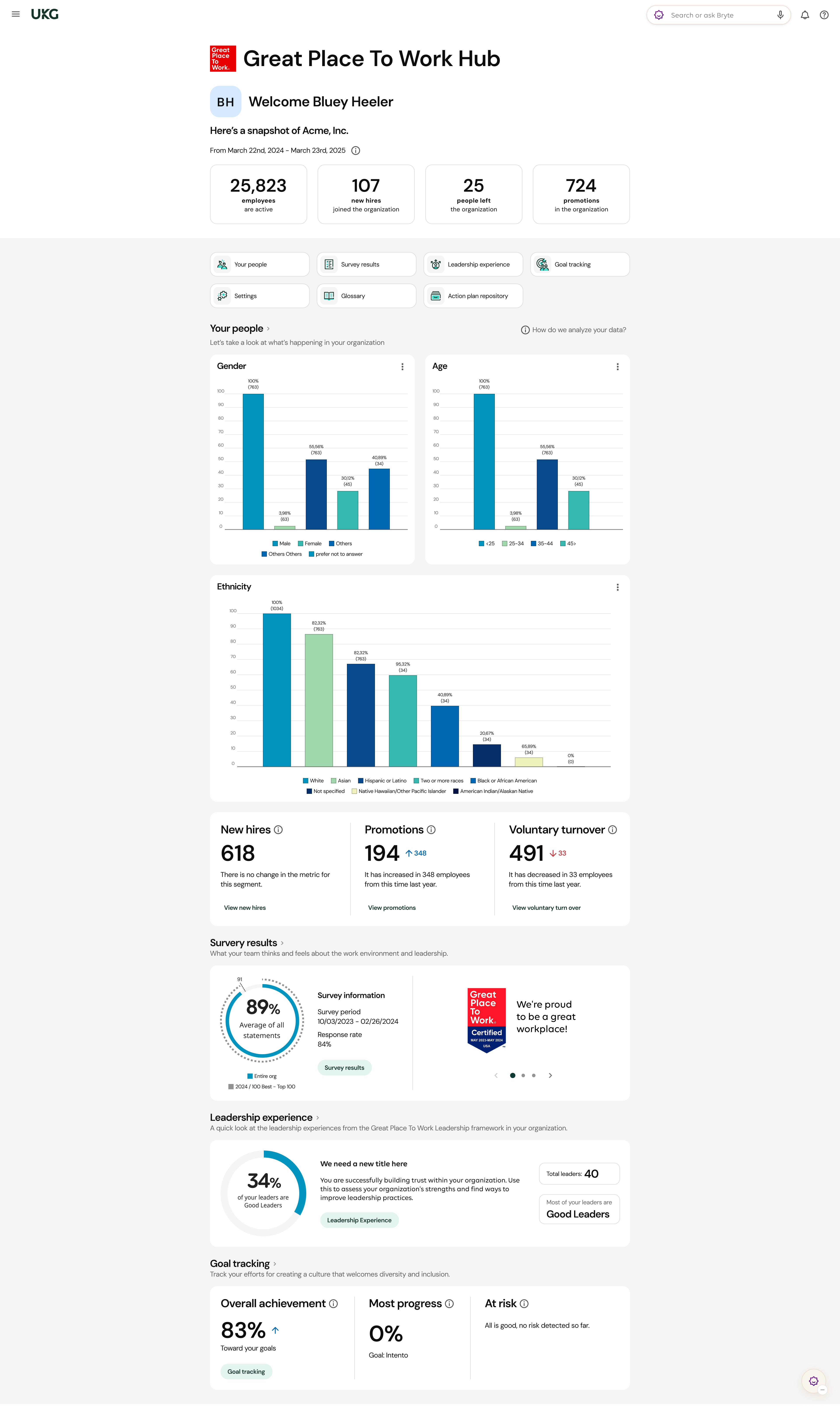
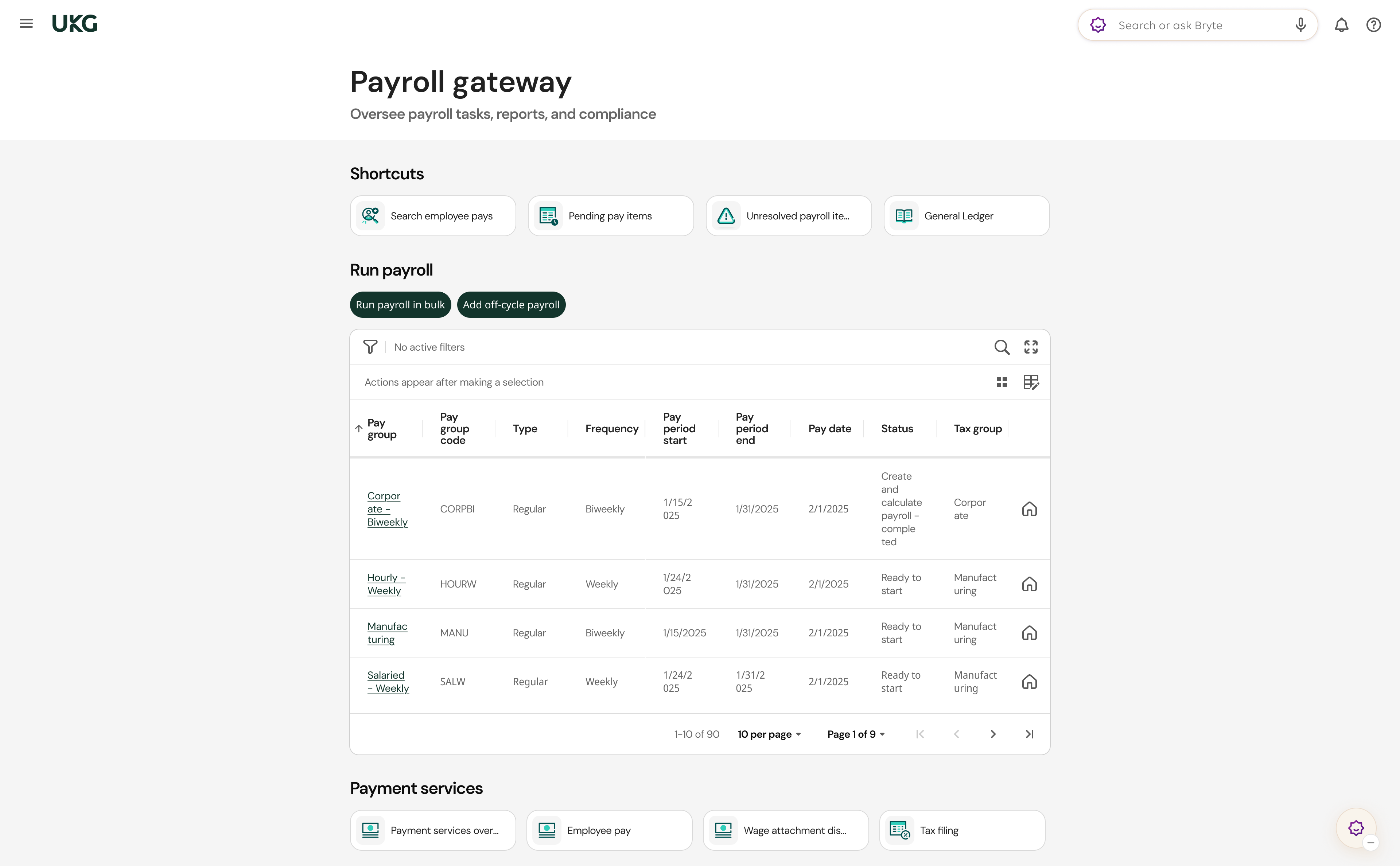
UKG delivers cloud-based HCM solutions including UKG Pro that help businesses simplify payroll computations, accelerate talent acquisition, manage time and attendance, and support proactive, strategic talent management on a global level.
N/A
Pricing
Document 365
PowerDMS by NEOGOV
UKG Pro
Editions & Modules
No answers on this topic
No answers on this topic
No answers on this topic
Offerings
Pricing Offerings
Document 365
PowerDMS by NEOGOV
UKG Pro
Free Trial
No
Yes
No
Free/Freemium Version
No
No
No
Premium Consulting/Integration Services
No
No
Yes
Entry-level Setup Fee
No setup fee
No setup fee
No setup fee
Additional Details
$9.99 month-to-month. $19.99 for a 3 month plan.$59.99 for a yearly plan.
One of the things that I have noticed the most is that it saves a lot of time when working with documents of different formats that need to be converted to PDF. Scanning documents is also one of the best features of this app. Being able to have the history of modifications, and changes in the documents is very important for any sector, as well as the signing of documents online. The issue of authentication every time you need to use it can sometimes cause inconvenience, but then you forget when you have a robust and comfortable tool to work with. I do not recommend this application if the company has different versions of operating systems. It is not the most recommended application.
This software is very well suited for law enforcement agencies of all sizes from 5 to 5000 officers. There is a mobile app that allows officers to quickly and easily search while out in the field or on a call. They can quickly review a policy, locate a form, pull up a map and much more using either the mobile app or the desktop application.
I feel UKG Pro has been so horribly rolled out at the City of Houston. I'm amazed that, as a system administrator, it even works at all. In my opinion, the greatest expense the city has budgeted is managed by a shoe-string, janky, bug-ridden mess. I truly hope UKG is bought out for 2 cents and scattered to dust. In my opinion, terrible maintenance and support, the worst consultants money can buy, the sleaziest sales accountants. This system tries my patience as a lead system administrator and I would caution anyone considering bringing in this mess to their business. It's been a year now, and we still have workarounds and bugs daily.
Policy management- [Users] sign for, and can take [tests] to prove understanding of policy right in the application. As [the] policy is updated, old versions are retained, so that we not only know what a policy contains, we can track changes and provide information on what a policy was at any given time in the past.
Training- Users receive notifications when training is due and are guided to complete the training. If the training requires recertification, PowerDMS can be configured to alert the user that re-training is needed, without a supervisor needing to keep track. All documents used in training, including presentations and videos, can be contained in the PowerDMS course, so we can prove not only that an employee was trained, but exactly what curriculum was use din any given training.
Accreditation Assessment- [Our] accreditation standards manual is uploaded directly into PowerDMS. Proofs are accomplished using the actual policy and procedure, as well as the documents created during the workday. There is absolutely no duplication of effort.
Communications accountability- Email [can] be read and forgotten. With PowerDMS, a document can be distributed for user signatures, insuring that the user took affirmative action to read and understand the document.
UKG has an amazing support team to reach out to if assistance is needed
All add-ons of UKG Pro integrate seamlessly making it a powerful software program
UKG Pro is very configurable to meet the specific needs of companies
It is easy to use and navigate
The mobile app is loved by all employees and provides on-demand access
The Ultimate Community is amazing!! On-demand information on all products and how they are used. Connect with other companies that use UKG Pro and learn from each other.
The Learning Centre is also amazing!! Learning right at your fingertips anytime, anywhere.
The Workflow process in PowerDMS is not as easy to grasp as some of the other concepts and requires a little more explaination, especially for non-administrative background users.
Users are unable to view the steps in a Workflow template in order to determine which Workflow would work best for their needs when routing documents.
It would be great to have multiple message options for past due inbox notifications in addition to the options for past due tasks to encourage users to go to their inbox to review their messages.
Teachers that are hard functionality. Okay. I would say the most issues that we've had is the admins or the HR department losing their access and it throws us for a loop. It's like, what happened? What's going on? So that's the main thing. And then some of our employees struggle with the hourly employees try to struggle with timekeeping as in clocking in and clocking out. But we got that resolved. Thank you UKG Pro. And our employees are happy again. I would recommend UKG Pro.
I have had nothing but positive experiences with PowerDMS from day one. If we ever run into a situation we are unsure of, PowerDMS support has ALWAYS been able to answer us basically immediately. I really love that they are constantly seeking to improve and expand.
We have been a customer since 2015, we have gone to market and find that UKG Pro product is both user friendly for administrators as well as the employee. The qualify of support and service of UKG team is valued and we trust the product.
There is a learning curve as with any software system and I have found those users who consistently use the system more have a much higher success rate than those who only log in to sign off on documents. Now that most users have been in the system for over 2 years I consistently hear how much easier the processes are than they originally thought they would be
It gets the job done, but not with a few deep sighs. Once you know where stuff lives, it's manageable, but the first learning curve is steep, some menus feel buried. However, it's consistent, reliable and doesn't crash on me, which counts for a lot. With a little UI glow up it could push into a 9 zone.
For the most part UltiPro has been reliable, but it could definitely be better. There have been several notable server issues where we were unable to access the product or unable to utilize some of the features. Customer support is usually quick to respond to questions about these issues, but they do not proactively reach out to customers whose environments have been effected by outages
We use PowerDMS in the cloud so our performance might be different from other users who use on-premise. The program has always been up with very minimal downtime and always seems responsive and snappy when navigating the UI and searching documents. We don't currently have any integrations with other software.
Normally UKG Pro loads quickly. We had been having major issues with reports running in a timely manner but recently they broke out our virtual server to another instance where is wasn't sharing resources and that seems to have helped reporting run more efficiently.
I just wish we had some in-state support. The contacts I have had with customer support have been great. Awesome communication, problem-solving, and support. I have talked to and met Stephanie Williams (CSA for Power DMS) at the most recent Entrust conference. She was professional and devoted time to addressing our agency needs.
The quality of UKG Support is related directly to the UKG rep. who handles the issue. In some cases you get someone who really is good at supporting the product and others may not have as much experience and it shows
I've been to a few in-person (hands on) training sessions and it is very similar to the online classes. You have the same reference material to look back on after the training. So regardless of in person training or online you really get the same thing.
Most of the online training was very generic (to be expected) but we had specific requirements for configuration that could have been better addressed with more individual sessions earlier on from our project team. However, we did finally begin booking training sessions with our implementation team which were recorded, and so provided additional information for how to correctly configure and test the system.
Implementation of PowerDMS was near seamless. The product was able to input existing policies and procedures within a few hours, which helped to lay the foundation for future use. Having PowerDMS on-boarding readily available was also a huge benefit.
Make sure you have all of your tax account information with all the states you are registered in available and that you are knowledgeable about the filing status, frequency, etc. We had some unique challenges with our state unemployment tax set up that I was not aware of and needed to be addressed prior to going live. Working with the state unemployment office can be a challenge.
Basically the recommendation of Document 365 is based on the price-performance ratio against NITRO and Adobe (Really expensive)Ease of use was not decisive in the evaluation.The ease of scanning against NITRO and Adobe is more or less the same.The determining feature of Document 365 is the ease of converting documents to PDF
PowerDMS is a lot different than Linkedin Learnings. In PowerDMS you have to create your own courses versus in Linkedin Learnings they provide extensive content on a wide variety of subject matter. Linkedin Learnings is what we have used in our organization for Bias Training and Ethics Training. PowerDMS is the repository for documents and Trainings, so the systems work very differently
We used ADP WFN prior to switching to UKG. We interviewed three different payroll companies to see what our options were. UKG stood out and aligned with our company values. The sales team was very helpful and asked questions about what we were currently doing and how they could assist with simplifying things. I personally had a side meeting with them to see if there were options for a process that we manually process and if UKG could actually eliminate the process. We came to the conclusion that we weren't able to get it 100%, but we could pull 80% of what we needed from UKG, and then we would only need to manipulate 20% of the information. It was also determined from that meeting that we wouldn't need to pay extra to have a special report built. The customer service is what we were sold on. The other companies that we looked at didn't give us the confidence that their customer service would be any better than what we previously had.
Created efficient processes for approving document revision
Migrated what originally was a paper system to electronic
Accessible for any employee by logging in, employees do not have to seek out policy and procedure binders, and updated documents can be automatically sent to inboxes when updated.
My company acquired another company, and with a UKG partner, we were able to bring them online in UKG within two months of the acquisition date.
When COVID sent us remote, we could configure custom fields to track vaccination status.
The C-suite can get custom reports done in minutes, or ours, where our previous HRIS would have taken days to accomplish, as data would have had to have been exported to Excel and then manipulated inside Excel.
UKG has allowed to go virtual paper free as both a candidate and employee.