Google Drive is a cloud file storage, synchronization, and collaboration platform and service, that features Google Docs, Sheets, and Slides for document editing and presentation.
$6
per month
Progress ShareFile
Score 8.2 out of 10
N/A
ShareFile is a cloud-based file sharing and storage service built for business. The product was acquired by Citrix Systems in 2011, and is now offered by Progress Software.
$52.80
per month 3 users (minimum)
SolarWinds Serv-U
Score 9.0 out of 10
N/A
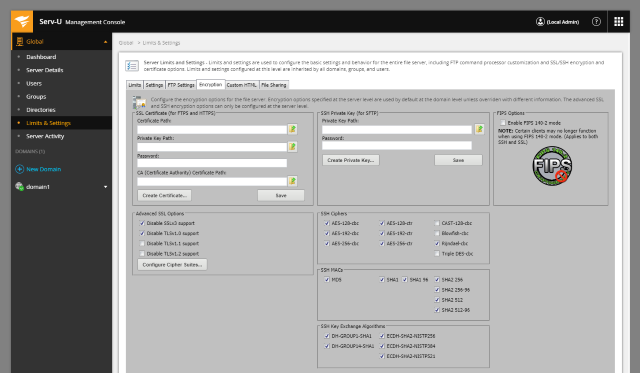
SolarWinds® Serv-U® is presented by the vendor as an easy-to-use FTP or MFT server software designed to deliver security, automation, and centralized control for file transfers in an organization. Deployed within a data center, Serv-U FTP or MFT Server can help users safely exchange files within your organization and with your business partners. Do not risk file transfer data getting exposed in the cloud and compromise security. Serv-U software is built to be an effective self-hosted…
N/A
Pricing
Google Drive
Progress ShareFile
SolarWinds Serv-U
Editions & Modules
Basic
$6.00
per month
Business
$12.00
per month
Enterprise
Contact Vendor for Quote
per month
Advanced
$17.60
per month per user (minimum 3 users)
Premium
$27.50
per month per user (minimum 3 users)
Industry Advantage
$45.83
per month per user (minimum 3 users)
Virtual Data Room
$75.00
per month per user (minimum 5 users)
No answers on this topic
Offerings
Pricing Offerings
Google Drive
Progress ShareFile
SolarWinds Serv-U
Free Trial
Yes
Yes
Yes
Free/Freemium Version
Yes
No
No
Premium Consulting/Integration Services
No
No
No
Entry-level Setup Fee
No setup fee
No setup fee
No setup fee
Additional Details
Discounts are available for students, educators, and non profit organizations.
Compared to an FTP site or Google Drive, Sharefile is great because our clients do not have to register or sign in with an FTP site or Google Drive. They can simply use a link we provide and can easily download files. Microsoft Office 365 is starting to use this feature and …
Sharefile "plays slightly nicer" with Microsoft products than Google, though I think Google Drive has a more, and more powerful feature set. It's a very competent alternative though, and I do enjoy using it, now that I'm more comfortable with the interface. As I've said …
Google Drive is easier to use and more people have this ability to use this program. Citrix works better in the business aspect and you can use it with employees. Google Drive gets into personal emailing and sharing and I only like using citrix for work.
Google Drive and Dropbox have been out a long time but I think that ShareFile takes the best part of those software and then adds some. If you are looking for something more manageable that is so easy to implement company-wide, then ShareFile would be a great option. While …
First and foremost we are both a Citrix and Microsoft partner so we will always recommend their products. 3 years ago we found ShareFile's biggest selling point was the ease of setup, administration, and ease of use while still being an enterprise-grade product. We also enjoyed …
Progress ShareFile is the option which my employer selected which I have free access to. The other platforms that I have utilized are in connection with an M&A transaction that a client or advisor has engaged for the transaction. ShareFile is simple to use for its options but …
ShareFile offers more professional level services, and doesn't constantly "run out" of space, forcing you to upgrade to continue. When doing a cost comparison, the competitors may seem cheaper at first, but by the time you add on the features to make it comparable, the pricing …
Verified User
Administrative Assistant
Chose Progress ShareFile
The large file size for uploading and downloading documents was the one thing that the others just couldn't compare to.
Our main determination of moving to Citrix ShareFile is the recognized security features. ShareFile was created with this in mind and went out of their way in the sales process to help us understand their features. We also work with many large healthcare organizations so this …
ShareFile has a more native feel which is helpful for the “older” employees.
The search feature in ShareFile.com is fast and searches document text along with tags and keywords.
I have only used Google Drive for personal use for uploading and downloading information and files. ShareFile is already a leader in this space (versus smartstreet).
I perceive ShareFile to be a more secure solution for real estate than the others. And easier to transmit documents to and from. And Citrix is based here in Raleigh, so I do enjoy supporting a local business.
It is possible to share files and folders with up to 200 email addresses, as well as with persons outside the company.Use the drop-down arrow to select who may see, comment on, or change the file or folder before sending out an invitation.I am very much impressed with this feature
When we have a particularly large ad or job printing file that would "clog up" the email process, using ShareFile is very helpful. It's also useful for particular photographers we work with to upload a batch of photos all at once. Where it doesn't work as well for us is when trying to get clients to make use of a login to access folders. We find them reluctant to take on the learning curve. It works best for us when we just send them a clickable download link, and at most just require a tracking name and email address.
For anyone who needs to receive/send files between themselves and others, in an organized fashion, I would strongly recommend Serv-U as a great tool at a sensible cost. In our line of work, we can get several customers signed in at once, each sending in hundreds of Megabytes of data simultaneously. Serv-U has never struggled with this. We don't use the Quota set up for sending/receiving data but I can see it is useful where an exchange of information is the point.
Any user with access can store a file using different platforms like Android, IOS, Windows, or Ubuntu (Desktop version)
You can share files with any number of different users with different access rights or you can even keep it public by providing the access link and assign different rights for public access
You can open Excel/Word files using google software Sheets/Docs in the browser environment without having to install software like Microsoft Office etc on your Windows OS
Workflows to get customer/affiliate responses to comments on documents.
I used to have the signature feature initially, but it was removed from the original plan, so I could only use it if I chose to select the higher plan price.
I love the upload notifications and reports on user activity.
The document storage versions are fantastic. I am the only user with Delete privileges, and I love that I can make those selections.
Integrations with Microsoft 365 - FANTASTIC - thank you.
The Wizard allows us to create new user accounts very easily and quickly. We do not have a formal IT department so those of us "mere mortals" can use this easily.
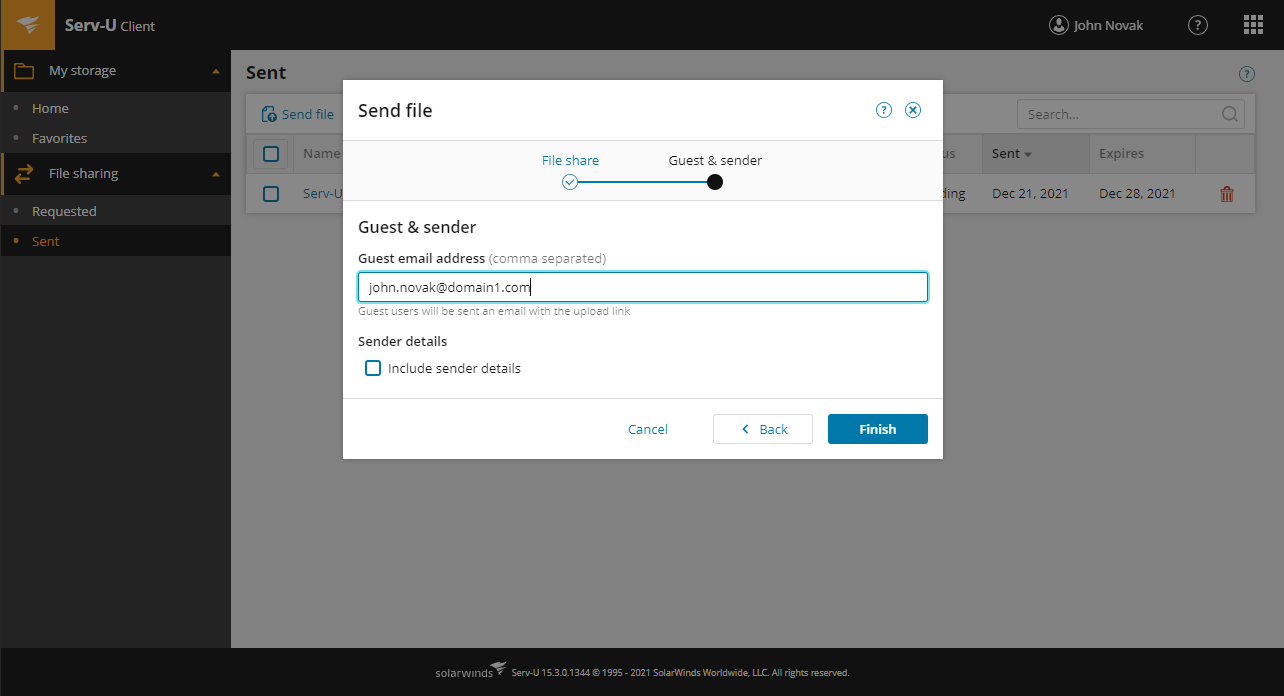
Using the Web Client has made it very simple to set up and instruct our customers on getting to the server from any device with a minimum of fuss. We have many customers with ESL, and school students including middle and high school. Most of them are not computer experts, just regular users so the simplicity allows to do the whole setup over the phone in minutes.
The newer version of Serv-U does not appear to be very resource-hungry so our computer runs nice and fast, without having to be a top of the range powerbox. We concentrated on large storage to cope with the file sizes we receive daily.
Having a little bit more control and clarity over what is shared and how it is shared would be a useful improvement.
Could be more robust and flexible as far as assigning restrictions.
Google Sheets could be enhanced because Excel really is not there yet as a product with equal capabilities as there are still quite a few limitations to the functionality.
The web console is not the most user friendly site to use to get to, and send my files.
We have had users that have not liked the change in workflow to get files from Progress ShareFile when they were used to just clicking on files on an email.
That management of the tools are not the most user friendly. There have been some improvements but keeping up with certs and setting up new users can be more work than expected.
It's perfect for me. It keeps things saved and is easy to remove items if needed. Also, I very much enjoy the formatting options. Along with the integrations it has for SSO. Overall, this is the most user friendly system I have ever come across.
It's a highly effective and secure storage system, has robust workarounds for serving the various equipment limits of our users, meets high security requirements of HIPAA standards, significantly reduces our needs for producing paper trails.
It's easy enough to use for computer users of all ages and skill levels. I am an advanced user, and I think the hardest part might be showing someone how to download and set up the app on their device if they weren't too familiar with computers, but overall it is very easy to understand.
ShareFile is so easy to use I was able to download all of my projects files and have them set up to sync before my supervisor could even come over to explain the process to me. It is a neatly organized and intuitive software that allows even the less tech-savvy to become power users.
The documents load fairly quickly and also update in real time, especially given the fact that multiple people can be using it at once. The "Offline" feature works great to allow the user to make edits and access the document without access to the internet, and then sync changes later once they're back.
Easy to use, easy to integrate with Outlook. I only gave it a 9 because I have found that sometimes it does not play nicely with Outlook and can slow it down. But, when that happens (not frequent), I restart Outlook and all is well again
It takes a few days for customer support to get back to you. Although, I have not had to use support too often. Once you get an email back, they are very thorough and work hard to fix the problem quickly. It is a really great resource and a great way to get the help you need if you're stuck. A phone call also works quickly but you have to call during specific times.
Citrix was generally responsive and helpful in solving technical issues. Like any cloud based SaaS product there is a danger that it may go down. This was a rare occurrence over my three years of using the product. The more common issue we encountered was clients forgetting their login which was easily managed through a forgot password functionality.
The effective google workspace using training that my organization received and was conducted by me (as a team lead of the ICT team) was mind-blowing and as a result, our staff is performing well in terms of using the application for their daily jobs than before. Now, in my institution, all teachers and all the administrative personnel are very much interested in cloud storage facilities, in previous my institution was afraid of losing all important documents in the cloud storage. But, after having received the training they are now realized that if anyone has only one google account then he or she can use 15GB of cloud storage freely and they are now happy because now it is not necessary for anyone to carry the traditional pen drive.
It's an extremely easy software to implement, once you sign up for a google account you automatically have access to google drive with a set amount of storage space. The business or Google Suite accounts have more storage space than a regular free account, but setting up and accessing google drive is very easy in both cases
Good documentation for the API. With a little help from RS tech staff, any competent programmer should be able to integrate RightSignature with an existing system in a week or three. That help is easy to get as well
In short, Google Drive is better for independent users who store a normal amount of stuff. OneDrive makes more sense for businesses and teams that are doing heavy-duty storage or large-scale syncing. Realistically, though, most users will fall somewhere in between the two, where either platform would meet their needs.
ShareFile is easier and does what you need. I have moved a few organizations from SharePoint to ShareFile. Just easier. You can setup different areas for different departments, setup their permissions and it is easy enough for them to do what they want in their zones. The mobile app works great as well. So you can all the features you really use from SP, but just easier to setup and use.
Previously we have used FileZilla and Microsoft FTP services, but neither out-performed Serv-U. although it was easy to use, FileZilla required constant attention from IT staff and did not live up to security protocol in place. The Windows Server FTP was difficult to configure for clients due to the tight integration with Active Directory. This also limited who could help administer the server.
All of our clients and consulting engineers find ShareFile easy to use, thus complementing our business.
Our staff also find ShareFile intuitive, accessible, and easy to use, making it an ideal, everyday indispensable desktop tool for everyone in our company.
ShareFile can be linked to our firm's primary website as a placed for private use. We haven't found need for this yet, but might in the future.