Chose Ooma Office
When we selected Ooma, it had the better feature set, reliability, and ease of implementation.

| Product | Rating | Most Used By | Product Summary | Starting Price |
|---|---|---|---|---|
 Ooma Office | N/A | For businesses of all sizes, Ooma provides advanced voice and collaboration features which they describe as flexible and scalable. With plans starting at $19.95 per user per month, Ooma Office is available without contracts or long-term commitments so as to make it easy for a small business to scale its office phone system with Ooma as its business grows. Ooma Office features include: Unlimited Calling in U.S., Canada, Mexico and Puerto Rico Free Local… | $9.95 per month | |
 RingEX | N/A | RingEx is a cloud-based VoIP solution available via computer mobile application. It features video and audio conferencing, desktop phone rentals, collaboration tools, and integrations with other business applications. Plans are available on a monthly, per user subscription basis. | N/A |
| Ooma Office | RingEX | |||||||||||||||
|---|---|---|---|---|---|---|---|---|---|---|---|---|---|---|---|---|
| Editions & Modules |
| No answers on this topic | ||||||||||||||
| Offerings |
| |||||||||||||||
| Entry-level Setup Fee | $19.95 per user/month | No setup fee | ||||||||||||||
| Additional Details | Ooma Office offers plans starting at $19.95 per user/month with no contracts, ever. | Pricing is /user/month paid annually. Pricing increases when paid monthly. Core - $20/month (paid monthly) Advanced - $25/month (paid monthly) Ultra - $35/month (paid monthly) Customer Engagement Bundle - contact us for pricing | ||||||||||||||
| More Pricing Information | ||||||||||||||||
| Ooma Office | RingEX | |
|---|---|---|
| Considered Both Products |  Ooma Office  Steve Parker Chief Risk Advisor Chose Ooma Office RingCentral is far more difficult to set up and costs more (monthly).  Matthew Perrault Business Owner/Operator Chose Ooma Office Easier to use, more features, and definitely more Bang for your $  Terry Mills Regional Vice President Chose Ooma Office I used a land line company for years and then switched to a VOIP company. When I learned how much better Ooma was, I was really skeptical at first, but they allowed me to try their service. Once I did, there was no comparison. I switched to Ooma and have never looked back.  Jennifer Heagle Director of Coworking Chose Ooma Office So much better, easier to use and less expensive! Overall better product. Support is heads and tails above what Nextiva pretends to offer its customers! I will save over $6000 my first year alone with Ooma. Thank you for making such a great product. You will help small …  David Buckley Senior Pastor Chose Ooma Office We only used our local phone company. Compared to our local phone company, Ooma Office beats it hands down. It is much cheaper. It has an app for my phone that works brilliantly. It is user-friendly. We are able to take calls both in the office and when we are mobile. The …  Hillary Louarti Manager Chose Ooma Office We went over to Ooma [Office] after having had Intermedia for several years. Intermedia was good, but they were due for an update on many of their systems, which they did after we left. With Ooma [Office], we have our hold music and other basic, easy to use options that fit …  Josh Bicknell Owner, Educator Chose Ooma Office This is my first experience with a VOIP phone system, but previously I had tried to use AT&T for my business line, although the setup never even happened because of misinformation I was given. In the end I'm glad I ended up with Ooma instead because it has been much more …  Tom Von Braunsberg President Chose Ooma Office The Ooma product offer significantly more features a small business at a much lower price. The customer service is excellent. We are treated the same as if we were their largest customer. The larger communication companies don’t seem to be too interest in the small business … |  RingEX  Michael Reffner Operations Director Chose RingEX Each of these products have benefits, some of which relates specifically to the specific needs of a company. We liked the call recording options in Hubspot and the workflow tracking in Monday. High Level wasn't the best fit for our needs. In the future, we anticipate using …  Will Christie Managing Attorney Chose RingEX We have looked at all the competition and none come close to providing the ease of use and efficiency we have found with RingEX. We appreciate how they are constantly updating and upgrading their capabilities and functionality in ways we didn't even know we needed until we …  Gerson Pozo Excecutive Assistant Chose RingEX From the user perspective, JustCall and Aircall gave you the ability to listen to the recorded call. RingEX's taking notes feature is great, just not 100% accurate. Therefore, I would say having the ability to access the recording calls in the user interface can be very useful. …  Daniela Carias Villafranca STRATEGIC PARTNERSHIP CONSULTANT Chose RingEX RingEx is more user friendly and the reporting is also one of the reasons we chose it. Voi is also a great tool we use and is very user friendly. |
| Ooma Office | RingEX | |||||||||||||||||||||||||||
|---|---|---|---|---|---|---|---|---|---|---|---|---|---|---|---|---|---|---|---|---|---|---|---|---|---|---|---|---|
| Cloud PBX |
| |||||||||||||||||||||||||||
| Call Management |
| |||||||||||||||||||||||||||
| VoIP system collaboration |
| |||||||||||||||||||||||||||
| Mobile apps |
| |||||||||||||||||||||||||||
| Performance & Compatibility of Online Events Software |
| |||||||||||||||||||||||||||
| Screen Sharing |
| |||||||||||||||||||||||||||
| Online Meetings / Events |
| |||||||||||||||||||||||||||
| Online Events Collaboration |
| |||||||||||||||||||||||||||
| Online Events Security |
| |||||||||||||||||||||||||||
| Unified Communications Platform and Collaboration |
|
| Ooma Office | RingEX | |
|---|---|---|
| Small Businesses |  CloudTalk Score 7.4 out of 10 |  Broadvoice | GoContact Score 9.1 out of 10 |
| Medium-sized Companies | CloudTalk Score 7.4 out of 10 |  Cisco Unified Communications Manager (Call Manager) Score 8.7 out of 10 |
| Enterprises |  Cisco Business Edition 7000 (discontinued) Score 9.0 out of 10 | Cisco Unified Communications Manager (Call Manager) Score 8.7 out of 10 |
| All Alternatives | View all alternatives | View all alternatives |
| Ooma Office | RingEX | |
|---|---|---|
| Likelihood to Recommend | 6.7 (0 ratings) | 8.6 (0 ratings) |
| Likelihood to Renew | 9.1 (0 ratings) | 8.9 (0 ratings) |
| Usability | 7.2 (0 ratings) | 8.7 (0 ratings) |
| Availability | - (0 ratings) | 9.2 (0 ratings) |
| Performance | - (0 ratings) | 8.0 (0 ratings) |
| Support Rating | 8.1 (0 ratings) | 5.3 (0 ratings) |
| In-Person Training | - (0 ratings) | 7.3 (0 ratings) |
| Implementation Rating | 8.0 (0 ratings) | 8.1 (0 ratings) |
| Configurability | - (0 ratings) | 7.0 (0 ratings) |
| Ease of integration | - (0 ratings) | 9.0 (0 ratings) |
| Product Scalability | - (0 ratings) | 10.0 (0 ratings) |
| Vendor post-sale | - (0 ratings) | 4.0 (0 ratings) |
| Vendor pre-sale | - (0 ratings) | 8.0 (0 ratings) |
| Ooma Office | RingEX | |
|---|---|---|
| Likelihood to Recommend |
Hillary Louarti Manager |
|
| Pros |
|
|
| Cons |
|
|
| Likelihood to Renew |
|
 Matt Fleming Help Desk Technician |
| Usability |
|
|
| Reliability and Availability | No answers on this topic |
|
| Performance | No answers on this topic |
 Kyle Eaton, CFP®, CDFA® Certified Financial Planner |
| Support Rating |
|
|
| In-Person Training | No answers on this topic |
|
| Implementation Rating |
|
|
| Alternatives Considered |
|
|
| Scalability | No answers on this topic |
|
| Return on Investment |
 Wendy White Facility Manager |
|
| ScreenShots | Ooma Office Screenshots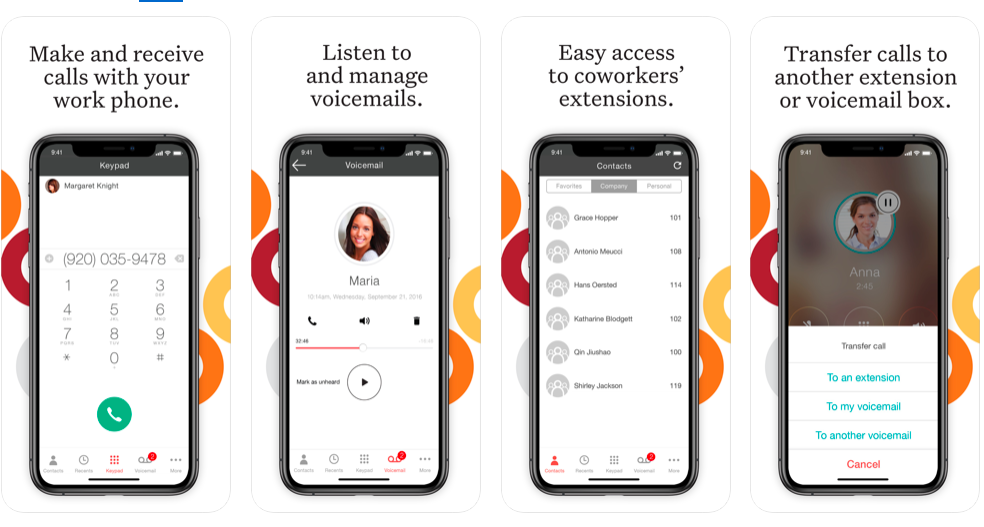    |