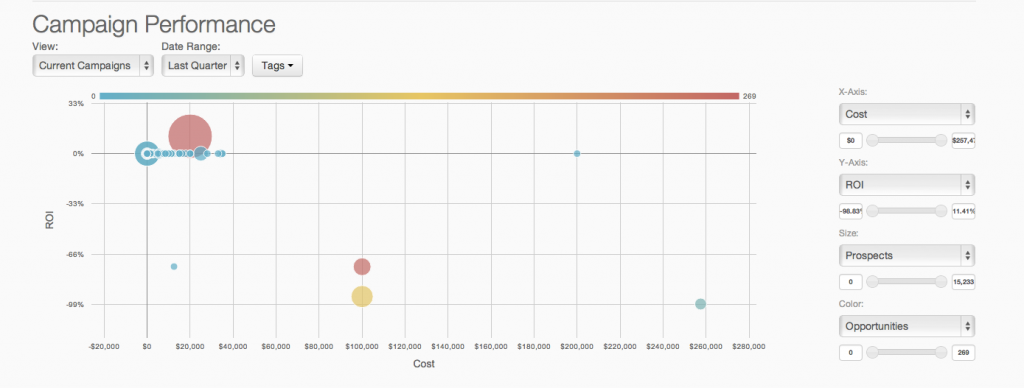
Marketing Cloud is a cloud-based digital marketing platform, used by marketers can segment their audience, deliver personalized messages, track campaign performance, engage leads and accounts, and optimize strategies based on real-time insights.
$1,250
per month per installation
Tableau Desktop
Score8.6 out of 10
N/A
Tableau Desktop is a data visualization product from Tableau. It connects to a variety of data sources for combining disparate data sources without coding. It provides tools for discovering patterns and insights, data calculations, forecasts, and statistical summaries and visual storytelling.
$1,380
per year (purchased via a Creator license)
Tableau Server
Score7.5 out of 10
N/A
Tableau Server allows Tableau Desktop users to publish dashboards to a central server to be shared across their organizations. The product is designed to facilitate collaboration across the organization. It can be deployed on a server in the data center, or it can be deployed on a public cloud.
$12
Per User Per Month
Pricing
Agentforce Marketing
Tableau Desktop
Tableau Server
Editions & Modules
Account Engagement
$1,250
per month
Engagement
$1,250
per month
Intelligence
$3,000
per month
Loyalty Management
$20,000
per month
Personalization
$100,000
per year
Data Cloud for Marketing
$108,000
per year
Tableau Creator License
$115
per month (billed annually) per user
Viewer
$12.00
Per User Per Month
Explorer
$35.00
Per User Per Month
Creator
$70.00
Per User Per Month
Offerings
Pricing Offerings
Agentforce Marketing
Tableau Desktop
Tableau Server
Free Trial
Yes
No
Yes
Free/Freemium Version
No
Yes
No
Premium Consulting/Integration Services
Yes
Yes
Yes
Entry-level Setup Fee
No setup fee
No setup fee
No setup fee
Additional Details
—
All pricing plans are billed annually. A Creator license includes Tableau Desktop, Tableau Prep Builder, and Tableau Pulse. Discounts sometimes available for volume.
A de minimis incentive was given to thank the reviewer for their time. The incentive was not used to bias or drive a particular response, nor was the incentive contingent on a positive endorsement. TR verified that a representative sample of customers was invited. More Info
Marketing Coordinator in Marketing at BSI Americas (Non-profit Organization Management, 501-1000 employees)
Chose Agentforce Marketing
Eloqua had a more visual UI, where Pardot goes by a folder structure. Though I prefered the Eloqua interface, Pardot has a quicker refresh and you can see your changes instantly. Pardot seems to have far less "quirks" than Eloqua, so less customized solutions are required.
A de minimis incentive was given to thank the reviewer for their time. The incentive was not used to bias or drive a particular response, nor was the incentive contingent on a positive endorsement. More Info
Health Information Analytics Analyst in Research & Development at Kings View Community Services, Inc. (Hospital & Health Care, 201-500 employees)
Chose Tableau Desktop
When we first looked at getting a visualization software for analytics we looked into two options Microsoft Power BI and Tableau Desktop, and even though Power BI is more cost-effective we decided to go with Tableau Desktop as it had more options that we are looking for such as …
A de minimis incentive was given to thank the reviewer for their time. The incentive was not used to bias or drive a particular response, nor was the incentive contingent on a positive endorsement. More Info
Verified User
Chose Tableau Desktop
Microsoft PowerBI could potentially be a better fit for organizations on Office365, it's a close call though. Google Data Studio has potential but is still far behind Tableau on the "user-friendly" factor. Tableau still seems to dominate for the "recommended" analytics tool, …
A de minimis incentive was given to thank the reviewer for their time. The incentive was not used to bias or drive a particular response, nor was the incentive contingent on a positive endorsement. More Info
Verified User
Chose Tableau Desktop
Tableau is next generation tool where other two are old traditional BI tools Other tools are very slow and difficult to use, and required lot of technical expertise to use them. Tableau's look and feel is much nicer than those two.
A de minimis incentive was given to thank the reviewer for their time. The incentive was not used to bias or drive a particular response, nor was the incentive contingent on a positive endorsement. More Info
A de minimis incentive was given to thank the reviewer for their time. The incentive was not used to bias or drive a particular response, nor was the incentive contingent on a positive endorsement. More Info
A de minimis incentive was given to thank the reviewer for their time. The incentive was not used to bias or drive a particular response, nor was the incentive contingent on a positive endorsement. More Info
Research Assistant in Research & Development at UTD (Higher Education, 1-10 employees)
Chose Tableau Desktop
If any changes had to be made to existing visualizations when we used QlikView, a lot of security constraints existed and I had to run to the IT team for every change I had to implement.
Tableau gives easy security change rights to the developer environment.
A de minimis incentive was given to thank the reviewer for their time. The incentive was not used to bias or drive a particular response, nor was the incentive contingent on a positive endorsement. More Info
Verified User
Chose Tableau Desktop
I feel like Tableau is easier to use and offers a greater selection of visualizations. I feel that the dashboards are easier to put together and offer a great amount of flexibility for the end-user. Tableau has an excellent user support group. I find the community to be …
A de minimis incentive was given to thank the reviewer for their time. The incentive was not used to bias or drive a particular response, nor was the incentive contingent on a positive endorsement. More Info
Business Intelligence Analyst in Information Technology at Match.com (Internet, 201-500 employees)
Chose Tableau Desktop
My current work environment uses both Tableau Online, MicroStrategy & SSRS in parallel. Tableau is much closer to the SSRS in terms of visualization tool where as MicroStrategy is an enterprise data modeling and reporting tool.
Based on the use case we use different tools. Here …
A de minimis incentive was given to thank the reviewer for their time. The incentive was not used to bias or drive a particular response, nor was the incentive contingent on a positive endorsement. More Info
Verified User
Chose Tableau Desktop
Python is programming tools, while Tableau is an easy to use drag and drop data visualization tool. This may not be an apple to apple comparison. Compared to Excel, Tableua is way over the top when it comes to data visualization.
A de minimis incentive was given to thank the reviewer for their time. The incentive was not used to bias or drive a particular response, nor was the incentive contingent on a positive endorsement. More Info
Business Intelligence Engineer in Engineering at Experticity (Marketing and Advertising, 51-200 employees)
Chose Tableau Desktop
In comparison to Tableau, the other dashboarding/BI tools I've used feel clunky, are very slow to develop in, and seem to lack features of a more modernized tool like Tableau. In Pentaho Analyzer, for instance, trying to include multiple worksheets or reports in a single …
A de minimis incentive was given to thank the reviewer for their time. The incentive was not used to bias or drive a particular response, nor was the incentive contingent on a positive endorsement. More Info
Systems Analyst in Information Technology at CPI Aerostructures (Aviation & Aerospace, 201-500 employees)
Chose Tableau Desktop
I had the trial version of Tableau Desktop downloaded, installed, configured and was creating meaningful dashboards in almost 15 minutes. While other software we used had great features, none of them were able to compare with this trial experience. Tableau's user forums were …
A de minimis incentive was given to thank the reviewer for their time. The incentive was not used to bias or drive a particular response, nor was the incentive contingent on a positive endorsement. More Info
Product Development at Cass Information Systems (Financial Services, 1001-5000 employees)
Chose Tableau Desktop
Cass evaluated Domo, QlikView and Birst prior to selecting Tableau. It came down to cost (and by a significant margin); the others have relatively high implementation, hosting and other costs. Additionally, based on a recent Gartner "Magic Quadrant", Tableau exceeds all others …
A de minimis incentive was given to thank the reviewer for their time. The incentive was not used to bias or drive a particular response, nor was the incentive contingent on a positive endorsement. More Info
Renowned digital analytics consultant, innovator, speaker, thought leader in Marketing at (self employed) (Internet, 1-10 employees)
Chose Tableau Desktop
I haven't used other tools for a number of years - when I made the selection my criteria were ease of use (including, slicing & dicing data at will), connectivity to various data sources (especially REST API - which Tableau doesn't support natively but now has a way to use …
A de minimis incentive was given to thank the reviewer for their time. The incentive was not used to bias or drive a particular response, nor was the incentive contingent on a positive endorsement. More Info
Verified User
Chose Tableau Desktop
Tableau Desktop needs no to minimal coding experience. It easily integrates with various data sources. It is very easy to create usable smart reports.
A de minimis incentive was given to thank the reviewer for their time. The incentive was not used to bias or drive a particular response, nor was the incentive contingent on a positive endorsement. More Info
A de minimis incentive was given to thank the reviewer for their time. The incentive was not used to bias or drive a particular response, nor was the incentive contingent on a positive endorsement. More Info
BI Analyst in Customer Service at Kaiser Foundation Health Plan (Utilities, 10,001+ employees)
Chose Tableau Desktop
I have used SSRS, Crystal Reports, Microsoft Excel, and Business Objects. Tableau offers more functionality than the rest and is pretty intuitive. I think SSRS is the easiest to use. Query speed is excellent with SSRS (at least when you are connected to SQL Server). Microsoft …
Verified User
Chose Tableau Desktop
Against the usual incumbents within the pharmaceutical industry, Tableau has much better and faster access to database data especially stored in the Oracle database, without needing any interim transformations or data universe needing to be created. Also it has comparatively …
A de minimis incentive was given to thank the reviewer for their time. The incentive was not used to bias or drive a particular response, nor was the incentive contingent on a positive endorsement. More Info
Enterprise Program Analyst in Corporate at Assurant (Insurance, 10,001+ employees)
Chose Tableau Desktop
As far as I know, we do not currently use Domo, however I've seen some demos of their product. Domo is very good with cloud-based software and it also incorporates social media data. Domo is also good at using cloud-based excel file building vs. building spreadsheets on my …
A de minimis incentive was given to thank the reviewer for their time. The incentive was not used to bias or drive a particular response, nor was the incentive contingent on a positive endorsement. More Info
Measurement Solutions Designer in Marketing at MRM McCann (Marketing and Advertising, 1001-5000 employees)
Chose Tableau Desktop
Tableau is the most powerful and easy to use of the alternatives, as long as the data sources are properly connected. None of the other tools have allowed us to connect and integrate data into one report in the way that Tableau's data connectivity allows us to. Then the ability …
A de minimis incentive was given to thank the reviewer for their time. The incentive was not used to bias or drive a particular response, nor was the incentive contingent on a positive endorsement. More Info
Data Analyst in Information Technology at Bridgepoint Education (Education Management, 5001-10,000 employees)
Chose Tableau Desktop
Tableau is by far the superior product when it comes to analysis, ease of use, and end user experience. People are usually more familiar with Excel so it can be difficult to break them out of their comfort zone. Lastly, when it comes to subscriptions, SSRS is the tool I prefer. …
A de minimis incentive was given to thank the reviewer for their time. The incentive was not used to bias or drive a particular response, nor was the incentive contingent on a positive endorsement. More Info
CEO in Corporate at VIA - Visual Intelligence & Analysis (1-10 employees)
Chose Tableau Desktop
We evaluated QlikView and Tableau for a Fortune 500 corporation 15 months ago in full disclosure. To be all too brief we found QlikView to be a very good tool but more IT dependent than Tableau. Newer features and functions may offset some this one significance.
Associate Data Analytics Consultant in Sales at Mariner (Information Technology and Services, 11-50 employees)
Chose Tableau Desktop
We have evaluated QlikView as well. QlikView is another tool in the "Self-Service BI" world. However, it's focus is mainly on creating ad-hoc data models and using these models to make visualizations. Tableau, on the other hand, will take an existing data model and make much …
Verified User
Chose Tableau Desktop
Oracle OBIEE.
The primary factors for choosing Tableau were the licensing costs; ability to view data from multiple data sources; the ease of infrastructure to setup; and ability for users to create and maintain their own worksheets without the need for IT assistance.
A de minimis incentive was given to thank the reviewer for their time. The incentive was not used to bias or drive a particular response, nor was the incentive contingent on a positive endorsement. TR verified that a representative sample of customers was invited. More Info
Verified User
Chose Tableau Server
The choice to use Tableau Server is really made for you if you already have adopted Tableau Desktop. If you're focused on an on-premise solution, Tableau is probably the way that you'll have to go. Looker and Mode are cloud-based (so is Tableau Online) and offer a true …
A de minimis incentive was given to thank the reviewer for their time. The incentive was not used to bias or drive a particular response, nor was the incentive contingent on a positive endorsement. More Info
Lead Systems Analyst/Project Manager in Information Technology at Navicent Health (Hospital & Health Care, 5001-10,000 employees)
Chose Tableau Server
There were a lot of reasons why we chose Tableau and the least is the cost but also the way Tableau stores data in the columnar fashion instead of in Cubes. We went through a painstaking selection process and at the end, came down to a couple of vendors and we ended up with the …
A de minimis incentive was given to thank the reviewer for their time. The incentive was not used to bias or drive a particular response, nor was the incentive contingent on a positive endorsement. More Info
Verified User
Chose Tableau Server
Excel took forever to load the data and crashed, and Tableau wins.
A de minimis incentive was given to thank the reviewer for their time. The incentive was not used to bias or drive a particular response, nor was the incentive contingent on a positive endorsement. More Info
Product Manager in Product Management at Atkore International (Building Materials, 501-1000 employees)
Chose Tableau Server
We still use Microsoft Excel for much of the lighter, day-to-day pivot tables or calculations. We see Tableau as the future however and are slowly tying more and more of our standard work with Tableau. Smartsheet isn't a 1:1 example, but it was considered for importing …
A de minimis incentive was given to thank the reviewer for their time. The incentive was not used to bias or drive a particular response, nor was the incentive contingent on a positive endorsement. More Info
Business Data Analyst in Institutional Research at University of Kentucky (Higher Education, 10,001+ employees)
Chose Tableau Server
I did not choose Tableau for my organization, but did choose my organization in part because they use Tableau! Fantastic flexibility combined with relative ease of visualization.
A de minimis incentive was given to thank the reviewer for their time. The incentive was not used to bias or drive a particular response, nor was the incentive contingent on a positive endorsement. More Info
A de minimis incentive was given to thank the reviewer for their time. The incentive was not used to bias or drive a particular response, nor was the incentive contingent on a positive endorsement. More Info
Verified User
Chose Tableau Server
A comprehensive proof of concept study done. We evaluated different vendors and also consider strategic reports (like Gartner) to make a decision. Tableau was the winner. The developers especially liked it, because integrating it to the existing system was very easy.
A de minimis incentive was given to thank the reviewer for their time. The incentive was not used to bias or drive a particular response, nor was the incentive contingent on a positive endorsement. More Info
Software Engineer in Research & Development at San Jose State university (Information Technology and Services, 5001-10,000 employees)
Chose Tableau Server
Sisense was another tool I came across, but I chose Tableau over Sisense as an end-to-end tool for data visualisation and BI. Tableau is the complete data visualisation tool, which is what I was looking for. So, I chose Tableau. Plus, it's easy to use and there are no complex …
A de minimis incentive was given to thank the reviewer for their time. The incentive was not used to bias or drive a particular response, nor was the incentive contingent on a positive endorsement. More Info
Software Engineer in Information Technology at VMware (Computer Software, 10,001+ employees)
Chose Tableau Server
Tableau is better than Splunk in analyzing the unstructured data and displaying all relevant information to the user. I have used Splunk but it does not provide the information of every component of a system, it just drills down to log analytics. Tableau is beyond Splunk, as …
A de minimis incentive was given to thank the reviewer for their time. The incentive was not used to bias or drive a particular response, nor was the incentive contingent on a positive endorsement. More Info
Financial Analyst in Finance and Accounting at AccorHotels (Hospitality, 10,001+ employees)
Chose Tableau Server
Tableau by far has the most intuitive interface and best out of the box looks for presentation. The speed of development and ease of development is unbeatable.
A de minimis incentive was given to thank the reviewer for their time. The incentive was not used to bias or drive a particular response, nor was the incentive contingent on a positive endorsement. More Info
A de minimis incentive was given to thank the reviewer for their time. The incentive was not used to bias or drive a particular response, nor was the incentive contingent on a positive endorsement. More Info
Sr.Cognos/QlikView/Tableau Administrator & Architect in Information Technology at AIG (Insurance, 10,001+ employees)
Chose Tableau Server
QlikView can't connect to live data (in general) Licensing Costs of QlikView and Cognos are expensive. Cognos doesn't have excellent Graphics embedded within the tool
A de minimis incentive was given to thank the reviewer for their time. The incentive was not used to bias or drive a particular response, nor was the incentive contingent on a positive endorsement. More Info
Verified User
Chose Tableau Server
Three "self service" BI tools were looked at: Tableau, Spotfire & Qlikview. To put it very simply, Spotfire had a lot of overlap with a tool that was already present at the bank, SAS. QlikView's biggest negative was that everything was brought in via RAM, and there are gigantic …
A de minimis incentive was given to thank the reviewer for their time. The incentive was not used to bias or drive a particular response, nor was the incentive contingent on a positive endorsement. More Info
Vice President of Product Management & Engineering in Product Management at Passenger (Market Research, 51-200 employees)
Chose Tableau Server
We evaluated Tableau Server against all the major players out there. We had a bad experience with one of the major players and switched them out for Tableau. It was one of the best business decisions we have made due to our experience with Tableau and their team. Tableau offers …
A de minimis incentive was given to thank the reviewer for their time. The incentive was not used to bias or drive a particular response, nor was the incentive contingent on a positive endorsement. More Info
Senior Business Intelligence Developer- Tableau in Information Technology at ARCADIS U.S. (Environmental Services, 10,001+ employees)
Chose Tableau Server
I've personally have used a vast majority of the Business Intelligence products on the marketplace. I've used all of the Oracle products over the past few years. I've used all of the products in the Microsoft stack, along with Cognos, Qlikview, etc. Each are effective if your …
A de minimis incentive was given to thank the reviewer for their time. The incentive was not used to bias or drive a particular response, nor was the incentive contingent on a positive endorsement. More Info
Associate Consultant in Information Technology at Pariveda Solutions (Information Technology and Services, 201-500 employees)
Chose Tableau Server
Tableau Server has many competitors, two primary ones would be SAP Business Objects and Microsoft PowerView through Tabular Analysis Services. I have worked with all three products. First and foremost, in terms of data visualization Tableau is the best by far. However there are …
A de minimis incentive was given to thank the reviewer for their time. The incentive was not used to bias or drive a particular response, nor was the incentive contingent on a positive endorsement. More Info
Verified User
Chose Tableau Server
For full blown BI Suites, Microstrategy, Oracle and others were evaluated. However Tableau is used to supplement those systems in our case.
Quality Management Data Analyst in Quality Assurance at Southern Maine Medical Center (Hospital & Health Care, 1001-5000 employees)
Chose Tableau Server
QlikView, Tibco Spotfire, SAS, and SAP. At the time, all cost more than Tableau for our (small) needs, SAS and SAP were in some ways overqualified in terms of breadth, and none of them had the ease of use of Tableau.
MD in Corporate at InterWorks (Computer Software, 11-50 employees)
Chose Tableau Server
This search turned up a number of candidates. I think the main alternative considered was SiSense. Tableau Server with Tableau Desktop was the most expensive solution but I was convinced it actually represented the best value.
I think the product, by definition, is meant for marketing — and we use it exactly for that, for running campaigns. That’s the best-suited use case for the product. I don’t think it’s really meant to be used for anything else — that’s just not how it’s designed.
A de minimis incentive was given to thank the reviewer for their time. The incentive was not used to bias or drive a particular response, nor was the incentive contingent on a positive endorsement. More Info
The best scenario is definitely to collect data from several sources and create dedicated dashboards for specific recipients. However, I miss the possibility of explaining these reports in more detail. Sometimes, we order a report, and after half a year, we don't remember the meaning of some data (I know it's our fault as an organization, but the tool could force better practices).
A de minimis incentive was given to thank the reviewer for their time. The incentive was not used to bias or drive a particular response, nor was the incentive contingent on a positive endorsement. More Info
Whole funnel and specific channel performance from upper to lower funnel metrics. The ability to view full channel performance for some time, such as weekly, monthly, or quarterly, has truly been monumental in how my team optimizes specific channels and campaigns. Daily performance tracking is a bit overwhelming, with load times and having to refresh specific live views over time. It can be challenging to do so at times, as extensive dashboards take much longer to load.
A de minimis incentive was given to thank the reviewer for their time. The incentive was not used to bias or drive a particular response, nor was the incentive contingent on a positive endorsement. More Info
A de minimis incentive was given to thank the reviewer for their time. The incentive was not used to bias or drive a particular response, nor was the incentive contingent on a positive endorsement. TR verified that a representative sample of customers was invited. More Info
An excellent tool for data visualization, it presents information in an appealing visual format—an exceptional platform for storing and analyzing data in any size organization.
Through interactive parameters, it enables real-time interaction with the user and is easy to learn and get support from the community.
A de minimis incentive was given to thank the reviewer for their time. The incentive was not used to bias or drive a particular response, nor was the incentive contingent on a positive endorsement. More Info
It's good at doing what it is designed for: accessing visualizations without having to download and open a workbook in Tableau Desktop. The latter would be a very inefficient method for sharing our metrics, so I am glad that we have Tableau Server to serve this function.
Publishing to Tableau Server is quick and easy. Just a few clicks from Tableau Desktop and a few seconds of publishing through an average speed network, and the new visualizations are live!
Seeing details on who has viewed the visualization and when. This is something particularly useful to me for trying to drive adoption of some new pages, so I really appreciate the granularity provided in Tableau Server
A de minimis incentive was given to thank the reviewer for their time. The incentive was not used to bias or drive a particular response, nor was the incentive contingent on a positive endorsement. TR verified that a representative sample of customers was invited. More Info
A de minimis incentive was given to thank the reviewer for their time. The incentive was not used to bias or drive a particular response, nor was the incentive contingent on a positive endorsement. TR verified that a representative sample of customers was invited. More Info
Tableau Server has had some issue handling some of our larger data sets. Our extract refreshes fail intermittently with no obvious error that we can fix
Tableau Server has been hard to work with before they launched their new Rest API, which is also a little tricky to work with
A de minimis incentive was given to thank the reviewer for their time. The incentive was not used to bias or drive a particular response, nor was the incentive contingent on a positive endorsement. More Info
As of right now we have not seen any other program that integrates as seamlessly into our Salesforce platform. We have barely scratched the surface of all the features and use cases. It would be irresponsible to make a move to another platform in the near future. We have not come up against any limitations that would prompt a need to switch
Our use of Tableau Desktop is still fairly low, and will continue over time. The only real concern is around cost of the licenses, and I have mentioned this to Tableau and fully expect the development of more sensible models for our industry. This will remove any impediment to expansion of our use.
A de minimis incentive was given to thank the reviewer for their time. The incentive was not used to bias or drive a particular response, nor was the incentive contingent on a positive endorsement. More Info
It simply is used all the time by more and more people. Migrating to something else would involve lots of work and lots of training. The renewal fee being fair, it simply isn't worth migrating to a different tool for now.
A de minimis incentive was given to thank the reviewer for their time. The incentive was not used to bias or drive a particular response, nor was the incentive contingent on a positive endorsement. TR verified that a representative sample of customers was invited. More Info
You won't find another solution that has as many features as Salesforce Marketing Cloud Interaction Studio. We all know Salesforce, we all know how big they are and it's not for nothing... Their tools do most of the things you want, need and even imagine. Using it is complicated, but the usability is infinite.
A de minimis incentive was given to thank the reviewer for their time. The incentive was not used to bias or drive a particular response, nor was the incentive contingent on a positive endorsement. More Info
Tableau Desktop has proven to be a lifesaver in many situations. Once we've completed the initial setup, it's simple to use. It has all of the features we need to quickly and efficiently synthesize our data. Tableau Desktop has advanced capabilities to improve our company's data structure and enable self-service for our employees.
Tableau Server takes training and experience in order to unlock the application's full potential. This is best handled by a qualified data scientist or data analytics manager. Tableau user interface layout, nomenclature, and command structure take time and training to become proficient with. Integration and connectivity require proper IT developer support.
A de minimis incentive was given to thank the reviewer for their time. The incentive was not used to bias or drive a particular response, nor was the incentive contingent on a positive endorsement. TR verified that a representative sample of customers was invited. More Info
Upgrades and timing of the upgrades were communicated well and planned during off hours for our work. If we did have a campaign scheduled during that time, it would kick-off after the system was back active. There were a few unplanned system down times, but it was a rare occurrence and those times were also short in duration.
When used as a stand-alone tool, Tableau Desktop has unlimited uptime, which is always nice. When used in conjunction with Tableau Server, this tool has as much uptime as your server admins are willing to give it. All in all, I've never had an issue with Tableau's availability.
Our instance of Tableau Server was hosted on premises (I believe all instances are) so if there were any outages it was normally due to scheduled maintenance on our end. If the Tableau server ever went down, a quick restart solved most issues
Though the make up of MA apps is not built this way today, it would be nice to see them become more real-time. The integration between Salesforce and Pardot is not a true real-time integration. If I modify something in Salesforce, those changes are not automatically reflected in Pardot immediately. There is a delay of about 15 minutes before the systems sync. This delay, although not long, is less than ideal We would love the systems to be integrated real time such that changes are propagated from one system to the other immediately.
Tableau Desktop's performance is solid. You can really dig into a large dataset in the form of a spreadsheet, and it exhibits similarly good performance when accessing a moderately sized Oracle database. I noticed that with Tableau Desktop 9.3, the performance using a spreadsheet started to slow around 75K rows by about 60 columns. This was easily remedied by creating an extract and pushing it to Tableau Server, where performance went to lightning fast
A de minimis incentive was given to thank the reviewer for their time. The incentive was not used to bias or drive a particular response, nor was the incentive contingent on a positive endorsement. More Info
While there are definitely cases where a user can do things that will make a particular worksheet or dashboard run slowly, overall the performance is extremely fast. The user experience of exploratory analysis particularly shines, there's nothing out there with the polish of Tableau.
They are really responsive and more than not solve the problem or give you insight to how you can manage the solution yourself. I do find however sometimes a long delay on the more complex issues when they need to loop in other departments. but overall a good experience with support
A de minimis incentive was given to thank the reviewer for their time. The incentive was not used to bias or drive a particular response, nor was the incentive contingent on a positive endorsement. TR verified that a representative sample of customers was invited. More Info
Tableau support has been extremely responsive and willing to help with all of our requests. They have assisted with creating advanced analysis and many different types of custom icons, data formatting, formulas, and actions embedded into graphs. Tableau offers a weekly presentation of features and assists with internal company projects.
A de minimis incentive was given to thank the reviewer for their time. The incentive was not used to bias or drive a particular response, nor was the incentive contingent on a positive endorsement. More Info
We have consistently had highly satisfactory results every time we've reached out for help. Our contractor, used for Tableau server maintenance and dashboard development is very technically skilled. When he hits a roadblock on how to do something with Tableau, the support staff have provided timely and useful guidance. He frequently compares it to Cognos and says that while Cognos has capabilities Tableau doesn't, the bottom line value for us is a no-brainer
A de minimis incentive was given to thank the reviewer for their time. The incentive was not used to bias or drive a particular response, nor was the incentive contingent on a positive endorsement. More Info
The trainers at the Pardot user conference (Elevate and Connections) were very knowledgeable and presented the material well. Again, the content was targeted to more of a new user audience, and was not really relevant for folks who had been using the product for 2+ years.
It is admittedly hard to train a group of people with disparate levels of ability coming in, but the software is so easy to use that this is not a huge problem; anyone who can follow simple instructions can catch up pretty quickly.
In our case, they hired a private third party consultant to train our dept. It was extremely boring and felt like it dragged on. Everything I learned was self taught so I was not really paying attention. But I do think that you can easily spend a week on the tool and go over every nook and cranny. We only had the consultant in for a day or two.
Pardot's online training touches on all topics briefly and vaguely without much indepth exploration into how a final outcome could look, such as Nurturing Campaigns, Email templates, landing page templates, etc... The only true way to uncover Pardot's full capabilities is to have Front End design and coding experience. Without this key skill set, I would not recommend Pardot to another business.
I think the training was good overall, but it was maybe stating the obvious things that a tech savvy young engineer would be able to pick up themselves too. However, the example work books were good and Tableau web community has helped me with many problems
A de minimis incentive was given to thank the reviewer for their time. The incentive was not used to bias or drive a particular response, nor was the incentive contingent on a positive endorsement. More Info
The Tableau website is full of videos that you can follow at your own pace. As a very small company with a Tableau install, access to these free resources was incredibly useful to allowing me to implement Tableau to its potential in a reasonable and proportionate manner.
From an IT perspective, once you set up the Javascript beacon and start collecting data there is a waiting game. During this time you can start labeling your site actions which can be labor intensive for a single person, but you don't really have the final end-users on the platform yet. We did a lot of training so users were experienced, but it wasn't until they had their first tasks to accomplish that they started using the system and had questions. I'd recommend setting up some immediate goals for an end-user to start segmenting for the purpose of displaying message campaigns so you can jump start end-user action.
Again, training is the key and the company provides a lot of example videos that will help users discover use cases that will greatly assist their creation of original visualizations. As with any new software tool, productivity will decline for a period. In the case of Tableau, the decline period is short and the later gains are well worth it.
A de minimis incentive was given to thank the reviewer for their time. The incentive was not used to bias or drive a particular response, nor was the incentive contingent on a positive endorsement. More Info
Implementation was over the phone with the vendor, and did not go particularly well. Again, think this was our fault as our integration and IT oversight was poor, and we made errors. Would they have happened had a vendor been onsite? Not sure, probably not, but we probably wouldn't have paid for that either
We use Salesforce Marketing Cloud for lead management, generating reports, tracking customer and dealer information, inputting orders, and more. I prefer HubSpot for email marketing and automation because it is easier to use and the emails are designed much better. We currently use Salesforce and HubSpot, and we are very happy to have both, as they have different pros/cons.
A de minimis incentive was given to thank the reviewer for their time. The incentive was not used to bias or drive a particular response, nor was the incentive contingent on a positive endorsement. TR verified that a representative sample of customers was invited. More Info
I have used Power BI as well, the pricing is better, and also training costs or certifications are not that high. Since there is python integration in Power BI where I can use data cleaning and visualizing libraries and also some machine learning models. I can import my python scripts and create a visualization on processed data.
A de minimis incentive was given to thank the reviewer for their time. The incentive was not used to bias or drive a particular response, nor was the incentive contingent on a positive endorsement. More Info
Today, if my shop is largely Microsoft-centric, I would be hard pressed to choose a product other than Power BI. Tableau was the visualization leader for years, but Microsoft has caught up with them in many areas, and surpassed them in some. Its ability to source, transform, and model data is superior to Tableau. Tableau still has the lead in some visualizations, but Power BI's rise is evidenced by its ever-increasing position in the leadership section of the Gartner Magic Quadrant.
A de minimis incentive was given to thank the reviewer for their time. The incentive was not used to bias or drive a particular response, nor was the incentive contingent on a positive endorsement. More Info
A de minimis incentive was given to thank the reviewer for their time. The incentive was not used to bias or drive a particular response, nor was the incentive contingent on a positive endorsement. TR verified that a representative sample of customers was invited. More Info
Prior to this, we had no solution and literally were doing things on paper in a world where technology is outpacing paper. Having this process optimized has made it easier for the sales and marketing people to change information. From the training perspective, it has allowed us to see holes in where we could create additional support training, so the ROI here has been a lot more than just the optimization of a process.
A de minimis incentive was given to thank the reviewer for their time. The incentive was not used to bias or drive a particular response, nor was the incentive contingent on a positive endorsement. More Info
Tableau Desktop's scaleability is really limited to the scale of your back-end data systems. If you want to pull down an extract and work quickly in-memory, in my application it scaled to a few tens of millions of rows using the in-memory engine. But it's really only limited by your back-end data store if you have or are willing to invest in an optimized SQL store or purpose-built query engine like Veritca or Netezza or something similar.
Salesforce Marketing Cloud allows us to more efficiently reach out to a higher number of prospects.
Salesforce Marketing Cloud allows us to nimbly communicate important messages in a timely fashion to facilitate conversion.
Salesforce Marketing Cloud allows us to track who is opening our messages so that we can stop sending to those not interested and focus on the most engaged audiences.
A de minimis incentive was given to thank the reviewer for their time. The incentive was not used to bias or drive a particular response, nor was the incentive contingent on a positive endorsement. TR verified that a representative sample of customers was invited. More Info
Tableau was acquired years ago, and has provided good value with the content created.
Ongoing maintenance costs for the platform, both to maintain desktop and server licensing has made the continuing value questionable when compared to other offerings in the marketplace.
Users have largely been satisfied with the content, but not with the overall performance. This is due to a combination of factors including the performance of the Tableau engines as well as development deficiencies.
A de minimis incentive was given to thank the reviewer for their time. The incentive was not used to bias or drive a particular response, nor was the incentive contingent on a positive endorsement. More Info
Tableau does take dedicated FTE to create and analyze the data. It's too complex (and powerful) a product not to have someone dedicated to developing with it.
There are some significant setup for the server product.
Once sever setup is complete, it's largely "fire and forget" until an update is necessary. The server update process is cumbersome.
A de minimis incentive was given to thank the reviewer for their time. The incentive was not used to bias or drive a particular response, nor was the incentive contingent on a positive endorsement. More Info