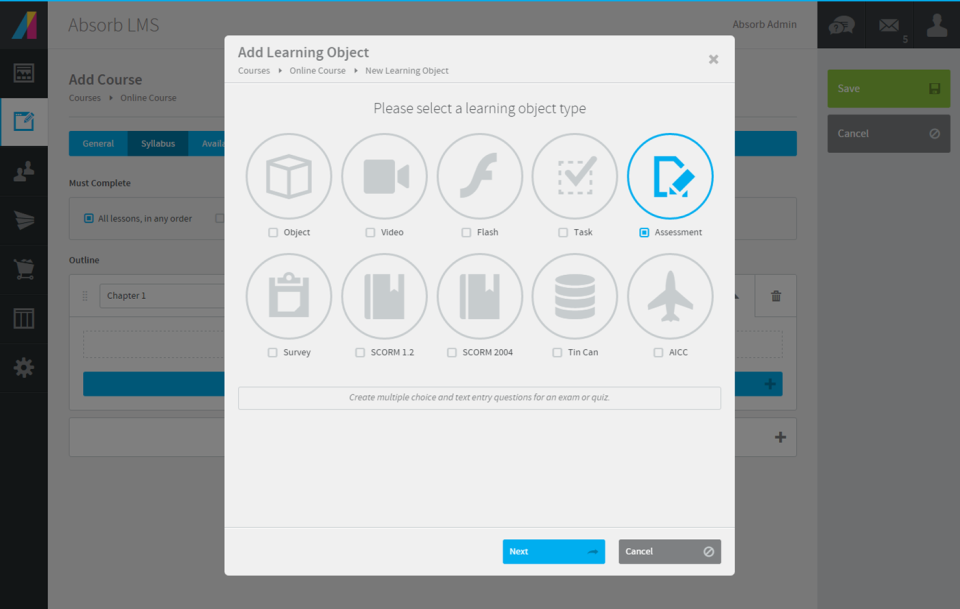
Absorb LMS aims to empower organizations to train employees with the skills needed to stay modern and relevant in today's fast-paced world. The LMS software focuses on aligning learning needs with business demands.
N/A
Adobe Learning Manager
Score 8.1 out of 10
Mid-Size Companies (51-1,000 employees)
Adobe Learning Manager is a Learning Management System developed by Adobe Inc. that offers personalized learning at scale to employees, partners and customers alike. Compliant with GDPR guidelines, SOC2 TYPE 2 and FedRAMP Certifications, Adobe Learning Manager integrates with Adobe Experience Manager Sites, Adobe Commerce, Marketo Engage with out-of-the-box components and any other application through Open APIs, offering hybrid learning programs and detailed analytics.…
N/A
LMS365
Score 7.8 out of 10
N/A
ELEARNINGFORCE in Edgewater brings learning management to Office 365 and SharePoint. LMS365 blends with the Microsoft infrastructure and is designed to eliminate expensive integration, time-consuming development, and unwanted complexity. Learners access learning plans, courses, personal progress reports, and certificates from within the SharePoint business process.
Our organization previously used LMS365, which did not support eCommerce and had difficulties supporting external users. (My understanding is the issues with external users may have been directly related to our Microsoft implementation and not directly LMS365's fault, but it …
We considered Absorb LMS and Saba Cloud but found that Adobe Captivate Prime had better service and support but was also easier to integrate and deploy with our other services. The fact that we had a team member familiar with the platform also made it easy for us to pick Adobe …
Verified User
C-Level Executive
Chose Adobe Learning Manager
We've considered alternatives only because the support and documentation of Adobe Captivate Prime is lacking. We have not made any purchase decisions yet but might switch to an alternative solution soon. This market space is growing faster during COVID and there are a lot of …
When we were looking for different Learning Management system we searched around for a long time, we tried to book a demonstration with Absorb Anywhere but they seemed to be very lax on there with replying and giving the information of what the system included before we had the …
Manager of Credentialing and Organization Development
Chose LMS365
As a not for profit, we have to keep cost in mind in all decisions. After demos with various software we found LMS365 to be the most cost effective with the most ease of use.
As a way to deliver eLearning content and track completion, I think Absorb handles our 7000+ users competently. In addition, their support team was always extremely helpful and responsive. When we went through the process of integrating Absorb with Skillsoft Business Advanced library, Absorb's team was very knowledgeable and helpful. I think teams needing more streamlined checklist-style OJT skills tracking will be disappointed by Absorb's feature. It takes 4-5 clicks for a user to trainer to sign off on one skill.
It's good if you have a good use case for that feed. I do know that you have to incorporate it in a process in isolation. It's not you don't realize the full value, so you have to incorporate it into an overall improvement process. I would say the pro cases are marketing optimization with respect to campaigns. And I would say that the areas it's not well suited is in distilling attribution. So if you were to take all of the improvements that it suggested, the numbers exceed revenue, which isn't real, but that's a hard problem to solve. Nobody's really solved that problem well. So distilling the attribution piece would be good. And it is well suited for marketing campaigns in the ideation phase of so
If a customer does not have SharePoint the entry in that kind of solution is a bit harder as the use of SharePoint can be so broad. It does not mean it is not the right solution as a company can use SharePoint LMS to start with and then expand to other functions and features. I strongly recommend to use SharePoint Standard or Enterprise and forgo the "free" SharePoint version as a) SharePoint's core functions and features are greatly enhanced in these two premium versions and b) more and more SharePoint LMS functions make use of these core Standard and Enterprise features in the future, like taxonomy, user profiles, etc. In general with all project it is as well recommended to have the full buy in by upper management and that the project initiative is fully supported. Adding such a solution (SharePoint LMS or any other LMS solution) will require the team not only to have a good plan on how the requirements can be achieved from a technical point of view, but how a training program can be rolled out to an organization of 5, 500, 5.000 or 50.000. The technical deployment of SharePoint LMS is measurable (I would say between 1-4 weeks based on the complexity, scale of the environment). 1-2 weeks of training (depending on the base knowledge of SharePoint in the company and the need to add knowledge of SharePoint LMS). That's it. Technically you are ready. If needed, any custom work, integration and development work comes on top. Where customer struggle is the availability and dedication of their own teams. Course content needs to be created, how should a course look like, what are the parameters, what are top ten things needed moving a course which was taught in a class room, but now to be delivered online. Buying the licenses is one thing, getting the solution up and running form a technical point of view is another, making it YOURS is the challenge!
Overall, Absorb LMS is pretty easy to use for learners and especially for admins. It's practical to create and manage course content - it provides the most crucial options and yet is lean enough not to overcomplicate the admin's life. The consistent and customizable "table-view" in most of the admin-areas is very helpful and easy to follow.
Using Enrollment Rules, Absorb LMS let you define who a course applies to and how they get enrolled. You can build rules based on learner attributes, such as department, location job role, group, to include or exclude specific audiences. The way Absorb LMS is using enrollment attributes, no other LMS actually can fulfill our requirements easier. Enrollment rules are mainly embedded in individual course options (you can also create scheduled enrollments outside of the courses).
Rich and engaging learning experiences that capture employees' attention.
Is multi-device capable so our teams can take classes where it's most convenient for them during the day, especially if they don't have an assigned static workstation?
Allows us to personalize compliance training based on where our employees are at in the organizational chart, competencies, and requirements.
The "And" and "Or" rules for self + automatic enrollment could be spelled out more to clarify who we're enrolling into courses
The thumbnail and poster "Upload photo" section is confusing. There should be a "Favorites" folder where we can easily find most commonly used posters and thumbnails
more education around Absorb analyze essentials
How the Featured courses section ranks courses is confusing on the back-end. I need to switch the primary one to second place to feature the new one first. But if the previous one now becomes second place, what happens to the old course that was in second place? I've noticed the order you select on the back-end for this isn't always reflected on user side
Same comment as Featured Courses but for appearance of billboards. Hard to position each in the right order
When the user clicks into a different portion of the file library and then needs to return to a previous class the software forces you to go all the way back to the beginning of the coursework, this isn’t that painful just annoying.
We love the ability to have a user-friendly system that integrates well with our different HR interfaces (we have 3 systems that feed data/employees into the system). It makes it easy to track course completions and report out on metrics enterprise-wide. In addition, the ability to provide consistent education to staff who are geographically dispersed is a huge incentive for us, and Absorb LMS does this seamlessly.
Currently, our company uses this program and another competitor for our learning management software. We like the adaptability of this program and appreciate the customer service that Adobe provides, however the other program is starting to turn out to be a better value for our company as they improve their compatibility.
It is very simple for me: As I said, I am (we are) selling and consulting around SharePoint LMS. SharePoint LMS is a killer application which needs to be in every company which has a vision and mission to deliver and create knowledge. So you can say Thomas (me) is biased, but I only encourage you to check out the solution to hear what we have to say and stack our solution against the other solutions out there.
I have never built/managed an LMS platform before and I find it very user friendly and capable of doing 98% of what I need it to do. We have been in the system almost a year and one of the struggles I had using the reporting tool has already been resolved and updated!
In general, the user experience in Adobe Learning Manager is very satisfactory. The layout of the interface, the structure and the order of the available functionalities make it very intuitive and usable. The adaptation to mobile devices is very convenient since most of the participants connect through these electronic devices.
Ultimately, in my opinion LMS365 is a bit clunky to use. It has most of the features you need, but most need to be configured by your technology department, e.g., SSO, user groups in Entra ID, notifications through Slack, teams, etc. If you're looking for an all-in-one solution, look elsewhere, as lms365 has several catches to its proposition.
We have never had any major issue with Absorb's availability. Any outages that have occurred have been planned an communicated. Any small issues that occur within the Absorb platform have been addressed efficiently and quickly by support and the development team
On a few occasions, I've logged in to issue a test to a staff member and my course would just spin. I've had to reschedule several test attempts due to this. In my opinion, the issue was not resolved by Adobe
We have experienced infrequent issues with things like load times on reporting, or pages timing out, but for the large majority of our time within the system things have worked as they should
The performance of Adobe Captivate Prime is also extremely good. The user interface is fast and easy to load. The complexity is not nearly as bad as some of the other programs on the market. Speed was not impacted.
We absolutely loved both our sales representative, Mike Kuphos, and our Implementation manager, Joe Zizian. Joe has continued to be a great resource, even since we went live with our LMS and were moved into the maintenance stage! I sent over a quick question recently when I was stuck in the platform... within hours, he responded with a video walking me through how to do what I was having trouble with. I truly cannot say enough wonderful things about Joe and the level of customer service he has provided throughout implementation and beyond. I haven't really had to use alternate support methods.
I think they have a competent, friendly and "resolving" team. I have only ever been met with a willingness to assist any and every query I have come across. Roy who is one of the technical people is amazing, and so is my Customer Success Manager, Hema! I do not know what I would do without them.
The few times we actually needed support generally were during major upgrades of the system and getting a quick handle on how the configuration changed were the primary reasons.
The training was comprehensive - there were existing modules to learn functionality but working with Absorb staff, and receiving recordings of those walk-throughs, made a rapid understanding of the LMS achievable and covered the necessary material that was needed and allowed for specific questions to be addressed.
The implementation of Absorb went very seamlessly. We previously had the Oracle LMS and importing user data and getting the new system up to speed was painless. The smooth transition helped leaders and staff gain confidence early in the application/company and we have had a successful partnership with Absorb since.
Trial period was great, and It let me plenty of time to try the different feature of the platform. However, when we decided to move forward, the ADOBE team was slow and not reactive at all. Actually after 2 years, I am still waiting for answers which is quite unacceptable.
Absorb LMS is feature packed with small but smart elements (can have a username that isnt an email, can change the core language used in the platform, can change the font and layout) that offer greater security and accessibility for learners.
360 keeps up the Adobe learning manager. It even outclasses it in certain parts, but with a huge stalwart tech giant like Adobe, it is hard to keep up. Many of the features are present, but there's always that final touch missing. And it is always trying to play catchup.
I will pick EdApp or Totara if you're after an all-in-one LMS solution that is feature-rich. For a university educational setting, Moodle continues to make sense. Safety Culture now owns EdApp, so over time, these platforms will likely be merged. LMS needs a huge overhaul to catch up.
We have already scaled our LMS from a couple hundred users to 1000 users and have plans to scale even larger. We use the LMS across multiple internal departments. countries and user types. Absorb has made it easy to integrate and scale and we will continue to scale in the near future.
The product's overall scalability and flexibility is extremely good. I wish that the other products our company uses were this flexible! The product is easy to deploy across multiple departments and teams as needed.
We work directly with Kirsten Spak, who has continuously provided timely and quality help for myself as the lead and our organization. Kirsten has helped us ensure that we are going about things as efficiently and is always willing to walk through things to demonstrate suggestions and functions. As we look to expand our offerings further, Kirsten has helped strategize for the best approach, which has helped our workflow and the end-user experience. As we are still relatively new users, but using the LMS every day, Kirsten has been very patient and provided clear instruction on processes when we were unsure of what to do and has been able to troubleshoot, with her team, functions that were desired but not availability at the time, to provide us with solutions.
Our ROI is yet to be determined as we haven't fully rolled it out yet. We hope that this will improve our customer loyalty and advocacy, set us apart from competitors, and appeal to prospects as something that is extremely valuable. ROI measurements will include customer participation, satisfaction from learners and their managers and any new customers who quote the platform as a reason they chose us.