Adobe Workfront, acquired by Adobe in late 2020, is a web-based project-management tool. It is designed for both IT and marketing teams, but can be implemented for any kind of project. Workfront offers all the features standard to project management platforms, as well as resource allocation, automation, and agile workflow.
N/A
Constant Contact
Score 7.9 out of 10
N/A
Constant Contact is a full-featured email marketing solution with capabilities such as social media integration, drag-and-drop editing, and real-time reporting. It is a bulk email tool designed for SMB customers. Since 2019, Constant Contact also offers marketing automation features, a website and landing page builder, and other tools to support midsize businesses.
$12
per month
HCL Unica
Score 8.2 out of 10
N/A
HCL Unica is available as a cloud or on-premise solution that provides fully integrated marketing automation software for enterprise. It includes enterprise marketing automation tools that optimize marketing activities, to ensure excellent customer experiences and data privacy.
N/A
Pricing
Adobe Workfront
Constant Contact
HCL Unica
Editions & Modules
No answers on this topic
Lite
Starting at $12.00
per month
Standard
Starting at $35.00
per month
Premium
Starting at $80.00
per month
No answers on this topic
Offerings
Pricing Offerings
Adobe Workfront
Constant Contact
HCL Unica
Free Trial
No
Yes
No
Free/Freemium Version
No
No
No
Premium Consulting/Integration Services
Yes
No
No
Entry-level Setup Fee
Optional
No setup fee
Optional
Additional Details
—
The SMS Marketing tool can be added to any Standard or Premium Constant Contact account. SMS is only available in the US for Standard and Premium paid plans. SMS can be added when logged in to an account after purchase. Plans start at $10/month for up to 500 messages.
Workfront by far has the advantage over these competitors given the SaaS backend. The challenge for Workfront has been on the financial side. From a marketing perspective, managing the costs associated with projects is a bit of a gap with Workfront. This takes nothing away …
Mailchimp is pretty comparable in a lot of ways to Constant Contact, but Constant Contact just continues to win when it comes to deliver-ability and user-interface. It's clean, simple, and intuitive.
Workfront enables us to manage all our projects effectively while providing a comprehensive overview of team resources. The Resource Planner helps the team identify their capacity to determine whether they are over- or under-allocated. This information is crucial for project planning and ensuring team members do not experience burnout.
Constant Contact is an excellent tool for sending out flyers and newsletters. However, I feel the content's appearance is typically all the same. When I receive an email from Constant Contact, I can immediately identify it - the templates usually all look the same. When sending out communications with images, it is easy to use Constant Contact and link webpages. However, the email layout is always vertical and can get very lengthy. I prefer a more flip-book approach with options to flip the page.
I think it is wel suited for a business with a lot of one on one relations in the database. For example a supermarket that sells products to a client and gives a reduction on that product. It is nice if the selection process is not to complex and does not involve to many calculations. It is also nice if it is very clear what you want to follow up. In our environment we have lots of many-to-many relations. for example one product is held by more then one client. And that client might have more of those products with other clients. These kind of situation demands for a lot of calculations with derived fields(*), and there things go far too slow. Unica is probably not such a good solution for us, because our environment is too complex, and so is to process of creating the selection, we often have to change things in the selection flows. Because of the complexity it is difficult to see what the flow is exactly doing afterwoods, it also takes to much time to modify existing campaigns. The interface is not handy to work with, if you have long lists of variables, of tables or derived fields(*) you have to scroll through trough them, you can not really search them or reorder them. You can not drag and drop fields or other objects like derived fields in the flow, what would be easy if you have to make frequent changes to the proces flow. When you copy objects something the content of the object changes because the links with other objects or lost. (*) derived field: field to calculate something
Market segmentation is great: my main segmentation is by region because that's how our sales team is divided.
Lists: making customized email lists is easy and intuitive; the custom fields allow some flexibility in case our fields don't exactly line up with Constant Contact's.
Campaigns: creating campaigns is quick and simple. I especially appreciate the 'resend to non-openers' option. I am constantly using this feature.
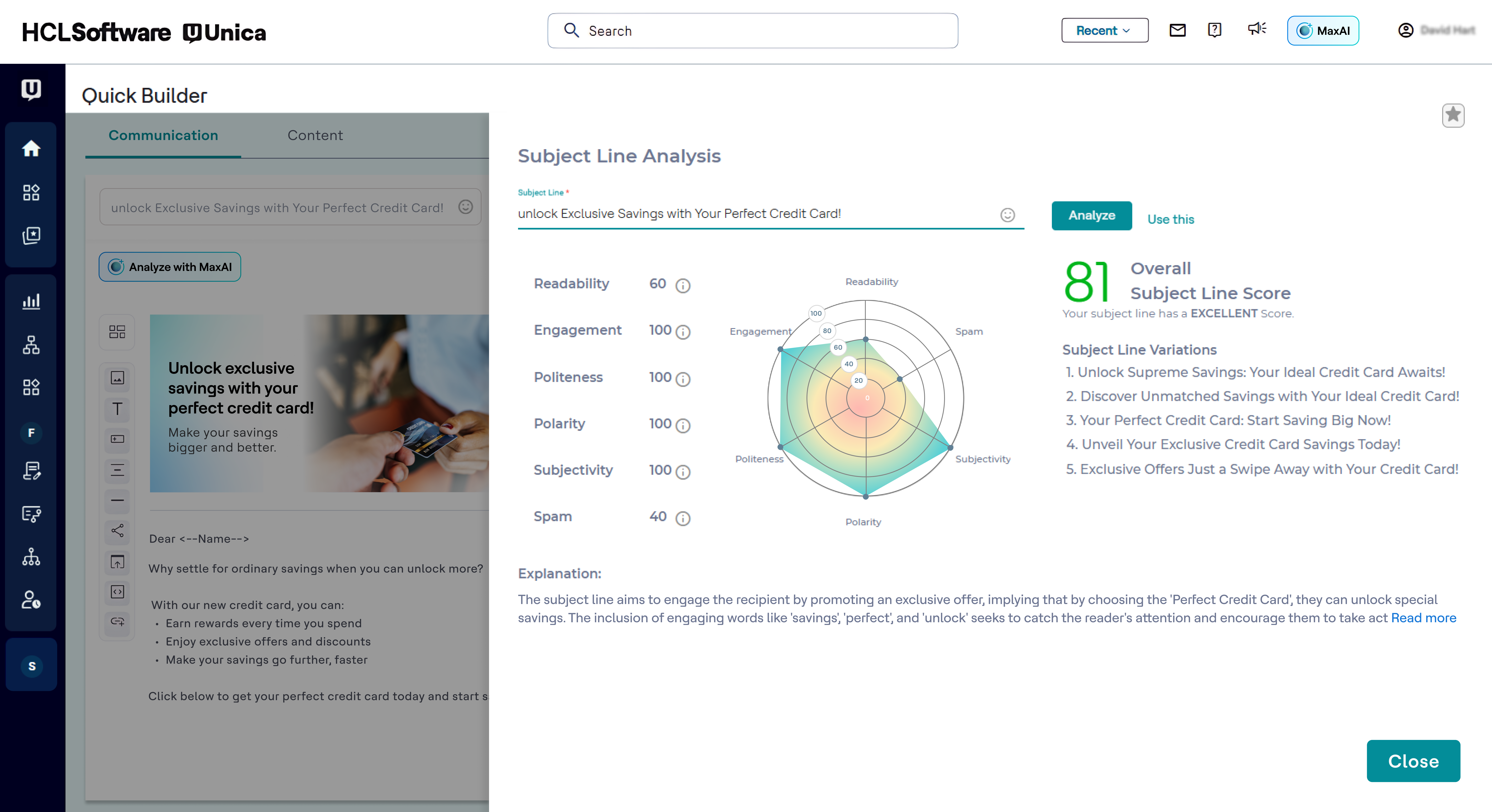
Subject line generator: I like using the recommended subject lines. I'm able to plug in their recommended ideas, or sometimes, this feature helps me generate my own ideas.
Ability to translate Multiple SQL queries into a very easy to use visual GUI.
Provides the ability to pre-define segments, run them once in off hours, store them in their own system tables for quick youth and a significant reduction in CPU utilization on the database.
It’s use of Reusable objects. Including user variables to pre-define calculations one time, macros that you can create and pass values to parameterize the SQL code And the creation of templates to easily replicate work.
It’s ability to bring in external data on the fly that can very easily be mapped into any flowchart.
It’s flexibility and creating UNIX script via triggers to automate sending of files to multiple vendors with different FTP sites
It’s flexibility in the output layouts that it can create.
It would be nice if we had more customizable options for emails - like moving around pictures and text boxes, rather than a set spot for everything to go.
I would like it if multiple people could work on a document at one time. So if I'm in charge of graphics, I can get those updated while someone else is entering content, etc.
Greater integration of real time (Interact) capabilities with outbound channels, in particular IBM eMessage Email & SMS delivery.
Additional outbound channels to be integrated into eMessage, including Facebook Fanpage & Twitter DM broadcasts. At the moment these are possible only through custom additional integration.
Support for additional marketing database technology, e.g. MySQL, Exasol, ParAccel, WX2.
Provision of database technology with software purchase, as Web technology (IBM WebSphere Express) is supplied for free, but no database is supplied - since IBM also market DB2, which is a supported technology it seems a shame.
All that I've said already is why. I suppose the clearest way to say it is that at this point? I cannot imagine running the 300+ active projects in eMarketing without AtTask; it simply wouldn't be possible and even more; I wouldn't imagine why we'd try to find an alternative tool when we have one meeting our needs.
There is no doubt that we are going to renew Constant Contact. We have not just invested a lot of time in learning and creating a great looking product but we have developed a strong database of information that allows us to track how we are doing for each newsletter. This supports our goals of creating products that residents desire and are excited to receive.
There are three main factors to renew a licence: 1) Cost to migrate to another platform would be rather expensive and time consuming, plus the requirement of retraining employees to use a new tool 2) It has been proven time and time again that it is a market leader in the space (10 years +) 3) It can be built upon, with the addition of additional IBM EMM modules - despite theories it does have very strong digital capabilities.
Workfront is overly complex, but it is functional as a tool to keep track of projects. It is a shame that sometimes it takes a lot of clicks to find anything. Workfront is slowly modernizing its interface but at the same time, hides certain information away thus making the experience feels worse.
There is always room for improvement. I don't know how they test their systems, but they should invite not-so computer savvy people to test it. If I, as an expert have problems, they need to think like the technophobe. Since I've used Constant Contact in the past as part of my former employment, I have not viewed any of the tutorials and just jumped in to work on my client's newsletter. With that said, I found some areas easy and some a bit cumbersome
Maintenance is required, but usually after work hours, Some days the proofing tool function is not operational, but this is a new function of the tool that WF is working out. the kinks on. Chrome is the best browser to use the system in and we find Firefox and Explorer lose some view functionality - Gantt Chart, Resource Grid
Workfront's performance has been very good. Everything always feels very fast and snappy in my experience. We have integrated it with custom scripts to create folder structure for media managing our projects. It works very well.
The system seemed quite slow sometimes. Specifically, there was sometimes a delay in sends if it was during a high traffic period. There were time-outs when uploading new code for an email, and a lag in reporting analytics which was sometimes as long as 72 hours
I know that this particular company has it's own Adobe Workfront employee that builds out things they need from the software, and meets with them regularly to troubleshoot. I'm not part of this process, but it's refreshing to see Adobe provide this level of customer service to people, and they're expedient.
I think the overall support for Constant Contact has always been incredible; I have nothing negative to say. Our customer support representative was attentive, easy to understand, and very knowledgeable. I never felt like I wasn't a priority of his and my issues, while very small, were fixed in a very short time frame.
The training is very easy to use and you can simply choose the topics included in the course(s) that are most important to your training needs. After each training course, you are tested on what you have learned. If you need a refresher course, they provide Course Catalogs as well as instructor-led courses & workshops.
Most people learn as you go, a lot of this stuff requires trial and error throughout so my suggestion is to provide as much information in the upfront and keep it as simple as possible. You can add other tools and features as you go but everyone should have the basics down so no bad habits can start to develop. Be persistent with everyone, and don't be afraid to correct and talk through steps again so everyone is on the same page
Implementation is very easy for someone who wants to send out the “batch and blast” type newsletters. If you want to use their templates with no customizations, the product works fine. However, the more customizations you get into involving link color, etc, that’s where things can get tricky for someone who may not be familiar with coding
- We had to rebuild a part of the datamart afterwards to tighten up and simplify the selection process. But as it was too time consuming to rebuild all the existing campaigns, we no run campaigns on different versions of the datamart. - The response tracking of the campaigns never worked out well, it was impossible to implement a direct response where there is a link between the lead and the response in our operational process
It's been a while since I've used another time and resource management platform, but I would say that Adobe Workfront takes the cake. Its newly refreshed user interface is simple to navigate, whereas other platforms can be quite confusing when "drilling down" on a project. Also, Adobe Workfront has features that I have not seen in other platforms, including collaboration capabilities and the ability to upload a document as proof so it can be reviewed for grammar, consistency, formatting, etc., before being presented or sent to a client.
Constant Contact is much more intuitive for people who are not tech-savvy. Also, while sendgrid offered more options in it's drag and drop interface, it displayed differently across different email clients, which made it very cumbersome to use. It also took much longer to upload contact lists and it was harder to manage existing contacts. Performance in sendgrid was much slower as well, and the Preview feature was quite buggy. Our team initially chose sendgrid because of the integration options that it's API offered, but we ultimately switched to Constant Contact because it was much easier to build campaigns and better suited our requirements.
The contact history and the response history are so powerful. You can track whatever you want to help the call center to push relevant offers to our customer. In addition, predictive models can be built, with patience, in IBM Campaign. If you have some complaints from the call center about any campaigns, you can easily validate it into the contact or response history.
As I stated earlier, I didn't have to pay for Workfront myself- I'm a user under a large organization. I know it's not cheap to implement, I don't know how the price scales for a small-business, but I do like the product enough that I'm going to look into it in the future for my own company.
We have been using Workfront for about 3 years. During this time they continue to be a very stable project management system. Workfront's overall scalability is able to handle increased loads of work. When using Workfront for a project management tool for the web team, we store documents, images & video's without any issues. They work with their customer's to provide the best project management system in the market today! I highly recommend Workfront for all project management needs. Workfront strives to deliver unique technology solutions to growing companies!
Very reliable in sending email campaigns and controlling the recipients so that no contact is sent the same email more than once, even if they are on a resent list
I have had nothing but positive impacts from using Constant Contact.
The church is large, and there are many subgroups and axillary groups within the church. Setting up specific groups based on responsibility, interest, member goals, and service needs allows me to send information quickly, saving valuable time for other tasks.
Constant Contact allows leadership to stay personally engaged with the members I work with, without over-taxing my time. It feels so seamless.