Overview
ProductRatingMost Used ByProduct SummaryStarting Price
Chrome Remote Desktop
Score 8.3 out of 10
N/A
Chrome Remote Desktop from Google is a cross-platform remote administration and remote desktop tool that requires the Chrome browser and an extension. It is free to use.
$0
GoToMyPC
Score 8.3 out of 10
N/A
GoToMyPC is a remote administration offering from GoTo (formerly LogMeIn) with mobile deployment to work on files, programs, and networks from home or while traveling.
$28
per month per computer
ISL Light
Score 8.9 out of 10
Small Businesses (1-50 employees)
ISL Light is remote support and remote access software that enables SMBs and large enterprises to offer fast and efficient support and maintenance for Windows, Mac and Linux computers as well as mobile device support for Android and iOS.
$16.90
per month (1 concurrent user)
Pricing
Chrome Remote DesktopGoToMyPCISL Light
Editions & Modules
No answers on this topic
Corporate
$28
per month per computer
Pro
$33
per month per computer
Personal
$35
per month per computer
Starter
$16.90
per month
Standard
$34.90
per month
Self-Hosted
$44.90
per month
Premium
$54.90
per month
Offerings
Pricing Offerings
Chrome Remote DesktopGoToMyPCISL Light
Free Trial
NoNoYes
Free/Freemium Version
YesNoNo
Premium Consulting/Integration Services
NoNoYes
Entry-level Setup FeeNo setup feeNo setup feeNo setup fee
Additional DetailsISL Online's pricing model considers the number of licenses purchased, which determines the maximum number of concurrent users within the organization. A concurrent user is defined as anyone running one or more sessions simultaneously from any device. There are no restrictions on the number of ISL Light users within a company or the remote devices managed. For example, with three licenses, an unlimited number of people in a company can use ISL Light and can access an unlimited number of remote devices, but only three users can use it concurrently. When one of these three users ends their session, a fourth user can begin their session, and so on.
More Pricing Information
Community Pulse
Chrome Remote DesktopGoToMyPCISL Light
Considered Multiple Products
Chrome Remote Desktop

No answer on this topic

GoToMyPC
Chose GoToMyPC
Connection is not the same. GoToMyPC has a stronger connection compared to Chrome remote. I feel that GoToMyPC is very reliable and secure. I can access remote desktops and share or sync files through the app’s web browser on any device, not sure about the competitor but, I …
ISL Light
Chose ISL Light
I used LogMeIn Rescue for several years, and it has more features rich but is horrifically expensive compared to ISL Light, which was the main reason I changed. Chrome Remote Desktop must be viewed as a threat in the remote desktop application sphere. The features and usability …
Chose ISL Light
ISL is considerably more cost effective for us, partly because we've opted to self-host it. Not many other providers offer this approach.
Chose ISL Light
ISL Light is easy to use and covers all our permanant access devices but is also easy to manage our ad-hoc clients, the only negative over some is you can't automate remote tasks
Chose ISL Light
More user-friendly. More affordable. A Slovenian product (which means it supports the Slovene language). User support is very satisfactory and responsive. Simple installation and does not require additional knowledge from colleagues.
Chose ISL Light
None of these work when trying to connect from my personal computer. Guys in our IT offered to use ISL Light and it worked without a glitch ever since.
Chose ISL Light
Sometimes I use team-viewer but ISL Light is much better because it is on the PC level, not on user level, so you can switch users while remotely connected.
Features
Chrome Remote DesktopGoToMyPCISL Light
Remote Administration
Comparison of Remote Administration features of Product A and Product B
Chrome Remote Desktop
8.2
21 Ratings
4% above category average
GoToMyPC
4.0
103 Ratings
66% below category average
ISL Light
8.2
108 Ratings
4% above category average
Screen sharing6.620 Ratings7.067 Ratings8.7102 Ratings
File transfer7.511 Ratings5.383 Ratings8.6102 Ratings
Instant message7.06 Ratings2.820 Ratings8.083 Ratings
Secure remote access with Smart Card authentication9.03 Ratings2.914 Ratings8.125 Ratings
Access to sleeping/powered-off computers9.210 Ratings1.948 Ratings6.378 Ratings
Over-the-Internet remote session9.021 Ratings7.684 Ratings8.799 Ratings
Initiate remote control from mobile8.017 Ratings2.653 Ratings8.264 Ratings
Remote management of servers & workstations9.119 Ratings3.856 Ratings8.787 Ratings
Remote Active Directory® management7.05 Ratings3.224 Ratings8.832 Ratings
Centralized management dashboard9.08 Ratings2.928 Ratings8.364 Ratings
Session record9.05 Ratings3.026 Ratings7.771 Ratings
Annotations9.04 Ratings2.89 Ratings8.456 Ratings
Monitoring and Alerts9.04 Ratings6.921 Ratings7.947 Ratings
Multi-platform remote control7.015 Ratings3.124 Ratings8.379 Ratings
Best Alternatives
Chrome Remote DesktopGoToMyPCISL Light
Small Businesses
Getscreen.me
Getscreen.me
Score 9.6 out of 10
Getscreen.me
Getscreen.me
Score 9.6 out of 10
Getscreen.me
Getscreen.me
Score 9.6 out of 10
Medium-sized Companies
Remote Desktop Manager
Score 9.5 out of 10
Remote Desktop Manager
Score 9.5 out of 10
Remote Desktop Manager
Score 9.5 out of 10
Enterprises
Remote Desktop Manager
Score 9.5 out of 10
Remote Desktop Manager
Score 9.5 out of 10
Remote Desktop Manager
Score 9.5 out of 10
All AlternativesView all alternativesView all alternativesView all alternatives
User Ratings
Chrome Remote DesktopGoToMyPCISL Light
Likelihood to Recommend
9.3
(21 ratings)
7.8
(104 ratings)
8.5
(91 ratings)
Likelihood to Renew
7.0
(2 ratings)
9.1
(5 ratings)
9.1
(3 ratings)
Usability
8.8
(7 ratings)
7.6
(22 ratings)
8.3
(54 ratings)
Availability
-
(0 ratings)
9.1
(2 ratings)
9.1
(1 ratings)
Performance
-
(0 ratings)
9.1
(2 ratings)
9.1
(1 ratings)
Support Rating
3.8
(7 ratings)
9.1
(13 ratings)
9.1
(3 ratings)
Implementation Rating
10.0
(1 ratings)
9.1
(3 ratings)
9.1
(2 ratings)
Configurability
-
(0 ratings)
9.1
(2 ratings)
-
(0 ratings)
Product Scalability
-
(0 ratings)
9.1
(2 ratings)
9.1
(1 ratings)
User Testimonials
Chrome Remote DesktopGoToMyPCISL Light
Likelihood to Recommend
Google
It is well suited in cases where your company/organization is looking for a low/no cost remote desktop solution, or is looking for something that can be used by most anyone right away. Most organizations don't want things to be too complex, especially with a remote desktop solution, which is generally not very complex software to begin with. It would be less appropriate in cases where the company/organization has already purchased licensing for a commercial product, and/or has been heavily using a commercial product for some time.
Read full review
GoTo (formerly LogMeIn)
I think GoToMyPC is well-suited for any scenario I have encountered, although I only have experience using it in a small firm setting. Otherwise, for working from home and traveling or file retrieval, it has proved more than adequate. I have not encountered a scenario that I thought was less than appropriate.
Read full review
ISL Online
ISL light is suitable for anyone who plans to provide remote assistance services on a medium to large scale. Due to the high entry price, it is less suitable for consultants with a smaller number of clients or remote stations that need management. Their smallest package in which minutes are rented does not seem suitable for most cases.
Read full review
Pros
Google
  • Unlike Microsoft's Remote Desktop, this program is the same across platforms, which is helpful for users.
  • This program also allows direct control over the desktop (like TeamViewer) and doesn't give you a simulated log on (like Remote Desktop). This is advantageous for seeing exactly what's on the screen but can make it a little laggy.
  • The interface is very nice and clear once it's set up. It's obvious which computer is which and it's just a couple of clicks from opening the program to a connection.
  • The mobile app is also really really well done.
Read full review
GoTo (formerly LogMeIn)
  • I am able to easily access both of my home monitors on GoToMyPC by simply clicking on a slider bar.
  • I have access to all of my drives and programs as if I were sitting in my office.
  • GoToMyPC allows me to print to my office printers so I can complete paperwork and print it for my colleagues back in the office to use.
Read full review
ISL Online
  • Prikaz strani na kateri se nahaja uporabnik
  • Prikaz kontaktov uporabnikov
  • Zgodovina pogovorov s strankami
  • Možnost spreminjanja statusa dosegljivosti
  • Nalaganje datotek, zajemov slik,..
  • Klepetalnik, ki je enostaven za uporabo
  • Nas obvesti, da smo dobili sporočilo, tudi če smo izven klepetalnika
  • Display the page the user is on
  • Displaying user contacts
  • Customer conversation history
  • Ability to change availability status
  • Uploading files, capturing images, etc.
  • An easy-to-use chatbot
  • Notifies us that we have received a message, even if we are outside the chat room
Read full review
Cons
Google
  • More fluid video rendering. Does a good job, but could use a more consistent framerate at times.
  • A way to easier switch between multiple monitors.
  • Adding an ability to zoom for multi-monitor display. Sometimes on a single screen it can get difficult to read if trying to view them all.
Read full review
GoTo (formerly LogMeIn)
  • Transfer or copy files from the computer drive (c drive) to your active desktop file folders.
  • The ability to set your own "Time Out" too often I have to log back in if switching between computer screens.
  • Easier way to print documents to printers not connected to the computer being accessed.
Read full review
ISL Online
  • Need a control toggle at least on AlwaysOn. User moves the mouse and you lose all control instantly.
  • Clipboard features are a bit wonky still, and your clipboard seems to get emptied a lot. So if you're trying to copy and paste you might lose something
  • Passwords for the systems are saved per machine, so if you work from multiple devices it can be tricky if you have complex passwords
Read full review
Likelihood to Renew
Google
A very easy lightweight tool that is completely scalable and deployed via google admin platform. The tool is free to use and works extremely well with the chrome devices we currently have deployed. Any organization using chrome or google suites should look into this tool as it's much easier to use then other remote software in the market
Read full review
GoTo (formerly LogMeIn)
I have been using GotomyPC for 20 years and it's gotten better with time. It's the best remote app that I've tried. The others were harder to use and not as functional. It allows us to work from anywhere just as if we were in the office. Even being able to print to my remote location is a wonderful way of doing work. I don't have to drag it to my remote device, It will just print without any hassle
Read full review
ISL Online
We are renew the license for 10 years now and we do not see why would change that. It just gets better with every new version.
Read full review
Usability
Google
Just a great product that has saved countless hours of commute to work and given the flexibility to be able to work from anywhere, whether at home or when away on holiday overseas. I love that it is a free product and is just as great as its competitors' products. It has also allowed me to prepare for work for the following day.
Read full review
GoTo (formerly LogMeIn)
Really easy to use-even if you forget your password frequently like me. The reset password feature is not cumbersome and does not require phoning Customer Service. Just a few clicks and a bit of creativity to come up with a new password. I like this "easy button" approach. Definitely recommend.
Read full review
ISL Online
Everything works well and quickly, and that's all we need. ISL Light always works, and we've never had a situation where the server was inaccessible or the website was down. It simply gives us a 100% guarantee that we can always log in to our customers' systems. We can install the ISL Light client at our customers' sites without any problems, even though security is high.
Read full review
Reliability and Availability
Google
No answers on this topic
GoTo (formerly LogMeIn)
I've never had a problem unless the host computer itself is having an issue - such as being off line.
Read full review
ISL Online
During the entere time of use, I have never come across any availability issues.
Read full review
Performance
Google
No answers on this topic
GoTo (formerly LogMeIn)
Everything loads quickly. The only lag has been when our internet provider didn't fix our connection. Once that was resolved, no problems.
Read full review
ISL Online
High performance!
Read full review
Support Rating
Google
The only support I ever accessed were help files and web tutorials. I never tried to access personal support, mostly because I don't believe much of it is available. As a free service, my expectations for support are pretty low; that said, Chrome Remote Desktop is easy enough to configure and troubleshoot even with limited technical knowledge.
Read full review
GoTo (formerly LogMeIn)
I have never had to contact support. The product is so easy to use I have not needed help (yet). But if I had to contact them, I am sure they would be just as great to work with as the product itself is.
Read full review
ISL Online
We had issues with mouse skipping on mobile devices. Support is immediatly availabe, they examined our case and in one of the new versions of the app this problem was gone.
Read full review
Implementation Rating
Google
None, its quick and easy
Read full review
GoTo (formerly LogMeIn)
It set up quickly and assigning log ins to various computers was simple. I don't think you need many insights into the product. It's easy to implement and easy to use. Since it's a work tool, it needs be that way. I wouldn't want the tool to have any learning curve when some of the people using it are not tech savvy. They are accessing their work computers for files or to work on apps that their remote devices might not have loaded.
Read full review
ISL Online
It was so easy!
Read full review
Alternatives Considered
Google
Chrome Remote Desktop seems to be a an easy to use and efficient program. Such as TeamViewer, however TeamViewer offers more program features such as able to control a device's function (shutting down, restarting, audio input, cmd etc). With those added program features I believe Chrome Remote Desktop can almost be up to par with TeamViewer.
Read full review
GoTo (formerly LogMeIn)
I recently started having problems with Splashtop - slow response/freezes/drops, and after troubleshooting everything
internet and hardware related, decided to check out GoToMyPC as one step
in troubleshooting. GoToMyPC has better response
time and has been more reliable. So far I am pleased with the switch with just a couple of minor matters mentioned earlier in review.
Read full review
ISL Online
The main reason was price initially, after TeamViewer jacked up the price 3 fold come covid in start of 2020, told them to get stuffed and went elsewhere, back then they had a good reliable product, then after I switched to another provider, the came crawling back and offer me the same price I was paying before the COVID tax (3 times increase in price) like I said, told them to get stuffed, ISL on the other hand didn’t increase their price when covid started, so have been with them ever since.
Read full review
Contract Terms and Pricing Model
Google
No answers on this topic
GoTo (formerly LogMeIn)
No answers on this topic
ISL Online
tot perfecte
Read full review
Scalability
Google
No answers on this topic
GoTo (formerly LogMeIn)
I can use it on all of my devices - even my Galaxy phone. Once you log into your device, you work on it as if you were physically in front of it. Not much complexity in that. If you can work on your own device, you can work on it through another device - even a phone.
Read full review
ISL Online
Easy to deploy onto new devices. Ability to group devices so they can managed remotely efficiently.
Read full review
Professional Services
Google
No answers on this topic
GoTo (formerly LogMeIn)
No answers on this topic
ISL Online
No professional services used
Read full review
Return on Investment
Google
  • Using Chrome Remote Desktop, we've saved money on remote desktop software.
  • Using Chrome Remote Desktop, we've saved money by not needing to purchase additional hardware (monitors).
  • Using Chrome Remote Desktop has improved the productivity of my organization by allowing employees to work from anywhere.
Read full review
GoTo (formerly LogMeIn)
  • Increased productivity since I can access remotely
  • Ability to use my laptop making my desktop a mobile workstation
  • Ability to provide answers at closed-door meetings about budgeting, expenses, invoices without needing to leave the room to look it up on my desktop.
Read full review
ISL Online
  • It allows you to hold meetings with clients from other cities.
  • Ease of training staff from large groups
  • Resolving problems in a short time, which is an optimal strategy for improving delivery times
  • permite realizar reuniones con clientes de otras ciudades
  • Facilidad de capacitar personal de grupos numerosos
  • Resolucion de problemas en tiempo corto, lo cual es una estrategia optima para mejorar los tiempos de entrega
Read full review
ScreenShots

Chrome Remote Desktop Screenshots

Screenshot of the option to share a screen or access another computer in Chrome Remote Desktop.Screenshot of the screen to setup a remote connection.

ISL Light Screenshots

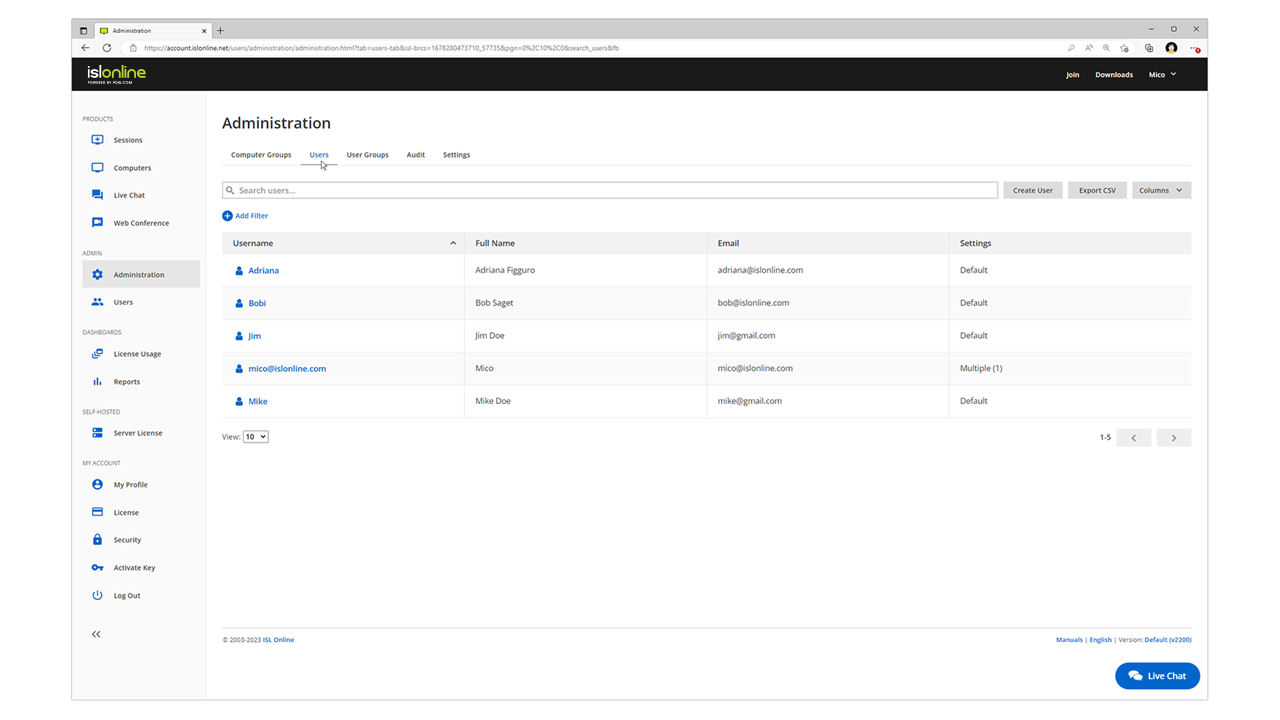
Screenshot of remote access control in ISL Light.Screenshot of unattended access setup. Access can be allowed to as many computers as desired.Screenshot of a connection with a remote client, which can be set up by sending an email or sharing a link.Screenshot of interactions with the Windows UAC on a remote device.Screenshot of the dual panel File Manager, used to transfer files.Screenshot of the web console where remote desktop sessions can be managed from a web browser.