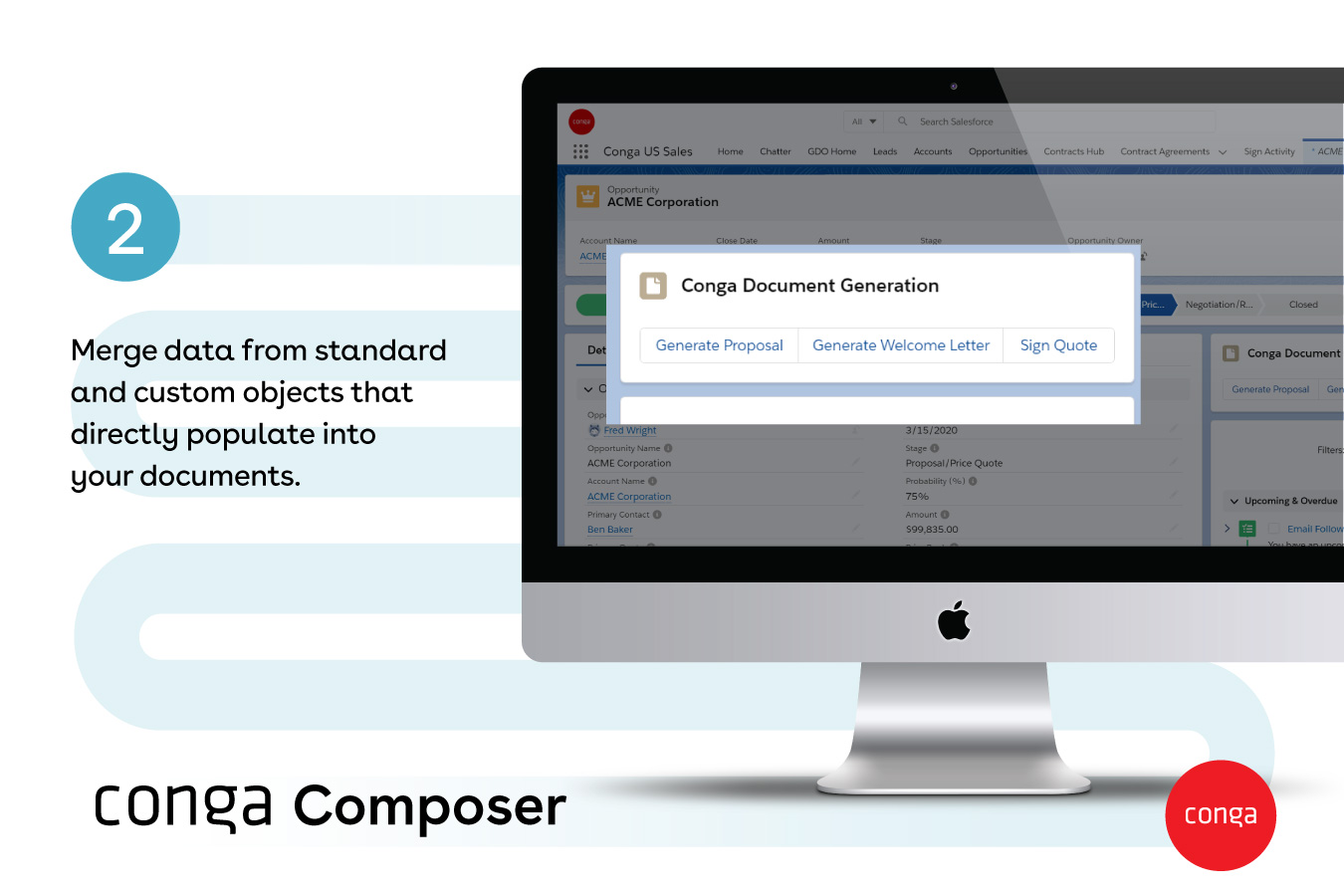
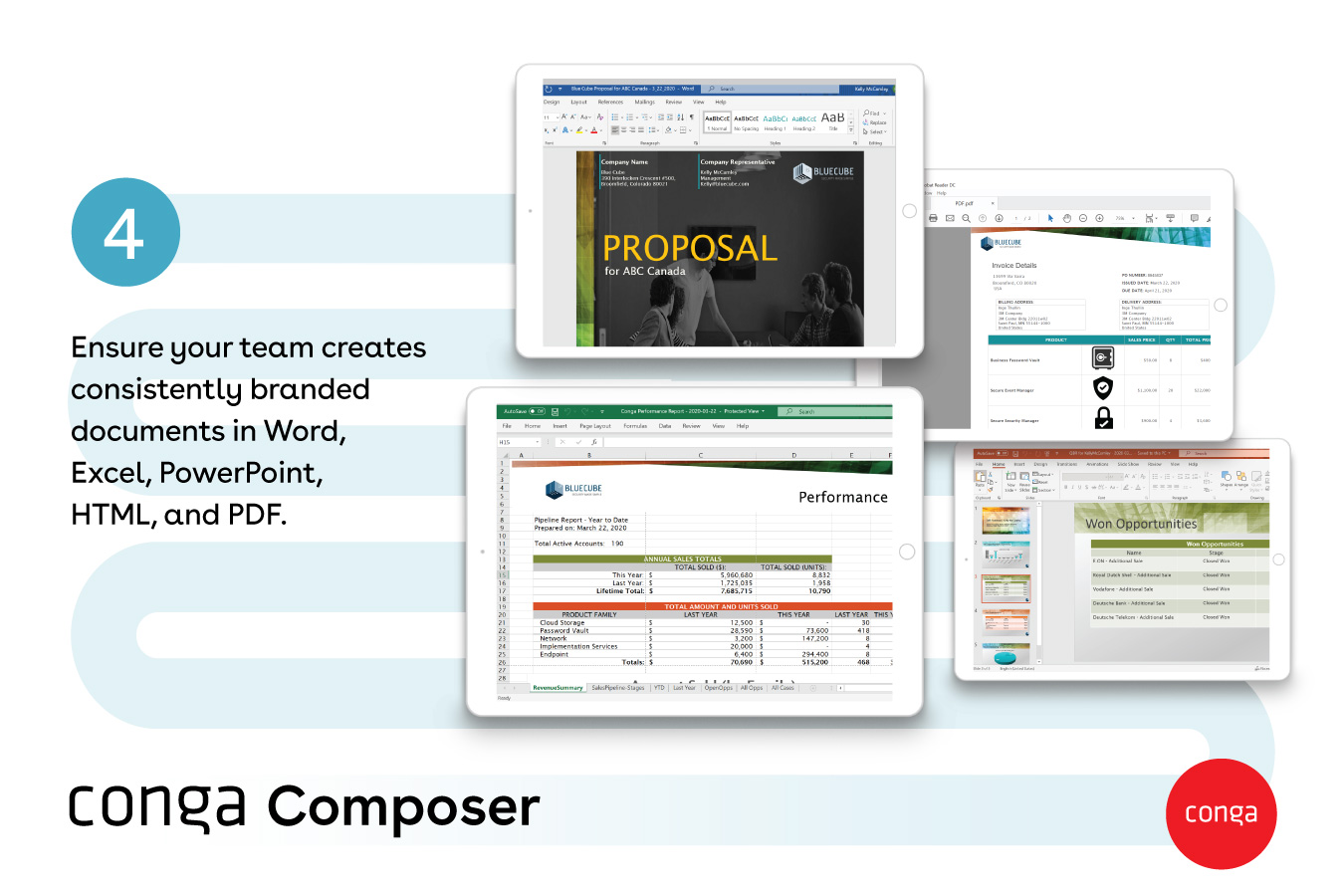
Conga Composer is a document generation and automation tool designed to simplify and streamline the process of creating and distributing customized documents, presentations, and reports.
N/A
Sage Intacct
Score 8.6 out of 10
N/A
Sage Intacct is a cloud ERP system targeted at high-growth small and medium-sized businesses. Intacct includes applications for core financials and accounting, purchasing, order management, and financial reporting and business intelligence. It also integrates with 3rd party software like Salesforce.
N/A
QuickBooks Online
Score 8.0 out of 10
N/A
QuickBooks Online is a SaaS version of the QuickBooks product. It contains all of the features found in the local version. Higher-priced plans include greater automation, payment management, inventory and time tracking, and analytics features.
Firstly, we used Conga Composer to generate documents and DocuSign as the e-signature tool. However, Conga Sign proved to be much more cost-effective for our user base, as users didn’t need to switch to another system like DocuSign to send contracts to customers. With both …
Yeah, Conga is something that the client has selected. We asked them the same question — they believe they’re a long-time user of Conga and they have trust in that product. So that’s the reason.
Only reason was its integration with salesforce. In those apps, we had to manually copy paste the data to generate document and get signed but with conga composer’s salesforce integration, it fetches all the data from salesforce and generate the document for us and once …
We have used PandaDoc and with our personal experience, we can say that Composer is way better as it lets us pull data from multiple Salesforce objects, apply conditional logic, and generate highly customized documents.
Conga Composer helps us in document generation part and once the document has been generated from Conga Composer it can be sent out to the customers. Here we can also use Conga Email Template to send out the message and the attachments. Docusign here works so well and we can …
S-Docs is also great with Salesforce; however, it offers broader integration, scalable automation, and a deeper support ecosystem. Conga Composer delivers more powerful and flexible document generation.
I've used PandaDoc before; it is nowhere near as good as Conga Composer in terms of usability and end-user experience. Conga is much more valuable and business-oriented.
We used the out of the box salesforce functionality but realized when our order forms used multiple currencies and had some customization we realized we needed a tool like Conga Composer
We used Microsoft Excel to manipulate all the data from different objects, now we can click a button and the report is generated, Excel provides a powerful tool, but Conga Composer is better than Excel to generate the data in the format that the customer wants, you don't need …
Sage Intacct has been great - we were coming over from Sage 50 and wanted to stay in the Sage ecosystem. Other than my aforementioned areas of improvement, we have been super happy with the platform.
Sage Intacct is a comprehensive all in one ERP business management tool that stacks up very well compared to the competition, it has very useful modules and functions within each module. The multi-entity and dimension functionality can be a game changer depending on if it is …
At first, we were indeed attracted to Intacct because it offered a lot of customization options and helped us better integrate multiple programs. However, we later discovered that the learning curve was steep, and because the vendor didn’t fully understand our business, we had …
We selected the Sage Intacct Package due to the overall sales points by the VAR that this would improve our project costing and meet our payroll type needs. The last selling point was the ability to have a VAR within the state who could be in person for meetings with us and …
Sage 50 has significantly less features/capabilities to Sage Intacct. Intacct's ability to report and segment data, in addition to it being web-based, make it much more user friendly and easy to access both the platform and relevant data needed. We are still using Rent Manager …
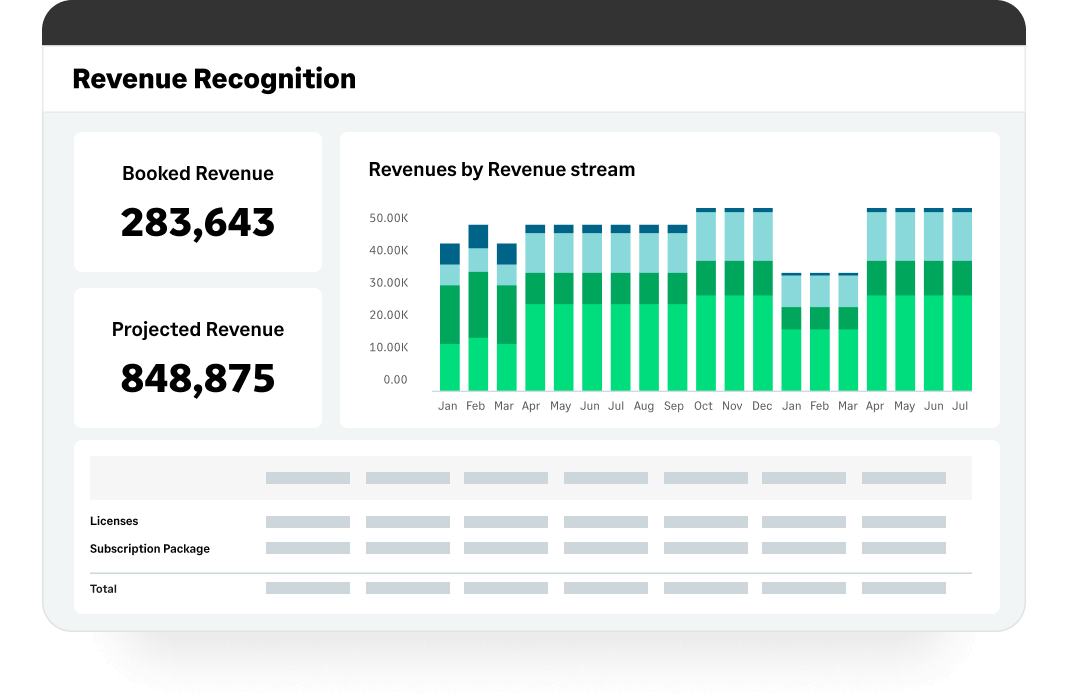
Sage was cheaper than Acumatica and already being used, so it was easier to stick with Sage than make a big transition with a lean team. QuickBooks would not have had the revenue recognition capabilities that Sage has.
I think Sage is much easier to use and makes more accounting sense than either MIP or FE. I often wonder if accountants are involved in creating accounting software but i do not feel like that with Sage.
We felt the 2nd best alternative to Sage Intacct was Aplos, then Blackbaud. However, there were some issues: > Overall functionality - All of our initial business requirements were fully met with Sage Intacct, which was mostly similar to other offerings. Where Sage Intacct …
I think Sage Intacct is by far the worst accounting software I have ever used. We only selected Sage Intacct in order to integrate with WooCommerce's order management platform...which we have since then ditched. We should have never migrated over from QuickBooks. We should have …
I selected both. They work together. I specifically selected MineralTree because it has a direct and bi-directional API sync with Sage Intacct. Again, I think Sage needs to be proactive to smooth out a couple of bumps: 1. the mapping of the restriction field; 2. the deleting of …
Sage Intacct offered more cloud-based options and greater customization than the software previously used. The cost-to-benefit ratio could not be beat.
I have mentioned several of the tools and applications that Sage has made available to my company and how my company has constructed to use them and apply them to our daily lives of bookkeeping, with receivable and checks and balances, making it a better and proper system with …
MS GP was no longer supported, so we switched to Intacct. QuickBooks wasn't nearly as robust, and we were enticed by both the peer organizations that use Intacct and the ability to make the system work for us in ways MS financial software had historically not.
We evaluated Sage Intacct alongside many other options, but Blackbaud and NetSuite were the frontrunners. They all were cloud-based and capable systems, but for our team, Sage Intacct was the clearer choice for a few reasons.
First, usability. Our team has varying levels of …
Sage accounting is not very user friendly compare to the QuickBooks Online. When there are adjustments in the vendor accounts, it hard to process in Sage accounting and reconcile the accounts. In QuickBooks Online, it is easy to process the whole accounting with ease. The …
We have mainly only used QuickBooks for the past few years. The last time we evaluated another similar product was Square, and that was probably 5 years ago. QuickBooks was much more robust and, at the time, offered us more features overall than Square did. It just felt like a …
QBO is the cheapest of the mentioned options. It is much easier to navigate than NetSuite. Rillet and Campfire are still pretty new, so they are building out their different functionalities. QBO lacks the strength of the AI native platforms, like Campfire and Rillet, and it …
QuickBooks Online is best for small and mid sized businesses needing simple affordable accounting. Its starting price is from $19. Xero is stronger for collaboration with unlimited users. Their cost starts with 15, and they are good for flexible reports. Netsuite is built for …
QuickBooks is the best overall as it is intuitive and easy to use, whilst meeting the needs of a CFO. Xero is very popular for IFRS reporting standards and the English-speaking countries internationally. MYOB is the most popular in Australia. SAGE is very strong for …
The employer I am currently with already had QuickBooks in place. The other ERP systems are much more robust, however they come with a much steeper price that might not be necessary if the business is in its infancy.
QuickBooks Online makes working with clients in distant states more seamless. When my clients were on Desktop, I had to upload backups for the client to download and execute. They would frequently make changes and not tell me, which would lead to inaccurate reporting at the end …
I only selected QuickBooks online to control the cost of bookkeeping and accounting for my company. Freshbooks was a delight to use, with excellent support, intuitive UI, and easy integrations. The only reason I stay with QuickBooks is because I personally do not have the …
I initially chose QuickBooks Online because I had already used the desktop version and was familiar with the interface. I have not tried any other similar software.
Xero has alot of dead ends, you cant click through to things, you have to go all the way back out, theres no shortcuts, so it takes alot of time. With both, the transactions dont let you know they are connected to a bank feed transactions, you are just assuming they are until …
Sage Intacct is very difficult to use and the inter-face is decades behind QB online. The ease to which one can find and manage information on QB online versus Sage Intacct is remarkable. QB Online is made for people who actually manage and facilitate financial information. I …
Widely adopted by U.S. customers, Stronger tools, easier to download and save. We have been a QuickBooks Online customer for 10 years and the price nearly never increases and always stays roughly the same, and offers richer functionality than Xero. We had Xero mostly when we …
From my experience, Conga Composer is particularly well-suited for generating documents, such as quotes and contracts, directly from Salesforce. It saves us a great deal of time, which is remarkably beneficial for companies with sales teams. Not suitable for companies lacking significant Salesforce expertise or administrative support.
Sage Intacct is well suited for below areas 1) Integrations with third party applications 2) Contracts module for billing based on milestones and Direct Invoicing 3) Customer communications for Pending Invoices/ Dunning 4) End to End Procure to Pay module for vendor payments 5) Bank reconciliations by integrating with Bank Portals Sage Intacct is less suited for 1) Prospective MEA Allocations 2) MEA allocations during Partial cancellation of contracts 3) Past due reminders for customers 4) Exchange rate history is not available in Intacct.
I appreciate the ability to auto-generate invoices for recurring transactions, which saves time, as well as the option to set up auto-generated transactions. The report option is super helpful when reviewing information, as you can click to view the details in the report without having to go back and forth.
It allows us to generate multiple documents at once using batch generation. This simple automation saves a lot of time for our team.
Its very user friendly. Even a newbie can simply generate document by clicking a button once this is setup by the admin.
Integrate Conga Sign with Conga Composer and it will automatically sent for e- signature once generated saving lot of time. we previously had to wait a lot for the signature.
Custom, real-time financial reporting. I am able to streamline my reporting to pull in various account groups and calculations which save me time from having to do it in Excel.
Out of the box standard reports for clients who don't require as custom of reporting or even as a great starting point to build out reports.
Integrations with other platforms, such as Airbase, various banks, Rippling, etc.
The dashboard module is extremely helpful in my monthly review of various entities.
Workflows for accounts payable invoice review are terrific.
Bill payment allows you to pay vendors online via ACH or check without having to write a physical check, which reduces admin time.
The cloud based login lends well to a remote or hybrid work environment for staff.
QuickBooks Online allows you to pre-configure vendors' general ledger expense accounts. This helps with general ledger coding accuracy and consistency.
QuickBooks Online integrates with Rippling HRIS, Coast, Capital One, JPMorgan Chase, etc., which lends well to an efficient month-end closing and reduced administrative time.
Purchase Orders cannot be linked to multiple bill payments which makes tracking purchase orders in QuickBooks Online obsolete. Without the function we have to track this within a different more manual spreadsheet.
Would be helpful if you could "split" bank transactions directly from the "review" downloads from the bank. Currently, to split transactions to multiple accounts we need to first categorize, then review after assigning to 1 account.
We most likely will renew conga because of it's strong salesforce integration and we're so engrained into it with all of our different brands and products/services. It would take a lot of time, money and resources to switch to something else.
Sage Intacct continues to well-satisfy our needs and is an easy-to-use product. Service reliability has been excellent. The ability to integrate Sage Intacct with best-in-class companion products that handle expense reporting, budgeting, etc... makes Sage Intacct an excellent value. We continue to be extremely well-satisfied with the results and performance of our experience using Sage Intacct.
QBO needs better integration with non-Intuit products and developers need to use Intuit's open API to develop better add-ons. Clients are having a great deal of problems with their data importing from the bank and this takes time away from better revenue producing activities. Although the efficiencies are there, they are outweighted by the shortcomings of the product. When we ran a parallel of QBO versus other cloud accounting products, we had more issues with the QBO product than any other
It's a fairly simple tool to integrate into your current business structure. When we've had issues, we were able to resolve them extremely quickly. The users click a button and it can bring in all the quote lines, and our credit application seamlessly into our tool. I'd definitely recommend it to other colleagues
The ease of use as a seasoned user is wonderful; however, new users struggle to adapt to the program efficiently. Better training videos--all in one location--would be beneficial. The use of a "sandbox" environment is a great tool for new employees or for the fiscal department to test certain journal entries or other transactions to verify accuracy of data.
I had very little trouble setting up the program and migrating from our old accounting system. The daily usage is also very intuitive and easy. Anytime we run into minor trouble with the program, there are always tons of help available on YouTube, so we don't even look up the online manual anymore.
There has only been one occurrence where Sage Intacct was not available to me, however I had already been working a number of hours trying to get a project completed. It honestly allowed me to step back and take a much needed break.
As fas as integration is concerned I don't feel this slows Sage Intacct down at all. However, sometimes I do feel it takes some larger reports more time to load due to all the detail. As well as, I "move very fast" in my motions so sometimes I double click on fuctions too quickly and the system seems to think that I have a duplicate request.
As a conga parter we have created more than 50+ cases with conga support and many times we have got the answers on the chat support itself. A very effective knowledge base and conga university give you all the study material to enhance your product knowledge. Conga support has been very effective and has always responded quickly to questions and issues
Only a few times have we had to reach out to support, and every time we did, we received a relatively quick response and a solution was found fairly quickly. Only once was there an issue that took longer than a week to resolve, but it still did eventually get solved.
In my experience, most representatives keep me on the phone for hours, literally, for a single issue and then usually cannot resolve it satisfactorily. I have 10 open cases that need resolution and, in my experience, there has been NO follow-up communication on any of them.
I have taken in person training classes at several of the annual Sage Intacct user conferences. It is very interactive and the trainers are very easy to follow and understand. They are great at getting everyone in the class involved. They also make sure everyone has learned to task before moving to a new one.
The free training is very minimal. For what we pay for the service, I would like more training. We end up training new users in-house because the provided free training is not nearly comprehensive enough. That being said, the training provided, for the material covered, was adequate and relevant for the given topics.
I would not use a thrid party administrator to implement your system, especially if you are going to be modifying the system at all. Use Intacct implementors as they will be able to better support you on any issues that come up after you go live.
The person in charge of QB needs to be very accurate with record keeping and is recommended to stay on top of tasks. The biggest issue we have is reconciliation, and those issues occur only when too much time has occurred between reconciliations
We have not been able to find an offering that allowed for the level of customization or could handle the complexity of the solutions we've built using Conga's products. We selected Conga originally as it was recommended at the time (2012) and there weren't any better alternatives - but we have looked recently and still can't find anything better.
We felt the 2nd best alternative to Sage Intacct was Aplos, then Blackbaud. However, there were some issues: > Overall functionality - All of our initial business requirements were fully met with Sage Intacct, which was mostly similar to other offerings. Where Sage Intacct distinguished itself was in its business model, what we would end up with after implementation that would stream-line our organization. > Open architecture - APIs for our other specific software tools were already part of Sage Intacct and others did not have the robust existing offerings and did not make clear how we would build such hooks. > Pricing - Sage Intacct ended up the best price, with the software and implementation support bundled into one annual price. Our multi-year agreement was also the best price, through negotiations / iterations. > References - We contacted references for each vendor in consideration. Church/non-profit Sage Intacct users spoke and understood "our language" and were incredibly positive about their experience with Sage Intacct. References provided by other vendors missed the mark in terms of a business match, which doesn't bode well if those are what is offered.
QBO is the cheapest of the mentioned options. It is much easier to navigate than NetSuite. Rillet and Campfire are still pretty new, so they are building out their different functionalities. QBO lacks the strength of the AI native platforms, like Campfire and Rillet, and it doesn't hang well with NetSuite on inventory.
As we have grown along our professional path, we have also expanded our use of QB. The scalability is easy and features seem to be waiting for you until you need them. We have increased profits by over 10x from our first year in business to the current and have yet to find a reason to look elsewhere
Positive - It runs better than our old software when we all work together, rather than having to sign off on each other and deal with syncing issues.
Negative - It's not as easy to go back to fix an amount, a date, etc. Sometimes, a very small mistake needs to be corrected by voiding and redoing the entire transaction.
We can successfully sync other software we use with Intacct! It reduces workload when things are automated.
I think the help function is cumbersome and hard to use. When I go to refresh myself on a function, say quarterly, I feel like I have to cast about just looking for it.
The account reconciliation works, but in this place that could benefit from messaging, there are no easy helping functions flagging things like amounts that fit the discrepancy.
Even styling invoices and documents is more cumbersome than it should be.