Overview
ProductRatingMost Used ByProduct SummaryStarting Price
ScreenConnect
Score 8.4 out of 10
N/A
ConnectWise ScreenConnect is a remote support, access, and meeting solution. With it, users can utilize remote support and access to repair computers, provide updates, and manage machines. Users can also conduct online seminars and presentations using remote meetings.
$39
per month
Okta
Score 8.9 out of 10
N/A
Okta is an enterprise grade identity management service, built in the cloud. IT can manage access across any application, person or device. Whether the people are employees, partners or customers or whether the applications are in the cloud, on premises or on a mobile device, Okta helps IT become more secure and maintain compliance. The Okta service provides directory services, single sign-on, authentication, provisioning, workflow, and built in reporting. ment systems.
$6
per month per user
RealVNC Connect
Score 8.7 out of 10
N/A
RealVNC® Connect is a secure remote access solution from RealVNC. It can be used to connect to a remote device anywhere in the world to view its desktop in real-time and take control as though sitting in front of it.
$8.25
per month (billed annually) per concurrent session
Pricing
ScreenConnectOktaRealVNC Connect
Editions & Modules
One
$39
per month
Standard
$59
per month
Premium
$69
per month
Starter
$6.00
per month per user
Essentials
$17.00
per month per user
Professional
Inquire for pricing
Per User Per Month
Enterprise
Inquire for pricing
Per User Per Month
Essentials
$8.25
per month (billed annually) per concurrent session
Plus
$16.50
per month (billed annually) per concurrent session (add up to 3)
Premium
$29.75
per month (billed annually) per concurrent session (add up to 5)
Enterprise
Custom Pricing
per year
Enterprise
Custom Pricing
Offerings
Pricing Offerings
ScreenConnectOktaRealVNC Connect
Free Trial
YesYesYes
Free/Freemium Version
NoNoYes
Premium Consulting/Integration Services
NoNoNo
Entry-level Setup FeeNo setup feeNo setup feeNo setup fee
Additional DetailsPlans work on a Per Concurrent Session basis. Each plan gives access to a bundled number of devices, but limits apply to the amount of devices that can be connected at any given time. The Premium plan includes On-Demand Assist, a useful tool for providing just-in-time remote support to end-users without them needing RealVNC Connect installed on their device.
More Pricing Information
Community Pulse
ScreenConnectOktaRealVNC Connect
Considered Multiple Products
ScreenConnect
Chose ScreenConnect
Very inexpensive for agent licences annual, no costs per device and no on-site hardware to maintain.
Chose ScreenConnect
ScreenConenct is easier to use and simply allows you to connect easily. ScreenConnect also allows you to save the access session or make it a one off session. LogMeIn always wanted to save the session and sometimes the customer could get lost in the shuffle.
Chose ScreenConnect
AnyDesk, TeamViewer and Chrome Remote Desktop
Chose ScreenConnect
We prefer ScreenConnect as it is much better for an MSP with thousands of client machines, the other options don't provide an easy way of accessing a machine quickly enough. We have also had an issue with the other software's reliability to connect. ScreenConnect's integration …
Chose ScreenConnect
Although ScreenConnect is more expensive than the competition, you get what you pay for. ScreenConnect is easy to use as an admin, and end user. It is easy to set up and configure, and it allows you to quickly view the status of devices and access them remotely from one dashboard
Chose ScreenConnect
I used anydesk when i was in my previous company. I dont know much about anydesk, but it was almost similar to this. Most of the features that are there in ScreenConnect are also there in anydesk.
Chose ScreenConnect
Its lightweight and it is slightly cheaper than TeamViewer at least at the time of buying ScreenConnect. But we are exploring any desk and splash top again.
Chose ScreenConnect
For cost and management capabilities, I found ScreenConnect to be the best option. Some of the other services offered easier connection opportunities for my clients, but overall, I liked the tools and price point of ScreenConnect.
Chose ScreenConnect
TeamViewer is more more limited than what ConnectWise ScreenConnect offers. ConnectWise ScreenConnect has more trust built into it by installing running processes on the client computers. The tools work reliably and TeamViewer is not the better choice for use across multiple …
Chose ScreenConnect
I think ConnectWise ScreenConnect is by far the superior product to all of these. It is way ahead and does do not even come close. It has way more options and features and is much easier to use and manage.
Chose ScreenConnect
ConnectWise Control is far superior just on price alone. Logmein Rescue's pricing is ridiculous in comparison. The ease of use from the end user is similar with both products. However, the technician side of the software is significantly better on the ConnectWise Control …
Chose ScreenConnect
ConnectWise Control gives you a lot of the features that the other products provide, but nothing that you won't use. Nothing is worse than a clunky remote session where you are fighting for CPU/RAM resources, and ConnectWise Control beats them all hands down. This product is …
Chose ScreenConnect
ConnectWise Control was more reliable and cheaper than TeamViewer and LogMeIn however the support wasn't as good when there was an issue.
ConnectWise Control is a faster solution however we did experience crashes every now and again.
Chose ScreenConnect
TeamViewer is great functionality-wise, but for new users, it's difficult to install and start using it. Also it turns out to be very pricey.
Chose ScreenConnect
We have used Beyond Trust occasionally for one of our White Label clients, but have found it is not as robust as ConnectWise Control. The seamless integration of Control with ConnectWise Automate makes it the best and most effective choice for our technical teams to deploy and …
Chose ScreenConnect
ConnectWise Control does a better job with on demand access with our clients PCs, than BeyondTrust. However they have better access when it comes to PCs we dont have anything installed on and need them to go to our website to access their PCs.
Chose ScreenConnect
In terms of overall ease of use ConnectWise Control (formerly ScreenConnect), is so much easier to setup and use. Create and download the installer, and then run it once. I've never had any issues with remote machines being behind a firewall or having to be on the AD. There are …
Chose ScreenConnect
We like the functionality of ConnectWise and the ability to create custom groups and packages that help with deployment of the agent on our client workstations. Overall it's a more robust and flexible solution that suits our needs.
Chose ScreenConnect
ConnectWise is easy to implement, the software functions and feature support our users equipments. Deployment agents is simple, can be run on demand with url and email. Agent could be pre-install and provide constantly remote access to user PC or equipment. It also offer a …
Chose ScreenConnect
To be honest it holds it's own against Teamviewer, Teams, Timbuktu, Anydesk etc, but has nothing that makes it better or worse.
Chose ScreenConnect
RDP is fine for what it is, but there's a lot you can't usually do like connect from outside the network without opening up the firewall.
As for Kaseya, I can't recall what their remote options were, but they left a lot to be desired. One method was similar to an RDP session and …
Chose ScreenConnect
ConnectWise works very well. As well as any other remote connection software I have used. It's biggest draw back is lack of support for Chrome/Mobile OS's. This is something that a competitor I have used does very well and it be great if they added this in the future. I am …
Chose ScreenConnect
There's no comparison. ConnectWise Control is the clear winner. The interface is much more intuitive and easy to use.
Okta
Chose Okta
Ping is a hybrid Identity management too ie it works on cloud and on prem both. As majority of our servers are on cloud, we chose Okta
Ping was providing WLP solutions and again this was not something we needed at that time so Okta was our choice. Plus the terms of contract were …
Chose Okta
Ultimately, we found Okta stood out for its ease of integration across a wide range of applications, vendor-neutral approach, and overall user experience, which aligned best with our needs.
Chose Okta
Okta is far superior in terms of integrations, user interface, automation, and connectivity. Additionally, Okta offers better support and availability, and a more robust solution across every capacity Entra competes in. Okta simply works, whereas Microsoft Entra has a large …
Chose Okta
Azure AD is very restrict to Microsoft tools only, although it's possible to use tools outside Microsoft, the security provided wasn't the best. In my case, where most of my company tools are outside Micrisoft, Okta is a very reliable option as it's neutral and compatible to …
Chose Okta
Internal expertise was with Okta, we also considered total cost of ownership, admin overhead, and deployment/setup time.
Chose Okta
Okta over Ukg Pro choosen just for simple and straight forward reason is SSO/MFA login ,security is been taken care. We have automated onboarding with Okta where UKG I feel is more inclined towards payroll stuff. So in all Okta offers flexibility where I can use multiple …
Chose Okta
Okta’s ability to consolidate so many apps in one platform created a very user friendly work environment. It’s robust identity management and security features made it a standout choice for our company as we looked to simplify access management.
Chose Okta
Okta and Auth0 are similar in a number of ways, but ultimately they serve different cases. Okta is likely the preferred option for scenarios where IT or other admin staff need the ability to control account access for other staff members.
Chose Okta
It’s conditional access and Zero Trust policies give us strong security control without complicating user experience and we no longer require on-prem AD set ups, which is a huge plus for us due to its cloud directory capabilities.
Chose Okta
The only others services that I use for password storage are my google work account and Apple iCloud. Overall, I'd rank apple the lowest . Gmail is the most convenient in terms of quickly going to a site and having the password prefill. Where Okta is better than Google though, …
Chose Okta
We selected Okta since as I mentioned earlier, speed means a lot to our account. The reason behind that is because it enables us a lot faster and utilize our apps better. Do not get me wrong, PingOne is a great app, its just that the app itself does not have the processing …
Chose Okta
Substantial ease of accessibility, usability, and compatibility, along with superior platform of integration towards a simplified central hub feature set.
Chose Okta
We use the Twilio Authy app to authenticate for our payroll/benefits application, and prefer Okta to the Twilio application. It is more user-friendly and easier to install and manage.
Chose Okta
- Many features like SSO, MFA, API access management etc.
- Integration with third party apps
- Company needs
Chose Okta
This was compared to Cisco Duo which we had previously for MFA along with Okta for application access.
Chose Okta
Microsoft Entra ID and OneLogin by One Identity
Chose Okta
Okta is worlds better than any other IDP Solution that I have come across.
Their documentation on integrations is STELLAR, their support staff is knowledgeable and awesome, their service is reliable and just works.
Chose Okta
Okta provides a better user experience and a portal to make things simple not only for the admins but also the customers. Compared to Entra and Duo Okta is light years ahead in innovation and user experience.
Chose Okta
Previous to Okta, we did not have a central cloud IdP system, each app had it's own authentication and authorization internally. That led to a fairly messy and divergent situation where every system had a different method and look for authentication and authorization. …
Chose Okta
I'd say that Okta handles authentication more efficiently than Duo. It covers more applications and is easier to manage.
Chose Okta
We have no experience with other products. In the past we have considered to implement Google SSO and Apple SSO, we did some partial development, but we never released those changes.
RealVNC Connect
Chose RealVNC Connect
We selected RealVNC Connect due to their support of different OS's and having a mobile client.
Chose RealVNC Connect
Security is a big deal, even more so these days. We needed a remote access tool that we could trust to be secure and constantly evolve to modern standards. VNC Connect came at eh right price for us and provides all the tools we need.
Chose RealVNC Connect
VNC is light and sleek with the quick setup, was impressed with the quick setup despite poor Internet connection outdoor. Teamviewer is good, but the pricing is not as good as VNC. Both do the basic job, but VNC still outperform Teamviewer in terms of performance and ease of use.
Chose RealVNC Connect
TeamViewer is another easy to use remote connectivity software that I like for fast connection and little lag. TeamViewer is good for screen sharing. I often prefer VNC Connect for its cross platform compatibility and its mobile access capability. TeamViewer is a little …
Chose RealVNC Connect
The best part is that [the] VNC Connect application supports multi-platform compatibility with Windows and Linux systems. In addition, it is simple, and the session is approved or unapproved, which enables us to provide quick support in the business process. The running service …
Chose RealVNC Connect
It is good for one-shot use and not having to pre-configure remote devices, but we felt that the interface for connecting was not as simple.
Chose RealVNC Connect
With so many things tech-related we have many options and ways to accomplish the same thing. I think one of the important things to remember is the companies track record and support record for their users. In our experience, VNC Connect has been able to be competitive in all …
Chose RealVNC Connect
VNC Connect works just as well as the top products on the market. At the time VNC Connect was priced better and provided us with a simple reliable tool. VNC Connect works well cross-platform which is important to our institute as we are a 60/40 PC to Mac ratio. Reliability …
Chose RealVNC Connect

Remote desktop - works well but not as easy to initiate

Teamviewer - works well, easy to initiate but more expensive

Chose RealVNC Connect
VNC is much easier to use than any of the listed platforms.
Chose RealVNC Connect
There is no comparison. pcAnywhere was terribly buggy and was never reliable. VNC connect is 99% reliable.
Chose RealVNC Connect
I like VNC over TeamViewer and Microsoft Remote Desktop Services. Teamviewer seems slower than VNC and is more expensive. Microsoft RDP takes over the console so users cannot interact in any way.
Chose RealVNC Connect
VNC is way faster and has more features than Chrome Remote Desktop.
Chose RealVNC Connect
I have used TeamViewer and while both are great programs, VNC just seem more minimalist and tuned to doing EXACTLY what I need it to do.
Chose RealVNC Connect
Overall the VNC Connect software outperforms the TeamViewer software in most areas however, the TeamViewer billing model can be more appropriate for some situations.
Chose RealVNC Connect
VNC Connect stacks up very well to other competitors. With this simple program, you can remotely connect and access other computers with the same VNC Connect agent installed. The only reason we're moving away from using this is that our current Ninja RMM Tools computer …
Chose RealVNC Connect
Like I have mentioned before, depending on what you need, RealVNC may not be the best fit. It's the does-it-all Enterprise ready version produced by the original manufacturers. Installation's pretty simple, it's deployable if needed and it sports a lot of party tricks. …
Chose RealVNC Connect
I'm afraid that the only thing VNC has going for it is that it's free. Otherwise ConnectWise is an infinitely superior product and one which I would heartily recommend. We also looked at Bomgar, but the pricing there was astronomical in comparison with Connectwise. The free …
Chose RealVNC Connect
VNC works really well. It gives a superior level of access compared to far more expensive products such as GoToAssist or WebEx Support Center, and does so at a tiny fraction of the cost. It also consumes far fewer resources than either of those two competing products. It's an …
Chose RealVNC Connect
At the time of our switch to GotoAssist, we we seeking a solution that allowed admin access to workstations. GotoAssist met our requirements for this problem.
Chose RealVNC Connect
We have been using VNC for many years now and continue to use VNC due to its reliability and ease of use. When we need quick access to a remote computer for troubleshooting, VNC doesn't glitch or cause disconnects. Sometimes it may run slow but that is due to network issues, …
Chose RealVNC Connect
TeamViewer seems to crash often, causing the TeamViewer host to have to be restarted. The performance isn't comparable to RealVNC and the GUI isn't very intuitive. TeamViewer does shine better when using it for external connections, but RealVNC is moe lightweight and adaptable …
Chose RealVNC Connect
Screen quality compared to others like ScreenConnect, Bomgar, and others is not as good. But I don't need quality screens. I just need the minimal when connecting to servers so RealVNC fits that need very nicely.
Features
ScreenConnectOktaRealVNC Connect
Remote Administration
Comparison of Remote Administration features of Product A and Product B
ScreenConnect
8.3
Ratings
5% above category average
Okta
-
Ratings
RealVNC Connect
7.3
Ratings
8% below category average
Screen sharing9.80 Ratings00 Ratings9.00 Ratings
File transfer8.60 Ratings00 Ratings8.00 Ratings
Instant message8.30 Ratings00 Ratings6.10 Ratings
Secure remote access with Smart Card authentication7.00 Ratings00 Ratings7.00 Ratings
Access to sleeping/powered-off computers6.70 Ratings00 Ratings6.00 Ratings
Over-the-Internet remote session10.00 Ratings00 Ratings9.00 Ratings
Initiate remote control from mobile7.10 Ratings00 Ratings9.00 Ratings
Remote management of servers & workstations9.00 Ratings00 Ratings4.70 Ratings
Remote Active Directory® management9.10 Ratings00 Ratings00 Ratings
Centralized management dashboard7.80 Ratings00 Ratings7.10 Ratings
Session record8.10 Ratings00 Ratings8.00 Ratings
Annotations7.80 Ratings00 Ratings5.30 Ratings
Monitoring and Alerts9.00 Ratings00 Ratings7.00 Ratings
Multi-platform remote control8.40 Ratings00 Ratings9.00 Ratings
Identity Management
Comparison of Identity Management features of Product A and Product B
ScreenConnect
-
Ratings
Okta
8.8
Ratings
7% above category average
RealVNC Connect
-
Ratings
ID-Management Access Control00 Ratings9.20 Ratings00 Ratings
ID Management Single-Sign On (SSO)00 Ratings9.30 Ratings00 Ratings
Multi-Factor Authentication00 Ratings9.10 Ratings00 Ratings
Password Management00 Ratings8.00 Ratings00 Ratings
Account Provisioning and De-provisioning00 Ratings8.80 Ratings00 Ratings
ID Management Workflow Automation00 Ratings8.50 Ratings00 Ratings
ID Risk Management00 Ratings8.60 Ratings00 Ratings
Best Alternatives
ScreenConnectOktaRealVNC Connect
Small Businesses
Getscreen.me
Getscreen.me
Score 9.7 out of 10
Dashlane Password Manager
Score 9.1 out of 10
Getscreen.me
Getscreen.me
Score 9.7 out of 10
Medium-sized Companies
Remote Desktop Manager
Score 9.6 out of 10
RSA Access Manager (Discontinued)
Score 10.0 out of 10
Remote Desktop Manager
Score 9.6 out of 10
Enterprises
Remote Desktop Manager
Score 9.6 out of 10
RSA Access Manager (Discontinued)
Score 10.0 out of 10
Remote Desktop Manager
Score 9.6 out of 10
All AlternativesView all alternativesView all alternativesView all alternatives
User Ratings
ScreenConnectOktaRealVNC Connect
Likelihood to Recommend
8.8
(0 ratings)
8.9
(0 ratings)
9.5
(0 ratings)
Likelihood to Renew
10.0
(0 ratings)
8.0
(0 ratings)
8.0
(0 ratings)
Usability
8.9
(0 ratings)
9.0
(0 ratings)
8.0
(0 ratings)
Availability
10.0
(0 ratings)
10.0
(0 ratings)
-
(0 ratings)
Performance
10.0
(0 ratings)
9.0
(0 ratings)
-
(0 ratings)
Support Rating
8.2
(0 ratings)
10.0
(0 ratings)
8.0
(0 ratings)
Online Training
7.5
(0 ratings)
1.0
(0 ratings)
7.0
(0 ratings)
Implementation Rating
10.0
(0 ratings)
-
(0 ratings)
8.0
(0 ratings)
Configurability
10.0
(0 ratings)
-
(0 ratings)
-
(0 ratings)
Product Scalability
10.0
(0 ratings)
9.0
(0 ratings)
-
(0 ratings)
Vendor post-sale
10.0
(0 ratings)
6.4
(0 ratings)
-
(0 ratings)
Vendor pre-sale
5.0
(0 ratings)
6.4
(0 ratings)
-
(0 ratings)
User Testimonials
ScreenConnectOktaRealVNC Connect
Likelihood to Recommend
I feel [ConnectWise Control (formerly ScreenConnect)] works on all sizes of implementations. I've used it with about 1000 endpoints and I've even used it for managing a couple family machines to make remote support easier. It works super well and does exactly what you want it to. It has not disappointed me at all and I'd recommend it to any employers I work for as well.
Read full review
Should be well-suited for a SaaS business organisation as they have a lot of internal applications and need a role-based authentication system between the various teams, improving security and audit log system to account for any breaches. It integrates well with internal applications such as Salesforce and Oracle. Best when need of SSO.
Read full review
It is very easy to use if the remote device is already set up to receive connections, so if you are setting up devices before deploying them, it is a great tool to have. It is well-suited to use when shadowing users or using it as a teaching tool. There are other products that are better if you are trying to help someone on a one-use basis.
Read full review
Pros
  • Self-hosted - this is great for me and makes it easy to control my data, which is important for my clients.
  • Mobile Access - being able to quickly diagnose and resolve an issue while on the road is great.
  • Persistent - "always on" connections with screen capture.
  • Great User Interface and chat works exceptionally well.
Read full review
  • Centralized control of enterprise passwords
  • Extensive customization of acceptable password criteria
  • One system for Identity and Access Management to learn
  • Scalable throughout the university for all central services
  • Uniform login experience for students, faculty, and staff
  • Single point of response to address termination of access
  • Ability to use FastPass for lower priority systems
  • Excellent support of multi-factor requirements
Read full review
  • Allow remote connection to pc and servers that are located within our WAN. The connection is stable with fast response (no lag)
  • Allow remote connection to pc and servers that are located outside. The connection is stable with fast response (no lag)
  • It allows chat function with the user, and pasting capability from local desktop and mapped a drive to the remote system.
Read full review
Cons
  • If CWC integrated with more RMM software other than LabTech it would be great as LabTech is way too expensive and convoluted at this point so we discontinued using it in favor of a simpler and much less expensive option.
  • Though it does support multiple monitors well, it would be nice to have the ability to have it automatically pop each remote monitor out to the local monitors if so desired.
  • Right now it uses email for multifactor authentication, I would rather it use an electronic key that can be stored on cell phone or user desktop.
  • The ability for it to automatically login to a Windows desktop would be a big help as well. It will store a username and password but you must manually send a control-alt-delete and then click a button to have it fill. Tying to something like Lastpass along with an autologin feature would be great.
Read full review
  • I'm not sure it's really a room for improvement thing, but due to the granularity offered by Okta, sometimes it can be challenging to find exactly what you're looking for.
  • There was an instance in which we had issues getting SAML configured for an application. I feel this challenge was mostly user error (on our part) because we didn't realize the SAML instructions were SPECIFIC to each app integration and changed (codes) each time. We attempted to mirror the settings/configurations of an existing app (same app, but different domain). I think having a note somewhere that indicated that the instructions were unique to each integration would have saved us a bit of time. Again, I'm not sure this is really an issue with Okta though, more of a user learning curve thing.
  • Sometimes searching for things is a challenge (without the "Rockstar" add-in). For example, if you have a user group called "Okta_users_everyone", searching for "everyone" will not find it. You have to search for the beginning of the object name (not just any part of it). The ability to search partial or wildcard would greatly enhance search functionality.
Read full review
  • Some of the confusion of VNC upon installation is you need to be connected to the internet for it to function. This is not the case, but is unclear upon installation.
  • The licensing model is not ideal for locations that do not use the internet and function off of the grid.
Read full review
Likelihood to Renew
I would recommend this product for both internal remote control of end user workstations and remote access to other clients over the internet. It provides a secure and feature rich product that allows me to complete any necessary tasks without ever leaving the office. I will continue to renew as I'm eager to see what they do next. I would however wish the cloud service had a better API to work in conjunction with team collaboration or chat services to make it easier to connect with end users who use multiple workstations. (Slack or Stride provide this functionality)
Read full review
Okta has a passion to provide secure and scalable identity solution. Their passion has come across as advocacy in a way that has deepened my knowledge of the field of authentication. I took identity for granted before but after seeing features such as external authentication I know that Okta can enable my business to reach new heights
Read full review
VNC is a solid product for the price. It simply works and its reliable across different platforms. Some products state they work well in the Mac environment but don't deliver. This one does what it says. Connections are reliable, but of course, this depends on internet connections. The product works well over wireless connections as well. It delivers on what a remote tool should deliver on. My technicians are happy with the product and customers appreciate the ease of use when letting us connect to their systems. Some also appreciate the remote support while they are multi-task.
Read full review
Usability
If you're a support noobie or a seasoned admin, this product is everything you are looking for. Join with a code - CHECK! Hop onto a permanent session installed on a PC/Server - YOU GOT IT! Wake up a remote sleeping computer - no problem. Need to customize access to different roles in your organization - BUILT RIGHT IN!
Read full review
Some of its features are great and some are slightly complex and not easy without vendor support.
Read full review
It's a niche product and in that niche they try to cater to as many use cases as they can. Other as a TCO aspect i don't see many use cases where you can't use this product as the one tool for all remote session use cases in your company
Read full review
Reliability and Availability
In my 5 years of using the product, I am only aware of one time when the service was down and is was due to a backbone outage upstream.
Read full review
The Okta Identity Cloud advertises 4 9's of reliability and I would go as far to say that it may even do better than that. As a true Global organization that operates in just about every region of the world, we have yet to have an issue with The Okta Identity Cloud that has impacted our business operations.
Read full review
No answers on this topic
Performance
It performs well. It also has full control over windows security and does not get hung up like GoToMeeting when trying to install remote software at the prompt to install as admin / override. I have used TeamViewer, WebEx, LogMeIn and GoToMeeting. This is by far the best at spontaneous, remote control. It is also very easy to get a novice user connected to the session.
Read full review
From my perspective, for the things that my group uses it for, Okta is very fast. It is as least as fast as the local password database methods that it replaces on our campus enterprise services. I do not believe that it slows anything down at all. In fact, not having to think too much about the login, because they all look the same, probably speeds things up somewhat.
Read full review
No answers on this topic
Support Rating
There have been two times when something has went wrong and I needed immediate assistance in order to be able to use Screenconnect to be able to help clients and response has not been immediate. The response time has been within 24 hours. Both times if there had been easier to navigate self help I would have been able to help myself. With better self help and a speedier response it would definitely be a 10 as they always respond and help. Just a little more difficult or slow than it should be at times
Read full review
We've had a few support cases over the years and every case has been handled by the Okta support team beautifully. We received clear answers to questions we had regarding setup and even were provided simple to follow guides on how to setup their product to use with custom applications.
Read full review
VNC Connect is a reliable product that has been around for a long time. It is reasonably priced and works well in the Mac & PC environment. When you have a small team that supports many users we need tools that we can rely upon and that will get the job done on the first try. Many customers appreciate the quick assistance and can multi-task while our team works on their computer issues remotely. From a customer service point of view, this tool gives us transparency and efficient effectiveness.
Read full review
Online Training
the one I attended didn't grab my attention the way I thought it would. Maybe because of the way I use the product; or because of how I am using an online instance, not a locally installed version. Some of the discussion got more technical and off the topic, it seemed.
Read full review
No answers on this topic
The training is very informative, quick and to the point. All of the details one would need are present so the user doesn't have to go searching for additional information just to use the application. The layout of the training was also neat and concise, some of the other training sessions for other companies I've done in the past were confusing and not well thought out, this one is much more superior
Read full review
Implementation Rating
ConnectWise has done everything they could to help us in any situation. Great support team and their new updates are always providing features that we need. Its a simple solution that works the way we need it to. Their legacy pricing model is still much better than their subscription based model however it is still fair pricing
Read full review
No answers on this topic
No problem at all, love the product.
Read full review
Alternatives Considered
We have used Beyond Trust occasionally for one of our White Label clients, but have found it is not as robust as ConnectWise Control. The seamless integration of Control with ConnectWise Automate makes it the best and most effective choice for our technical teams to deploy and manage our client machines.
Read full review
Okta is far superior in terms of integrations, user interface, automation, and connectivity. Additionally, Okta offers better support and availability, and a more robust solution across every capacity Entra competes in. Okta simply works, whereas Microsoft Entra has a large overhead that is difficult to use when configuring things.
Read full review
VNC Connect stacks up very well to other competitors. With this simple program, you can remotely connect and access other computers with the same VNC Connect agent installed. The only reason we're moving away from using this is that our current Ninja RMM Tools computer monitoring agent includes the TeamViewer tool for us to use.
Read full review
Scalability
As far as I can see there are no real barriers to scaling up - as and when we need more subscriptions, we can add them in with no negative impact to the existing way that we're using the tool
Read full review
Being a cloud native application, The Okta Identity Cloud is extremely scalable and easy to setup. By integrating into existing directories and applications via standard techniques and protocols, it is very easy to both initially setup and add additional users as required. Once all the necessary integrations are setup, it's a simple rinse and repeat process to onboard additional users (which can be automated with imports as well)
Read full review
No answers on this topic
Return on Investment
  • Quite simply our business could not function without a form of remote control software. Control has done an amazing job at filling a core foundation pillar of our business model as an MSP, having some clients in very remote destinations, we can still service them through the use of Control.
  • We pay per technician for an unlimited number of endpoints, and this pricing model has served us very admirably. As a smaller startup MSP, the cost of paying per endpoint would only serve to hurt our growth. Being able to pay a flat rate based on staffing is very desirable.
  • The whole experience using Control is polished and speedy. I couldn't imaging going back to a slower solution, the value Control brings is palpable in our business model.
Read full review
  • Reduces password fatigue and keeps all my apps together in a central location for easy access throughout the day. Adding new apps is simple.
  • I am more productive by using the centralized app's portal rather than logging in to lots of different applications.
  • Nothing is automated through OKTA but it does improve our security.
Read full review
  • I have just used the software for about 1 month and so far so god. I am saving time whenever I can access my client's computers from my desk as opposed to having to leave my office to go to their offices. Saves me time and the client money.
Read full review
ScreenShots

ScreenConnect Screenshots

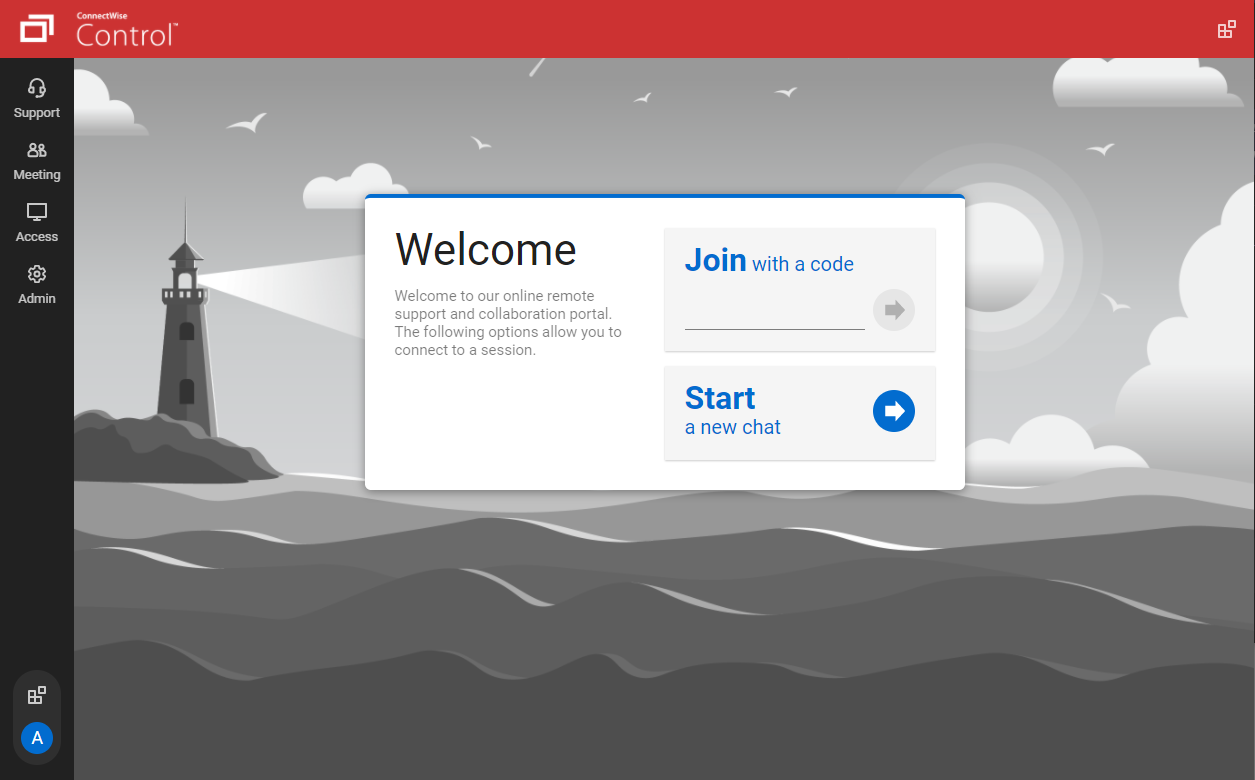
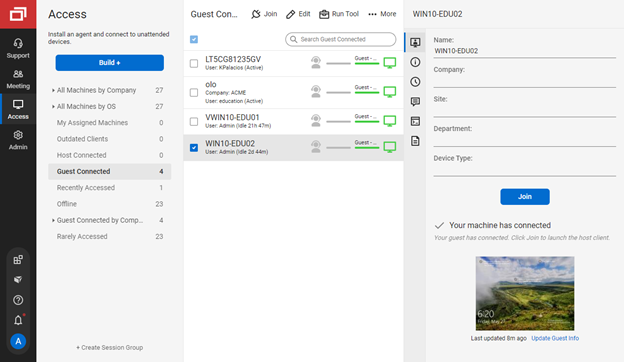
Screenshot of the guest page, where end-users enter a code to join a session with a technicianScreenshot of connecting from a Windows machine to a macOS machineScreenshot of the Extension Marketplace, where administrators can install and configure new features and integrationsScreenshot of the Access view of the Host page, where a technician can connect to unattended machinesScreenshot of the toolbox menu, which allows technicians to store and run executables, scripts, and other frequently-used filesScreenshot of the Host page, where a command can be run directly without connecting to the machine

RealVNC Connect Screenshots

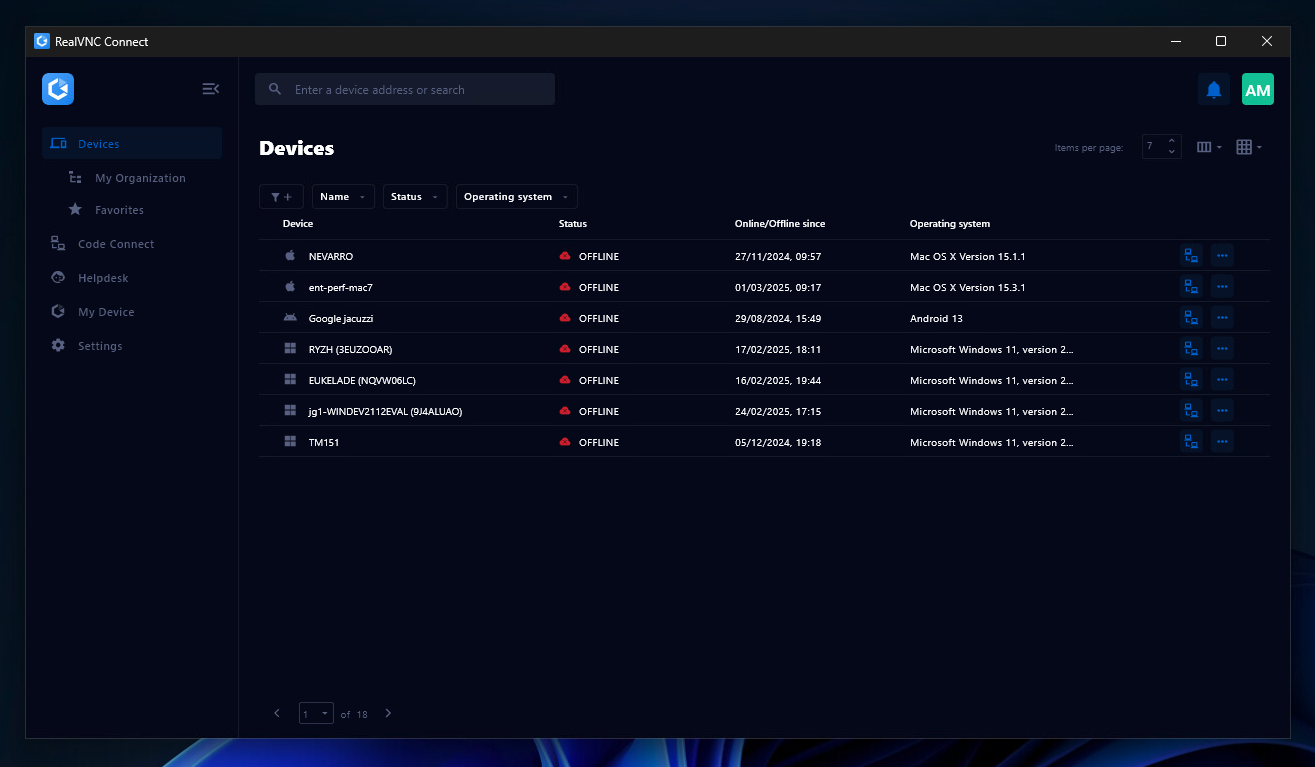
Screenshot of the Device List in the Connect v8 desktop appScreenshot of On-Demand Assist, which can be used to start a remote support session using a single-use code.