Chose Deputy
We moved to Deputy from When I Work as notifications weren’t reliable.

| Product | Rating | Most Used By | Product Summary | Starting Price |
|---|---|---|---|---|
 Deputy | Small Businesses (1-50 employees) | Deputy is a web-based workforce manager solution. Deputy is designed to help users simplify their scheduling, timesheets, HR, payroll, tasking, employee communication and administrative tasks. It includes various apps and one click payroll integration that aim to make workforce management easier. The Deputy platform enables users to schedule in line with demand, prepare accurate payroll, and communicate more clearly. Deputy streamlines employee admin, so teams can… | $5.50 per month per user | |
 When I Work | N/A | When I Work is a way for businesses to schedule, track time and attendance, and communicate with their hourly employees. The schedule and time clock is placed in every employee's pocket with When I Work's iOS and Android apps. It can be used to keep track of time off, employee availability, and manage shift swaps with a few clicks. When I Work integrates with payroll providers to streamline the process and avoid human error. | $2.50 per month per user | |
 WorkflowMax | Small Businesses (1-50 employees) | WorkflowMax is a web-based project management solution.The platform offers end-to-end functionality standard to project management software, including time tracking, lead management, collaboration with external stakeholders, invoicing, integrations, and customizable reporting. | $20 per month |
| Deputy | When I Work | WorkflowMax | ||||||||||||||||||||||
|---|---|---|---|---|---|---|---|---|---|---|---|---|---|---|---|---|---|---|---|---|---|---|---|---|
| Editions & Modules |
|
|
| |||||||||||||||||||||
| Offerings |
| |||||||||||||||||||||||
| Entry-level Setup Fee | Optional | No setup fee | No setup fee | |||||||||||||||||||||
| Additional Details | Discount available for annual billing. | — | — | |||||||||||||||||||||
| More Pricing Information | ||||||||||||||||||||||||
| Deputy | When I Work | WorkflowMax | |
|---|---|---|---|
| Considered Multiple Products | Deputy  Matthew McDermott Managing Partner Chose Deputy We did a trial of When I Work prior to implementing Deputy. Although it has been a few years, it didn't seem to have the same features and functionality as Deputy, although our pricing was less with When I Work if I recall. It may have changed since then so they are probably …  Spencer Jones Owner Chose Deputy The return on investment is quick at Deputy's price point. It is a simple app compared to the other options available and results in a quicker onboarding.  Oskar Figueroa Engineering Manager Chose Deputy Deputy is way better specifically to manage people and rosters. Xero does not have this functionality at this level.  Sander Kallshian Owner Chose Deputy Deputy was easier and more affordable than other solutions given the feature set and ease of implementation. |  When I Work No answer on this topic |  WorkflowMax No answer on this topic |
| Deputy | When I Work | WorkflowMax | |||||||||||||||||||||||||||||||||||||||||||||||||||||||||||
|---|---|---|---|---|---|---|---|---|---|---|---|---|---|---|---|---|---|---|---|---|---|---|---|---|---|---|---|---|---|---|---|---|---|---|---|---|---|---|---|---|---|---|---|---|---|---|---|---|---|---|---|---|---|---|---|---|---|---|---|---|---|
| Workforce Management Software Features |
| ||||||||||||||||||||||||||||||||||||||||||||||||||||||||||||
| Project Management |
| ||||||||||||||||||||||||||||||||||||||||||||||||||||||||||||
| Professional Services Automation |
|
| Deputy | When I Work | WorkflowMax | |
|---|---|---|---|
| Small Businesses | When I Work Score 7.1 out of 10 |  7shifts Score 9.9 out of 10 |  Stackby Score 8.9 out of 10 |
| Medium-sized Companies |  Paypro Workforce Management Score 9.1 out of 10 |  PowerDMS by NEOGOV Score 7.1 out of 10 |  InEight Score 8.4 out of 10 |
| Enterprises |  SAP Fieldglass Score 8.5 out of 10 |  Zoho People Score 8.9 out of 10 | InEight Score 8.4 out of 10 |
| All Alternatives | View all alternatives | View all alternatives | View all alternatives |
| Deputy | When I Work | WorkflowMax | |
|---|---|---|---|
| Likelihood to Recommend | 8.6 (409 ratings) | 10.0 (25 ratings) | 8.8 (28 ratings) |
| Likelihood to Renew | 8.8 (46 ratings) | 10.0 (1 ratings) | 9.0 (1 ratings) |
| Usability | 9.1 (404 ratings) | 9.0 (1 ratings) | 9.0 (2 ratings) |
| Availability | 9.5 (5 ratings) | - (0 ratings) | - (0 ratings) |
| Performance | 9.2 (5 ratings) | - (0 ratings) | - (0 ratings) |
| Support Rating | 8.4 (30 ratings) | 8.7 (19 ratings) | 7.0 (2 ratings) |
| In-Person Training | 10.0 (1 ratings) | - (0 ratings) | - (0 ratings) |
| Online Training | 10.0 (2 ratings) | - (0 ratings) | - (0 ratings) |
| Implementation Rating | 6.2 (398 ratings) | 8.0 (1 ratings) | 9.1 (1 ratings) |
| Configurability | 7.8 (6 ratings) | - (0 ratings) | - (0 ratings) |
| Ease of integration | 6.7 (3 ratings) | - (0 ratings) | - (0 ratings) |
| Product Scalability | 9.3 (5 ratings) | - (0 ratings) | - (0 ratings) |
| Vendor post-sale | 9.0 (5 ratings) | - (0 ratings) | - (0 ratings) |
| Vendor pre-sale | 8.8 (5 ratings) | - (0 ratings) | - (0 ratings) |
| Deputy | When I Work | WorkflowMax | |
|---|---|---|---|
| Likelihood to Recommend | Deputy
| When I Work
 Sasha Brito Marketing Director | Xero
|
| Pros | Deputy
| When I Work
| Xero
 Inés Prieto R&D / Product Development Engineer - Quality |
| Cons | Deputy
Matthew McDermott Managing Partner | When I Work
 Jayelynn Willman Assistant Manager | Xero
|
| Likelihood to Renew | Deputy
| When I Work
 AK Cyrway Co-Owner, President, Creative Services | Xero
 Lindsay Simpson Office Co-ordinator |
| Usability | Deputy
| When I Work
AK Cyrway Co-Owner, President, Creative Services | Xero
|
| Reliability and Availability | Deputy
| When I Work No answers on this topic | Xero No answers on this topic |
| Performance | Deputy
| When I Work No answers on this topic | Xero No answers on this topic |
| Support Rating | Deputy
| When I Work
| Xero
 Mary Moore Chief Bookkeeper and Xero Setup Expert |
| In-Person Training | Deputy
| When I Work No answers on this topic | Xero No answers on this topic |
| Online Training | Deputy
| When I Work No answers on this topic | Xero No answers on this topic |
| Implementation Rating | Deputy
| When I Work
AK Cyrway Co-Owner, President, Creative Services | Xero
Mary Moore Chief Bookkeeper and Xero Setup Expert |
| Alternatives Considered | Deputy
 Jeremiah Alexander Senior Office Manager | When I Work
 Emily Hammell Marketing and Communications Manager | Xero
 Caroline Laredo Managing Director |
| Scalability | Deputy
| When I Work No answers on this topic | Xero No answers on this topic |
| Return on Investment | Deputy
| When I Work
| Xero
|
| ScreenShots | Deputy Screenshots   | WorkflowMax Screenshots  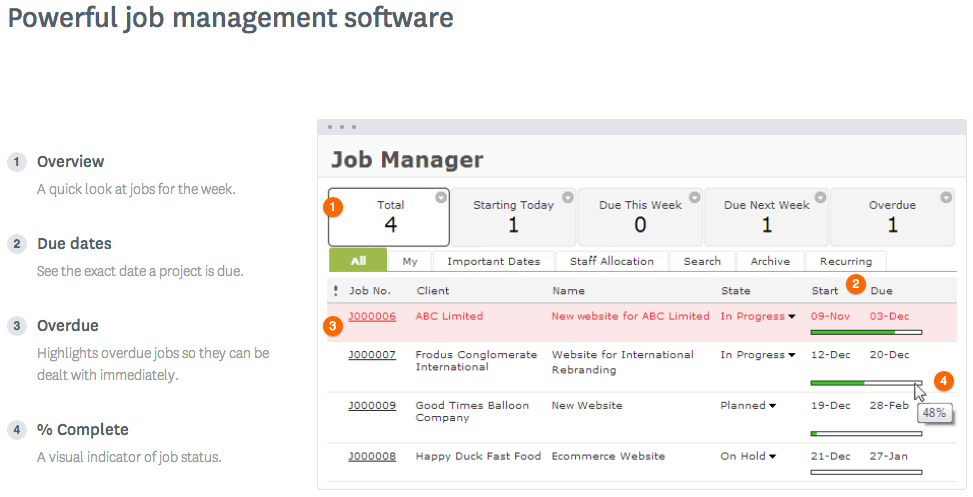  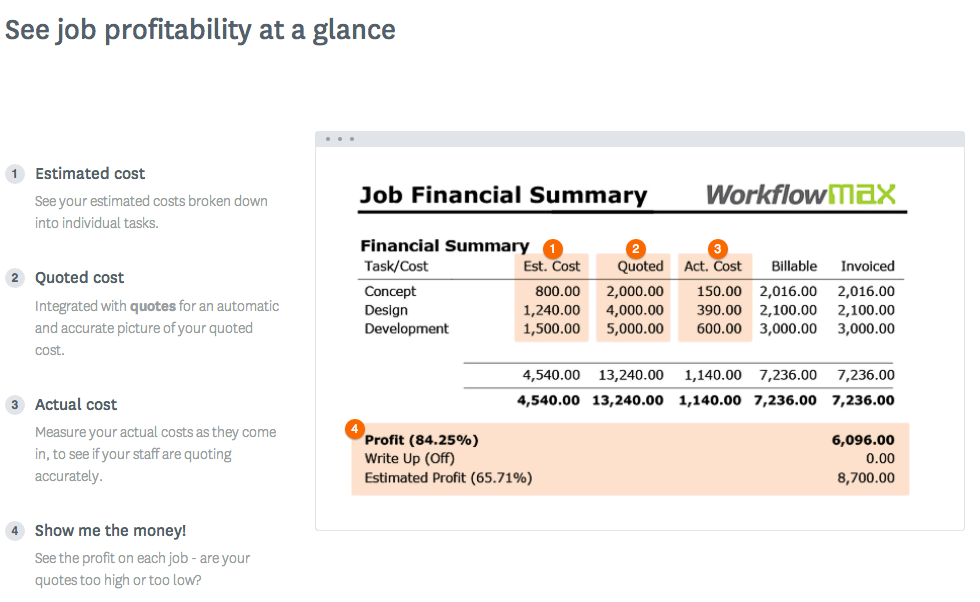  |
