Overview
ProductRatingMost Used ByProduct SummaryStarting Price
DocuSign
Score 8.7 out of 10
N/A
DocuSign supports transactions with document sharing and electronic signature, as well as automated and guided data collection and entry, record updating across disparate systems and payment collection upon agreement, as well as analytics and reporting.
$15
per month
Jotform
Score 8.4 out of 10
N/A
Jotform Enterprise is a digital workspace productivity tool that provides a platform for organizations. The aim of Jotform Enterprise is to give companies an easy-to-navigate tool that makes reaching out to customers, collaborating with coworkers, and collecting e-signatures and data a more seamless process. Jotform Enterprise strives to enable companies to make data-driven decisions without compromising when it comes to quality and security. It doesn’t matter what type of…
$0
SignRequest, now part of Box
Score 9.5 out of 10
Small Businesses (1-50 employees)
SignRequest was an e-signature platform acquired by Box in 2021. The eSignature tool is the basis for Box Sign, a feature now included in Box's core offering.
$0
per user
Pricing
DocuSignJotformSignRequest, now part of Box
Editions & Modules
Personal
$15
per month
Real Starter
$15
per month
DocuSign for Realtors
$35
per month
Standard
$40
per month
Business Pro
$60
per month
Advanced Solutions
Custom Pricing
Free
$0.00
Bronze
$34.00
Monthly
Silver
$39.00
Monthly
Gold
$99.00
Monthly
Enterprise
Custom
Start
$0.00
per user
Professional
$8.00
per user
SME
minimal $16.00
$4.00 per user
Enterprise
Custom
per user
API
Custom
per installation
Offerings
Pricing Offerings
DocuSignJotformSignRequest, now part of Box
Free Trial
YesYesYes
Free/Freemium Version
NoYesYes
Premium Consulting/Integration Services
NoNoYes
Entry-level Setup FeeNo setup feeNo setup feeNo setup fee
Additional DetailsFor text message verification and bank payment verification additional fees apply
More Pricing Information
Community Pulse
DocuSignJotformSignRequest, now part of Box
Considered Multiple Products
DocuSign

No answer on this topic

Jotform
Chose Jotform
DocuSign is more well known for signing legal documents across large enterprise but it was difficult to setup and get started on. Compared to DocuSign, Jotform was much easier to build, design and create our first form which we were able to embed on our website straight away. …
Chose Jotform
DocuSign did not allow you to create a template or provide templates, Textedly did not allow you to upload documents and/or modify.
Chose Jotform
Jotform offers better integration where you can publicly list the form for anyone with a link can submit informaiton and we are able to get full PDF reports on those worksheets. Nothing currently does something as simple as this. Jotform's user experience is a whole lot better.
Chose Jotform
Jotform was easier to use and easier to set up the documents to sign. Forms did not mess up or have to be redone and they were sent with communication emails back to me better as well. It sends document in email when signed as well which makes it easier to sign .
Chose Jotform
JotForm has a more user-friendly interface. [Inserting] different fields on JotForm are a lot easier than the competitors.
SignRequest, now part of Box
Chose SignRequest, now part of Box
DocuSign is used in other areas of our business (client contracts, MSAs, SOWs, etc.) because it integrates with Salesforce and because we are a partner. We don't use DocuSign for HR purposes because DocuSign automatically creates a copy of the document in Salesforce, which …
Chose SignRequest, now part of Box
Unlike Adobe Acrobat DC, SignRequest is actually designed to request signatures and presents itself as such to my clients. DocuSign is not as user-friendly and approachable as SignRequest in my opinion. Even the free version of SignRequest offers more options and functionality …
Chose SignRequest, now part of Box
SignRequest is far and away more afforable than its competitors. Their support is also very responsive and willing to make improvements whereas its competitors seem to be a bit more unapproachable as far as their support goes. I have been able to resolve billing and reporting …
Chose SignRequest, now part of Box
Friendly interface, affordable costs, easy to understand and use, personalized language. You can manage users, templates and documents.
Chose SignRequest, now part of Box
Less money and easier to set up than more well-branded e-signature platforms. Unlimited contracts on paid plans, which is a lot more than any other e-signature software I've used before. And under the free plan, you can get 15 contracts signed with limited features. For smaller …
Chose SignRequest, now part of Box
We actually ended up switching to HelloSign after about three months. The main reason was the depth of the Salesforce integration that we needed to have. SignRequest is a really top-notch product for the market they play in. Small businesses especially will be able to use the …
Chose SignRequest, now part of Box
They have an unlimited free plan. In other words, you can sign as many documents as you want for free each month. The others (last I checked) limited your total number of signed docs on the freemium plan. That's certainly nice. SignRequest's upgrades come from more features …
Chose SignRequest, now part of Box
I think SignRequest offers more and more powerful customization options thank competitors. I wasn't a fan of the user interface and usability when trying to customize documents on competitors' products, but SignRequest was easy. I also like SignRequest's template functionality …
Features
DocuSignJotformSignRequest, now part of Box
Survey Format & Appearance
Comparison of Survey Format & Appearance features of Product A and Product B
DocuSign
-
Ratings
Jotform
7.9
163 Ratings
1% below category average
SignRequest, now part of Box
-
Ratings
Survey templates00 Ratings8.6139 Ratings00 Ratings
Themes00 Ratings7.5147 Ratings00 Ratings
Custom logo/branding00 Ratings7.6153 Ratings00 Ratings
Survey Content
Comparison of Survey Content features of Product A and Product B
DocuSign
-
Ratings
Jotform
8.9
150 Ratings
5% above category average
SignRequest, now part of Box
-
Ratings
Changes to live survey00 Ratings9.1126 Ratings00 Ratings
Question design help00 Ratings9.0124 Ratings00 Ratings
Multiple question types00 Ratings8.7147 Ratings00 Ratings
Survey Logic
Comparison of Survey Logic features of Product A and Product B
DocuSign
-
Ratings
Jotform
9.4
126 Ratings
12% above category average
SignRequest, now part of Box
-
Ratings
Survey logic flexibility00 Ratings9.4126 Ratings00 Ratings
Survey Reporting & Analytics
Comparison of Survey Reporting & Analytics features of Product A and Product B
DocuSign
-
Ratings
Jotform
8.3
153 Ratings
3% above category average
SignRequest, now part of Box
-
Ratings
Response tracking00 Ratings8.0144 Ratings00 Ratings
Data export00 Ratings9.0146 Ratings00 Ratings
Standard reports00 Ratings7.8132 Ratings00 Ratings
Custom reports00 Ratings8.2124 Ratings00 Ratings
Analytics00 Ratings8.6114 Ratings00 Ratings
Survey Administration & Security
Comparison of Survey Administration & Security features of Product A and Product B
DocuSign
-
Ratings
Jotform
9.0
127 Ratings
4% above category average
SignRequest, now part of Box
-
Ratings
Access controls00 Ratings9.0123 Ratings00 Ratings
Compliance00 Ratings9.1116 Ratings00 Ratings
Survey Distribution
Comparison of Survey Distribution features of Product A and Product B
DocuSign
-
Ratings
Jotform
8.1
96 Ratings
0% above category average
SignRequest, now part of Box
-
Ratings
Vendor-offered crowdsourcing00 Ratings7.275 Ratings00 Ratings
Respondent restrictions00 Ratings9.096 Ratings00 Ratings
Best Alternatives
DocuSignJotformSignRequest, now part of Box
Small Businesses
Foxit eSign
Foxit eSign
Score 9.3 out of 10
Square 9 Softworks
Square 9 Softworks
Score 9.7 out of 10
Foxit eSign
Foxit eSign
Score 9.3 out of 10
Medium-sized Companies
MSB Docs
MSB Docs
Score 9.4 out of 10
Qualaroo
Qualaroo
Score 6.1 out of 10
MSB Docs
MSB Docs
Score 9.4 out of 10
Enterprises
Conga Sign
Conga Sign
Score 8.5 out of 10
Verint Voice of the Customer
Score 9.3 out of 10
DocuSign
DocuSign
Score 8.7 out of 10
All AlternativesView all alternativesView all alternativesView all alternatives
User Ratings
DocuSignJotformSignRequest, now part of Box
Likelihood to Recommend
8.5
(161 ratings)
7.7
(182 ratings)
8.0
(20 ratings)
Likelihood to Renew
7.0
(12 ratings)
9.4
(7 ratings)
-
(0 ratings)
Usability
8.1
(19 ratings)
8.0
(128 ratings)
10.0
(1 ratings)
Availability
10.0
(3 ratings)
-
(0 ratings)
-
(0 ratings)
Performance
10.0
(2 ratings)
-
(0 ratings)
-
(0 ratings)
Support Rating
10.0
(46 ratings)
7.4
(81 ratings)
8.8
(6 ratings)
Online Training
10.0
(1 ratings)
-
(0 ratings)
-
(0 ratings)
Implementation Rating
10.0
(5 ratings)
8.9
(3 ratings)
-
(0 ratings)
Ease of integration
-
(0 ratings)
9.1
(1 ratings)
-
(0 ratings)
Product Scalability
10.0
(1 ratings)
-
(0 ratings)
-
(0 ratings)
User Testimonials
DocuSignJotformSignRequest, now part of Box
Likelihood to Recommend
DocuSign
This product is well suited in the use case that I provided before: when it comes to onboarding employees and providing a clear channel for decision making for human resources, this is an excellent tool to accomplish that. I would say the weak points is when you have back and forth communication with users that it might seem a little redundant to have that back and forth communication in that scenario.
Read full review
Jotform
We use it for mostly community surveys and I absolutely prefer it over any other survey program out there. It is easy to create, easy to understand and easy to navigate. I love the QR code option it creates for you to share your form/ survey with others. It really is the best out there!
Read full review
Discontinued Products
It works great for us; we deal with contractors in different parts of the world and it has been perfect for securing e-signatures from them and having a signed contract that both parties have access to. I'm not sure where it would be less appropriate—perhaps when there are significant legal risks or something of that nature, but with the types of transactions we've been dealing with, it's been perfect.
Read full review
Pros
DocuSign
  • Ease of sending the same document out to multiple recipients, at multiple locations, for multiple signatures
  • Quick turnaround - once the recipient signs the document, we receive notification and the document back immediately
  • Can resend, alter, change, and/or add to the email and/or document that is sent out very easily
  • The recipient can save the document after signing, so they too have their own electronic copy for their records
Read full review
Jotform
  • Gathers information on my clients
  • Gathers and organizes information on my prospects
  • Enables my Team to use the form I create as a Template so they don't have to re-create it which saves them valuable time.
  • Educates clients about the benefit of supplementation
  • Educates my prospects
Read full review
Discontinued Products
  • e-Signatures- Businesses are all working online today. Paper contracts are becoming more and more obsolete, so you need a solution that provides online contracts.
  • Price- SignRequest has one of the more attractive price points for businesses.
  • Usability- Our team was able to figure out how to use SignRequest without too much hassle, although some competitors have more intuitive products.
Read full review
Cons
DocuSign
  • Tracking, particularly when collecting signatures through connected applications, such as an ATS, is not always clean or easily traceable.
  • Formatting documents to handle electronic signature types (signatures, initials, etc.) is not always easy, and highly dependent on the partner's technology.
  • It is not convenient to have to use DocuSign as a stand alone product if the signatures are required for 3rd party applications. It definitely excels on its own, but the scope of that usage, at least for us, is slim.
Read full review
Jotform
  • The price is too high for casual users like myself
  • The automation took some time to figure out (that's understandable)
  • Making the forms look uniform took a lot of time to setup
  • Some parts like the approval emails, notification emails can be confusing
Read full review
Discontinued Products
  • I think the "prepare document" screen can be a little more user-friendly
  • A way to keep the documents organized a bit better on the documents screen
  • I would also love a way to keep the contacts organized--or to transfer contacts from our database to the site
Read full review
Likelihood to Renew
DocuSign
I can't imagine doing business without DocuSign now. I would never want to go back to the way we used to do things. The "new way" is "the way" is "the right way." We can honestly be proud of a "one right way" process and not have to suffer through "5 ways for 5 days."
Read full review
Jotform
I need this software to run my business, it's built around it.
Read full review
Discontinued Products
No answers on this topic
Usability
DocuSign
Generally user-friendly once you have command of the basics, but also has a lot of nuances that can make it difficult to train others on. DocuSign University is a helpful tool, but understandably a lot of content to get through to become a well-versed user. A lot of different functionalities but only a few I use on a weekly basis.
Read full review
Jotform
As a seasoned user who relies on seamless online forms for a multitude of purposes, I can confidently attest that JotForm has not only simplified the form creation process but has also elevated it to new heights.JotForm's interface is a masterpiece of intuitive design. Even if you're a newcomer to the world of online form creation, the platform's user-friendly layout will have you crafting professional-grade forms in no time.
Read full review
Discontinued Products
I have found it easy to use and self-explanatory from day one. I love how clear and easy it is to use since I am not techy!
Read full review
Reliability and Availability
DocuSign
It does not go down. I have had zero issues with DocuSign, approaching 4 years.
Read full review
Jotform
No answers on this topic
Discontinued Products
No answers on this topic
Performance
DocuSign
Everything loads quickly. Reports are generated in a reasonable time. No noticeable difference in integrated software processing speeds.
Read full review
Jotform
No answers on this topic
Discontinued Products
No answers on this topic
Support Rating
DocuSign
I'd give them a 10, but there has been 1 or 2 small cases that seemed to fall to the wayside, but I was able to call them up and get them resolved. We were having a bad implementation night (after midnight) and we needed assistance from Docusign. They were able to get an engineer to help us in the early morning hours
Read full review
Jotform
I honestly have not used the support feature with Jotform. From what I can see when I look information up, everything I want to do something that I can't figure out myself it seems to not be a possible solution or edit that Jotform is currently capable of.
Read full review
Discontinued Products
Easy to understand supporting documents with a great search feature to easily find the information I need for legal purposes, API connections, how to connect Gmail or G Suite, along with the ability to send a message to them. They don't seem to have an online chat feature or a call option, but that's why it's so inexpensive. Since it's already easy to use, it takes less time to find out information.
Read full review
Online Training
DocuSign
Docusign is super easy to use, and apart from a few administration details, there was really nothing to train on. Post implementation, there were issues with configuration of auto-filled documents with the integrating 3rd party. That training required some time, because the DocuSign expert took the time to walk me through the 3rd party's configuration (how often does that happen?) so I could see how DocuSign should be best used to overcome weaknesses in the 3rd party platform. 10/10 expert care.
Read full review
Jotform
No answers on this topic
Discontinued Products
No answers on this topic
Implementation Rating
DocuSign
Until you get the hang of it, I recommend doing several internal tests before sending a document to a client. As I mentioned earlier, you have to go through a bit of trial and error at first to verify that the workflow works as expected.
Read full review
Jotform
the most valuable things that Jotform give free trial, so the resistant users can get the experiences of the easiness and more handling to the digital things
Read full review
Discontinued Products
No answers on this topic
Alternatives Considered
DocuSign
There has never been anything that we could really compare to Docusign. We have tried sending documents in a PDF version, but that was not nearly as efficient. DocuSign saves your signature in the system and uses that as it goes through your documents.
Read full review
Jotform
Typeform is better hands down [in my opinion]. It's not even a comparison as [I feel] JotForm doesn't work properly and [from my experience I think] their support is very problematic. I would suggest using Typeform or using GravityForms as an alternative to JotForm. Whatever you do, [I feel you shouldn't] depend on JotForm for something that is important to your business or research project.
Read full review
Discontinued Products
Adobe Acrobat left me frustrated and annoyed. I was wasting hours each week trying to upload contracts and agreements and customize them for each client. It never sent right and ended up being more frustrating for us and our clients in the end. So I tested some other tools before coming across SignRequest in a Google search. I started with their free plan which offered so much for a small business owner. As our business grew, we upgraded and haven't looked back. From day one I've never had an issue with this tool and recommend it to anyone looking for an online easy to use software to manage signing documents and contracts
Read full review
Scalability
DocuSign
In my years of using DocuSign, I have never had an outage. I haven't even encountered a bug.
Read full review
Jotform
No answers on this topic
Discontinued Products
No answers on this topic
Return on Investment
DocuSign
  • Less paper use, faster signature times, less time standing at the printer/scanner to send documents to yourself
  • Security over your signature! Security over your company's signature and authorization to approve projects, cash flow etc
  • Love audit trails and the seamless tracking of the status of the document
Read full review
Jotform
  • It saved me time. Within minutes I was able to create and share forms to collect demographic data.
  • While struggling to use another software, I thought of Jotform and it was able to assist me with collating the data I had to confirm results previously obtained.
  • I could not easily identify what new information was provided in a resubmission by a respondent.
Read full review
Discontinued Products
  • Positive impact - able to complete onboarding process electronically rather than ask new employees to complete documents and scan them back
  • Negative impact - have heard from several employees that the UI makes it tedious to complete documents that have a lot of fields
Read full review
ScreenShots

DocuSign Screenshots

Screenshot of Screenshot of Screenshot of

Jotform Screenshots

Screenshot of Screenshot of Screenshot of Screenshot of Screenshot of Screenshot of

SignRequest, now part of Box Screenshots
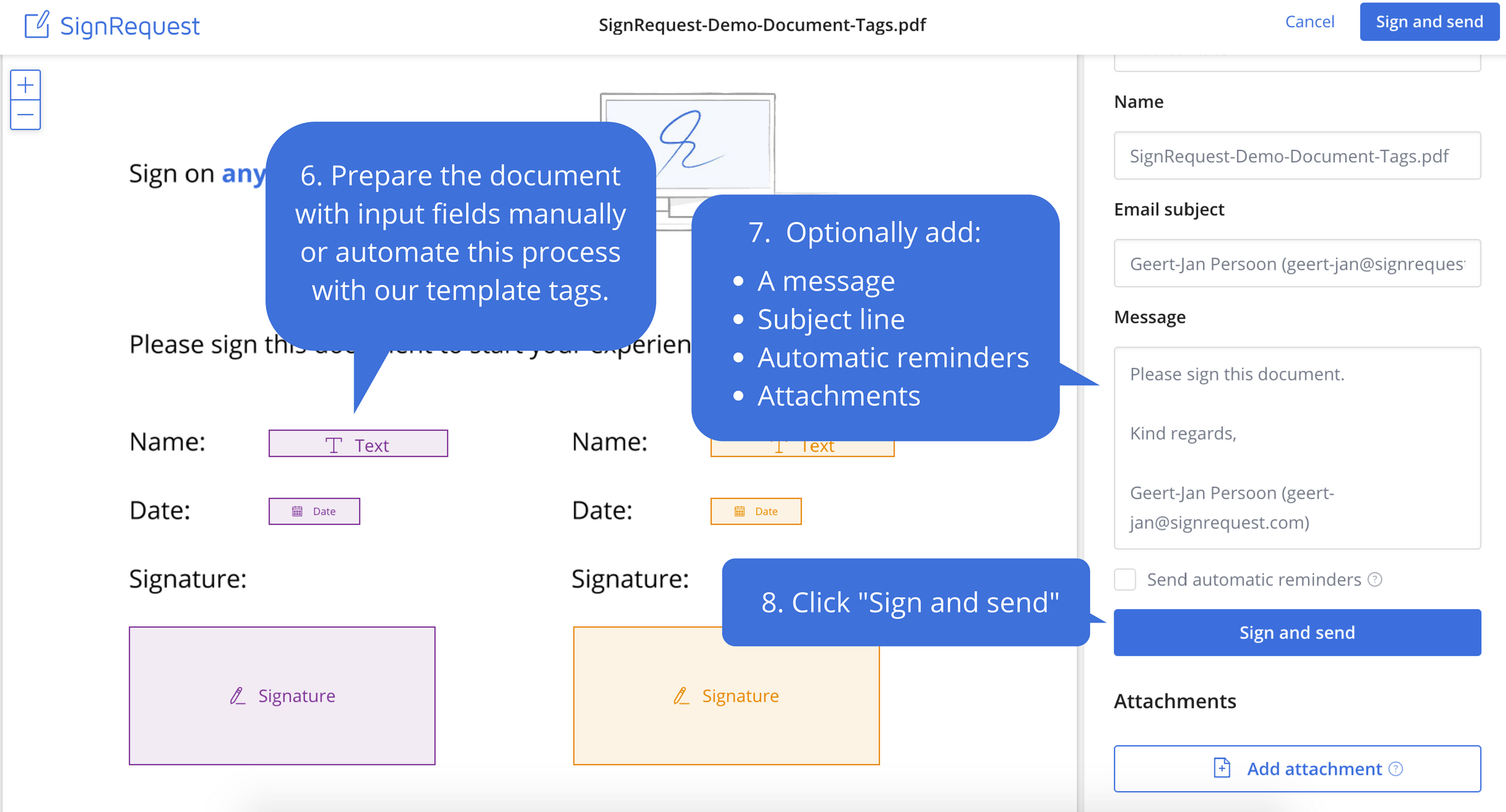
Screenshot of Step 1: Upload the document that needs to be signedScreenshot of Step 2: Prepare document before sendingScreenshot of Step 3: Your customers experience the ease of e-signingScreenshot of Step 4: Signed documents are stored and shared with your customerScreenshot of Step 5: Every alteration to a document is logged for legal purposes