Overview
ProductRatingMost Used ByProduct SummaryStarting Price
Dropbox
Score 8.4 out of 10
N/A
Dropbox is a cloud storage solution, equipped with features that help users to save time, improve productivity, and collaborate with others. Users can edit PDFs, share videos, sign documents, and collaborate with stakeholders without leaving Dropbox.
$9.99
per month
Insightly
Score 7.7 out of 10
N/A
Insightly is presented as a modern, affordable CRM that is easy to use, simple to customize, and that scales with companies as they grow, designed to solve common pain points that legacy CRMs can't. Available in any vertical, Insightly CRM customers can add companion products for marketing automation, customer service, and integrations in the same platform. Insightly has more than a million users worldwide.
$348
per year per user
Progress ShareFile
Score 8.2 out of 10
N/A
ShareFile is a cloud-based file sharing and storage service built for business. The product was acquired by Citrix Systems in 2011, and is now offered by Progress Software.
$52.80
per month 3 users (minimum)
Pricing
DropboxInsightlyProgress ShareFile
Editions & Modules
Plus
$9.99
per month
Essentials
$18
per month
Business
$20
per month per user
Business Plus
$26
per month per user
Basic
Free
Plus
$29
per month (billed annually) per user
Professional
$49
per month (billed annually) per user
Enterprise
$99
per month (billed annually) per user
Advanced
$17.60
per month per user (minimum 3 users)
Premium
$27.50
per month per user (minimum 3 users)
Industry Advantage
$45.83
per month per user (minimum 3 users)
Virtual Data Room
$75.00
per month per user (minimum 5 users)
Offerings
Pricing Offerings
DropboxInsightlyProgress ShareFile
Free Trial
NoYesYes
Free/Freemium Version
NoNoNo
Premium Consulting/Integration Services
NoYesNo
Entry-level Setup FeeNo setup feeNo setup feeNo setup fee
Additional DetailsDiscount available for annual pricing.
More Pricing Information
Community Pulse
DropboxInsightlyProgress ShareFile
Considered Multiple Products
Dropbox
Chose Dropbox
Dropbox is the most user-friendly when compared to similar software applications. It also seems to have the most functionality built into one program with the exception of maybe ShareFile, however, ShareFile comes at a much higher cost. I am skeptical of the security provided …
Chose Dropbox
I essentially only used Avionte as a database to store info for payroll purpose only. The interface is not as user friendly as Dropbox and it doesn't save documents. I use ShareFile(Rightsignature) to send potential applicants on-boarding documents. It stores all the documents …
Chose Dropbox
Dropbox is way easier to use than OneDrive, which I consider more complicated. Google Drive is limited in its basic options. ShareFile is time-limited, which is annoying. Plus, Dropbox has better direct team share features. Plus, Dropbox is more transparent.
Chose Dropbox
ShareFile was difficult to log into
Chose Dropbox
Less expensive but sharefile was more secure
Chose Dropbox
Dropbox is the only reliable backup and SYNC, with versioning and smooth background operation on Mac OS.
Chose Dropbox
I like Dropbox better, just more use to Dropbox and those others are a little harder to figure out. Dropbox is more user friendly
Chose Dropbox
Dropbox is a more trusted source that I feel comfortable using for so many important documents. Other websites tend to crash and create corrupted or missing documents.
Chose Dropbox
The firm chose to use Dropbox.
Chose Dropbox
Dropbox customer support and availability worldwide is better, it is more compatible with other programs and browsers and it rarely stops working.

There is plenty of space on Dropbox that you can use from Dropbox and it takes lesser steps to upload or download or even to share …
Chose Dropbox
Both tools are very good. ShareFile has more security, but Dropbox is more user-friendly. We actually have been back and forth on which platform to use. Many of us use Dropbox personally, but understand the business value add of ShareFile with healthcare clients.
Insightly
Chose Insightly
Insightly is the only CRM I have used. I will be investigating HubSpot.
Chose Insightly
I think that sales software should take sales behavior into account when setting up the UI. Pipedrive and Trello are great because they use Kanban style progress visuals, i.e. the movement of cards through a process from left to right. Trello is great because it can also be …
Chose Insightly
Trialed the trial version of this. It wasn't as intuitive. The basic features of Insightly are pretty intuitive and you can be logging leads within 10 minutes. Zoho CRM didn't offer Outlook integration and certainly didn't have the degree of customer support and training that …
Chose Insightly
Insightly had the features we needed at the right price point. The free trial was long enough for us to get comfortable with the system to make an educated decision.
Chose Insightly
They all have their own purposes but work well together for workflow management and keeping track of contributors. I also use the contacts app on my iPhone and computer.
Chose Insightly
Bitrix24 was just too over the top for me. I don't need all of the features that they offer, and so I chose Insightly for our business. Bitrix does have some very key features that I wish Insightly would bring in, such as task dependencies and subtasking.
Chose Insightly
Of all the products I tried, Insightly was the most intuitive to configure & use. It felt like a very clean & efficient application to use.
Chose Insightly
Add to that list quite a few more - but these were the ones that stood out and lasted longer in the evaluation process. Can't remember specifically why we chose Insightly in the end, but we did a lot of testing before we did, and there were several points where other solutions …
Chose Insightly
More cost effective, feature rich and intuitive to use
Chose Insightly
Insightly had a much easier user interface, and also better functionality. The only downside is with Really Simple Systems I could have had all three members of staff on the free system, whereas with insightly only two of us can use it - we don't really feel for the amount we …
Chose Insightly
Insightly still feels more simple to use - not so 'step complex' ... and gives me quick access to the things that I need ....
Chose Insightly
  • Mobile integration was the best.
  • Creating links between objects is made very easy.
  • Very easy to customize.
Progress ShareFile
Chose Progress ShareFile
Dropbox was sufficient, but it required downloading Adobe Acrobat. And I'll tell you this - many people in our organization aren't the best with installing the 'right' software (i.e., they do a Google search, click a link, click the wrong download button and install some other …
Chose Progress ShareFile
The only comparison that I can think of is Dropbox. I liked the user interface and features better with Citrix Sharefile compared to Dropbox. The price was also more reasonable for business than Dropbox. We've used ShareFile for years and have no plans of switching to another …
Chose Progress ShareFile
Dropbox and Box are both great file-sharing services as well but offer minimal integration features for the programs. The UI for both is simpler but the workflow features of Citrix make it a win for us as it gives us the ability to automate many things we used to manually do, …
Chose Progress ShareFile
I think Citrix ShareFile is more secure and reliable than Dropbox. It definitely projects an aura of professionalism to use ShareFile rather than Dropbox. It's like the difference between a lawyer having an email address from his own domain versus a lawyer using a Gmail …
Chose Progress ShareFile
Google Drive and Dropbox have been out a long time but I think that ShareFile takes the best part of those software and then adds some. If you are looking for something more manageable that is so easy to implement company-wide, then ShareFile would be a great option. While …
Chose Progress ShareFile
Cost is the main reason that we went with Citrix ShareFile. Both have the functionality that we need. Dropbox is more robust (though Citrix ShareFile is catching up), but we have no need for the more robust features. We were essentially able to have 1 additional user for free …
Chose Progress ShareFile
Dropbox Business makes it really difficult to share individual folders collaboratively with a PASSWORD with outside users. I didn't realize this until I was locked in for a year, so I was mad. Citrix allows for storage that is useful to me and secure for the clients.
Chose Progress ShareFile
Cost, ease of use, and reliability make this the far superior product. Dropbox performs well but has had quirks like constant disconnects, file syncs not showing up in a timely manner, etc. OneDrive is just overall invasive and frustrating until properly set-up.
Chose Progress ShareFile
  • Dropbox--I don't believe it has the robust encryption capabilities as does ShareFile package that we use; I think it has electronic signing, but I don't know to what extent that feature is legally authenticated for HIPAA standards.
  • Apricot--purpose can be similar, but Apricot is …
Chose Progress ShareFile
First and foremost we are both a Citrix and Microsoft partner so we will always recommend their products. 3 years ago we found ShareFile's biggest selling point was the ease of setup, administration, and ease of use while still being an enterprise-grade product. We also enjoyed …
Chose Progress ShareFile
Dropbox for Business coming further along and could surely offer the FTP like functionality we are looking for as well as the centralized admin piece but there were two main things Dropbox could not help us with. They did not offer the Outlook plugin capability nor did they …
Chose Progress ShareFile
I think Dropbox is a plague to the world of cloud storage. It sucks. ShareFile doesn't suck.
Chose Progress ShareFile
DocuSign did not allow me to save directly to a client folder. ShareFile will allow this, and it cut out having to move or download the file then store it in a client folder. We used that along with Dropbox. Dropbox did not allow us to seamlessly see who had access to what …
Chose Progress ShareFile
Dropbox and others like Mega is are open to anyone and when they leave your company they take those documents with them. ShareFile give secure sharing but you keep control of your documents. ShareFile also offers other tools like Outlook plug-ins and windows mapping tools.
Chose Progress ShareFile
It has been years since I compared ShareFile with other secure data storage offerings. I chose ShareFile because of its affordability and need to have scalability.
Dropbox, while it gives 2GB of free storage, seems to charge more for the same service I get with ShareFile. I …
Chose Progress ShareFile
Progress ShareFile is the option which my employer selected which I have free access to. The other platforms that I have utilized are in connection with an M&A transaction that a client or advisor has engaged for the transaction. ShareFile is simple to use for its options but …
Chose Progress ShareFile
ShareFile offers more professional level services, and doesn't constantly "run out" of space, forcing you to upgrade to continue. When doing a cost comparison, the competitors may seem cheaper at first, but by the time you add on the features to make it comparable, the pricing …
Chose Progress ShareFile
Other platforms allow you to share information but without the security and confirmation guarantees that ShareFile offers. Although they provide fewer features, they are often less intuitive and less easy to work with. To date we do not consider trying other options, as we do …
Chose Progress ShareFile
All have their strengths but we've been with Citrix for so long it only makes sense we are using Sharefile. We also use Citrix GoToMeeting a lot.
Chose Progress ShareFile
One of the main issues we had with other file storage software in the past has been the ability for users to accidentally delete data from the entire company account and not just their specific user access or profile. There were not enough safeguards and warning messages in …
Chose Progress ShareFile
Our main determination of moving to Citrix ShareFile is the recognized security features. ShareFile was created with this in mind and went out of their way in the sales process to help us understand their features. We also work with many large healthcare organizations so this …
Chose Progress ShareFile
Functionally, they're on the same level as ShareFile. However, my experience with each of these was from a personal account perspective. From a corporate level, knowing that my data lives in my data center and not having to go through the hassle of negotiating a BAA makes …
Chose Progress ShareFile
ShareFile has a more native feel which is helpful for the “older” employees. The search feature in ShareFile.com is fast and searches document text along with tags and keywords.
Chose Progress ShareFile
Citrix ShareFile has the workflow capabilities and collaboration features that others don't. This made the solution more appealing to us.
Features
DropboxInsightlyProgress ShareFile
File Sharing & Management
Comparison of File Sharing & Management features of Product A and Product B
Dropbox
8.0
1336 Ratings
4% below category average
Insightly
-
Ratings
Progress ShareFile
7.6
90 Ratings
9% below category average
Versioning8.11110 Ratings00 Ratings7.672 Ratings
Video files7.91092 Ratings00 Ratings6.254 Ratings
Audio files8.2988 Ratings00 Ratings5.749 Ratings
Document collaboration7.81162 Ratings00 Ratings7.877 Ratings
Access control8.41234 Ratings00 Ratings8.884 Ratings
File search7.61280 Ratings00 Ratings8.085 Ratings
Device sync8.31230 Ratings00 Ratings9.070 Ratings
Cloud Storage Security & Administration
Comparison of Cloud Storage Security & Administration features of Product A and Product B
Dropbox
8.5
1265 Ratings
1% below category average
Insightly
-
Ratings
Progress ShareFile
8.9
85 Ratings
3% above category average
User and role management8.41130 Ratings00 Ratings9.079 Ratings
File organization8.41246 Ratings00 Ratings9.185 Ratings
Device management8.61110 Ratings00 Ratings8.567 Ratings
Cloud Storage Platform
Comparison of Cloud Storage Platform features of Product A and Product B
Dropbox
8.3
1255 Ratings
4% below category average
Insightly
-
Ratings
Progress ShareFile
8.4
86 Ratings
3% below category average
Performance7.81244 Ratings00 Ratings8.182 Ratings
Reliability9.01251 Ratings00 Ratings8.785 Ratings
Storage Reports8.3954 Ratings00 Ratings8.468 Ratings
Sales Force Automation
Comparison of Sales Force Automation features of Product A and Product B
Dropbox
-
Ratings
Insightly
7.3
420 Ratings
7% below category average
Progress ShareFile
-
Ratings
Customer data management / contact management00 Ratings8.2402 Ratings00 Ratings
Workflow management00 Ratings7.0369 Ratings00 Ratings
Territory management00 Ratings7.387 Ratings00 Ratings
Opportunity management00 Ratings8.1365 Ratings00 Ratings
Integration with email client (e.g., Outlook or Gmail)00 Ratings7.1376 Ratings00 Ratings
Contract management00 Ratings6.521 Ratings00 Ratings
Quote & order management00 Ratings7.172 Ratings00 Ratings
Interaction tracking00 Ratings6.9330 Ratings00 Ratings
Channel / partner relationship management00 Ratings7.724 Ratings00 Ratings
Customer Service & Support
Comparison of Customer Service & Support features of Product A and Product B
Dropbox
-
Ratings
Insightly
7.1
13 Ratings
8% below category average
Progress ShareFile
-
Ratings
Case management00 Ratings7.011 Ratings00 Ratings
Call center management00 Ratings7.28 Ratings00 Ratings
Help desk management00 Ratings7.19 Ratings00 Ratings
Marketing Automation
Comparison of Marketing Automation features of Product A and Product B
Dropbox
-
Ratings
Insightly
6.9
327 Ratings
12% below category average
Progress ShareFile
-
Ratings
Lead management00 Ratings6.5311 Ratings00 Ratings
Email marketing00 Ratings7.3260 Ratings00 Ratings
CRM Project Management
Comparison of CRM Project Management features of Product A and Product B
Dropbox
-
Ratings
Insightly
6.7
403 Ratings
14% below category average
Progress ShareFile
-
Ratings
Task management00 Ratings6.9389 Ratings00 Ratings
Billing and invoicing management00 Ratings6.039 Ratings00 Ratings
Reporting00 Ratings7.1339 Ratings00 Ratings
CRM Reporting & Analytics
Comparison of CRM Reporting & Analytics features of Product A and Product B
Dropbox
-
Ratings
Insightly
7.5
364 Ratings
2% below category average
Progress ShareFile
-
Ratings
Forecasting00 Ratings7.092 Ratings00 Ratings
Pipeline visualization00 Ratings7.9341 Ratings00 Ratings
Customizable reports00 Ratings7.7328 Ratings00 Ratings
Customization
Comparison of Customization features of Product A and Product B
Dropbox
-
Ratings
Insightly
7.3
366 Ratings
5% below category average
Progress ShareFile
-
Ratings
Custom fields00 Ratings8.2365 Ratings00 Ratings
Custom objects00 Ratings7.3123 Ratings00 Ratings
Scripting environment00 Ratings6.86 Ratings00 Ratings
API for custom integration00 Ratings7.1192 Ratings00 Ratings
Security
Comparison of Security features of Product A and Product B
Dropbox
-
Ratings
Insightly
7.5
313 Ratings
12% below category average
Progress ShareFile
-
Ratings
Single sign-on capability00 Ratings7.6279 Ratings00 Ratings
Role-based user permissions00 Ratings7.3214 Ratings00 Ratings
Social CRM
Comparison of Social CRM features of Product A and Product B
Dropbox
-
Ratings
Insightly
7.4
90 Ratings
1% below category average
Progress ShareFile
-
Ratings
Social data00 Ratings6.825 Ratings00 Ratings
Social engagement00 Ratings8.078 Ratings00 Ratings
Integrations with 3rd-party Software
Comparison of Integrations with 3rd-party Software features of Product A and Product B
Dropbox
-
Ratings
Insightly
6.3
156 Ratings
17% below category average
Progress ShareFile
-
Ratings
Marketing automation00 Ratings7.5156 Ratings00 Ratings
Compensation management00 Ratings5.14 Ratings00 Ratings
Platform
Comparison of Platform features of Product A and Product B
Dropbox
-
Ratings
Insightly
5.5
325 Ratings
32% below category average
Progress ShareFile
-
Ratings
Mobile access00 Ratings5.5325 Ratings00 Ratings
Best Alternatives
DropboxInsightlyProgress ShareFile
Small Businesses
SugarSync
SugarSync
Score 4.1 out of 10
Salesmate
Salesmate
Score 10.0 out of 10
SugarSync
SugarSync
Score 4.1 out of 10
Medium-sized Companies
Druva Security Cloud
Score 9.4 out of 10
Creatio
Creatio
Score 9.0 out of 10
Druva Security Cloud
Score 9.4 out of 10
Enterprises
Druva Security Cloud
Score 9.4 out of 10
Creatio
Creatio
Score 9.0 out of 10
Druva Security Cloud
Score 9.4 out of 10
All AlternativesView all alternativesView all alternativesView all alternatives
User Ratings
DropboxInsightlyProgress ShareFile
Likelihood to Recommend
8.6
(1348 ratings)
7.7
(432 ratings)
8.2
(113 ratings)
Likelihood to Renew
8.2
(41 ratings)
9.0
(34 ratings)
9.1
(8 ratings)
Usability
8.1
(496 ratings)
7.7
(168 ratings)
6.5
(26 ratings)
Availability
6.8
(3 ratings)
9.0
(6 ratings)
9.1
(1 ratings)
Performance
6.0
(8 ratings)
7.9
(25 ratings)
9.1
(14 ratings)
Support Rating
6.6
(38 ratings)
8.9
(34 ratings)
1.0
(14 ratings)
In-Person Training
-
(0 ratings)
9.1
(1 ratings)
-
(0 ratings)
Online Training
8.2
(2 ratings)
9.0
(8 ratings)
-
(0 ratings)
Implementation Rating
7.5
(4 ratings)
8.2
(26 ratings)
9.1
(3 ratings)
Configurability
6.4
(1 ratings)
10.0
(18 ratings)
6.6
(2 ratings)
Contract Terms and Pricing Model
-
(0 ratings)
8.5
(3 ratings)
-
(0 ratings)
Ease of integration
-
(0 ratings)
9.0
(10 ratings)
1.0
(1 ratings)
Product Scalability
6.6
(4 ratings)
9.0
(9 ratings)
1.0
(1 ratings)
Professional Services
-
(0 ratings)
10.0
(1 ratings)
-
(0 ratings)
Vendor post-sale
-
(0 ratings)
9.1
(3 ratings)
9.1
(1 ratings)
Vendor pre-sale
-
(0 ratings)
7.9
(3 ratings)
9.1
(1 ratings)
User Testimonials
DropboxInsightlyProgress ShareFile
Likelihood to Recommend
Dropbox
Let me describe a scenario that happened recently in our organization's marketing team storing thousands of images videos and pdfs and Dropbox is done a great perfomer in this situation by the product features which is very helpful for the team, such as smart sync reduces disc usage, preview support for many media formats & Integrate with Adobe Creative Cloud.
Read full review
Unbounce
There are a lot of things Insightly is great with for Career Services but much of my job is updating things manually because Insightly doesn't have a way to help me manage the database the way we need to. We have multiple academic records per students but needed to have fields that are multiselect on our contacts. These are all manually updated which are very tedious and not the best for what we need it to be able to do
Read full review
Progress ShareFile
When we have a particularly large ad or job printing file that would "clog up" the email process, using ShareFile is very helpful. It's also useful for particular photographers we work with to upload a batch of photos all at once. Where it doesn't work as well for us is when trying to get clients to make use of a login to access folders. We find them reluctant to take on the learning curve. It works best for us when we just send them a clickable download link, and at most just require a tracking name and email address.
Read full review
Pros
Dropbox
  • I can share projects I need feedback on.
  • I can make projects available to editors so that they can do their work.
  • Dropbox is a place where I can store files that I can access from anywhere, even if I don't have my laptop with me at the time.
  • I have an old friend who is an acting professor in Tokyo. He loves the dialogue that I write in my novels. He converts chapters into scenework for his acting students. They get very excited when there's new material!
Read full review
Unbounce
  • The ability to set up filters to generate lists based on just the categories I am interested in.
  • It's integration with our sales data so we can see customer spending trends across multiple years and seasons.
  • The ability to circle back to previous email correspondence to refresh on past conversations with individual clients.
Read full review
Progress ShareFile
  • Secure File Storage and Sharing.
  • Workflows to get customer/affiliate responses to comments on documents.
  • I used to have the signature feature initially, but it was removed from the original plan, so I could only use it if I chose to select the higher plan price.
  • I love the upload notifications and reports on user activity.
  • The document storage versions are fantastic. I am the only user with Delete privileges, and I love that I can make those selections.
  • Integrations with Microsoft 365 - FANTASTIC - thank you.
Read full review
Cons
Dropbox
  • I’d like to be able to hover over an image/document and have it expand/enlarge without actually opening it
  • I’d love to see a carousel that lets me thumb through more quickly
  • I’m almost always in thumbnail view. I’d like to see them re-organize automatically when something is moved or deleted instead of leaving an empty space.
  • AI options for photo editing.
  • Easier pdf markups
Read full review
Unbounce
  • Once you are immersed in the platform, for all of its integration kudos, the platform became "intuitive" if that is the right word for it. There was some push back from staff on deployment.
  • The service and support team at Insightly was very responsive, but it seemed as if they had fielded similar complaints, and slower learning curves than we expected.
  • Unfortunately, while all has worked out nicely now and we are very happy with the platform, we had to have additional instruction time for all the staff during onboarding as workflows, dashboards, and pipelines were more time intensive than expected on the demo.
Read full review
Progress ShareFile
  • The web console is not the most user friendly site to use to get to, and send my files.
  • We have had users that have not liked the change in workflow to get files from Progress ShareFile when they were used to just clicking on files on an email.
  • That management of the tools are not the most user friendly. There have been some improvements but keeping up with certs and setting up new users can be more work than expected.
Read full review
Likelihood to Renew
Dropbox
Dropbox is a user-friendly, easy tool which requires little to no skill and they offer a free version with a good amount of storage available. There are other file sharing tools available however at a cost. Dropbox free version I have used for years and it serves every purpose I need.
Read full review
Unbounce
Insightly offers a great product; it's the right fit for our company at this time. We were, however, considering moving to Contactually due to their cost effective automation features. However, they lacked the project management capabilities of Insightly. As our company grows, we would love to stay with Insightly - and if they can nail the automation and add the ability to customize a little bit more, it would be the perfect solution for us. For a larger company with a more involved sales team, you might find the metrics/reporting to be a bit basic. Insightly offers great customer service even to free customers
Read full review
Progress ShareFile
It's a highly effective and secure storage system, has robust workarounds for serving the various equipment limits of our users, meets high security requirements of HIPAA standards, significantly reduces our needs for producing paper trails.
Read full review
Usability
Dropbox
It works extremely well, and we have never had any issues with connecting or sharing files. It's very easy to use, and any team member can share, add, and delete files to a virtual drive. This is extremely helpful, and it's an amazing tool to use, ensuring everyone can connect and work together effectively.
Read full review
Unbounce
Anyone with any experience with a working knowledge of Facebook or using a Windows computer will be able to quickly adapt to Insightly and use it to suit their needs. It can become more difficult to use as a company might have custom workflows or Insightly customer service might need to customize the program to better suit a company's need. A slow introduction to the system is better than having to learn the program quickly. Parts and knowledge build on each other so it hard to grasp all at once. The learning curve for Insightly is 2-3 weeks while mastery comes with time and exposure to the program
Read full review
Progress ShareFile
ShareFile is so easy to use I was able to download all of my projects files and have them set up to sync before my supervisor could even come over to explain the process to me. It is a neatly organized and intuitive software that allows even the less tech-savvy to become power users.
Read full review
Reliability and Availability
Dropbox
I really recommend the product for the Dropbox availability is a great having very very less downtimes, they errors are less I have been faced yet, due to connectivity sometimes we are getting errors. Only sometimes the limitations of some features show some errors.
Read full review
Unbounce
The provider is 100% available, with no downtime, maintenance, or unexpected outages. We have been able to perform solid continuous services for 12 months without any interruptions. We have backups as well, unlike the in-house backup that they keep on their end. I believe they have a very good redundancy and backup infrastructure in case they get any outages.
Read full review
Progress ShareFile
The software has never been down when I needed to use it.
Read full review
Performance
Dropbox
Dropbox is really useful, you can access any file from anywhere and you can upload and even edit files online, but, sometimes it can be slow. Downloading, uploading, and syncing is a bit slow, it can take several minutes. Furthermore, the search engine for large amounts of data can be slow too and it is not powerful.
Read full review
Unbounce
Pages normally load quickly, but every now and then, as entering updates to fields, it take a while to update. Sometimes even after refreshing the screen, we have to exit and go back in to get the fields or queries to update.
Read full review
Progress ShareFile
Easy to use, easy to integrate with Outlook. I only gave it a 9 because I have found that sometimes it does not play nicely with Outlook and can slow it down. But, when that happens (not frequent), I restart Outlook and all is well again
Read full review
Support Rating
Dropbox
They immediately responded like in an example that I gave where one of our staff members accidentally deleted the whole Special Hope Network Dropbox, we immediately contacted Dropbox they walked us through the steps of how to retrieve the information and luckily enough we were able to retrieve the entire Dropbox and we have had back and forth with Dropbox on what to do when an employee leaves how to remove them how to add another employee.
Read full review
Unbounce
We have used Insightly for almost 2 years now. We have always been able to get in touch with support for a variety of reasons and they have never disappointed us. The support staff have always been very understanding. They have assisted with answers to our questions and have provided great tech support. We would highly recommend them.
Read full review
Progress ShareFile
Citrix was generally responsive and helpful in solving technical issues. Like any cloud based SaaS product there is a danger that it may go down. This was a rare occurrence over my three years of using the product. The more common issue we encountered was clients forgetting their login which was easily managed through a forgot password functionality.
Read full review
In-Person Training
Dropbox
The person for corporate product dealing and knowledge of the product explore and better and secure use are properly handover to us. Also provide full software and tool training from the basic to the pro level with each and every possible explanation. Provide many sessions regarding every doubt. Also Guide better suitable options for our business to migrate and integrate for the expansion in all places employee smoothly.
Read full review
Unbounce
Well, we didn’t get the chance to do this in-person training but rather one-on-one online training with HR in-house. There were PowerPoints to discuss as well as video instructions on how to use the app, so it was okay. We were able to play around with it during the training or onboarding session.
Read full review
Progress ShareFile
No answers on this topic
Online Training
Dropbox
I did not personally take any training for Dropbox so I am self taught but I know when our Vice President selected Dropbox, he personally did do some training modules on it and I'm assuming it was very easy and simple to understand since he now acts like he is a pro at it!
Read full review
Unbounce
I've used Insightly's online training &/ or learned as I went. I've found the blogs and online written material helpful. I've also attended a few webinars, which can be useful if you use a J-I-T approach so as not to overwhelm you (or your staff) with functionality that you are using just yet. The fact that it's all available on their website and you can learn at your own pace is invaluable
Read full review
Progress ShareFile
No answers on this topic
Implementation Rating
Dropbox
I needed to stay current in improving my daily operations. Dropbox
was suggested to me by a former colleague two-years ago and I've been using it just fine ever since.
Read full review
Unbounce
did not participate in the implementation of this product did not participate in the implementation of this product did not participate in the implementation of this product did not participate in the implementation of this product did not participate in the implementation of this product did not participate in the implementation of this product
Read full review
Progress ShareFile
Good documentation for the API. With a little help from RS tech staff, any competent programmer should be able to integrate RightSignature with an existing system in a week or three. That help is easy to get as well
Read full review
Alternatives Considered
Dropbox
I prefer the layout and visual aspect of Dropbox as it mirrors my files on my computer. I feel that I am more organized, and it's easier to find my files in Dropbox than it was with Google Drive.
Read full review
Unbounce
Insightly is significantly better than Zendesk. It is easy to use, pleasant to look at, and makes sense. However, I don't think Insightly is fair now compared to Salesforce. Insightly can do many of the same things as Salesforce, but I've only started on some of these features. Insightly has excellent potential, and its support team drives me to make it what I believe it can be. For the price, I believe Insightly is worth it.
Read full review
Progress ShareFile
ShareFile is easier and does what you need. I have moved a few organizations from SharePoint to ShareFile. Just easier. You can setup different areas for different departments, setup their permissions and it is easy enough for them to do what they want in their zones. The mobile app works great as well. So you can all the features you really use from SP, but just easier to setup and use.
Read full review
Contract Terms and Pricing Model
Dropbox
I would recommend to this product directly to the sales team of Dropbox for the best deal provide to my referred person and provide the best service to them.
Read full review
Unbounce
I don’t have the exact answers for this, but our accounting or finance department negotiates this. They always handle this kind of stuff and negotiate yearly licenses. Usually, they purchase 10 licenses in bulk and ask for a discount in bulk. Other than that, if there are any issues encountered on the app, they account for that. If it’s broken, that’s also taken into consideration when renewing the contract.
Read full review
Progress ShareFile
No answers on this topic
Scalability
Dropbox
It's easy to integrate with the systems of Windows and Linux, easy to have web versions accessible, which provide the web login credentials. Also, it can be installed for individuals for the best autosync features.
Read full review
Unbounce
(+) Being able to download my LinkedIn connections was a huge benefit. (+) I use the task function to stay on top of my follow-up activity which is another positive feature. (+) The sorting capabilities also help me pinpoint the contacts that I need to stay on top of. (-) When I add a new lead from an existing organization, I would like the organization's information to automatically populate the fields like address, website, description. I enter all that information manually. (-) My mass mailing experience has been tedious due to the email function being interrupted and crashing due to bad email addresses in some of my records. (-) Many of my leads do not have current email addresses. I wish Insightly offered a tool to help find email addresses. I spend too much time researching to find email addresses.
Read full review
Progress ShareFile
I am a one person office. I have no idea how this software would scale to a larger office.
Read full review
Professional Services
Dropbox
Their services are highly rated for moving massive, complex data sets from legacy on-premise servers to the cloud with minimal downtime.
Read full review
Unbounce
Our Customer Success Manager was great. A real professional and knowledgeable about the features and how they worked with our requirements
Read full review
Progress ShareFile
No answers on this topic
Return on Investment
Dropbox
  • When it works (usually if a client already has Dropbox, so they don't get the solicitation to sign up), it works flawlessly.
  • I've had multiple clients not see the "continue with download only" at the bottom and email me to resend the media another way because they don't have a Dropbox account.
Read full review
Unbounce
  • Positive Impact>Visibility is critical when it comes to taking proactive measures within the organization. The Insightly Tool has helped use with that which minimizes costs when it comes to rework. We can proactively plan for upcoming growth and identify areas of improvement.
Read full review
Progress ShareFile
  • All of our clients and consulting engineers find ShareFile easy to use, thus complementing our business.
  • Our staff also find ShareFile intuitive, accessible, and easy to use, making it an ideal, everyday indispensable desktop tool for everyone in our company.
  • ShareFile can be linked to our firm's primary website as a placed for private use. We haven't found need for this yet, but might in the future.
Read full review
ScreenShots

Dropbox Screenshots

Screenshot of the action bar, that sits across the browser page can be used to record the screen, edit PDFs, upload files, create folders, get signatures, or send and track documents.Screenshot of Dropbox Replay, that lets collaborators leave frame-accurate feedback and markups directly on project files.Screenshot of Dropbox Capture, which can be used to take screen recordings, screenshots, and GIFs with one click and share them with a link.Screenshot of the interface where Dropbox lets users upload, edit, send, and sign PDFs in one place.

Insightly Screenshots

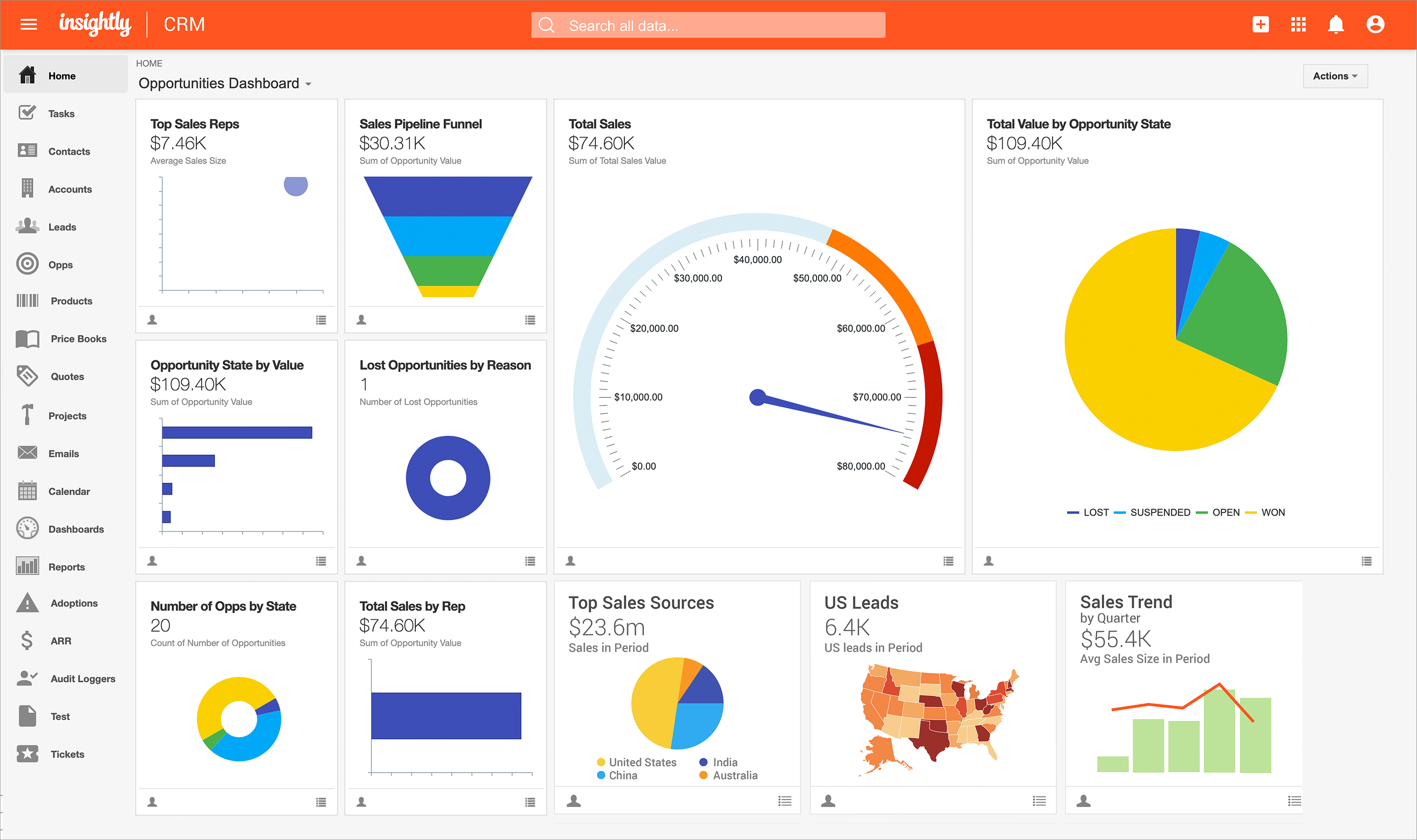
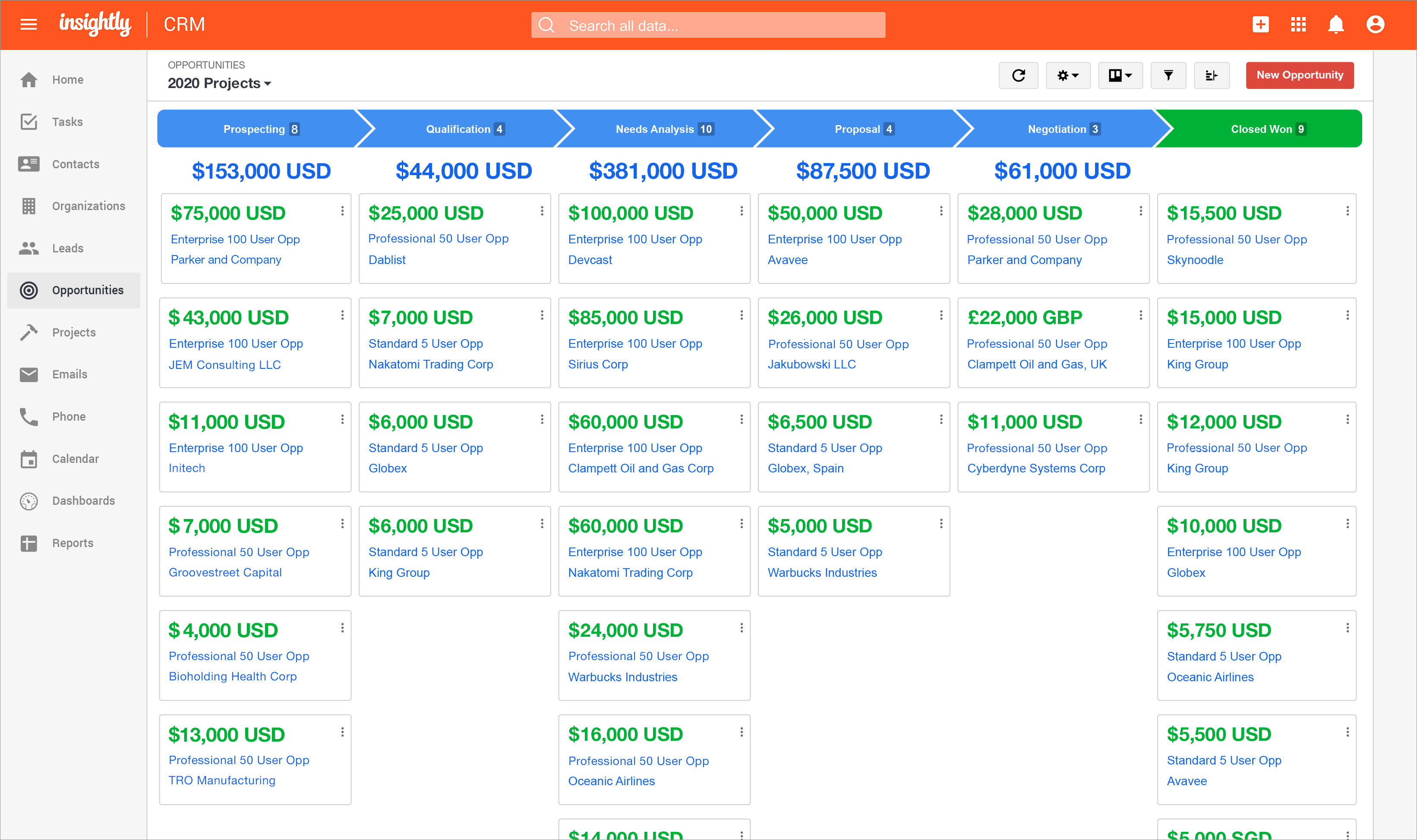
Screenshot of Insightly's lead status and activity tracking, available so that nothing falls through the cracks.Screenshot of the reporting feature, which provides insight into sales and productivity performance.Screenshot of the Insightly Opportunities dashboard.Screenshot of Insightly on mobile.Screenshot of Screenshot of

Progress ShareFile Screenshots

Screenshot of the ShareFile dashboardScreenshot of ShareFile's Outlook PluginScreenshot of the Projects interfaceScreenshot of ShareFile's link sharing optionsScreenshot of ShareFile's e-signature